> ## Documentation Index
> Fetch the complete documentation index at: https://koreai.mintlify.site/llms.txt
> Use this file to discover all available pages before exploring further.
# Create Agents
Create, configure, and deploy agents. Agents are the core AI units in Agent Platform that reason autonomously, call tools, and compose responses based on a goal and persona you define.
You can optionally add a `FLOW` section with structured steps for deterministic control over parts of the conversation.
This guide walks through creating an agent in Studio, writing its ABL definition, and an overview of the complete configuration workflow.
## Before You Begin
* You must be signed in to Studio with an account that belongs to the target workspace.
* You need developer permissions on the project where you are creating the agent.
* To use the AI Architect for guided setup, a workspace administrator must configure an LLM provider under **Admin** > **Arch**.
## Agent Types
Every agent reasons by default. You can optionally add a `FLOW` section for structured, deterministic step execution.
| Feature | Agent (default) | Agent with FLOW section |
| --------------- | -------------------------------------------- | ----------------------------------------------------- |
| Decision making | LLM decides next action. | Steps define explicit transitions. |
| Best for | Open-ended conversations, complex reasoning. | Structured workflows, deterministic processes. |
| Editor UI | Full-page configuration panel. | Visual flow canvas with step nodes. |
| Step control | LLM determines when to use tools. | Each step explicitly defines actions and transitions. |
Adding a `FLOW` section does not create a different agent type. The agent continues to use reasoning and tool orchestration, while structured flow steps provide deterministic control for specific workflow paths.
## Create An Agent in Studio
### Open The Agents Page
Navigate to your project and select **Agents** from the sidebar.
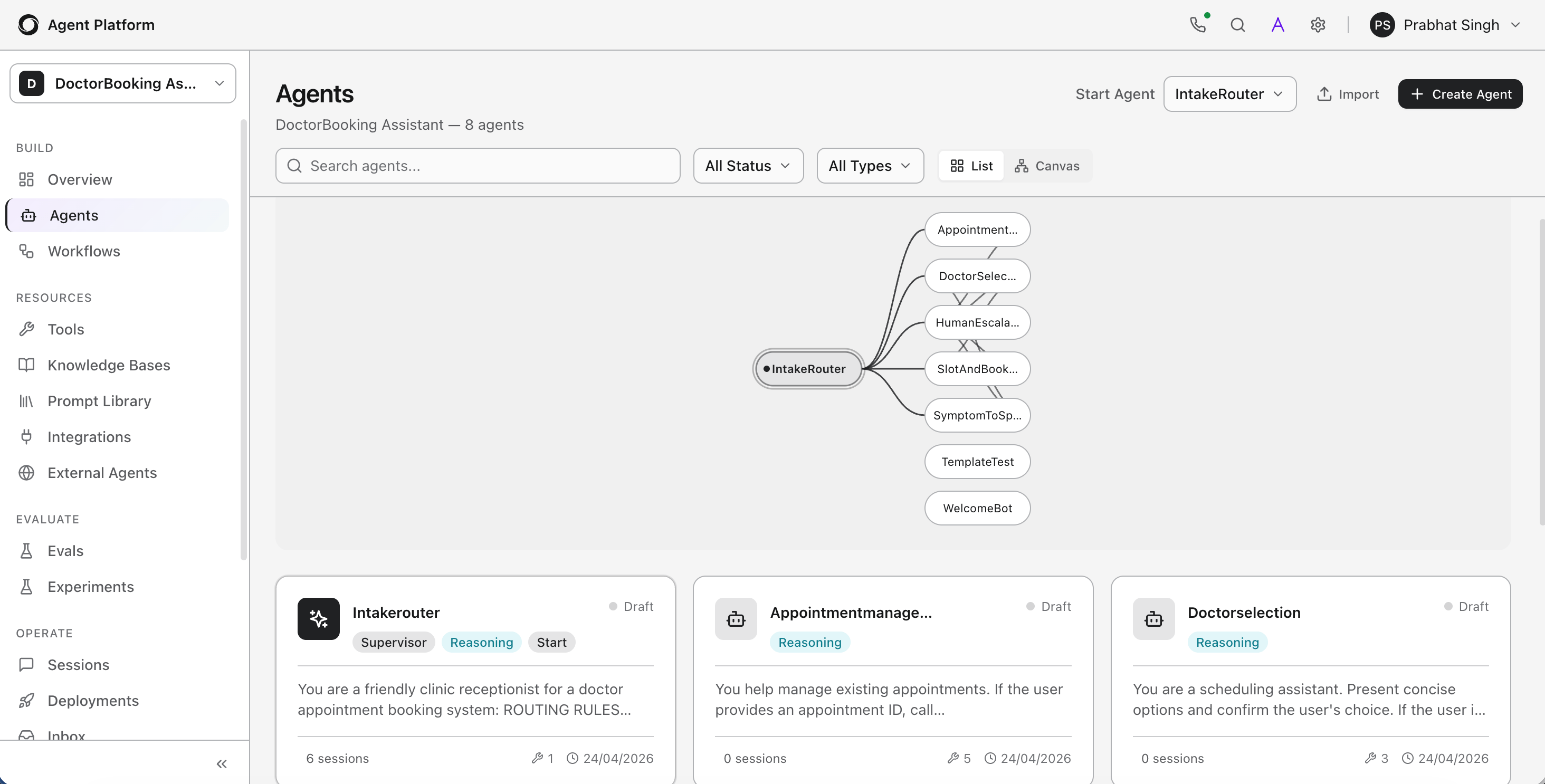 The Agents page lists all agents in the project. Each entry shows the agent name, flow indicator, deployment status, and last-modified timestamp.
### Start Agent Creation
Click **Create Agent**.
The Agents page lists all agents in the project. Each entry shows the agent name, flow indicator, deployment status, and last-modified timestamp.
### Start Agent Creation
Click **Create Agent**.
 Fill in the details.
| Field | Required | Description |
| ------------------ | -------- | ---------------------------------------------------------------------------------------------------- |
| **Name** | Yes | Must start with a letter and contain only letters, numbers, and underscores. Maximum 100 characters. |
| **Execution mode** | Yes | Choose a blank agent (LLM-driven by default) or add a FLOW section for structured step execution. |
| **Description** | No | A brief summary of what the agent does. |
Click **Create** to open the agent editor.
## Use the ABL Editor
After creating an agent, you can configure it in two ways:
* **Visual editor** - a form-based interface with dedicated sections for identity, tools, memory, flow, and more.
* **ABL Editor** - a full code editor where you write or edit the agent's ABL definition directly.
Both modes stay in sync. Changes made in the visual editor are reflected in the ABL Editor and vice versa.
To switch to the full-screen ABL Editor, click **DSL** icon in the agent's top navigation bar.
Fill in the details.
| Field | Required | Description |
| ------------------ | -------- | ---------------------------------------------------------------------------------------------------- |
| **Name** | Yes | Must start with a letter and contain only letters, numbers, and underscores. Maximum 100 characters. |
| **Execution mode** | Yes | Choose a blank agent (LLM-driven by default) or add a FLOW section for structured step execution. |
| **Description** | No | A brief summary of what the agent does. |
Click **Create** to open the agent editor.
## Use the ABL Editor
After creating an agent, you can configure it in two ways:
* **Visual editor** - a form-based interface with dedicated sections for identity, tools, memory, flow, and more.
* **ABL Editor** - a full code editor where you write or edit the agent's ABL definition directly.
Both modes stay in sync. Changes made in the visual editor are reflected in the ABL Editor and vice versa.
To switch to the full-screen ABL Editor, click **DSL** icon in the agent's top navigation bar.
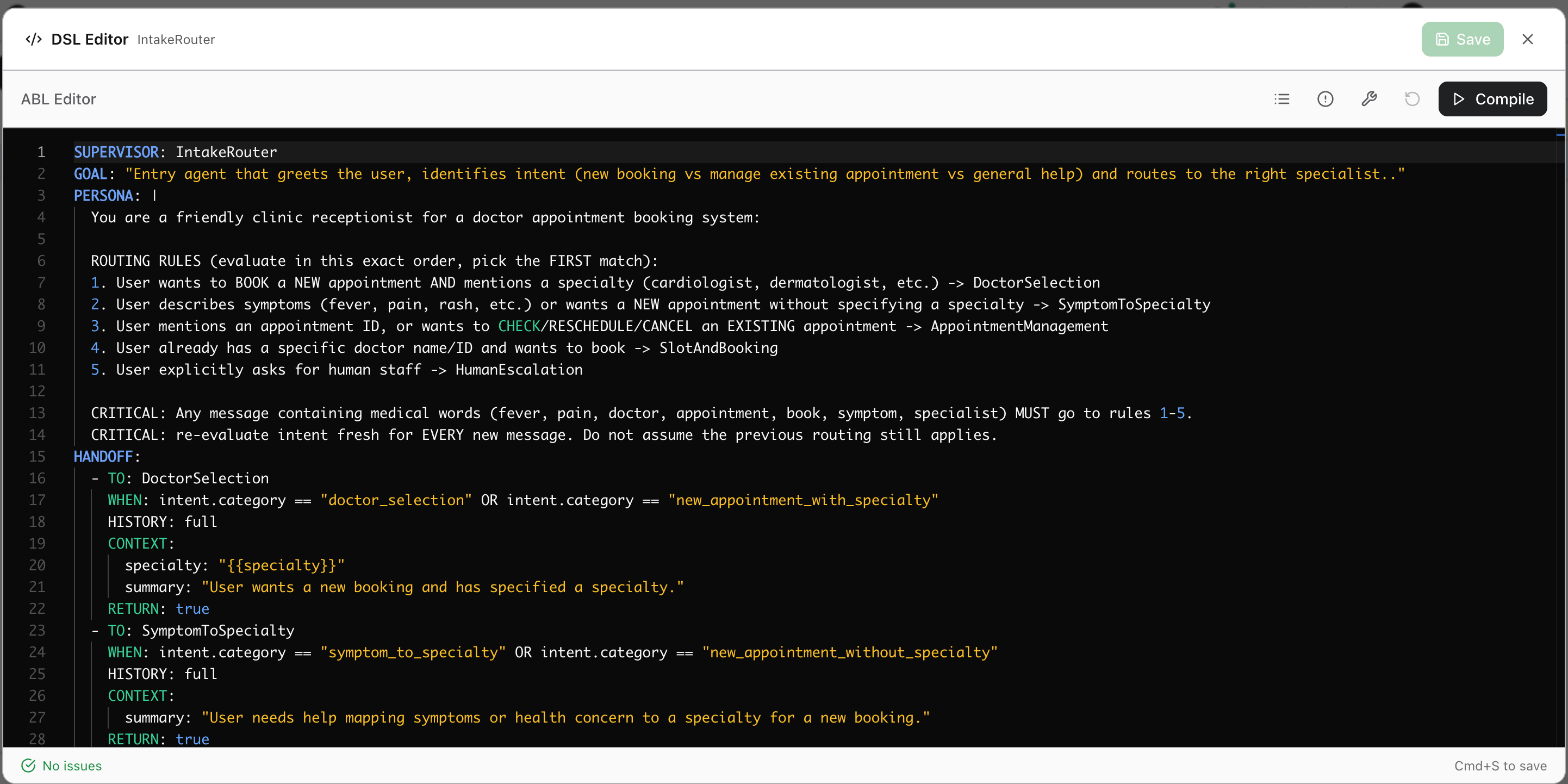 The ABL Editor provides syntax highlighting, line numbers, and inline error markers. See the top navigation bar for available options.
It also supports a slash-command interface. Typing / opens a contextual command menu with available capabilities (for example. tools, gather fields, handoff configurations). Selecting a command inserts the relevant snippet automatically into the editor.
### Save and Validate
Click **Save** to save and validate your ABL definition. Studio parses the definition in real time and flags any syntax issues inline. The status bar at the bottom shows **No issues** when the definition is valid.
Click **Compile** to run a full structural validation without saving - useful for checking the definition before committing changes.
### Outline Panel
The Outline panel on the left side of the editor displays the agent's structure as a navigable tree. It reflects the sections and blocks defined in your ABL code - including `PERSONA`, `MEMORY`, `HANDOFFS`, and sub-agents or steps.
The ABL Editor provides syntax highlighting, line numbers, and inline error markers. See the top navigation bar for available options.
It also supports a slash-command interface. Typing / opens a contextual command menu with available capabilities (for example. tools, gather fields, handoff configurations). Selecting a command inserts the relevant snippet automatically into the editor.
### Save and Validate
Click **Save** to save and validate your ABL definition. Studio parses the definition in real time and flags any syntax issues inline. The status bar at the bottom shows **No issues** when the definition is valid.
Click **Compile** to run a full structural validation without saving - useful for checking the definition before committing changes.
### Outline Panel
The Outline panel on the left side of the editor displays the agent's structure as a navigable tree. It reflects the sections and blocks defined in your ABL code - including `PERSONA`, `MEMORY`, `HANDOFFS`, and sub-agents or steps.
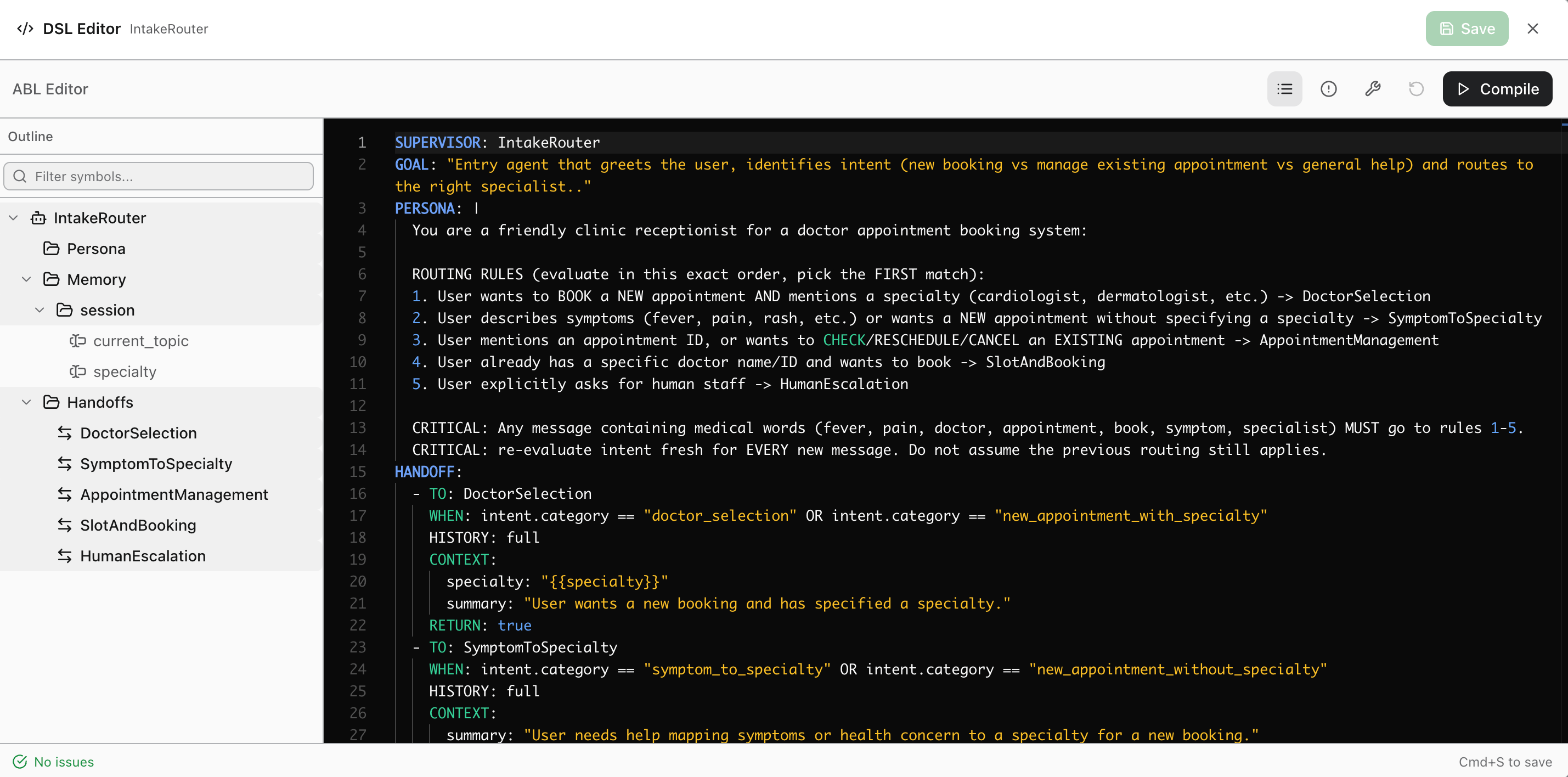 Use the **Filter symbols** search box at the top of the Outline to jump to any section in a large definition.
### Diagnostics Panel
The Diagnostics panel appears at the bottom of the editor. It lists all validation issues grouped by type.
Use the **Filter symbols** search box at the top of the Outline to jump to any section in a large definition.
### Diagnostics Panel
The Diagnostics panel appears at the bottom of the editor. It lists all validation issues grouped by type.
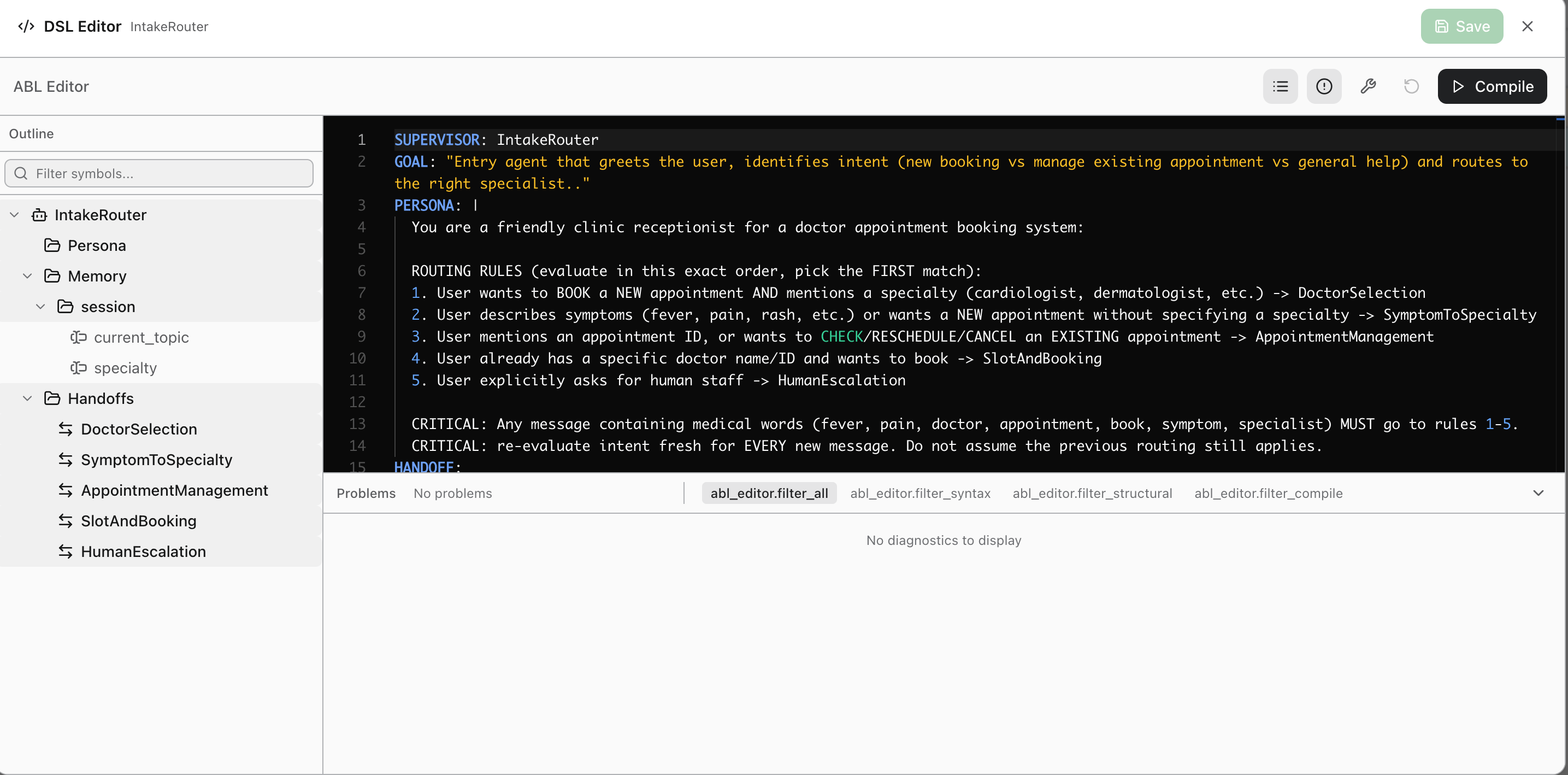 | Tab | What It Shows |
| -------------- | --------------------------------------------------------------------- |
| **Problems** | All issues across syntax, structural, and compile checks. |
| **Syntax** | Malformed ABL syntax errors. |
| **Structural** | Logical issues such as missing required fields or invalid references. |
| **Compile** | Errors that prevent the definition from being compiled and deployed. |
### Insert Tool Signature
Instead of typing tool signatures manually, use the **Insert Tool Signature** shortcut to search and insert a pre-built signature from any tool defined in the project.
| Tab | What It Shows |
| -------------- | --------------------------------------------------------------------- |
| **Problems** | All issues across syntax, structural, and compile checks. |
| **Syntax** | Malformed ABL syntax errors. |
| **Structural** | Logical issues such as missing required fields or invalid references. |
| **Compile** | Errors that prevent the definition from being compiled and deployed. |
### Insert Tool Signature
Instead of typing tool signatures manually, use the **Insert Tool Signature** shortcut to search and insert a pre-built signature from any tool defined in the project.
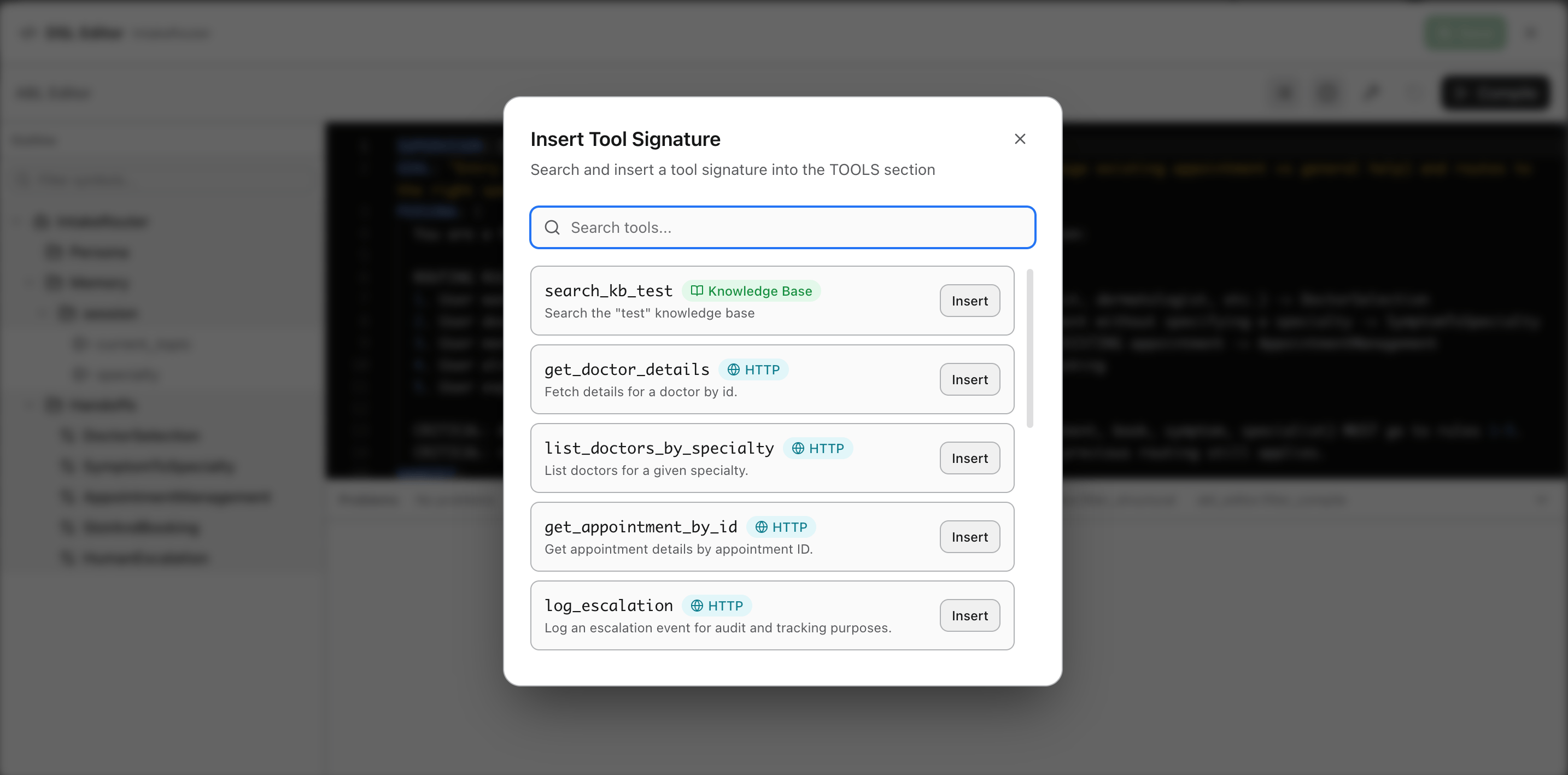 The dialog lists all available tools with their type (HTTP, Knowledge Base, and so on) and a description. Click **Insert** to add the tool's signature directly into the `TOOLS` block at your cursor position.
## Define Identity And Persona
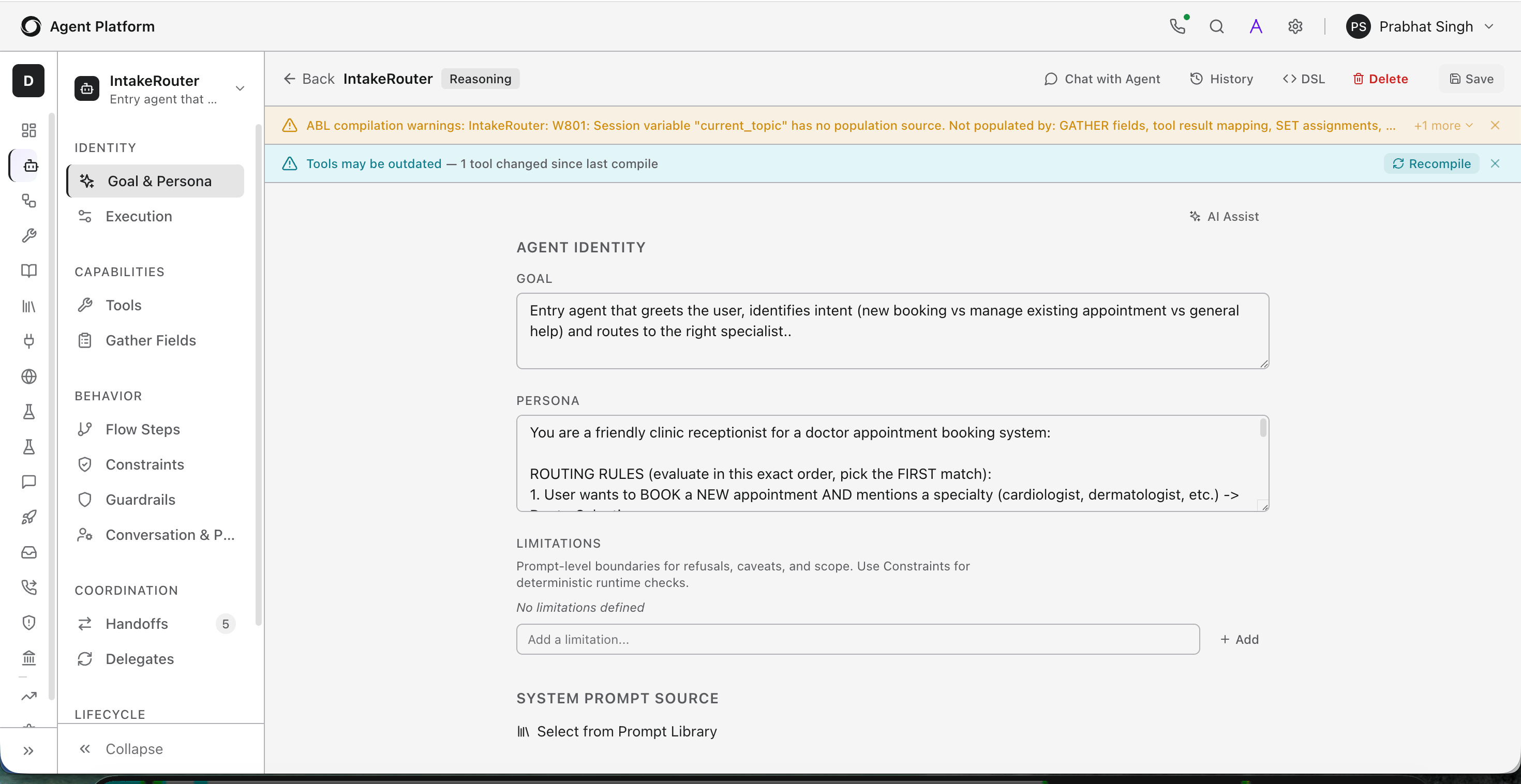
Identity and persona control how an agent communicates - its tone, expertise, and boundaries.
The dialog lists all available tools with their type (HTTP, Knowledge Base, and so on) and a description. Click **Insert** to add the tool's signature directly into the `TOOLS` block at your cursor position.
## Define Identity And Persona
Identity and persona control how an agent communicates - its tone, expertise, and boundaries.
 ### Core Identity Fields
Define the agent's identity in the `AGENT` block.
```yaml theme={null}
AGENT: Policy_Advisor
GOAL: |
Answer customer policy questions using semantic search
over policy documents. Clarify ambiguous queries before searching.
PERSONA: |
Knowledgeable and patient policy specialist.
Cites source documents when answering. Never guesses.
LIMITATIONS:
- "Cannot modify or override existing policies"
- "Cannot process refunds directly"
```
| Field | Purpose |
| ------------- | ----------------------------------------------------------------------------------------------------------------------------------------------- |
| `GOAL` | Defines what the agent accomplishes. |
| `PERSONA` | Defines how the agent communicates - tone, style, and expertise. |
| `LIMITATIONS` | Prompt-level boundaries the agent can use to refuse requests, explain caveats, or stay in scope. For hard enforcement, pair with `CONSTRAINTS`. |
Keep `GOAL` and `PERSONA` concise and specific. Vague instructions lead to
inconsistent behavior.
### Add An Opening Message
Use `ON_START` to send a greeting before any user input.
```yaml theme={null}
ON_START:
RESPOND: |
Hello! I am your booking specialist.
I can help you view, modify, upgrade, or cancel your reservation.
What would you like to do?
```
`ON_START` fires once per session initialization for that agent.
You can also call tools in `ON_START` - for example, to check if the user is returning - and set session variables before greeting.
```yaml theme={null}
ON_START:
CALL: check_returning_user
SET:
session_initialized = true
RESPOND: |
Welcome back, {{user_name}}! How can I help you today?
```
`ON_START` only fires when the agent is the session entry point or receives a
handoff. If the agent is not being initialized, `ON_START` will not run.
Valid Directives inside `ON_START`:
| Directive | What it does |
| -------------- | ------------------------------------------------------------------------------------------ |
| `RESPOND:` | Sends an initial message to the user when the session starts. |
| `FORMATS:` | Defines rich content for the initial response without a preceding `RESPOND:` block. |
| `VOICE:` | Defines voice configuration for the initial response without a preceding `RESPOND:` block. |
| `ACTIONS:` | Adds interactive buttons or forms to the initial message. |
| `CALL:` | Invokes a tool when the session starts. |
| `SET:` | Sets a variable using the syntax `SET: field = value`. |
| `DELEGATE:` | Immediately delegate the session to another agent at startup. |
| `MESSAGE_KEY:` | Specifies the internationalization key for the response message. |
| `BRANCHES:` | Defines conditional branching logic. |
```yaml theme={null}
MESSAGES:
welcome_default: "Welcome! How can I help you today?"
ON_START:
SET: user_role = session.user.role
BRANCHES:
- IF: user_role == "admin"
RESPOND: "Welcome, Admin! You can manage users, agents, and system settings."
- IF: user_role == "manager"
RESPOND: "Welcome! You can review reports and manage your team's work."
- ELSE:
MESSAGE_KEY: welcome_default
```
### Supervisor Agents
For multi-agent projects, use the `SUPERVISOR` block to define the orchestrating agent.
```yaml theme={null}
SUPERVISOR: Retail_Supervisor
GOAL: "Route customers to the right specialist for product discovery, purchases, orders, returns, loyalty, or human support"
PERSONA: |
Professional and helpful retail assistant.
Friendly, efficient, and knowledgeable about our product catalog.
Recognizes returning customers and adapts to their shopping history.
Routes requests to the right specialist quickly and transparently.
LIMITATIONS:
- "Cannot process payments or complete purchases directly"
- "Cannot access customer financial information"
- "Cannot override pricing, discount policies, or return windows"
- "Must not share personal information about other customers"
```
## Configure Execution
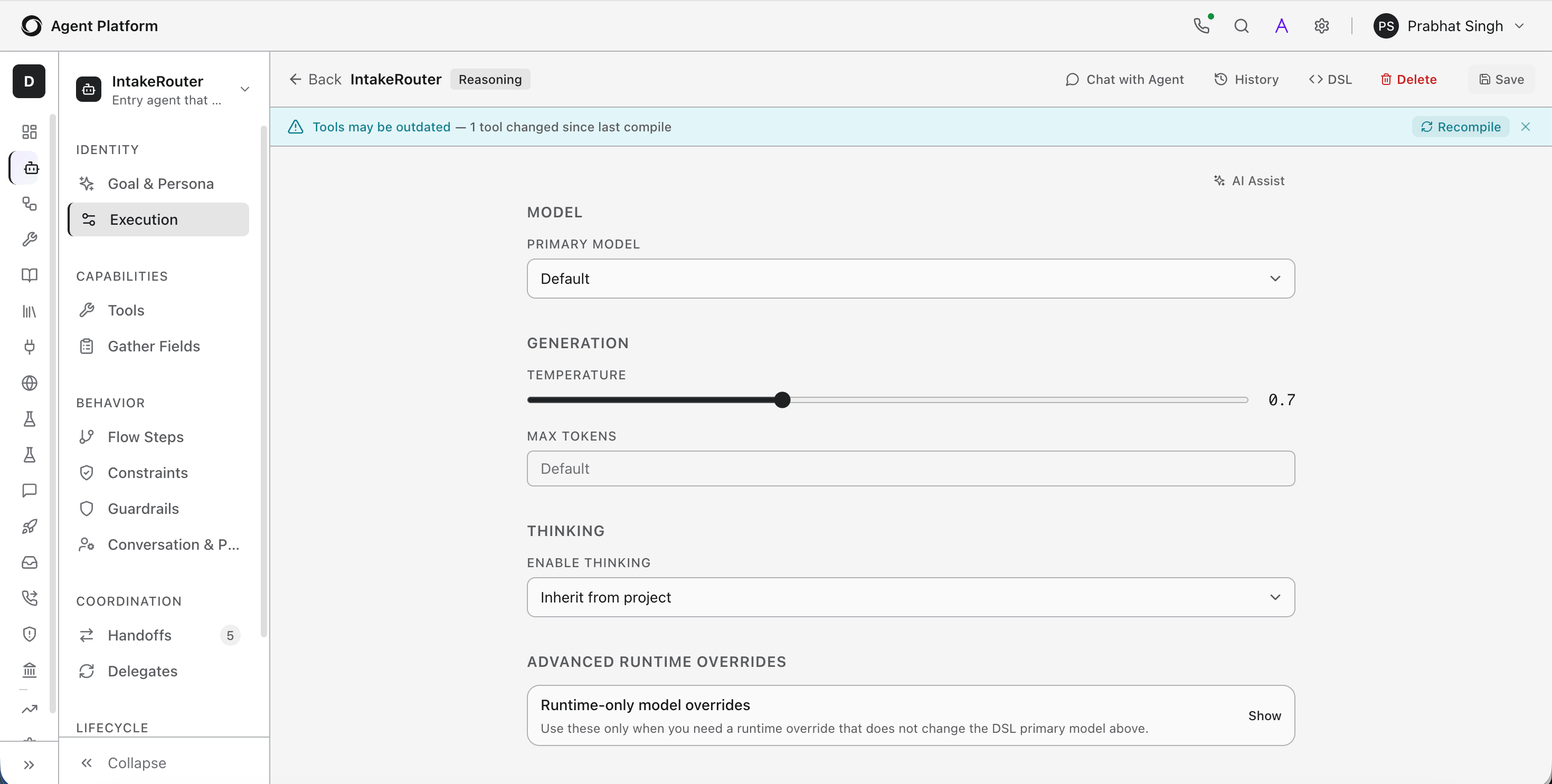
The execution block controls model selection, token limits, reasoning depth, and timeout behavior.
### Core Identity Fields
Define the agent's identity in the `AGENT` block.
```yaml theme={null}
AGENT: Policy_Advisor
GOAL: |
Answer customer policy questions using semantic search
over policy documents. Clarify ambiguous queries before searching.
PERSONA: |
Knowledgeable and patient policy specialist.
Cites source documents when answering. Never guesses.
LIMITATIONS:
- "Cannot modify or override existing policies"
- "Cannot process refunds directly"
```
| Field | Purpose |
| ------------- | ----------------------------------------------------------------------------------------------------------------------------------------------- |
| `GOAL` | Defines what the agent accomplishes. |
| `PERSONA` | Defines how the agent communicates - tone, style, and expertise. |
| `LIMITATIONS` | Prompt-level boundaries the agent can use to refuse requests, explain caveats, or stay in scope. For hard enforcement, pair with `CONSTRAINTS`. |
Keep `GOAL` and `PERSONA` concise and specific. Vague instructions lead to
inconsistent behavior.
### Add An Opening Message
Use `ON_START` to send a greeting before any user input.
```yaml theme={null}
ON_START:
RESPOND: |
Hello! I am your booking specialist.
I can help you view, modify, upgrade, or cancel your reservation.
What would you like to do?
```
`ON_START` fires once per session initialization for that agent.
You can also call tools in `ON_START` - for example, to check if the user is returning - and set session variables before greeting.
```yaml theme={null}
ON_START:
CALL: check_returning_user
SET:
session_initialized = true
RESPOND: |
Welcome back, {{user_name}}! How can I help you today?
```
`ON_START` only fires when the agent is the session entry point or receives a
handoff. If the agent is not being initialized, `ON_START` will not run.
Valid Directives inside `ON_START`:
| Directive | What it does |
| -------------- | ------------------------------------------------------------------------------------------ |
| `RESPOND:` | Sends an initial message to the user when the session starts. |
| `FORMATS:` | Defines rich content for the initial response without a preceding `RESPOND:` block. |
| `VOICE:` | Defines voice configuration for the initial response without a preceding `RESPOND:` block. |
| `ACTIONS:` | Adds interactive buttons or forms to the initial message. |
| `CALL:` | Invokes a tool when the session starts. |
| `SET:` | Sets a variable using the syntax `SET: field = value`. |
| `DELEGATE:` | Immediately delegate the session to another agent at startup. |
| `MESSAGE_KEY:` | Specifies the internationalization key for the response message. |
| `BRANCHES:` | Defines conditional branching logic. |
```yaml theme={null}
MESSAGES:
welcome_default: "Welcome! How can I help you today?"
ON_START:
SET: user_role = session.user.role
BRANCHES:
- IF: user_role == "admin"
RESPOND: "Welcome, Admin! You can manage users, agents, and system settings."
- IF: user_role == "manager"
RESPOND: "Welcome! You can review reports and manage your team's work."
- ELSE:
MESSAGE_KEY: welcome_default
```
### Supervisor Agents
For multi-agent projects, use the `SUPERVISOR` block to define the orchestrating agent.
```yaml theme={null}
SUPERVISOR: Retail_Supervisor
GOAL: "Route customers to the right specialist for product discovery, purchases, orders, returns, loyalty, or human support"
PERSONA: |
Professional and helpful retail assistant.
Friendly, efficient, and knowledgeable about our product catalog.
Recognizes returning customers and adapts to their shopping history.
Routes requests to the right specialist quickly and transparently.
LIMITATIONS:
- "Cannot process payments or complete purchases directly"
- "Cannot access customer financial information"
- "Cannot override pricing, discount policies, or return windows"
- "Must not share personal information about other customers"
```
## Configure Execution
The execution block controls model selection, token limits, reasoning depth, and timeout behavior.
 ```yaml theme={null}
EXECUTION:
model: claude-sonnet-4-5-20250929
temperature: 0.3
max_tokens: 4096
max_reasoning_iterations: 15
tool_timeout: 10000
```
| Field | Description |
| -------------------------- | ------------------------------------------------------------------------------ |
| `model` | LLM model for this agent. |
| `temperature` | Controls response variability. Lower values produce more deterministic output. |
| `max_tokens` | Maximum tokens per response. |
| `max_reasoning_iterations` | Caps the number of tool-call/response cycles before forcing a final response. |
| `tool_timeout` | Milliseconds to wait for a tool call before timing out. |
Always set `max_reasoning_iterations` to prevent runaway loops. Start with 10–15 and tune based on observed behavior.
## Add Tools
Tools let agents call external APIs, retrieve data, or trigger actions. Define tools in the `TOOLS` block with their signature and a description.
Create the tool at the project level, then attach it to the agent via UI or DSL.
```yaml theme={null}
TOOLS:
search_policies(query: string, category: string) -> {results: object[], totalCount: number}
description: "Search policy documents by query and category"
get_policy_detail(policy_id: string) -> {title: string, content: string, effectiveDate: string}
description: "Get full text of a specific policy"
```
Tool descriptions are injected into the LLM context. Clear, accurate descriptions directly influence which tool the agent selects.
**Add Instructions for Tool Use**
Use numbered `INSTRUCTIONS` when the agent must follow a specific sequence for using tools.
```yaml theme={null}
INSTRUCTIONS: |
1. Identify the policy area from the user's question.
2. Search relevant documents with search_policies.
3. If results are ambiguous, ask the user to narrow down.
4. Present the answer with source attribution.
```
If the agent calls the wrong tool, improve the `description` field on each
tool definition and add explicit numbered steps in `INSTRUCTIONS`.
For full details on different types of tools, see [Tools guide](/agent-platform/tools-overview).
## Capabilities
After defining identity, execution, and tools, configure how the agent collects and retains data.
**Gather**: Define structured fields the agent should capture from users during a conversation. Use `GATHER` to prompt for required inputs with type validation and required flags. This is available as a dedicated section in both the flow steps and the agent editor. For details, see [Gather Data from Users](/agent-platform/gather-data).
**Memory**: Configure session variables (available within a conversation), persistent state (stored across sessions), and remember/recall triggers that automatically store and inject context.
```yaml theme={null}
MEMORY:
session:
- customer_id
- recommended_products
persistent:
- user.risk_profile
- user.preferred_products
remember:
- WHEN: risk_profile IS SET
STORE: risk_profile -> user.risk_profile
recall:
- ON: session:start
ACTION: inject_context
PATHS: [user.risk_profile, user.preferred_products]
```
For full details, see the [Data Collection and Memory & State guides](/agent-platform/memory-and-state).
## Coordination
Configure how the agent hands off work to other agents or to human operators.
**Handoffs** - Rules that transfer the conversation to another agent when a condition is met. Handoffs pass context such as session variables to the receiving agent.
**Delegates** - Configuration for sub-agents that this agent can invoke to complete subtasks without transferring the conversation. The delegating agent retains control and receives the result.
**Escalation** - Triggers and routing logic for escalating to a human agent, including context passing and queue assignment.
For full details, see the [Multi-Agent Orchestration](/agent-platform/orchestrate) guide.
## Lifecycle
Define what happens at the start and end of each session, and how the agent handles errors.
### On Start
Actions that fire when a session begins: tool calls, variable initialization, and a greeting response. See [`ON_START` examples](#add-an-opening-message) earlier in this guide.
| Field | Description |
| ----------------------- | ---------------------------------------------------------------------------------------------------------------------------- |
| **Enable ON\_START** | Enables or disables startup actions when a conversation begins. |
| **Initial Message** | Sends a welcome or introductory message at the start of the conversation. |
| **Tool Call on Start** | Automatically invokes a tool when the conversation starts. |
| **Delegate on Start** | Transfers the conversation to a selected delegate agent on startup. |
| **Voice** | Configures voice settings for the startup interaction. |
| **Rich Content** | Adds structured content such as quick replies, cards, images, lists, or other supported rich media to the startup message. |
| **Interactive Actions** | Adds interactive controls such as buttons, dropdowns (Select), and input fields to collect user responses during onboarding. |
| **Submit Label** | Defines the text displayed on the submit button for interactive actions. |
| **Submit ID** | Specifies the unique identifier associated with the submit action. |
**Interactive Actions Types**
| Action | Description |
| ---------- | ------------------------------------------------------------------ |
| **Button** | Displays a clickable button that submits a predefined value. |
| **Select** | Displays a dropdown list from which the user can select an option. |
| **Input** | Displays a text field for collecting free-form user input. |
### Error Handling
Recovery strategies for tool failures, timeout errors, and unexpected input. Configure fallback responses and retry logic to keep conversations from dead-ending.
Error Handling
Use the Error Handling page to define how the agent responds when an error occurs during execution.
| Field | Description |
| ----------------- | ---------------------------------------------------------------------- |
| **Handler Name** | Unique identifier for the error handler (for example, `default`). |
| **Error Message** | Message displayed to the user when the error occurs. |
| **Then** | Defines the action the agent takes after displaying the error message. |
| Action | Description |
| -------------- | ---------------------------------------------------------------- |
| **Continue** | Continues the conversation after displaying the error message. |
| **Escalate** | Routes the conversation to a configured escalation target. |
| **Handoff** | Transfers the conversation to another agent. |
| **Complete** | Ends the conversation and marks it as completed. |
| **Backtrack** | Returns to the previous step and continues execution from there. |
| **Retry Step** | Retries the step that encountered the error. |
Example: If a tool call fails, the agent can display "An error occurred. Please try again." and then either retry the step, continue the conversation, or route the user to another agent.
### Completion
Conditions that determine when the agent's task is done and the session should close.
Configure one or more completion conditions using expressions that evaluate the current conversation state, such as whether all required information has been collected. When a condition evaluates to true, the agent marks the interaction as complete and can optionally send a final response message to the user before ending the conversation.
```yaml theme={null}
COMPLETE:
- WHEN: policy_answer_provided == true
RESPOND: "Is there anything else about our policies I can help with?"
```
#### Templates and Messages
The Templates & Messages page allows you to create reusable response templates that can be referenced throughout the agent and present consistent agent output formatting. Templates can include multiple content formats such as Default, Markdown, HTML, and Voice.
```yaml theme={null}
ON_START:
RESPOND: TEMPLATE(welcome) # template name = welcome.
```
* Templates can be referenced anywhere in the agent abl to present responses.
* Templates support variable interpolation using {{ }} placeholders.
## Add A FLOW Section
Add a `FLOW` section when you need deterministic, step-by-step control, for example, booking flows, identity verification, or data collection wizards.
### Define A Flow
```yaml theme={null}
AGENT: Order_Tracker
GOAL: "Help customers look up and track their orders"
PERSONA: |
Efficient order specialist. Provides clear status updates.
Empathetic when orders are delayed.
TOOLS:
lookup_order(order_id: string) -> {order_id: string, status: string, tracking_number: string, estimated_delivery: string}
description: "Look up an order by ID"
get_shipping_details(tracking_number: string) -> {carrier: string, status: string, location: string, history: object[]}
description: "Get shipping and tracking information"
FLOW:
entry_point: ask_order_id
steps:
- ask_order_id
- lookup
- show_status
- shipping_details
ask_order_id:
REASONING: false
GATHER:
- order_id:
prompt: "What is your order number? (Format: ORD-XXXXX)"
type: string
required: true
THEN: lookup
lookup:
REASONING: false
CALL: lookup_order(order_id)
ON_SUCCESS:
SET: tracking_number = result.tracking_number
THEN: show_status
ON_FAIL:
RESPOND: "I could not find that order. Please check the number and try again."
THEN: ask_order_id
show_status:
REASONING: false
RESPOND: |
Order: {{order_id}}
Status: {{status}}
Estimated delivery: {{estimated_delivery}}
Would you like shipping details?
ON_INPUT:
- IF: input.contains("yes") OR input.contains("shipping") OR input.contains("track")
THEN: shipping_details
- ELSE:
THEN: COMPLETE
shipping_details:
REASONING: false
CALL: get_shipping_details(tracking_number)
ON_SUCCESS:
RESPOND: |
Carrier: {{carrier}}
Current location: {{location}}
Status: {{status}}
THEN: COMPLETE
ON_FAIL:
RESPOND: "Shipping details are unavailable right now."
THEN: COMPLETE
COMPLETE:
- WHEN: order_status_shown == true
RESPOND: "Is there anything else I can help with?"
```
Steps with `REASONING: false` follow the defined path exactly. The `THEN` keyword defines the next step. `ON_INPUT` branches based on user responses.
### Key Flow Constructs
**Entry point** - specifies which step starts the flow. If omitted, the first step in the `steps` list is used.
```yaml theme={null}
FLOW:
entry_point: welcome
```
**Step list shorthand** - declares step order. You still define each step separately.
```yaml theme={null}
FLOW:
welcome -> collect_info -> process -> confirm
```
**Tool call with branching:**
```yaml theme={null}
process_payment:
REASONING: false
CALL: charge_card(card_number, amount)
ON_SUCCESS:
RESPOND: "Payment of ${{amount}} processed."
THEN: confirmation
ON_FAIL:
RESPOND: "Payment failed. Try a different card?"
THEN: collect_payment
```
**Conditional branching on input:**
```yaml theme={null}
choose_action:
REASONING: false
ON_INPUT:
- IF: input.contains("track")
THEN: tracking_flow
- IF: input.contains("cancel")
THEN: cancel_flow
- IF: input.contains("return")
THEN: return_flow
- ELSE:
RESPOND: "Please choose: track, cancel, or return."
THEN: choose_action
```
**SET assignments:**
```yaml theme={null}
calculate_total:
REASONING: false
SET: nights = checkout_date - checkin_date
SET: total = room_price * nights
RESPOND: "Your total for {{nights}} nights is ${{total}}."
THEN: confirm_booking
```
**MAX\_ATTEMPTS** - limits retries on a step before routing to a fallback.
```yaml theme={null}
verify_identity:
REASONING: false
MAX_ATTEMPTS: 3
ON_EXHAUSTED: escalate_to_human
GATHER:
- ssn_last_four:
prompt: "Last 4 digits of your SSN?"
type: string
required: true
CALL: verify_identity(ssn_last_four)
ON_SUCCESS:
THEN: authenticated
ON_FAIL:
RESPOND: "That did not match. Please try again."
THEN: verify_identity
```
### Mix Reasoning And Deterministic Steps
Within a single flow, combine deterministic steps (`REASONING: false`) with reasoning steps (`REASONING: true`). Use deterministic control for data collection and confirmations; use LLM autonomy for open-ended research or analysis.
```yaml theme={null}
FLOW:
steps:
- collect_preferences
- research_options
- present_plan
- confirm
collect_preferences:
REASONING: false
GATHER:
- destination: required
prompt: "Where would you like to go?"
- travel_dates: required
type: date
prompt: "What are your travel dates?"
- budget: required
type: string
prompt: "What is your budget range?"
THEN: research_options
research_options:
REASONING: true
GOAL: |
Research travel options for {{destination}} on {{travel_dates}}
within a {{budget}} budget. Search flights, hotels, and check weather.
Compile a recommended itinerary with options at different price points.
AVAILABLE_TOOLS: [search_flights, search_hotels, get_weather]
EXIT_WHEN: itinerary_compiled == true
MAX_TURNS: 8
THEN: present_plan
present_plan:
REASONING: false
RESPOND: |
Here is your travel plan for {{destination}}:
{{compiled_itinerary}}
Would you like to proceed with booking, or adjust anything?
ON_INPUT:
- IF: input.contains("book") OR input.contains("yes")
THEN: confirm
- IF: input.contains("change") OR input.contains("adjust")
THEN: collect_preferences
- ELSE:
THEN: present_plan
confirm:
REASONING: false
RESPOND: "Booking confirmed. You will receive a confirmation email."
THEN: COMPLETE
```
Key properties for reasoning steps:
| Property | Purpose |
| ------------------ | ------------------------------------------------------------- |
| `REASONING: true` | Enables LLM autonomy for this step. |
| `GOAL` | Step-specific goal, overrides the agent-level goal. |
| `AVAILABLE_TOOLS` | Subset of agent tools available within this step. |
| `EXIT_WHEN` | Condition that ends the reasoning loop. |
| `MAX_TURNS` | Maximum reasoning cycles before a forced exit. Default is 10. |
| `STEP_CONSTRAINTS` | Additional constraints scoped to this reasoning zone. |
## NLU Intent Classification
Use the `NLU` block to define intents, entities, and categories that classify user messages and drive appropriate actions. NLU configuration supports:
* Intent classification using keyword patterns and example utterances.
* Entity extraction with typed extractors (enum, pattern, location, date, number, free text).
* Synonyms for normalizing variant expressions to canonical values.
* Embeddings-based matching for semantic similarity when keyword patterns are insufficient.
* Multi-language support with per-language model configuration.
* A glossary for domain-specific terminology.
For more details, see [NLU configuration](/agent-platform/abl-reference/nlu).
## Behavior
Control how the agent enforces rules, filters content, and adapts its behavior based on context.
**Constraints** - Rules and restrictions enforced at runtime. Unlike `LIMITATIONS`, constraints with `REQUIRE` conditions and `ON_FAIL` actions are hard enforcement - the agent cannot proceed without meeting the condition.
**Guardrails** - Content safety policies applied to agent inputs and outputs. Guardrails can block, redact, or flag content using built-in checks or external moderation providers.
```yaml theme={null}
GUARDRAILS:
- NAME: pii_filter
KIND: output
CHECK: "output NOT CONTAINS ssn_pattern AND output NOT CONTAINS credit_card_pattern"
ACTION: redact
MESSAGE: "Personal information has been removed from the response."
- NAME: content_safety
KIND: input
PROVIDER: openai_moderation
CATEGORY: hate
THRESHOLD: 0.7
ACTION: block
MESSAGE: "That request contains content I cannot help with."
```
**Behavior profiles** - Conditional behavior configurations that activate based on context, such as user role, session flags, or channel.
For full details, see the Constraints & Guardrails and Behavior Profiles guides.
## Multi-Language Support
Build agents that detect the user's language and respond in kind.
### Set Up Language Detection
```yaml theme={null}
NLU:
languages: ["en", "es", "fr", "de", "pt"]
defaultLanguage: "en"
allowCodeSwitching: true
```
| Field | Description |
| -------------------- | ------------------------------------------------------------------------------- |
| `languages` | Supported language codes (ISO 639-1). |
| `defaultLanguage` | Fallback when detection is ambiguous. |
| `allowCodeSwitching` | Whether the agent follows the user when they switch languages mid-conversation. |
### Route by Language
```yaml theme={null}
HANDOFF:
- TO: Spanish_Support
WHEN: detected_language == "es"
CONTEXT:
pass: [customer_id, query]
- TO: English_Support
WHEN: detected_language == "en"
CONTEXT:
pass: [customer_id, query]
```
### Provide Language-Specific Models
Route to different LLM models based on detected language.
```yaml theme={null}
NLU:
languages: ["en", "es", "ja"]
defaultLanguage: "en"
languageModels:
en: "claude-sonnet-4-5-20250929"
es: "claude-sonnet-4-5-20250929"
ja: "gpt-4o"
```
### Add A Glossary
Inject domain-specific terms to ensure the agent uses correct terminology regardless of language.
```yaml theme={null}
NLU:
languages: ["en", "es"]
defaultLanguage: "en"
glossary:
- "Agent Platform"
- "SearchAI"
- "eval set"
- "guardrail policy"
```
### Set Language per Environment Variable
For deployments that serve a single market:
```yaml theme={null}
NLU:
defaultLanguage: "{{env.DEFAULT_LANGUAGE}}"
```
Configure `DEFAULT_LANGUAGE=es` for your Spanish market deployment and `DEFAULT_LANGUAGE=en` for English.
### Write Multi-Language Templates
```yaml theme={null}
TEMPLATES:
welcome:
DEFAULT: "Welcome! How can I help you today?"
MARKDOWN: |
# Welcome!
How can I help you today?
bienvenida:
DEFAULT: "Bienvenido! Como puedo ayudarte hoy?"
```
## Customize Agent Response
Agents can respond with more than plain text. Every RESPOND statement supports dynamic variables, reusable templates, rich content, interactive actions, and channel-specific formatting. The platform automatically renders the appropriate response for the active channel.
### RESPOND
Use `RESPOND` to return inline text or multi-line messages. Values from variables, memory, and tool outputs can be referenced using `{{ }}` interpolation.
```yaml theme={null}
RESPOND: "Hello {{customer_name}}, welcome back!"
```
For multi-line content, use pipe symbol.
```yaml theme={null}
RESPOND: |
Here is your transfer summary:
From: {{source_account}}
To: {{beneficiary_name}}
Amount: {{amount}} {{currency}}
```
For reusable or channel-specific responses, reference a template instead.
```yaml theme={null}
RESPOND: TEMPLATE(welcome_message)
```
### Templates
Use the `TEMPLATES` block to define named, reusable responses that can be referenced throughout the agent using `TEMPLATE(name)`. Templates help eliminate duplication, maintain consistent messaging, and simplify updates by defining a response once and reusing it across multiple flows.
Templates support:
* Variable interpolation using `{{ }}` to insert dynamic values.
* Conditional blocks and loops for rendering dynamic content.
* Multiple channel-specific variants, allowing the same response to be rendered differently on web, voice, Slack, WhatsApp, Teams, and other supported channels.
* Interactive actions for building rich, interactive experiences.
The platform automatically selects the appropriate template variant for the active channel. `DEFAULT` is required and serves as the fallback when no channel-specific variant is available.
| Variant | Purpose |
| -------------------- | ------------------------------ |
| `DEFAULT` | Plain text fallback (required) |
| `MARKDOWN` | Rich Markdown formatting |
| `HTML` | HTML content |
| `VOICE_INSTRUCTIONS` | Text-to-speech guidance |
| `ADAPTIVE_CARD` | Microsoft Teams/Web cards |
| `SLACK` | Slack Block Kit |
| `WHATSAPP` | WhatsApp message format |
| `AG_UI` | AG-UI event format |
Templates can be referenced from `RESPOND`, `ON_START`, and `COMPLETE` blocks using `TEMPLATE(name)`.
[Refer to this guide for details and examples](/agent-platform/abl-reference/rich-content-and-expressions#templates).
### Interactive Responses
Add interactive elements to any response using `ACTIONS`.
Supported actions include:
* Buttons for predefined choices.
* Select menus for choosing from a list.
* Input fields for collecting user input.
* Forms for grouping multiple inputs with a submit action.
[Learn More](/agent-platform/abl-reference/rich-content-and-expressions#interactive-actions).
### Carousels
Carousels display a horizontal scrollable collection of cards, each with a title, subtitle, image, and action buttons. Use carousels when presenting multiple options for the user to browse and select from, such as hotel results, product listings, flight options, and similar multi-item responses.
Define carousels within the `RICH_CONTENT` block using the `CAROUSEL` key.
```yaml theme={null}
RICH_CONTENT:
CAROUSEL:
- title: "Economy Class"
subtitle: "$289 - UA 891"
imageUrl: "https://cdn.example.com/economy.jpg"
defaultActionUrl: "https://booking.example.com/ua891"
buttons:
- id: select_economy
type: button
label: "Select"
value: "ua891_economy"
- title: "Business Class"
subtitle: "$1,249 - UA 891"
imageUrl: "https://cdn.example.com/business.jpg"
buttons:
- id: select_business
type: button
label: "Select"
value: "ua891_business"
```
[For the complete list of carousel card properties and additional examples, see Carousel Rich Content](/agent-platform/abl-reference/rich-content-and-expressions#carousels)
## Customize System Messages
Use `MESSAGES` to customize system-generated responses to match the agent's voice.
```yaml theme={null}
MESSAGES:
error_default: "I am sorry, something went wrong. Let me try again or connect you with a team member."
constraint_blocked: "I am unable to proceed due to a policy restriction."
escalation_format: "Let me connect you with a team member who can help further."
conversation_complete: "Thank you for contacting us. Have a great day!"
gather_prompt: "I need a bit more information to help you."
```
## Test Your Agent
Studio provides an integrated chat interface for testing agents in real time.
1. Open the agent from the Agents list.
2. Switch to the **Chat** tab.
3. Type messages in the input field to interact with the agent.
The chat interface sends messages to the runtime and displays the agent's responses in real time.
### Debug Panel
The chat view includes a split-pane debug panel.
| Panel item | What it shows |
| ---------------------- | ------------------------------------------------------------------------- |
| **Trace events** | Every action the agent takes: LLM calls, tool invocations, state changes. |
| **Timing information** | Latency for each operation. |
| **Variable state** | Current values of session variables. |
Use trace events to understand why an agent made a particular decision. They
show the full chain of reasoning, tool calls, and responses.
### Session Management
Each test conversation creates a session. You can:
* Start a new session to begin a fresh conversation.
* View session history from the **Sessions** page.
* Copy the session ID for reference or debugging.
For full details, refer [Sessions guide](/agent-platform/sessions).
## Use The AI Architect
AI Architect is a context-aware AI assistant built into Studio. Access it from the **Architect icon** in the Studio header bar.
The panel adapts to your current context. When editing a specific section (for example, Identity or Tools), the Architect shows section-specific suggestions and proposes code changes as a diff you can accept, reject, or refine.
AI Architect requires an LLM provider configured at the workspace level under **Admin** > **Arch**. If no provider is configured, a warning banner appears in the panel.
## Troubleshooting
| Symptom | Resolution |
| ------------------------------------------------ | ------------------------------------------------------------------------------------------------------------------------------------------------------------------------- |
| **Agent loops endlessly** | Set `max_reasoning_iterations` in the `EXECUTION` block to cap tool-call/response cycles. |
| **Agent calls the wrong tool** | Improve `INSTRUCTIONS` with numbered steps and add clear `description` fields to each tool definition. |
| **Agent responds when it should use a tool** | Strengthen the `GOAL` to explicitly state when tool use is required (for example, "Always search before answering"). |
| **Agent ignores limitations** | `LIMITATIONS` are prompt-level boundaries - the LLM may not always enforce them. For hard enforcement, use `CONSTRAINTS` with `REQUIRE` conditions and `ON_FAIL` actions. |
| **Agent tone drifts in long conversations** | Keep the persona description concise and specific. Use `MESSAGES` to control system-generated text. |
| **Flow skips a step** | Verify every step has a `THEN` pointing to the correct next step. A missing `THEN` ends the flow early. |
| **User input not matched in `ON_INPUT`** | Conditions are evaluated top-to-bottom. Place more specific conditions before general ones, and always include an `ELSE` branch. |
| **Reasoning step runs too long** | Set `MAX_TURNS` lower: 3–5 for focused tasks, 8–10 for research tasks. |
| **Reasoning step produces inconsistent results** | Add `STEP_CONSTRAINTS` to narrow the reasoning scope and use a specific step-level `GOAL`. |
| **Low NLU classification accuracy** | Add 10 or more examples per intent and enable embeddings for semantic matching. |
| **Intent confusion between similar intents** | Make patterns more distinct. Increase the confidence threshold. |
| **Agent responding in the wrong language** | Verify `allowCodeSwitching` is enabled. Add explicit instructions in `PERSONA` to respond in the user's language. |
***
**Related**
* [Studio Overview](/agent-platform/projects#studio) - navigation, project management, and workspace layout.
* [Tools, Knowledge & Connections](/agent-platform/tools-overview) - managing tools and resources used by agents.
* [Testing, Deployment & Operations](/agent-platform/evals) - evaluations and deployment.
* [Multi-Agent Orchestration](/agent-platform/orchestrate) - coordinating multiple agents.
* [Safety & Guardrails](/agent-platform/safety-and-guardrails) - content safety and constraints.
* [Memory & State](/agent-platform/memory-and-state) - session and persistent memory.
* [FLOW reference](/agent-platform/abl-reference/flow) - complete FLOW syntax reference.
* [Tools reference](/agent-platform/abl-reference/tools) - tool definition syntax.
```yaml theme={null}
EXECUTION:
model: claude-sonnet-4-5-20250929
temperature: 0.3
max_tokens: 4096
max_reasoning_iterations: 15
tool_timeout: 10000
```
| Field | Description |
| -------------------------- | ------------------------------------------------------------------------------ |
| `model` | LLM model for this agent. |
| `temperature` | Controls response variability. Lower values produce more deterministic output. |
| `max_tokens` | Maximum tokens per response. |
| `max_reasoning_iterations` | Caps the number of tool-call/response cycles before forcing a final response. |
| `tool_timeout` | Milliseconds to wait for a tool call before timing out. |
Always set `max_reasoning_iterations` to prevent runaway loops. Start with 10–15 and tune based on observed behavior.
## Add Tools
Tools let agents call external APIs, retrieve data, or trigger actions. Define tools in the `TOOLS` block with their signature and a description.
Create the tool at the project level, then attach it to the agent via UI or DSL.
```yaml theme={null}
TOOLS:
search_policies(query: string, category: string) -> {results: object[], totalCount: number}
description: "Search policy documents by query and category"
get_policy_detail(policy_id: string) -> {title: string, content: string, effectiveDate: string}
description: "Get full text of a specific policy"
```
Tool descriptions are injected into the LLM context. Clear, accurate descriptions directly influence which tool the agent selects.
**Add Instructions for Tool Use**
Use numbered `INSTRUCTIONS` when the agent must follow a specific sequence for using tools.
```yaml theme={null}
INSTRUCTIONS: |
1. Identify the policy area from the user's question.
2. Search relevant documents with search_policies.
3. If results are ambiguous, ask the user to narrow down.
4. Present the answer with source attribution.
```
If the agent calls the wrong tool, improve the `description` field on each
tool definition and add explicit numbered steps in `INSTRUCTIONS`.
For full details on different types of tools, see [Tools guide](/agent-platform/tools-overview).
## Capabilities
After defining identity, execution, and tools, configure how the agent collects and retains data.
**Gather**: Define structured fields the agent should capture from users during a conversation. Use `GATHER` to prompt for required inputs with type validation and required flags. This is available as a dedicated section in both the flow steps and the agent editor. For details, see [Gather Data from Users](/agent-platform/gather-data).
**Memory**: Configure session variables (available within a conversation), persistent state (stored across sessions), and remember/recall triggers that automatically store and inject context.
```yaml theme={null}
MEMORY:
session:
- customer_id
- recommended_products
persistent:
- user.risk_profile
- user.preferred_products
remember:
- WHEN: risk_profile IS SET
STORE: risk_profile -> user.risk_profile
recall:
- ON: session:start
ACTION: inject_context
PATHS: [user.risk_profile, user.preferred_products]
```
For full details, see the [Data Collection and Memory & State guides](/agent-platform/memory-and-state).
## Coordination
Configure how the agent hands off work to other agents or to human operators.
**Handoffs** - Rules that transfer the conversation to another agent when a condition is met. Handoffs pass context such as session variables to the receiving agent.
**Delegates** - Configuration for sub-agents that this agent can invoke to complete subtasks without transferring the conversation. The delegating agent retains control and receives the result.
**Escalation** - Triggers and routing logic for escalating to a human agent, including context passing and queue assignment.
For full details, see the [Multi-Agent Orchestration](/agent-platform/orchestrate) guide.
## Lifecycle
Define what happens at the start and end of each session, and how the agent handles errors.
### On Start
Actions that fire when a session begins: tool calls, variable initialization, and a greeting response. See [`ON_START` examples](#add-an-opening-message) earlier in this guide.
| Field | Description |
| ----------------------- | ---------------------------------------------------------------------------------------------------------------------------- |
| **Enable ON\_START** | Enables or disables startup actions when a conversation begins. |
| **Initial Message** | Sends a welcome or introductory message at the start of the conversation. |
| **Tool Call on Start** | Automatically invokes a tool when the conversation starts. |
| **Delegate on Start** | Transfers the conversation to a selected delegate agent on startup. |
| **Voice** | Configures voice settings for the startup interaction. |
| **Rich Content** | Adds structured content such as quick replies, cards, images, lists, or other supported rich media to the startup message. |
| **Interactive Actions** | Adds interactive controls such as buttons, dropdowns (Select), and input fields to collect user responses during onboarding. |
| **Submit Label** | Defines the text displayed on the submit button for interactive actions. |
| **Submit ID** | Specifies the unique identifier associated with the submit action. |
**Interactive Actions Types**
| Action | Description |
| ---------- | ------------------------------------------------------------------ |
| **Button** | Displays a clickable button that submits a predefined value. |
| **Select** | Displays a dropdown list from which the user can select an option. |
| **Input** | Displays a text field for collecting free-form user input. |
### Error Handling
Recovery strategies for tool failures, timeout errors, and unexpected input. Configure fallback responses and retry logic to keep conversations from dead-ending.
Error Handling
Use the Error Handling page to define how the agent responds when an error occurs during execution.
| Field | Description |
| ----------------- | ---------------------------------------------------------------------- |
| **Handler Name** | Unique identifier for the error handler (for example, `default`). |
| **Error Message** | Message displayed to the user when the error occurs. |
| **Then** | Defines the action the agent takes after displaying the error message. |
| Action | Description |
| -------------- | ---------------------------------------------------------------- |
| **Continue** | Continues the conversation after displaying the error message. |
| **Escalate** | Routes the conversation to a configured escalation target. |
| **Handoff** | Transfers the conversation to another agent. |
| **Complete** | Ends the conversation and marks it as completed. |
| **Backtrack** | Returns to the previous step and continues execution from there. |
| **Retry Step** | Retries the step that encountered the error. |
Example: If a tool call fails, the agent can display "An error occurred. Please try again." and then either retry the step, continue the conversation, or route the user to another agent.
### Completion
Conditions that determine when the agent's task is done and the session should close.
Configure one or more completion conditions using expressions that evaluate the current conversation state, such as whether all required information has been collected. When a condition evaluates to true, the agent marks the interaction as complete and can optionally send a final response message to the user before ending the conversation.
```yaml theme={null}
COMPLETE:
- WHEN: policy_answer_provided == true
RESPOND: "Is there anything else about our policies I can help with?"
```
#### Templates and Messages
The Templates & Messages page allows you to create reusable response templates that can be referenced throughout the agent and present consistent agent output formatting. Templates can include multiple content formats such as Default, Markdown, HTML, and Voice.
```yaml theme={null}
ON_START:
RESPOND: TEMPLATE(welcome) # template name = welcome.
```
* Templates can be referenced anywhere in the agent abl to present responses.
* Templates support variable interpolation using {{ }} placeholders.
## Add A FLOW Section
Add a `FLOW` section when you need deterministic, step-by-step control, for example, booking flows, identity verification, or data collection wizards.
### Define A Flow
```yaml theme={null}
AGENT: Order_Tracker
GOAL: "Help customers look up and track their orders"
PERSONA: |
Efficient order specialist. Provides clear status updates.
Empathetic when orders are delayed.
TOOLS:
lookup_order(order_id: string) -> {order_id: string, status: string, tracking_number: string, estimated_delivery: string}
description: "Look up an order by ID"
get_shipping_details(tracking_number: string) -> {carrier: string, status: string, location: string, history: object[]}
description: "Get shipping and tracking information"
FLOW:
entry_point: ask_order_id
steps:
- ask_order_id
- lookup
- show_status
- shipping_details
ask_order_id:
REASONING: false
GATHER:
- order_id:
prompt: "What is your order number? (Format: ORD-XXXXX)"
type: string
required: true
THEN: lookup
lookup:
REASONING: false
CALL: lookup_order(order_id)
ON_SUCCESS:
SET: tracking_number = result.tracking_number
THEN: show_status
ON_FAIL:
RESPOND: "I could not find that order. Please check the number and try again."
THEN: ask_order_id
show_status:
REASONING: false
RESPOND: |
Order: {{order_id}}
Status: {{status}}
Estimated delivery: {{estimated_delivery}}
Would you like shipping details?
ON_INPUT:
- IF: input.contains("yes") OR input.contains("shipping") OR input.contains("track")
THEN: shipping_details
- ELSE:
THEN: COMPLETE
shipping_details:
REASONING: false
CALL: get_shipping_details(tracking_number)
ON_SUCCESS:
RESPOND: |
Carrier: {{carrier}}
Current location: {{location}}
Status: {{status}}
THEN: COMPLETE
ON_FAIL:
RESPOND: "Shipping details are unavailable right now."
THEN: COMPLETE
COMPLETE:
- WHEN: order_status_shown == true
RESPOND: "Is there anything else I can help with?"
```
Steps with `REASONING: false` follow the defined path exactly. The `THEN` keyword defines the next step. `ON_INPUT` branches based on user responses.
### Key Flow Constructs
**Entry point** - specifies which step starts the flow. If omitted, the first step in the `steps` list is used.
```yaml theme={null}
FLOW:
entry_point: welcome
```
**Step list shorthand** - declares step order. You still define each step separately.
```yaml theme={null}
FLOW:
welcome -> collect_info -> process -> confirm
```
**Tool call with branching:**
```yaml theme={null}
process_payment:
REASONING: false
CALL: charge_card(card_number, amount)
ON_SUCCESS:
RESPOND: "Payment of ${{amount}} processed."
THEN: confirmation
ON_FAIL:
RESPOND: "Payment failed. Try a different card?"
THEN: collect_payment
```
**Conditional branching on input:**
```yaml theme={null}
choose_action:
REASONING: false
ON_INPUT:
- IF: input.contains("track")
THEN: tracking_flow
- IF: input.contains("cancel")
THEN: cancel_flow
- IF: input.contains("return")
THEN: return_flow
- ELSE:
RESPOND: "Please choose: track, cancel, or return."
THEN: choose_action
```
**SET assignments:**
```yaml theme={null}
calculate_total:
REASONING: false
SET: nights = checkout_date - checkin_date
SET: total = room_price * nights
RESPOND: "Your total for {{nights}} nights is ${{total}}."
THEN: confirm_booking
```
**MAX\_ATTEMPTS** - limits retries on a step before routing to a fallback.
```yaml theme={null}
verify_identity:
REASONING: false
MAX_ATTEMPTS: 3
ON_EXHAUSTED: escalate_to_human
GATHER:
- ssn_last_four:
prompt: "Last 4 digits of your SSN?"
type: string
required: true
CALL: verify_identity(ssn_last_four)
ON_SUCCESS:
THEN: authenticated
ON_FAIL:
RESPOND: "That did not match. Please try again."
THEN: verify_identity
```
### Mix Reasoning And Deterministic Steps
Within a single flow, combine deterministic steps (`REASONING: false`) with reasoning steps (`REASONING: true`). Use deterministic control for data collection and confirmations; use LLM autonomy for open-ended research or analysis.
```yaml theme={null}
FLOW:
steps:
- collect_preferences
- research_options
- present_plan
- confirm
collect_preferences:
REASONING: false
GATHER:
- destination: required
prompt: "Where would you like to go?"
- travel_dates: required
type: date
prompt: "What are your travel dates?"
- budget: required
type: string
prompt: "What is your budget range?"
THEN: research_options
research_options:
REASONING: true
GOAL: |
Research travel options for {{destination}} on {{travel_dates}}
within a {{budget}} budget. Search flights, hotels, and check weather.
Compile a recommended itinerary with options at different price points.
AVAILABLE_TOOLS: [search_flights, search_hotels, get_weather]
EXIT_WHEN: itinerary_compiled == true
MAX_TURNS: 8
THEN: present_plan
present_plan:
REASONING: false
RESPOND: |
Here is your travel plan for {{destination}}:
{{compiled_itinerary}}
Would you like to proceed with booking, or adjust anything?
ON_INPUT:
- IF: input.contains("book") OR input.contains("yes")
THEN: confirm
- IF: input.contains("change") OR input.contains("adjust")
THEN: collect_preferences
- ELSE:
THEN: present_plan
confirm:
REASONING: false
RESPOND: "Booking confirmed. You will receive a confirmation email."
THEN: COMPLETE
```
Key properties for reasoning steps:
| Property | Purpose |
| ------------------ | ------------------------------------------------------------- |
| `REASONING: true` | Enables LLM autonomy for this step. |
| `GOAL` | Step-specific goal, overrides the agent-level goal. |
| `AVAILABLE_TOOLS` | Subset of agent tools available within this step. |
| `EXIT_WHEN` | Condition that ends the reasoning loop. |
| `MAX_TURNS` | Maximum reasoning cycles before a forced exit. Default is 10. |
| `STEP_CONSTRAINTS` | Additional constraints scoped to this reasoning zone. |
## NLU Intent Classification
Use the `NLU` block to define intents, entities, and categories that classify user messages and drive appropriate actions. NLU configuration supports:
* Intent classification using keyword patterns and example utterances.
* Entity extraction with typed extractors (enum, pattern, location, date, number, free text).
* Synonyms for normalizing variant expressions to canonical values.
* Embeddings-based matching for semantic similarity when keyword patterns are insufficient.
* Multi-language support with per-language model configuration.
* A glossary for domain-specific terminology.
For more details, see [NLU configuration](/agent-platform/abl-reference/nlu).
## Behavior
Control how the agent enforces rules, filters content, and adapts its behavior based on context.
**Constraints** - Rules and restrictions enforced at runtime. Unlike `LIMITATIONS`, constraints with `REQUIRE` conditions and `ON_FAIL` actions are hard enforcement - the agent cannot proceed without meeting the condition.
**Guardrails** - Content safety policies applied to agent inputs and outputs. Guardrails can block, redact, or flag content using built-in checks or external moderation providers.
```yaml theme={null}
GUARDRAILS:
- NAME: pii_filter
KIND: output
CHECK: "output NOT CONTAINS ssn_pattern AND output NOT CONTAINS credit_card_pattern"
ACTION: redact
MESSAGE: "Personal information has been removed from the response."
- NAME: content_safety
KIND: input
PROVIDER: openai_moderation
CATEGORY: hate
THRESHOLD: 0.7
ACTION: block
MESSAGE: "That request contains content I cannot help with."
```
**Behavior profiles** - Conditional behavior configurations that activate based on context, such as user role, session flags, or channel.
For full details, see the Constraints & Guardrails and Behavior Profiles guides.
## Multi-Language Support
Build agents that detect the user's language and respond in kind.
### Set Up Language Detection
```yaml theme={null}
NLU:
languages: ["en", "es", "fr", "de", "pt"]
defaultLanguage: "en"
allowCodeSwitching: true
```
| Field | Description |
| -------------------- | ------------------------------------------------------------------------------- |
| `languages` | Supported language codes (ISO 639-1). |
| `defaultLanguage` | Fallback when detection is ambiguous. |
| `allowCodeSwitching` | Whether the agent follows the user when they switch languages mid-conversation. |
### Route by Language
```yaml theme={null}
HANDOFF:
- TO: Spanish_Support
WHEN: detected_language == "es"
CONTEXT:
pass: [customer_id, query]
- TO: English_Support
WHEN: detected_language == "en"
CONTEXT:
pass: [customer_id, query]
```
### Provide Language-Specific Models
Route to different LLM models based on detected language.
```yaml theme={null}
NLU:
languages: ["en", "es", "ja"]
defaultLanguage: "en"
languageModels:
en: "claude-sonnet-4-5-20250929"
es: "claude-sonnet-4-5-20250929"
ja: "gpt-4o"
```
### Add A Glossary
Inject domain-specific terms to ensure the agent uses correct terminology regardless of language.
```yaml theme={null}
NLU:
languages: ["en", "es"]
defaultLanguage: "en"
glossary:
- "Agent Platform"
- "SearchAI"
- "eval set"
- "guardrail policy"
```
### Set Language per Environment Variable
For deployments that serve a single market:
```yaml theme={null}
NLU:
defaultLanguage: "{{env.DEFAULT_LANGUAGE}}"
```
Configure `DEFAULT_LANGUAGE=es` for your Spanish market deployment and `DEFAULT_LANGUAGE=en` for English.
### Write Multi-Language Templates
```yaml theme={null}
TEMPLATES:
welcome:
DEFAULT: "Welcome! How can I help you today?"
MARKDOWN: |
# Welcome!
How can I help you today?
bienvenida:
DEFAULT: "Bienvenido! Como puedo ayudarte hoy?"
```
## Customize Agent Response
Agents can respond with more than plain text. Every RESPOND statement supports dynamic variables, reusable templates, rich content, interactive actions, and channel-specific formatting. The platform automatically renders the appropriate response for the active channel.
### RESPOND
Use `RESPOND` to return inline text or multi-line messages. Values from variables, memory, and tool outputs can be referenced using `{{ }}` interpolation.
```yaml theme={null}
RESPOND: "Hello {{customer_name}}, welcome back!"
```
For multi-line content, use pipe symbol.
```yaml theme={null}
RESPOND: |
Here is your transfer summary:
From: {{source_account}}
To: {{beneficiary_name}}
Amount: {{amount}} {{currency}}
```
For reusable or channel-specific responses, reference a template instead.
```yaml theme={null}
RESPOND: TEMPLATE(welcome_message)
```
### Templates
Use the `TEMPLATES` block to define named, reusable responses that can be referenced throughout the agent using `TEMPLATE(name)`. Templates help eliminate duplication, maintain consistent messaging, and simplify updates by defining a response once and reusing it across multiple flows.
Templates support:
* Variable interpolation using `{{ }}` to insert dynamic values.
* Conditional blocks and loops for rendering dynamic content.
* Multiple channel-specific variants, allowing the same response to be rendered differently on web, voice, Slack, WhatsApp, Teams, and other supported channels.
* Interactive actions for building rich, interactive experiences.
The platform automatically selects the appropriate template variant for the active channel. `DEFAULT` is required and serves as the fallback when no channel-specific variant is available.
| Variant | Purpose |
| -------------------- | ------------------------------ |
| `DEFAULT` | Plain text fallback (required) |
| `MARKDOWN` | Rich Markdown formatting |
| `HTML` | HTML content |
| `VOICE_INSTRUCTIONS` | Text-to-speech guidance |
| `ADAPTIVE_CARD` | Microsoft Teams/Web cards |
| `SLACK` | Slack Block Kit |
| `WHATSAPP` | WhatsApp message format |
| `AG_UI` | AG-UI event format |
Templates can be referenced from `RESPOND`, `ON_START`, and `COMPLETE` blocks using `TEMPLATE(name)`.
[Refer to this guide for details and examples](/agent-platform/abl-reference/rich-content-and-expressions#templates).
### Interactive Responses
Add interactive elements to any response using `ACTIONS`.
Supported actions include:
* Buttons for predefined choices.
* Select menus for choosing from a list.
* Input fields for collecting user input.
* Forms for grouping multiple inputs with a submit action.
[Learn More](/agent-platform/abl-reference/rich-content-and-expressions#interactive-actions).
### Carousels
Carousels display a horizontal scrollable collection of cards, each with a title, subtitle, image, and action buttons. Use carousels when presenting multiple options for the user to browse and select from, such as hotel results, product listings, flight options, and similar multi-item responses.
Define carousels within the `RICH_CONTENT` block using the `CAROUSEL` key.
```yaml theme={null}
RICH_CONTENT:
CAROUSEL:
- title: "Economy Class"
subtitle: "$289 - UA 891"
imageUrl: "https://cdn.example.com/economy.jpg"
defaultActionUrl: "https://booking.example.com/ua891"
buttons:
- id: select_economy
type: button
label: "Select"
value: "ua891_economy"
- title: "Business Class"
subtitle: "$1,249 - UA 891"
imageUrl: "https://cdn.example.com/business.jpg"
buttons:
- id: select_business
type: button
label: "Select"
value: "ua891_business"
```
[For the complete list of carousel card properties and additional examples, see Carousel Rich Content](/agent-platform/abl-reference/rich-content-and-expressions#carousels)
## Customize System Messages
Use `MESSAGES` to customize system-generated responses to match the agent's voice.
```yaml theme={null}
MESSAGES:
error_default: "I am sorry, something went wrong. Let me try again or connect you with a team member."
constraint_blocked: "I am unable to proceed due to a policy restriction."
escalation_format: "Let me connect you with a team member who can help further."
conversation_complete: "Thank you for contacting us. Have a great day!"
gather_prompt: "I need a bit more information to help you."
```
## Test Your Agent
Studio provides an integrated chat interface for testing agents in real time.
1. Open the agent from the Agents list.
2. Switch to the **Chat** tab.
3. Type messages in the input field to interact with the agent.
The chat interface sends messages to the runtime and displays the agent's responses in real time.
### Debug Panel
The chat view includes a split-pane debug panel.
| Panel item | What it shows |
| ---------------------- | ------------------------------------------------------------------------- |
| **Trace events** | Every action the agent takes: LLM calls, tool invocations, state changes. |
| **Timing information** | Latency for each operation. |
| **Variable state** | Current values of session variables. |
Use trace events to understand why an agent made a particular decision. They
show the full chain of reasoning, tool calls, and responses.
### Session Management
Each test conversation creates a session. You can:
* Start a new session to begin a fresh conversation.
* View session history from the **Sessions** page.
* Copy the session ID for reference or debugging.
For full details, refer [Sessions guide](/agent-platform/sessions).
## Use The AI Architect
AI Architect is a context-aware AI assistant built into Studio. Access it from the **Architect icon** in the Studio header bar.
The panel adapts to your current context. When editing a specific section (for example, Identity or Tools), the Architect shows section-specific suggestions and proposes code changes as a diff you can accept, reject, or refine.
AI Architect requires an LLM provider configured at the workspace level under **Admin** > **Arch**. If no provider is configured, a warning banner appears in the panel.
## Troubleshooting
| Symptom | Resolution |
| ------------------------------------------------ | ------------------------------------------------------------------------------------------------------------------------------------------------------------------------- |
| **Agent loops endlessly** | Set `max_reasoning_iterations` in the `EXECUTION` block to cap tool-call/response cycles. |
| **Agent calls the wrong tool** | Improve `INSTRUCTIONS` with numbered steps and add clear `description` fields to each tool definition. |
| **Agent responds when it should use a tool** | Strengthen the `GOAL` to explicitly state when tool use is required (for example, "Always search before answering"). |
| **Agent ignores limitations** | `LIMITATIONS` are prompt-level boundaries - the LLM may not always enforce them. For hard enforcement, use `CONSTRAINTS` with `REQUIRE` conditions and `ON_FAIL` actions. |
| **Agent tone drifts in long conversations** | Keep the persona description concise and specific. Use `MESSAGES` to control system-generated text. |
| **Flow skips a step** | Verify every step has a `THEN` pointing to the correct next step. A missing `THEN` ends the flow early. |
| **User input not matched in `ON_INPUT`** | Conditions are evaluated top-to-bottom. Place more specific conditions before general ones, and always include an `ELSE` branch. |
| **Reasoning step runs too long** | Set `MAX_TURNS` lower: 3–5 for focused tasks, 8–10 for research tasks. |
| **Reasoning step produces inconsistent results** | Add `STEP_CONSTRAINTS` to narrow the reasoning scope and use a specific step-level `GOAL`. |
| **Low NLU classification accuracy** | Add 10 or more examples per intent and enable embeddings for semantic matching. |
| **Intent confusion between similar intents** | Make patterns more distinct. Increase the confidence threshold. |
| **Agent responding in the wrong language** | Verify `allowCodeSwitching` is enabled. Add explicit instructions in `PERSONA` to respond in the user's language. |
***
**Related**
* [Studio Overview](/agent-platform/projects#studio) - navigation, project management, and workspace layout.
* [Tools, Knowledge & Connections](/agent-platform/tools-overview) - managing tools and resources used by agents.
* [Testing, Deployment & Operations](/agent-platform/evals) - evaluations and deployment.
* [Multi-Agent Orchestration](/agent-platform/orchestrate) - coordinating multiple agents.
* [Safety & Guardrails](/agent-platform/safety-and-guardrails) - content safety and constraints.
* [Memory & State](/agent-platform/memory-and-state) - session and persistent memory.
* [FLOW reference](/agent-platform/abl-reference/flow) - complete FLOW syntax reference.
* [Tools reference](/agent-platform/abl-reference/tools) - tool definition syntax.