> ## Documentation Index
> Fetch the complete documentation index at: https://koreai.mintlify.site/llms.txt
> Use this file to discover all available pages before exploring further.
# Gather Data from Users
Use `GATHER` to collect structured data from users through natural conversation. Instead of rigid form-filling, it lets the agent extract field values from user input in natural language — a user saying "I want to fly to Paris on March 10 for two people" can fill three fields at once. Fields can be validated, corrected, and inferred from context without restarting the flow.
You can configure `GATHER` using the **Gather Fields** section in Studio or by editing the `GATHER` block directly in the ABL Editor.
## Before You Begin
* You must have an agent created in your project. See [Create Agents](/agent-platform/create-agents).
* To use inference and LLM-based validation, an LLM provider must be configured under **Admin > Models**.
## Configure Gather Fields
### In Studio
Navigate to your agent and select **Gather Fields** from the **Capabilities** group in the agent editor sidebar.
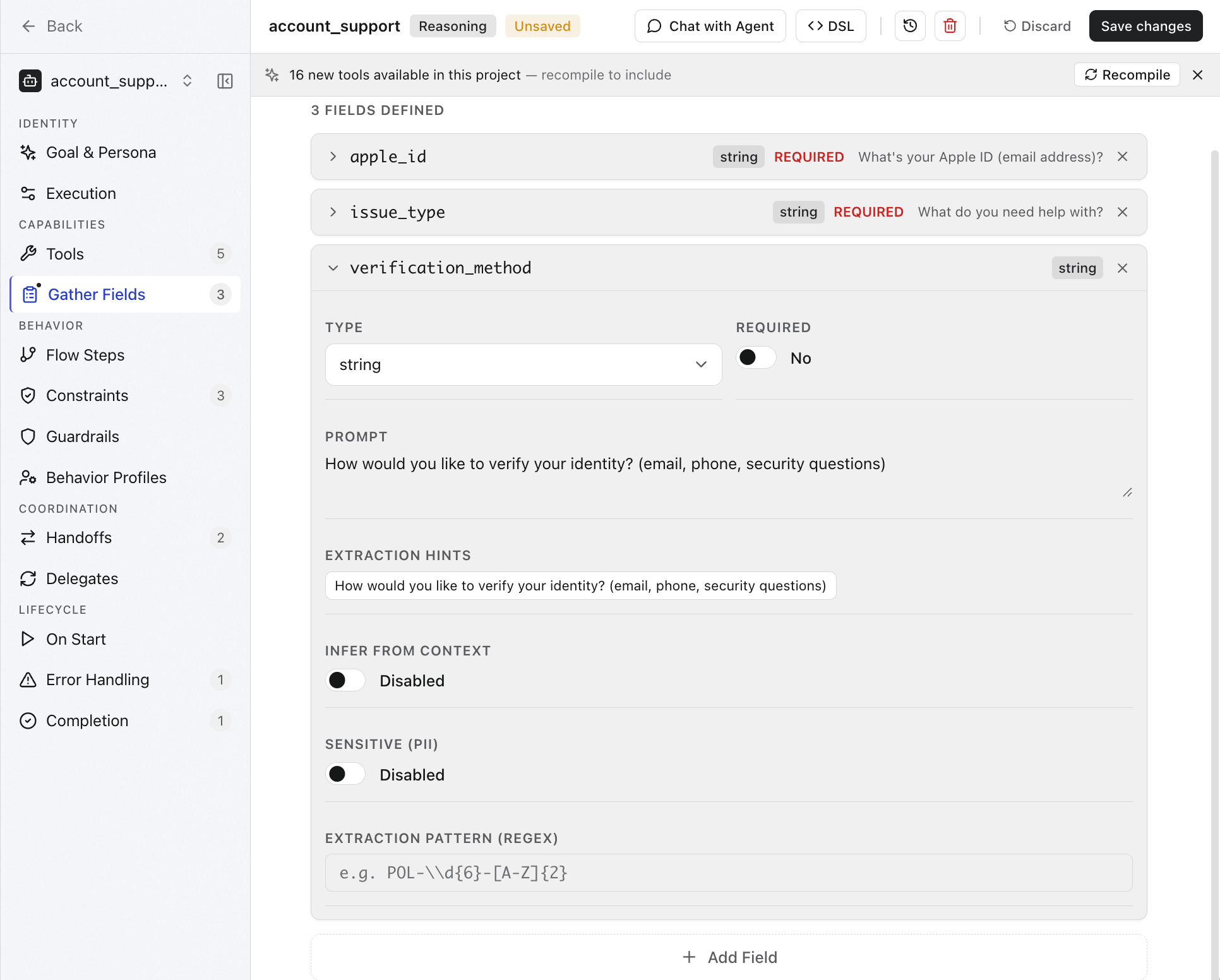 The Gather Fields page lists all defined fields. Click any field to expand its configuration, or click **+ Add Field** to define a new one.
Each field has the following properties.
| Property | Description |
| ------------------------------ | ----------------------------------------------------------------------------------------------- |
| **Field name** | The variable name used to reference the collected value in ABL and templates. |
| **Type** | The data type to collect. See [Field types](#field-types). |
| **Required** | Whether the agent must collect this field before proceeding. |
| **Prompt** | The question the agent asks the user to collect this field. |
| **Default Value** | The default value for this field. |
| **Extraction hints** | Instructions that guide the LLM on how to interpret ambiguous input for this field. |
| **Infer from context** | When enabled, the LLM extracts the value from prior conversation without asking the user again. |
| **Sensitive (PII)** | When enabled, the field value is masked in logs and traces. |
| **Extraction pattern (regex)** | A regex pattern for strict extraction. The field value must match this pattern. |
Click **Save changes** after configuring fields.
### In the ABL Editor
Define `GATHER` at the agent level for fields the LLM collects through natural conversation, or inside a flow step for deterministic collection.
**Agent-level GATHER:**
```yaml theme={null}
AGENT: Hotel_Search
GOAL: "Help users find hotels"
GATHER:
destination:
prompt: "Where would you like to stay?"
type: string
required: true
checkin:
prompt: "When is your check-in date?"
type: date
required: true
checkout:
prompt: "When is your check-out date?"
type: date
required: true
guests:
prompt: "How many guests?"
type: number
required: false
default: 2
```
**GATHER inside a flow step:**
```yaml theme={null}
collect_trip_info:
REASONING: false
GATHER:
- destination: required
prompt: "Where would you like to stay?"
- checkin_date: required
type: date
prompt: "Check-in date?"
- checkout_date: required
type: date
prompt: "Check-out date?"
- num_guests:
type: number
default: 2
prompt: "How many guests?"
COMPLETE_WHEN: destination AND checkin_date AND checkout_date
THEN: search_hotels
```
Agent-level `GATHER` uses a named field syntax. Flow step `GATHER` uses a compact list syntax. `COMPLETE_WHEN` defines when the step has enough data to advance.
## Field properties
| Property | Type | Required | Default | Description |
| ------------------- | ------------------------------- | -------- | ---------- | ----------------------------------------------------------------------- |
| prompt | string | Yes | -- | The question or instruction shown to the user to collect this field |
| type | string | No | "string" | Data type for the field value |
| required | boolean | No | true | Whether the field must be collected before proceeding |
| default | any | No | none | Default value used if the user does not provide one |
| validate | string | No | none | Validation expression |
| validation\_process | "REGEX" \| "CODE" \| "LLM" | No | none | How validation is performed |
| retry\_prompt | string | No | none | Custom prompt shown when validation fails |
| max\_retries | number | No | none | Maximum validation retry attempts |
| infer | boolean | No | false | Allow the LLM to infer the value from context |
| infer\_confidence | number | No | 0.8 | Minimum confidence threshold for accepting inferred values (0.0--1.0) |
| infer\_confirm | boolean | No | true | Whether to confirm inferred values with the user |
| extraction\_hints | `string[]` | No | none | Hints to guide the LLM's value extraction |
| prompt\_mode | "ask" \| "extract\_only" | No | "ask" | Whether the prompt is shown to the user or used only for LLM extraction |
| range | boolean | No | false | Collect as a range `{low, high}` instead of a scalar |
| list | boolean | No | false | Collect as an array instead of a scalar |
| preferences | boolean | No | false | Categorize into accept/desire/avoid/refuse preference sets |
| activation | string \| `{when: string}` | No | "required" | Activation mode |
| depends\_on | `string[]` | No | none | Fields that must be collected before this field activates |
| sensitive | boolean | No | false | Whether this field carries PII |
| sensitive\_display | "redact" \| "mask" \| "replace" | No | none | How sensitive values are displayed outside the gather context |
| mask\_config | `{showFirst, showLast, char}` | No | none | Masking configuration when sensitive\_display is "mask" |
| transient | boolean | No | false | Whether PII auto-cleans after gather completes |
| extraction\_pattern | string | No | none | Custom regex pattern for value extraction |
| extraction\_group | number | No | 0 | Capture group index for extraction\_pattern |
| semantics | object | No | none | Supplemental metadata about the value |
## Field Types
| Type | Example values |
| --------- | --------------------------- |
| `string` | Any text. |
| `number` | `42`, `3.14` |
| `date` | `2026-03-15`, `next Friday` |
| `email` | `user@example.com` |
| `phone` | `+1-555-0123` |
| `boolean` | `yes`, `no`, `true` |
## Collection Strategies
The collection strategy controls how the agent extracts field values from user input.
```yaml theme={null}
collect_trip_info:
REASONING: false
GATHER:
FIELDS:
- checkin_date: required
- checkout_date: required
- num_guests: required
STRATEGY: llm
THEN: search_and_show
```
| Strategy | Behavior |
| --------- | --------------------------------------------------------------------------- |
| `llm` | LLM extracts values from natural language. This is the default. |
| `pattern` | Strict pattern matching only. |
| `hybrid` | Tries pattern matching first, then falls back to LLM for unresolved fields. |
Use `hybrid` when some fields have a predictable format (such as order IDs or
phone numbers) but others are open-ended.
## Field Validation
Add validation to enforce data formats, value ranges, and business rules before the agent proceeds.
### Validate With an Expression
```yaml theme={null}
GATHER:
email:
prompt: "What is your email address?"
type: email
required: true
validate: pattern(^[\\w.+-]+@[\\w-]+\\.[\\w.-]+$)
age:
prompt: "How old are you?"
type: number
required: true
validate: "value >= 18 AND value <= 120"
```
The `validate` expression is evaluated at runtime. If it fails, the agent re-prompts the user.
### Set the Validation Process
```yaml theme={null}
GATHER:
order_id:
prompt: "What is your order number? (Format: ORD-XXXXX)"
type: string
required: true
validation: "^ORD-[A-Z0-9]{5}$"
validation_process: REGEX
address:
prompt: "What is your shipping address?"
type: string
required: true
validation: "Verify this is a valid US mailing address with street, city, state, and ZIP"
validation_process: LLM
```
| Process | Behavior |
| ------- | ------------------------------------------------------------------------------------------------------------------------------------------------------------------------------------------------------------------------------------------------------------------------------------------------------------------------------------------------------------------------------------- |
| `REGEX` | Matches the value against a regular expression pattern. |
| `CODE` | Runs a code snippet for validation. |
| `LLM` | Asks the LLM to evaluate whether the value is valid. When multiple gathered fields in the same extraction pass use `VALIDATION_PROCESS: LLM`, the runtime batches them into one validation call by default and returns per-field failures. A custom field-validation prompt override preserves legacy single-field validation calls so tenant-specific prompt contracts remain exact. |
### Customize Retry Behavior
```yaml theme={null}
GATHER:
phone_number:
prompt: "What is your phone number?"
type: phone
required: true
validation: "^\\+?[1-9]\\d{1,14}$"
validation_process: REGEX
retry_prompt: "That does not look like a valid phone number. Please enter a number like +15551234567."
max_retries: 3
```
`retry_prompt` replaces the default re-prompt message when validation fails. `max_retries` caps how many times the agent asks before moving on or escalating.
### Validate enum Values
```yaml theme={null}
GATHER:
cancellation_scope:
prompt: "Would you like to cancel the entire order or specific items?"
type: string
required: true
validate: enum(full, partial)
infer: true
extraction_hints:
- "If user says 'all', 'everything', or 'whole order', infer 'full'"
- "If user mentions specific items or says 'some', infer 'partial'"
```
`enum()` restricts accepted values to a defined set. Combined with `infer: true`, the LLM maps natural language input to the valid enum values.
### Validate Across Fields
Validation expressions can reference other gathered fields for cross-field validation.
```yaml theme={null}
GATHER:
checkin_date:
prompt: "Check-in date?"
type: date
required: true
validate: "value >= today()"
retry_prompt: "The check-in date must be today or later."
checkout_date:
prompt: "Check-out date?"
type: date
required: true
validate: "value > checkin_date"
retry_prompt: "Check-out must be after your check-in date of {{checkin_date}}."
```
### Validate with CONSTRAINTS
For business rules that go beyond field format, use `CONSTRAINTS` alongside `GATHER`.
```yaml theme={null}
CONSTRAINTS:
- REQUIRE order_id.matches("^ORD-[A-Z0-9]{5}$") OR email IS SET
ON_FAIL: "Please provide a valid order number (format: ORD-XXXXX) or an email address."
- REQUIRE lookup_attempts <= 3
ON_FAIL: "I have been unable to find your order after several attempts. Let me connect you with a specialist."
```
### Validate Payment Fields in a Flow Step
```yaml theme={null}
collect_payment:
REASONING: false
GATHER:
- card_number: required
validation: "^[0-9]{13,19}$"
validation_process: REGEX
retry_prompt: "Please enter a valid card number (13-19 digits)."
max_retries: 3
- expiry: required
validation: "^(0[1-9]|1[0-2])\\/([0-9]{2})$"
validation_process: REGEX
retry_prompt: "Please enter expiry as MM/YY."
- cvv: required
validation: "^[0-9]{3,4}$"
validation_process: REGEX
retry_prompt: "CVV must be 3 or 4 digits."
THEN: process_payment
```
## LLM Inference
LLM inference lets the agent fill field values from conversational context without asking the user explicitly.
### Enable Inference on a Field
```yaml theme={null}
GATHER:
cancellation_reason:
prompt: "May I ask the reason for the cancellation?"
type: string
required: false
infer: true
```
With `infer: true`, if the user already said "I do not need the order anymore," the agent fills `cancellation_reason` without prompting again.
### Control Inference Confidence
```yaml theme={null}
GATHER:
destination:
prompt: "Where would you like to travel?"
type: string
required: true
infer: true
infer_confidence: 0.9
infer_confirm: true
```
| Property | Default | Purpose |
| ------------------ | ------- | ---------------------------------------------------------- |
| `infer` | `false` | Allow the LLM to extract the value from context. |
| `infer_confidence` | `0.8` | Minimum confidence score to accept an inferred value. |
| `infer_confirm` | `true` | Ask the user to confirm inferred values before proceeding. |
When `infer_confirm: true`, the agent confirms with the user before accepting — for example, "It sounds like you want to travel to Paris. Is that correct?"
### Add Extraction Hints
Extraction hints guide the LLM on how to map natural language input into structured values.
```yaml theme={null}
GATHER:
cancellation_scope:
prompt: "Would you like to cancel the entire order or specific items?"
type: string
required: false
infer: true
extraction_hints:
- "If user says 'all', 'everything', 'whole order', infer 'full'"
- "If user mentions specific items or says 'some', infer 'partial'"
selected_items:
prompt: "Which items would you like to cancel?"
type: string
required: false
extraction_hints:
- "Only needed for partial cancellations"
- "Match user input to item names from the order"
```
Extraction hints are especially useful for domain-specific terminology and ambiguous phrases.
### Silent Extraction Without Prompting
Use `prompt_mode: extract_only` when the prompt is an instruction to the LLM, not a question for the user. The agent silently extracts the value from context.
```yaml theme={null}
GATHER:
sentiment:
prompt: "Assess the customer's emotional state from the conversation"
type: string
required: false
infer: true
prompt_mode: extract_only
```
### Activate Fields Conditionally
Use `depends_on` and `activation` to collect a field only when another field meets a condition.
```yaml theme={null}
GATHER:
trip_type:
prompt: "Is this a round trip or one way?"
type: string
required: true
infer: true
extraction_hints:
- "If user mentions return date, infer 'round_trip'"
- "If user says 'one way' or mentions only departure, infer 'one_way'"
return_date:
prompt: "When would you like to return?"
type: date
required: false
infer: true
depends_on: [trip_type]
activation:
when: "trip_type == 'round_trip'"
```
`return_date` is only collected when `trip_type` is `round_trip`. If the user says "I need a round trip to London, leaving March 10 and returning March 17," both fields are inferred from a single message.
Use `activation: progressive` to activate a field only after its dependencies are met, letting the conversation unfold naturally.
```yaml theme={null}
GATHER:
budget:
prompt: "What is your budget?"
type: string
required: true
luxury_preferences:
prompt: "Any specific luxury amenities you want?"
type: string
activation: progressive
depends_on: [budget]
```
### High-confidence Inference without Confirmation
Set `infer_confirm: false` for fields where the inferred value is obvious from context — for example, detecting language from how the user writes.
```yaml theme={null}
GATHER:
language_preference:
prompt: "What language do you prefer?"
type: string
required: false
infer: true
infer_confidence: 0.95
infer_confirm: false
```
Use a high `infer_confidence` threshold to avoid silent mismatches when skipping confirmation.
## Optional Fields and Defaults
Optional fields are collected only if the user provides them. Default values are used when the user skips the field.
```yaml theme={null}
GATHER:
priority:
prompt: "What priority level? (low, medium, high)"
type: string
required: false
default: "medium"
notes:
prompt: "Any additional notes?"
type: string
required: false
```
## Collecting Ranges and Lists
By default, GATHER collects a single scalar value per field. Use range or list to collect structured multi-value input instead.
### Collect a Range
Set `range: true` to collect a `{low, high}` pair — useful for price ranges, age brackets, date windows, and similar bounded inputs.
```yaml theme={null}
GATHER:
price_range:
prompt: "What is your budget range? (for example. $100 to $300)"
type: number
required: true
range: true
```
The collected value is stored as an object: `{low: number, high: number}`.
### Collect a List
Set `list: true` to collect multiple values of the same type as an array — useful for item selections, amenity preferences, or multiple destinations.
```yaml theme={null}
GATHER:
preferred_amenities:
prompt: "Which amenities are important to you? (for example. pool, gym, parking)"
type: string
required: false
list: true
```
The collected value is stored as an array: `["val1", "val2", "val3"]`.
## Handling Sensitive Fields
For PII and sensitive fields, use the `sensitive` property along with `sensitive_display` property to suggest how to show the sensitive fields.
For full details on display modes and masking configuration, see [Handling transient and sensitive fields.](/agent-platform/abl-reference/gather#transient-and-sensitive-fields)
## Present Collected Values
Use `PRESENT` to show collected values back to the user as each field is filled.
```yaml theme={null}
collect_trip_info:
REASONING: false
GATHER:
- destination: required
prompt: "Where would you like to stay?"
- checkin_date: required
type: date
- checkout_date: required
type: date
PRESENT: |
Here is what I have so far:
{{#if destination}}Destination: {{destination}}{{/if}}
{{#if checkin_date}}Check-in: {{checkin_date}}{{/if}}
{{#if checkout_date}}Check-out: {{checkout_date}}{{/if}}
COMPLETE_WHEN: destination AND checkin_date AND checkout_date
THEN: search_hotels
```
## Handling Corrections to Fields within a Flow
Enable corrections so users can change previously provided values without restarting the flow. This property is set at the flow level and not at the field level.
### Enable Corrections on a Flow Step
```yaml theme={null}
collect_trip_info:
REASONING: false
GATHER:
- destination: required
prompt: "Where would you like to stay?"
- checkin_date: required
type: date
prompt: "Check-in date?"
- checkout_date: required
type: date
prompt: "Check-out date?"
CORRECTIONS: true
COMPLETE_WHEN: destination AND checkin_date AND checkout_date
THEN: search_hotels
```
With `CORRECTIONS: true`, the user can say "actually, change the destination to London" at any point during collection, and the agent clears and re-collects that field.
### Use SUB\_INTENTS for Targeted Corrections
`SUB_INTENTS` define scoped intents valid only within a step. if a field is cleared by a sub intent, the agent re-collects it.
```yaml theme={null}
collect_trip_info:
REASONING: false
GATHER:
- destination: required
- checkin_date: required
type: date
- checkout_date: required
type: date
SUB_INTENTS:
- INTENT: "change destination"
CLEAR: [destination]
RESPOND: "Sure, what is the new destination?"
- INTENT: "change dates"
CLEAR: [checkin_date, checkout_date]
RESPOND: "What are your new travel dates?"
COMPLETE_WHEN: destination AND checkin_date AND checkout_date
THEN: search_hotels
```
### Use ON\_INPUT for Deterministic Correction Branching
```yaml theme={null}
get_dates:
REASONING: false
GATHER:
- checkin_date: required
type: date
- checkout_date: required
type: date
ON_INPUT:
- IF: input == "back"
THEN: get_destination
- IF: input.contains("change destination")
THEN: get_destination
- ELSE:
THEN: get_guests
```
### Handle Corrections at the Review Step with DIGRESSIONS
`DIGRESSIONS` allow jumping to any step in the flow from a review or confirmation step. Unlike `SUB_INTENTS`, digressions leave the current step entirely.
```yaml theme={null}
review_booking:
REASONING: false
PRESENT: |
Booking Summary:
Hotel: {{selected_hotel.name}}
Dates: {{checkin_date}} to {{checkout_date}}
Guests: {{num_guests}}
Guest: {{guest_name}} ({{guest_email}})
Total: ${{total_price}}
Type "confirm" to complete or "change [field]" to modify.
DIGRESSIONS:
- INTENT: "change hotel"
GOTO: select_hotel
- INTENT: "change dates"
CLEAR: [checkin_date, checkout_date]
GOTO: collect_trip_info
- INTENT: "change guest"
GOTO: collect_guest_info
ON_INPUT:
- IF: input == "confirm"
THEN: confirm
- ELSE:
RESPOND: "Please type 'confirm' to proceed or 'change [field]' to modify."
THEN: review_booking
```
### Handle Exhausted Retries
`MAX_ATTEMPTS` on the step limits total retries. `ON_EXHAUSTED` defines the fallback step when the limit is reached.
```yaml theme={null}
verify_identity:
REASONING: false
MAX_ATTEMPTS: 3
ON_EXHAUSTED: connect_to_human
GATHER:
- verification_code:
prompt: "Enter the 6-digit code sent to your phone."
type: string
required: true
validation: "^[0-9]{6}$"
validation_process: REGEX
retry_prompt: "That code is not valid. Please enter exactly 6 digits."
max_retries: 3
CALL: verify_code(verification_code)
ON_SUCCESS:
THEN: authenticated
ON_FAIL:
RESPOND: "That code did not match. Please try again."
THEN: verify_identity
```
`MAX_ATTEMPTS` counts entries to the step, not individual field retries.
`max_retries` on a field counts field-level retries separately.
### Apply Global Digressions Across All Flow Steps
Global digressions are available in every step. `RESUME: true` returns to the current step after handling the digression.
```yaml theme={null}
FLOW:
steps:
- welcome
- collect_info
- search
- confirm
global_digressions:
REASONING: false
- INTENT: "cancel"
RESPOND: "Booking cancelled. Would you like to start over?"
GOTO: welcome
- INTENT: "help"
RESPOND: "I can help you find and book hotels. Tell me your destination and dates."
RESUME: true
- INTENT: "start over"
GOTO: welcome
```
Without `RESUME`, the `GOTO` target becomes the new active step.
## Troubleshooting
| Symptom | Resolution |
| ------------------------------------------------------------------- | -------------------------------------------------------------------------------------------------------------------- |
| **Fields not extracted from natural language** | Verify `STRATEGY: llm` is set (or omitted, since `llm` is the default). Add `extraction_hints` for ambiguous fields. |
| **Step advances before all required fields are collected** | Add `COMPLETE_WHEN` with explicit conditions listing all required fields. |
| **Validation never passes** | Check regex pattern escaping — in ABL, backslashes need to be doubled (`\\d`, not `\d`). |
| **User stuck in retry loop** | Set `max_retries` to 2–3. After exhaustion, the agent proceeds or escalates rather than looping. |
| **Cross-field validation runs before dependent field is collected** | Order `GATHER` fields so dependencies are listed first, or use `COMPLETE_WHEN` to control when validation evaluates. |
| **Inference fills a field incorrectly** | Raise `infer_confidence` to `0.9` or higher. Set `infer_confirm: true` to require explicit user confirmation. |
| **Agent asks for a field the user already mentioned** | Verify `infer: true` is set on the field and `STRATEGY` is `llm` or `hybrid` (not `pattern`). |
| **Extraction hints ignored** | Hints must be a list of strings. Each hint should be a clear, specific instruction — not a long paragraph. |
| **User correction not detected** | Add explicit `SUB_INTENTS` or `DIGRESSIONS` for the correction patterns your users are likely to use. |
| **Cleared field not re-collected** | After `CLEAR`, the step must re-prompt. Verify `GATHER` includes the cleared field and `COMPLETE_WHEN` requires it. |
The Gather Fields page lists all defined fields. Click any field to expand its configuration, or click **+ Add Field** to define a new one.
Each field has the following properties.
| Property | Description |
| ------------------------------ | ----------------------------------------------------------------------------------------------- |
| **Field name** | The variable name used to reference the collected value in ABL and templates. |
| **Type** | The data type to collect. See [Field types](#field-types). |
| **Required** | Whether the agent must collect this field before proceeding. |
| **Prompt** | The question the agent asks the user to collect this field. |
| **Default Value** | The default value for this field. |
| **Extraction hints** | Instructions that guide the LLM on how to interpret ambiguous input for this field. |
| **Infer from context** | When enabled, the LLM extracts the value from prior conversation without asking the user again. |
| **Sensitive (PII)** | When enabled, the field value is masked in logs and traces. |
| **Extraction pattern (regex)** | A regex pattern for strict extraction. The field value must match this pattern. |
Click **Save changes** after configuring fields.
### In the ABL Editor
Define `GATHER` at the agent level for fields the LLM collects through natural conversation, or inside a flow step for deterministic collection.
**Agent-level GATHER:**
```yaml theme={null}
AGENT: Hotel_Search
GOAL: "Help users find hotels"
GATHER:
destination:
prompt: "Where would you like to stay?"
type: string
required: true
checkin:
prompt: "When is your check-in date?"
type: date
required: true
checkout:
prompt: "When is your check-out date?"
type: date
required: true
guests:
prompt: "How many guests?"
type: number
required: false
default: 2
```
**GATHER inside a flow step:**
```yaml theme={null}
collect_trip_info:
REASONING: false
GATHER:
- destination: required
prompt: "Where would you like to stay?"
- checkin_date: required
type: date
prompt: "Check-in date?"
- checkout_date: required
type: date
prompt: "Check-out date?"
- num_guests:
type: number
default: 2
prompt: "How many guests?"
COMPLETE_WHEN: destination AND checkin_date AND checkout_date
THEN: search_hotels
```
Agent-level `GATHER` uses a named field syntax. Flow step `GATHER` uses a compact list syntax. `COMPLETE_WHEN` defines when the step has enough data to advance.
## Field properties
| Property | Type | Required | Default | Description |
| ------------------- | ------------------------------- | -------- | ---------- | ----------------------------------------------------------------------- |
| prompt | string | Yes | -- | The question or instruction shown to the user to collect this field |
| type | string | No | "string" | Data type for the field value |
| required | boolean | No | true | Whether the field must be collected before proceeding |
| default | any | No | none | Default value used if the user does not provide one |
| validate | string | No | none | Validation expression |
| validation\_process | "REGEX" \| "CODE" \| "LLM" | No | none | How validation is performed |
| retry\_prompt | string | No | none | Custom prompt shown when validation fails |
| max\_retries | number | No | none | Maximum validation retry attempts |
| infer | boolean | No | false | Allow the LLM to infer the value from context |
| infer\_confidence | number | No | 0.8 | Minimum confidence threshold for accepting inferred values (0.0--1.0) |
| infer\_confirm | boolean | No | true | Whether to confirm inferred values with the user |
| extraction\_hints | `string[]` | No | none | Hints to guide the LLM's value extraction |
| prompt\_mode | "ask" \| "extract\_only" | No | "ask" | Whether the prompt is shown to the user or used only for LLM extraction |
| range | boolean | No | false | Collect as a range `{low, high}` instead of a scalar |
| list | boolean | No | false | Collect as an array instead of a scalar |
| preferences | boolean | No | false | Categorize into accept/desire/avoid/refuse preference sets |
| activation | string \| `{when: string}` | No | "required" | Activation mode |
| depends\_on | `string[]` | No | none | Fields that must be collected before this field activates |
| sensitive | boolean | No | false | Whether this field carries PII |
| sensitive\_display | "redact" \| "mask" \| "replace" | No | none | How sensitive values are displayed outside the gather context |
| mask\_config | `{showFirst, showLast, char}` | No | none | Masking configuration when sensitive\_display is "mask" |
| transient | boolean | No | false | Whether PII auto-cleans after gather completes |
| extraction\_pattern | string | No | none | Custom regex pattern for value extraction |
| extraction\_group | number | No | 0 | Capture group index for extraction\_pattern |
| semantics | object | No | none | Supplemental metadata about the value |
## Field Types
| Type | Example values |
| --------- | --------------------------- |
| `string` | Any text. |
| `number` | `42`, `3.14` |
| `date` | `2026-03-15`, `next Friday` |
| `email` | `user@example.com` |
| `phone` | `+1-555-0123` |
| `boolean` | `yes`, `no`, `true` |
## Collection Strategies
The collection strategy controls how the agent extracts field values from user input.
```yaml theme={null}
collect_trip_info:
REASONING: false
GATHER:
FIELDS:
- checkin_date: required
- checkout_date: required
- num_guests: required
STRATEGY: llm
THEN: search_and_show
```
| Strategy | Behavior |
| --------- | --------------------------------------------------------------------------- |
| `llm` | LLM extracts values from natural language. This is the default. |
| `pattern` | Strict pattern matching only. |
| `hybrid` | Tries pattern matching first, then falls back to LLM for unresolved fields. |
Use `hybrid` when some fields have a predictable format (such as order IDs or
phone numbers) but others are open-ended.
## Field Validation
Add validation to enforce data formats, value ranges, and business rules before the agent proceeds.
### Validate With an Expression
```yaml theme={null}
GATHER:
email:
prompt: "What is your email address?"
type: email
required: true
validate: pattern(^[\\w.+-]+@[\\w-]+\\.[\\w.-]+$)
age:
prompt: "How old are you?"
type: number
required: true
validate: "value >= 18 AND value <= 120"
```
The `validate` expression is evaluated at runtime. If it fails, the agent re-prompts the user.
### Set the Validation Process
```yaml theme={null}
GATHER:
order_id:
prompt: "What is your order number? (Format: ORD-XXXXX)"
type: string
required: true
validation: "^ORD-[A-Z0-9]{5}$"
validation_process: REGEX
address:
prompt: "What is your shipping address?"
type: string
required: true
validation: "Verify this is a valid US mailing address with street, city, state, and ZIP"
validation_process: LLM
```
| Process | Behavior |
| ------- | ------------------------------------------------------------------------------------------------------------------------------------------------------------------------------------------------------------------------------------------------------------------------------------------------------------------------------------------------------------------------------------- |
| `REGEX` | Matches the value against a regular expression pattern. |
| `CODE` | Runs a code snippet for validation. |
| `LLM` | Asks the LLM to evaluate whether the value is valid. When multiple gathered fields in the same extraction pass use `VALIDATION_PROCESS: LLM`, the runtime batches them into one validation call by default and returns per-field failures. A custom field-validation prompt override preserves legacy single-field validation calls so tenant-specific prompt contracts remain exact. |
### Customize Retry Behavior
```yaml theme={null}
GATHER:
phone_number:
prompt: "What is your phone number?"
type: phone
required: true
validation: "^\\+?[1-9]\\d{1,14}$"
validation_process: REGEX
retry_prompt: "That does not look like a valid phone number. Please enter a number like +15551234567."
max_retries: 3
```
`retry_prompt` replaces the default re-prompt message when validation fails. `max_retries` caps how many times the agent asks before moving on or escalating.
### Validate enum Values
```yaml theme={null}
GATHER:
cancellation_scope:
prompt: "Would you like to cancel the entire order or specific items?"
type: string
required: true
validate: enum(full, partial)
infer: true
extraction_hints:
- "If user says 'all', 'everything', or 'whole order', infer 'full'"
- "If user mentions specific items or says 'some', infer 'partial'"
```
`enum()` restricts accepted values to a defined set. Combined with `infer: true`, the LLM maps natural language input to the valid enum values.
### Validate Across Fields
Validation expressions can reference other gathered fields for cross-field validation.
```yaml theme={null}
GATHER:
checkin_date:
prompt: "Check-in date?"
type: date
required: true
validate: "value >= today()"
retry_prompt: "The check-in date must be today or later."
checkout_date:
prompt: "Check-out date?"
type: date
required: true
validate: "value > checkin_date"
retry_prompt: "Check-out must be after your check-in date of {{checkin_date}}."
```
### Validate with CONSTRAINTS
For business rules that go beyond field format, use `CONSTRAINTS` alongside `GATHER`.
```yaml theme={null}
CONSTRAINTS:
- REQUIRE order_id.matches("^ORD-[A-Z0-9]{5}$") OR email IS SET
ON_FAIL: "Please provide a valid order number (format: ORD-XXXXX) or an email address."
- REQUIRE lookup_attempts <= 3
ON_FAIL: "I have been unable to find your order after several attempts. Let me connect you with a specialist."
```
### Validate Payment Fields in a Flow Step
```yaml theme={null}
collect_payment:
REASONING: false
GATHER:
- card_number: required
validation: "^[0-9]{13,19}$"
validation_process: REGEX
retry_prompt: "Please enter a valid card number (13-19 digits)."
max_retries: 3
- expiry: required
validation: "^(0[1-9]|1[0-2])\\/([0-9]{2})$"
validation_process: REGEX
retry_prompt: "Please enter expiry as MM/YY."
- cvv: required
validation: "^[0-9]{3,4}$"
validation_process: REGEX
retry_prompt: "CVV must be 3 or 4 digits."
THEN: process_payment
```
## LLM Inference
LLM inference lets the agent fill field values from conversational context without asking the user explicitly.
### Enable Inference on a Field
```yaml theme={null}
GATHER:
cancellation_reason:
prompt: "May I ask the reason for the cancellation?"
type: string
required: false
infer: true
```
With `infer: true`, if the user already said "I do not need the order anymore," the agent fills `cancellation_reason` without prompting again.
### Control Inference Confidence
```yaml theme={null}
GATHER:
destination:
prompt: "Where would you like to travel?"
type: string
required: true
infer: true
infer_confidence: 0.9
infer_confirm: true
```
| Property | Default | Purpose |
| ------------------ | ------- | ---------------------------------------------------------- |
| `infer` | `false` | Allow the LLM to extract the value from context. |
| `infer_confidence` | `0.8` | Minimum confidence score to accept an inferred value. |
| `infer_confirm` | `true` | Ask the user to confirm inferred values before proceeding. |
When `infer_confirm: true`, the agent confirms with the user before accepting — for example, "It sounds like you want to travel to Paris. Is that correct?"
### Add Extraction Hints
Extraction hints guide the LLM on how to map natural language input into structured values.
```yaml theme={null}
GATHER:
cancellation_scope:
prompt: "Would you like to cancel the entire order or specific items?"
type: string
required: false
infer: true
extraction_hints:
- "If user says 'all', 'everything', 'whole order', infer 'full'"
- "If user mentions specific items or says 'some', infer 'partial'"
selected_items:
prompt: "Which items would you like to cancel?"
type: string
required: false
extraction_hints:
- "Only needed for partial cancellations"
- "Match user input to item names from the order"
```
Extraction hints are especially useful for domain-specific terminology and ambiguous phrases.
### Silent Extraction Without Prompting
Use `prompt_mode: extract_only` when the prompt is an instruction to the LLM, not a question for the user. The agent silently extracts the value from context.
```yaml theme={null}
GATHER:
sentiment:
prompt: "Assess the customer's emotional state from the conversation"
type: string
required: false
infer: true
prompt_mode: extract_only
```
### Activate Fields Conditionally
Use `depends_on` and `activation` to collect a field only when another field meets a condition.
```yaml theme={null}
GATHER:
trip_type:
prompt: "Is this a round trip or one way?"
type: string
required: true
infer: true
extraction_hints:
- "If user mentions return date, infer 'round_trip'"
- "If user says 'one way' or mentions only departure, infer 'one_way'"
return_date:
prompt: "When would you like to return?"
type: date
required: false
infer: true
depends_on: [trip_type]
activation:
when: "trip_type == 'round_trip'"
```
`return_date` is only collected when `trip_type` is `round_trip`. If the user says "I need a round trip to London, leaving March 10 and returning March 17," both fields are inferred from a single message.
Use `activation: progressive` to activate a field only after its dependencies are met, letting the conversation unfold naturally.
```yaml theme={null}
GATHER:
budget:
prompt: "What is your budget?"
type: string
required: true
luxury_preferences:
prompt: "Any specific luxury amenities you want?"
type: string
activation: progressive
depends_on: [budget]
```
### High-confidence Inference without Confirmation
Set `infer_confirm: false` for fields where the inferred value is obvious from context — for example, detecting language from how the user writes.
```yaml theme={null}
GATHER:
language_preference:
prompt: "What language do you prefer?"
type: string
required: false
infer: true
infer_confidence: 0.95
infer_confirm: false
```
Use a high `infer_confidence` threshold to avoid silent mismatches when skipping confirmation.
## Optional Fields and Defaults
Optional fields are collected only if the user provides them. Default values are used when the user skips the field.
```yaml theme={null}
GATHER:
priority:
prompt: "What priority level? (low, medium, high)"
type: string
required: false
default: "medium"
notes:
prompt: "Any additional notes?"
type: string
required: false
```
## Collecting Ranges and Lists
By default, GATHER collects a single scalar value per field. Use range or list to collect structured multi-value input instead.
### Collect a Range
Set `range: true` to collect a `{low, high}` pair — useful for price ranges, age brackets, date windows, and similar bounded inputs.
```yaml theme={null}
GATHER:
price_range:
prompt: "What is your budget range? (for example. $100 to $300)"
type: number
required: true
range: true
```
The collected value is stored as an object: `{low: number, high: number}`.
### Collect a List
Set `list: true` to collect multiple values of the same type as an array — useful for item selections, amenity preferences, or multiple destinations.
```yaml theme={null}
GATHER:
preferred_amenities:
prompt: "Which amenities are important to you? (for example. pool, gym, parking)"
type: string
required: false
list: true
```
The collected value is stored as an array: `["val1", "val2", "val3"]`.
## Handling Sensitive Fields
For PII and sensitive fields, use the `sensitive` property along with `sensitive_display` property to suggest how to show the sensitive fields.
For full details on display modes and masking configuration, see [Handling transient and sensitive fields.](/agent-platform/abl-reference/gather#transient-and-sensitive-fields)
## Present Collected Values
Use `PRESENT` to show collected values back to the user as each field is filled.
```yaml theme={null}
collect_trip_info:
REASONING: false
GATHER:
- destination: required
prompt: "Where would you like to stay?"
- checkin_date: required
type: date
- checkout_date: required
type: date
PRESENT: |
Here is what I have so far:
{{#if destination}}Destination: {{destination}}{{/if}}
{{#if checkin_date}}Check-in: {{checkin_date}}{{/if}}
{{#if checkout_date}}Check-out: {{checkout_date}}{{/if}}
COMPLETE_WHEN: destination AND checkin_date AND checkout_date
THEN: search_hotels
```
## Handling Corrections to Fields within a Flow
Enable corrections so users can change previously provided values without restarting the flow. This property is set at the flow level and not at the field level.
### Enable Corrections on a Flow Step
```yaml theme={null}
collect_trip_info:
REASONING: false
GATHER:
- destination: required
prompt: "Where would you like to stay?"
- checkin_date: required
type: date
prompt: "Check-in date?"
- checkout_date: required
type: date
prompt: "Check-out date?"
CORRECTIONS: true
COMPLETE_WHEN: destination AND checkin_date AND checkout_date
THEN: search_hotels
```
With `CORRECTIONS: true`, the user can say "actually, change the destination to London" at any point during collection, and the agent clears and re-collects that field.
### Use SUB\_INTENTS for Targeted Corrections
`SUB_INTENTS` define scoped intents valid only within a step. if a field is cleared by a sub intent, the agent re-collects it.
```yaml theme={null}
collect_trip_info:
REASONING: false
GATHER:
- destination: required
- checkin_date: required
type: date
- checkout_date: required
type: date
SUB_INTENTS:
- INTENT: "change destination"
CLEAR: [destination]
RESPOND: "Sure, what is the new destination?"
- INTENT: "change dates"
CLEAR: [checkin_date, checkout_date]
RESPOND: "What are your new travel dates?"
COMPLETE_WHEN: destination AND checkin_date AND checkout_date
THEN: search_hotels
```
### Use ON\_INPUT for Deterministic Correction Branching
```yaml theme={null}
get_dates:
REASONING: false
GATHER:
- checkin_date: required
type: date
- checkout_date: required
type: date
ON_INPUT:
- IF: input == "back"
THEN: get_destination
- IF: input.contains("change destination")
THEN: get_destination
- ELSE:
THEN: get_guests
```
### Handle Corrections at the Review Step with DIGRESSIONS
`DIGRESSIONS` allow jumping to any step in the flow from a review or confirmation step. Unlike `SUB_INTENTS`, digressions leave the current step entirely.
```yaml theme={null}
review_booking:
REASONING: false
PRESENT: |
Booking Summary:
Hotel: {{selected_hotel.name}}
Dates: {{checkin_date}} to {{checkout_date}}
Guests: {{num_guests}}
Guest: {{guest_name}} ({{guest_email}})
Total: ${{total_price}}
Type "confirm" to complete or "change [field]" to modify.
DIGRESSIONS:
- INTENT: "change hotel"
GOTO: select_hotel
- INTENT: "change dates"
CLEAR: [checkin_date, checkout_date]
GOTO: collect_trip_info
- INTENT: "change guest"
GOTO: collect_guest_info
ON_INPUT:
- IF: input == "confirm"
THEN: confirm
- ELSE:
RESPOND: "Please type 'confirm' to proceed or 'change [field]' to modify."
THEN: review_booking
```
### Handle Exhausted Retries
`MAX_ATTEMPTS` on the step limits total retries. `ON_EXHAUSTED` defines the fallback step when the limit is reached.
```yaml theme={null}
verify_identity:
REASONING: false
MAX_ATTEMPTS: 3
ON_EXHAUSTED: connect_to_human
GATHER:
- verification_code:
prompt: "Enter the 6-digit code sent to your phone."
type: string
required: true
validation: "^[0-9]{6}$"
validation_process: REGEX
retry_prompt: "That code is not valid. Please enter exactly 6 digits."
max_retries: 3
CALL: verify_code(verification_code)
ON_SUCCESS:
THEN: authenticated
ON_FAIL:
RESPOND: "That code did not match. Please try again."
THEN: verify_identity
```
`MAX_ATTEMPTS` counts entries to the step, not individual field retries.
`max_retries` on a field counts field-level retries separately.
### Apply Global Digressions Across All Flow Steps
Global digressions are available in every step. `RESUME: true` returns to the current step after handling the digression.
```yaml theme={null}
FLOW:
steps:
- welcome
- collect_info
- search
- confirm
global_digressions:
REASONING: false
- INTENT: "cancel"
RESPOND: "Booking cancelled. Would you like to start over?"
GOTO: welcome
- INTENT: "help"
RESPOND: "I can help you find and book hotels. Tell me your destination and dates."
RESUME: true
- INTENT: "start over"
GOTO: welcome
```
Without `RESUME`, the `GOTO` target becomes the new active step.
## Troubleshooting
| Symptom | Resolution |
| ------------------------------------------------------------------- | -------------------------------------------------------------------------------------------------------------------- |
| **Fields not extracted from natural language** | Verify `STRATEGY: llm` is set (or omitted, since `llm` is the default). Add `extraction_hints` for ambiguous fields. |
| **Step advances before all required fields are collected** | Add `COMPLETE_WHEN` with explicit conditions listing all required fields. |
| **Validation never passes** | Check regex pattern escaping — in ABL, backslashes need to be doubled (`\\d`, not `\d`). |
| **User stuck in retry loop** | Set `max_retries` to 2–3. After exhaustion, the agent proceeds or escalates rather than looping. |
| **Cross-field validation runs before dependent field is collected** | Order `GATHER` fields so dependencies are listed first, or use `COMPLETE_WHEN` to control when validation evaluates. |
| **Inference fills a field incorrectly** | Raise `infer_confidence` to `0.9` or higher. Set `infer_confirm: true` to require explicit user confirmation. |
| **Agent asks for a field the user already mentioned** | Verify `infer: true` is set on the field and `STRATEGY` is `llm` or `hybrid` (not `pattern`). |
| **Extraction hints ignored** | Hints must be a list of strings. Each hint should be a clear, specific instruction — not a long paragraph. |
| **User correction not detected** | Add explicit `SUB_INTENTS` or `DIGRESSIONS` for the correction patterns your users are likely to use. |
| **Cleared field not re-collected** | After `CLEAR`, the step must re-prompt. Verify `GATHER` includes the cleared field and `COMPLETE_WHEN` requires it. |