> ## Documentation Index
> Fetch the complete documentation index at: https://koreai.mintlify.site/llms.txt
> Use this file to discover all available pages before exploring further.
# Multi-Agent Orchestration
Multi-agent orchestration distributes tasks across specialized agents, each focused on a specific domain such as billing, authentication, or order tracking.
Orchestration relies on three components:
* **Routing**: Determines which agent handles a request based on user intent, session state, or custom conditions. The supervisor evaluates routing rules on every message.
* **Context propagation**: Gives the target agent the data it needs without asking the user to repeat themselves. Context does not transfer automatically. You must pass it explicitly.
* **Control flow**: Determines whether the calling agent keeps control after routing or transfers it permanently. This controls how results flow back and whether the user notices a transfer.
Together, these mechanisms let you build systems where the user experiences a single, unified assistant while specialized agents work together behind the scenes.
## Types of Orchestration
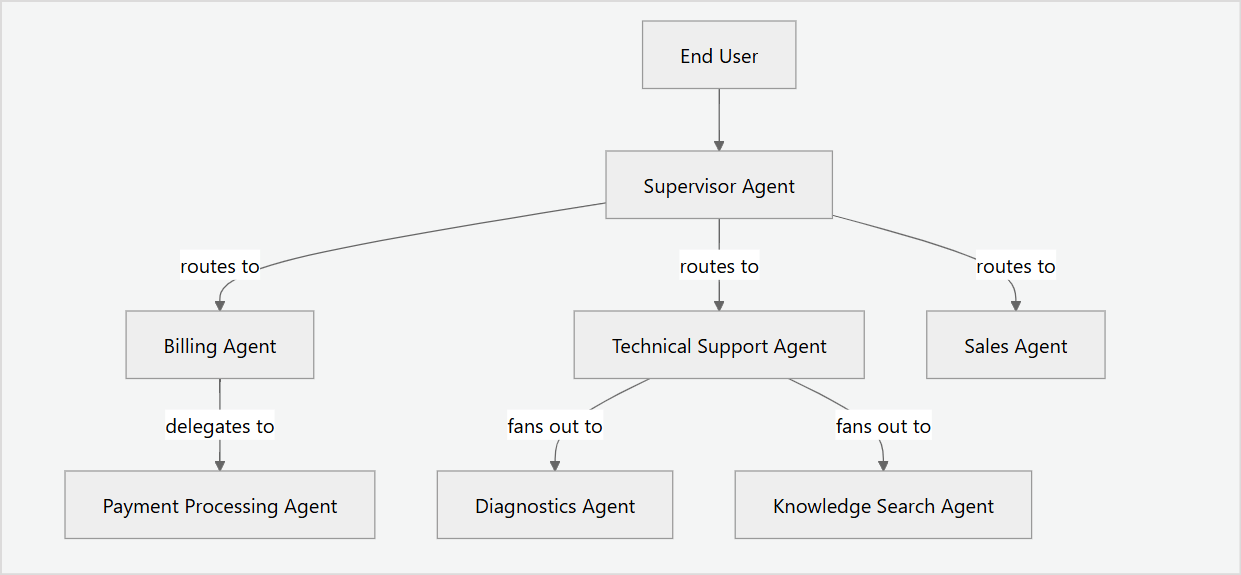
The platform supports four orchestration patterns:
| Pattern | When to use | User experience |
| ---------------------------------------------------- | ------------------------------------------------------------------------------------------------- | ---------------------------------------------------------------------------------------------- |
| [Supervisor](/agent-platform/orchestrate#supervisor) | Entry point for multi-agent systems; routes by intent. | The user always talks to one agent, which routes the request to a specialized agent as needed. |
| [Handoff](/agent-platform/orchestrate#handoff) | Route the conversation to a specialist agent. | The user is transferred to a new agent. |
| [Delegation](/agent-platform/orchestrate#delegate) | The agent needs a sub-task done. It sends the sub-task to another agent and gets the result back. | Transparent. The user does not see the delegation. |
| [Fan-out](/agent-platform/orchestrate#fan-out) | The agent needs multiple things done in parallel. It runs multiple agents and merges the results. | Transparent. The user sees a single combined result. |
| [Escalation](/agent-platform/escalate) | Transfer to a human agent with full context. | The user interacts with a human agent. |
**Sample Multi-Agent Orchestration**
 ## Configure Orchestration
You can configure orchestration in two ways:
### Using the Agent Platform Studio
* Navigate to the **Agents** page to view all agents in the project.
## Configure Orchestration
You can configure orchestration in two ways:
### Using the Agent Platform Studio
* Navigate to the **Agents** page to view all agents in the project. 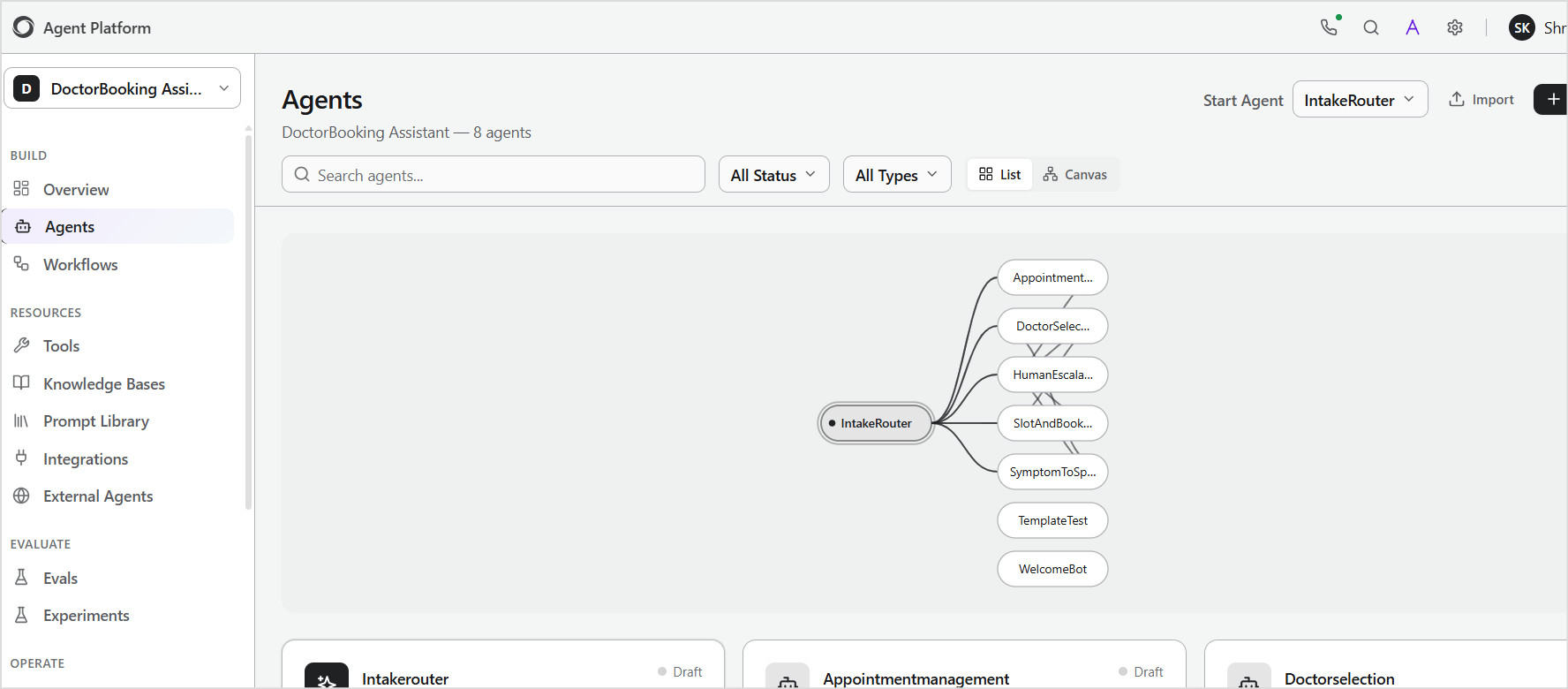 * Use the **Canvas view** to visualize relationships between agents.
 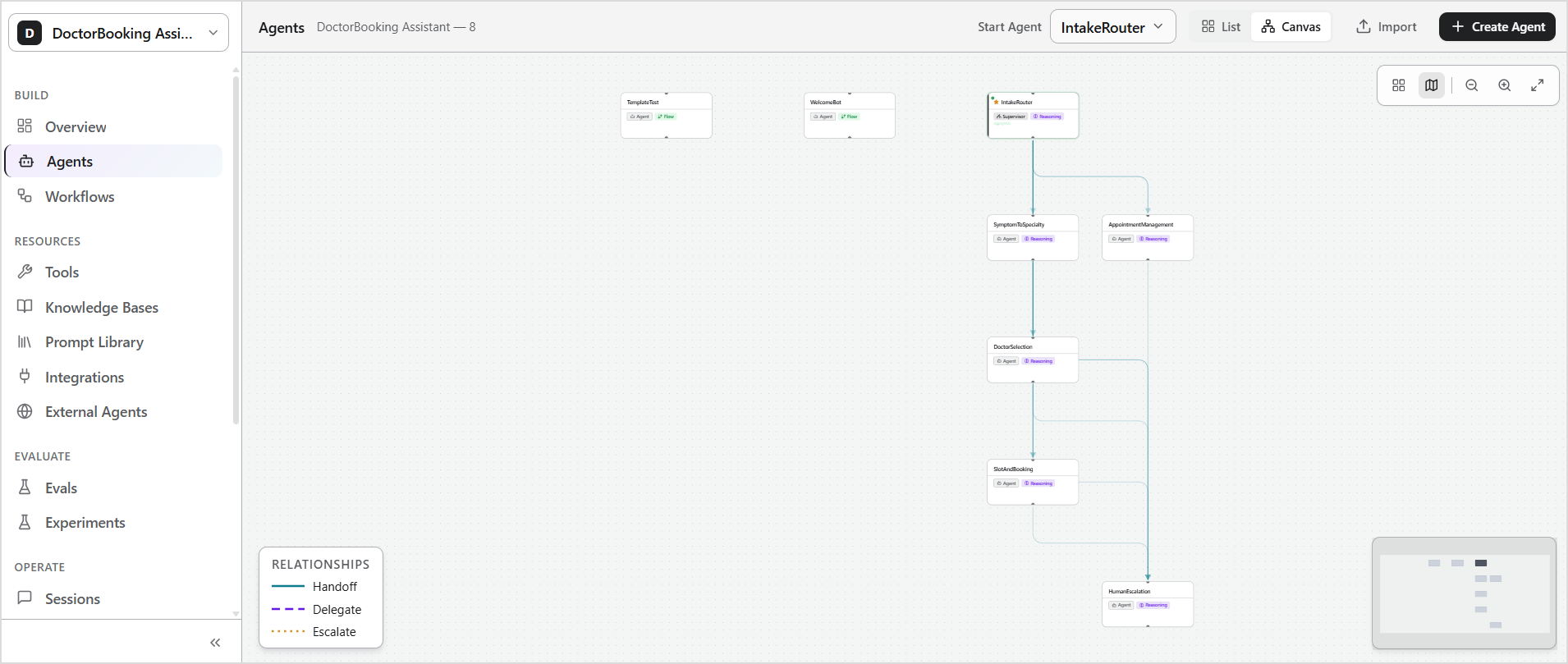 * Select an agent to open its configuration page.
* Configure **handoffs or delegation** under the **Coordination** section.
* Save your changes.
### Using the DSL Editor
* Open the agent and switch to **DSL view**.
* Define the orchestration logic using ABL constructs such as:
* `SUPERVISOR`
* `HANDOFF`
* `DELEGATE`
* Compile and save your changes.
* Updates apply immediately after a successful compilation.
The UI and ABL are interchangeable. Changes made in ABL appear in the UI, and changes made in the UI appear in ABL.
## Orchestration Patterns
### Supervisor
A supervisor is a special agent that acts as the central router for a multi-agent system. It does the following:
* Receives every incoming message.
* Routes each message to a specific agent based on user intent, session state, channel, or custom conditions.
* Performs pre-routing actions, such as fetching data or checking authentication state, before forwarding the request to a specialized agent.
A multi-agent system can have only one supervisor. It is the entry point for all user interactions.
#### How It Works
When a user sends a message, the supervisor:
* Receives the message as the active agent.
* Optionally performs a pre-routing action using tools.
* Evaluates its `HANDOFF` rules top to bottom.
* Routes the message to the first agent whose `WHEN` condition matches.
* Regains control when the child agent completes with `RETURN: true`.
* Handles the message directly if no `HANDOFF` rule matches and `canRespondDirectly` is enabled. Otherwise, it returns an error.
#### How to Set Up
Define a supervisor using the `SUPERVISOR` keyword in the ABL file.
```yaml theme={null}
SUPERVISOR: "agent-name"
```
Then define the following properties for the supervisor agent.
| Field | Required | Description |
| ---------------- | -------- | ---------------------------------------------------------------------------------------------------------------------------------------- |
| GOAL | Yes | What the supervisor is responsible for. Helps the LLM understand its role. |
| PERSONA | No | Defines the supervisor's tone and communication style. |
| LIMITATIONS | No | Specifies what the supervisor can't do to prevent incorrect handling. |
| ON\_START | No | Message sent to the user at the start of the session. |
| TOOLS | No | Tools the supervisor can invoke before routing. |
| HANDOFF | Yes | List of agents to which the request is routed based on the conditions. The Platform evaluates the rules top-to-bottom; first match wins. |
| RETURN\_HANDLERS | No | Defines actions when a child agent returns control. |
| ESCALATE | No | Conditions that trigger escalation to a human agent. |
| ON\_ERROR | No | Fallback behavior when routing fails or an agent is unavailable. |
| COMPLETE | No | Responses sent when the session ends or a handoff completes. |
| MEMORY | No | Session and persistent memory configuration. |
#### Examples
**1. Travel Supervisor**
```yaml theme={null}
SUPERVISOR: Travel_Supervisor
PERSONA: "Professional travel assistant. Friendly and efficient. Routes requests to the right specialist quickly and transparently."
GOAL: "Route customers to the right specialist -- booking, sales, support, or human agent -- with full context preservation."
LIMITATIONS:
- "Cannot make bookings or process payments directly."
- "Cannot access user account information directly."
ON_START:
- RESPOND: "Welcome! I am your travel assistant. I can help you search and book flights, manage a booking, or connect you with support. What can I help you with today?"
RETURN_HANDLERS:
route_to_booking_manager:
CLEAR: [return_to]
CONTINUE: true
reclassify_intent:
CLEAR: [current_intent]
RESUME_INTENT: true
HANDOFF:
- TO: Sales_Agent
WHEN: intent.category == "new_booking" OR intent.category == "travel_search"
CONTEXT:
pass: [search_context, user_preferences, budget]
summary: "User looking to book new travel."
- TO: Booking_Manager
WHEN: intent.category == "manage_existing_booking"
CONTEXT:
pass: [user_id, booking_context, auth_token]
summary: "User managing their reservation."
ESCALATE:
triggers:
- WHEN: user.wants_human_agent == true OR user.frustration_detected == true
REASON: "User requests human assistance."
PRIORITY: high
TAGS: [human_request]
COMPLETE:
- WHEN: handoff_successful == true
RESPOND: "I have connected you with the right specialist."
- WHEN: user.session_ended == true
RESPOND: "Thank you for using our travel service."
```
**2. Priority-ordered routing**
Routing rules are evaluated top to bottom. Use specific rules before general ones.
```yaml theme={null}
RETURN_HANDLERS:
route_to_booking_manager:
CLEAR: [return_to]
CONTINUE: true
reclassify_intent:
CLEAR: [current_intent]
RESUME_INTENT: true
ESCALATE:
triggers:
- WHEN: intent.category == "escalation" OR user.frustration_detected == true
REASON: "User requests human assistance or is frustrated"
PRIORITY: high
TAGS: [human_request]
- WHEN: intent.category == "complaint"
REASON: "Customer complaint requires a human specialist"
PRIORITY: high
TAGS: [complaint]
HANDOFF:
- TO: Authentication_Agent
WHEN: user.is_authenticated == false AND intent.category == "manage_booking"
CONTEXT:
pass: [session_context, return_to]
summary: "User needs to authenticate"
history: summary_only
memory_grants:
- path: workflow.auth_token
access: readwrite
- path: user.last_verified_at
access: read
RETURN: true
ON_RETURN:
handler: route_to_booking_manager
- TO: Booking_Manager
WHEN: user.is_authenticated == true AND intent.category == "manage_booking"
CONTEXT:
pass: [user_id, booking_context, auth_token]
summary: "Authenticated user managing reservation"
# P4 -- New bookings
- TO: Sales_Agent
WHEN: intent.category == "new_booking" OR intent.category == "travel_search"
CONTEXT:
pass: [search_context, user_preferences, budget]
summary: "User looking to book"
# P5 -- Fallback
- TO: Clarification_Agent
WHEN: intent.unclear == true OR intent.confidence < 0.5
CONTEXT:
pass: [session_context, last_message]
summary: "Need clarification"
RETURN: true
ON_RETURN:
handler: reclassify_intent
Supervisor with tools: Supervisors can have tools for pre-routing tasks.
SUPERVISOR: NOC_Supervisor
GOAL: "Triage network alarms and route to specialist agents"
TOOLS:
get_active_alarms(severity: string = "all") -> {alarms: array, total: number}
description: "Retrieve active alarms from the network management system"
type: http
endpoint: "https://nms.example.com/api/alarms"
method: POST
auth: bearer
HANDOFF:
- TO: Network_Triage
WHEN: alarm.category IN ["link_degradation", "fiber_cut", "hardware_warning"]
CONTEXT:
pass: [alarm_id, severity, site_code, category]
summary: "New alarm requires triage"
RETURN: true
- TO: Incident_Manager
WHEN: severity == "critical" OR severity == "major"
CONTEXT:
pass: [alarm_id, severity, site_code, affected_subscribers]
summary: "High-severity issue requires incident management"
RETURN: true
```
### Handoff
A handoff transfers the conversation from one agent to another. The original agent stops handling the request at the point of handoff.
A handoff can originate from a supervisor routing to a specialist agent, or directly from one agent to another for peer-to-peer routing. In both cases, the target agent receives the context and continues the conversation from that point.
#### How It Works
* The calling agent evaluates its `HANDOFF` rules.
* When a condition is met, the conversation transfers to the target agent.
* The target agent receives the context defined in the `CONTEXT` block.
* `RETURN` must be set to `false` for handoff orchestration.
#### How to Set Up
Configure the handoff in the originating agent, which is the agent that initiates the transfer.
* In the Studio, open the agent and add a handoff under the **Coordination** section.
* Alternatively, define the following properties in the ABL editor.
| Field | Required | Description |
| ---------- | -------- | -------------------------------------------------------------------------------------------- |
| TO | Yes | Name of the target agent |
| WHEN | Yes | Condition for routing; accepts expressions or natural language. |
| CONTEXT | No | Data passed to the target agent (pass, summary, history, memory\_grants). |
| RETURN | No | Whether control returns to the supervisor or parent agent after completion (default: false). |
| ON\_RETURN | No | Action when the child returns; references a RETURN\_HANDLERS entry. |
| PRIORITY | No | Evaluation priority: lower numbers are evaluated first. |
Use `HANDOFF` for machine-to-machine agent routing only. Use `ESCALATE` when the target agent is a human operator.
**Context properties**
| Property | Description |
| -------------- | ---------------------------------------------------------------------------------------------------------------- |
| pass | An array of variables to send to the target. The target agent receives these as pre-populated session variables. |
| summary | Natural language description of why the handoff occurred. |
| memory\_grants | Explicit durable-memory grants (path + access) for the receiving agent. |
| history | Conversation history strategy (safe default: auto). |
**RETURN\_HANDLERS actions**
* `CLEAR` - Removes the listed session variables before continuing.
* `CONTINUE` - Resumes normal routing after the return.
* `RESUME_INTENT` - Re-evaluates the user's intent and re-routes.
**History Strategies**
| Value | Behavior |
| -------------------------- | ---------------------------------------------------------------------------------------- |
| `auto` | Use the handoff summary when available; otherwise, pass bounded recent history (default) |
| `none` | No conversation history passed |
| `summary_only` | Pass only the handoff summary, never raw messages |
| `full` | Pass the entire conversation history |
| `{ mode: last_n, count: }` | Pass only the last N messages using the typed bounded-history form |
#### Examples
**1. Handoff from Supervisor**
```yaml theme={null}
SUPERVISOR: Support_Supervisor
HANDOFF:
- TO: Order_Tracking
WHEN: intent.category == "order_inquiry" OR intent.category == "shipping"
CONTEXT:
pass: [customer_id, order_id, session_context]
summary: "Customer wants to track or manage an order"
RETURN: false
```
**2. Handoff from an agent**
```yaml theme={null}
AGENT: Order_Tracking
GOAL: "Help customers track orders"
HANDOFF:
- TO: Returns_And_Refunds
WHEN: intent.category == "return" OR intent.category == "refund"
CONTEXT:
pass: [customer_id, order_id, item_id]
summary: "Customer wants to return or get a refund for an item."
RETURN: false
- TO: Sales_Agent
WHEN: reorder_ready == true AND user.ready_to_checkout == true
CONTEXT:
pass: [customer_id, cart_items, total]
summary: "Customer reordering -- cart ready for checkout."
RETURN: false
```
**3. Pass variables during handoff**
```yaml theme={null}
HANDOFF:
- TO: Booking_Manager
WHEN: intent.category == "manage_booking"
CONTEXT:
pass: [user_id, booking_context, auth_token]
summary: "Authenticated user managing their reservation"
```
**4. Scoped access to memory on handoff**
```yaml theme={null}
HANDOFF:
- TO: Authentication_Agent
WHEN: user.is_authenticated == false AND action_requires_auth == true
CONTEXT:
pass: [session_context, return_to]
summary: "User needs to authenticate"
memory_grants:
- path: workflow.auth_token
access: readwrite
- path: user.last_verified_at
access: read
RETURN: true
```
**5. Pass complete history as context**
```yaml theme={null}
HANDOFF:
- TO: Support_Agent
WHEN: intent.category == "support"
CONTEXT:
pass: [customer_id, issue_description]
summary: "Customer needs technical support"
history: full
```
### Delegate
Delegation is a call-and-return pattern. The parent agent sends a task to a child agent, waits for the result, and then continues its own processing with the returned data. The delegation is transparent. The user does not see it.
#### How It Works
1. The parent agent evaluates its `DELEGATE` conditions.
2. When a condition matches, the parent sends the defined `INPUT` to the sub-agent.
3. The sub-agent processes the task and returns its result through its `COMPLETE` property.
4. The parent agent maps the returned values to its own session variables using `RETURNS`.
5. The parent agent continues processing using the result, as defined in `USE_RESULT`.
6. If the sub-agent fails or times out, `ON_FAIL` handles the error.
#### How to Set Up
Configure the delegation in the originating agent, which is the agent that initiates the transfer.
* In the Studio, open the agent and add **Delegate** under the **Coordination** section.
* Alternatively, define the following properties in the `DELEGATE` block in the ABL editor.
| Property | Required | Description |
| ------------ | -------- | ----------------------------------------------------------------------------------------------------------------------------------------------------------------------- |
| `AGENT` | Yes | Name of the sub-agent to call |
| `WHEN` | Yes | The condition that triggers the delegation |
| `PURPOSE` | Yes | Description of what the sub-agent should accomplish |
| `INPUT` | Yes | Map of parent variables to sub-agent input parameters (sub-agent param → parent session variable) |
| `RETURNS` | Yes | Map of sub-agent output fields back to parent session variables (delegate variable → parent session variable) |
| `USE_RESULT` | Yes | Instructions for how the parent agent uses the result |
| `TIMEOUT` | No | Maximum time to wait for the sub-agent (for example, 10s) |
| `ON_FAIL` | No | Action if the sub-agent fails or times out. Options: RESPOND "message" (show a message and continue), ESCALATE (trigger escalation), RETRY count (retry the delegation) |
#### Examples
**1. Set up delegate from an agent.**
```yaml theme={null}
DELEGATE:
- AGENT: Fee_Calculator
WHEN: action_type == "modify" OR action_type == "upgrade"
PURPOSE: "Calculate total fees and price differences for the requested changes"
INPUT:
booking_id: selected_booking
change_type: action_type
changes: change_details
RETURNS:
total_fee: quoted_fee
breakdown: fee_breakdown
USE_RESULT: "Present fee breakdown to customer before asking for confirmation"
TIMEOUT: "10s"
ON_FAIL: RESPOND "Unable to calculate fees right now. Let me try again."
```
**2. Corresponding Delegate Agent**
```yaml theme={null}
AGENT: Fee_Calculator
GOAL: |
Calculate all applicable fees for booking changes --
modification fees, price differences, upgrade costs --
and return a clear breakdown.
PERSONA: |
Precise fee calculation specialist.
Returns detailed breakdowns.
TOOLS:
get_modification_fee(booking_id: string, change_type: string) -> {base_fee: number, currency: string}
description: "Get the base modification fee"
calculate_price_difference(booking_id: string, original_item: object, new_item: object) -> {price_diff: number, breakdown: object}
description: "Calculate price difference between original and new selection"
COMPLETE:
- WHEN: fee_calculated == true
RESPOND: |
Fee breakdown:
{{#each fee_breakdown}}
- {{this.description}}: {{this.amount}} {{this.currency}}
{{/each}}
Total: {{total_fee}} {{currency}}
```
**3. Pass Context to Delegate Agents**
```yaml theme={null}
DELEGATE:
- AGENT: Fee_Calculator
WHEN: action_type == "modify"
PURPOSE: "Calculate fees for the modification"
INPUT:
booking_id: selected_booking
change_type: action_type
changes: change_details
RETURNS:
total_fee: quoted_fee
breakdown: fee_breakdown
USE_RESULT: "Present fee breakdown to customer"
```
### Fan-out
Fan-out sends a task to multiple agents simultaneously and aggregates their results, such as searching flights and hotels in parallel. The parallel execution is transparent. The user sees a single combined response.
#### How It Works
1. A user message matches the `WHEN` condition on multiple `HANDOFF` or `DELEGATE` rules simultaneously.
2. All matching agents run in parallel.
3. Each agent runs independently and returns its results.
4. Results merge back into the calling agent's state.
5. The calling agent responds with the aggregated result.
6. If one agent fails, its `ON_FAIL` handler runs independently and the other agents continue.
#### How to Set Up
You can implement fan-out in two ways:
* **Via Supervisor HANDOFF**: Define multiple `HANDOFF` rules with the same `WHEN` condition and `RETURN: true`. Each matching rule triggers a separate agent. Use `RETURN_HANDLERS` to merge results as each agent returns.
* **Via DELEGATE**: Define multiple `DELEGATE` entries with overlapping `WHEN` conditions. Each delegate runs independently and returns its result to the parent agent via `RETURNS`. Use distinct variable names in `RETURNS` for each delegate to prevent one result from overwriting another.
#### Examples
**1. Via Supervisor HANDOFF - Route to multiple agents from a supervisor**
In the following example, when `intent.category == "plan_trip"` matches, all three handoff rules trigger. Each agent runs independently and returns results to the supervisor via `RETURN: true`. Child return data merges back into the supervisor state before the named return handler continues orchestration.
```yaml theme={null}
SUPERVISOR: Travel_Planner
GOAL: "Help users plan trips by searching flights, hotels, and activities in parallel"
RETURN_HANDLERS:
merge_flight_results:
CONTINUE: true
merge_hotel_results:
CONTINUE: true
merge_activity_results:
CONTINUE: true
HANDOFF:
- TO: Flight_Search
WHEN: intent.category == "plan_trip" OR intent.category == "search_flights"
CONTEXT:
pass: [origin, destination, travel_dates, passengers]
summary: "Search for available flights"
RETURN: true
ON_RETURN:
handler: merge_flight_results
- TO: Hotel_Search
WHEN: intent.category == "plan_trip" OR intent.category == "search_hotels"
CONTEXT:
pass: [destination, checkin_date, checkout_date, guests]
summary: "Search for available hotels"
RETURN: true
ON_RETURN:
handler: merge_hotel_results
- TO: Activity_Search
WHEN: intent.category == "plan_trip" OR intent.category == "search_activities"
CONTEXT:
pass: [destination, travel_dates, interests]
summary: "Search for activities and experiences"
RETURN: true
ON_RETURN:
handler: merge_activity_results
```
**2. Via DELEGATE**
Multiple `DELEGATE` entries with overlapping `WHEN` conditions can execute in parallel. Each delegate returns its results independently.
```yaml theme={null}
AGENT: Trip_Planner
DELEGATE:
- AGENT: Flight_Search
WHEN: need_flights == true
PURPOSE: "Find available flights for the trip"
INPUT:
origin: departure_city
destination: arrival_city
date: travel_date
RETURNS:
flights: available_flights
best_price: cheapest_flight_price
USE_RESULT: "Include flight options in the trip plan"
TIMEOUT: "15s"
ON_FAIL: RESPOND "Flight search is unavailable. Continuing with hotel search."
- AGENT: Hotel_Search
WHEN: need_hotels == true
PURPOSE: "Find available hotels at the destination"
INPUT:
destination: arrival_city
checkin: checkin_date
checkout: checkout_date
RETURNS:
hotels: available_hotels
best_price: cheapest_hotel_price
USE_RESULT: "Include hotel options in the trip plan"
TIMEOUT: "15s"
ON_FAIL: RESPOND "Hotel search is unavailable. Continuing with other results."
```
**3. Fan out with partial failure tolerance**
Each delegate has its own `ON_FAIL` handler. If one supplier is unavailable, the agent proceeds with partial results from the others.
```yaml theme={null}
DELEGATE:
- AGENT: Price_Checker_A
WHEN: comparison_mode == true
PURPOSE: "Check price from supplier A"
INPUT:
product_id: sku
quantity: qty
RETURNS:
price_a: supplier_a_price
USE_RESULT: "Compare with other suppliers"
TIMEOUT: "5s"
ON_FAIL: RESPOND "Supplier A unavailable."
- AGENT: Price_Checker_B
WHEN: comparison_mode == true
PURPOSE: "Check price from supplier B"
INPUT:
product_id: sku
quantity: qty
RETURNS:
price_b: supplier_b_price
USE_RESULT: "Compare with other suppliers"
TIMEOUT: "5s"
ON_FAIL: RESPOND "Supplier B unavailable."
```
### Difference Between Handoff and Delegate
| Aspect | Handoff | Delegation |
| -------------- | ---------------------------------------------------------------------- | ----------------------------------------------------------------------------------------------------------------- |
| Control flow | Transfers the conversation permanently or temporarily to another agent | Always call-and-return. The parent agent always regains control after the sub-agent completes |
| User awareness | The user may be aware that they are talking to a different agent | Sub-agent is never visible to the user |
| Data flow | CONTEXT pass list and history strategy | Structured INPUT/RETURNS mapping with explicit variable mapping on both sides |
| Use case | The user needs to interact with a different specialist agent | Parent agent needs a background task completed — such as a calculation or lookup — before continuing its own flow |
### Difference between Delegate and Fan-out
The key distinction is parallelism and scope. Use delegation when you need a result from one sub-agent before the parent can continue. Use fan-out when you need results from multiple independent agents simultaneously — for example, searching flights and hotels at the same time.
| Aspect | Delegation | Fan-out |
| ---------------- | ---------------------------------------- | ------------------------------------------------------------------------------------- |
| Number of agents | One sub-agent | Multiple agents simultaneously |
| Execution | Sequential - parent waits for the result | Parallel - all agents run at once |
| Results | Single result returned | Multiple results aggregated |
| Partial failure | Single `ON_FAIL` handler | Each agent has its own `ON_FAIL` handler. One agent failing does not stop the others. |
| Use case | One background task | Multiple independent tasks |
### Context Propagation Between Agents
No data is automatically shared between agents. Every piece of data that a target agent needs must be explicitly passed using one of three mechanisms: session variables, conversation history, or persistent memory grants.
| Data type | Handoff | Delegation | Fan-out |
| ---------------------- | ------------------------------------------------------------------------------------- | ---------------------------- | ---------------------------- |
| Session metadata | Forwarded (non-internal values) | Available via parent context | Available via parent context |
| Conversation history | Configurable (auto default / summary\_only / full / `{ mode: last_n, count }` / none) | Not shared | Not shared |
| Gather progress | Not transferred (each agent has its own) | Not transferred | Not transferred |
| Custom variables (SET) | Transferred as metadata | Passed explicitly | Passed explicitly |
| Workflow-scoped memory | Shared only through explicit memory\_grants | Not shared unless passed | Not shared unless passed |
| Agent-specific state | Not transferred | Not transferred | Not transferred |
**Memory-based Context Sharing**
```yaml theme={null}
MEMORY:
session:
- customer_id
- current_intent
- routing_history
- conversation_summary
- session_context
TYPE: object
DESCRIPTION: "Current session state snapshot passed to child agents on handoff"
persistent:
- user.name
- user.language
- user.preferred_agent
- user.last_verified_at
remember:
- WHEN: user_name IS SET
STORE: user_name -> user.name
- WHEN: user_language IS SET
STORE: user_language -> user.language
recall:
- ON: session:start
ACTION: inject_context
PATHS: [user.name, user.language, user.preferred_agent]
```
For more details on memory and access scopes, see the [guide on memory management across agents](/agent-platform/memory-and-state).
## Points to Note
### Routing and Handoff Behavior
1. `HANDOFF` rules evaluate top-to-bottom. First match wins. Place specific conditions before general ones.
2. `HANDOFF` is for agent-to-agent routing only. Use `ESCALATE` when the target is a human operator or a queue.
3. `RETURN` defaults to false. Set `RETURN: true` explicitly when you need a call-and-return pattern.
4. The default history strategy is `auto`. Opt into `summary_only` for strict no-transcript transfer.
### Variables and Data
1. Null or undefined variables are not passed at handoff time. Set all required variables before the handoff condition fires.
2. In a `DELEGATE` `INPUT` map, the left side is the sub-agent's parameter name and the right side is the parent's session variable. Reversing them causes empty input.
3. In fan-out, if two delegates write to the same `RETURNS` variable, one overwrites the other. Use unique names per delegate output.
4. Persistent memory requires explicit `memory_grants` in the `CONTEXT` block. Without it, the target agent cannot read the value.
### Reliability
1. Always set `TIMEOUT` on every `DELEGATE` block. Without it, a stalled sub-agent blocks the parent indefinitely.
2. Track `handoff_count` in session memory and escalate when it reaches 3 or 4 to prevent routing loops.
## Troubleshooting Guide
**Routing and Handoff**
| Symptom | Fix |
| ----------------------------------------- | ---------------------------------------------------------------------------------------------------------------------- |
| Routing goes to the wrong agent | `HANDOFF` rules evaluate top-to-bottom and first match wins. Move specific conditions above general ones. |
| No rule matches the user message | Add a fallback rule at the bottom of the `HANDOFF` block that routes to a clarification agent or escalates to a human. |
| Agent loops between supervisor and child | Set `RETURN: false` on terminal handoffs. Use `ON_RETURN` with a named handler when `RETURN: true` is used. |
| Handoff creates a loop between two agents | Set clear `WHEN` conditions on both sides. Use RETURN: true on one side to establish a parent-child relationship. |
| User is bouncing between agents | Track handoff\_count in session memory and add an `ESCALATE` trigger at 3 or 4 handoffs. |
| User repeats information after handoff | Use `history: auto` or `history: full` in the `CONTEXT` block so the target agent has prior context. |
**Context and Variables**
| Symptom | Fix |
| ------------------------------------- | ----------------------------------------------------------------------------------------------------------------------------------------- |
| Target agent does not receive context | Verify that all variables in the pass list are set before the handoff condition is triggered. Null or undefined variables are not passed. |
| Too much context slows down the agent | Pass only the variables the target agent needs. Use `history: auto or summary_only` instead of `history: full` for long conversations. |
| Persistent memory not accessible | Add an explicit `memory_grants` entry in the `CONTEXT` block. Without it, the target agent cannot read the value. |
**Delegation and Fan-out**
| Symptom | Fix |
| ------------------------------------------------- | -------------------------------------------------------------------------------------------------------------------------------------------------------------- |
| Delegate never returns | Set `TIMEOUT` on every `DELEGATE` block. Without it, the calling agent waits indefinitely if the sub-agent stalls. |
| Delegate agent does not receive input | Verify the variable names on the right side of the `INPUT` map match existing session variables in the calling agent. |
| Return values not mapped correctly | Verify keys in `RETURNS` match the output variable names from the delegate. Left side is the delegate's variable, right side is the parent's session variable. |
| Parallel agents not executing concurrently | Verify that multiple `WHEN` conditions match simultaneously for the same user message. |
| Results from one agent overwrite those of another | Use distinct variable names in `RETURNS` for each delegate. For example, supplier\_a\_price and supplier\_b\_price, not both price. |
| Timeout on slow agents in fan-out | Set `TIMEOUT` on each delegate independently. Use `ON_FAIL` to handle agents that do not respond in time. |
* Select an agent to open its configuration page.
* Configure **handoffs or delegation** under the **Coordination** section.
* Save your changes.
### Using the DSL Editor
* Open the agent and switch to **DSL view**.
* Define the orchestration logic using ABL constructs such as:
* `SUPERVISOR`
* `HANDOFF`
* `DELEGATE`
* Compile and save your changes.
* Updates apply immediately after a successful compilation.
The UI and ABL are interchangeable. Changes made in ABL appear in the UI, and changes made in the UI appear in ABL.
## Orchestration Patterns
### Supervisor
A supervisor is a special agent that acts as the central router for a multi-agent system. It does the following:
* Receives every incoming message.
* Routes each message to a specific agent based on user intent, session state, channel, or custom conditions.
* Performs pre-routing actions, such as fetching data or checking authentication state, before forwarding the request to a specialized agent.
A multi-agent system can have only one supervisor. It is the entry point for all user interactions.
#### How It Works
When a user sends a message, the supervisor:
* Receives the message as the active agent.
* Optionally performs a pre-routing action using tools.
* Evaluates its `HANDOFF` rules top to bottom.
* Routes the message to the first agent whose `WHEN` condition matches.
* Regains control when the child agent completes with `RETURN: true`.
* Handles the message directly if no `HANDOFF` rule matches and `canRespondDirectly` is enabled. Otherwise, it returns an error.
#### How to Set Up
Define a supervisor using the `SUPERVISOR` keyword in the ABL file.
```yaml theme={null}
SUPERVISOR: "agent-name"
```
Then define the following properties for the supervisor agent.
| Field | Required | Description |
| ---------------- | -------- | ---------------------------------------------------------------------------------------------------------------------------------------- |
| GOAL | Yes | What the supervisor is responsible for. Helps the LLM understand its role. |
| PERSONA | No | Defines the supervisor's tone and communication style. |
| LIMITATIONS | No | Specifies what the supervisor can't do to prevent incorrect handling. |
| ON\_START | No | Message sent to the user at the start of the session. |
| TOOLS | No | Tools the supervisor can invoke before routing. |
| HANDOFF | Yes | List of agents to which the request is routed based on the conditions. The Platform evaluates the rules top-to-bottom; first match wins. |
| RETURN\_HANDLERS | No | Defines actions when a child agent returns control. |
| ESCALATE | No | Conditions that trigger escalation to a human agent. |
| ON\_ERROR | No | Fallback behavior when routing fails or an agent is unavailable. |
| COMPLETE | No | Responses sent when the session ends or a handoff completes. |
| MEMORY | No | Session and persistent memory configuration. |
#### Examples
**1. Travel Supervisor**
```yaml theme={null}
SUPERVISOR: Travel_Supervisor
PERSONA: "Professional travel assistant. Friendly and efficient. Routes requests to the right specialist quickly and transparently."
GOAL: "Route customers to the right specialist -- booking, sales, support, or human agent -- with full context preservation."
LIMITATIONS:
- "Cannot make bookings or process payments directly."
- "Cannot access user account information directly."
ON_START:
- RESPOND: "Welcome! I am your travel assistant. I can help you search and book flights, manage a booking, or connect you with support. What can I help you with today?"
RETURN_HANDLERS:
route_to_booking_manager:
CLEAR: [return_to]
CONTINUE: true
reclassify_intent:
CLEAR: [current_intent]
RESUME_INTENT: true
HANDOFF:
- TO: Sales_Agent
WHEN: intent.category == "new_booking" OR intent.category == "travel_search"
CONTEXT:
pass: [search_context, user_preferences, budget]
summary: "User looking to book new travel."
- TO: Booking_Manager
WHEN: intent.category == "manage_existing_booking"
CONTEXT:
pass: [user_id, booking_context, auth_token]
summary: "User managing their reservation."
ESCALATE:
triggers:
- WHEN: user.wants_human_agent == true OR user.frustration_detected == true
REASON: "User requests human assistance."
PRIORITY: high
TAGS: [human_request]
COMPLETE:
- WHEN: handoff_successful == true
RESPOND: "I have connected you with the right specialist."
- WHEN: user.session_ended == true
RESPOND: "Thank you for using our travel service."
```
**2. Priority-ordered routing**
Routing rules are evaluated top to bottom. Use specific rules before general ones.
```yaml theme={null}
RETURN_HANDLERS:
route_to_booking_manager:
CLEAR: [return_to]
CONTINUE: true
reclassify_intent:
CLEAR: [current_intent]
RESUME_INTENT: true
ESCALATE:
triggers:
- WHEN: intent.category == "escalation" OR user.frustration_detected == true
REASON: "User requests human assistance or is frustrated"
PRIORITY: high
TAGS: [human_request]
- WHEN: intent.category == "complaint"
REASON: "Customer complaint requires a human specialist"
PRIORITY: high
TAGS: [complaint]
HANDOFF:
- TO: Authentication_Agent
WHEN: user.is_authenticated == false AND intent.category == "manage_booking"
CONTEXT:
pass: [session_context, return_to]
summary: "User needs to authenticate"
history: summary_only
memory_grants:
- path: workflow.auth_token
access: readwrite
- path: user.last_verified_at
access: read
RETURN: true
ON_RETURN:
handler: route_to_booking_manager
- TO: Booking_Manager
WHEN: user.is_authenticated == true AND intent.category == "manage_booking"
CONTEXT:
pass: [user_id, booking_context, auth_token]
summary: "Authenticated user managing reservation"
# P4 -- New bookings
- TO: Sales_Agent
WHEN: intent.category == "new_booking" OR intent.category == "travel_search"
CONTEXT:
pass: [search_context, user_preferences, budget]
summary: "User looking to book"
# P5 -- Fallback
- TO: Clarification_Agent
WHEN: intent.unclear == true OR intent.confidence < 0.5
CONTEXT:
pass: [session_context, last_message]
summary: "Need clarification"
RETURN: true
ON_RETURN:
handler: reclassify_intent
Supervisor with tools: Supervisors can have tools for pre-routing tasks.
SUPERVISOR: NOC_Supervisor
GOAL: "Triage network alarms and route to specialist agents"
TOOLS:
get_active_alarms(severity: string = "all") -> {alarms: array, total: number}
description: "Retrieve active alarms from the network management system"
type: http
endpoint: "https://nms.example.com/api/alarms"
method: POST
auth: bearer
HANDOFF:
- TO: Network_Triage
WHEN: alarm.category IN ["link_degradation", "fiber_cut", "hardware_warning"]
CONTEXT:
pass: [alarm_id, severity, site_code, category]
summary: "New alarm requires triage"
RETURN: true
- TO: Incident_Manager
WHEN: severity == "critical" OR severity == "major"
CONTEXT:
pass: [alarm_id, severity, site_code, affected_subscribers]
summary: "High-severity issue requires incident management"
RETURN: true
```
### Handoff
A handoff transfers the conversation from one agent to another. The original agent stops handling the request at the point of handoff.
A handoff can originate from a supervisor routing to a specialist agent, or directly from one agent to another for peer-to-peer routing. In both cases, the target agent receives the context and continues the conversation from that point.
#### How It Works
* The calling agent evaluates its `HANDOFF` rules.
* When a condition is met, the conversation transfers to the target agent.
* The target agent receives the context defined in the `CONTEXT` block.
* `RETURN` must be set to `false` for handoff orchestration.
#### How to Set Up
Configure the handoff in the originating agent, which is the agent that initiates the transfer.
* In the Studio, open the agent and add a handoff under the **Coordination** section.
* Alternatively, define the following properties in the ABL editor.
| Field | Required | Description |
| ---------- | -------- | -------------------------------------------------------------------------------------------- |
| TO | Yes | Name of the target agent |
| WHEN | Yes | Condition for routing; accepts expressions or natural language. |
| CONTEXT | No | Data passed to the target agent (pass, summary, history, memory\_grants). |
| RETURN | No | Whether control returns to the supervisor or parent agent after completion (default: false). |
| ON\_RETURN | No | Action when the child returns; references a RETURN\_HANDLERS entry. |
| PRIORITY | No | Evaluation priority: lower numbers are evaluated first. |
Use `HANDOFF` for machine-to-machine agent routing only. Use `ESCALATE` when the target agent is a human operator.
**Context properties**
| Property | Description |
| -------------- | ---------------------------------------------------------------------------------------------------------------- |
| pass | An array of variables to send to the target. The target agent receives these as pre-populated session variables. |
| summary | Natural language description of why the handoff occurred. |
| memory\_grants | Explicit durable-memory grants (path + access) for the receiving agent. |
| history | Conversation history strategy (safe default: auto). |
**RETURN\_HANDLERS actions**
* `CLEAR` - Removes the listed session variables before continuing.
* `CONTINUE` - Resumes normal routing after the return.
* `RESUME_INTENT` - Re-evaluates the user's intent and re-routes.
**History Strategies**
| Value | Behavior |
| -------------------------- | ---------------------------------------------------------------------------------------- |
| `auto` | Use the handoff summary when available; otherwise, pass bounded recent history (default) |
| `none` | No conversation history passed |
| `summary_only` | Pass only the handoff summary, never raw messages |
| `full` | Pass the entire conversation history |
| `{ mode: last_n, count: }` | Pass only the last N messages using the typed bounded-history form |
#### Examples
**1. Handoff from Supervisor**
```yaml theme={null}
SUPERVISOR: Support_Supervisor
HANDOFF:
- TO: Order_Tracking
WHEN: intent.category == "order_inquiry" OR intent.category == "shipping"
CONTEXT:
pass: [customer_id, order_id, session_context]
summary: "Customer wants to track or manage an order"
RETURN: false
```
**2. Handoff from an agent**
```yaml theme={null}
AGENT: Order_Tracking
GOAL: "Help customers track orders"
HANDOFF:
- TO: Returns_And_Refunds
WHEN: intent.category == "return" OR intent.category == "refund"
CONTEXT:
pass: [customer_id, order_id, item_id]
summary: "Customer wants to return or get a refund for an item."
RETURN: false
- TO: Sales_Agent
WHEN: reorder_ready == true AND user.ready_to_checkout == true
CONTEXT:
pass: [customer_id, cart_items, total]
summary: "Customer reordering -- cart ready for checkout."
RETURN: false
```
**3. Pass variables during handoff**
```yaml theme={null}
HANDOFF:
- TO: Booking_Manager
WHEN: intent.category == "manage_booking"
CONTEXT:
pass: [user_id, booking_context, auth_token]
summary: "Authenticated user managing their reservation"
```
**4. Scoped access to memory on handoff**
```yaml theme={null}
HANDOFF:
- TO: Authentication_Agent
WHEN: user.is_authenticated == false AND action_requires_auth == true
CONTEXT:
pass: [session_context, return_to]
summary: "User needs to authenticate"
memory_grants:
- path: workflow.auth_token
access: readwrite
- path: user.last_verified_at
access: read
RETURN: true
```
**5. Pass complete history as context**
```yaml theme={null}
HANDOFF:
- TO: Support_Agent
WHEN: intent.category == "support"
CONTEXT:
pass: [customer_id, issue_description]
summary: "Customer needs technical support"
history: full
```
### Delegate
Delegation is a call-and-return pattern. The parent agent sends a task to a child agent, waits for the result, and then continues its own processing with the returned data. The delegation is transparent. The user does not see it.
#### How It Works
1. The parent agent evaluates its `DELEGATE` conditions.
2. When a condition matches, the parent sends the defined `INPUT` to the sub-agent.
3. The sub-agent processes the task and returns its result through its `COMPLETE` property.
4. The parent agent maps the returned values to its own session variables using `RETURNS`.
5. The parent agent continues processing using the result, as defined in `USE_RESULT`.
6. If the sub-agent fails or times out, `ON_FAIL` handles the error.
#### How to Set Up
Configure the delegation in the originating agent, which is the agent that initiates the transfer.
* In the Studio, open the agent and add **Delegate** under the **Coordination** section.
* Alternatively, define the following properties in the `DELEGATE` block in the ABL editor.
| Property | Required | Description |
| ------------ | -------- | ----------------------------------------------------------------------------------------------------------------------------------------------------------------------- |
| `AGENT` | Yes | Name of the sub-agent to call |
| `WHEN` | Yes | The condition that triggers the delegation |
| `PURPOSE` | Yes | Description of what the sub-agent should accomplish |
| `INPUT` | Yes | Map of parent variables to sub-agent input parameters (sub-agent param → parent session variable) |
| `RETURNS` | Yes | Map of sub-agent output fields back to parent session variables (delegate variable → parent session variable) |
| `USE_RESULT` | Yes | Instructions for how the parent agent uses the result |
| `TIMEOUT` | No | Maximum time to wait for the sub-agent (for example, 10s) |
| `ON_FAIL` | No | Action if the sub-agent fails or times out. Options: RESPOND "message" (show a message and continue), ESCALATE (trigger escalation), RETRY count (retry the delegation) |
#### Examples
**1. Set up delegate from an agent.**
```yaml theme={null}
DELEGATE:
- AGENT: Fee_Calculator
WHEN: action_type == "modify" OR action_type == "upgrade"
PURPOSE: "Calculate total fees and price differences for the requested changes"
INPUT:
booking_id: selected_booking
change_type: action_type
changes: change_details
RETURNS:
total_fee: quoted_fee
breakdown: fee_breakdown
USE_RESULT: "Present fee breakdown to customer before asking for confirmation"
TIMEOUT: "10s"
ON_FAIL: RESPOND "Unable to calculate fees right now. Let me try again."
```
**2. Corresponding Delegate Agent**
```yaml theme={null}
AGENT: Fee_Calculator
GOAL: |
Calculate all applicable fees for booking changes --
modification fees, price differences, upgrade costs --
and return a clear breakdown.
PERSONA: |
Precise fee calculation specialist.
Returns detailed breakdowns.
TOOLS:
get_modification_fee(booking_id: string, change_type: string) -> {base_fee: number, currency: string}
description: "Get the base modification fee"
calculate_price_difference(booking_id: string, original_item: object, new_item: object) -> {price_diff: number, breakdown: object}
description: "Calculate price difference between original and new selection"
COMPLETE:
- WHEN: fee_calculated == true
RESPOND: |
Fee breakdown:
{{#each fee_breakdown}}
- {{this.description}}: {{this.amount}} {{this.currency}}
{{/each}}
Total: {{total_fee}} {{currency}}
```
**3. Pass Context to Delegate Agents**
```yaml theme={null}
DELEGATE:
- AGENT: Fee_Calculator
WHEN: action_type == "modify"
PURPOSE: "Calculate fees for the modification"
INPUT:
booking_id: selected_booking
change_type: action_type
changes: change_details
RETURNS:
total_fee: quoted_fee
breakdown: fee_breakdown
USE_RESULT: "Present fee breakdown to customer"
```
### Fan-out
Fan-out sends a task to multiple agents simultaneously and aggregates their results, such as searching flights and hotels in parallel. The parallel execution is transparent. The user sees a single combined response.
#### How It Works
1. A user message matches the `WHEN` condition on multiple `HANDOFF` or `DELEGATE` rules simultaneously.
2. All matching agents run in parallel.
3. Each agent runs independently and returns its results.
4. Results merge back into the calling agent's state.
5. The calling agent responds with the aggregated result.
6. If one agent fails, its `ON_FAIL` handler runs independently and the other agents continue.
#### How to Set Up
You can implement fan-out in two ways:
* **Via Supervisor HANDOFF**: Define multiple `HANDOFF` rules with the same `WHEN` condition and `RETURN: true`. Each matching rule triggers a separate agent. Use `RETURN_HANDLERS` to merge results as each agent returns.
* **Via DELEGATE**: Define multiple `DELEGATE` entries with overlapping `WHEN` conditions. Each delegate runs independently and returns its result to the parent agent via `RETURNS`. Use distinct variable names in `RETURNS` for each delegate to prevent one result from overwriting another.
#### Examples
**1. Via Supervisor HANDOFF - Route to multiple agents from a supervisor**
In the following example, when `intent.category == "plan_trip"` matches, all three handoff rules trigger. Each agent runs independently and returns results to the supervisor via `RETURN: true`. Child return data merges back into the supervisor state before the named return handler continues orchestration.
```yaml theme={null}
SUPERVISOR: Travel_Planner
GOAL: "Help users plan trips by searching flights, hotels, and activities in parallel"
RETURN_HANDLERS:
merge_flight_results:
CONTINUE: true
merge_hotel_results:
CONTINUE: true
merge_activity_results:
CONTINUE: true
HANDOFF:
- TO: Flight_Search
WHEN: intent.category == "plan_trip" OR intent.category == "search_flights"
CONTEXT:
pass: [origin, destination, travel_dates, passengers]
summary: "Search for available flights"
RETURN: true
ON_RETURN:
handler: merge_flight_results
- TO: Hotel_Search
WHEN: intent.category == "plan_trip" OR intent.category == "search_hotels"
CONTEXT:
pass: [destination, checkin_date, checkout_date, guests]
summary: "Search for available hotels"
RETURN: true
ON_RETURN:
handler: merge_hotel_results
- TO: Activity_Search
WHEN: intent.category == "plan_trip" OR intent.category == "search_activities"
CONTEXT:
pass: [destination, travel_dates, interests]
summary: "Search for activities and experiences"
RETURN: true
ON_RETURN:
handler: merge_activity_results
```
**2. Via DELEGATE**
Multiple `DELEGATE` entries with overlapping `WHEN` conditions can execute in parallel. Each delegate returns its results independently.
```yaml theme={null}
AGENT: Trip_Planner
DELEGATE:
- AGENT: Flight_Search
WHEN: need_flights == true
PURPOSE: "Find available flights for the trip"
INPUT:
origin: departure_city
destination: arrival_city
date: travel_date
RETURNS:
flights: available_flights
best_price: cheapest_flight_price
USE_RESULT: "Include flight options in the trip plan"
TIMEOUT: "15s"
ON_FAIL: RESPOND "Flight search is unavailable. Continuing with hotel search."
- AGENT: Hotel_Search
WHEN: need_hotels == true
PURPOSE: "Find available hotels at the destination"
INPUT:
destination: arrival_city
checkin: checkin_date
checkout: checkout_date
RETURNS:
hotels: available_hotels
best_price: cheapest_hotel_price
USE_RESULT: "Include hotel options in the trip plan"
TIMEOUT: "15s"
ON_FAIL: RESPOND "Hotel search is unavailable. Continuing with other results."
```
**3. Fan out with partial failure tolerance**
Each delegate has its own `ON_FAIL` handler. If one supplier is unavailable, the agent proceeds with partial results from the others.
```yaml theme={null}
DELEGATE:
- AGENT: Price_Checker_A
WHEN: comparison_mode == true
PURPOSE: "Check price from supplier A"
INPUT:
product_id: sku
quantity: qty
RETURNS:
price_a: supplier_a_price
USE_RESULT: "Compare with other suppliers"
TIMEOUT: "5s"
ON_FAIL: RESPOND "Supplier A unavailable."
- AGENT: Price_Checker_B
WHEN: comparison_mode == true
PURPOSE: "Check price from supplier B"
INPUT:
product_id: sku
quantity: qty
RETURNS:
price_b: supplier_b_price
USE_RESULT: "Compare with other suppliers"
TIMEOUT: "5s"
ON_FAIL: RESPOND "Supplier B unavailable."
```
### Difference Between Handoff and Delegate
| Aspect | Handoff | Delegation |
| -------------- | ---------------------------------------------------------------------- | ----------------------------------------------------------------------------------------------------------------- |
| Control flow | Transfers the conversation permanently or temporarily to another agent | Always call-and-return. The parent agent always regains control after the sub-agent completes |
| User awareness | The user may be aware that they are talking to a different agent | Sub-agent is never visible to the user |
| Data flow | CONTEXT pass list and history strategy | Structured INPUT/RETURNS mapping with explicit variable mapping on both sides |
| Use case | The user needs to interact with a different specialist agent | Parent agent needs a background task completed — such as a calculation or lookup — before continuing its own flow |
### Difference between Delegate and Fan-out
The key distinction is parallelism and scope. Use delegation when you need a result from one sub-agent before the parent can continue. Use fan-out when you need results from multiple independent agents simultaneously — for example, searching flights and hotels at the same time.
| Aspect | Delegation | Fan-out |
| ---------------- | ---------------------------------------- | ------------------------------------------------------------------------------------- |
| Number of agents | One sub-agent | Multiple agents simultaneously |
| Execution | Sequential - parent waits for the result | Parallel - all agents run at once |
| Results | Single result returned | Multiple results aggregated |
| Partial failure | Single `ON_FAIL` handler | Each agent has its own `ON_FAIL` handler. One agent failing does not stop the others. |
| Use case | One background task | Multiple independent tasks |
### Context Propagation Between Agents
No data is automatically shared between agents. Every piece of data that a target agent needs must be explicitly passed using one of three mechanisms: session variables, conversation history, or persistent memory grants.
| Data type | Handoff | Delegation | Fan-out |
| ---------------------- | ------------------------------------------------------------------------------------- | ---------------------------- | ---------------------------- |
| Session metadata | Forwarded (non-internal values) | Available via parent context | Available via parent context |
| Conversation history | Configurable (auto default / summary\_only / full / `{ mode: last_n, count }` / none) | Not shared | Not shared |
| Gather progress | Not transferred (each agent has its own) | Not transferred | Not transferred |
| Custom variables (SET) | Transferred as metadata | Passed explicitly | Passed explicitly |
| Workflow-scoped memory | Shared only through explicit memory\_grants | Not shared unless passed | Not shared unless passed |
| Agent-specific state | Not transferred | Not transferred | Not transferred |
**Memory-based Context Sharing**
```yaml theme={null}
MEMORY:
session:
- customer_id
- current_intent
- routing_history
- conversation_summary
- session_context
TYPE: object
DESCRIPTION: "Current session state snapshot passed to child agents on handoff"
persistent:
- user.name
- user.language
- user.preferred_agent
- user.last_verified_at
remember:
- WHEN: user_name IS SET
STORE: user_name -> user.name
- WHEN: user_language IS SET
STORE: user_language -> user.language
recall:
- ON: session:start
ACTION: inject_context
PATHS: [user.name, user.language, user.preferred_agent]
```
For more details on memory and access scopes, see the [guide on memory management across agents](/agent-platform/memory-and-state).
## Points to Note
### Routing and Handoff Behavior
1. `HANDOFF` rules evaluate top-to-bottom. First match wins. Place specific conditions before general ones.
2. `HANDOFF` is for agent-to-agent routing only. Use `ESCALATE` when the target is a human operator or a queue.
3. `RETURN` defaults to false. Set `RETURN: true` explicitly when you need a call-and-return pattern.
4. The default history strategy is `auto`. Opt into `summary_only` for strict no-transcript transfer.
### Variables and Data
1. Null or undefined variables are not passed at handoff time. Set all required variables before the handoff condition fires.
2. In a `DELEGATE` `INPUT` map, the left side is the sub-agent's parameter name and the right side is the parent's session variable. Reversing them causes empty input.
3. In fan-out, if two delegates write to the same `RETURNS` variable, one overwrites the other. Use unique names per delegate output.
4. Persistent memory requires explicit `memory_grants` in the `CONTEXT` block. Without it, the target agent cannot read the value.
### Reliability
1. Always set `TIMEOUT` on every `DELEGATE` block. Without it, a stalled sub-agent blocks the parent indefinitely.
2. Track `handoff_count` in session memory and escalate when it reaches 3 or 4 to prevent routing loops.
## Troubleshooting Guide
**Routing and Handoff**
| Symptom | Fix |
| ----------------------------------------- | ---------------------------------------------------------------------------------------------------------------------- |
| Routing goes to the wrong agent | `HANDOFF` rules evaluate top-to-bottom and first match wins. Move specific conditions above general ones. |
| No rule matches the user message | Add a fallback rule at the bottom of the `HANDOFF` block that routes to a clarification agent or escalates to a human. |
| Agent loops between supervisor and child | Set `RETURN: false` on terminal handoffs. Use `ON_RETURN` with a named handler when `RETURN: true` is used. |
| Handoff creates a loop between two agents | Set clear `WHEN` conditions on both sides. Use RETURN: true on one side to establish a parent-child relationship. |
| User is bouncing between agents | Track handoff\_count in session memory and add an `ESCALATE` trigger at 3 or 4 handoffs. |
| User repeats information after handoff | Use `history: auto` or `history: full` in the `CONTEXT` block so the target agent has prior context. |
**Context and Variables**
| Symptom | Fix |
| ------------------------------------- | ----------------------------------------------------------------------------------------------------------------------------------------- |
| Target agent does not receive context | Verify that all variables in the pass list are set before the handoff condition is triggered. Null or undefined variables are not passed. |
| Too much context slows down the agent | Pass only the variables the target agent needs. Use `history: auto or summary_only` instead of `history: full` for long conversations. |
| Persistent memory not accessible | Add an explicit `memory_grants` entry in the `CONTEXT` block. Without it, the target agent cannot read the value. |
**Delegation and Fan-out**
| Symptom | Fix |
| ------------------------------------------------- | -------------------------------------------------------------------------------------------------------------------------------------------------------------- |
| Delegate never returns | Set `TIMEOUT` on every `DELEGATE` block. Without it, the calling agent waits indefinitely if the sub-agent stalls. |
| Delegate agent does not receive input | Verify the variable names on the right side of the `INPUT` map match existing session variables in the calling agent. |
| Return values not mapped correctly | Verify keys in `RETURNS` match the output variable names from the delegate. Left side is the delegate's variable, right side is the parent's session variable. |
| Parallel agents not executing concurrently | Verify that multiple `WHEN` conditions match simultaneously for the same user message. |
| Results from one agent overwrite those of another | Use distinct variable names in `RETURNS` for each delegate. For example, supplier\_a\_price and supplier\_b\_price, not both price. |
| Timeout on slow agents in fan-out | Set `TIMEOUT` on each delegate independently. Use `ON_FAIL` to handle agents that do not respond in time. |