> ## Documentation Index
> Fetch the complete documentation index at: https://koreai.mintlify.site/llms.txt
> Use this file to discover all available pages before exploring further.
# Integrations
> Connect AI for Process to 120+ third-party services using OAuth2, API, Bearer, or Basic Auth. Manage connections and integrate with Weights & Biases, Hugging Face, and AWS S3.
The **Integrations** feature connects your AI for Process account to third-party services. Once connected, use them from the workflow canvas with the [Integration node](/ai-for-process/nodes#integration-node).
AI for Process supports 120+ integrations with the following authentication methods:
* **API**: Authenticate using a token in headers or query parameters. Used for API Key or Access Token integrations.
* **OAuth2**: Uses the OAuth2 authorization framework to grant limited access without sharing passwords.
* **Access Token**: Temporary token the app uses to access user resources.
* **Scopes**: Permissions attached to the token. For example, `read:email` or `write:files`.
* **Expires**: Tokens become invalid after a set period for security.
* **Refresh Token**: Obtains a new access token when the previous one expires, without re-authentication.
* **Bearer**: Uses a bearer token in the request header, typically within an OAuth2 flow, to access protected resources.
* **Basic Auth**: Authenticates using a username and password in the request header. Supported for ServiceNow, Freshdesk, Snowflake, Amplitude, and Mixpanel.
Other authentication methods for certain integrations include **Basic**, **Basic with JWT**, **OAuth1**, and custom authentication defined by the service provider. Some providers support multiple authentication methods.
## Access Integrations
1. In AI for Process, click **Settings** in the top menu.
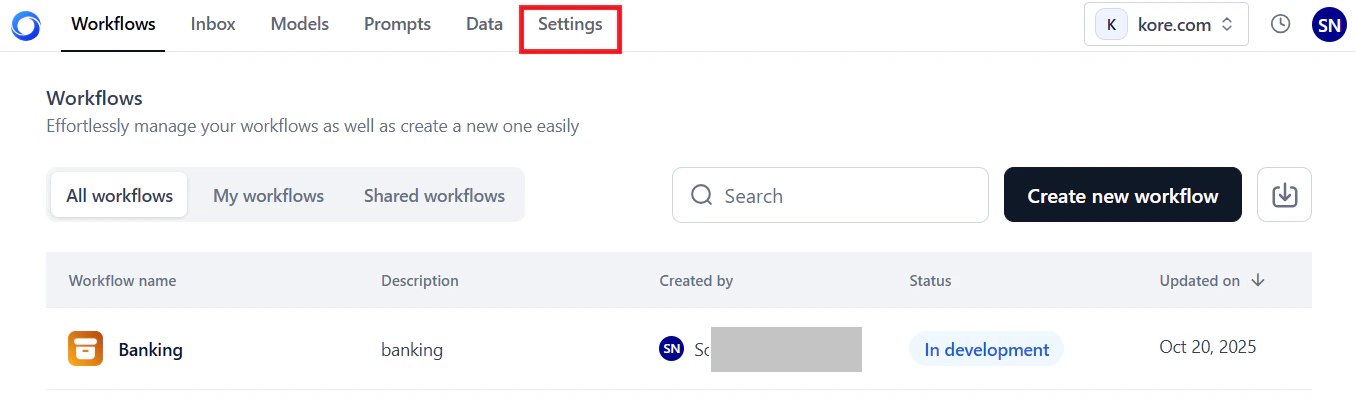 2. Click **Integrations** in the left menu.
## Browse Available Integrations
The **Integrations** page has two tabs:
* **All Integrations**: Lists available integrations grouped by category. Once you configure a connection, that integration moves to the **Connected** tab. If you delete the connection, it returns to this list.
2. Click **Integrations** in the left menu.
## Browse Available Integrations
The **Integrations** page has two tabs:
* **All Integrations**: Lists available integrations grouped by category. Once you configure a connection, that integration moves to the **Connected** tab. If you delete the connection, it returns to this list.
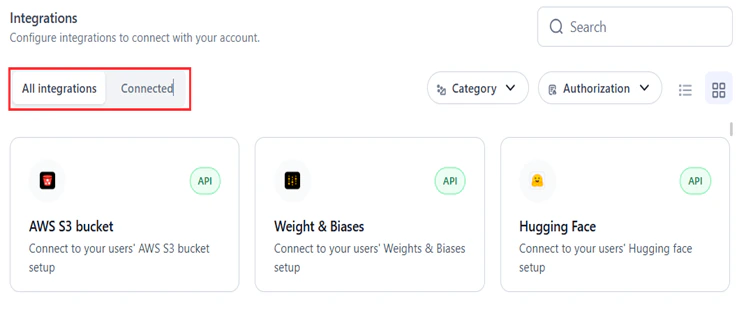 * **Connected**: Lists all configured connections.
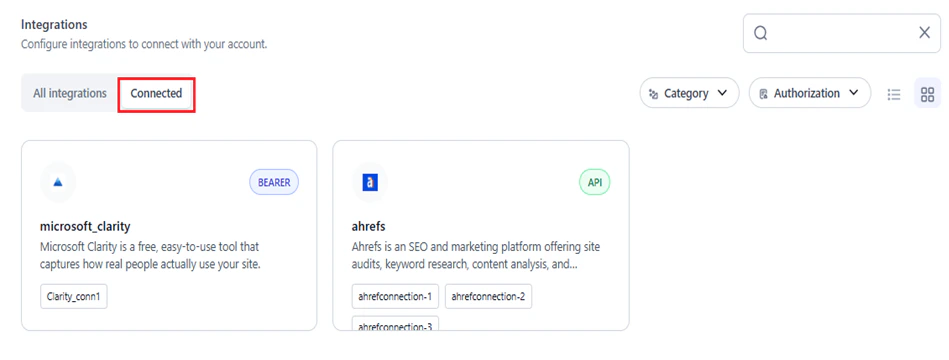 Use the following filters to find an integration:
* **Search**: Enter the name (full or partial) in the **Search** field.
Use the following filters to find an integration:
* **Search**: Enter the name (full or partial) in the **Search** field.
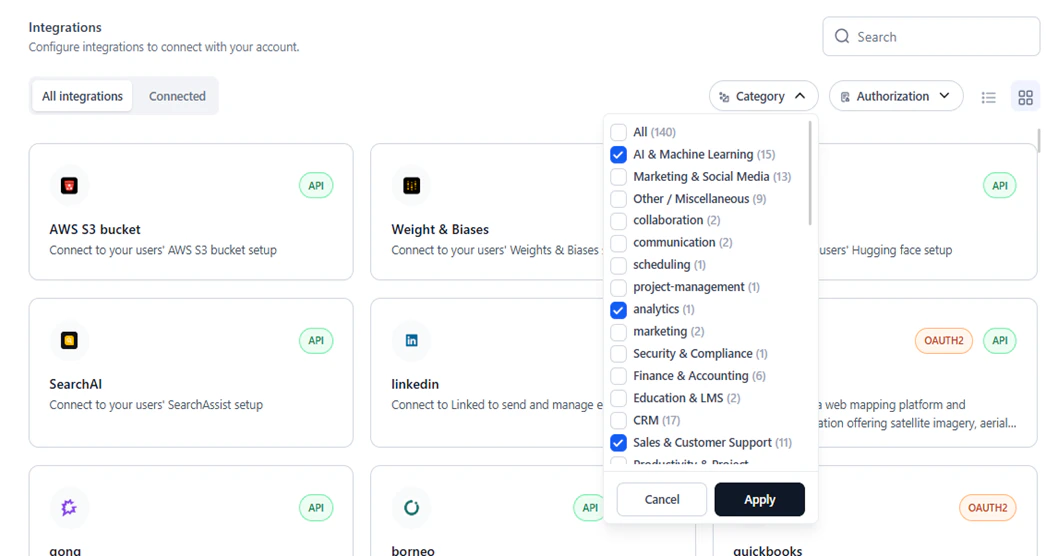
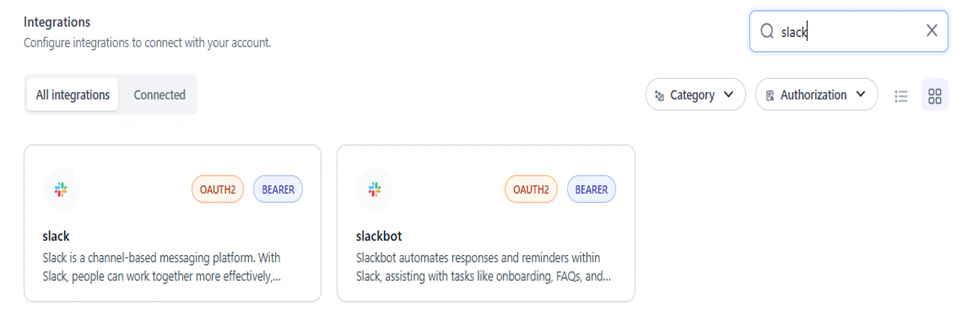 * **Category**: Select one or more categories and click **Apply** to filter by use case (for example, AI and Machine Learning, Marketing, E-commerce).
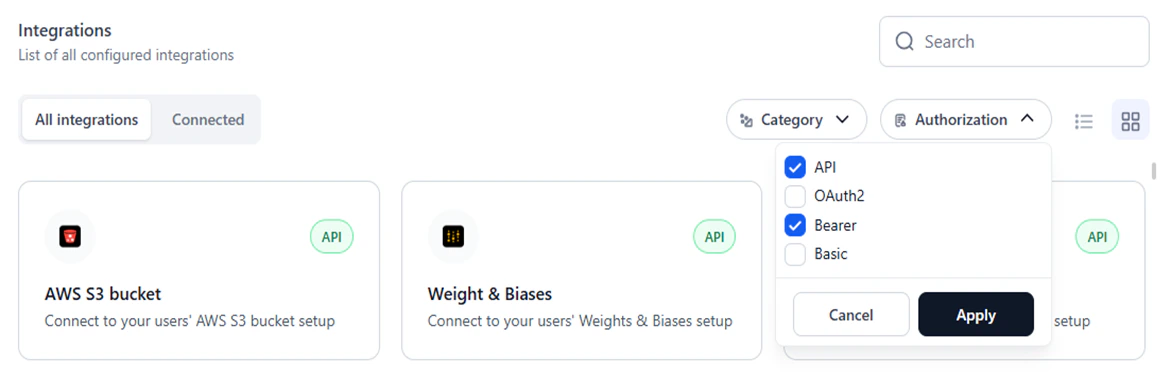
 * **Authorization**: Select one or more authorization types and click **Apply** to filter by auth method.
 Toggle between display modes:
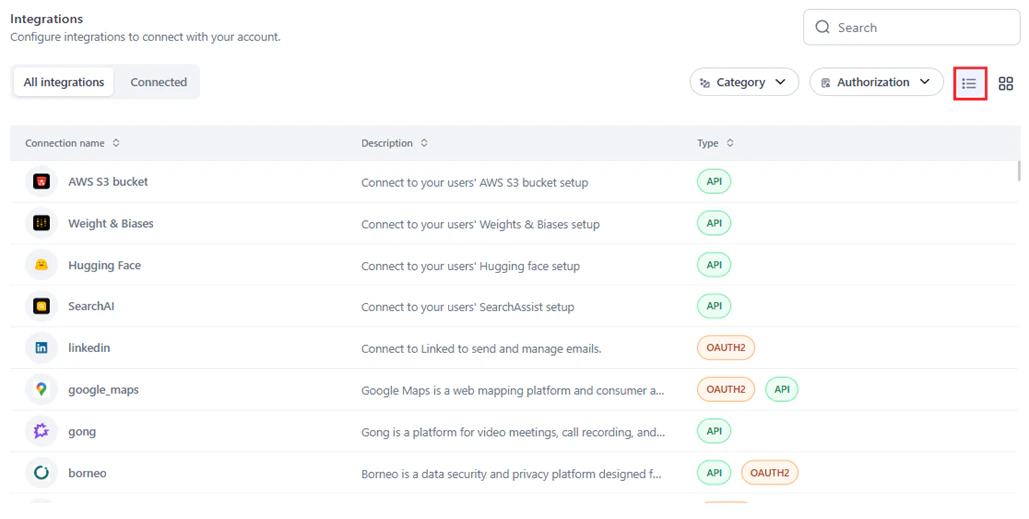
* **List view**: Shows integrations in a table with Connection Name, Description, and Type.
Toggle between display modes:
* **List view**: Shows integrations in a table with Connection Name, Description, and Type.
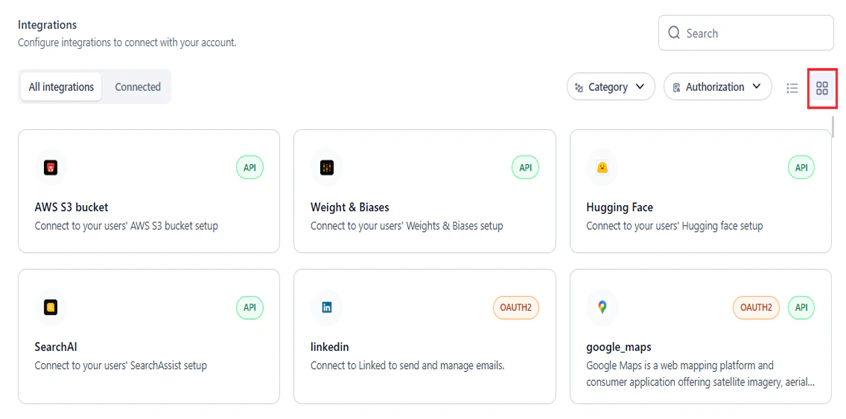
 * **Tile view** (default): Shows integrations as cards.
 ## Supported Integrations
| Integration | Description | Supported Actions | Authorization Types |
| --------------------- | ------------------------------------------------------------------------------------------- | ----------------- | ---------------------- |
| Acculynx | Data exchange between AccuLynx and third-party applications. | 8 | API |
| Active\_campaign | Marketing automation, CRM, and email marketing. | 7 | API |
| Affinity | CRM focused on relationship intelligence and workflow automation. | 20 | API |
| Agencyzoom | P\&C insurance agency platform for sales, retention, and performance analytics. | 99 | API, BASIC WITH JWT |
| Ahrefs | SEO platform for site audits, keyword research, content analysis, and competitive insights. | 40 | API |
| Airtable | Low-code platform for building apps and automating workflows. | 17 | OAUTH2, BEARER, API |
| Amplitude | Digital analytics software. | 16 | BASIC |
| Apaleo | API-first property management platform for hotels and apartment groups. | 29 | OAUTH2 |
| Apollo | CRM for managing contacts, leads, and opportunities. | 17 | API |
| Asana | Team task and project management. | 15 | OAUTH2 |
| Attio | Customizable workspace for team relationships and workflows. | 56 | OAUTH2 |
| AWS S3 Bucket | Connect to AWS S3 buckets. | 1 | API |
| Bamboohr | Human resources software as a service. | 159 | API |
| Bill | Bill.com API integration. | 221 | BILLCOM AUTH |
| Bitbucket | Git-based code hosting with pull requests and team collaboration. | 15 | OAUTH2 |
| Blackboard | Insights and in-app guidance for Blackboard Learn via Anthology Adopt. | 314 | OAUTH2 |
| Bolna | Conversational voice agents for customer interactions and support automation. | 15 | API |
| Borneo | Data security and privacy platform for sensitive data discovery and remediation. | 154 | API, OAUTH2 |
| Box | Cloud content management and file sharing. | 273 | OAUTH2 |
| Brevo | Email marketing, SMS campaigns, and marketing automation. | 221 | API |
| Browserbase\_workflow | Browsing app that reads a URL and returns its contents. | 1 | API |
| Bugbug | Browser-based test automation for testers, developers, and product managers. | 4 | API |
| Cal | Meeting coordination with booking pages, calendar syncing, and availability management. | 142 | API, CALCOM AUTH |
| Calendly | Appointment scheduling with automated invitations, availability checks, and reminders. | 41 | OAUTH2 |
| Canva | Canvas LMS API for courses, users, enrollments, and grades. | 32 | OAUTH2 |
| Canvas | Web-based learning management system for online course delivery and communication. | 79 | OAUTH2, API |
| Clickup | Project management with tasks, docs, goals, and chat in a single platform. | 126 | OAUTH2, API |
| codeinterpreter | Python coding environment with integrated data analysis and script execution. | 4 | API |
| Coinbase | Cryptocurrency trading and management APIs. | 6 | API |
| Composio | AI agent and LLM integrations via function calling. | 12 | API |
| Composio\_search | Web searching and scraping. | 12 | API |
| Confluence | Team collaboration and knowledge management. | 190 | OAUTH2 |
| Contentful | Content platform APIs for managing and delivering content to apps and websites. | 3 | OAUTH2, API |
| Crustdata | AI-powered B2B data intelligence with real-time company and people data. | 14 | API |
| Coda | Collaborative workspace for documents, workflows, and team productivity. | 97 | API |
| Dialpad | Cloud-based business communication with calls, video, messaging, and collaboration. | 192 | OAUTH2, API |
| Discord | Instant messaging and VoIP social platform. | 169 | OAUTH2, BEARER |
| Discordbot | Automated Discord bots for moderation, notifications, and community engagement. | 169 | OAUTH2, BEARER |
| Docusign | eSignature and digital agreement management. | 342 | OAUTH2 |
| Dropbox | Cloud file storage, synchronization, and sharing. | 9 | OAUTH2 |
| Dynamics365 | Microsoft CRM, ERP, and productivity apps for sales, marketing, and operations. | 16 | OAUTH2 |
| Elevenlabs | AI voice generation in any language. | 59 | API |
| Entelligence | AI-powered insights, recommendations, and predictive analytics. | 2 | API |
| Exa | Search service with query execution, similar link discovery, and answer generation. | 4 | API |
| Excel | Create and manage Microsoft Excel spreadsheets. | 25 | OAUTH2 |
| Figma | Collaborative interface design. | 44 | OAUTH2, API |
| Firecrawl | Automated web crawling and data extraction at scale. | 7 | API |
| Fireflies | Meeting transcription, summarization, search, and voice conversation analysis. | 10 | API |
| Flutterwave | Payment APIs for multiple currencies and countries. | 2 | API |
| Foursquare | Place search and recommendations from the Foursquare Places database. | 5 | API |
| Freshdesk | Customer support platform with automation. | 7 | BASIC |
| Gmail | Send and manage emails via Gmail. | 21 | OAUTH2, BEARER |
| Gong | Platform for video meetings, call recording, and team collaboration. | 54 | API |
| Google\_maps | Web mapping with satellite imagery, street maps, and route planning. | 4 | OAUTH2, API |
| Googleads | Manage and create Google Ads campaigns. | 4 | OAUTH2 |
| Googlebigquery | Query BigData with Google BigQuery. | 1 | GOOGLE SERVICE ACCOUNT |
| Googlecalendar | Time management and scheduling. | 12 | OAUTH2, BEARER |
| Googledocs | Google Docs document management. | 5 | OAUTH2, BEARER |
| Googledrive | Google Drive cloud storage. | 10 | OAUTH2, BEARER |
| Googlemeet | Google Meet video conferencing. | 5 | OAUTH2 |
| Googlephotos | Google Photos storage and management. | 12 | OAUTH2 |
| Googlesheets | Google Sheets web-based spreadsheets. | 9 | OAUTH2 |
| Googlesuper | Unified access to Google Drive, Calendar, Gmail, Sheets, Analytics, Ads, and more. | 93 | API, OAUTH2, BEARER |
| Googletasks | Task management integrated with Gmail and Google Calendar. | 11 | OAUTH2 |
| Gorgias | E-commerce customer service platform. | 32 | OAUTH2 |
| Github | Git-based code hosting with issue tracking and CI/CD integrations. | 908 | OAUTH2 |
| Hackernews | Cybersecurity news with real-time updates and threat intelligence. | 6 | API |
| Heygen | AI-powered video creation platform. | 35 | API |
| Hubspot | CRM integrating email automation, marketing, and customer service. | 229 | OAUTH2, BEARER |
| Hugging Face | Hugging Face ML model integration. | 1 | API |
| Intercom | Business messaging for customer communication across app, web, and email. | 43 | OAUTH2 |
| Jira | Issue and project tracking. | 544 | OAUTH2, API |
| Junglescout | Amazon seller product research, sales estimates, and competitive insights. | 6 | API |
| Klaviyo | Email and SMS marketing for e-commerce with segmentation and conversion tracking. | 231 | API, OAUTH2 |
| Kommo | CRM for managing customer relationships, sales pipelines, and business processes. | 15 | OAUTH2 |
| Linear | Issue management and project tracking. | 15 | OAUTH2, API |
| Linkedin | LinkedIn API. | 4 | OAUTH2 |
| Linkhut | Platform for saving, organizing, and sharing links. | 2 | OAUTH2 |
| Linkup | Web search for RAG use cases. | 1 | API |
| Listennotes | Podcast search engine. | 26 | API |
| Lmnt | Text-to-speech and voice cloning API. | 7 | API |
| Mailchimp | Email marketing and automation with templates, segmentation, and analytics. | 271 | OAUTH2 |
| Mem0 | AI-driven note-taking, knowledge recall, and productivity workflows. | 43 | API |
| Metaads | Meta Marketing API for ad campaigns, ad sets, custom audiences, and analytics. | 16 | OAUTH2, API |
| Microsoft\_clarity | Free website analytics tool capturing real user behavior. | 1 | BEARER |
| Microsoft\_teams | Microsoft Teams channel management. | 13 | OAUTH2 |
| Mixpanel | Analytics platform for user engagement and retention. | 19 | BASIC |
| Monday | Cloud-based work operating system for team workflows and projects. | 21 | OAUTH2 |
| Neon | Serverless Postgres platform for scalable applications. | 69 | API |
| Notion | Unified workspace for notes, docs, wikis, and tasks. | 23 | OAUTH2, API |
| One\_drive | Microsoft OneDrive cloud storage with offline access and real-time collaboration. | 7 | OAUTH2 |
| Onepage | User and company data enrichment API. | 2 | API |
| Open\_sea | NFT marketplace for crypto collectibles. | 22 | API |
| Outlook | Microsoft email and calendaring with contacts and scheduling. | 22 | OAUTH2 |
| Pagerduty | Incident, schedule, and alert management. | 357 | OAUTH2, API |
| Perplexityai | AI-powered natural language search with domain filtering and real-time streaming. | 1 | API |
| Peopledatalabs | B2B data enrichment and identity resolution for user profile building. | 14 | API |
| Pipedrive | Sales management with pipeline visualization, lead tracking, and automation. | 275 | OAUTH2, BEARER |
| Placekey | Unique identifier generation for physical places. | 2 | API |
| PostHog | Open-source product analytics for user interaction and behavior tracking. | 358 | API |
| Quickbooks | Cloud-based accounting for finances, income, and expenses. | 13 | OAUTH2 |
| Ramp | Finance platform for expense management and business insights. | 8 | OAUTH2 |
| Recallai | Single API for meeting bots on Zoom, Google Meet, and Microsoft Teams. | 8 | API |
| Reddit | Post and comment on Reddit. | 9 | OAUTH2 |
| Resend | Email delivery via Resend API. | 18 | API |
| Retellai | Call capture, transcription, and conversation analytics. | 10 | API |
| Rocketlane | Customer onboarding and project delivery with shared workspaces and milestones. | 6 | API |
| Salesforce | CRM for sales, service, marketing, and analytics. | 32 | OAUTH2 |
| Search AI | SearchAssist integration. | 1 | API |
| Semanticscholar | AI-powered academic search engine for scientific literature. | 14 | API |
| Semrush | SEO suite for keyword research, competitor analysis, and Google Ads optimization. | 36 | API |
| Sendgrid | Cloud-based email delivery with transactional and marketing email services. | 375 | API |
| Sentry | Error tracking and monitoring. | 178 | BEARER |
| Serpapi | Real-time search engine results API for SEO and research. | 10 | API |
| Servicenow | IT Service Management platform. | 5 | BASIC |
| Share\_point | SharePoint document management and team collaboration. | 6 | OAUTH2 |
| Shortcut | Product development work aligned with company objectives. | 122 | API |
| Shopify | E-commerce platform for online and in-person sales. | 26 | API, OAUTH2 |
| Slack | Channel-based messaging with workflow integrations. | 174 | OAUTH2, BEARER |
| slackbot | Automated Slack bots for onboarding, FAQs, and team notifications. | 174 | OAUTH2, BEARER |
| Snowflake | Snowflake cloud data platform for running queries. | 4 | BASIC |
| Stripe | Online payment processing. | 19 | API |
| Supabase | Open-source backend with Postgres, authentication, storage, and real-time APIs. | 77 | OAUTH2, API |
| Tavily | Advanced search with image inclusion, raw content, and domain filtering. | 1 | API |
| Textrazor | Natural language processing API for text analysis. | 1 | API |
| Text\_to\_pdf | Convert text to PDF. | 1 | API |
| Tinyurl | URL shortening and link analytics. | 1 | API |
| Todoist | Task and project management app. | 4 | OAUTH2 |
| Trello | Kanban-style project management. | 323 | OAUTH, BEARER |
| Twitter | Twitter (now X) social media platform. | 72 | OAUTH2 |
| Twitter\_media | Twitter multimedia workflows for marketing campaigns. | 1 | OAUTH |
| Typefully | AI-powered content creation and publishing. | 5 | API |
| Weathermap | Weather data, forecasts, and climate mapping. | 1 | API |
| Weight & Biases | Weights & Biases ML experiment tracking. | 1 | API |
| Whatsapp | Customer messaging and automation via WhatsApp Business API. | 5 | API |
| Workiom | Workflow automation and custom application building. | 3 | API |
| Yousearch | Web search platform. | 1 | API |
| Youtube | YouTube actions and integrations. | 11 | OAUTH2 |
| Zenrows | Web scraping and data extraction via ZenRows API. | 1 | API |
| Zendesk | Customer service and sales platform. | 11 | OAUTH2 |
| Zoom | Video conferencing with breakout rooms, screen sharing, and integrations. | 172 | OAUTH2 |
| Zoominfo | Revenue team data platform. | 14 | BASIC WITH JWT |
| Zoho | Zoho CRM interactions. | 6 | OAUTH2 |
## Add a Connection
You can also add a connection directly from the **Integration node** on the workflow canvas. [Learn more](/ai-for-process/nodes#integration-node).
1. [Access Integrations](#access-integrations).
2. Select an integration:
* **New connection**: In the **All Integrations** tab, optionally filter by **Category** and **Authorization**, then click the required integration.
* **Existing provider**: Click the **Connected** tab and select the provider.
3. Click **Add Connection**.
## Supported Integrations
| Integration | Description | Supported Actions | Authorization Types |
| --------------------- | ------------------------------------------------------------------------------------------- | ----------------- | ---------------------- |
| Acculynx | Data exchange between AccuLynx and third-party applications. | 8 | API |
| Active\_campaign | Marketing automation, CRM, and email marketing. | 7 | API |
| Affinity | CRM focused on relationship intelligence and workflow automation. | 20 | API |
| Agencyzoom | P\&C insurance agency platform for sales, retention, and performance analytics. | 99 | API, BASIC WITH JWT |
| Ahrefs | SEO platform for site audits, keyword research, content analysis, and competitive insights. | 40 | API |
| Airtable | Low-code platform for building apps and automating workflows. | 17 | OAUTH2, BEARER, API |
| Amplitude | Digital analytics software. | 16 | BASIC |
| Apaleo | API-first property management platform for hotels and apartment groups. | 29 | OAUTH2 |
| Apollo | CRM for managing contacts, leads, and opportunities. | 17 | API |
| Asana | Team task and project management. | 15 | OAUTH2 |
| Attio | Customizable workspace for team relationships and workflows. | 56 | OAUTH2 |
| AWS S3 Bucket | Connect to AWS S3 buckets. | 1 | API |
| Bamboohr | Human resources software as a service. | 159 | API |
| Bill | Bill.com API integration. | 221 | BILLCOM AUTH |
| Bitbucket | Git-based code hosting with pull requests and team collaboration. | 15 | OAUTH2 |
| Blackboard | Insights and in-app guidance for Blackboard Learn via Anthology Adopt. | 314 | OAUTH2 |
| Bolna | Conversational voice agents for customer interactions and support automation. | 15 | API |
| Borneo | Data security and privacy platform for sensitive data discovery and remediation. | 154 | API, OAUTH2 |
| Box | Cloud content management and file sharing. | 273 | OAUTH2 |
| Brevo | Email marketing, SMS campaigns, and marketing automation. | 221 | API |
| Browserbase\_workflow | Browsing app that reads a URL and returns its contents. | 1 | API |
| Bugbug | Browser-based test automation for testers, developers, and product managers. | 4 | API |
| Cal | Meeting coordination with booking pages, calendar syncing, and availability management. | 142 | API, CALCOM AUTH |
| Calendly | Appointment scheduling with automated invitations, availability checks, and reminders. | 41 | OAUTH2 |
| Canva | Canvas LMS API for courses, users, enrollments, and grades. | 32 | OAUTH2 |
| Canvas | Web-based learning management system for online course delivery and communication. | 79 | OAUTH2, API |
| Clickup | Project management with tasks, docs, goals, and chat in a single platform. | 126 | OAUTH2, API |
| codeinterpreter | Python coding environment with integrated data analysis and script execution. | 4 | API |
| Coinbase | Cryptocurrency trading and management APIs. | 6 | API |
| Composio | AI agent and LLM integrations via function calling. | 12 | API |
| Composio\_search | Web searching and scraping. | 12 | API |
| Confluence | Team collaboration and knowledge management. | 190 | OAUTH2 |
| Contentful | Content platform APIs for managing and delivering content to apps and websites. | 3 | OAUTH2, API |
| Crustdata | AI-powered B2B data intelligence with real-time company and people data. | 14 | API |
| Coda | Collaborative workspace for documents, workflows, and team productivity. | 97 | API |
| Dialpad | Cloud-based business communication with calls, video, messaging, and collaboration. | 192 | OAUTH2, API |
| Discord | Instant messaging and VoIP social platform. | 169 | OAUTH2, BEARER |
| Discordbot | Automated Discord bots for moderation, notifications, and community engagement. | 169 | OAUTH2, BEARER |
| Docusign | eSignature and digital agreement management. | 342 | OAUTH2 |
| Dropbox | Cloud file storage, synchronization, and sharing. | 9 | OAUTH2 |
| Dynamics365 | Microsoft CRM, ERP, and productivity apps for sales, marketing, and operations. | 16 | OAUTH2 |
| Elevenlabs | AI voice generation in any language. | 59 | API |
| Entelligence | AI-powered insights, recommendations, and predictive analytics. | 2 | API |
| Exa | Search service with query execution, similar link discovery, and answer generation. | 4 | API |
| Excel | Create and manage Microsoft Excel spreadsheets. | 25 | OAUTH2 |
| Figma | Collaborative interface design. | 44 | OAUTH2, API |
| Firecrawl | Automated web crawling and data extraction at scale. | 7 | API |
| Fireflies | Meeting transcription, summarization, search, and voice conversation analysis. | 10 | API |
| Flutterwave | Payment APIs for multiple currencies and countries. | 2 | API |
| Foursquare | Place search and recommendations from the Foursquare Places database. | 5 | API |
| Freshdesk | Customer support platform with automation. | 7 | BASIC |
| Gmail | Send and manage emails via Gmail. | 21 | OAUTH2, BEARER |
| Gong | Platform for video meetings, call recording, and team collaboration. | 54 | API |
| Google\_maps | Web mapping with satellite imagery, street maps, and route planning. | 4 | OAUTH2, API |
| Googleads | Manage and create Google Ads campaigns. | 4 | OAUTH2 |
| Googlebigquery | Query BigData with Google BigQuery. | 1 | GOOGLE SERVICE ACCOUNT |
| Googlecalendar | Time management and scheduling. | 12 | OAUTH2, BEARER |
| Googledocs | Google Docs document management. | 5 | OAUTH2, BEARER |
| Googledrive | Google Drive cloud storage. | 10 | OAUTH2, BEARER |
| Googlemeet | Google Meet video conferencing. | 5 | OAUTH2 |
| Googlephotos | Google Photos storage and management. | 12 | OAUTH2 |
| Googlesheets | Google Sheets web-based spreadsheets. | 9 | OAUTH2 |
| Googlesuper | Unified access to Google Drive, Calendar, Gmail, Sheets, Analytics, Ads, and more. | 93 | API, OAUTH2, BEARER |
| Googletasks | Task management integrated with Gmail and Google Calendar. | 11 | OAUTH2 |
| Gorgias | E-commerce customer service platform. | 32 | OAUTH2 |
| Github | Git-based code hosting with issue tracking and CI/CD integrations. | 908 | OAUTH2 |
| Hackernews | Cybersecurity news with real-time updates and threat intelligence. | 6 | API |
| Heygen | AI-powered video creation platform. | 35 | API |
| Hubspot | CRM integrating email automation, marketing, and customer service. | 229 | OAUTH2, BEARER |
| Hugging Face | Hugging Face ML model integration. | 1 | API |
| Intercom | Business messaging for customer communication across app, web, and email. | 43 | OAUTH2 |
| Jira | Issue and project tracking. | 544 | OAUTH2, API |
| Junglescout | Amazon seller product research, sales estimates, and competitive insights. | 6 | API |
| Klaviyo | Email and SMS marketing for e-commerce with segmentation and conversion tracking. | 231 | API, OAUTH2 |
| Kommo | CRM for managing customer relationships, sales pipelines, and business processes. | 15 | OAUTH2 |
| Linear | Issue management and project tracking. | 15 | OAUTH2, API |
| Linkedin | LinkedIn API. | 4 | OAUTH2 |
| Linkhut | Platform for saving, organizing, and sharing links. | 2 | OAUTH2 |
| Linkup | Web search for RAG use cases. | 1 | API |
| Listennotes | Podcast search engine. | 26 | API |
| Lmnt | Text-to-speech and voice cloning API. | 7 | API |
| Mailchimp | Email marketing and automation with templates, segmentation, and analytics. | 271 | OAUTH2 |
| Mem0 | AI-driven note-taking, knowledge recall, and productivity workflows. | 43 | API |
| Metaads | Meta Marketing API for ad campaigns, ad sets, custom audiences, and analytics. | 16 | OAUTH2, API |
| Microsoft\_clarity | Free website analytics tool capturing real user behavior. | 1 | BEARER |
| Microsoft\_teams | Microsoft Teams channel management. | 13 | OAUTH2 |
| Mixpanel | Analytics platform for user engagement and retention. | 19 | BASIC |
| Monday | Cloud-based work operating system for team workflows and projects. | 21 | OAUTH2 |
| Neon | Serverless Postgres platform for scalable applications. | 69 | API |
| Notion | Unified workspace for notes, docs, wikis, and tasks. | 23 | OAUTH2, API |
| One\_drive | Microsoft OneDrive cloud storage with offline access and real-time collaboration. | 7 | OAUTH2 |
| Onepage | User and company data enrichment API. | 2 | API |
| Open\_sea | NFT marketplace for crypto collectibles. | 22 | API |
| Outlook | Microsoft email and calendaring with contacts and scheduling. | 22 | OAUTH2 |
| Pagerduty | Incident, schedule, and alert management. | 357 | OAUTH2, API |
| Perplexityai | AI-powered natural language search with domain filtering and real-time streaming. | 1 | API |
| Peopledatalabs | B2B data enrichment and identity resolution for user profile building. | 14 | API |
| Pipedrive | Sales management with pipeline visualization, lead tracking, and automation. | 275 | OAUTH2, BEARER |
| Placekey | Unique identifier generation for physical places. | 2 | API |
| PostHog | Open-source product analytics for user interaction and behavior tracking. | 358 | API |
| Quickbooks | Cloud-based accounting for finances, income, and expenses. | 13 | OAUTH2 |
| Ramp | Finance platform for expense management and business insights. | 8 | OAUTH2 |
| Recallai | Single API for meeting bots on Zoom, Google Meet, and Microsoft Teams. | 8 | API |
| Reddit | Post and comment on Reddit. | 9 | OAUTH2 |
| Resend | Email delivery via Resend API. | 18 | API |
| Retellai | Call capture, transcription, and conversation analytics. | 10 | API |
| Rocketlane | Customer onboarding and project delivery with shared workspaces and milestones. | 6 | API |
| Salesforce | CRM for sales, service, marketing, and analytics. | 32 | OAUTH2 |
| Search AI | SearchAssist integration. | 1 | API |
| Semanticscholar | AI-powered academic search engine for scientific literature. | 14 | API |
| Semrush | SEO suite for keyword research, competitor analysis, and Google Ads optimization. | 36 | API |
| Sendgrid | Cloud-based email delivery with transactional and marketing email services. | 375 | API |
| Sentry | Error tracking and monitoring. | 178 | BEARER |
| Serpapi | Real-time search engine results API for SEO and research. | 10 | API |
| Servicenow | IT Service Management platform. | 5 | BASIC |
| Share\_point | SharePoint document management and team collaboration. | 6 | OAUTH2 |
| Shortcut | Product development work aligned with company objectives. | 122 | API |
| Shopify | E-commerce platform for online and in-person sales. | 26 | API, OAUTH2 |
| Slack | Channel-based messaging with workflow integrations. | 174 | OAUTH2, BEARER |
| slackbot | Automated Slack bots for onboarding, FAQs, and team notifications. | 174 | OAUTH2, BEARER |
| Snowflake | Snowflake cloud data platform for running queries. | 4 | BASIC |
| Stripe | Online payment processing. | 19 | API |
| Supabase | Open-source backend with Postgres, authentication, storage, and real-time APIs. | 77 | OAUTH2, API |
| Tavily | Advanced search with image inclusion, raw content, and domain filtering. | 1 | API |
| Textrazor | Natural language processing API for text analysis. | 1 | API |
| Text\_to\_pdf | Convert text to PDF. | 1 | API |
| Tinyurl | URL shortening and link analytics. | 1 | API |
| Todoist | Task and project management app. | 4 | OAUTH2 |
| Trello | Kanban-style project management. | 323 | OAUTH, BEARER |
| Twitter | Twitter (now X) social media platform. | 72 | OAUTH2 |
| Twitter\_media | Twitter multimedia workflows for marketing campaigns. | 1 | OAUTH |
| Typefully | AI-powered content creation and publishing. | 5 | API |
| Weathermap | Weather data, forecasts, and climate mapping. | 1 | API |
| Weight & Biases | Weights & Biases ML experiment tracking. | 1 | API |
| Whatsapp | Customer messaging and automation via WhatsApp Business API. | 5 | API |
| Workiom | Workflow automation and custom application building. | 3 | API |
| Yousearch | Web search platform. | 1 | API |
| Youtube | YouTube actions and integrations. | 11 | OAUTH2 |
| Zenrows | Web scraping and data extraction via ZenRows API. | 1 | API |
| Zendesk | Customer service and sales platform. | 11 | OAUTH2 |
| Zoom | Video conferencing with breakout rooms, screen sharing, and integrations. | 172 | OAUTH2 |
| Zoominfo | Revenue team data platform. | 14 | BASIC WITH JWT |
| Zoho | Zoho CRM interactions. | 6 | OAUTH2 |
## Add a Connection
You can also add a connection directly from the **Integration node** on the workflow canvas. [Learn more](/ai-for-process/nodes#integration-node).
1. [Access Integrations](#access-integrations).
2. Select an integration:
* **New connection**: In the **All Integrations** tab, optionally filter by **Category** and **Authorization**, then click the required integration.
* **Existing provider**: Click the **Connected** tab and select the provider.
3. Click **Add Connection**.
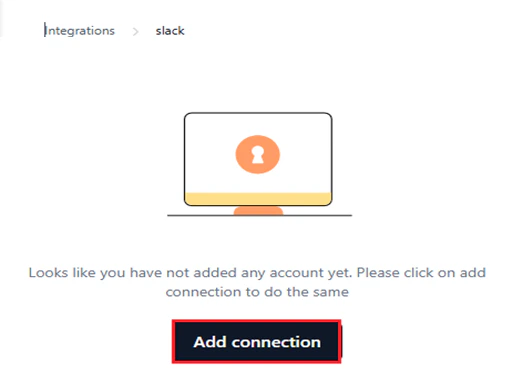
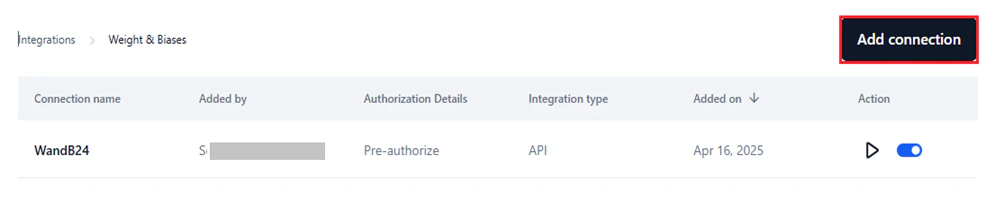 4. In the configuration window, enter a **Connection Name** and configure the **Authorization Details**. Select the authentication type for the connection. Only one auth type is allowed per connection.
The **Pre-authorize the integration** option is selected by default, requiring authentication credentials to interact with the service.
Configure the authorization details based on the selected type:
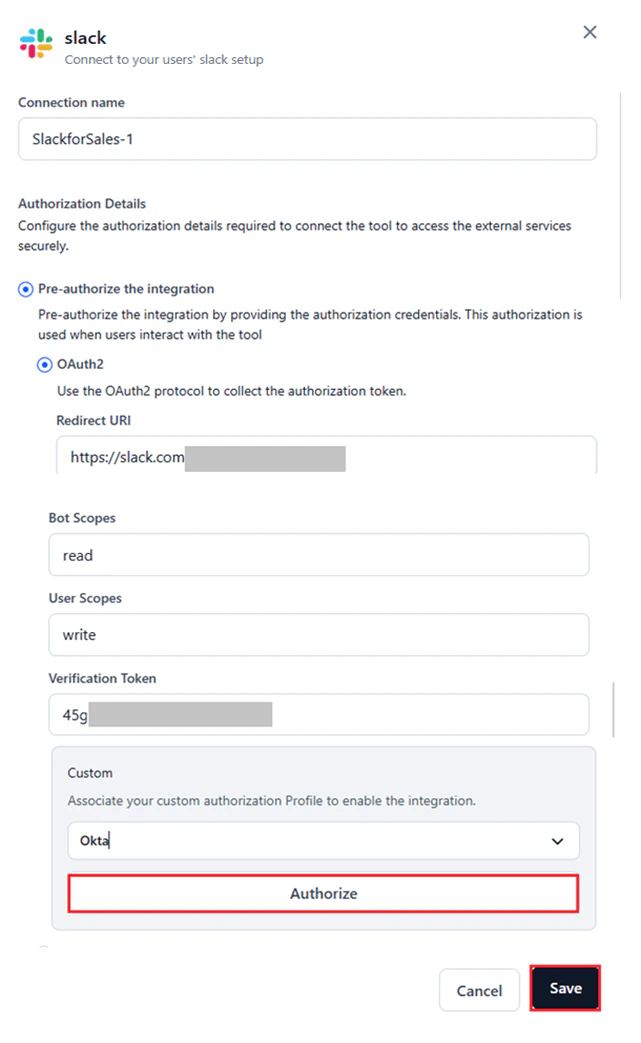
* Select the configured **Auth Profile** under **Custom** to authenticate the integration. [Learn more](/ai-for-process/settings/security-control#add-an-authorization-profile) about adding auth profiles.
* **Custom auth** uses a tailored authentication process set up in AI for Process, as an alternative to standard flows like API or OAuth2.
* After selecting an auth profile, its credentials populate the corresponding fields such as **Redirect URL**, **Scopes**, and **Base URL**.
* Re-authentication is not required unless the auth profile is deleted from your account.
* Connecting to a provider with a deleted auth profile results in an error. Deleted auth profiles no longer appear in the **Custom** window.
* Click **Authorize** to test the integration for the selected auth profile.
4. In the configuration window, enter a **Connection Name** and configure the **Authorization Details**. Select the authentication type for the connection. Only one auth type is allowed per connection.
The **Pre-authorize the integration** option is selected by default, requiring authentication credentials to interact with the service.
Configure the authorization details based on the selected type:
* Select the configured **Auth Profile** under **Custom** to authenticate the integration. [Learn more](/ai-for-process/settings/security-control#add-an-authorization-profile) about adding auth profiles.
* **Custom auth** uses a tailored authentication process set up in AI for Process, as an alternative to standard flows like API or OAuth2.
* After selecting an auth profile, its credentials populate the corresponding fields such as **Redirect URL**, **Scopes**, and **Base URL**.
* Re-authentication is not required unless the auth profile is deleted from your account.
* Connecting to a provider with a deleted auth profile results in an error. Deleted auth profiles no longer appear in the **Custom** window.
* Click **Authorize** to test the integration for the selected auth profile.
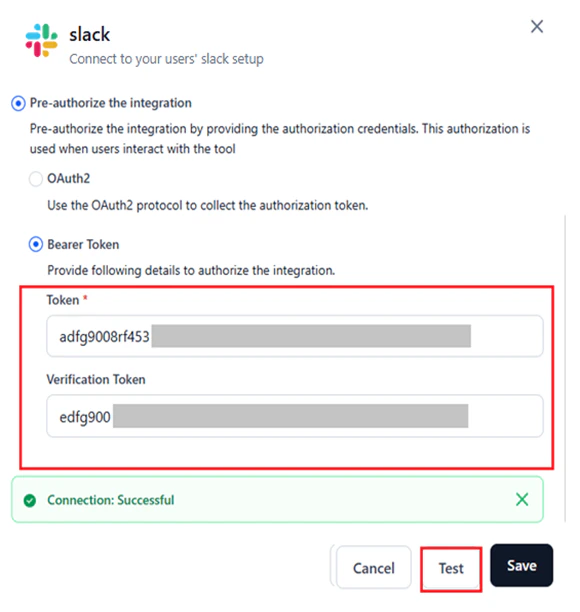
 * Enter the bearer token and any related credentials such as Base URL, API Key, or Bot Token. Required fields depend on the bearer authentication framework of the selected provider.
* Retrieve these values from the provider's Admin console > **Settings**.
* Click **Test** to validate the connection.
* Enter the bearer token and any related credentials such as Base URL, API Key, or Bot Token. Required fields depend on the bearer authentication framework of the selected provider.
* Retrieve these values from the provider's Admin console > **Settings**.
* Click **Test** to validate the connection.
 * Enter the **API Key** or **Access Token**. Additional fields may be required based on the provider.
* Retrieve these values from the provider's Admin console > **Settings**.
* Click **Test** to validate the connection.
* Enter the **API Key** or **Access Token**. Additional fields may be required based on the provider.
* Retrieve these values from the provider's Admin console > **Settings**.
* Click **Test** to validate the connection.
 * Enter the required credentials. For example, Amplitude requires an API key and API secret.
* Retrieve these values from the provider's Admin console > **Settings**.
* Click **Test** to validate the connection.
* Enter the required credentials. For example, Amplitude requires an API key and API secret.
* Retrieve these values from the provider's Admin console > **Settings**.
* Click **Test** to validate the connection.
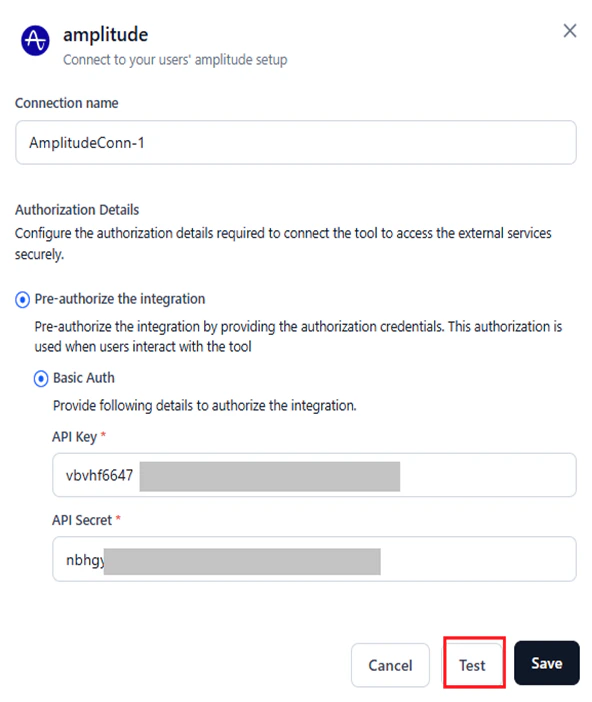 For other authentication types such as OAuth1, retrieve the required values from the admin console of your provider's site.
5. Click **Save** after testing the connection successfully.
The **Save** button is available only after you provide all the required inputs.
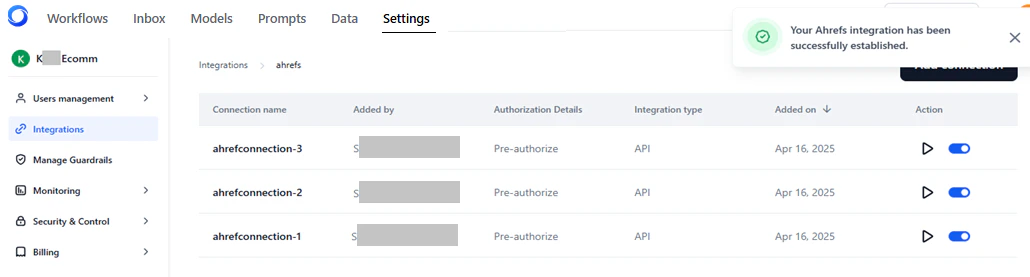
A success message confirms the connection. The Connections page for the provider lists all configured connections.
For other authentication types such as OAuth1, retrieve the required values from the admin console of your provider's site.
5. Click **Save** after testing the connection successfully.
The **Save** button is available only after you provide all the required inputs.
A success message confirms the connection. The Connections page for the provider lists all configured connections.
 ## Manage Connections
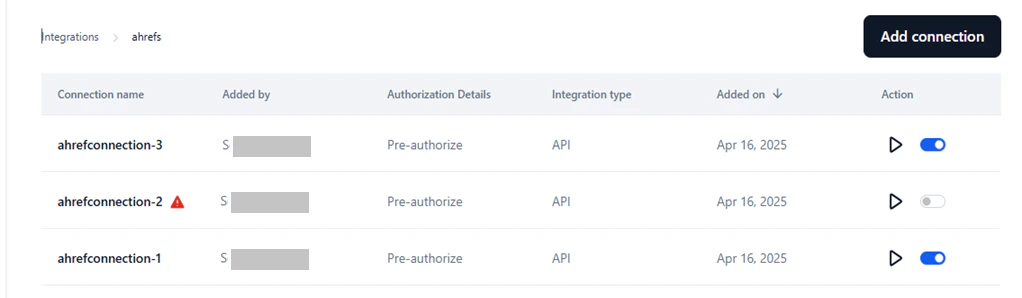
In the **Connected** tab, you can view, edit, test, and manage all configured connections for a provider.
Each connection entry shows:
* **Connection Name**: The unique name set during configuration.
* **Added By**: The admin or user who added the connection.
* **Authorization Details**: Displays *Pre-authorize*.
* **Integration Type**: API, OAuth2, Bearer, Basic Auth, etc.
* **Added on**: The date the connection was added.
* **Action**: Test the connection or enable/disable it.
## Manage Connections
In the **Connected** tab, you can view, edit, test, and manage all configured connections for a provider.
Each connection entry shows:
* **Connection Name**: The unique name set during configuration.
* **Added By**: The admin or user who added the connection.
* **Authorization Details**: Displays *Pre-authorize*.
* **Integration Type**: API, OAuth2, Bearer, Basic Auth, etc.
* **Added on**: The date the connection was added.
* **Action**: Test the connection or enable/disable it.
 ### Edit a Connection
You can't modify the name of a connection. To edit the other details, follow these steps:
1. Access **Integrations** → **Connected** → Select the connection.
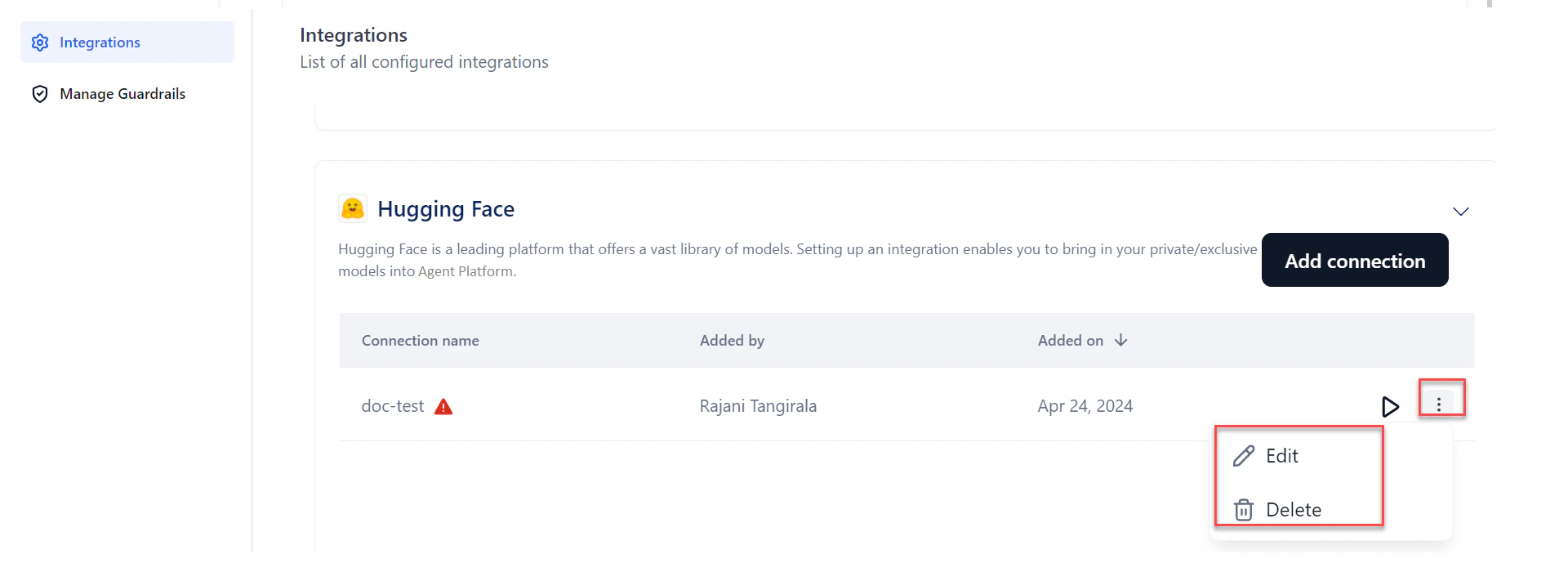
2. Click the **Ellipses** icon → **Edit**.
3. Modify the required fields in the **Authorization Details** section.
4. (Optional) Click **Test** to validate.
5. Click **Save**.
### Edit a Connection
You can't modify the name of a connection. To edit the other details, follow these steps:
1. Access **Integrations** → **Connected** → Select the connection.
2. Click the **Ellipses** icon → **Edit**.
3. Modify the required fields in the **Authorization Details** section.
4. (Optional) Click **Test** to validate.
5. Click **Save**.
 ### Delete a Connection
1. Access **Integrations** → **Connected** → Select the connection.
2. Click the **Ellipses** icon → **Delete**.
3. Click **Delete** to confirm.
Deletion is irreversible and removes all associations of the connection from the Platform.
### Test a Connection
1. Access **Integrations** → **Connected** → Select the connection.
2. Click the **Play** icon.
### Delete a Connection
1. Access **Integrations** → **Connected** → Select the connection.
2. Click the **Ellipses** icon → **Delete**.
3. Click **Delete** to confirm.
Deletion is irreversible and removes all associations of the connection from the Platform.
### Test a Connection
1. Access **Integrations** → **Connected** → Select the connection.
2. Click the **Play** icon.
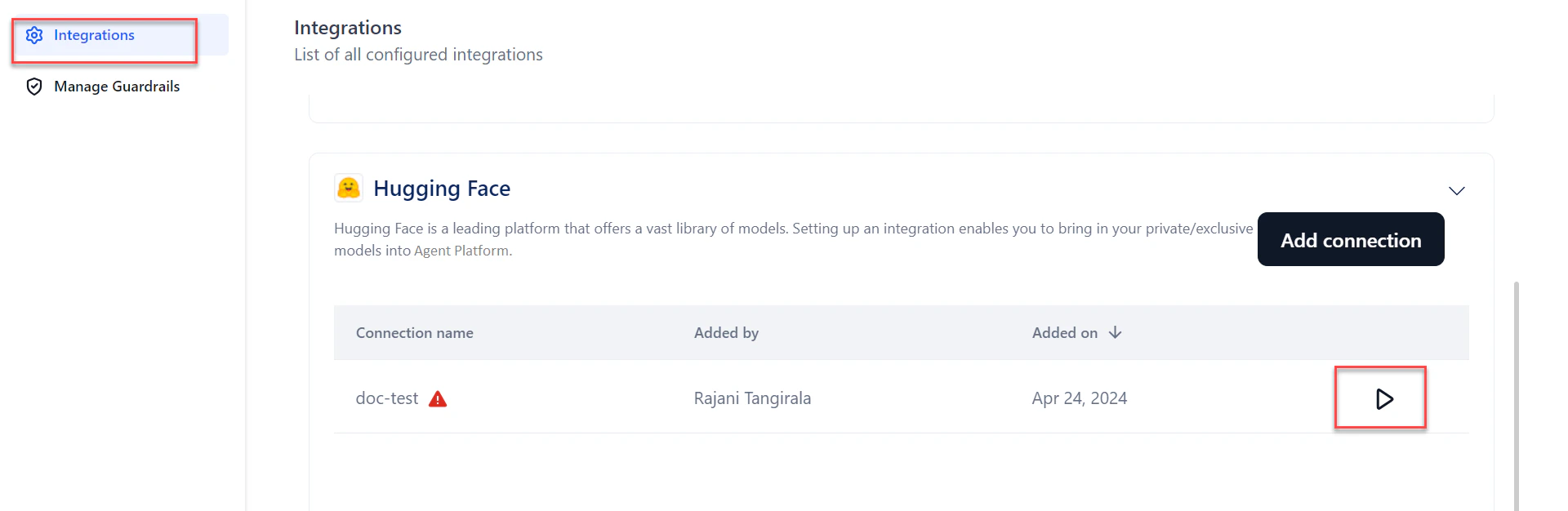
 The connection is validated in the background. Errors are highlighted with a **warning** icon.
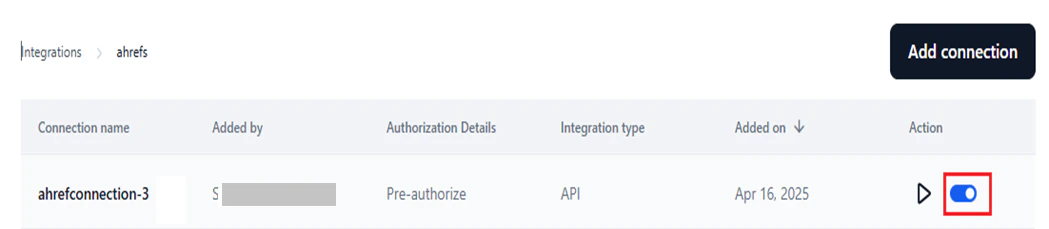
 ### Enable or Disable a Connection
Enabling a connection makes it available for user authentication with the provider and for use in the **Integration node** on the workflow canvas.
Use the toggle to enable (default) or disable the connection as needed.
### Enable or Disable a Connection
Enabling a connection makes it available for user authentication with the provider and for use in the **Integration node** on the workflow canvas.
Use the toggle to enable (default) or disable the connection as needed.
 ### Resolve Connection Errors
Errors may occur due to invalid credentials when adding or using a connection.
To view the error:
1. In the **Connected** tab, select the connection.
2. Click **Play** to test the connection.
3. Hover over the **warning** icon to see the reason for the error. Alternatively, click **Edit**, open the configuration window, and click **Test**.
### Resolve Connection Errors
Errors may occur due to invalid credentials when adding or using a connection.
To view the error:
1. In the **Connected** tab, select the connection.
2. Click **Play** to test the connection.
3. Hover over the **warning** icon to see the reason for the error. Alternatively, click **Edit**, open the configuration window, and click **Test**.
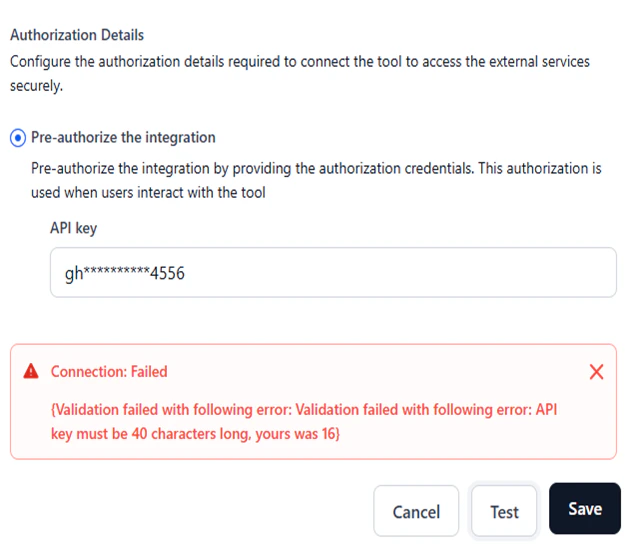 To resolve the error, click **Edit**, provide the correct credentials, and then test and save it.
## Integrate with Weights and Biases
Connecting to Weights and Biases (WandB) links AI for Process to your WandB account so that fine-tuning data is sent to the WandB console for additional analytics.
1. In AI for Process, click **Settings** in the top menu.
2. Click **Integrations** in the left menu.
3. Click **Weights & Biases** from the integrations list. The section expands.
To resolve the error, click **Edit**, provide the correct credentials, and then test and save it.
## Integrate with Weights and Biases
Connecting to Weights and Biases (WandB) links AI for Process to your WandB account so that fine-tuning data is sent to the WandB console for additional analytics.
1. In AI for Process, click **Settings** in the top menu.
2. Click **Integrations** in the left menu.
3. Click **Weights & Biases** from the integrations list. The section expands.
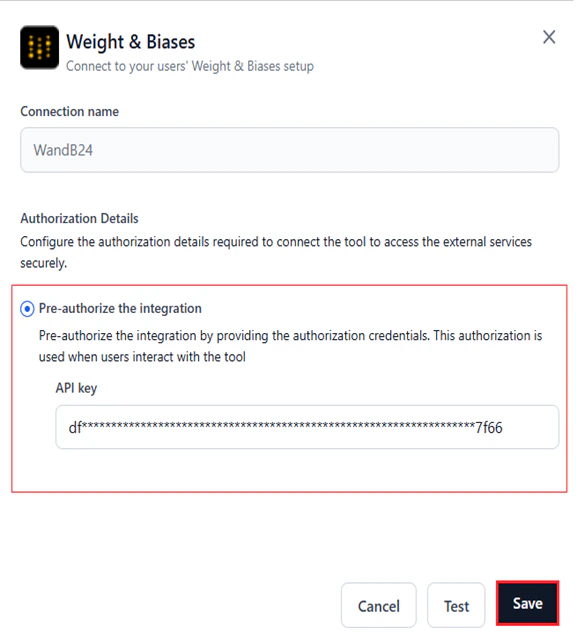
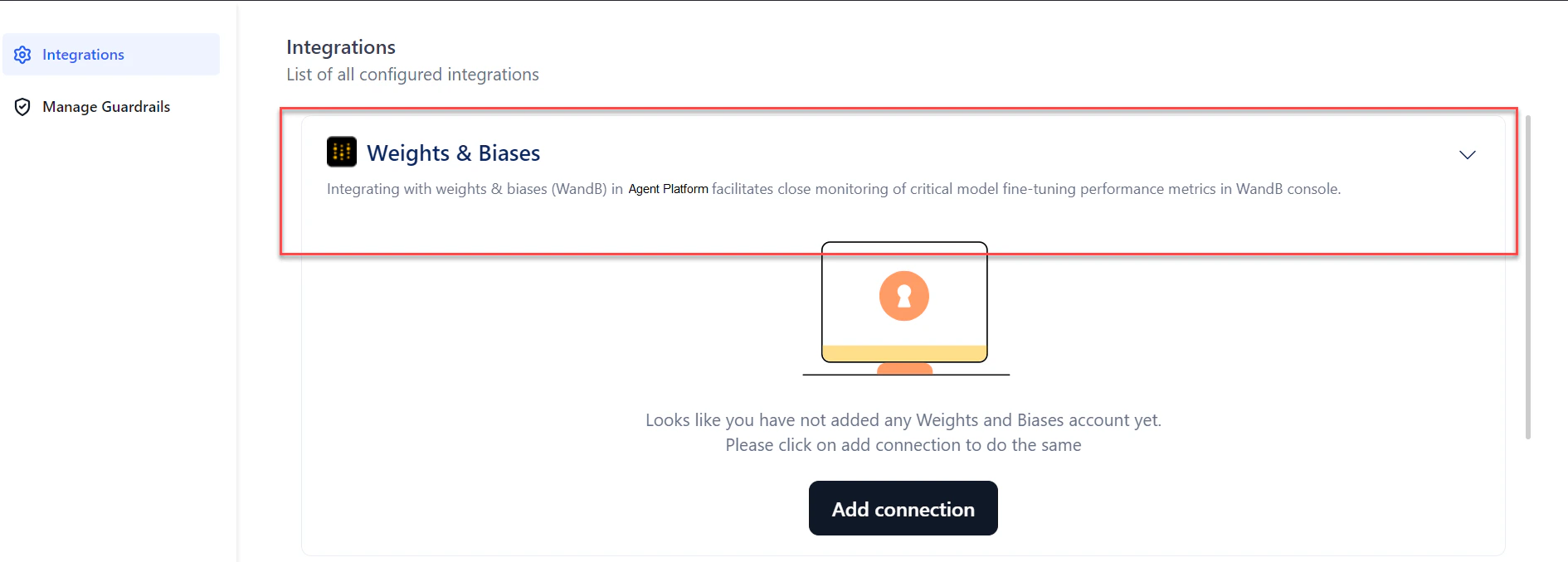 4. Click **Add connection**. The **Weights & Biases** dialog opens.
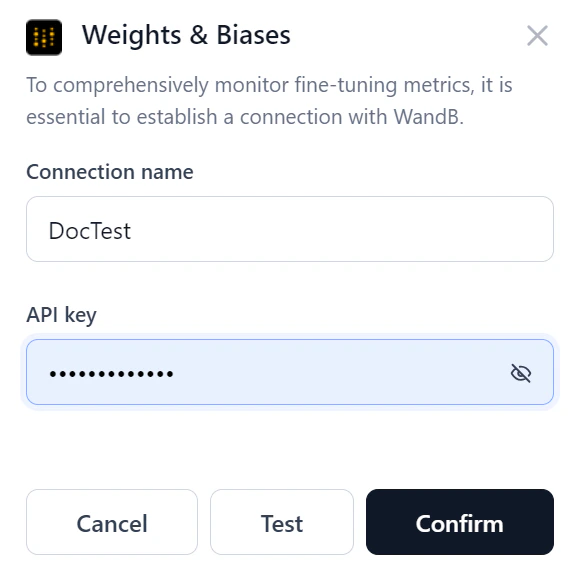 5. Enter the following details:
* **Connection name**: A unique name for the connection.
* **API key**: The unique identifier for your WandB account.
6. Click **Test** to verify the connection.
5. Enter the following details:
* **Connection name**: A unique name for the connection.
* **API key**: The unique identifier for your WandB account.
6. Click **Test** to verify the connection.
 * If the connection succeeds, click **Confirm** to complete the setup.
* If the connection fails, verify the credentials or cancel the setup.
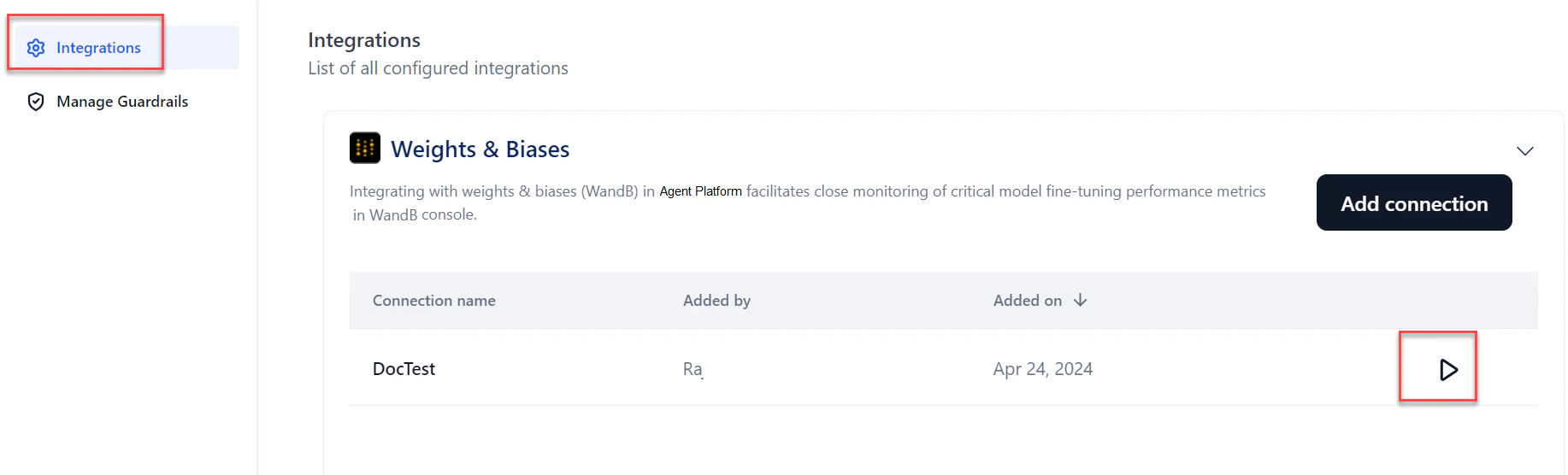
7. From the connections list, click the **Play** button to re-test the connection at any time.
* If the connection succeeds, click **Confirm** to complete the setup.
* If the connection fails, verify the credentials or cancel the setup.
7. From the connections list, click the **Play** button to re-test the connection at any time.
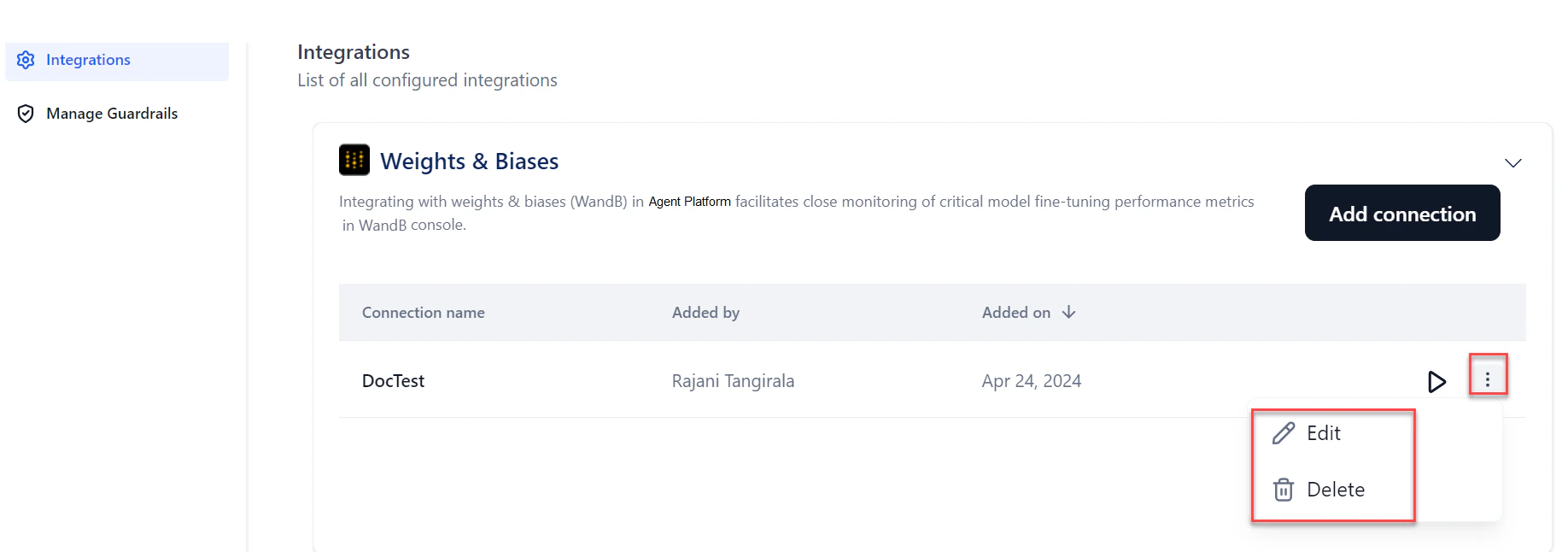
 8. To edit or delete the connection, hover over the connection name and click the **three dots** icon.
 Once the WandB connection is set up, the connection name appears in the **Weights and Biases** section of the [Create a Fine-Tuned Model](/ai-for-process/models/fine-tuned-model#create-a-fine-tuned-model) wizard.
## Integrate with Hugging Face
Connecting to Hugging Face lets you use publicly available text generation and text-to-text generation models directly in AI for Process. For private or exclusive models, provide your Hugging Face access token to authenticate.
1. In AI for Process, click **Settings** in the top menu.
2. Click **Integrations** in the left menu.
3. Click **Hugging Face** from the integrations list. The section expands.
Once the WandB connection is set up, the connection name appears in the **Weights and Biases** section of the [Create a Fine-Tuned Model](/ai-for-process/models/fine-tuned-model#create-a-fine-tuned-model) wizard.
## Integrate with Hugging Face
Connecting to Hugging Face lets you use publicly available text generation and text-to-text generation models directly in AI for Process. For private or exclusive models, provide your Hugging Face access token to authenticate.
1. In AI for Process, click **Settings** in the top menu.
2. Click **Integrations** in the left menu.
3. Click **Hugging Face** from the integrations list. The section expands.
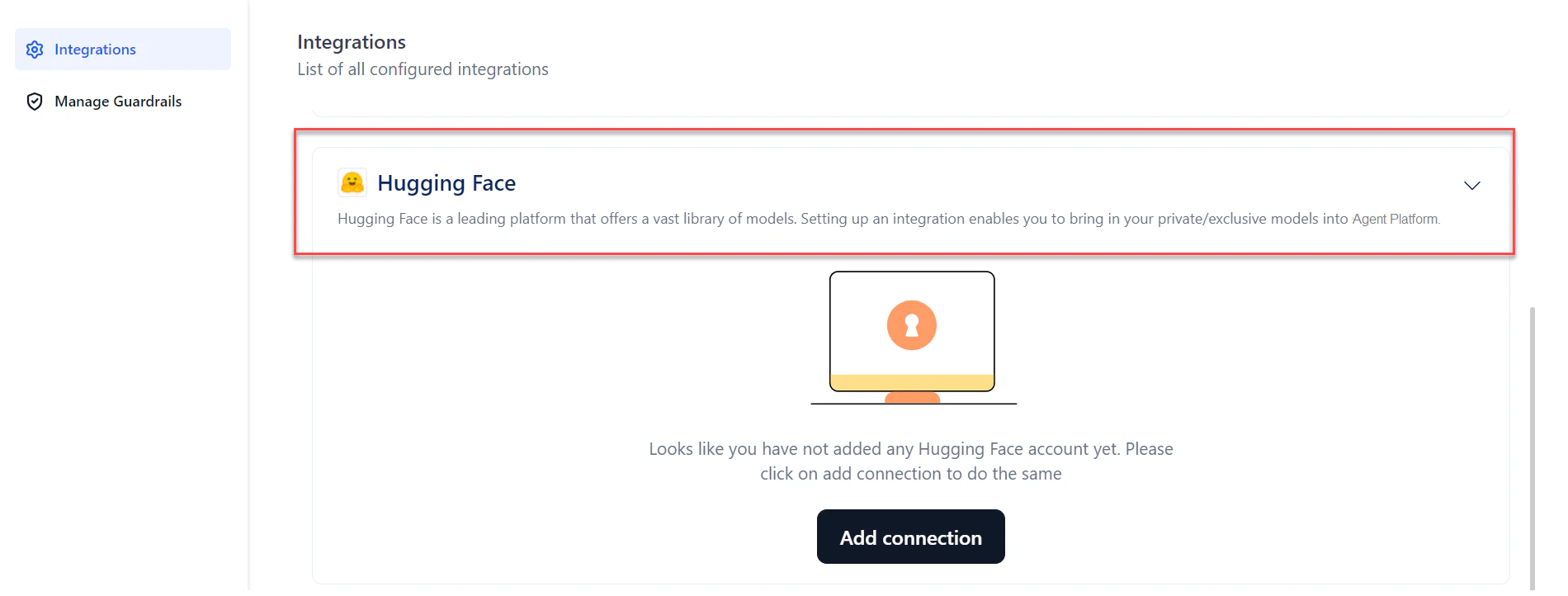 4. Click **Add connection**. The **Hugging Face** dialog opens.
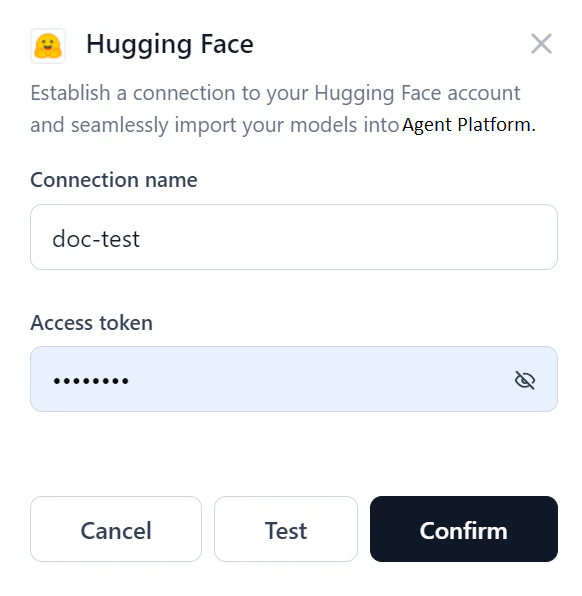 5. Enter the following details:
* **Connection name**: A unique name for the connection.
* **Access token**: The unique identifier for your Hugging Face account.
6. Click **Test** to verify the connection.
5. Enter the following details:
* **Connection name**: A unique name for the connection.
* **Access token**: The unique identifier for your Hugging Face account.
6. Click **Test** to verify the connection.
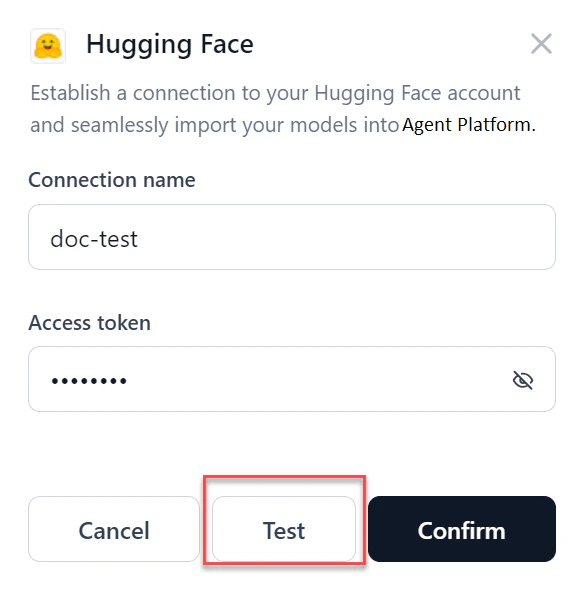 * If the connection succeeds, click **Confirm** to complete the setup.
* If the connection fails, verify the credentials or cancel the setup.
7. From the connections list, click the **Play** button to re-test the connection at any time.
* If the connection succeeds, click **Confirm** to complete the setup.
* If the connection fails, verify the credentials or cancel the setup.
7. From the connections list, click the **Play** button to re-test the connection at any time.
 8. To edit or delete the connection, hover over the connection name and click the **three dots** icon.
 * Once the connection is set up, the connection name appears in the dropdown when [selecting and deploying an open-source model](/ai-for-process/models/open-source-models#configure-your-open-source-model).
* If you delete a Hugging Face connection used for a model's deployment, the system prompts you to select a new connection on redeployment.
## Integrate with AWS S3 Bucket
Connecting to AWS S3 lets you import files from your S3 bucket and use them in AI for Process workflows.
1. In AI for Process, click **Settings** in the top menu.
2. Click **Integrations** in the left menu.
3. Click **AWS S3 bucket** from the integrations list. The section expands.
* Once the connection is set up, the connection name appears in the dropdown when [selecting and deploying an open-source model](/ai-for-process/models/open-source-models#configure-your-open-source-model).
* If you delete a Hugging Face connection used for a model's deployment, the system prompts you to select a new connection on redeployment.
## Integrate with AWS S3 Bucket
Connecting to AWS S3 lets you import files from your S3 bucket and use them in AI for Process workflows.
1. In AI for Process, click **Settings** in the top menu.
2. Click **Integrations** in the left menu.
3. Click **AWS S3 bucket** from the integrations list. The section expands.
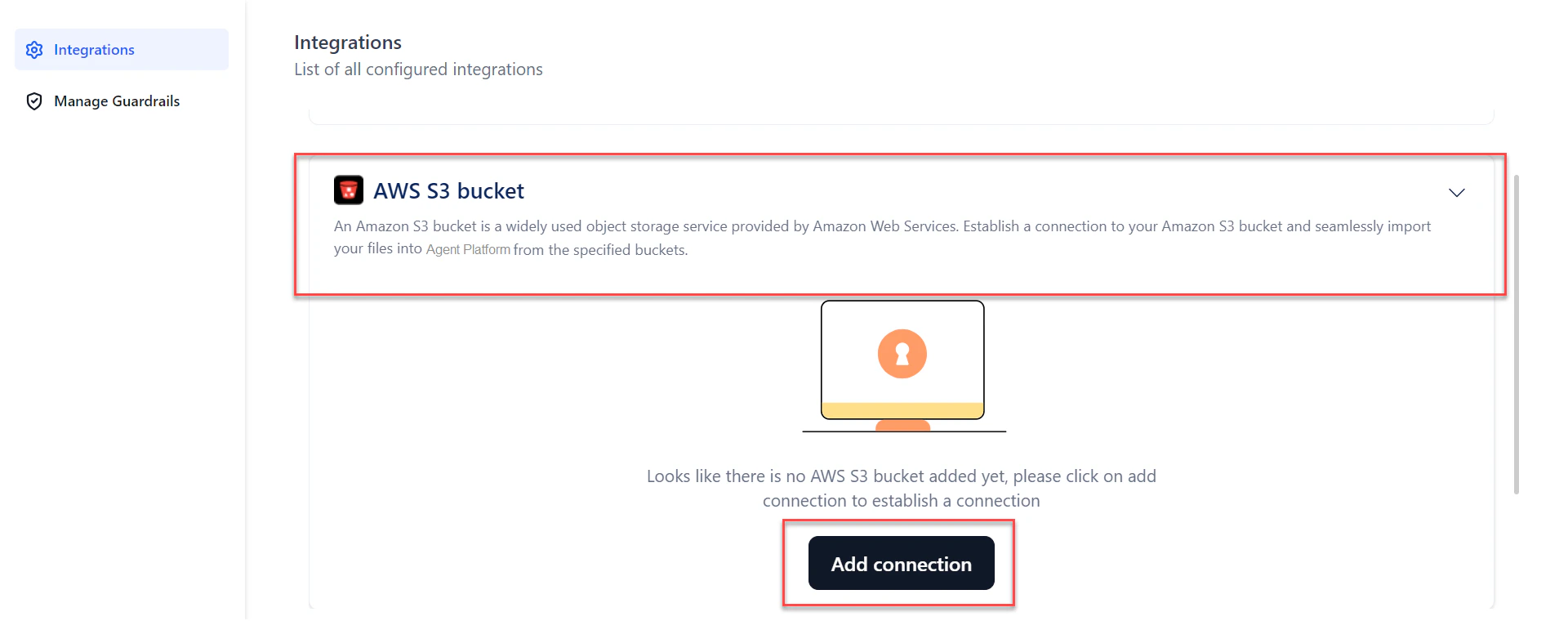 4. Click **Add connection**. The **AWS S3 bucket** dialog opens.
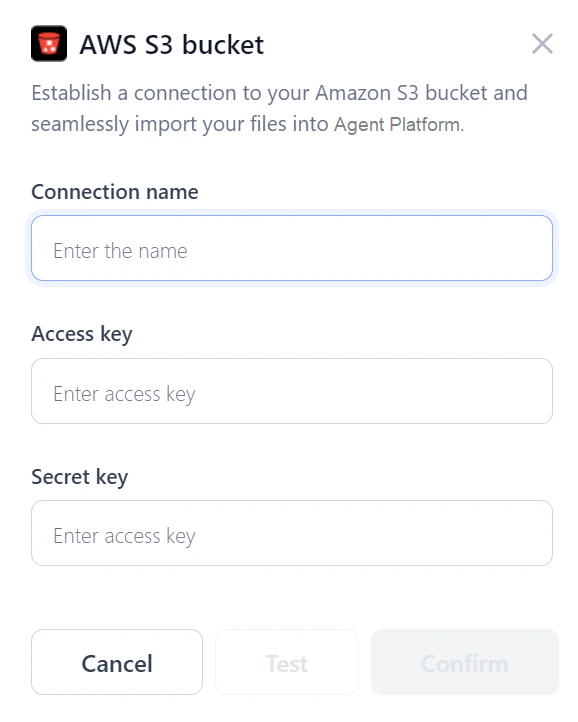 5. Enter the following details:
* **Connection name**: A unique name for the connection.
* **Access key**: The unique identifier for your AWS account.
* **Secret key**: The confidential key paired with the Access Key ID.
* **Bucket name**: The bucket name configured in the S3 console.
6. Click **Test** to verify the connection.
* If the connection succeeds, click **Confirm** to complete the setup.
* If the connection fails, verify the credentials or cancel the setup.
7. From the connections list, click the **Play** button to re-test the connection at any time.
### Use S3 Files in the Workflow Builder
Once the S3 connection is set up, you can use the imported files in the Workflow Builder canvas:
1. Create an **Input variable** with type **Remote File**.
2. Add an API node and point to the remote file using the **URL** field.
The file content is available in the context object and can be accessed in any subsequent nodes.
5. Enter the following details:
* **Connection name**: A unique name for the connection.
* **Access key**: The unique identifier for your AWS account.
* **Secret key**: The confidential key paired with the Access Key ID.
* **Bucket name**: The bucket name configured in the S3 console.
6. Click **Test** to verify the connection.
* If the connection succeeds, click **Confirm** to complete the setup.
* If the connection fails, verify the credentials or cancel the setup.
7. From the connections list, click the **Play** button to re-test the connection at any time.
### Use S3 Files in the Workflow Builder
Once the S3 connection is set up, you can use the imported files in the Workflow Builder canvas:
1. Create an **Input variable** with type **Remote File**.
2. Add an API node and point to the remote file using the **URL** field.
The file content is available in the context object and can be accessed in any subsequent nodes.