> ## Documentation Index
> Fetch the complete documentation index at: https://koreai.mintlify.site/llms.txt
> Use this file to discover all available pages before exploring further.
# Manage Roles, Permissions, and Access Levels
> Configure Role-based Access Control (RBAC) in AI for Process — understand role types, system and custom roles, access levels, and module-wise permissions for account, workflow, and agentic app features.
Role Management in the **Settings** console implements Role-based Access Control (RBAC) for account, workflow, and agentic app features. When you invite or add a user, you assign a role that defines their module-level permissions and access. Use it to control user actions, update roles when job functions change, and revoke access when a user leaves.
**Key points:**
* **Master Admin**: Automatically assigned to the account creator. Has the highest access level — can create, modify, and delete custom role permissions and manage all users.
* **App Owner**: Automatically assigned to the agentic app creator. Has full administrative access across all platform features and configurations.
* **Default role for new users**: **Viewer**, which provides the minimum required access. Change this anytime in the **Settings** console.
* **System roles** have preset permissions that cannot be modified or deleted. Duplicate a system role to customize it as a custom role.
* **Custom roles** let you tailor permissions and access for specific organizational needs.
***
## Role Types
A role type defines the scope of a role's permissions. Roles are auto-assigned based on context:
| Role Type | Scope | Auto-assigned to | Managed by |
| ------------ | ----------------------------------------------------- | ------------------------------- | ------------ |
| **Account** | Users, integrations, and security permissions | Users invited to the account | Master Admin |
| **Workflow** | Workflow configurations and deployments | Users invited to a workflow | tool admin |
| **App** | Agentic app features, configurations, and deployments | Users invited to an agentic app | App Owner |
***
## System-defined Roles
System-defined (default) roles are built into the system at the account, workflow, and agentic app levels. Their scopes, permissions, and access levels are preset and **cannot be modified or deleted**. To customize, [duplicate a system role](#duplicate-a-system-role) and edit the copy.
**Account roles:**
| Role | Description |
| ---------------- | ----------------------------------------------------------------------------------- |
| **Master Admin** | Full control over workflow and model management, and all Settings console features. |
| **Admin** | All permissions except model deletion, billing, and connectors. |
| **Member** | Can create workflows, add external models, and modify specific integrations. |
| **Viewer** | View-only access across the platform. |
**Workflow roles:**
| Role | Description |
| ---------------- | ---------------------------------------------------------------------------------------------------------------------------------- |
| **tool admin** | Full control over workflow management, versioning, sharing, deployment, deletion, configuration, monitoring, and API key creation. |
| **tool manager** | All workflow permissions except deletion. |
| **tool editor** | Can create versions, deploy, monitor, and export workflows. |
| **tool viewer** | Can view node details and generate output only. |
**App roles:**
| Role | Description |
| ----------------- | --------------------------------------------------------------------------------------------------------------------------------------- |
| **App Owner** | Full administrative access across all platform features and configurations. Cannot be removed from the system. Manages all other roles. |
| **App Admin** | Full access to most Agentic App system features. Can modify all roles except the App Owner's permissions. |
| **App Developer** | Full access to core development features including configurations, workflows, guardrails, and data. Limited admin access. |
| **App Viewer** | View-only access to specific features including configurations, workflows, guardrails, and simulation. |
| **App Tester** | View-only access to most system features — can observe and test agents and analytics. Cannot write or modify production features. |
***
## Custom Roles
Custom roles apply to **Account** and **Workflow** role types only. Admins can fully configure the scope, permissions, and access levels to match organizational requirements.
*Example:* A custom role "Banking workflow Conversation Moderator" can have full access to guardrail configuration but no access to create or deploy workflows.
**Important considerations:**
* After creating a custom role, it appears in the role dropdown during email invitations.
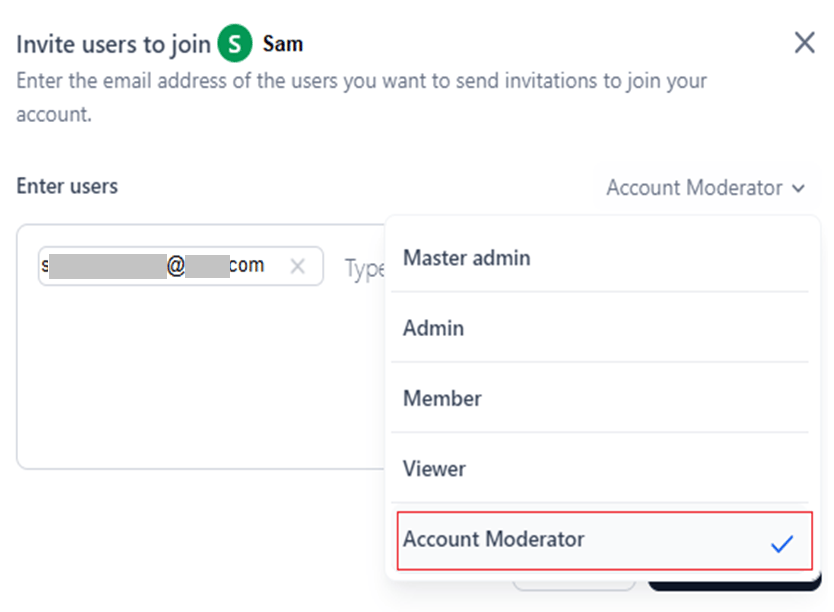 * You cannot delete a custom role assigned to active users or included in a pending invitation.
 To proceed, unassign the role or assign an alternative role to the affected users, then delete the custom role.
***
## Permissions
A **Permission** is a specific action (or set of actions) a user can perform for a module. Permissions are determined by:
* **Access level**: *Full*, *Custom*, *View*, or *No Access*.
* **Role type**: *Account*, *Workflow*, or *Agentic App*.
* **Role category**: *Admin* or *Workflow*.
*Example:* The system provides *full* access to *create a workflow version* to the *tool admin* role of the *Workflow* role type.
***
## Access Levels
| Level | Description |
| ------------- | ----------------------------------------------- |
| **Full** | View, add, edit, and delete module data. |
| **Custom** | View, add, and edit module data. Cannot delete. |
| **View** | View only. No edit or delete. |
| **No Access** | No access to the module's features. |
***
## Modules with Configurable Permissions
You can define permissions and access levels for the following modules:
* Agentic Apps.
* Workflows.
* Models.
* Prompts.
* Data.
* Evaluations/Evaluators.
* Settings — including Integrations, User Management, Security and Control, Monitoring, Guardrails, and Billing.
***
## Module-wise Permissions and Access Levels
The following tables summarize permissions and access levels for each default role type.
### Admin Role
| Module | Permission | Master Admin | Admin | Member | Viewer |
| ---------------------------------------------------------------- | ---------------------------------------------------------------------------------------------- | ------------ | ------ | --------- | --------- |
| **Workflows** | Create a workflow | Yes | Yes | Yes | No |
| | Workflow Import | Yes | Yes | Yes | No |
| **Models** | Access to Model ("View" is the default for a custom role) | Full | Custom | Custom | View |
| | Add an external model | Yes | Yes | Yes | No |
| | Create a custom model and perform fine-tuning | Yes | Yes | No | No |
| | Add open-source model | Yes | Yes | No | No |
| | Manage Deployment (deploy/undeploy/redeploy) | Yes | Yes | No | No |
| | Create or Delete an API Key for a model | Yes | Yes | No | No |
| | Export Model | Yes | Yes | No | No |
| | Delete Model | Yes | No | No | No |
| | Model Configuration | Yes | Yes | No | No |
| **Prompts** | Access to a Prompt | Yes | Yes | Yes | Yes |
| | Create an Experiment | Yes | Yes | Yes | No |
| **Settings** | Access to Settings (all sub-permissions depend on this being enabled) | Full | Custom | Custom | No Access |
| **Guardrails** | Access to guardrails at the account level | Yes | Yes | Yes | Yes |
| **Integrations** | Access to Integrations ("Full" is the default access) | Full | Full | Custom | View |
| | Delete an Integration | Yes | Yes | Yes | No |
| | Test an Integration | Yes | Yes | Yes | No |
| | Update an Integration | Yes | Yes | Yes | No |
| | Create an Integration | Yes | Yes | Yes | No |
| | Disable an Integration | Yes | Yes | Yes | No |
| **Users Management** | Access | Full | Full | No Access | No Access |
| | Invite User (via email or import) | Yes | Yes | No | No |
| | Bulk Import Users via files | Yes | Yes | No | No |
| | Assign/revoke system roles to users and manage profile and status | Yes | Yes | No | No |
| | Groups | Yes | Yes | No | No |
| | Enrolment | Yes | Yes | No | No |
| | Directory Sync to enroll users | Yes | Yes | No | No |
| | Manage Workflow Roles (Create and edit Custom roles, assign/revoke users) | Yes | Yes | No | No |
| | Manage Admin Roles (Create and edit Custom roles, assign/revoke users) | Yes | Yes | No | No |
| | Remove Users | Yes | Yes | No | No |
| | Manage User Settings (profile fields) — users with this permission can bulk change permissions | Yes | Yes | No | No |
| **Security and Control** | Access | Yes | Yes | No | No |
| | Create API App | Yes | Yes | No | No |
| | Delete API App | Yes | No | No | No |
| | Update API App | Yes | Yes | No | No |
| | Create or Delete an API Key | Yes | Yes | No | No |
| **Monitoring** | All actions | Yes | Yes | No | No |
| **Billing** (Plans, invoice, subscribe/unsubscribe, token usage) | All actions | Yes | No | No | No |
| **Workflow Management** | All actions | Yes | Yes | No | No |
| **Evaluations** | Access | Full | Custom | Custom | View |
| | Create projects | Yes | Yes | Yes | No |
| | Create Global Evaluators | Yes | Yes | Yes | No |
| | Delete Global Evaluators | Yes | No | No | No |
| | Edit Global Evaluators | Yes | Yes | No | No |
| **Manage Custom Scripts** | Access | Full | Custom | Custom | View |
| | Import New Custom Script | Yes | Yes | Yes | No |
| | Deploy/Re-deploy custom script | Yes | Yes | Yes | No |
| | Undeploy Custom Script | Yes | Yes | No | No |
| | Delete Custom Script | Yes | No | No | No |
| | Export Project | Yes | Yes | No | No |
| | Overview and Other Details | Yes | Yes | Yes | Yes |
| | Create/Delete an API Key | Yes | Yes | No | No |
### Workflow Role
| Module | Permission | tool admin | tool manager | tool editor | tool viewer |
| -------------- | -------------------------------------------------------------- | ---------- | ------------ | ----------- | ----------- |
| **Workflows** | Access to workflow ("Custom" is the default for a custom role) | Full | Custom | Custom | View |
| | Create a workflow Version | Yes | Yes | Yes | No |
| | Import as a Version | Yes | Yes | No | No |
| | Share/Unshare workflows, Assign workflow Roles, Remove users | Yes | Yes | No | No |
| | Delete workflow | Yes | No | No | No |
| | Export workflow | Yes | Yes | Yes | No |
| | Monitoring Trace of a workflow | Yes | Yes | Yes | Yes |
| | Editing Workflow | Yes | Yes | Yes | No |
| | Workflow configurations | Yes | Yes | Yes | No |
| | Create/Delete an API Key | Yes | Yes | No | No |
| **Deployment** | Manage Deployment (deploy/undeploy/redeploy) | Yes | Yes | Yes | No |
| **Guardrails** | Manage Guardrails Configuration | Yes | Yes | Yes | No |
| **Monitoring** | Audit Log | Yes | Yes | No | No |
### App Role — Agentic Apps
| Permission | App Owner | App Admin | App Developer | App Tester | App Viewer |
| --------------------- | --------- | --------- | ------------- | ---------- | ---------- |
| App Configuration | Full | Full | Full | View | View |
| Agents | Full | Full | Full | View | View |
| Code workflows | Full | Full | Full | View | View |
| Simulate | Full | View | View | View | View |
| Analytics | Full | Full | Full | View | No |
| Environments | Full | Full | View | View | No |
| API Keys | Full | Full | View | View | No |
| Audit Logs | Full | View | View | View | No |
| Guardrails | Full | Full | Full | View | View |
| Sharing & Permissions | Full | Full | Full | View | No |
| Versions | Full | Full | Full | View | No |
| Workflows Library | Full | Full | Full | View | View |
| Export workflow | Full | Full | Full | View | No |
**Detailed App role permissions:**
| Module | Permission | App Owner | App Admin | App Developer | App Tester | App Viewer |
| ------------------------- | --------------------------------------------------------------------------------------------- | --------- | --------- | ------------- | ---------- | ---------- |
| **App Configurations** | View Profile, View Config, view app versions | Yes | Yes | Yes | Yes | Yes |
| | Edit Profile, Edit Config, Import App version, Delete App version | Yes | Yes | Yes | No | No |
| **Agents** | View Agent | Yes | Yes | Yes | Yes | Yes |
| | Add Agent, Edit Agent, Link/Unlink workflows, Restore Agent/App Version, Create Agent Version | Yes | Yes | Yes | No | No |
| **Workflows** | View workflow | Yes | Yes | Yes | Yes | Yes |
| | Add workflow, Edit workflow, Create/Edit/Delete Inline workflow | Yes | Yes | Yes | No | No |
| **Simulate** | Test | Yes | Yes | Yes | Yes | Yes |
| **Analytics** | View Sessions, Traces, Generations | Yes | Yes | Yes | Yes | No |
| **Environments** | View Environment | Yes | Yes | Yes | Yes | No |
| | Create Environment, Delete Environment, Deploy Version | Yes | Yes | No | No | No |
| **API Keys** | View List | Yes | Yes | Yes | Yes | No |
| | Add Key | Yes | Yes | No | No | No |
| **Audit Logs** | View Logs | Yes | Yes | Yes | Yes | No |
| **Guardrails** | View Guardrails | Yes | Yes | Yes | Yes | Yes |
| | Add Guardrails, Edit Guardrails | Yes | Yes | Yes | No | No |
| **Sharing & Permissions** | View Users | Yes | Yes | Yes | Yes | No |
| | Add Users, Update Role | Yes | Yes | Yes | No | No |
### Evaluation Role
| Permission | Full | Edit | View |
| ---------------------------------------------------------- | ---- | ---- | ---- |
| Edit a project | Yes | Yes | No |
| Share a project | Yes | Yes | No |
| User management — invite/delete users from project | Yes | No | No |
| Delete a project | Yes | No | No |
| Create/delete custom evaluators | Yes | Yes | No |
| Create/rename evaluations | Yes | Yes | No |
| Delete Evaluations | Yes | No | No |
| Run an Evaluation | Yes | Yes | No |
| Add, edit, and delete evaluator columns and run evaluation | Yes | Yes | No |
| Create a custom evaluator | Yes | Yes | No |
| Save as a global evaluator | Yes | Yes | No |
| Export evaluation | Yes | Yes | No |
| Automate evaluation | Yes | Yes | No |
| Import rows | Yes | Yes | No |
| Add production data (model traces) | Yes | Yes | No |
| Run a prompt | Yes | Yes | No |
| Table options (user-specific) | Yes | Yes | Yes |
***
## Role Management Dashboard
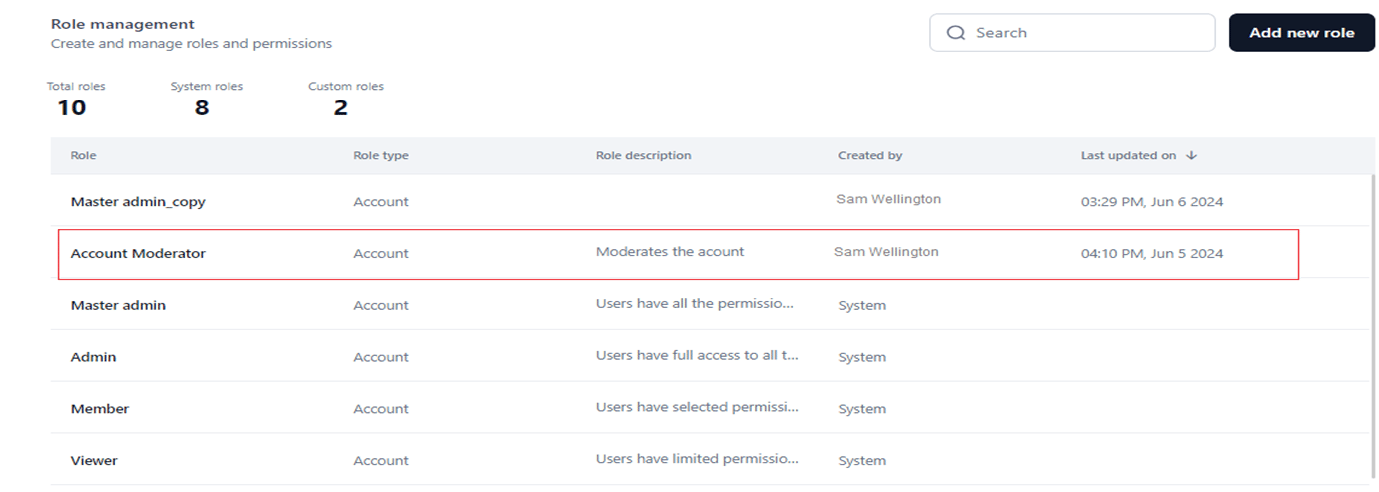
The **Role Management** dashboard shows all system and custom roles with their types, descriptions, and configurations.
To access the dashboard:
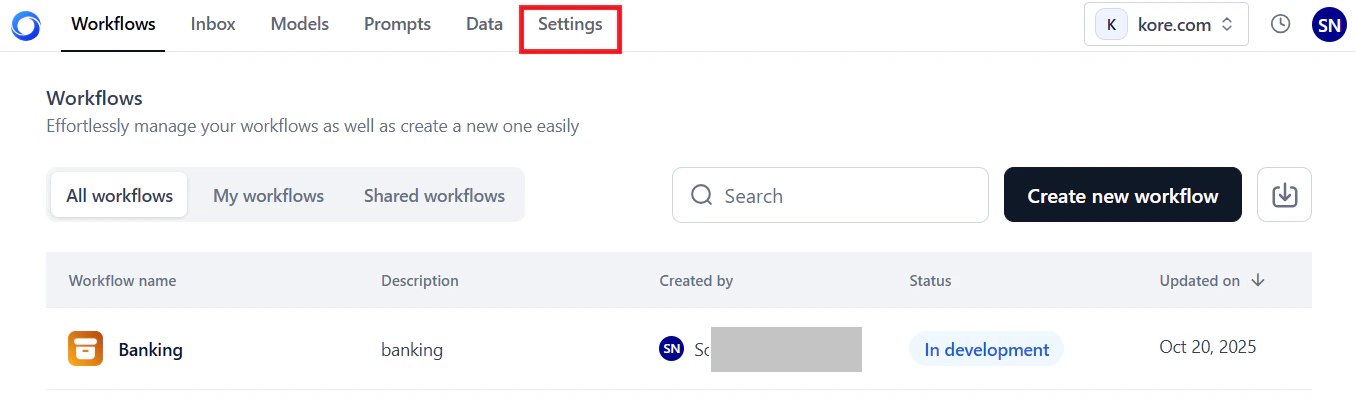
1. Click **Settings** on the top navigation bar.
To proceed, unassign the role or assign an alternative role to the affected users, then delete the custom role.
***
## Permissions
A **Permission** is a specific action (or set of actions) a user can perform for a module. Permissions are determined by:
* **Access level**: *Full*, *Custom*, *View*, or *No Access*.
* **Role type**: *Account*, *Workflow*, or *Agentic App*.
* **Role category**: *Admin* or *Workflow*.
*Example:* The system provides *full* access to *create a workflow version* to the *tool admin* role of the *Workflow* role type.
***
## Access Levels
| Level | Description |
| ------------- | ----------------------------------------------- |
| **Full** | View, add, edit, and delete module data. |
| **Custom** | View, add, and edit module data. Cannot delete. |
| **View** | View only. No edit or delete. |
| **No Access** | No access to the module's features. |
***
## Modules with Configurable Permissions
You can define permissions and access levels for the following modules:
* Agentic Apps.
* Workflows.
* Models.
* Prompts.
* Data.
* Evaluations/Evaluators.
* Settings — including Integrations, User Management, Security and Control, Monitoring, Guardrails, and Billing.
***
## Module-wise Permissions and Access Levels
The following tables summarize permissions and access levels for each default role type.
### Admin Role
| Module | Permission | Master Admin | Admin | Member | Viewer |
| ---------------------------------------------------------------- | ---------------------------------------------------------------------------------------------- | ------------ | ------ | --------- | --------- |
| **Workflows** | Create a workflow | Yes | Yes | Yes | No |
| | Workflow Import | Yes | Yes | Yes | No |
| **Models** | Access to Model ("View" is the default for a custom role) | Full | Custom | Custom | View |
| | Add an external model | Yes | Yes | Yes | No |
| | Create a custom model and perform fine-tuning | Yes | Yes | No | No |
| | Add open-source model | Yes | Yes | No | No |
| | Manage Deployment (deploy/undeploy/redeploy) | Yes | Yes | No | No |
| | Create or Delete an API Key for a model | Yes | Yes | No | No |
| | Export Model | Yes | Yes | No | No |
| | Delete Model | Yes | No | No | No |
| | Model Configuration | Yes | Yes | No | No |
| **Prompts** | Access to a Prompt | Yes | Yes | Yes | Yes |
| | Create an Experiment | Yes | Yes | Yes | No |
| **Settings** | Access to Settings (all sub-permissions depend on this being enabled) | Full | Custom | Custom | No Access |
| **Guardrails** | Access to guardrails at the account level | Yes | Yes | Yes | Yes |
| **Integrations** | Access to Integrations ("Full" is the default access) | Full | Full | Custom | View |
| | Delete an Integration | Yes | Yes | Yes | No |
| | Test an Integration | Yes | Yes | Yes | No |
| | Update an Integration | Yes | Yes | Yes | No |
| | Create an Integration | Yes | Yes | Yes | No |
| | Disable an Integration | Yes | Yes | Yes | No |
| **Users Management** | Access | Full | Full | No Access | No Access |
| | Invite User (via email or import) | Yes | Yes | No | No |
| | Bulk Import Users via files | Yes | Yes | No | No |
| | Assign/revoke system roles to users and manage profile and status | Yes | Yes | No | No |
| | Groups | Yes | Yes | No | No |
| | Enrolment | Yes | Yes | No | No |
| | Directory Sync to enroll users | Yes | Yes | No | No |
| | Manage Workflow Roles (Create and edit Custom roles, assign/revoke users) | Yes | Yes | No | No |
| | Manage Admin Roles (Create and edit Custom roles, assign/revoke users) | Yes | Yes | No | No |
| | Remove Users | Yes | Yes | No | No |
| | Manage User Settings (profile fields) — users with this permission can bulk change permissions | Yes | Yes | No | No |
| **Security and Control** | Access | Yes | Yes | No | No |
| | Create API App | Yes | Yes | No | No |
| | Delete API App | Yes | No | No | No |
| | Update API App | Yes | Yes | No | No |
| | Create or Delete an API Key | Yes | Yes | No | No |
| **Monitoring** | All actions | Yes | Yes | No | No |
| **Billing** (Plans, invoice, subscribe/unsubscribe, token usage) | All actions | Yes | No | No | No |
| **Workflow Management** | All actions | Yes | Yes | No | No |
| **Evaluations** | Access | Full | Custom | Custom | View |
| | Create projects | Yes | Yes | Yes | No |
| | Create Global Evaluators | Yes | Yes | Yes | No |
| | Delete Global Evaluators | Yes | No | No | No |
| | Edit Global Evaluators | Yes | Yes | No | No |
| **Manage Custom Scripts** | Access | Full | Custom | Custom | View |
| | Import New Custom Script | Yes | Yes | Yes | No |
| | Deploy/Re-deploy custom script | Yes | Yes | Yes | No |
| | Undeploy Custom Script | Yes | Yes | No | No |
| | Delete Custom Script | Yes | No | No | No |
| | Export Project | Yes | Yes | No | No |
| | Overview and Other Details | Yes | Yes | Yes | Yes |
| | Create/Delete an API Key | Yes | Yes | No | No |
### Workflow Role
| Module | Permission | tool admin | tool manager | tool editor | tool viewer |
| -------------- | -------------------------------------------------------------- | ---------- | ------------ | ----------- | ----------- |
| **Workflows** | Access to workflow ("Custom" is the default for a custom role) | Full | Custom | Custom | View |
| | Create a workflow Version | Yes | Yes | Yes | No |
| | Import as a Version | Yes | Yes | No | No |
| | Share/Unshare workflows, Assign workflow Roles, Remove users | Yes | Yes | No | No |
| | Delete workflow | Yes | No | No | No |
| | Export workflow | Yes | Yes | Yes | No |
| | Monitoring Trace of a workflow | Yes | Yes | Yes | Yes |
| | Editing Workflow | Yes | Yes | Yes | No |
| | Workflow configurations | Yes | Yes | Yes | No |
| | Create/Delete an API Key | Yes | Yes | No | No |
| **Deployment** | Manage Deployment (deploy/undeploy/redeploy) | Yes | Yes | Yes | No |
| **Guardrails** | Manage Guardrails Configuration | Yes | Yes | Yes | No |
| **Monitoring** | Audit Log | Yes | Yes | No | No |
### App Role — Agentic Apps
| Permission | App Owner | App Admin | App Developer | App Tester | App Viewer |
| --------------------- | --------- | --------- | ------------- | ---------- | ---------- |
| App Configuration | Full | Full | Full | View | View |
| Agents | Full | Full | Full | View | View |
| Code workflows | Full | Full | Full | View | View |
| Simulate | Full | View | View | View | View |
| Analytics | Full | Full | Full | View | No |
| Environments | Full | Full | View | View | No |
| API Keys | Full | Full | View | View | No |
| Audit Logs | Full | View | View | View | No |
| Guardrails | Full | Full | Full | View | View |
| Sharing & Permissions | Full | Full | Full | View | No |
| Versions | Full | Full | Full | View | No |
| Workflows Library | Full | Full | Full | View | View |
| Export workflow | Full | Full | Full | View | No |
**Detailed App role permissions:**
| Module | Permission | App Owner | App Admin | App Developer | App Tester | App Viewer |
| ------------------------- | --------------------------------------------------------------------------------------------- | --------- | --------- | ------------- | ---------- | ---------- |
| **App Configurations** | View Profile, View Config, view app versions | Yes | Yes | Yes | Yes | Yes |
| | Edit Profile, Edit Config, Import App version, Delete App version | Yes | Yes | Yes | No | No |
| **Agents** | View Agent | Yes | Yes | Yes | Yes | Yes |
| | Add Agent, Edit Agent, Link/Unlink workflows, Restore Agent/App Version, Create Agent Version | Yes | Yes | Yes | No | No |
| **Workflows** | View workflow | Yes | Yes | Yes | Yes | Yes |
| | Add workflow, Edit workflow, Create/Edit/Delete Inline workflow | Yes | Yes | Yes | No | No |
| **Simulate** | Test | Yes | Yes | Yes | Yes | Yes |
| **Analytics** | View Sessions, Traces, Generations | Yes | Yes | Yes | Yes | No |
| **Environments** | View Environment | Yes | Yes | Yes | Yes | No |
| | Create Environment, Delete Environment, Deploy Version | Yes | Yes | No | No | No |
| **API Keys** | View List | Yes | Yes | Yes | Yes | No |
| | Add Key | Yes | Yes | No | No | No |
| **Audit Logs** | View Logs | Yes | Yes | Yes | Yes | No |
| **Guardrails** | View Guardrails | Yes | Yes | Yes | Yes | Yes |
| | Add Guardrails, Edit Guardrails | Yes | Yes | Yes | No | No |
| **Sharing & Permissions** | View Users | Yes | Yes | Yes | Yes | No |
| | Add Users, Update Role | Yes | Yes | Yes | No | No |
### Evaluation Role
| Permission | Full | Edit | View |
| ---------------------------------------------------------- | ---- | ---- | ---- |
| Edit a project | Yes | Yes | No |
| Share a project | Yes | Yes | No |
| User management — invite/delete users from project | Yes | No | No |
| Delete a project | Yes | No | No |
| Create/delete custom evaluators | Yes | Yes | No |
| Create/rename evaluations | Yes | Yes | No |
| Delete Evaluations | Yes | No | No |
| Run an Evaluation | Yes | Yes | No |
| Add, edit, and delete evaluator columns and run evaluation | Yes | Yes | No |
| Create a custom evaluator | Yes | Yes | No |
| Save as a global evaluator | Yes | Yes | No |
| Export evaluation | Yes | Yes | No |
| Automate evaluation | Yes | Yes | No |
| Import rows | Yes | Yes | No |
| Add production data (model traces) | Yes | Yes | No |
| Run a prompt | Yes | Yes | No |
| Table options (user-specific) | Yes | Yes | Yes |
***
## Role Management Dashboard
The **Role Management** dashboard shows all system and custom roles with their types, descriptions, and configurations.
To access the dashboard:
1. Click **Settings** on the top navigation bar.
 2. In the **Users Management** section on the left menu, click **Role Management**.
The dashboard shows:
* **Summary counts**: Total roles, system roles, and custom roles.
2. In the **Users Management** section on the left menu, click **Role Management**.
The dashboard shows:
* **Summary counts**: Total roles, system roles, and custom roles.
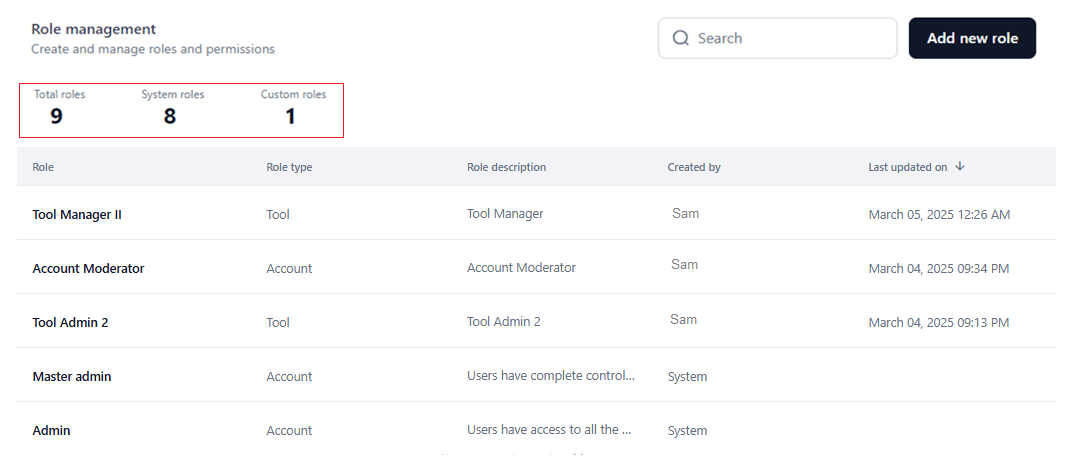 * **Role table** with the following columns:
* **Role**: The name of the system-generated or custom role.
* **Role Type**: Scope of the role — **Account**, **Workflow**, or **Agentic App**.
* **Description**: Pre-defined for system roles; you provide it for custom roles. Hover to view the full description.
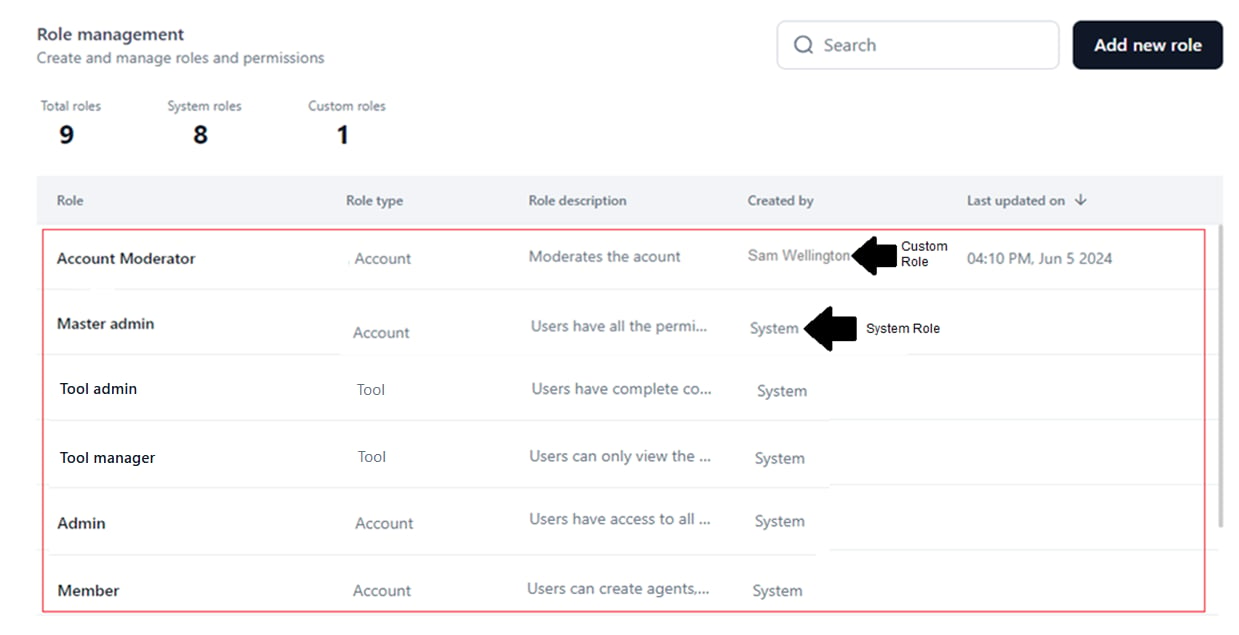
* **Created by**: Shows *System* for system roles, or the name of the user who created the custom role.
* **Last Updated On**: The date and time the custom role was last updated. Not shown for system roles since they cannot be modified.
* **Role table** with the following columns:
* **Role**: The name of the system-generated or custom role.
* **Role Type**: Scope of the role — **Account**, **Workflow**, or **Agentic App**.
* **Description**: Pre-defined for system roles; you provide it for custom roles. Hover to view the full description.
* **Created by**: Shows *System* for system roles, or the name of the user who created the custom role.
* **Last Updated On**: The date and time the custom role was last updated. Not shown for system roles since they cannot be modified.
 ### Search for a Role
1. Go to the **Role Management** dashboard.
2. Click the **Search** text field.
3. Enter the role name.
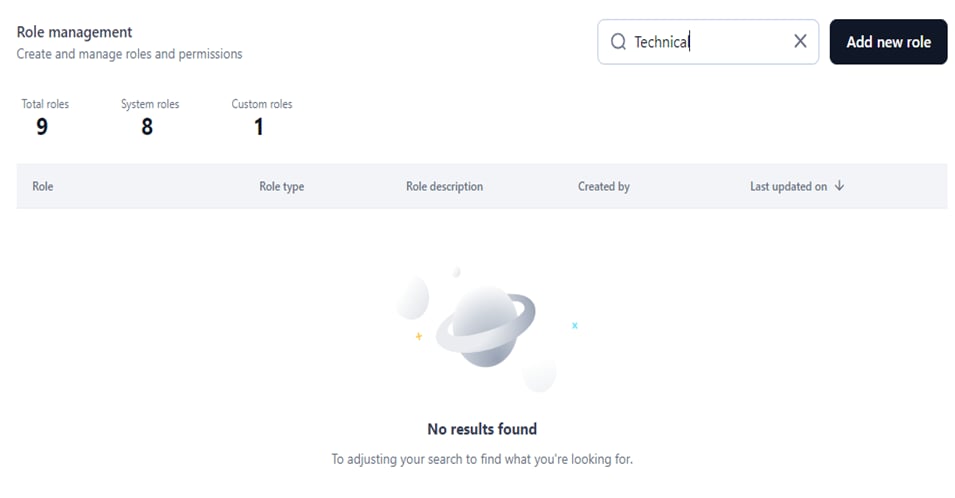
Matching results appear automatically. If no results are found:
### Search for a Role
1. Go to the **Role Management** dashboard.
2. Click the **Search** text field.
3. Enter the role name.
Matching results appear automatically. If no results are found:
 ***
## Manage System Roles
System roles cannot be created, modified, or deleted — permissions are pre-defined. You can duplicate them as custom roles and modify the copies.
### View Role Details
1. Go to the **Role Management** dashboard.
2. Click the **Ellipses** icon for a system role.
3. Select **View**.
***
## Manage System Roles
System roles cannot be created, modified, or deleted — permissions are pre-defined. You can duplicate them as custom roles and modify the copies.
### View Role Details
1. Go to the **Role Management** dashboard.
2. Click the **Ellipses** icon for a system role.
3. Select **View**.
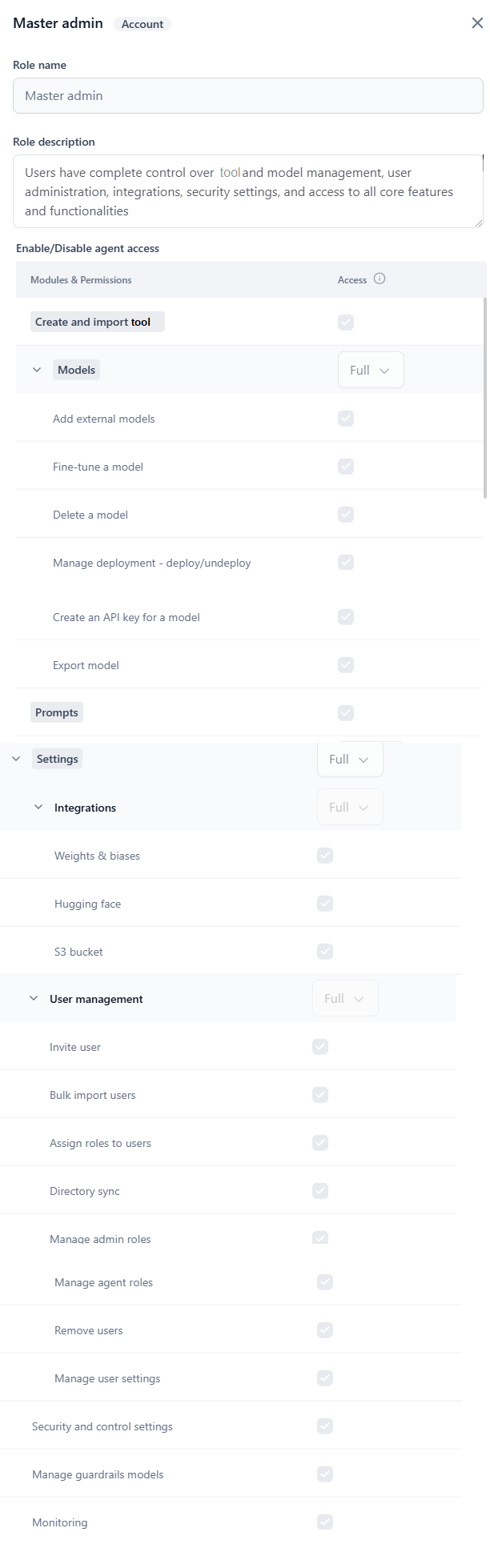
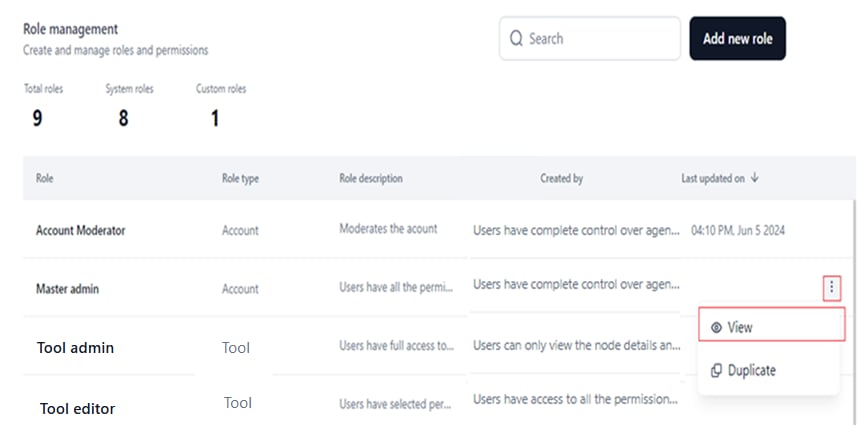 The details panel shows the role title, role type, name, description, and the configuration panel for module-wise permissions and access levels.
 ### Duplicate a System Role
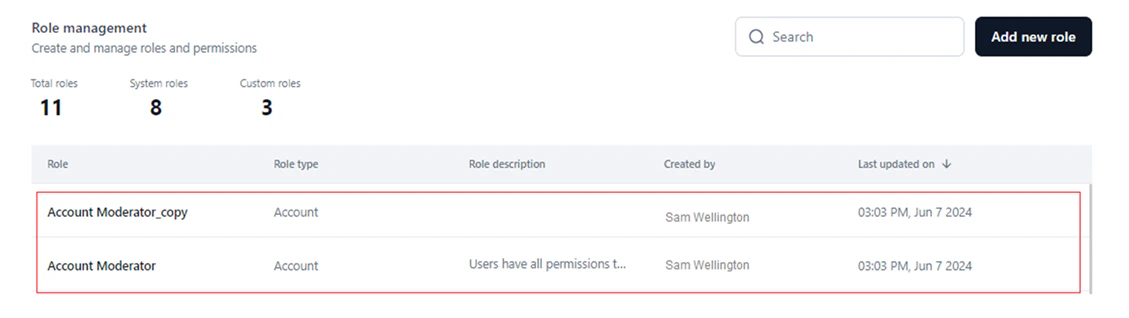
Duplicating creates a custom role that copies the system role's name, role type, and permission configurations. You can then modify, delete, or further duplicate this custom role.
* Changes to the duplicate do not affect the original system role.
* The **Last Updated On** value shows when the duplicate was created.
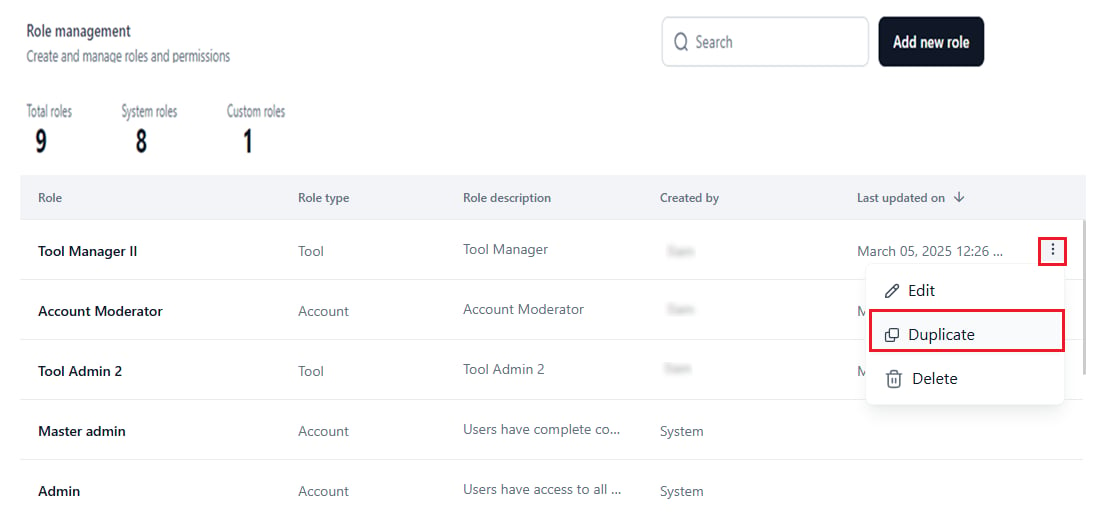
1. Go to the **Role Management** dashboard.
2. Click the **Ellipses** icon for a system role.
3. Select **Duplicate**.
### Duplicate a System Role
Duplicating creates a custom role that copies the system role's name, role type, and permission configurations. You can then modify, delete, or further duplicate this custom role.
* Changes to the duplicate do not affect the original system role.
* The **Last Updated On** value shows when the duplicate was created.
1. Go to the **Role Management** dashboard.
2. Click the **Ellipses** icon for a system role.
3. Select **Duplicate**.
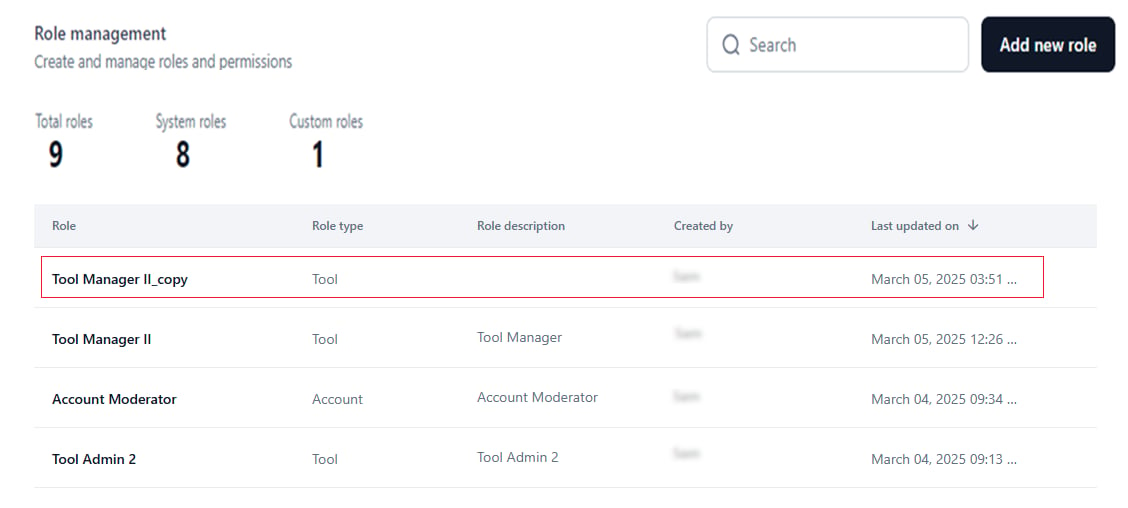
 The duplicate appears with the system role name followed by ***copy***. You can rename it.
 ***
## Manage Custom Roles
### Add a Custom Role
1. Go to **Role Management** on the **Settings** console.
2. Click **Add New Role**.
***
## Manage Custom Roles
### Add a Custom Role
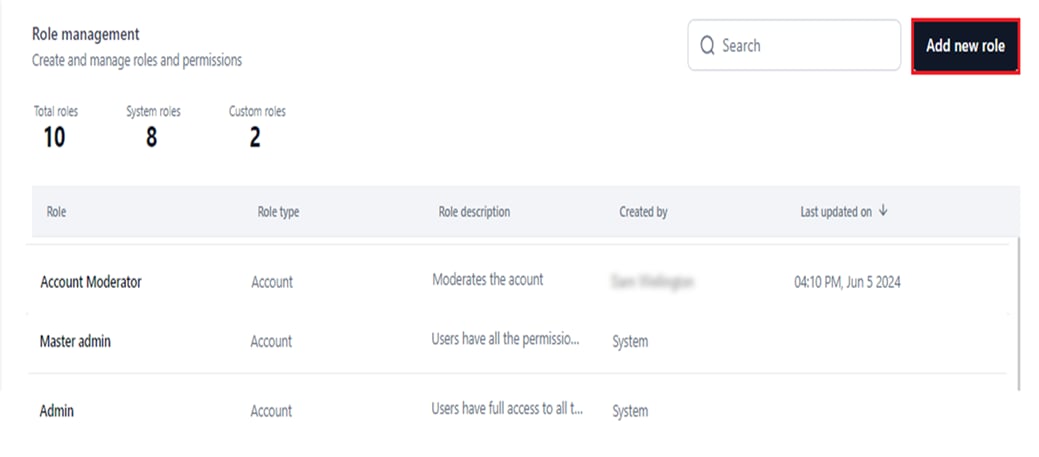
1. Go to **Role Management** on the **Settings** console.
2. Click **Add New Role**.
 3. In the **New Role** window:
* Enter a unique **Role Name** and **Role Description**.
3. In the **New Role** window:
* Enter a unique **Role Name** and **Role Description**.
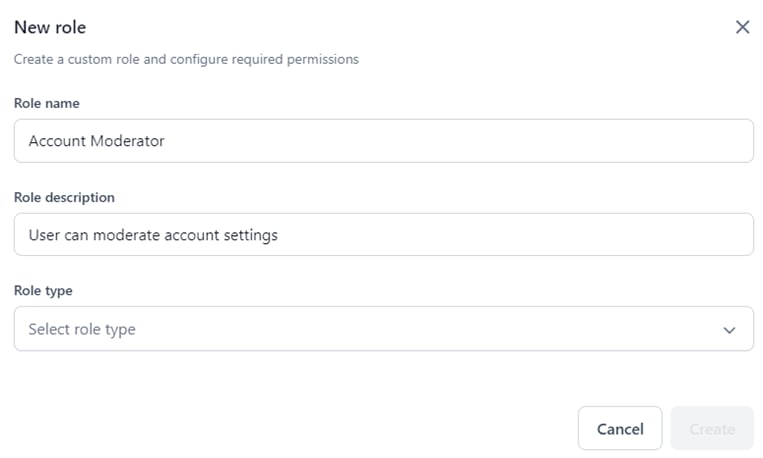 * Select the **Role Type** from the dropdown.
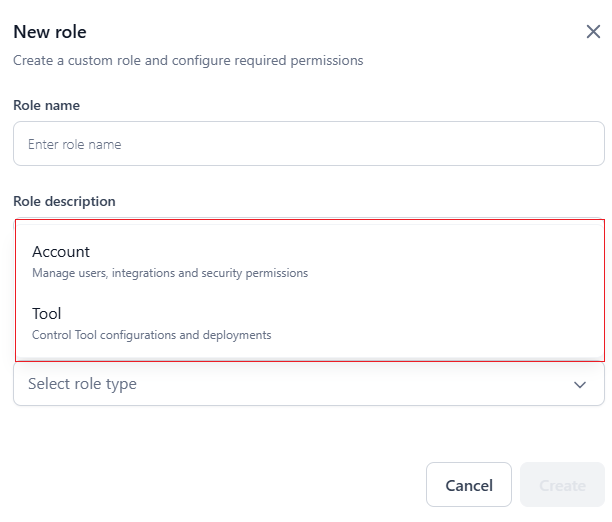 **If Role Type is Account:**
Enable or select access levels for module-wise permissions in the **Enable/Disable workflow access** section. If you select **Custom**, you can individually enable or disable permissions for:
* Create and Import workflow.
* Create agentic apps.
* Models (Add External models, Fine-tune, Delete, Manage Deployment, Create API key, Export).
* Prompts.
* Settings:
* Integrations (Weights and Biases, Hugging Face, S3 Bucket).
* User Management (Invite user, Bulk import, Assign roles, Directory Sync, Manage admin/workflow roles, Remove users, Manage user settings).
* Security and Control Settings.
* Manage Guardrail Models.
* Monitoring.
* Billing.
**If Role Type is Account:**
Enable or select access levels for module-wise permissions in the **Enable/Disable workflow access** section. If you select **Custom**, you can individually enable or disable permissions for:
* Create and Import workflow.
* Create agentic apps.
* Models (Add External models, Fine-tune, Delete, Manage Deployment, Create API key, Export).
* Prompts.
* Settings:
* Integrations (Weights and Biases, Hugging Face, S3 Bucket).
* User Management (Invite user, Bulk import, Assign roles, Directory Sync, Manage admin/workflow roles, Remove users, Manage user settings).
* Security and Control Settings.
* Manage Guardrail Models.
* Monitoring.
* Billing.
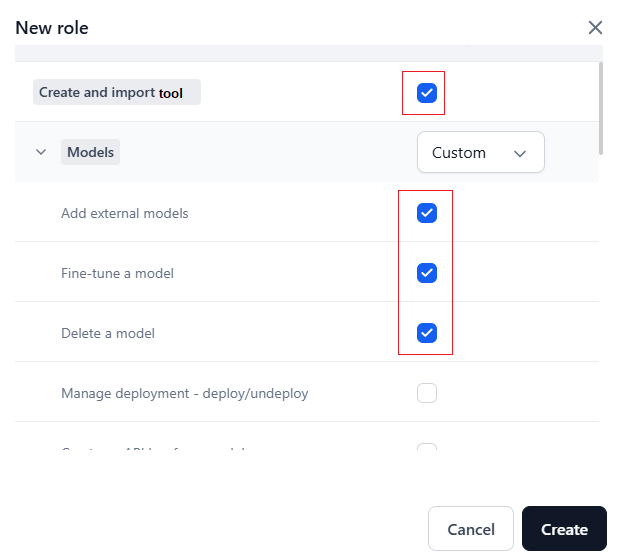 Select access levels (**Full**, **Custom**, **View**, **No Access**) for Models, Settings, Integrations, and User Management.
**Access level behavior:**
* Select the access level for **Models** first to activate its permissions. Skipping this step automatically disables them.
Select access levels (**Full**, **Custom**, **View**, **No Access**) for Models, Settings, Integrations, and User Management.
**Access level behavior:**
* Select the access level for **Models** first to activate its permissions. Skipping this step automatically disables them.
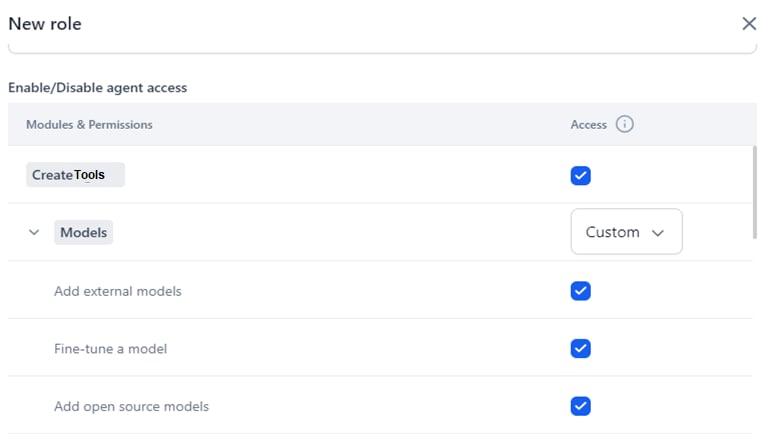 * **Full** automatically selects all module permissions.
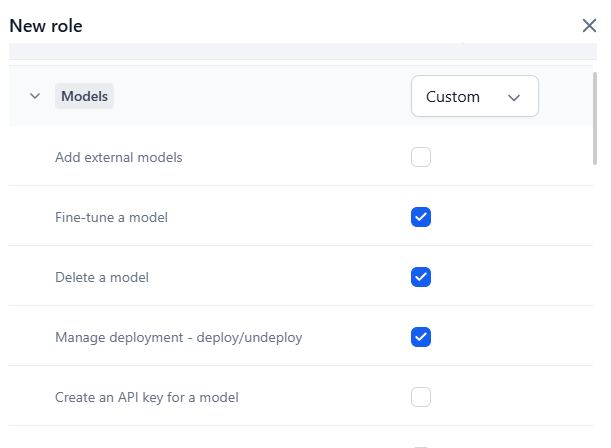
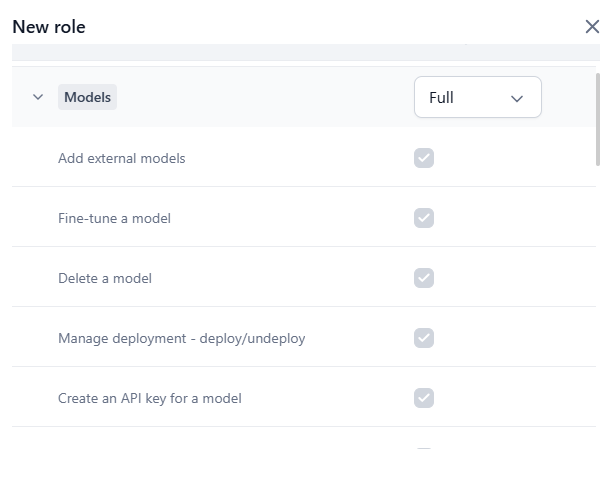 * **Custom** lets you select individual permissions.
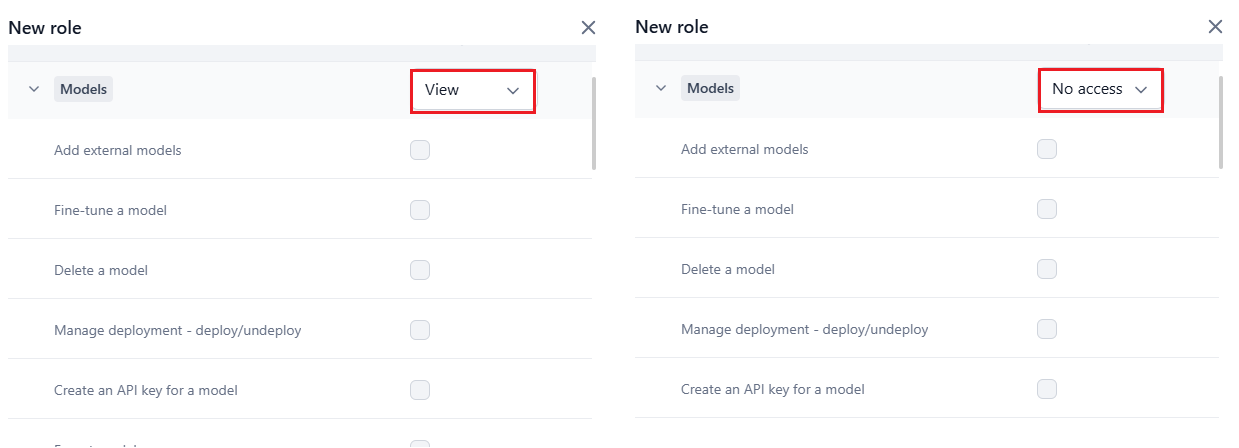
 * **View** and **No Access** disable permission selection.
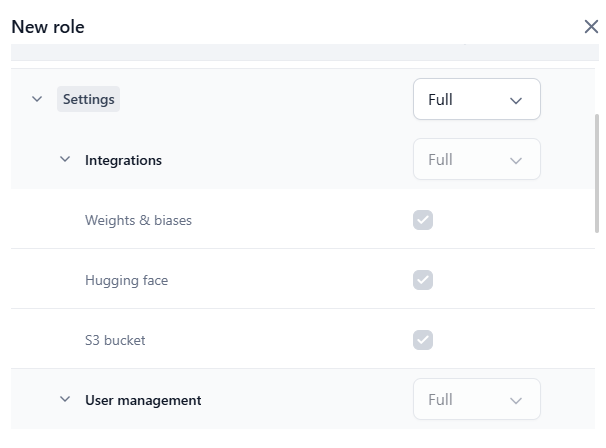
 * **Full** for **Settings** sets Integrations and User Management to Full, and enables all permissions for: Integrations (View is always on by default), User Management, Security and Control Settings, Manage Guardrail Models, Monitoring, and Billing.
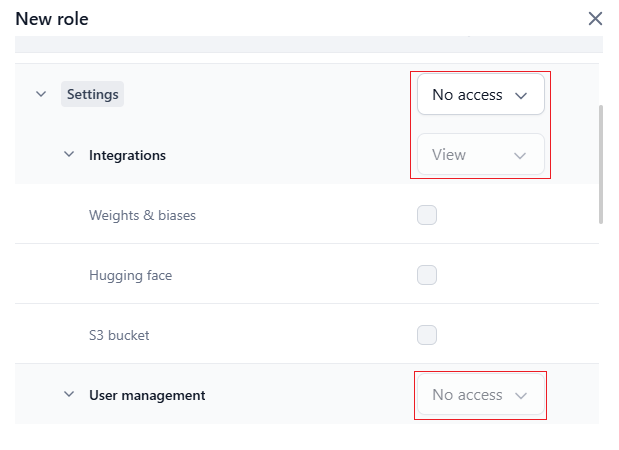
 * **No Access** for **Settings** sets Integrations to View and User Management to No Access, and disables all sub-permissions (View for Integrations remains on by default).
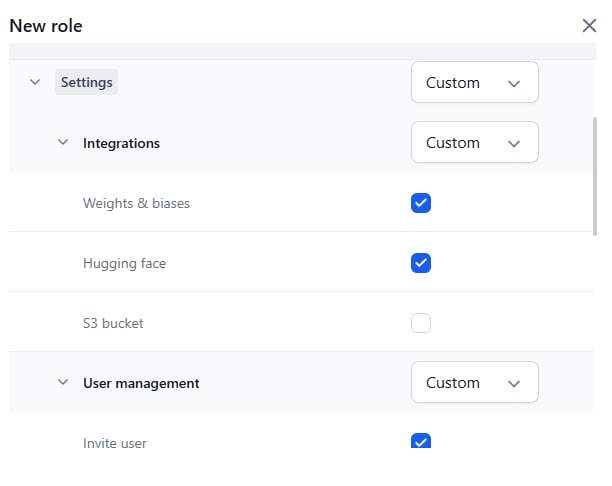
 * **Custom** for **Settings** sets Integrations and User Management to Custom, where you can select individual permissions. You can then change Integrations to Full or View, and User Management to Full or No Access.
 **If Role Type is Workflow:**
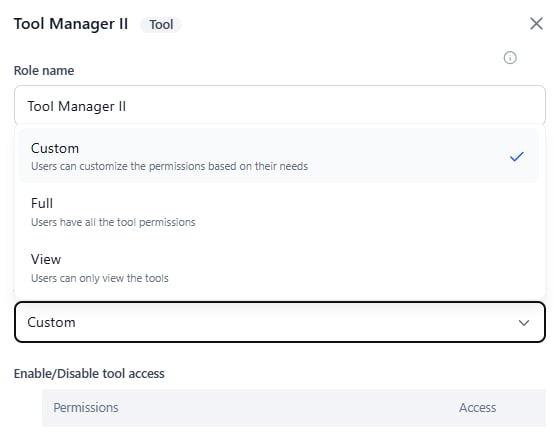
Select **Custom**, **View**, or **Full** for **Access**. Custom is the default.
**If Role Type is Workflow:**
Select **Custom**, **View**, or **Full** for **Access**. Custom is the default.
 Set workflow permissions in the **Enable/Disable workflow access** section:
* **View**: All permissions automatically disabled.
* **Full**: All permissions automatically enabled.
* **Custom**: Select individual workflow permissions to enable.
4. Click **Create**.
The custom role is created and listed on the **Role Management** dashboard.
Set workflow permissions in the **Enable/Disable workflow access** section:
* **View**: All permissions automatically disabled.
* **Full**: All permissions automatically enabled.
* **Custom**: Select individual workflow permissions to enable.
4. Click **Create**.
The custom role is created and listed on the **Role Management** dashboard.
 ### Edit a Custom Role
You can modify the role name, description, and access levels for Account or Workflow role types.
* The **Role Type** cannot be changed after creation. Create a new custom role to assign a different type.
* Updating a custom role changes permissions for all assigned users.
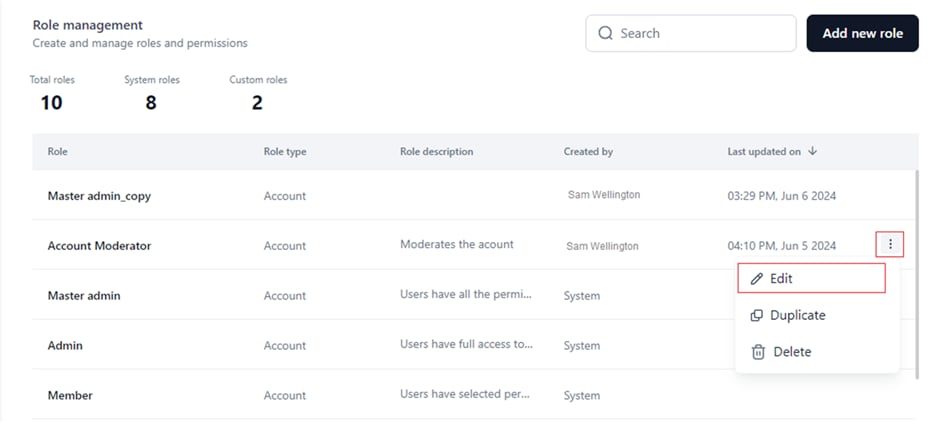
1. Go to the **Role Management** dashboard.
2. Click the **Ellipses** icon for the custom role.
3. Select **Edit**.
### Edit a Custom Role
You can modify the role name, description, and access levels for Account or Workflow role types.
* The **Role Type** cannot be changed after creation. Create a new custom role to assign a different type.
* Updating a custom role changes permissions for all assigned users.
1. Go to the **Role Management** dashboard.
2. Click the **Ellipses** icon for the custom role.
3. Select **Edit**.
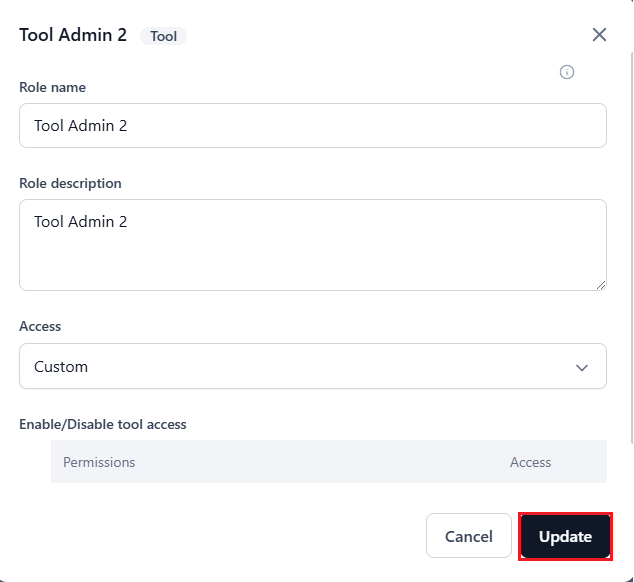
 4. In the **Update Role** window, edit the Role Name, Role Description, and/or Access level (*Custom*, *Full*, or *View*).
You cannot reset access levels for module-wise permissions in the **Enable/disable workflow access** section.
5. Click **Update**.
4. In the **Update Role** window, edit the Role Name, Role Description, and/or Access level (*Custom*, *Full*, or *View*).
You cannot reset access levels for module-wise permissions in the **Enable/disable workflow access** section.
5. Click **Update**.
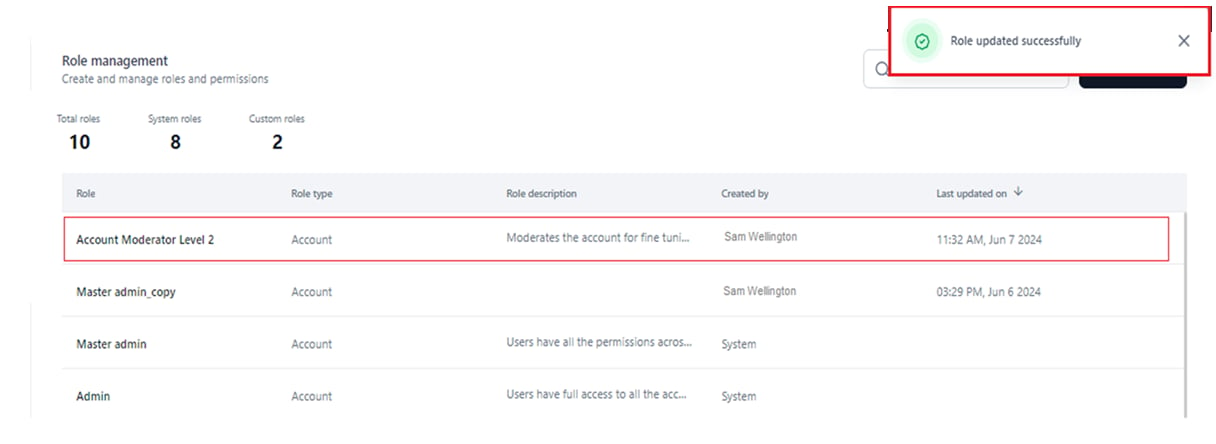
 A success message confirms the update.
 ### Delete a Custom Role
Deleting a custom role permanently removes it from the system and unassigns it from all users.
You can only delete one role at a time. Bulk delete is not supported.
**Prerequisite:** Ensure the custom role is not assigned to any active users. If it is, either [reassign an alternative role](#reassign-an-alternative-role-to-active-users) to active users, or delete inactive users with this role.
1. Go to the **Role Management** dashboard.
2. Click the **Ellipses** icon for the custom role.
3. Select **Delete**.
### Delete a Custom Role
Deleting a custom role permanently removes it from the system and unassigns it from all users.
You can only delete one role at a time. Bulk delete is not supported.
**Prerequisite:** Ensure the custom role is not assigned to any active users. If it is, either [reassign an alternative role](#reassign-an-alternative-role-to-active-users) to active users, or delete inactive users with this role.
1. Go to the **Role Management** dashboard.
2. Click the **Ellipses** icon for the custom role.
3. Select **Delete**.
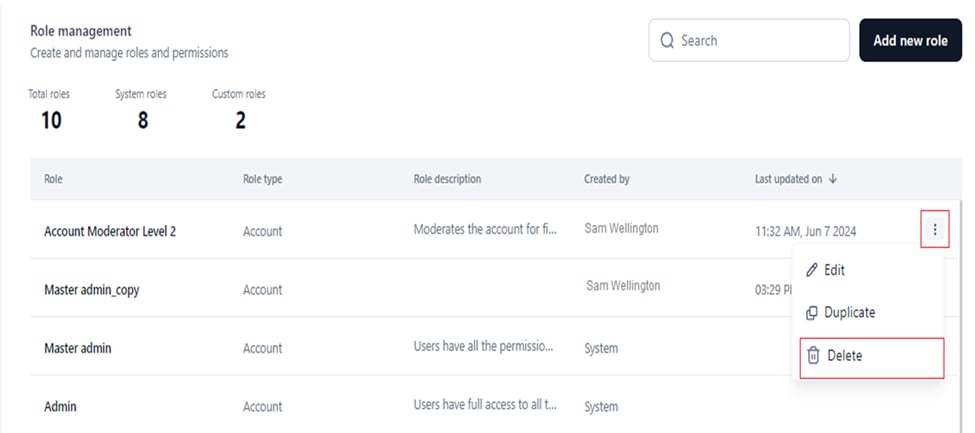 4. Click **Confirm**.
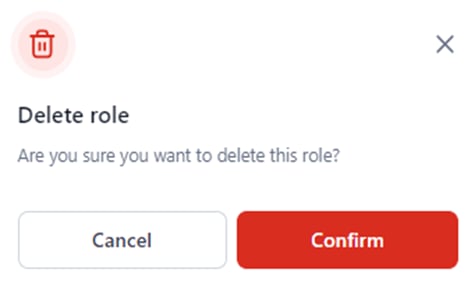 A success message appears and the role is removed from the dashboard.
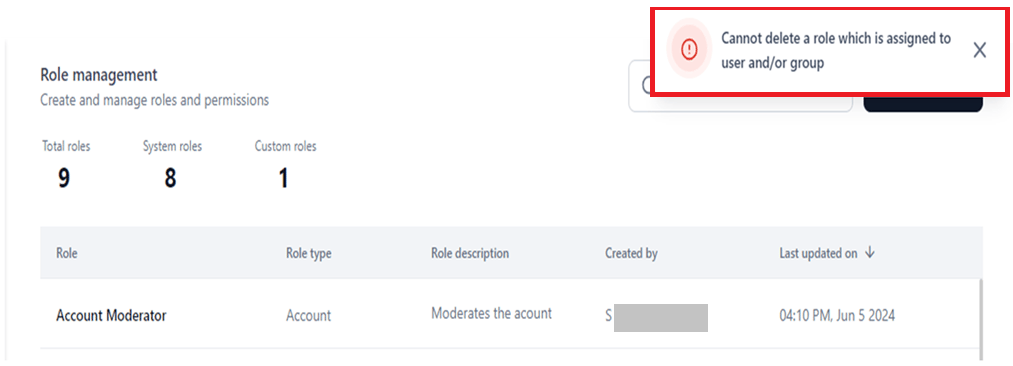
**Deletion error**
If the role is assigned to active or inactive users, the following error appears:
A success message appears and the role is removed from the dashboard.
**Deletion error**
If the role is assigned to active or inactive users, the following error appears:
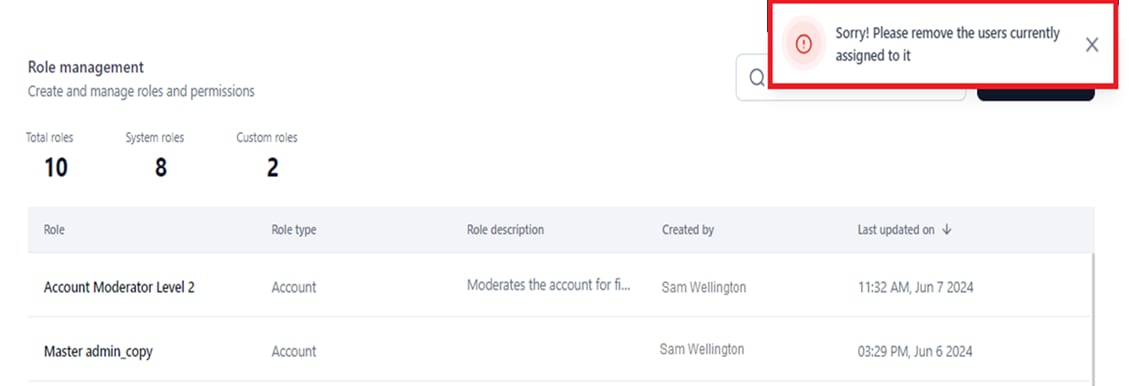 Use one of the following workarounds:
#### Reassign an Alternative Role to Active Users
1. Go to **Users Management** > **Users** on the **Settings** console.
2. Click the **Account Role** entry for the user.
3. Select the new role.
Use one of the following workarounds:
#### Reassign an Alternative Role to Active Users
1. Go to **Users Management** > **Users** on the **Settings** console.
2. Click the **Account Role** entry for the user.
3. Select the new role.
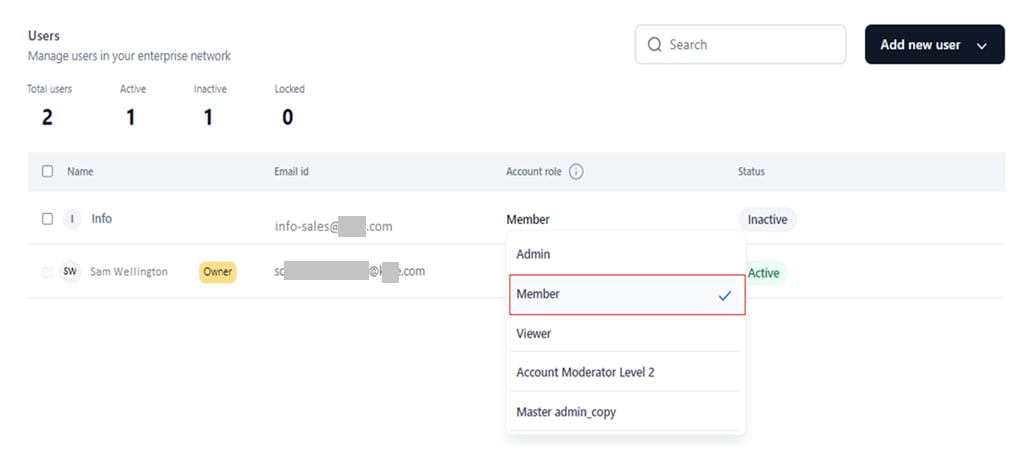 After reassigning, return to **Role Management** and delete the role. The custom role count decreases.
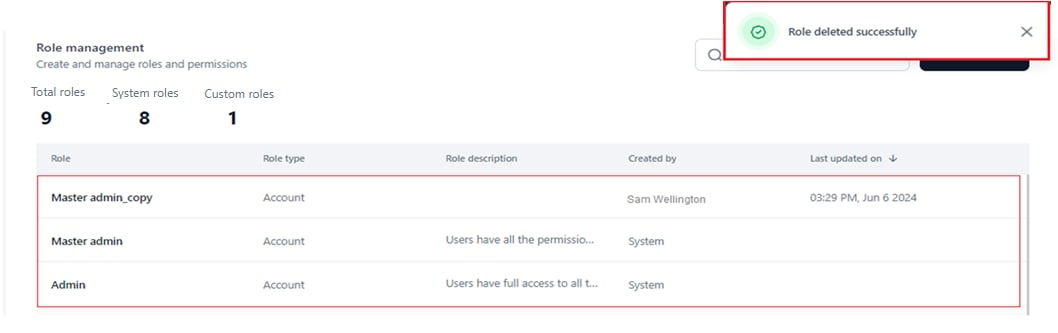 #### Delete Assigned Users
Go to the **Users Management** dashboard and delete all assigned users individually or in bulk. After deleting users, return to **Role Management** and delete the custom role.
### Duplicate a Custom Role
Like a system role, you can duplicate a custom role to copy its name, role type, and permission configurations. Follow the same steps as [Duplicate a System Role](#duplicate-a-system-role).
#### Delete Assigned Users
Go to the **Users Management** dashboard and delete all assigned users individually or in bulk. After deleting users, return to **Role Management** and delete the custom role.
### Duplicate a Custom Role
Like a system role, you can duplicate a custom role to copy its name, role type, and permission configurations. Follow the same steps as [Duplicate a System Role](#duplicate-a-system-role).