> ## Documentation Index
> Fetch the complete documentation index at: https://koreai.mintlify.app/llms.txt
> Use this file to discover all available pages before exploring further.
# Agent AI Widget
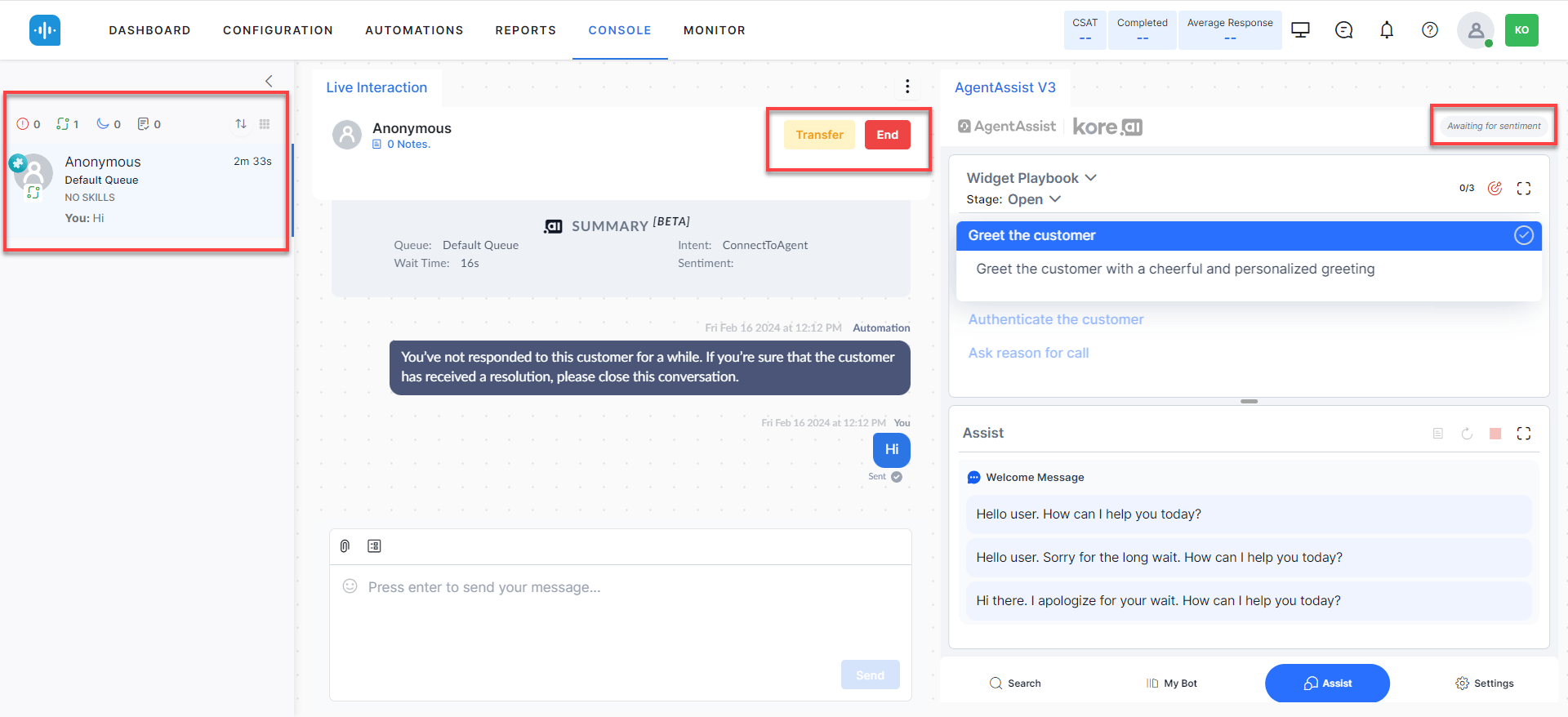
The Agent AI widget gives agents real-time AI assistance during customer interactions. It surfaces Dialog Tasks, Playbooks, coaching prompts, sentiment data, transcriptions, and summaries — all from a single panel.
 ***
## Features
| Feature | Description |
| -------------------------------- | ---------------------------------------------------------------------------------------------------- |
| **Dialog Tasks** | Pre-configured use cases that trigger when customer intent matches. Reduces manual typing. |
| **Playbooks** | Structured guidance for handling customer interactions step by step. |
| **Real-time Agent Coaching** | On-screen hints and nudges triggered by agent utterances and speech patterns. |
| **Real-time Sentiment Analysis** | Time-based graph showing customer emotional tone throughout the conversation. |
| **Transcription** | Live text transcription of voice calls. Agents can pause and resume to exclude PII. |
| **Auto Summarization** | Automatic conversation summaries to speed up decision-making. |
| **Generate Summary** | On-demand summary generation (up to 2 times per agent per conversation), including during transfers. |
| **PII Redaction** | Removes personally identifiable information from the agent view and transcripts. |
| **Feedback** | Agents rate suggestions to continuously improve AI recommendations. |
| **Next Best Action** | Suggests and runs Dialog Tasks for faster query resolution. |
| **Multi-language Support** | Agents can switch languages in real time to match customer preferences. |
| **Knowledge AI** | Customizable search results and FAQ suggestions from the knowledge base. |
| **File/Image Attachments** | Supports uploads up to 25 MB during live conversations. |
| **Theme Selection** | Dark or light widget theme. |
| **In-line Digital Forms** | Collect customer data through forms embedded in the widget. |
| **Agentic Copilot** | Runs conversations autonomously. Agents can cancel, override, or edit responses. |
| **Auto-Scroll** | Scrolls to the latest message automatically. |
***
## Widget Tabs
The widget has five tabs — **Search**, **My AI Agent (Bot)**, **Assist**, **Transcript** (voice only), and **More** — plus **Settings** and **Theme** controls.
***
## Features
| Feature | Description |
| -------------------------------- | ---------------------------------------------------------------------------------------------------- |
| **Dialog Tasks** | Pre-configured use cases that trigger when customer intent matches. Reduces manual typing. |
| **Playbooks** | Structured guidance for handling customer interactions step by step. |
| **Real-time Agent Coaching** | On-screen hints and nudges triggered by agent utterances and speech patterns. |
| **Real-time Sentiment Analysis** | Time-based graph showing customer emotional tone throughout the conversation. |
| **Transcription** | Live text transcription of voice calls. Agents can pause and resume to exclude PII. |
| **Auto Summarization** | Automatic conversation summaries to speed up decision-making. |
| **Generate Summary** | On-demand summary generation (up to 2 times per agent per conversation), including during transfers. |
| **PII Redaction** | Removes personally identifiable information from the agent view and transcripts. |
| **Feedback** | Agents rate suggestions to continuously improve AI recommendations. |
| **Next Best Action** | Suggests and runs Dialog Tasks for faster query resolution. |
| **Multi-language Support** | Agents can switch languages in real time to match customer preferences. |
| **Knowledge AI** | Customizable search results and FAQ suggestions from the knowledge base. |
| **File/Image Attachments** | Supports uploads up to 25 MB during live conversations. |
| **Theme Selection** | Dark or light widget theme. |
| **In-line Digital Forms** | Collect customer data through forms embedded in the widget. |
| **Agentic Copilot** | Runs conversations autonomously. Agents can cancel, override, or edit responses. |
| **Auto-Scroll** | Scrolls to the latest message automatically. |
***
## Widget Tabs
The widget has five tabs — **Search**, **My AI Agent (Bot)**, **Assist**, **Transcript** (voice only), and **More** — plus **Settings** and **Theme** controls.
 ***
## Search Tab
Shows all configured Dialog Tasks and supports searching for Dialog Tasks, FAQs, Generative AI answers, web pages, and files. Content updates automatically based on the conversation.
***
## Search Tab
Shows all configured Dialog Tasks and supports searching for Dialog Tasks, FAQs, Generative AI answers, web pages, and files. Content updates automatically based on the conversation.
 | Button | Action |
| -------------------------- | -------------------------------------------------------------------------------------- |
| **Run** | Runs a configured Dialog Task immediately. |
| **Run with Agent's Input** | Runs a Dialog Task with agent-provided inputs. Moves you to the My AI Agent (Bot) tab. |
| **Spyglass icon** | Submits the search query (or press **Enter**). |
### Error States
| Condition | Display |
| -------------------------------------- | ------------------------------------------------------------------------------------------------------------------------------------------------------------------------------------------------------------------------------------------------------------------------------------------------------------------------------------------------------------------------------------------------------------------------------------------------------------------------------------------------------------------------------------------------------------------------------------------------------------------------------------------------------------------------------------------------------------------------------------------------------------------------------------------------------------------------------------------------------------------------------------------------------------------------------------------------------------------------------------------------------------------------------------------------------------------------------------------------------------------------------------------------------------------------------------------------------------------------------------------------------------------------------------------------------------------------------------------------------------------------------------------------------------------------------------------------------------------------------------------------------------------------------------------------------------------------------------------------------------------------------------------------------------------------------------------------------------------------------------------------------------------------------------------------------------------------------------------------------------------------------------------------------------------------------------------- |
| Timeout or dialog tasks not configured |
| Button | Action |
| -------------------------- | -------------------------------------------------------------------------------------- |
| **Run** | Runs a configured Dialog Task immediately. |
| **Run with Agent's Input** | Runs a Dialog Task with agent-provided inputs. Moves you to the My AI Agent (Bot) tab. |
| **Spyglass icon** | Submits the search query (or press **Enter**). |
### Error States
| Condition | Display |
| -------------------------------------- | ------------------------------------------------------------------------------------------------------------------------------------------------------------------------------------------------------------------------------------------------------------------------------------------------------------------------------------------------------------------------------------------------------------------------------------------------------------------------------------------------------------------------------------------------------------------------------------------------------------------------------------------------------------------------------------------------------------------------------------------------------------------------------------------------------------------------------------------------------------------------------------------------------------------------------------------------------------------------------------------------------------------------------------------------------------------------------------------------------------------------------------------------------------------------------------------------------------------------------------------------------------------------------------------------------------------------------------------------------------------------------------------------------------------------------------------------------------------------------------------------------------------------------------------------------------------------------------------------------------------------------------------------------------------------------------------------------------------------------------------------------------------------------------------------------------------------------------------------------------------------------------------------------------------------------------------- |
| Timeout or dialog tasks not configured | 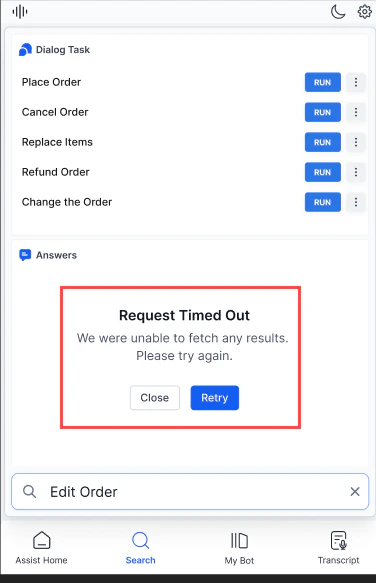 |
| Consecutive timeout |
|
| Consecutive timeout | 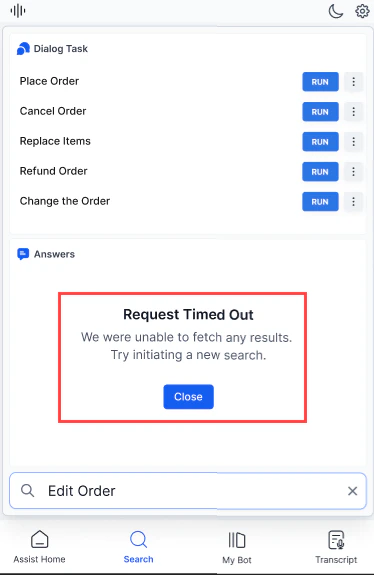 |
| Server error |
|
| Server error | 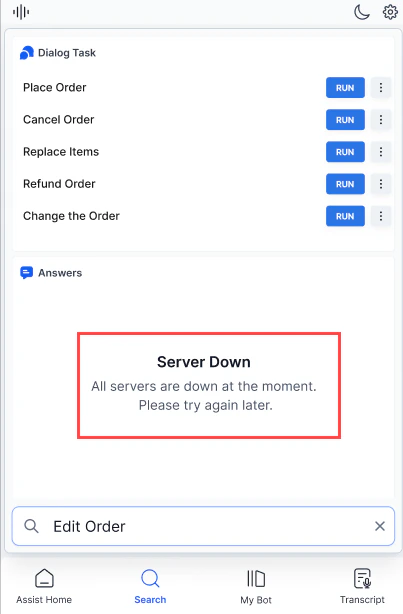 |
| Dialog Tasks not found |
|
| Dialog Tasks not found | 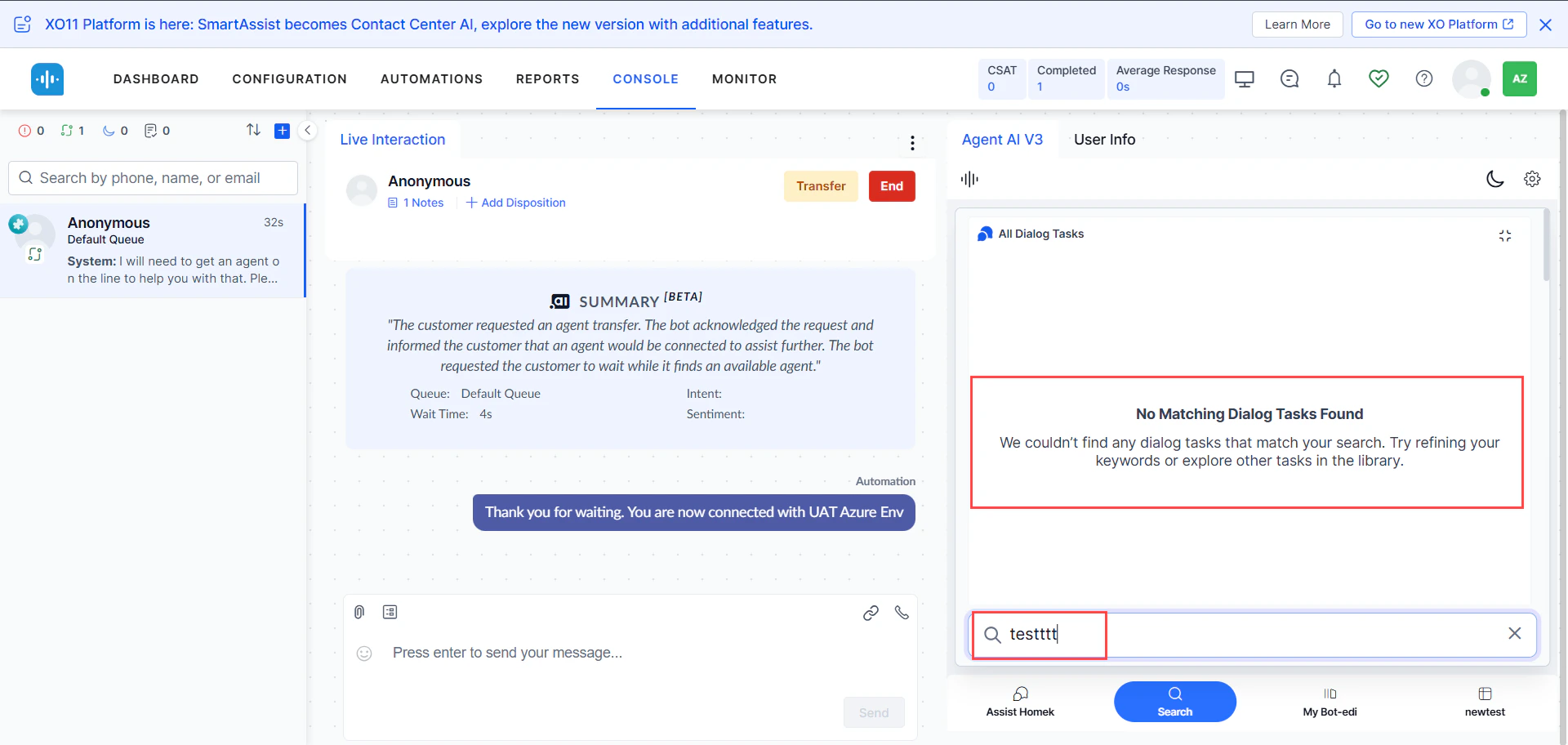 |
| No matching results |
|
| No matching results | 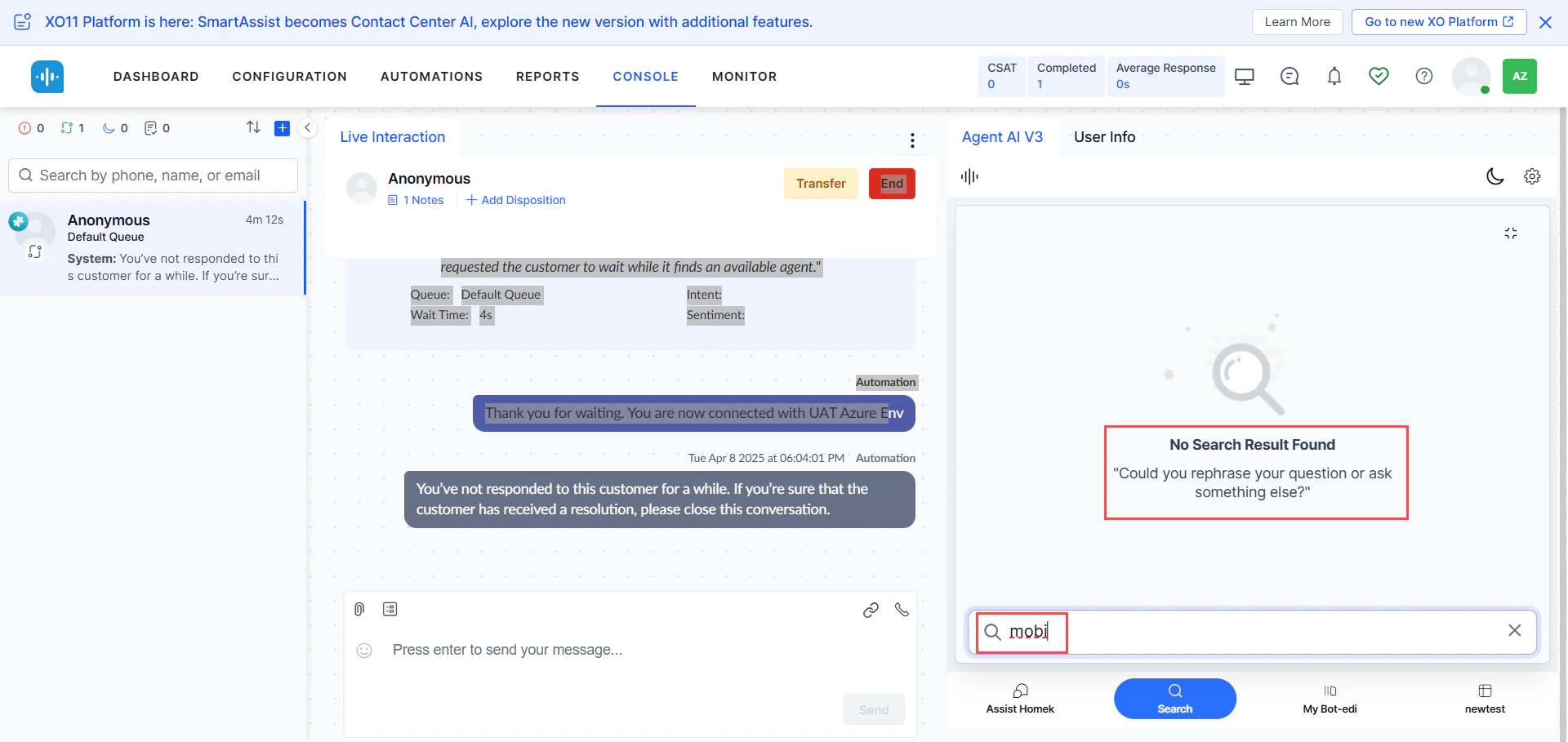 |
***
## My AI Agent (Bot) Tab
Lets agents run automations independently using their own inputs. Useful when automation fails mid-conversation or when agents need to run parallel queries without affecting the customer interaction.
|
***
## My AI Agent (Bot) Tab
Lets agents run automations independently using their own inputs. Useful when automation fails mid-conversation or when agents need to run parallel queries without affecting the customer interaction.
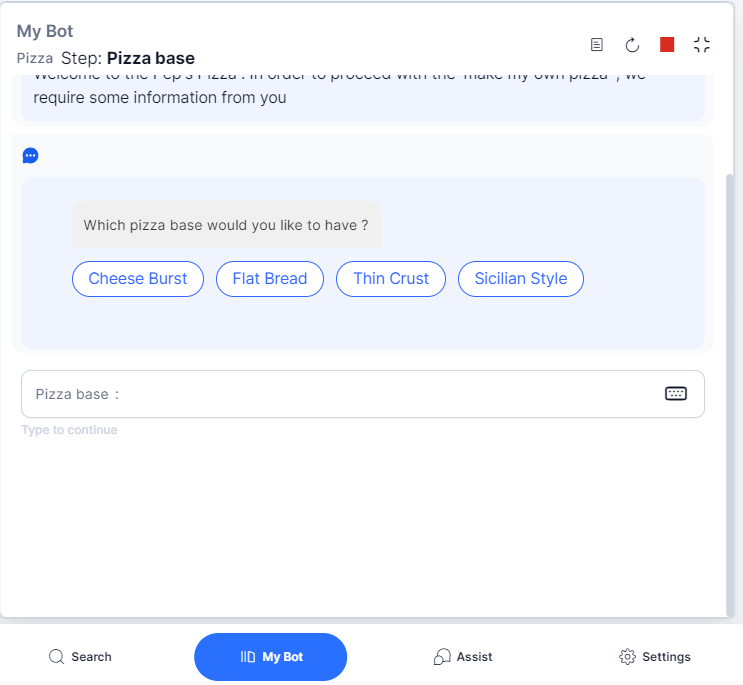 The tab displays Next Best Action suggestions based on the current conversation status.
***
## Assist Tab
The primary agent workspace. Monitors conversations automatically and surfaces Dialog Tasks, FAQs, Knowledge AI results, Playbooks, Agentic Copilot messages, and coaching prompts.
The tab displays Next Best Action suggestions based on the current conversation status.
***
## Assist Tab
The primary agent workspace. Monitors conversations automatically and surfaces Dialog Tasks, FAQs, Knowledge AI results, Playbooks, Agentic Copilot messages, and coaching prompts.
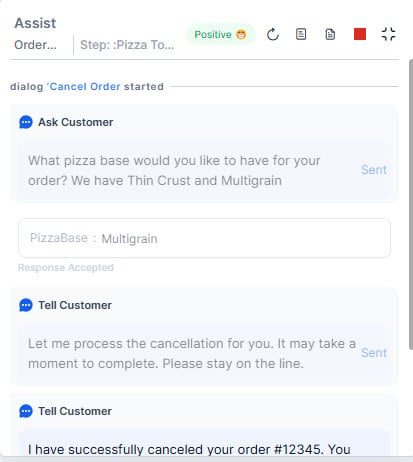 **The Assist tab:**
* Suggests the best response based on conversation context.
* Displays Agentic Copilot messages with a configurable delay (up to 10 seconds) before auto-sending.
* Retrieves knowledge base content based on customer intent.
* Shows historical automation runs and conversation history.
* Supports file and image attachments up to 25 MB.
* Allows on-demand summary generation (up to 2 times per conversation).
### Assist Tab Controls
| Control | Description |
| --------------------------- | ------------------------------------------------------------------------------------- |
| **Running Playbook stages** | Shows total and adhered stages (for example, 1/3 means 1 of 3 stages completed). |
| **Proceed to Close** | Moves a running playbook from Open to Close status. |
| **Send / Copy** | Send the message as-is or copy it to customize before sending. |
| **Up / Down arrows** | Jump to first or last message in the tab. |
| **Resume** | Resumes a paused playbook when switching between playbooks. |
| **List View** | Shows all entity entries captured in the conversation. |
| **Generate Summary** | Generates an on-demand conversation summary. |
| **Restart** | Restarts the Dialog Task from the beginning or with captured inputs. |
| **Terminate** | Stops the running Dialog Task. Options: Terminate, Cancel, or Continue with Override. |
| **Maximize / Minimize** | Expands or collapses the section. |
| **Playbook adherence** | Mark a step as complete manually if automatic detection does not trigger. |
### Agentic Copilot Messages
After Welcome Events execute, the widget displays: *"Agentic Copilot is actively listening to your conversation and ready to assist automatically."*
**The Assist tab:**
* Suggests the best response based on conversation context.
* Displays Agentic Copilot messages with a configurable delay (up to 10 seconds) before auto-sending.
* Retrieves knowledge base content based on customer intent.
* Shows historical automation runs and conversation history.
* Supports file and image attachments up to 25 MB.
* Allows on-demand summary generation (up to 2 times per conversation).
### Assist Tab Controls
| Control | Description |
| --------------------------- | ------------------------------------------------------------------------------------- |
| **Running Playbook stages** | Shows total and adhered stages (for example, 1/3 means 1 of 3 stages completed). |
| **Proceed to Close** | Moves a running playbook from Open to Close status. |
| **Send / Copy** | Send the message as-is or copy it to customize before sending. |
| **Up / Down arrows** | Jump to first or last message in the tab. |
| **Resume** | Resumes a paused playbook when switching between playbooks. |
| **List View** | Shows all entity entries captured in the conversation. |
| **Generate Summary** | Generates an on-demand conversation summary. |
| **Restart** | Restarts the Dialog Task from the beginning or with captured inputs. |
| **Terminate** | Stops the running Dialog Task. Options: Terminate, Cancel, or Continue with Override. |
| **Maximize / Minimize** | Expands or collapses the section. |
| **Playbook adherence** | Mark a step as complete manually if automatic detection does not trigger. |
### Agentic Copilot Messages
After Welcome Events execute, the widget displays: *"Agentic Copilot is actively listening to your conversation and ready to assist automatically."*
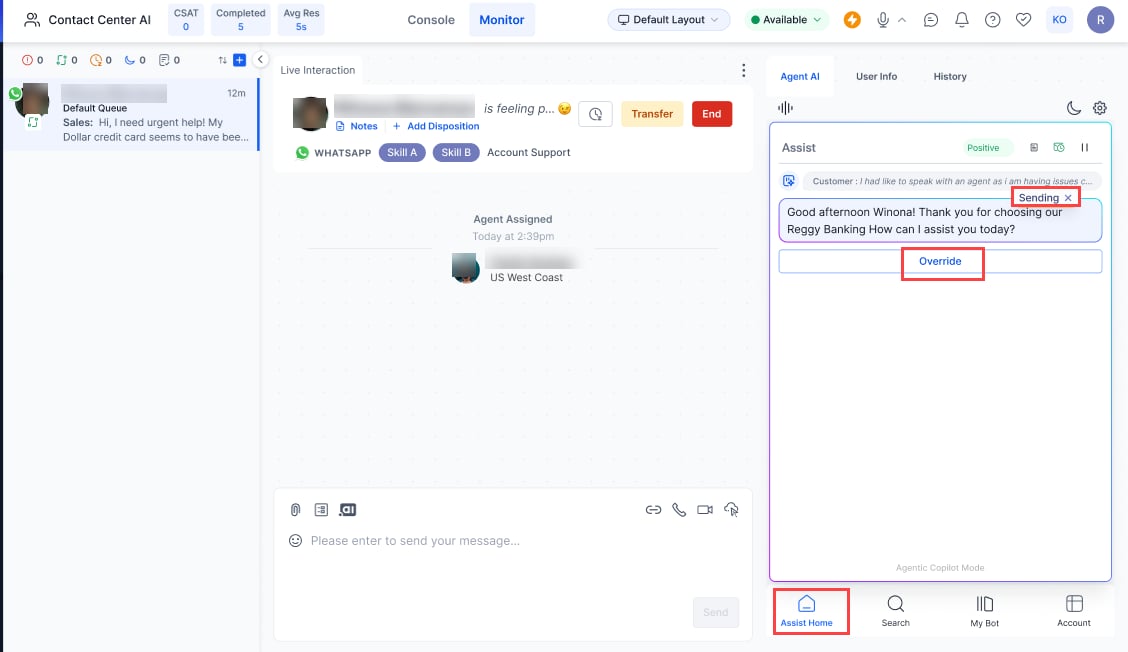 Each Agentic message includes a **Sending** button that delays auto-send for up to 10 seconds. During this window:
* Select **x** to cancel auto-send.
* Select **Copy** to move the message to the chat input field.
* Select **Send** to send immediately.
* Select **Override** to discard the Agentic response and type your own.
* Use the **Stop/Resume** icon (top-right) to pause or resume auto-send globally.
* Use the **Pause/Resume** icon (top-right) to pause or resume the Agentic app.
Each Agentic message includes a **Sending** button that delays auto-send for up to 10 seconds. During this window:
* Select **x** to cancel auto-send.
* Select **Copy** to move the message to the chat input field.
* Select **Send** to send immediately.
* Select **Override** to discard the Agentic response and type your own.
* Use the **Stop/Resume** icon (top-right) to pause or resume auto-send globally.
* Use the **Pause/Resume** icon (top-right) to pause or resume the Agentic app.
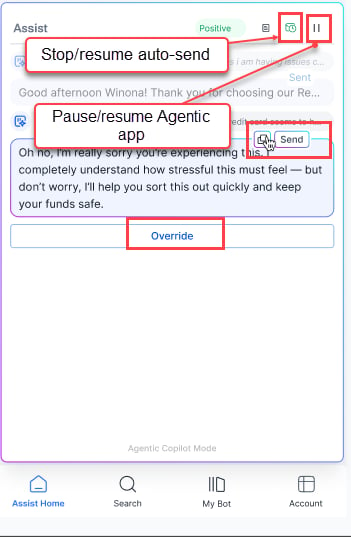 * Auto-send disables automatically if Agentic Copilot fails to respond.
* For messages outside the app's scope, Agentic indicates it cannot respond.
* To regenerate a failed response, double-click the corresponding customer message.
### Generate Summary
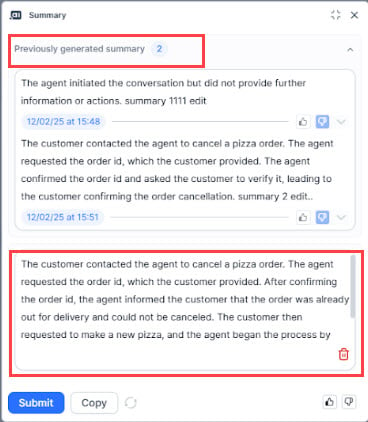
Agents can generate on-demand summaries at any point during a conversation, up to two times. Previous summaries with timestamps remain visible during agent transfers.
Enable the **Generate Summary** toggle in **Widget Theming > Layout Customization > Assist Action Menu Layout** to activate this feature.
* Auto-send disables automatically if Agentic Copilot fails to respond.
* For messages outside the app's scope, Agentic indicates it cannot respond.
* To regenerate a failed response, double-click the corresponding customer message.
### Generate Summary
Agents can generate on-demand summaries at any point during a conversation, up to two times. Previous summaries with timestamps remain visible during agent transfers.
Enable the **Generate Summary** toggle in **Widget Theming > Layout Customization > Assist Action Menu Layout** to activate this feature.
 ### Attachment Support
Attachments are limited to one file at a time, up to 25 MB.
**If the file is detected automatically:**
1. A "waiting…" indicator appears.
2. On success, the file name appears in the input field with a **View** button.
### Attachment Support
Attachments are limited to one file at a time, up to 25 MB.
**If the file is detected automatically:**
1. A "waiting…" indicator appears.
2. On success, the file name appears in the input field with a **View** button.
 Preview opens within the widget with **Back** and **Close** buttons.
 **If the file is not detected:**
An **Override** option appears. Select it, then choose the file from your local directory. Confirm with the tick mark or reject with the close icon.
**If the file is not detected:**
An **Override** option appears. Select it, then choose the file from your local directory. Confirm with the tick mark or reject with the close icon.
 **Error messages:**
| Error | Display |
| --------------------- | --------------------------------------------------------------------------------------------------------------------------------------------------------------------------------------------------------------------------------------------------------------------------------------------------------------------------------------------------------------------------------------------------------------------------------------------------------------------------------------------------------------------------------------------------------------------------------------------------------------------------------------------------------------------------------------------------------------------------------------------------------------------------------------------------------------------------------------------------------------------------------------------------------------------------------------------------------------------------------------------------------------------------------------------------------------------------------------------------------------------------------------------------------------------------------------------------------------------------------------------------------------------------------------------------------------------------------------------------------------------------------------------------------------------------------------------------------------------------------------------------------------------------------------------------------------------------------------------------------------------------------------------------------------------------------------------------------------------------------------------------------------------------------------------------------------------------------------------------------------------------------------------------------- |
| File exceeds 25 MB |
**Error messages:**
| Error | Display |
| --------------------- | --------------------------------------------------------------------------------------------------------------------------------------------------------------------------------------------------------------------------------------------------------------------------------------------------------------------------------------------------------------------------------------------------------------------------------------------------------------------------------------------------------------------------------------------------------------------------------------------------------------------------------------------------------------------------------------------------------------------------------------------------------------------------------------------------------------------------------------------------------------------------------------------------------------------------------------------------------------------------------------------------------------------------------------------------------------------------------------------------------------------------------------------------------------------------------------------------------------------------------------------------------------------------------------------------------------------------------------------------------------------------------------------------------------------------------------------------------------------------------------------------------------------------------------------------------------------------------------------------------------------------------------------------------------------------------------------------------------------------------------------------------------------------------------------------------------------------------------------------------------------------------------------------------- |
| File exceeds 25 MB | 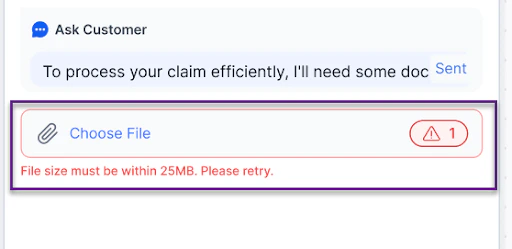 |
| Unsupported file type |
|
| Unsupported file type | 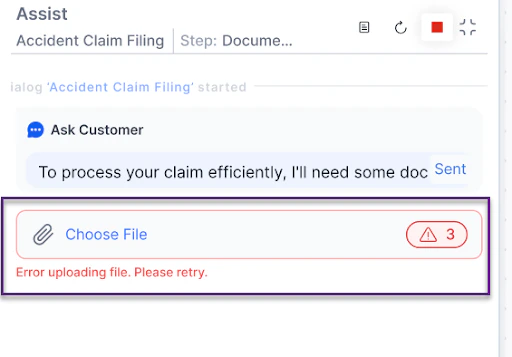 |
### In-line Digital Forms
Collect customer information through forms embedded in the Assist tab. To use this feature, configure forms with Dialog Tasks and set the Web/Mobile SDK Form Behavior to **Open inline form**.
|
### In-line Digital Forms
Collect customer information through forms embedded in the Assist tab. To use this feature, configure forms with Dialog Tasks and set the Web/Mobile SDK Form Behavior to **Open inline form**.
 **Form features:**
* **Close icon** — Exits the form. A confirmation dialog prompts before discarding.
**Form features:**
* **Close icon** — Exits the form. A confirmation dialog prompts before discarding.
 * **Fixed frame height** — 306 pixels with scroll support.
* **Submit button** — Sticky at the bottom of the form.
* **Fixed frame height** — 306 pixels with scroll support.
* **Submit button** — Sticky at the bottom of the form.
 **Behavior by application type:**
| Application | Behavior |
| ------------------------------ | ----------------------------------------------------------------------------------------------------------------------------------------------------- |
| **Third-party contact center** | Cannot send the form to the customer. Fill it out manually. |
| **Smart Assist Suite** | Can send the form to the customer. It can be sent multiple times but accessed only once. Simultaneous access by agent and customer triggers an error. |
**Behavior by application type:**
| Application | Behavior |
| ------------------------------ | ----------------------------------------------------------------------------------------------------------------------------------------------------- |
| **Third-party contact center** | Cannot send the form to the customer. Fill it out manually. |
| **Smart Assist Suite** | Can send the form to the customer. It can be sent multiple times but accessed only once. Simultaneous access by agent and customer triggers an error. |
 ***
## Transcript Tab
Available for voice calls only. Displays a real-time text transcription of the agent-customer conversation throughout the session.
***
## Transcript Tab
Available for voice calls only. Displays a real-time text transcription of the agent-customer conversation throughout the session.
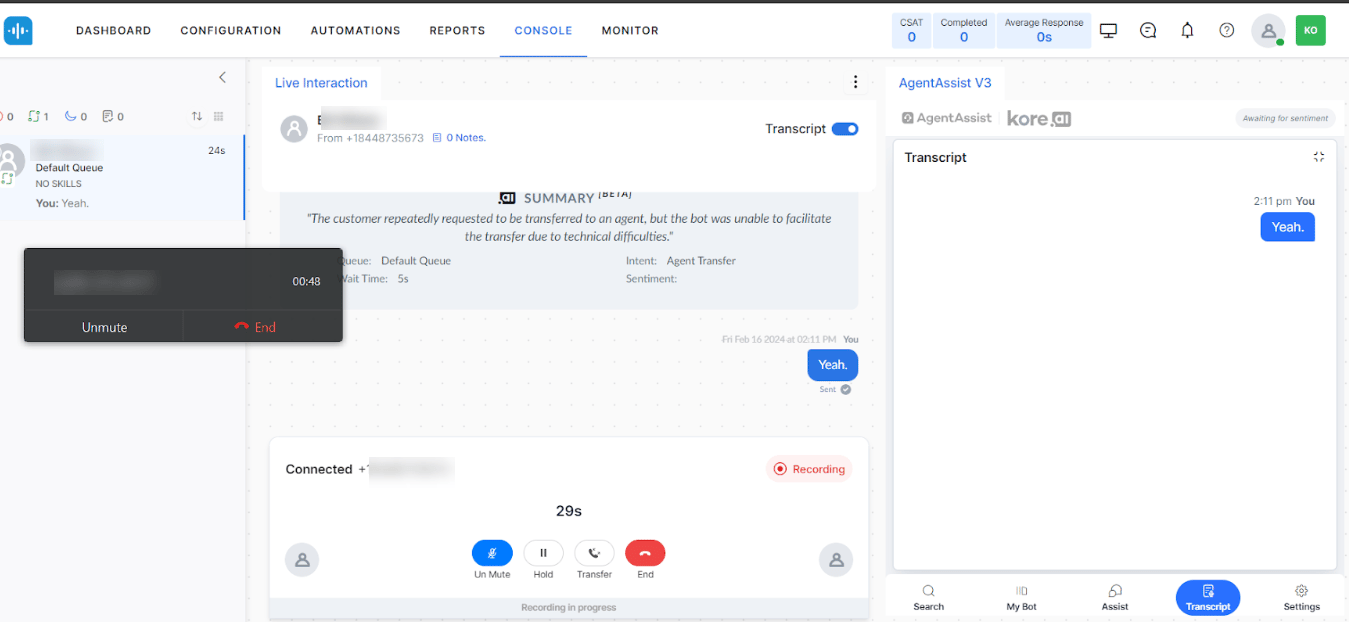 If **Auto-scroll Widget Content** is enabled in Settings, the tab scrolls to the latest utterance automatically. Agents can scroll manually as needed.
***
## More Tab
Lets agents submit overall feedback on the widget. Agents can select up to five positive or negative options and optionally add comments.
If the conversation is transferred, feedback from both agents is saved in the logs.
**To submit widget feedback:**
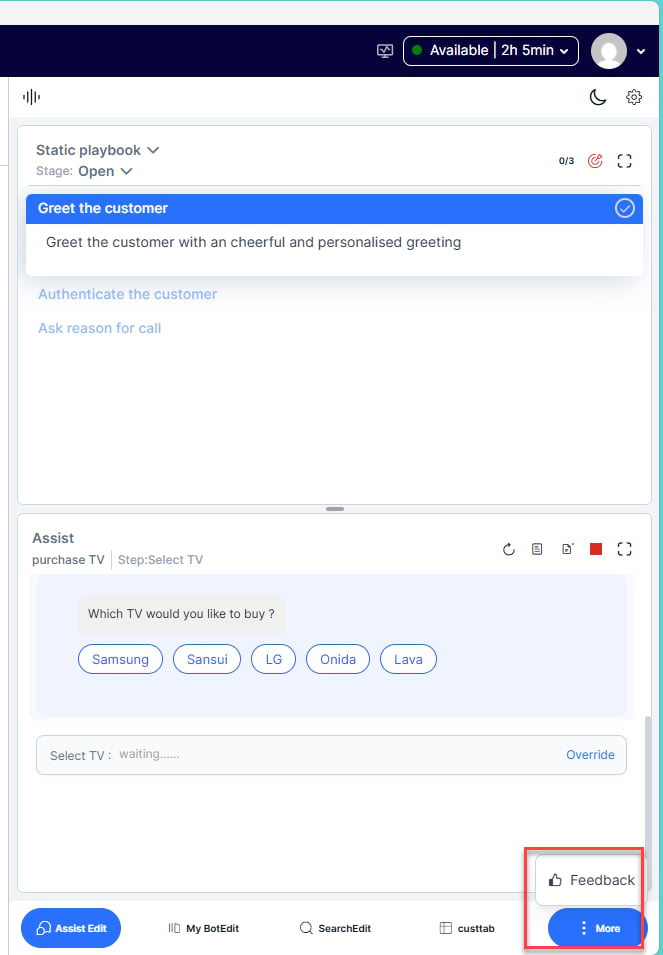
1. Select **More (…)** > **Feedback**.
If **Auto-scroll Widget Content** is enabled in Settings, the tab scrolls to the latest utterance automatically. Agents can scroll manually as needed.
***
## More Tab
Lets agents submit overall feedback on the widget. Agents can select up to five positive or negative options and optionally add comments.
If the conversation is transferred, feedback from both agents is saved in the logs.
**To submit widget feedback:**
1. Select **More (…)** > **Feedback**.
 2. Select **Satisfied** (positive) or **Unsatisfied** (negative).
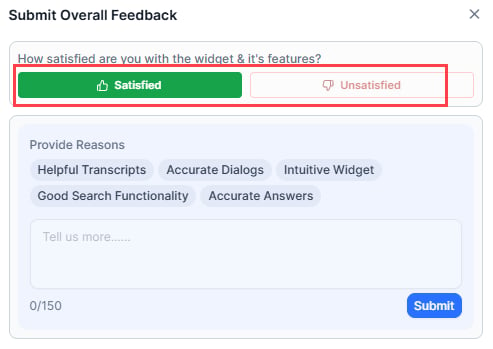 3. Select feedback options from the list and add comments if needed.
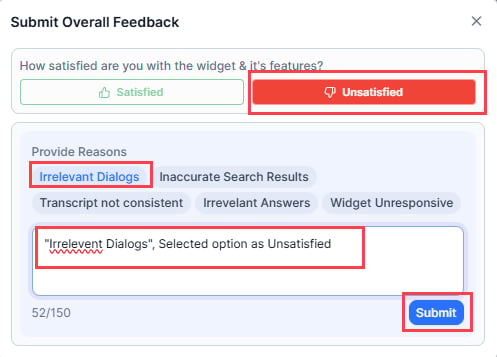 4. Select **Submit**.
***
## Settings
| Setting | Description |
| ----------------------- | ---------------------------------------------------------------------------------- |
| **Proactive Mode** | Toggles the widget's listening mode on or off. Disable if not working as expected. |
| **Auto-Scroll Content** | Controls auto-scroll in the Assist, My AI Agent (Bot), and Transcript tabs. |
| **Help & Support** | Links to documentation, FAQs, and Kore Academy courses. |
| **Language** | Select a display language for the widget. |
4. Select **Submit**.
***
## Settings
| Setting | Description |
| ----------------------- | ---------------------------------------------------------------------------------- |
| **Proactive Mode** | Toggles the widget's listening mode on or off. Disable if not working as expected. |
| **Auto-Scroll Content** | Controls auto-scroll in the Assist, My AI Agent (Bot), and Transcript tabs. |
| **Help & Support** | Links to documentation, FAQs, and Kore Academy courses. |
| **Language** | Select a display language for the widget. |


 ### Theme Selection
Choose **Dark** or **Light** theme from the Settings tab.
### Theme Selection
Choose **Dark** or **Light** theme from the Settings tab.
 ***
## V2 vs V3 Differences
### UI Changes
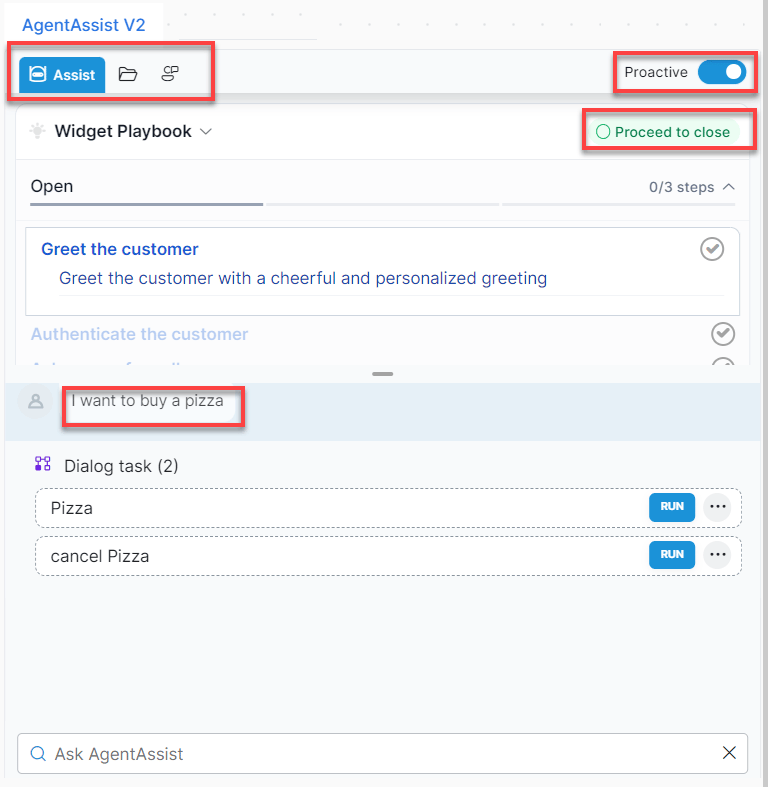
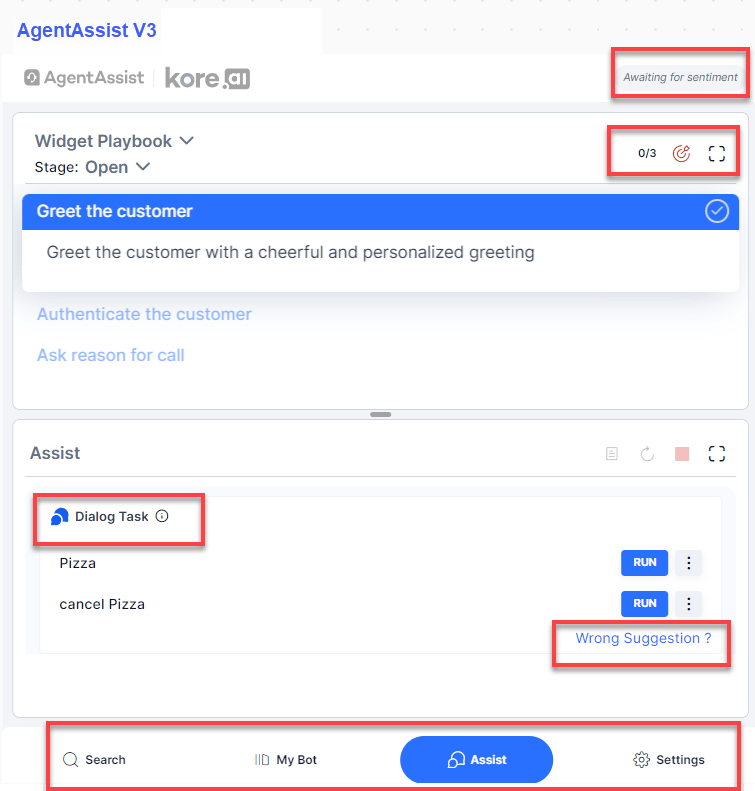
| Area | V2 | V3 |
| --------------------------------- | --------------------------------------------------------- | ---------------------------------------------------------------- |
| **Tabs** | Assist, Library, My AI Agent (Bot) + search bar at bottom | Search, My AI Agent (Bot), Assist, Settings |
| **Tab placement** | Top | Bottom |
| **Sentiment display** | Visible only on customer utterance match | Always visible; includes badges, icons, and emojis per utterance |
| **Proactive button** | Top-right corner of the widget | Settings tab |
| **Playbook closure** | "Proceed to Close" label | Symbol indicator |
| **Playbook list** | Primary playbooks only | Primary and Dynamic playbooks |
| **Dialog Task utterance display** | Shown at the top of the Dialog Task section | Tooltip via information icon hover |
**Agent AI V2**
***
## V2 vs V3 Differences
### UI Changes
| Area | V2 | V3 |
| --------------------------------- | --------------------------------------------------------- | ---------------------------------------------------------------- |
| **Tabs** | Assist, Library, My AI Agent (Bot) + search bar at bottom | Search, My AI Agent (Bot), Assist, Settings |
| **Tab placement** | Top | Bottom |
| **Sentiment display** | Visible only on customer utterance match | Always visible; includes badges, icons, and emojis per utterance |
| **Proactive button** | Top-right corner of the widget | Settings tab |
| **Playbook closure** | "Proceed to Close" label | Symbol indicator |
| **Playbook list** | Primary playbooks only | Primary and Dynamic playbooks |
| **Dialog Task utterance display** | Shown at the top of the Dialog Task section | Tooltip via information icon hover |
**Agent AI V2**
 **Agent AI V3**
 ### Feature-Level Changes
| Feature | V2 | V3 |
| ------------------------ | ------------------------------------ | ------------------------------------------------------------------------ |
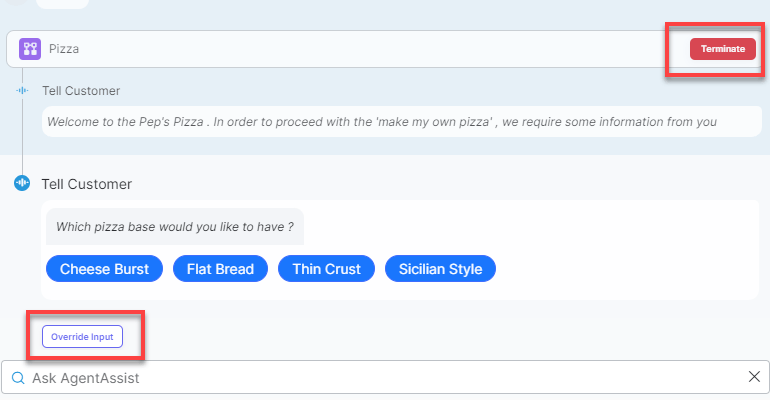
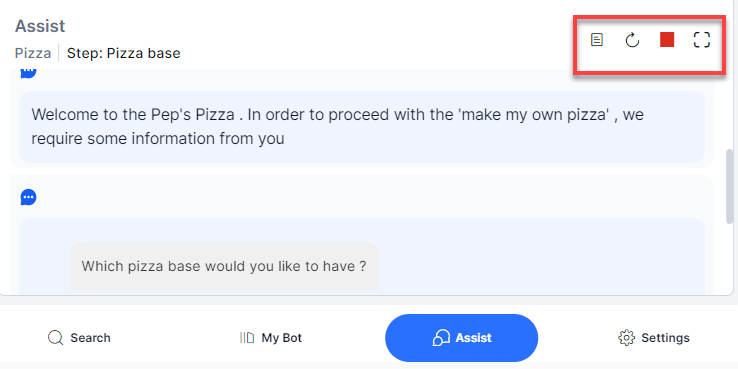
| **Dialog Task controls** | Terminate and Override Input buttons | List View, Restart, Terminate, and Maximize as icons |
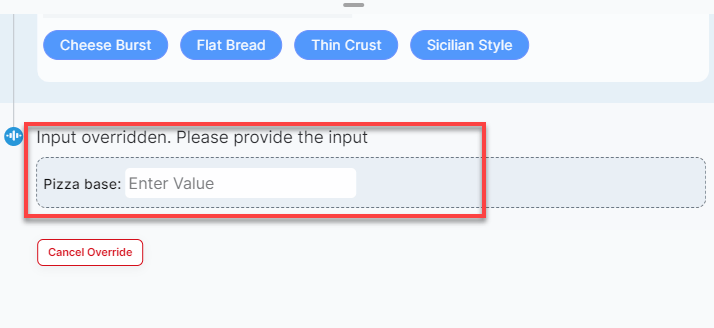
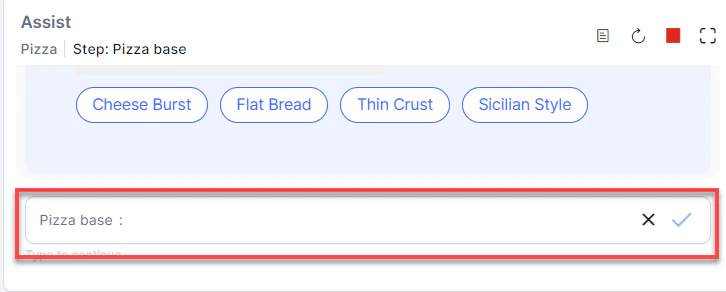
| **Override Input** | Button below the Dialog Task | Input field directly under the running Dialog Task |
| **Settings tab** | Not available | Proactive mode, Auto-Scroll, Documentation/FAQ links, Language selection |
**Agent AI V2 — Dialog Tasks**
### Feature-Level Changes
| Feature | V2 | V3 |
| ------------------------ | ------------------------------------ | ------------------------------------------------------------------------ |
| **Dialog Task controls** | Terminate and Override Input buttons | List View, Restart, Terminate, and Maximize as icons |
| **Override Input** | Button below the Dialog Task | Input field directly under the running Dialog Task |
| **Settings tab** | Not available | Proactive mode, Auto-Scroll, Documentation/FAQ links, Language selection |
**Agent AI V2 — Dialog Tasks**
 **Agent AI V3 — Dialog Tasks**
 **Agent AI V2 — Override Input**
 **Agent AI V3 — Override Input**
 Built with [Mintlify](https://mintlify.com).