> ## Documentation Index
> Fetch the complete documentation index at: https://koreai.mintlify.site/llms.txt
> Use this file to discover all available pages before exploring further.
# Agent AI FAQ
Answers to common configuration questions for Agent AI.
***
## Intent Extraction from Summary
**How do I configure the Intent Extraction from Summary feature?**
This feature extracts customer intents from a conversation summary captured during the On-Connect Dialog Task. Follow these steps to set it up.
**Step 1 — Add the context variable to the Dialog Task:**
1. Go to **Bot Builder** > **Dialog Tasks**.
2. Open the Dialog Task you want to configure for intent extraction.
3. Select **Component Properties** > **Edit Script** (or **Define Script** for a new task).
4. Add the following context variable in the script field:
```
context.session.BotUserSession.landingSummary
```
 5. Select **Save**.
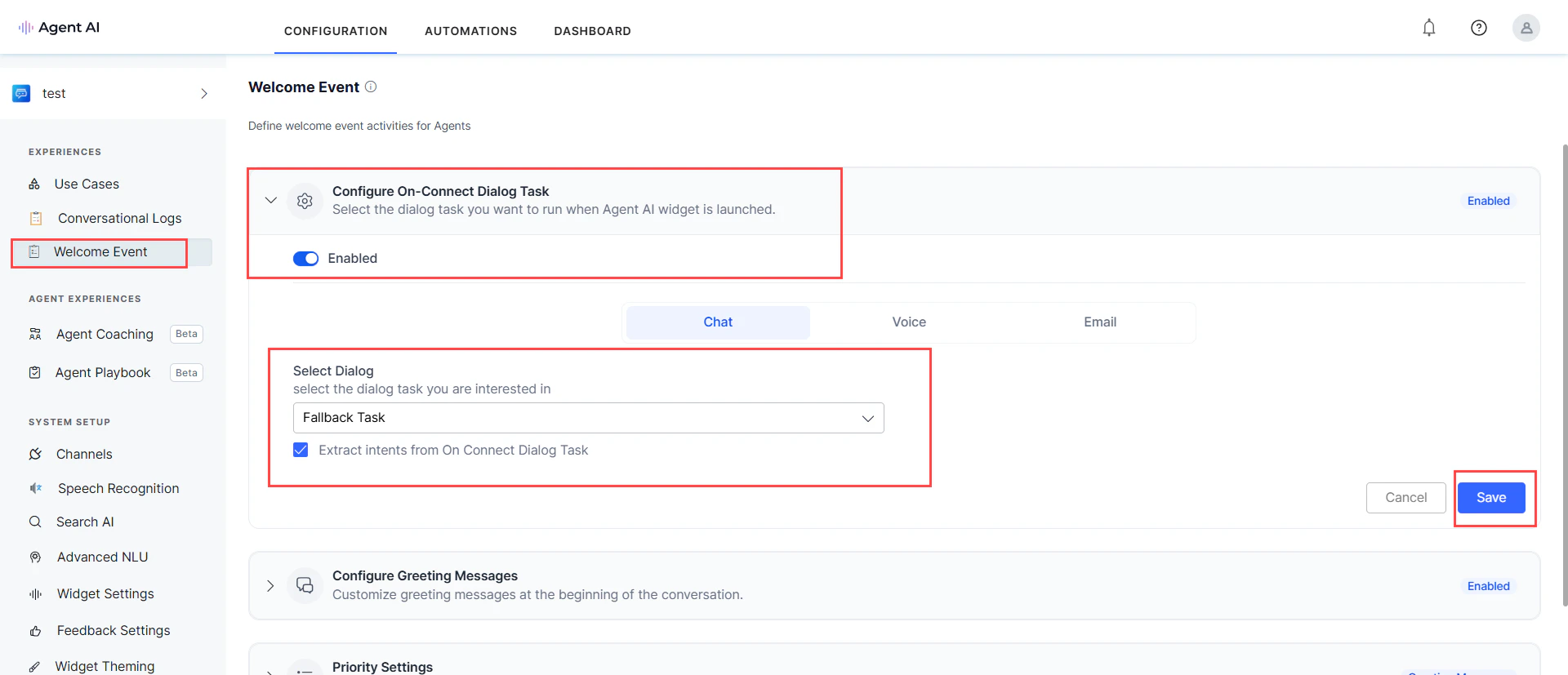
**Step 2 — Enable intent extraction in Welcome Events:**
1. Go to **Welcome Event** > **Configure On-Connect Dialog Task** and enable it.
2. Select the relevant dialog task from the **Select Dialog** dropdown.
3. Enable the **Extract intents from On Connect Dialog Task** checkbox.
4. Select **Save**.
5. Select **Save**.
**Step 2 — Enable intent extraction in Welcome Events:**
1. Go to **Welcome Event** > **Configure On-Connect Dialog Task** and enable it.
2. Select the relevant dialog task from the **Select Dialog** dropdown.
3. Enable the **Extract intents from On Connect Dialog Task** checkbox.
4. Select **Save**.