> ## Documentation Index
> Fetch the complete documentation index at: https://koreai.mintlify.site/llms.txt
> Use this file to discover all available pages before exploring further.
# Agent AI Web SDK v3.13.1
Agent AI Web SDK provides a versatile and customizable solution for integrating AI Agent functionalities into web applications. Built using JavaScript, Preact, and SCSS, this SDK enables seamless interaction, real-time event handling, and UI customization for an enhanced user experience.
## Prerequisites
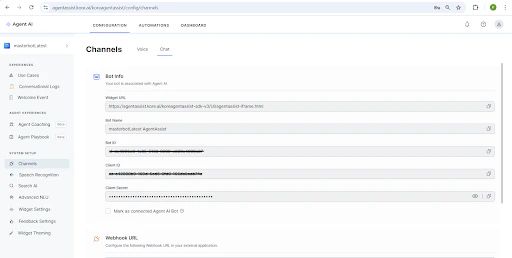
Before using the SDK, generate the following identifiers:
* **Client ID**
* **Bot ID**
* **Client Secret**
To generate the above identifiers, follow these steps:
1. Navigate to the [AgentAssist Configuration](https://agentassist.kore.ai/) page.
2. Open the **Automations** section.
3. Create a new app or import an existing one.
4. Once the app is created or imported, its details are displayed under the **Channels** section of the **Configuration** page.
Generate a JWT **(JSON Web Token)** using the above identifiers.
 ## Getting Started
There are two ways to integrate the SDK into your project:
* Installation via CDN
* Installation via NPM
### Installation via CDN
Include the SDK directly in your HTML via a CDN:
```
```
### Installation via NPM
To install the SDK via NPM, use the following command
```
npm install --save @kore/agentai-web-sdk
```
Initialize the SDK in your project
```
import { AAConfig, AAWindow } from '@kore/agentai-web-sdk';
const aaWindowInstance = new AAWindow();
const config = { ...AAConfig };
config.connectionDetails = {
domainUrl: "",
token: "",
botId: "XXXX",
botName: "",
conversationId: "XXXX",
interactiveLanguage: "en",
customData: {},
userName: "",
channel: "chat",
sessionId: "sessionId"
}
```
## Getting Started
There are two ways to integrate the SDK into your project:
* Installation via CDN
* Installation via NPM
### Installation via CDN
Include the SDK directly in your HTML via a CDN:
```
```
### Installation via NPM
To install the SDK via NPM, use the following command
```
npm install --save @kore/agentai-web-sdk
```
Initialize the SDK in your project
```
import { AAConfig, AAWindow } from '@kore/agentai-web-sdk';
const aaWindowInstance = new AAWindow();
const config = { ...AAConfig };
config.connectionDetails = {
domainUrl: "",
token: "",
botId: "XXXX",
botName: "",
conversationId: "XXXX",
interactiveLanguage: "en",
customData: {},
userName: "",
channel: "chat",
sessionId: "sessionId"
}
```