> ## Documentation Index
> Fetch the complete documentation index at: https://koreai.mintlify.app/llms.txt
> Use this file to discover all available pages before exploring further.
# Queues & Agents Dashboard
[Back to Analytics Overview](/ai-for-service/analytics/overview)
The Queues & Agents dashboard displays Overview, Efficiency, Agent Performance, and Queue Performance metrics for a selected time period.
## Accessing the Dashboard
1. Select **Analytics** on the left navigation pane.
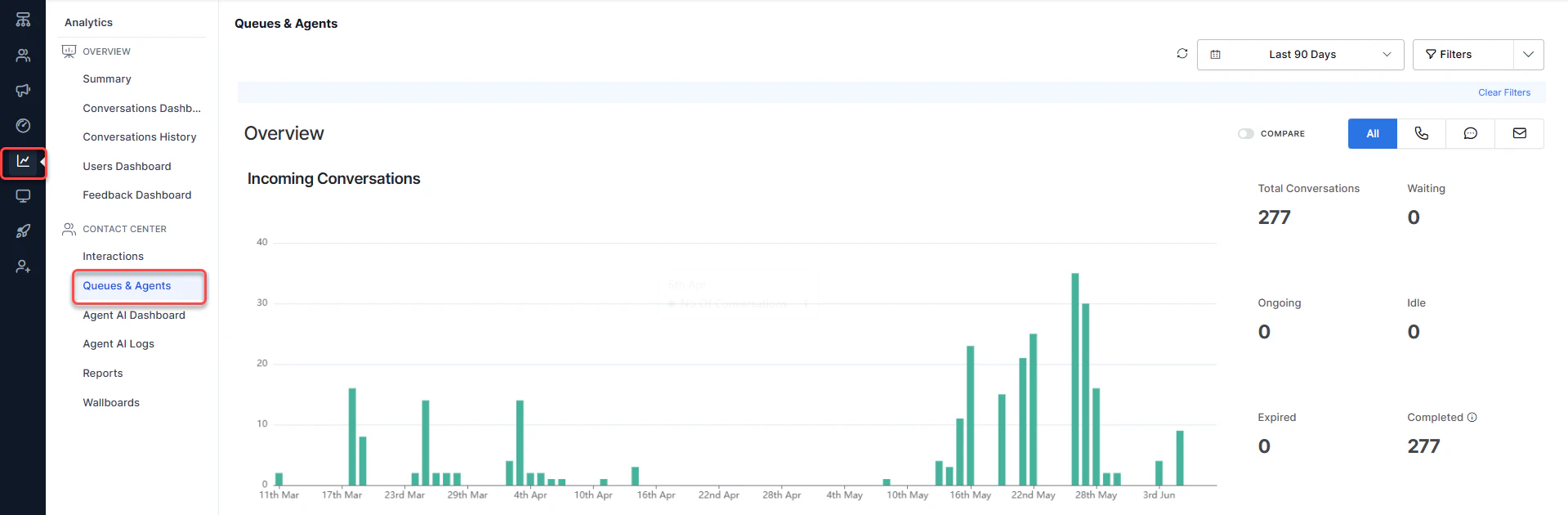 2. Select **Queues & Agents** under the **Contact Center** section. The dashboard displays on the right side of the page.
***
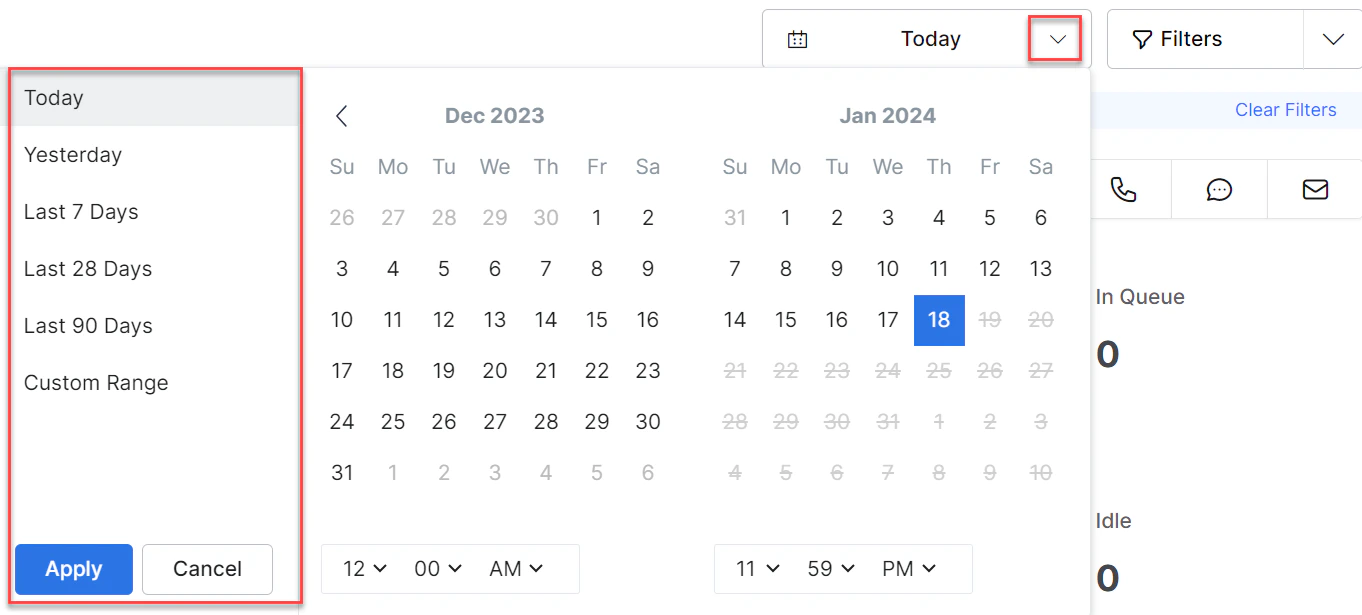
## Time Selection
Filter data for a specific time range by selecting a range and selecting **Apply**.
2. Select **Queues & Agents** under the **Contact Center** section. The dashboard displays on the right side of the page.
***
## Time Selection
Filter data for a specific time range by selecting a range and selecting **Apply**.
 ***
## Filters
You can create, save, edit, copy, and delete filters to avoid repeatedly setting the same options.
### Create Filter
1. Select **Filter**.
2. Select **New Filter**.
3. Select the Queues, Channels, Direction, and Agents.
***
## Filters
You can create, save, edit, copy, and delete filters to avoid repeatedly setting the same options.
### Create Filter
1. Select **Filter**.
2. Select **New Filter**.
3. Select the Queues, Channels, Direction, and Agents.
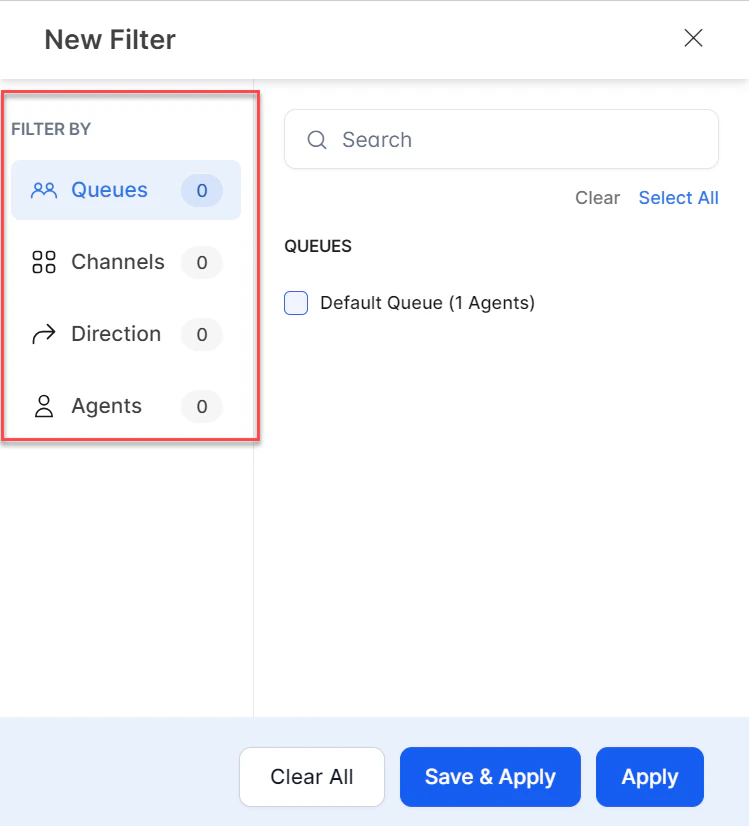 Available options:
* **Clear**: Clears the current selection.
* **Save & Apply**: Saves the filter for future use.
* **Apply**: Applies the filter for the current session only (not saved).
4. Select **Save & Apply**.
5. Enter a name for the filter and select **Save & Apply**.
A confirmation message appears and the filter is created.
### Edit Filter
1. Select the **Filters** tab. The saved filter name appears.
2. Select **Edit**.
3. Make the necessary changes and select **Save & Apply**.
A confirmation message appears and the filter is updated.
### Copy Filter
1. Select **Duplicate**.
2. In the **Rename Filter** window, enter a name and select **Save**.
A confirmation message appears and a copy of the filter is created.
### Mark as Default
1. Select **Mark as Default**.
A confirmation message appears and the filter is set as default.
### Delete Filter
1. Select **Delete**.
2. In the confirmation window, select **Delete**.
A confirmation message appears and the filter is deleted.
***
## Overview of Incoming Conversations
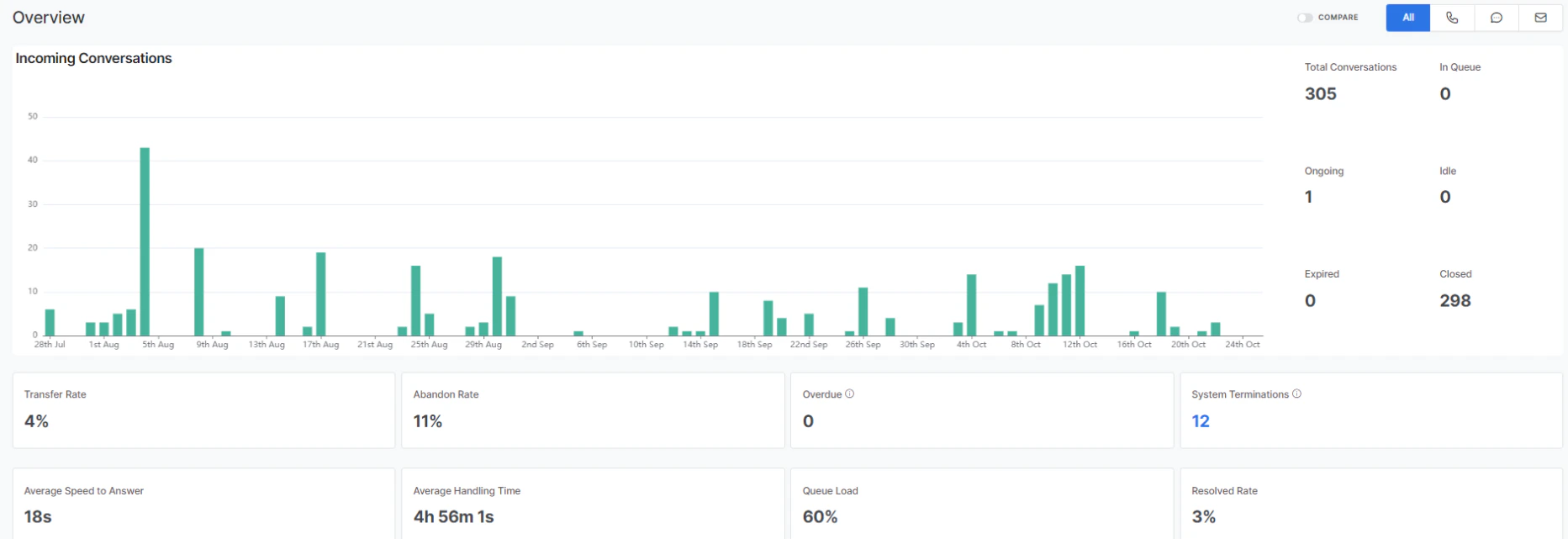
This section displays metrics for all conversations (phone, chat, and email).
| Metric | Description |
| ----------------------- | ------------------------------------------------------------------------------------------------------------- |
| Total Conversations | Total conversation count for the selected time range. |
| In Queue | Count of conversations currently in a queue. |
| Ongoing | Count of ongoing conversations. |
| Idle | Count of idle conversations. |
| Expired | Count of expired conversations. |
| Closed | Count of closed conversations. |
| Transfer Rate | Percentage of transferred conversations. |
| Abandon Rate | Percentage of abandoned conversations. |
| Overdue | Live count of conversations in the overdue state, based on selected queues and agents. |
| System Terminations | Count of conversations terminated by the system (based on selected queues). Select the count to view details. |
| Average Speed to Answer | Average time for an agent to respond to an assigned conversation. |
| Average Handling Time | Average handling time of conversations. |
| Queue Load | Live metric showing the current load on the system as a percentage of its capacity. |
| Resolved Rate | Percentage of resolved conversations. |
**COMPARE**: The COMPARE toggle compares historical metrics against a previous equal-sized time range. For example, if Average Handle Time is 12m 2s for the last 30 days and was 6m 1s previously, selecting Compare shows a 50% increase.
Available options:
* **Clear**: Clears the current selection.
* **Save & Apply**: Saves the filter for future use.
* **Apply**: Applies the filter for the current session only (not saved).
4. Select **Save & Apply**.
5. Enter a name for the filter and select **Save & Apply**.
A confirmation message appears and the filter is created.
### Edit Filter
1. Select the **Filters** tab. The saved filter name appears.
2. Select **Edit**.
3. Make the necessary changes and select **Save & Apply**.
A confirmation message appears and the filter is updated.
### Copy Filter
1. Select **Duplicate**.
2. In the **Rename Filter** window, enter a name and select **Save**.
A confirmation message appears and a copy of the filter is created.
### Mark as Default
1. Select **Mark as Default**.
A confirmation message appears and the filter is set as default.
### Delete Filter
1. Select **Delete**.
2. In the confirmation window, select **Delete**.
A confirmation message appears and the filter is deleted.
***
## Overview of Incoming Conversations
This section displays metrics for all conversations (phone, chat, and email).
| Metric | Description |
| ----------------------- | ------------------------------------------------------------------------------------------------------------- |
| Total Conversations | Total conversation count for the selected time range. |
| In Queue | Count of conversations currently in a queue. |
| Ongoing | Count of ongoing conversations. |
| Idle | Count of idle conversations. |
| Expired | Count of expired conversations. |
| Closed | Count of closed conversations. |
| Transfer Rate | Percentage of transferred conversations. |
| Abandon Rate | Percentage of abandoned conversations. |
| Overdue | Live count of conversations in the overdue state, based on selected queues and agents. |
| System Terminations | Count of conversations terminated by the system (based on selected queues). Select the count to view details. |
| Average Speed to Answer | Average time for an agent to respond to an assigned conversation. |
| Average Handling Time | Average handling time of conversations. |
| Queue Load | Live metric showing the current load on the system as a percentage of its capacity. |
| Resolved Rate | Percentage of resolved conversations. |
**COMPARE**: The COMPARE toggle compares historical metrics against a previous equal-sized time range. For example, if Average Handle Time is 12m 2s for the last 30 days and was 6m 1s previously, selecting Compare shows a 50% increase.
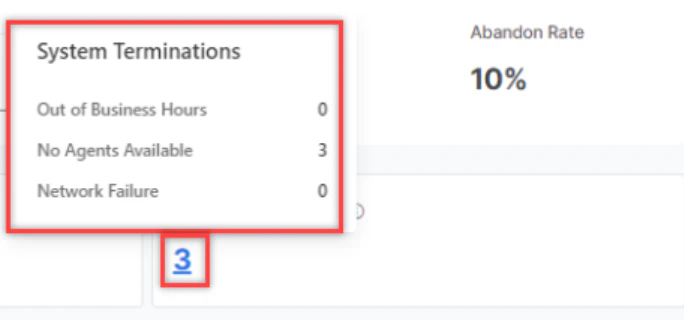
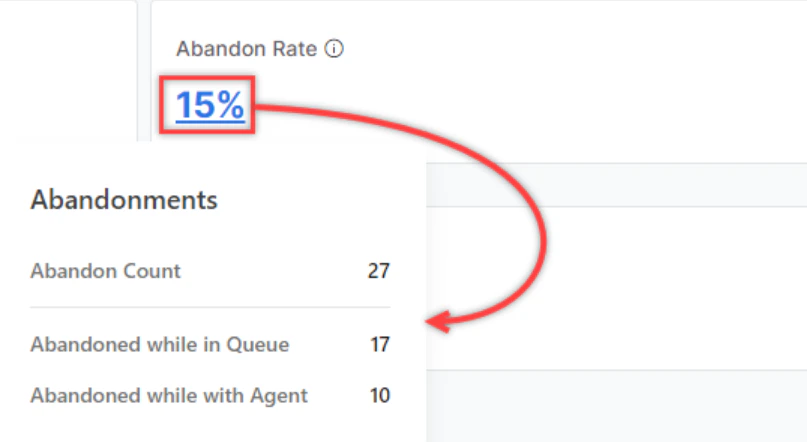 Selecting the percentage on the Abandon Rate widget shows:
* **Abandoned while in Queue**: Count of conversations abandoned while waiting in the queue.
* **Abandoned while with Agent**: Count of conversations abandoned while attended by an agent.
**Abandon Count formulas:**
* Digital Channels: `Abandon Count` = User Abandons While Waiting in Queue + Conversations With Agent that went through the Idle-Expired Sequence
* Voice Channels: `Abandon Count` = User Abandons While Waiting in Queue + Conversations With Agent where User Disconnects While Agent has the call on hold
Selecting the percentage on the Abandon Rate widget shows:
* **Abandoned while in Queue**: Count of conversations abandoned while waiting in the queue.
* **Abandoned while with Agent**: Count of conversations abandoned while attended by an agent.
**Abandon Count formulas:**
* Digital Channels: `Abandon Count` = User Abandons While Waiting in Queue + Conversations With Agent that went through the Idle-Expired Sequence
* Voice Channels: `Abandon Count` = User Abandons While Waiting in Queue + Conversations With Agent where User Disconnects While Agent has the call on hold
 ***
## Efficiency
This section displays individual metrics for all conversations (call, chat, and email).
### Voice Metrics
* Average Speed to Answer
* Average Handle Time
* Average Pick-up Time
* Average Engagement Time
* Average Talk Time
* Average Mute/Hold Time
### Chat Metrics
* Average Speed to Answer
* Average Handle Time
* Average First Response Time
* Average Agent Response Time
* Average Customer Response Time
### Transfers
* Transfer Rate
* Call Transfers
* Chat Transfers
**Skills In Queue**: Displays conversation counts per skill for conversations currently in the queue (active or waiting).
**Top Skills**: Displays the number of conversations per skill for the selected time range.
**Conversations by Disposition Set**: Lets you select a Disposition Set from the list and view conversations by disposition code.
* The Resolution Disposition Set is the default and appears in the Disposition & Notes section of the Live Interactions pane in the Agent Console.
* A multi-colored progress bar appears for codes in the selected Disposition Set.
* Separate progress bars appear under each Disposition Code.
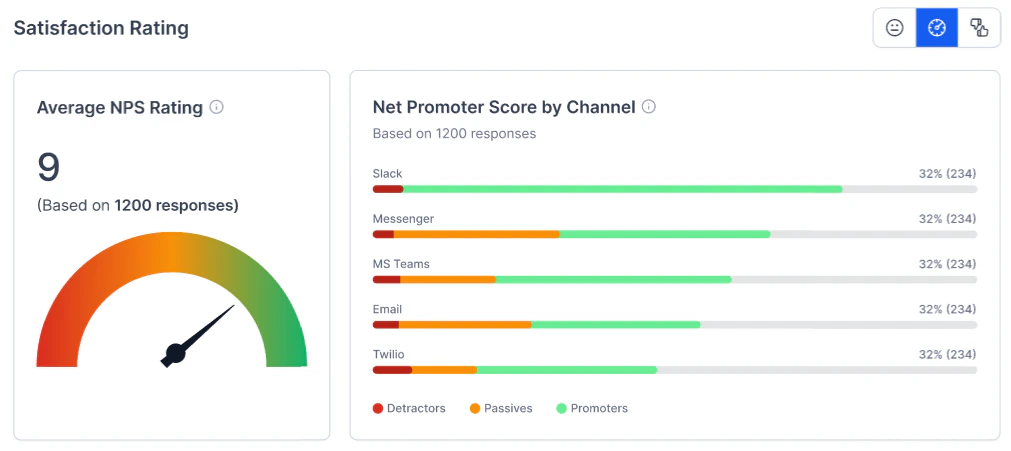
**Satisfaction Rating**: Displays results for the selected feedback survey (CSAT, NPS, Like/Dislike).
***
## Efficiency
This section displays individual metrics for all conversations (call, chat, and email).
### Voice Metrics
* Average Speed to Answer
* Average Handle Time
* Average Pick-up Time
* Average Engagement Time
* Average Talk Time
* Average Mute/Hold Time
### Chat Metrics
* Average Speed to Answer
* Average Handle Time
* Average First Response Time
* Average Agent Response Time
* Average Customer Response Time
### Transfers
* Transfer Rate
* Call Transfers
* Chat Transfers
**Skills In Queue**: Displays conversation counts per skill for conversations currently in the queue (active or waiting).
**Top Skills**: Displays the number of conversations per skill for the selected time range.
**Conversations by Disposition Set**: Lets you select a Disposition Set from the list and view conversations by disposition code.
* The Resolution Disposition Set is the default and appears in the Disposition & Notes section of the Live Interactions pane in the Agent Console.
* A multi-colored progress bar appears for codes in the selected Disposition Set.
* Separate progress bars appear under each Disposition Code.
**Satisfaction Rating**: Displays results for the selected feedback survey (CSAT, NPS, Like/Dislike).
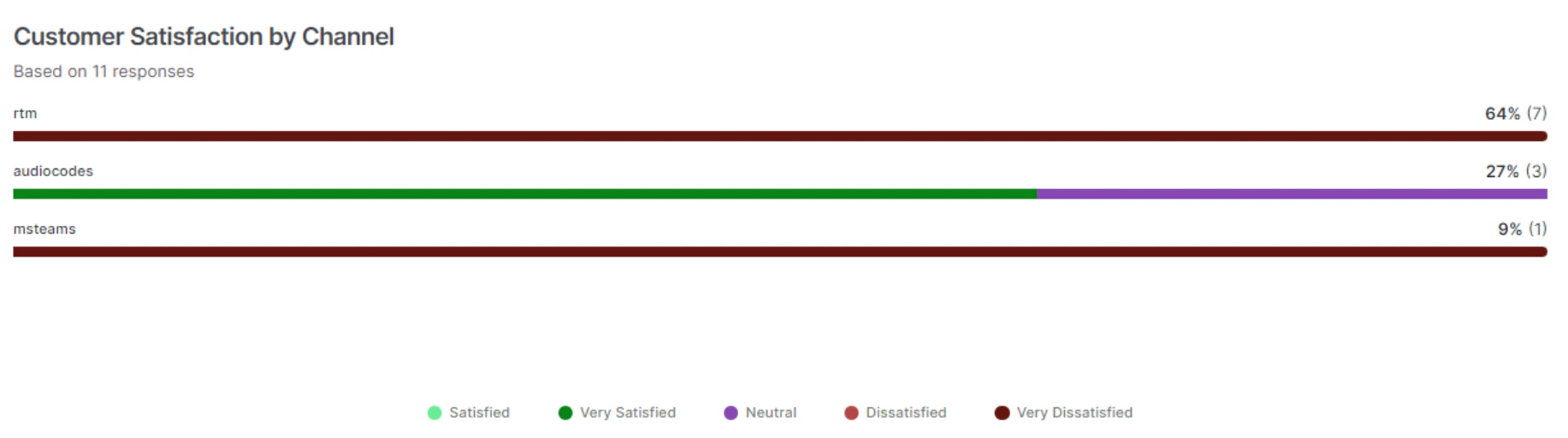
 **Customer Satisfaction by Channel**: Displays channel-wise customer satisfaction metrics based on survey responses.
 ***
## Agent Performance
This section displays agent performance metrics for all conversations (call, chat, and email).
***
## Agent Performance
This section displays agent performance metrics for all conversations (call, chat, and email).
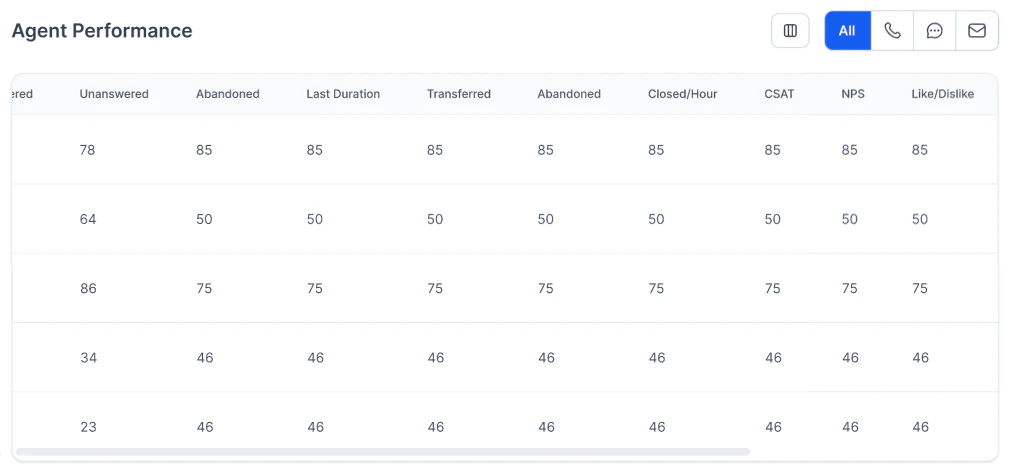 ### Agent Performance Metrics
| Metric | Description |
| ------------ | ------------------------------------------------------------------------ |
| Offered | Number of conversations assigned to the agent. |
| Answered | Number of conversations answered by the agent. |
| Unanswered | Number of conversations assigned but not answered by the agent. |
| Abandoned | Number of conversations where the user dropped off while with the agent. |
| Transferred | Number of conversations transferred by the agent. |
| Logged In | Agent login time between the selected start and end filters. |
| Closed/Hour | Number of conversations closed per hour. |
| AHT | Average Handle Time of conversations by the agent. |
| CSAT | Average CSAT score of the agent. |
| NPS | Average NPS score of the agent. |
| Like/Dislike | Average Like/Dislike score of the agent. |
***
## Queue Performance
This section displays queue performance metrics for all conversations (call, chat, and email).
### Agent Performance Metrics
| Metric | Description |
| ------------ | ------------------------------------------------------------------------ |
| Offered | Number of conversations assigned to the agent. |
| Answered | Number of conversations answered by the agent. |
| Unanswered | Number of conversations assigned but not answered by the agent. |
| Abandoned | Number of conversations where the user dropped off while with the agent. |
| Transferred | Number of conversations transferred by the agent. |
| Logged In | Agent login time between the selected start and end filters. |
| Closed/Hour | Number of conversations closed per hour. |
| AHT | Average Handle Time of conversations by the agent. |
| CSAT | Average CSAT score of the agent. |
| NPS | Average NPS score of the agent. |
| Like/Dislike | Average Like/Dislike score of the agent. |
***
## Queue Performance
This section displays queue performance metrics for all conversations (call, chat, and email).
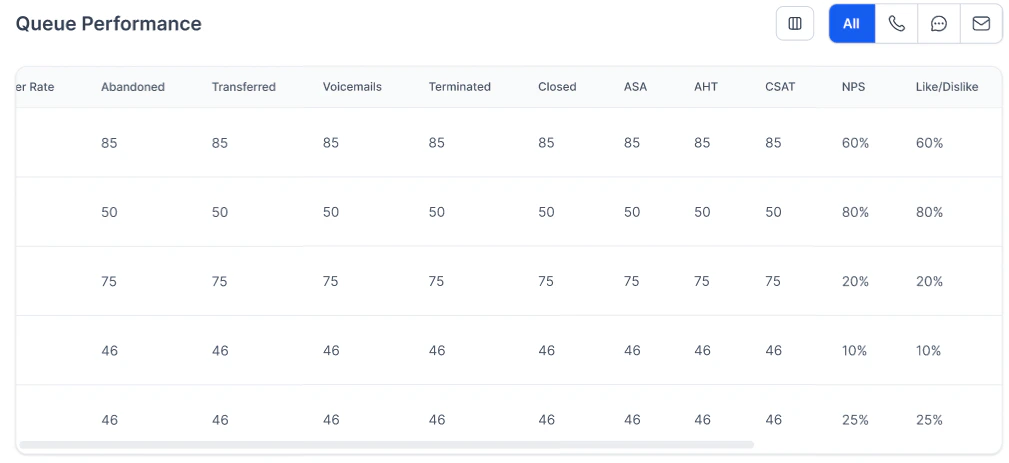 ### Queue Performance Metrics
| Metric | Description |
| ------------ | --------------------------------------------------------------------------------------------------------------------------------------------------------------------------------------------------------------------------------------------------------------------------------------------------------------------------------------------------------------------- |
| Incoming | Incoming = InQueue + Active + Idle + Expired + Completed + Transferred Out. Completed = Abandoned in Queue + System Terminated + All Conversations With Resolutions. Includes both inbound and outbound calls if the conversation entered the queue. For No-Filters, includes conversations transferred directly from AI Agents to an agent without entering a queue. |
| Answered | Number of conversations answered by agents in the queue. |
| Abandoned | Number of conversations where the user dropped off while with an agent in the queue. |
| Transferred | Number of conversations transferred from the queue. |
| Voicemails | Number of voicemails in the queue. |
| Terminated | Conversations terminated by the system (for example, no agents available, outside working hours, voice gateway failure, or network error). |
| Closed | Conversations an agent closed after performing after-call work, assigning dispositions, writing notes, and selecting Close. |
| ASA | Average Speed to Answer by agents in the queue. |
| AHT | Average Handle Time of conversations by agents in the queue. |
| CSAT | Average CSAT score in the queue. |
| NPS | Average NPS score in the queue. |
| Like/Dislike | Average Like/Dislike score in the queue. |
***
## Queues and Agents Field Reference
The behavior of each metric differs depending on whether data is filtered by queue or by agent.
| Metric | Filtered by Queues | Filtered by Agents |
| ----------------------- | ----------------------------------------------------------------------------------------------------------------------------------------------- | -------------------------------------------------------------------------------------------------------------- |
| Total Conversations | Conversations that have entered a queue. | Interactions that an agent accepts. |
| In Queue (live) | Conversations currently waiting in a queue. | NA |
| Ongoing (live) | Conversations in progress with agents from the queue. | Conversations in progress with selected agents. |
| Idle (live) | Conversations where the customer has been silent for a configured period (for example, 5 minutes). | Conversations where the customer has been silent for a configured period (for example, 5 minutes). |
| Expired (live) | Conversations where the customer has been silent for a configured period (for example, 10 minutes). | Conversations where the customer has been silent for a configured period (for example, 10 minutes). |
| Closed | Interactions that entered the queue and were ended by an agent or closed by the system while in the queue. | Interactions ended by the selected agent. |
| Transfer Rate | Transfers / Total Conversations × 100. Transfers = interactions where an agent in the queue transferred the call. | Transfers / Total Conversations × 100. Transfers = interactions where the selected agent transferred the call. |
| Abandon Rate | Abandonments / Closed × 100. Abandonments = interactions abandoned while in the selected queue or while being handled by an agent in the queue. | Abandonments / Closed × 100. Abandonments = interactions abandoned while being handled by the selected agent. |
| Average Speed to Answer | Sum of (Queue Wait time) / Closed. Queue Wait time = Accepted time – Queue Entry Time. | Sum of (Queue Wait time) / Closed. Queue Wait time = Accepted time – Queue Entry Time. |
| Average Handle Time | (Talk time + Hold Time + ACW time) / Closed. For chats, Hold Time = 0. | (Talk time + Hold Time + ACW time) / Closed. For chats, Hold Time = 0. |
| Queue Load | 100 × (Active or Waiting interactions / Handling Capacity of All Agents in Queue). | NA |
| Resolved Rate | Calls resolved in the queue / Closed calls. May be misleading with non-default disposition sets. | Calls resolved by the agent / Closed calls. May be misleading with non-default disposition sets. |
### Voice Metrics Reference
| Metric | Filtered by Queues | Filtered by Agents |
| ----------------------- | ----------------------------------------------------------------------------------------------------------------------------------------------- | ----------------------------------------------------------------------------------------------------------------------------------------------- |
| Average Speed to Answer | Sum of (Queue Wait time) across all conversations / Closed. Queue Wait time = Accepted time – Queue Entry Time. | Sum of (Queue Wait time) across all conversations / Closed. Queue Wait time = Accepted time – Queue Entry Time. |
| Average Handle Time | Handle Time of Each Interaction / Number of Closed Interactions. Handle Time = Talk Time + Hold Time + ACW time. | Handle Time of Each Interaction / Number of Closed Interactions. Handle Time = Talk Time + Hold Time + ACW time. |
| Average Pick-up Time | Pick-up time of each Interaction / Number of Closed Interactions. Pick Up Time = Time Agent Accepted – Time Agent was Assigned the interaction. | Pick-up time of each Interaction / Number of Closed Interactions. Pick Up Time = Time Agent Accepted – Time Agent was Assigned the interaction. |
| Average Engagement Time | Engagement Time = Talk Time + Hold Time. | Engagement Time = Talk Time + Hold Time. |
| Average Talk Time | Average talk time across all voice calls. Talk time = time the agent and caller were in active conversation. | Average talk time across all voice calls. Talk time = time the agent and caller were in active conversation. |
| Average Mute/Hold Time | Average hold time across all voice calls. | Average hold time across all voice calls. |
### Chat Metrics Reference
| Metric | Filtered by Queues | Filtered by Agents |
| ------------------------------ | ---------------------------------------------------------------------------------------------------------------------------------------------------------------------- | ---------------------------------------------------------------------------------------------------------------------------------------------------------------------- |
| Average Speed to Answer | Sum of (Queue Wait time) across all conversations / Closed. Queue Wait time = Accepted time – Queue Entry Time. | Sum of (Queue Wait time) across all conversations / Closed. Queue Wait time = Accepted time – Queue Entry Time. |
| Average Handle Time | Handle Time of Each Interaction / Number of Closed Interactions. Handle Time = Talk Time + ACW time. | Handle Time of Each Interaction / Number of Closed Interactions. Handle Time = Talk Time + ACW time. |
| Average First Response Time | First Response Time of Each Interaction / Number of Closed Interactions. First Response Time = from Agent accepted to Agent's first message. | First Response Time of Each Interaction / Number of Closed Interactions. First Response Time = from Agent accepted to Agent's first message. |
| Average Agent Response Time | Average of all durations from a customer's message to the agent's corresponding response. When there is a continuous stream of messages, the earliest message is used. | Average of all durations from a customer's message to the agent's corresponding response. When there is a continuous stream of messages, the earliest message is used. |
| Average Customer Response Time | Average of all durations from an agent's message to the next message from the customer. When there is a continuous stream of messages, the earliest message is used. | Average of all durations from an agent's message to the next message from the customer. When there is a continuous stream of messages, the earliest message is used. |
### Transfer and Skills Metrics Reference
| Metric | Filtered by Queues | Filtered by Agents |
| -------------------------------- | ---------------------------------------------------------------------------------------------------------------------------------- | ---------------------------------------------------------------------------------------------------------------------------------- |
| Transfer Rate | Conversations transferred from the queue (including back to the same queue) / Total Conversations. | Conversations transferred from the agent / Total Conversations. |
| Total Transfers | Conversations transferred from the queue (including back to the same queue). | Conversations transferred from the agent. |
| Call Transfers | Fraction of Total Transfers from voice calls. | Fraction of Total Transfers from voice calls. |
| Chat Transfers | Fraction of Total Transfers from digital channels. | Fraction of Total Transfers from digital channels. |
| Skills in Queue (live) | Count of conversations in the selected queue (active or waiting) per skill. Top 5 skills shown. | NA |
| Top Skills | Count of closed conversations entering selected queues per skill. | Count of closed conversations accepted by selected agents per skill. |
| Conversations by Disposition Set | Count of closed conversations assigned a particular disposition code. Changing the Disposition Set shows a different set of codes. | Count of closed conversations assigned a particular disposition code. Changing the Disposition Set shows a different set of codes. |
| Average Satisfaction Rating | Sum of all CSAT ratings / Number of conversations with a CSAT rating. | Sum of all CSAT ratings / Number of conversations with a CSAT rating. |
| Customer Satisfaction by Channel | Average CSAT rating by channel. | Average CSAT rating by channel. |
Built with [Mintlify](https://mintlify.com).
### Queue Performance Metrics
| Metric | Description |
| ------------ | --------------------------------------------------------------------------------------------------------------------------------------------------------------------------------------------------------------------------------------------------------------------------------------------------------------------------------------------------------------------- |
| Incoming | Incoming = InQueue + Active + Idle + Expired + Completed + Transferred Out. Completed = Abandoned in Queue + System Terminated + All Conversations With Resolutions. Includes both inbound and outbound calls if the conversation entered the queue. For No-Filters, includes conversations transferred directly from AI Agents to an agent without entering a queue. |
| Answered | Number of conversations answered by agents in the queue. |
| Abandoned | Number of conversations where the user dropped off while with an agent in the queue. |
| Transferred | Number of conversations transferred from the queue. |
| Voicemails | Number of voicemails in the queue. |
| Terminated | Conversations terminated by the system (for example, no agents available, outside working hours, voice gateway failure, or network error). |
| Closed | Conversations an agent closed after performing after-call work, assigning dispositions, writing notes, and selecting Close. |
| ASA | Average Speed to Answer by agents in the queue. |
| AHT | Average Handle Time of conversations by agents in the queue. |
| CSAT | Average CSAT score in the queue. |
| NPS | Average NPS score in the queue. |
| Like/Dislike | Average Like/Dislike score in the queue. |
***
## Queues and Agents Field Reference
The behavior of each metric differs depending on whether data is filtered by queue or by agent.
| Metric | Filtered by Queues | Filtered by Agents |
| ----------------------- | ----------------------------------------------------------------------------------------------------------------------------------------------- | -------------------------------------------------------------------------------------------------------------- |
| Total Conversations | Conversations that have entered a queue. | Interactions that an agent accepts. |
| In Queue (live) | Conversations currently waiting in a queue. | NA |
| Ongoing (live) | Conversations in progress with agents from the queue. | Conversations in progress with selected agents. |
| Idle (live) | Conversations where the customer has been silent for a configured period (for example, 5 minutes). | Conversations where the customer has been silent for a configured period (for example, 5 minutes). |
| Expired (live) | Conversations where the customer has been silent for a configured period (for example, 10 minutes). | Conversations where the customer has been silent for a configured period (for example, 10 minutes). |
| Closed | Interactions that entered the queue and were ended by an agent or closed by the system while in the queue. | Interactions ended by the selected agent. |
| Transfer Rate | Transfers / Total Conversations × 100. Transfers = interactions where an agent in the queue transferred the call. | Transfers / Total Conversations × 100. Transfers = interactions where the selected agent transferred the call. |
| Abandon Rate | Abandonments / Closed × 100. Abandonments = interactions abandoned while in the selected queue or while being handled by an agent in the queue. | Abandonments / Closed × 100. Abandonments = interactions abandoned while being handled by the selected agent. |
| Average Speed to Answer | Sum of (Queue Wait time) / Closed. Queue Wait time = Accepted time – Queue Entry Time. | Sum of (Queue Wait time) / Closed. Queue Wait time = Accepted time – Queue Entry Time. |
| Average Handle Time | (Talk time + Hold Time + ACW time) / Closed. For chats, Hold Time = 0. | (Talk time + Hold Time + ACW time) / Closed. For chats, Hold Time = 0. |
| Queue Load | 100 × (Active or Waiting interactions / Handling Capacity of All Agents in Queue). | NA |
| Resolved Rate | Calls resolved in the queue / Closed calls. May be misleading with non-default disposition sets. | Calls resolved by the agent / Closed calls. May be misleading with non-default disposition sets. |
### Voice Metrics Reference
| Metric | Filtered by Queues | Filtered by Agents |
| ----------------------- | ----------------------------------------------------------------------------------------------------------------------------------------------- | ----------------------------------------------------------------------------------------------------------------------------------------------- |
| Average Speed to Answer | Sum of (Queue Wait time) across all conversations / Closed. Queue Wait time = Accepted time – Queue Entry Time. | Sum of (Queue Wait time) across all conversations / Closed. Queue Wait time = Accepted time – Queue Entry Time. |
| Average Handle Time | Handle Time of Each Interaction / Number of Closed Interactions. Handle Time = Talk Time + Hold Time + ACW time. | Handle Time of Each Interaction / Number of Closed Interactions. Handle Time = Talk Time + Hold Time + ACW time. |
| Average Pick-up Time | Pick-up time of each Interaction / Number of Closed Interactions. Pick Up Time = Time Agent Accepted – Time Agent was Assigned the interaction. | Pick-up time of each Interaction / Number of Closed Interactions. Pick Up Time = Time Agent Accepted – Time Agent was Assigned the interaction. |
| Average Engagement Time | Engagement Time = Talk Time + Hold Time. | Engagement Time = Talk Time + Hold Time. |
| Average Talk Time | Average talk time across all voice calls. Talk time = time the agent and caller were in active conversation. | Average talk time across all voice calls. Talk time = time the agent and caller were in active conversation. |
| Average Mute/Hold Time | Average hold time across all voice calls. | Average hold time across all voice calls. |
### Chat Metrics Reference
| Metric | Filtered by Queues | Filtered by Agents |
| ------------------------------ | ---------------------------------------------------------------------------------------------------------------------------------------------------------------------- | ---------------------------------------------------------------------------------------------------------------------------------------------------------------------- |
| Average Speed to Answer | Sum of (Queue Wait time) across all conversations / Closed. Queue Wait time = Accepted time – Queue Entry Time. | Sum of (Queue Wait time) across all conversations / Closed. Queue Wait time = Accepted time – Queue Entry Time. |
| Average Handle Time | Handle Time of Each Interaction / Number of Closed Interactions. Handle Time = Talk Time + ACW time. | Handle Time of Each Interaction / Number of Closed Interactions. Handle Time = Talk Time + ACW time. |
| Average First Response Time | First Response Time of Each Interaction / Number of Closed Interactions. First Response Time = from Agent accepted to Agent's first message. | First Response Time of Each Interaction / Number of Closed Interactions. First Response Time = from Agent accepted to Agent's first message. |
| Average Agent Response Time | Average of all durations from a customer's message to the agent's corresponding response. When there is a continuous stream of messages, the earliest message is used. | Average of all durations from a customer's message to the agent's corresponding response. When there is a continuous stream of messages, the earliest message is used. |
| Average Customer Response Time | Average of all durations from an agent's message to the next message from the customer. When there is a continuous stream of messages, the earliest message is used. | Average of all durations from an agent's message to the next message from the customer. When there is a continuous stream of messages, the earliest message is used. |
### Transfer and Skills Metrics Reference
| Metric | Filtered by Queues | Filtered by Agents |
| -------------------------------- | ---------------------------------------------------------------------------------------------------------------------------------- | ---------------------------------------------------------------------------------------------------------------------------------- |
| Transfer Rate | Conversations transferred from the queue (including back to the same queue) / Total Conversations. | Conversations transferred from the agent / Total Conversations. |
| Total Transfers | Conversations transferred from the queue (including back to the same queue). | Conversations transferred from the agent. |
| Call Transfers | Fraction of Total Transfers from voice calls. | Fraction of Total Transfers from voice calls. |
| Chat Transfers | Fraction of Total Transfers from digital channels. | Fraction of Total Transfers from digital channels. |
| Skills in Queue (live) | Count of conversations in the selected queue (active or waiting) per skill. Top 5 skills shown. | NA |
| Top Skills | Count of closed conversations entering selected queues per skill. | Count of closed conversations accepted by selected agents per skill. |
| Conversations by Disposition Set | Count of closed conversations assigned a particular disposition code. Changing the Disposition Set shows a different set of codes. | Count of closed conversations assigned a particular disposition code. Changing the Disposition Set shows a different set of codes. |
| Average Satisfaction Rating | Sum of all CSAT ratings / Number of conversations with a CSAT rating. | Sum of all CSAT ratings / Number of conversations with a CSAT rating. |
| Customer Satisfaction by Channel | Average CSAT rating by channel. | Average CSAT rating by channel. |
Built with [Mintlify](https://mintlify.com).