> ## Documentation Index
> Fetch the complete documentation index at: https://koreai.mintlify.site/llms.txt
> Use this file to discover all available pages before exploring further.
# Agent Entry Exit Summary Report
[Back to Reports List](/ai-for-service/analytics/contact-center/reports/reports-list)
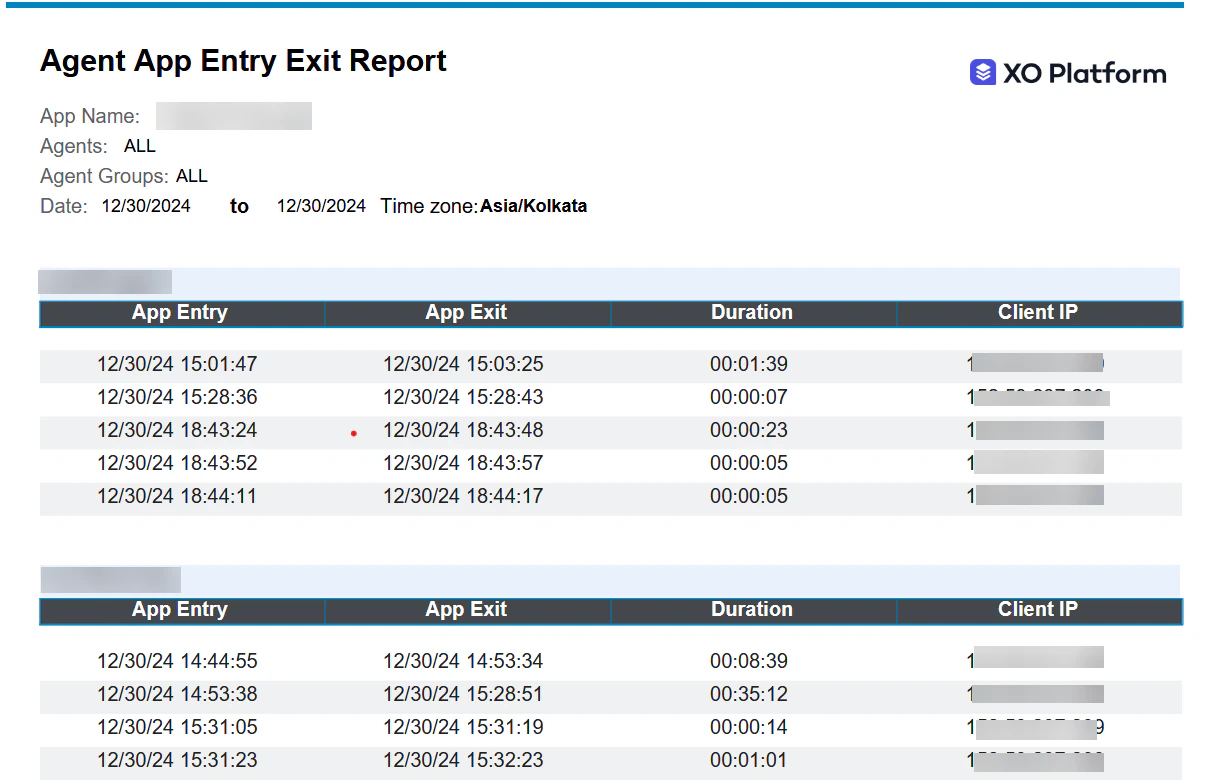
The Agent Entry Exit Summary Report is a detailed report of an agent's entry and exit events.
***
## Generate and Manage the Report
To create a new report, follow these steps:
1. On the Reports page, select **New Report**.
2. From the list of reports, select a report type to generate. For example, **Interaction Details Report**.
3. Enter the **Report Name** and **Report Description**.
4. Select a **Time Period**.
5. Select **Data Filters**.
6. Select **Report Generation** and choose **Run On Demand** or **Schedule**, where you can create up to six schedules (only one for the Hourly option).
7. Select the desired format.
8. Enter a **Send To** address (single email address or mailing list).
9. Select **Create** to create the report.
10. Select the **Run** option to generate the report. **Run On Demand** generates the report as and when needed, while **Schedule** configures automatic generation at the specified date and time. Use the toggle to enable or disable the schedule (applies only to scheduled reports).
11. Select the option to download the report.
Contact Center AI supports filters, scheduled report runs, on-demand runs, format and filter modifications, on reports.
The red dot beside the report indicates it was generated within the last 24 hours.
 ***
## Report Fields
| Field | Description | Example |
| :---------- | :--------------------------------------------------------------------------- | :------------------ |
| `App Entry` | Date and time at which the agent entered the system, starting a new session. | `01/06/23 15:57:17` |
| `App Exit` | Date and time at which the agent exited the system, ending a session. | `01/06/23 15:57:17` |
| `Duration` | Duration of the session (Entry - Exit). | `01:39:22` |
| `Client IP` | The IP address of the client device. | `192.168.1.100` |
***
***
## Report Fields
| Field | Description | Example |
| :---------- | :--------------------------------------------------------------------------- | :------------------ |
| `App Entry` | Date and time at which the agent entered the system, starting a new session. | `01/06/23 15:57:17` |
| `App Exit` | Date and time at which the agent exited the system, ending a session. | `01/06/23 15:57:17` |
| `Duration` | Duration of the session (Entry - Exit). | `01:39:22` |
| `Client IP` | The IP address of the client device. | `192.168.1.100` |
***