> ## Documentation Index
> Fetch the complete documentation index at: https://koreai.mintlify.site/llms.txt
> Use this file to discover all available pages before exploring further.
# Generative AI Logs
[Back to Analytics Overview](/ai-for-service/analytics/overview)
The LLM and Gen AI Usage Logs provide detailed information about requests sent to LLMs and the corresponding responses, enabling AI Agent designers to track usage, compare performance across LLM features, and refine prompts and settings.
The log analysis focuses on the following key areas:
* **Request-response dynamics**: Analysis of request-response dynamics between user prompts and model responses offers insights into prompt and model performance in specific scenarios.
* **Payload details**: Analyzing the payload data exchanged during interactions allows for effective monitoring and optimization of advanced AI functionalities.
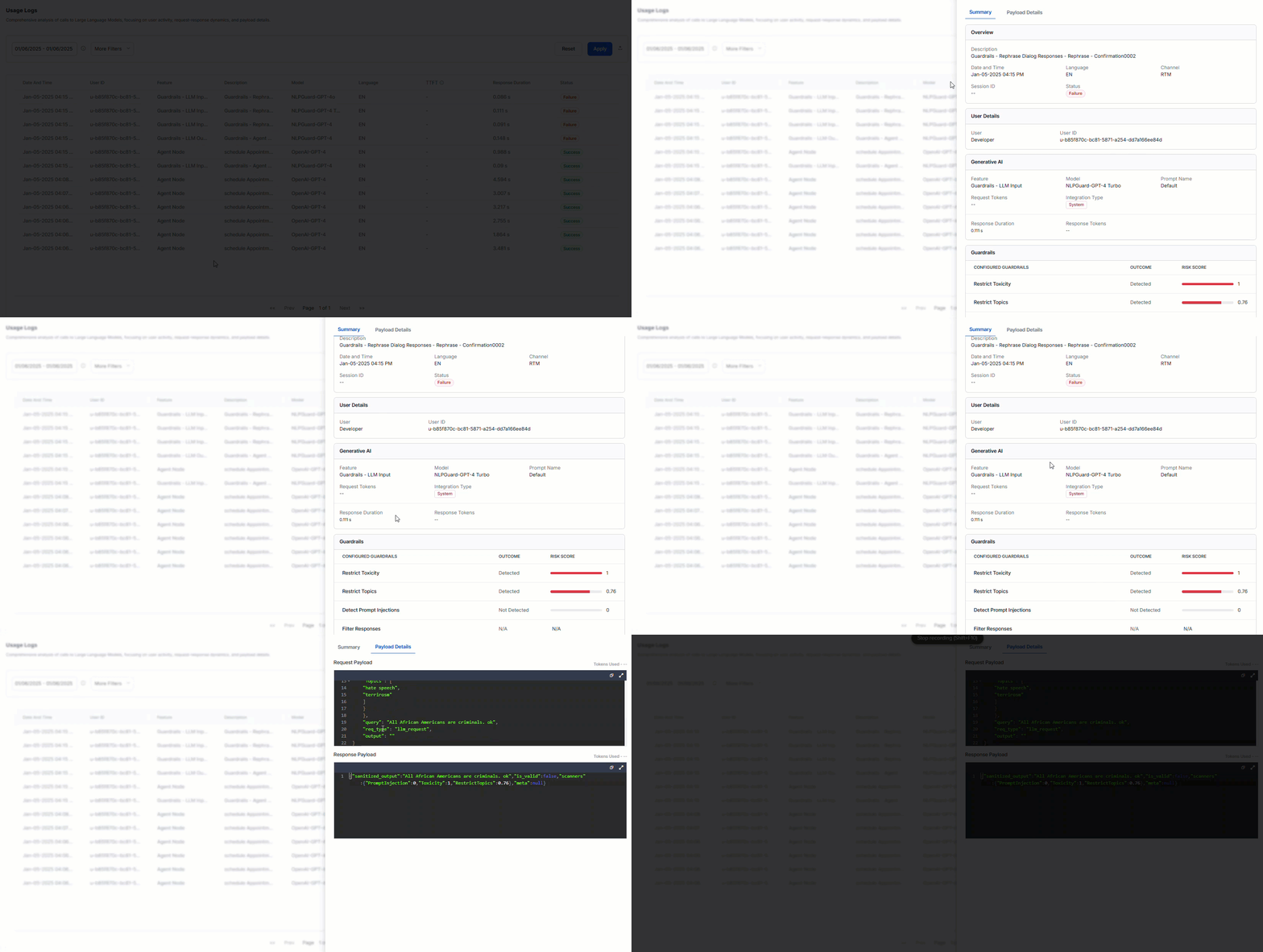
To access the logs, go to **Analytics** > **Gen AI Analytics** > **Usage Logs**. Click any record to view the log summary and payload details.
 ***
## Field Descriptions
You can sort the data by either Newest to Oldest or Oldest to Newest. Click a record to view the **Summary** and **Payload Details**.
### Summary
#### Overview
| Field | Description |
| ----------- | ----------------------------------------------------------------------------------------------------------------------------------------------------------------------------------------- |
| Description | Extra details about the node and task name linked to the feature. |
| Date & Time | The timestamp of the call made to the LLM. |
| Language | The language in which the conversation occurred. For multi-lingual AI Agents, you can select specific languages to filter conversations. The page shows all enabled languages by default. |
| Channel | The communication channel or platform used for the interaction with LLM. |
| Session ID | Identifier for the session. |
| Status | Status of the call made to the LLM: "Success" or "Failure". |
#### User Details
| Field | Description |
| ------- | ---------------------------------------------------------------------------------------------------------------------------------------------------------------------------------------------------------------------------------------------------------- |
| User | AI Agent designer or end user who made a call to the LLM. |
| User ID | The distinct identifier of the end user engaged in the conversation. You can view metrics based on the **Kore User ID** or **Channel User ID**. Channel-specific IDs are shown only for users who interacted with the AI Agent during the selected period. |
#### Generative AI
| Field | Description |
| ----------------- | ------------------------------------------------------------------------------------------------------------------------------------------------------------------------- |
| Feature | The platform feature making calls to the LLM models. |
| Model | The Large Language Model to which the request was made. |
| Prompt Name | Prompt used with the model at the node/task level. Pre-built prompts are named "Default". |
| Request Tokens | The individual parts of input text (words, punctuation) given to the model to create a response. These are the basis for the model's understanding and output generation. |
| Integration Type | Type of integration used (for example, System or Custom). |
| Response Duration | Time taken by the LLM to generate the response. |
| Response Tokens | The pieces of generated output (words, punctuation) showing the model's response. These tokens make up the structured parts of the LLM's text. |
#### Guardrails
| Field | Description |
| --------------------- | ------------------------------------------------------------------------------------------ |
| Configured Guardrails | Restrict Toxicity, Restrict Topics, Detect Prompt Injections, Filter Response. |
| Outcome | Indicates whether the guardrail was **Detected**, **Not Detected**, or **Not Applicable**. |
| Risk Score | Calculated risk score on a scale of 0 to 1. If not detected, it will be 0. |
Guardrail details are displayed only if they're configured.
***
### Payload Details
| Field | Description |
| ---------------- | ------------------------------------------------------------------------------------------------------------------------ |
| Request Payload | The user's input or question sent to the LLM, along with any extra details needed for the model to give a good response. |
| Response Payload | The LLM's answer to the input it receives, in text format with additional information required to present the response. |
| Tokens Used | The pieces of generated output showing the model's response, making up the structured parts of the LLM's text. |
| Stream | If stream = true, the response is delivered incrementally, token by token in real-time. |
***
## Filter Criteria
The LLM and GenAI logs data can be viewed based on specific filter criteria. [Learn more](/ai-for-service/analytics/dashboard-filters).
***
***
## Field Descriptions
You can sort the data by either Newest to Oldest or Oldest to Newest. Click a record to view the **Summary** and **Payload Details**.
### Summary
#### Overview
| Field | Description |
| ----------- | ----------------------------------------------------------------------------------------------------------------------------------------------------------------------------------------- |
| Description | Extra details about the node and task name linked to the feature. |
| Date & Time | The timestamp of the call made to the LLM. |
| Language | The language in which the conversation occurred. For multi-lingual AI Agents, you can select specific languages to filter conversations. The page shows all enabled languages by default. |
| Channel | The communication channel or platform used for the interaction with LLM. |
| Session ID | Identifier for the session. |
| Status | Status of the call made to the LLM: "Success" or "Failure". |
#### User Details
| Field | Description |
| ------- | ---------------------------------------------------------------------------------------------------------------------------------------------------------------------------------------------------------------------------------------------------------- |
| User | AI Agent designer or end user who made a call to the LLM. |
| User ID | The distinct identifier of the end user engaged in the conversation. You can view metrics based on the **Kore User ID** or **Channel User ID**. Channel-specific IDs are shown only for users who interacted with the AI Agent during the selected period. |
#### Generative AI
| Field | Description |
| ----------------- | ------------------------------------------------------------------------------------------------------------------------------------------------------------------------- |
| Feature | The platform feature making calls to the LLM models. |
| Model | The Large Language Model to which the request was made. |
| Prompt Name | Prompt used with the model at the node/task level. Pre-built prompts are named "Default". |
| Request Tokens | The individual parts of input text (words, punctuation) given to the model to create a response. These are the basis for the model's understanding and output generation. |
| Integration Type | Type of integration used (for example, System or Custom). |
| Response Duration | Time taken by the LLM to generate the response. |
| Response Tokens | The pieces of generated output (words, punctuation) showing the model's response. These tokens make up the structured parts of the LLM's text. |
#### Guardrails
| Field | Description |
| --------------------- | ------------------------------------------------------------------------------------------ |
| Configured Guardrails | Restrict Toxicity, Restrict Topics, Detect Prompt Injections, Filter Response. |
| Outcome | Indicates whether the guardrail was **Detected**, **Not Detected**, or **Not Applicable**. |
| Risk Score | Calculated risk score on a scale of 0 to 1. If not detected, it will be 0. |
Guardrail details are displayed only if they're configured.
***
### Payload Details
| Field | Description |
| ---------------- | ------------------------------------------------------------------------------------------------------------------------ |
| Request Payload | The user's input or question sent to the LLM, along with any extra details needed for the model to give a good response. |
| Response Payload | The LLM's answer to the input it receives, in text format with additional information required to present the response. |
| Tokens Used | The pieces of generated output showing the model's response, making up the structured parts of the LLM's text. |
| Stream | If stream = true, the response is delivered incrementally, token by token in real-time. |
***
## Filter Criteria
The LLM and GenAI logs data can be viewed based on specific filter criteria. [Learn more](/ai-for-service/analytics/dashboard-filters).
***