> ## Documentation Index
> Fetch the complete documentation index at: https://koreai.mintlify.site/llms.txt
> Use this file to discover all available pages before exploring further.
# Engagement Analytics
[Back to Analytics Overview](/ai-for-service/analytics/overview)
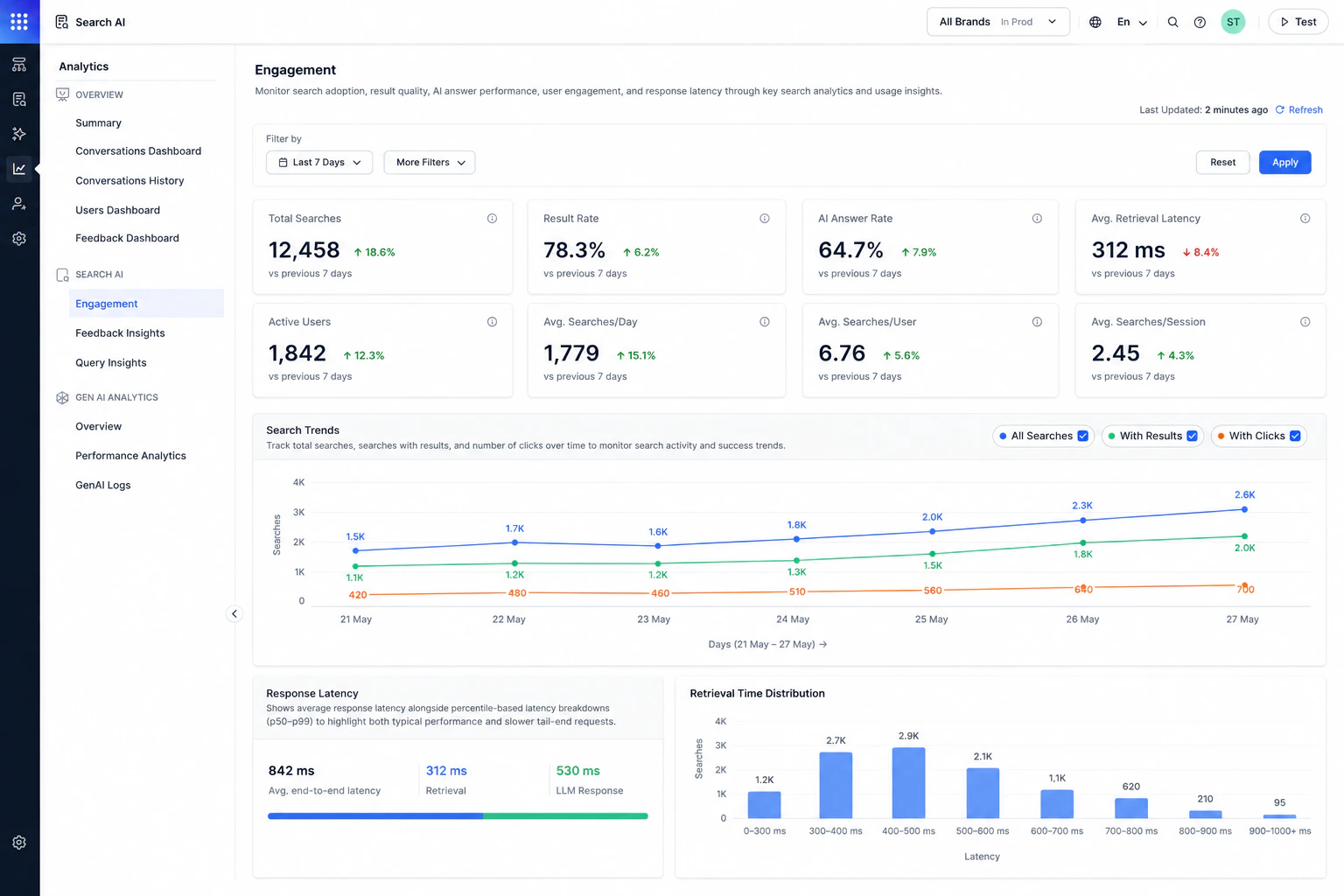
The Engagement dashboard helps you understand how users interact with Search AI. It provides visibility into search activity, answer effectiveness, user engagement trends, and response latency. Use this dashboard to analyze user engagement patterns, measure answer effectiveness and retrieval and response performance.
To access the Engagement dashboard:
1. Navigate to **Analytics**.
2. Under **Search AI**, select **Engagement**.
 ## Key Engagement Metrics
| Metric | Description |
| -------------------------- | -------------------------------------------------------------- |
| **Total Searches** | Total number of searches performed during the selected period. |
| **Result Rate** | Percentage of searches that returned results. |
| **AI Answer Rate** | Percentage of AI searches that generated valid AI answers. |
| **Avg. Retrieval Latency** | Average time taken to retrieve search results. |
| **Active Users** | Number of unique users who performed searches. |
| **Avg. Searches/Day** | Average number of searches performed per day. |
| **Avg. Searches/User** | Average number of searches performed by each user. |
| **Avg. Searches/Session** | Average number of searches performed within a session. |
## Search Trends
The Search Trends chart helps visualize search activity over time.
The chart displays:
* All searches.
* Searches with results.
* Searches with clicks.
Use this chart to identify peak usage periods, analyze search adoption trends, compare successful searches against total searches and monitor click engagement over time.
You can toggle individual trend lines on or off from the legend.
## Response Latency
The Response Latency section helps monitor search response performance.
This section includes:
* Average end-to-end latency
* Retrieval latency
* LLM response latency
Use these metrics to:
* Identify slow response patterns.
* Monitor overall answer performance.
* Analyze retrieval and generation delays.
## Retrieval Time Distribution
The Retrieval Time Distribution chart shows how searches are distributed across latency ranges. Use this chart to:
* Understand typical retrieval performance.
* Identify slow-performing searches.
* Monitor latency consistency across requests.
Use **More Filters** to filter analytics by Interaction Type, Channels, or Custom Analytics Metadata. Custom Analytics Metadata filters use the metadata sent in the `analyticsMetadata` field of the [Advanced Search API](/ai-for-service/apis/searchai/advance-search#request-parameters) request.
## Key Engagement Metrics
| Metric | Description |
| -------------------------- | -------------------------------------------------------------- |
| **Total Searches** | Total number of searches performed during the selected period. |
| **Result Rate** | Percentage of searches that returned results. |
| **AI Answer Rate** | Percentage of AI searches that generated valid AI answers. |
| **Avg. Retrieval Latency** | Average time taken to retrieve search results. |
| **Active Users** | Number of unique users who performed searches. |
| **Avg. Searches/Day** | Average number of searches performed per day. |
| **Avg. Searches/User** | Average number of searches performed by each user. |
| **Avg. Searches/Session** | Average number of searches performed within a session. |
## Search Trends
The Search Trends chart helps visualize search activity over time.
The chart displays:
* All searches.
* Searches with results.
* Searches with clicks.
Use this chart to identify peak usage periods, analyze search adoption trends, compare successful searches against total searches and monitor click engagement over time.
You can toggle individual trend lines on or off from the legend.
## Response Latency
The Response Latency section helps monitor search response performance.
This section includes:
* Average end-to-end latency
* Retrieval latency
* LLM response latency
Use these metrics to:
* Identify slow response patterns.
* Monitor overall answer performance.
* Analyze retrieval and generation delays.
## Retrieval Time Distribution
The Retrieval Time Distribution chart shows how searches are distributed across latency ranges. Use this chart to:
* Understand typical retrieval performance.
* Identify slow-performing searches.
* Monitor latency consistency across requests.
Use **More Filters** to filter analytics by Interaction Type, Channels, or Custom Analytics Metadata. Custom Analytics Metadata filters use the metadata sent in the `analyticsMetadata` field of the [Advanced Search API](/ai-for-service/apis/searchai/advance-search#request-parameters) request.