> ## Documentation Index
> Fetch the complete documentation index at: https://koreai.mintlify.site/llms.txt
> Use this file to discover all available pages before exploring further.
# Feedback Insights
[Back to Analytics Overview](/ai-for-service/analytics/overview)
The Feedback Insights dashboard helps analyze user feedback, click behavior, and the quality of result interactions.
Use this dashboard to:
* Measure user satisfaction.
* Analyze click-through behavior.
* Understand the result engagement quality.
* Identify negative feedback trends.
To access the dashboard:
1. Navigate to **Analytics**.
2. Under **Search AI**, select **Feedback Insights**.
Use the filters at the top of the dashboard to analyze data for a specific period or segment.
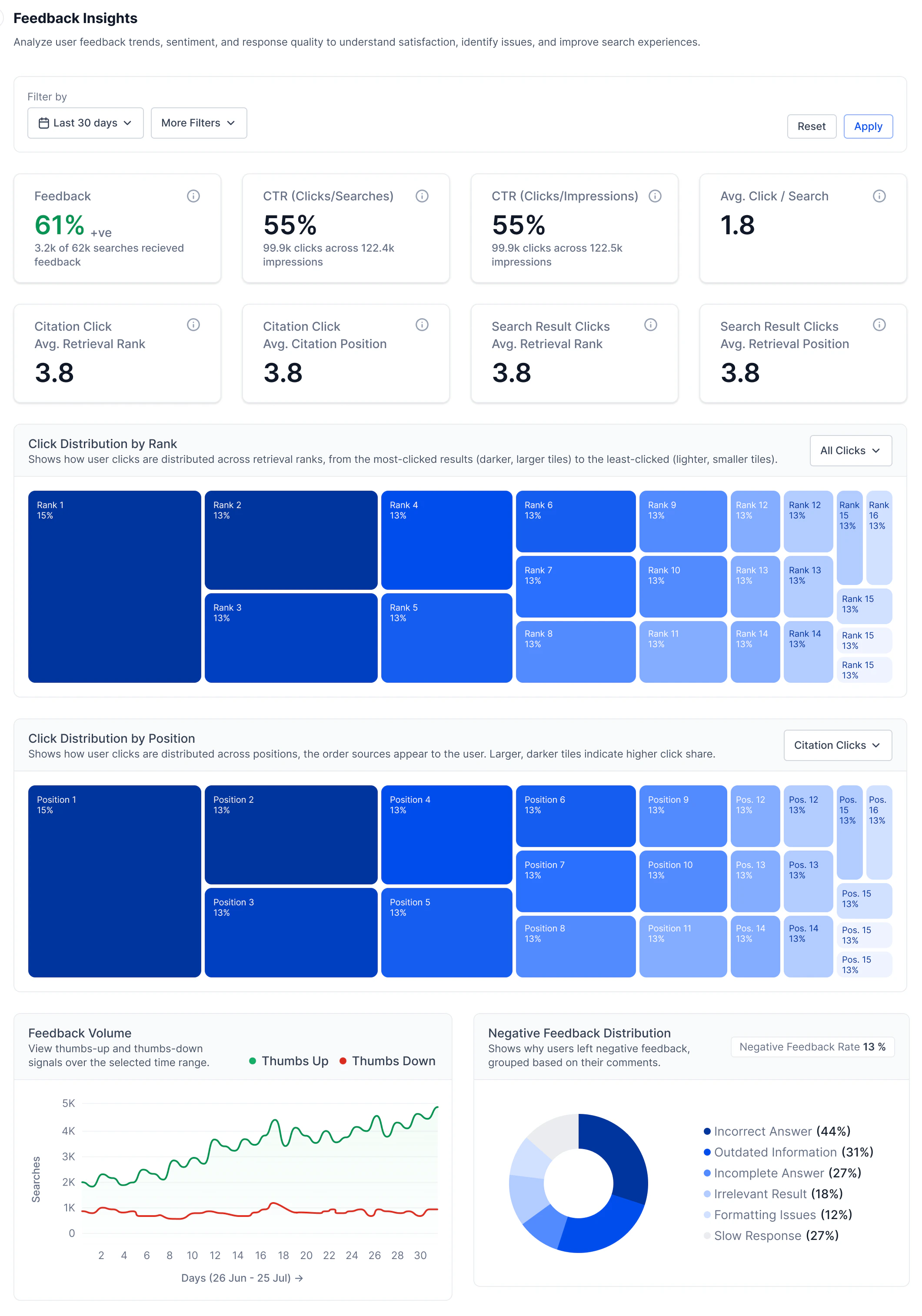 ## Feedback Overview Metrics
| Metric | Description |
| ------------------------------------------------ | ---------------------------------------------------------------------------------------------------------------------------- |
| **Feedback** | Percentage of searches that received user feedback. |
| **CTR (Clicks/Searches)** | Click-through rate based on searches performed. Indicates how often users click on search results after performing a search. |
| **CTR (Clicks/Impressions)** | Click-through rate based on result impressions. Indicates how often users click on results after seeing them. |
| **Avg. Click/Search** | Average number of clicks generated per search. |
| **Citation Click Avg. Retrieval Rank** | Average retrieval rank for clicked citations. |
| **Citation Click Avg. Citation Position** | Average citation position for clicked citations. |
| **Search Result Clicks Avg. Retrieval Rank** | Average retrieval rank for clicked search results. |
| **Search Result Clicks Avg. Retrieval Position** | Average position of clicked search results. |
## Click Distribution by Rank
This visualization shows how clicks are distributed across retrieval ranks. Use this section to:
* Understand which ranked results receive the most engagement
* Evaluate retrieval effectiveness
* Analyze click concentration patterns
You can filter the visualization by:
* All clicks
* Citation clicks
* Search result clicks
## Click Distribution by Position
This visualization shows how clicks are distributed based on result or citation position. Use this section to:
* Analyze user interaction patterns
* Understand engagement with displayed citations and results
* Evaluate answer and citation placement effectiveness
## Feedback Volume
The Feedback Volume chart displays thumbs-up and thumbs-down activity over time. Use this section to:
* Monitor feedback trends
* Identify sudden increases in negative feedback
* Track user satisfaction over time
## Negative Feedback Distribution
This section categorizes negative feedback provided by users. Use this section to identify common user issues, analyze recurring feedback patterns, and then use them to improve answer quality and retrieval relevance.
## Feedback Overview Metrics
| Metric | Description |
| ------------------------------------------------ | ---------------------------------------------------------------------------------------------------------------------------- |
| **Feedback** | Percentage of searches that received user feedback. |
| **CTR (Clicks/Searches)** | Click-through rate based on searches performed. Indicates how often users click on search results after performing a search. |
| **CTR (Clicks/Impressions)** | Click-through rate based on result impressions. Indicates how often users click on results after seeing them. |
| **Avg. Click/Search** | Average number of clicks generated per search. |
| **Citation Click Avg. Retrieval Rank** | Average retrieval rank for clicked citations. |
| **Citation Click Avg. Citation Position** | Average citation position for clicked citations. |
| **Search Result Clicks Avg. Retrieval Rank** | Average retrieval rank for clicked search results. |
| **Search Result Clicks Avg. Retrieval Position** | Average position of clicked search results. |
## Click Distribution by Rank
This visualization shows how clicks are distributed across retrieval ranks. Use this section to:
* Understand which ranked results receive the most engagement
* Evaluate retrieval effectiveness
* Analyze click concentration patterns
You can filter the visualization by:
* All clicks
* Citation clicks
* Search result clicks
## Click Distribution by Position
This visualization shows how clicks are distributed based on result or citation position. Use this section to:
* Analyze user interaction patterns
* Understand engagement with displayed citations and results
* Evaluate answer and citation placement effectiveness
## Feedback Volume
The Feedback Volume chart displays thumbs-up and thumbs-down activity over time. Use this section to:
* Monitor feedback trends
* Identify sudden increases in negative feedback
* Track user satisfaction over time
## Negative Feedback Distribution
This section categorizes negative feedback provided by users. Use this section to identify common user issues, analyze recurring feedback patterns, and then use them to improve answer quality and retrieval relevance.