> ## Documentation Index
> Fetch the complete documentation index at: https://koreai.mintlify.site/llms.txt
> Use this file to discover all available pages before exploring further.
# Share Metadata from AI for Service to Agent Platform
[Back to How-to Guides](/ai-for-service/automation/how-tos/guide)
As users interact with AI for Service (XO), the platform collects contextual data such as user preferences, channel details, order information, and session data. You can pass this context to the Agent Platform so agents can use it for personalized, context-aware responses and tool execution.
## Use Cases
| Use Case | Example |
| -------------------------- | -------------------------------------------------- |
| Priority handling | Pass customer tier or status for routing. |
| Channel-specific responses | Share channel type information. |
| Personalization | Transfer user preferences. |
| Session continuity | Include session context for ongoing conversations. |
## Prerequisites
* A variable defined in AI for Service. See [Using Variables](/ai-for-service/app-settings/variables/using-bot-variables).
* An Agentic app created in Agent Platform. See [Create an Agentic App](/agent-platform/v1/agents/agentic-apps/create-an-app#1-create-an-app).
* The Agentic app integrated with AI for Service via the Automation node. See [Full Autonomy](/ai-for-service/flows/node-types/automation#full-autonomy).
## Setup
### Step 1: Create or Identify Variables
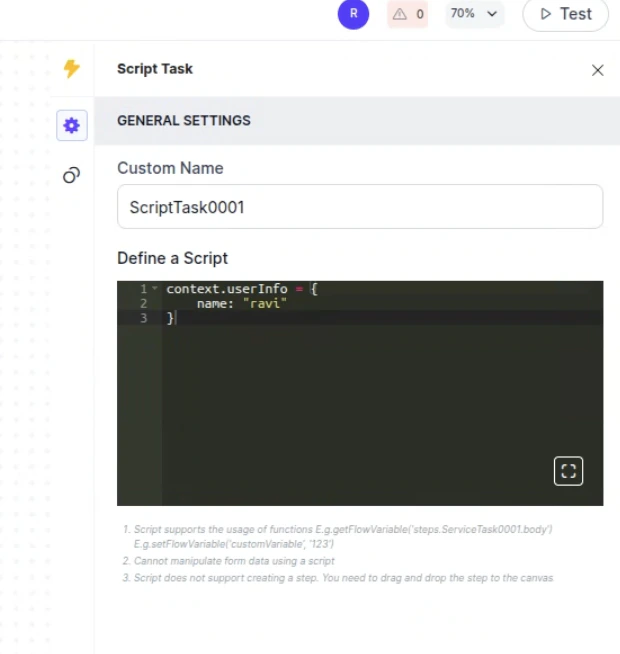
In AI for Service, create or use existing variables in the context object (for example, `context.userInfo.name` or `context.channel.type`). These capture runtime data to pass as metadata.
 ### Step 2: Configure Metadata in the Automation Node
1. Go to **Flow & Channels** > **Automation Routing** > **Routing Modes**.
2. For any welcome flow, select **More options** (...) > **Automation Settings**.
3. Confirm that **Full Autonomy**, the Agentic app, and the environment are selected.
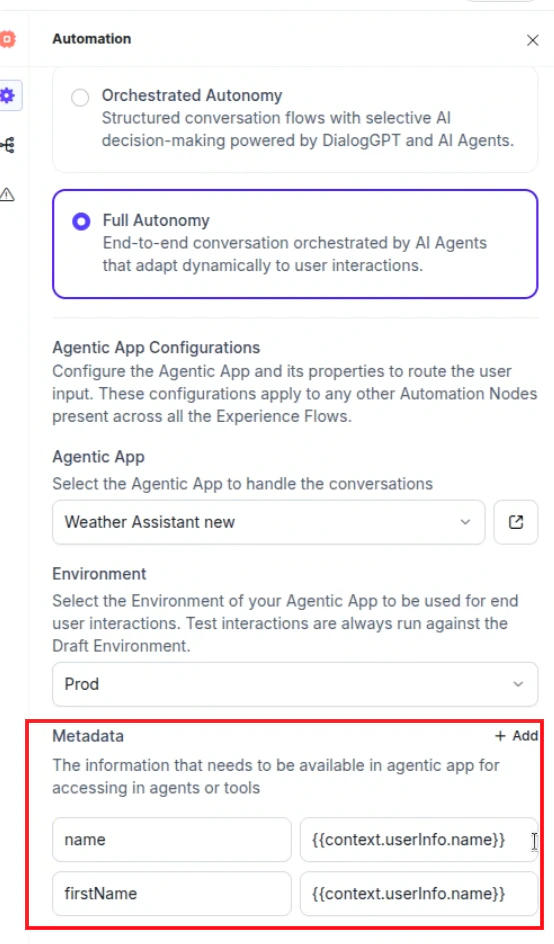
4. In the **Metadata** section, click **+ Add** and enter key-value pairs:
* **Key**: A logical name (for example, `name`).
* **Value**: The XO variable path (for example, `context.userInfo.name`).
Changes are auto-saved.
### Step 2: Configure Metadata in the Automation Node
1. Go to **Flow & Channels** > **Automation Routing** > **Routing Modes**.
2. For any welcome flow, select **More options** (...) > **Automation Settings**.
3. Confirm that **Full Autonomy**, the Agentic app, and the environment are selected.
4. In the **Metadata** section, click **+ Add** and enter key-value pairs:
* **Key**: A logical name (for example, `name`).
* **Value**: The XO variable path (for example, `context.userInfo.name`).
Changes are auto-saved.
 ### Step 3: Access Metadata in Agent Platform
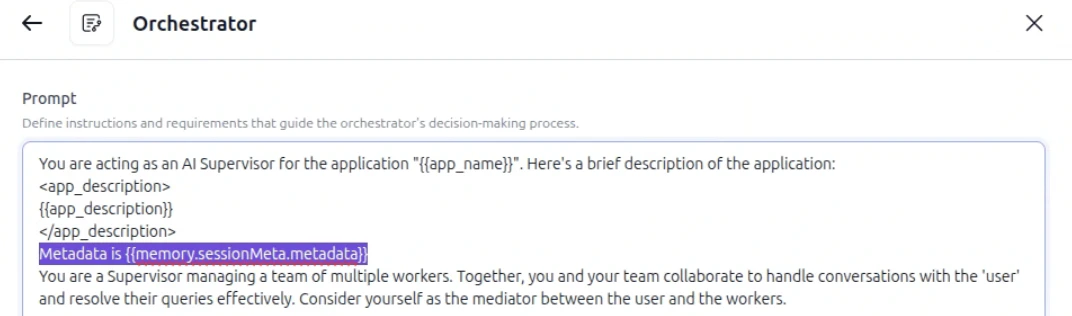
The metadata is automatically stored in the agent's memory under `sessionMeta.metadata`. Access it in agent prompts, supervisor prompts, or code tools:
```
{{memory.sessionMeta.metadata.keyname}}
```
**Examples**
| Location | Example |
| ----------------- | ---------------------------------------------------------------------------------------- |
| Agent Prompt | `The customer's current order is {{memory.sessionMeta.metadata.ordernumber}}.` |
| Supervisor Prompt | `Assist the agent based on customer tier: {{memory.sessionMeta.metadata.customerTier}}.` |
For code tools, see [Memory Stores in Agentic Apps](/agent-platform/v1/memory).
### Step 3: Access Metadata in Agent Platform
The metadata is automatically stored in the agent's memory under `sessionMeta.metadata`. Access it in agent prompts, supervisor prompts, or code tools:
```
{{memory.sessionMeta.metadata.keyname}}
```
**Examples**
| Location | Example |
| ----------------- | ---------------------------------------------------------------------------------------- |
| Agent Prompt | `The customer's current order is {{memory.sessionMeta.metadata.ordernumber}}.` |
| Supervisor Prompt | `Assist the agent based on customer tier: {{memory.sessionMeta.metadata.customerTier}}.` |
For code tools, see [Memory Stores in Agentic Apps](/agent-platform/v1/memory).
 ***
## Debug Metadata
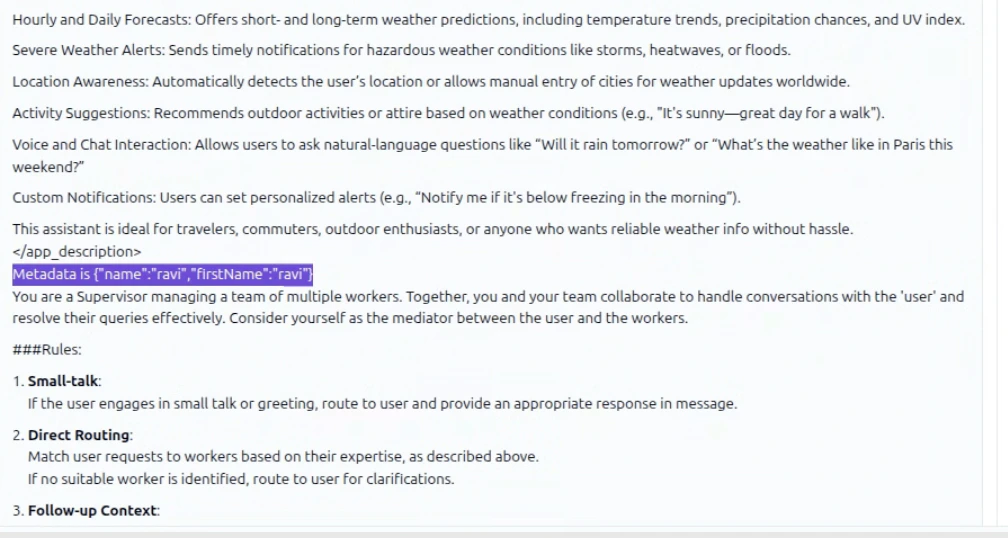
During execution, metadata variables are injected into the memory store and visible in the **Traces** tab.
1. Start a test conversation from AI for Service with metadata.
2. Navigate to the relevant session or trace in Agent Platform.
3. Verify that memory variables are resolved and values are correct.
***
## Debug Metadata
During execution, metadata variables are injected into the memory store and visible in the **Traces** tab.
1. Start a test conversation from AI for Service with metadata.
2. Navigate to the relevant session or trace in Agent Platform.
3. Verify that memory variables are resolved and values are correct.
 ***
***