> ## Documentation Index
> Fetch the complete documentation index at: https://koreai.mintlify.site/llms.txt
> Use this file to discover all available pages before exploring further.
# Spell Correction - Version 2
The Spell Correction feature corrects misspelled words in the user's utterance based on the conversation language.
Version 10.1.19 introduces Spell Correction Version 2 for English, French, and Dutch with the following advantages:
* **Consistent Spell Correction Experience**: Spell correction happens at a central place immediately after language detection, unlike Version 1 where it occurred separately at each NLP engine.
* **Enhanced Accuracy**: Words are checked against comprehensive dictionaries using edit distance to find and rank corrections based on their commonness.
***
## Configurations to Manage Spell Correction
Two new language-specific settings are available in **Advanced NLP Configurations** (disabled by default):
* **Spell Correction Version**: Select from the drop-down and choose the version.
* **Spell Correction Status**: Select from the drop-down and toggle the status to **Enabled**.
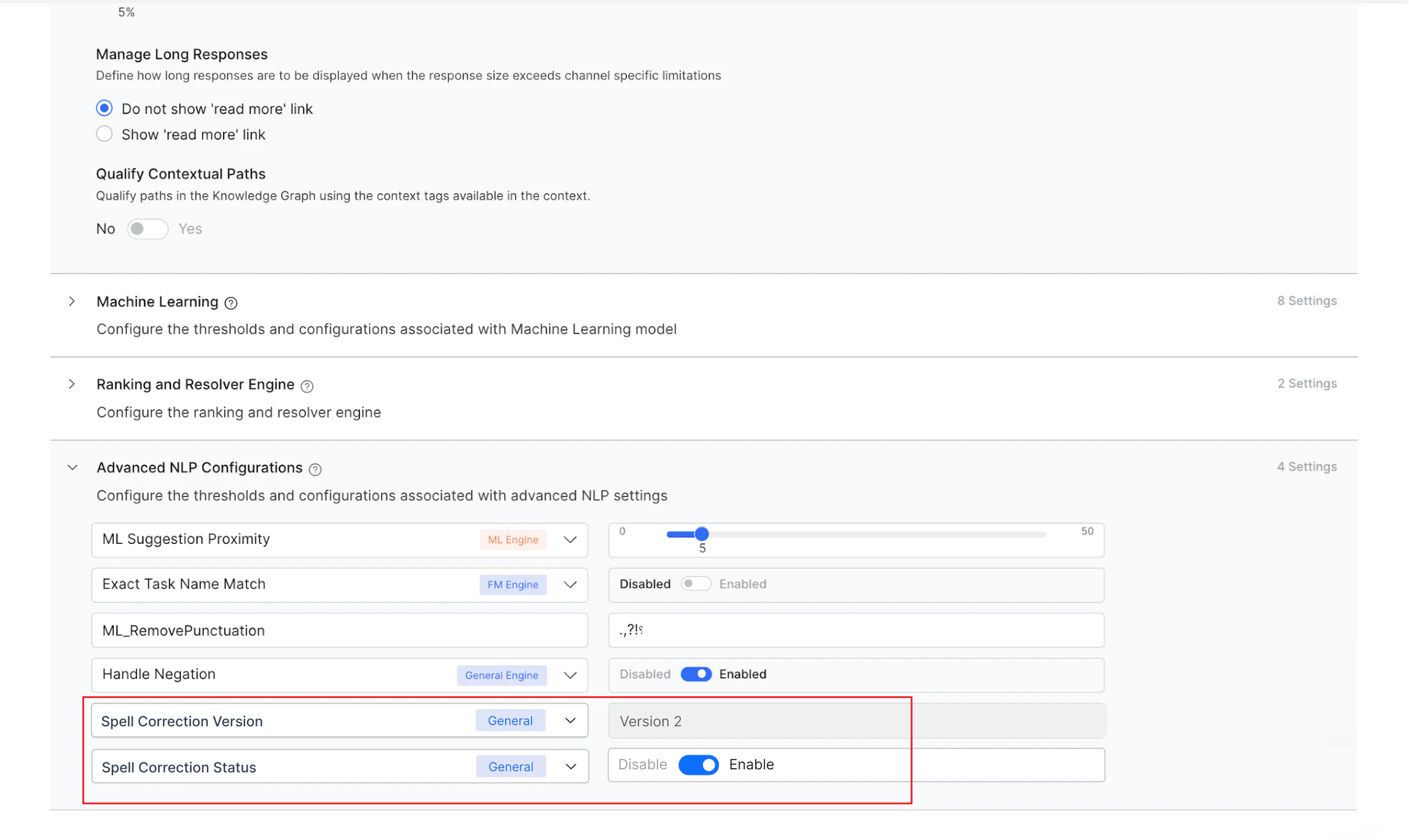 When enabled, spell correction runs immediately after language detection, and the corrected input is used by all engines for further processing.
Once V2 is enabled, the following legacy settings are removed:
* **Auto-Correction** in Knowledge Graph.
* **ML\_Spell\_Correction** custom flag in Advanced NLP Configurations.
***
## Impact on New and Existing Bots
* **New bots and existing bots without spell correction enabled** (in configured or published copy for ML and KG engines): Only Spell Correction V2 is supported. Configure and enable the settings as described above.
* **Existing bots with spell correction already enabled** (in either configured or published copy in ML or KG engine): Both versions are supported. An **upgrade banner** appears on the **NLU Config** screen. You can initiate the upgrade from the banner, and the platform will automatically configure the required settings.
When enabled, spell correction runs immediately after language detection, and the corrected input is used by all engines for further processing.
Once V2 is enabled, the following legacy settings are removed:
* **Auto-Correction** in Knowledge Graph.
* **ML\_Spell\_Correction** custom flag in Advanced NLP Configurations.
***
## Impact on New and Existing Bots
* **New bots and existing bots without spell correction enabled** (in configured or published copy for ML and KG engines): Only Spell Correction V2 is supported. Configure and enable the settings as described above.
* **Existing bots with spell correction already enabled** (in either configured or published copy in ML or KG engine): Both versions are supported. An **upgrade banner** appears on the **NLU Config** screen. You can initiate the upgrade from the banner, and the platform will automatically configure the required settings.
 Alternatively, manually select **Version 2** as the Spell Correction Version. To downgrade, select **Version 1** and the platform will automatically handle the configuration changes.
***
Alternatively, manually select **Version 2** as the Spell Correction Version. To downgrade, select **Version 1** and the platform will automatically handle the configuration changes.
***