> ## Documentation Index
> Fetch the complete documentation index at: https://koreai.mintlify.site/llms.txt
> Use this file to discover all available pages before exploring further.
# App Import and Export
[Back to Deployment](/ai-for-service/deployment/overview)
App Management covers importing, exporting, and managing AI Agent configurations for migration, cloning, and backup.
***
## Import & Export
### Import Types
| Type | Behavior |
| ---------------------- | ------------------------------------------------------------------------------------------------------------------------------------------------------------------------------------------------------------------------------------------------------------------------------------------------------------------------------------------------------------------------------------------------------------------------------------------------------------------------------------------------------------------------------------------------------------------------------------------------------------------------------------------------------------------------------------------------------------------------------------------------------------------------------------------------------------------------------------------------------------------------------------------------------------------------------------------------------------------------------------------------------------------------------- |
| **Full Import** | Replaces all Automation AI components and configurations with those in the imported file. Configurations not included in the file are removed.
**Contact Center AI Behavior:**
- Only conditional flows are imported.
- All other configurations remain unchanged.
**Flow Handling:**
- **Start and Exit Flows (Automation AI):**
- Imported from the source agent.
- If a flow with the same name exists in the target agent, it's replaced.
- Flows that exist only in the target agent and aren't present in the source are retained.
- **Conditional Flows (Contact Center AI):**
- Imported from the source agent.
- If a flow with the same name exists in the target agent, it's replaced.
- Flows that exist only in the target agent and aren't present in the source are retained.
**Additional Behavior:**
The webhook channel in the target agent is preserved, even if it's not included in the import. |
| | |
| **Incremental Import** | Merges the import file into the target agent. Retains additional configurations in both source and target. Allows selective component import. |
Back up the target agent before a Full Import. Overwritten configurations can't be recovered.
Bot imports aren't supported — only App imports. To upgrade an XO10 Bot, follow the [migration path to XO11](/ai-for-service/getting-started/upgrade-guide).
Before importing, review the `config.json` file — it contains variables that need values for the target agent.
***
### Import to an Existing Agent
1. Open the target agent and go to **Deploy > Import & Export**.
2. Select the **Import** tab.
3. Choose an upload method:
* **JSON Files**: Upload `appDefinition.json` and `config.json` separately. Optionally upload a custom script file (max 500 KB).
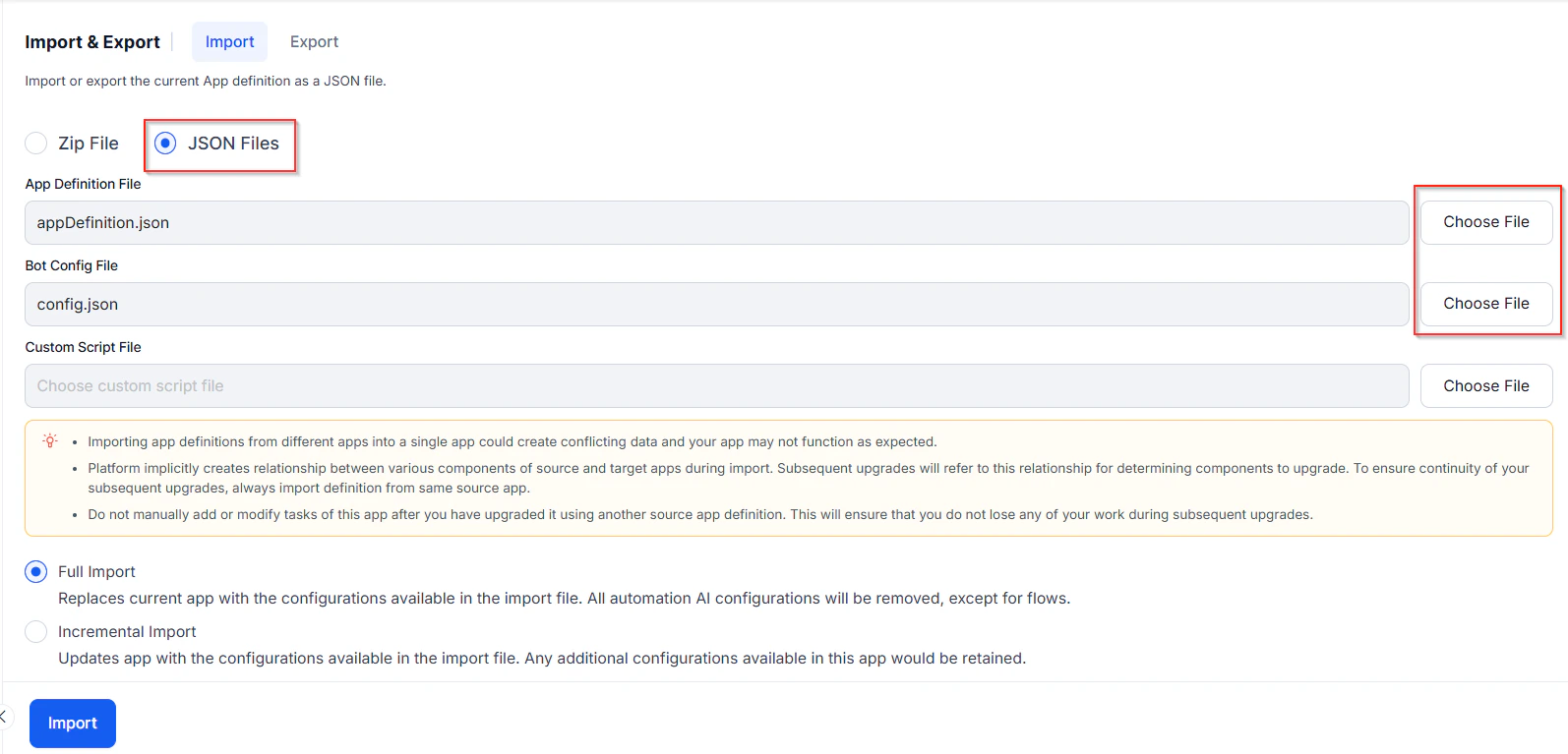 * **ZIP File**: Upload the `.zip` exported from the source agent directly.
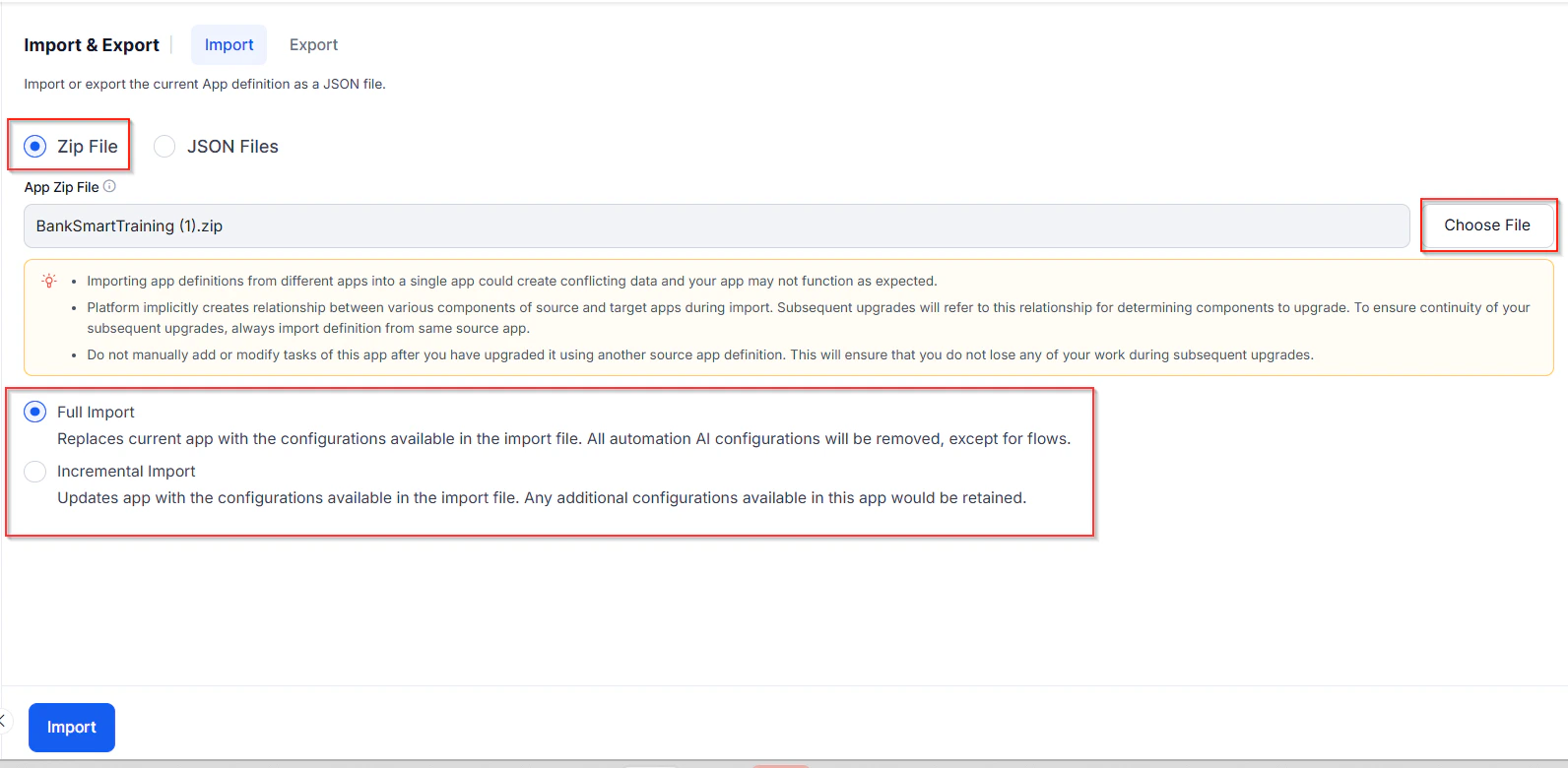 4. Select **Full Import** or **Incremental Import**.
5. **Full Import** behavior for Generative AI and LLM:
* Deletes existing models and prompts in the target; overwrites with those from the import file.
* Retains model configurations present in both source and target.
* Replaces all feature mappings, custom instructions, guardrails, and DialogGPT.
* Preserves existing integrations; imports XO-GPT as-is.
* Enables imported features with warnings.
* Handles **Azure OpenAI by Kore.ai** integration based on token status.
* Requires a manual update of the LLM key when importing a DialogGPT-enabled export that uses LLMs (other than XO-GPT) for the application to function as expected.
6. **Incremental Import** — select the components to import:
4. Select **Full Import** or **Incremental Import**.
5. **Full Import** behavior for Generative AI and LLM:
* Deletes existing models and prompts in the target; overwrites with those from the import file.
* Retains model configurations present in both source and target.
* Replaces all feature mappings, custom instructions, guardrails, and DialogGPT.
* Preserves existing integrations; imports XO-GPT as-is.
* Enables imported features with warnings.
* Handles **Azure OpenAI by Kore.ai** integration based on token status.
* Requires a manual update of the LLM key when importing a DialogGPT-enabled export that uses LLMs (other than XO-GPT) for the application to function as expected.
6. **Incremental Import** — select the components to import:
.png?fit=max&auto=format&n=zLY-lI0evQMUW4OT&q=85&s=eb5546c0b5542c256f1fd7355cc069f4) * **Flows**: Select specific flows to import.
* **Automation Tasks**: Dialog tasks, Digital Forms, Small Talk, or FAQs (with or without comments).
When importing Automation Tasks, also select **NLP Data** — utterances linked to dialog tasks aren't imported otherwise.
* **NLP Data**: Synonyms, Concepts, Traits, Rules, Utterances, Patterns, and Standard Responses.
* **Append** (default): Imports utterances and retains any additional utterances in the agent.
* **Replace**: Imports utterances and removes any additional utterances in the agent.
* **Flows**: Select specific flows to import.
* **Automation Tasks**: Dialog tasks, Digital Forms, Small Talk, or FAQs (with or without comments).
When importing Automation Tasks, also select **NLP Data** — utterances linked to dialog tasks aren't imported otherwise.
* **NLP Data**: Synonyms, Concepts, Traits, Rules, Utterances, Patterns, and Standard Responses.
* **Append** (default): Imports utterances and retains any additional utterances in the agent.
* **Replace**: Imports utterances and removes any additional utterances in the agent.
.png?fit=max&auto=format&n=zLY-lI0evQMUW4OT&q=85&s=875c943f17a91a82bb799f44785d8d5f) Imported Traits, Synonyms, and Concepts replace those in the target. Rules import only with their associated dialog tasks.
* **Settings**: App Settings, Variables, Voice Call Properties, and Generative AI and LLM (integrations, prompts, feature mappings, guardrails, DialogGPT).
* **Custom Dashboards**: Imports custom dashboards from the Analyze section.
* **Agent AI Dashboards**: Agent coaching rules, checklists, and configurations.
7. On the backup prompt, click **Backup** to download the current agent configuration.
Imported Traits, Synonyms, and Concepts replace those in the target. Rules import only with their associated dialog tasks.
* **Settings**: App Settings, Variables, Voice Call Properties, and Generative AI and LLM (integrations, prompts, feature mappings, guardrails, DialogGPT).
* **Custom Dashboards**: Imports custom dashboards from the Analyze section.
* **Agent AI Dashboards**: Agent coaching rules, checklists, and configurations.
7. On the backup prompt, click **Backup** to download the current agent configuration.
.png?fit=max&auto=format&n=zLY-lI0evQMUW4OT&q=85&s=3e6148d71a1a675e14de3fc1b3806f9b) 8. Click **Proceed**, then **Done** after the import completes.
Import fails if the agent has been restored but not published after the restore.
***
### Create a New Agent via Import
1. On the landing page, click **New App > Import App**.
8. Click **Proceed**, then **Done** after the import completes.
Import fails if the agent has been restored but not published after the restore.
***
### Create a New Agent via Import
1. On the landing page, click **New App > Import App**.
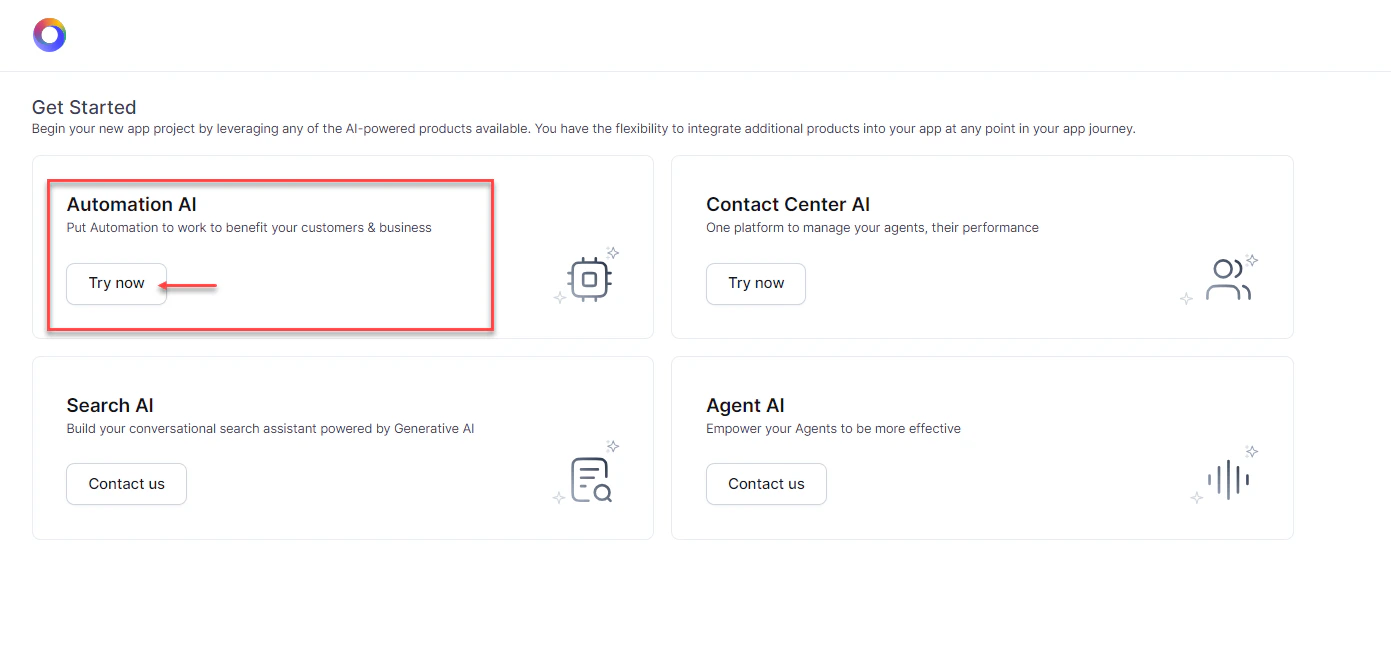
-new.png?fit=max&auto=format&n=zLY-lI0evQMUW4OT&q=85&s=c431ad7d4d769866a269cd41b8617293) 2. On the **Get Started** screen, click **Try now** on the **Automation AI** tile.
2. On the **Get Started** screen, click **Try now** on the **Automation AI** tile.
 3. Enter an **App Name** and optionally set an icon.
4. Choose an upload method:
* **JSON Files**: Upload `appDefinition.json` and `config.json`. Optionally upload a custom script file (max 500 KB).
* **ZIP File**: Upload the exported `.zip` directly.
5. Click **Create App**.
3. Enter an **App Name** and optionally set an icon.
4. Choose an upload method:
* **JSON Files**: Upload `appDefinition.json` and `config.json`. Optionally upload a custom script file (max 500 KB).
* **ZIP File**: Upload the exported `.zip` directly.
5. Click **Create App**.
.png?fit=max&auto=format&n=zLY-lI0evQMUW4OT&q=85&s=ad8a4f6a7fb49c1c4147cfc9de5c74a3) ***
### Incremental Import: Component Reference
| Component | Behavior |
| --------------------------------------------- | ------------------------------------------------------------------------------------------------------------------------------------------------------------------------------------------------------------------------------------------------------------------------------------------------------------------------------------------------------------------------------------------------------------------------------------------------------------------------------- |
| Tasks with the same Reference ID | Replace target tasks; status resets to **Configured** (including Suspended and Rejected tasks). |
| Tasks in source with a different Reference ID | Created in the target with the same Reference ID. |
| Tasks in target with a different Reference ID | Remain unchanged. |
| Utterances, Patterns, Task-level Synonyms | Replace those in the target and apply to imported tasks. Published models in the target are unchanged. |
| App Synonyms and Standard Responses | Replace existing synonyms and standard responses in the target. |
| Synonyms, Concepts, Traits | Imported with all underlying terms; replace those in the target. |
| Rules | Imported only if their tagged dialog tasks are also imported. On-Prem: NLP components (Synonyms, Concepts, Rules, Traits) can be imported from a higher to a lower platform version by selecting **NLP Settings**, but Rules still require their dialog tasks. |
| Generative AI and LLM | • Keeps existing prompts; adds new ones.
***
### Incremental Import: Component Reference
| Component | Behavior |
| --------------------------------------------- | ------------------------------------------------------------------------------------------------------------------------------------------------------------------------------------------------------------------------------------------------------------------------------------------------------------------------------------------------------------------------------------------------------------------------------------------------------------------------------- |
| Tasks with the same Reference ID | Replace target tasks; status resets to **Configured** (including Suspended and Rejected tasks). |
| Tasks in source with a different Reference ID | Created in the target with the same Reference ID. |
| Tasks in target with a different Reference ID | Remain unchanged. |
| Utterances, Patterns, Task-level Synonyms | Replace those in the target and apply to imported tasks. Published models in the target are unchanged. |
| App Synonyms and Standard Responses | Replace existing synonyms and standard responses in the target. |
| Synonyms, Concepts, Traits | Imported with all underlying terms; replace those in the target. |
| Rules | Imported only if their tagged dialog tasks are also imported. On-Prem: NLP components (Synonyms, Concepts, Rules, Traits) can be imported from a higher to a lower platform version by selecting **NLP Settings**, but Rules still require their dialog tasks. |
| Generative AI and LLM | • Keeps existing prompts; adds new ones.
• Replaces feature mappings, custom instructions, guardrails, and DialogGPT.
• Preserves integrations.
• Imports XO-GPT as-is.
• Enables features with warnings.
• Handles Azure OpenAI by Kore.ai based on token status.
• Requires a manual update of the LLM key when importing a DialogGPT-enabled export that uses LLMs (other than XO-GPT) for the application to function as expected. |
## Export
Exporting downloads a `.zip` archive with the following files:
| File | Contents |
| --------------------- | ----------------------------------------------------------------------------------------------------- |
| `appDefinition.json` | Metadata, tasks, synonyms, utterances, patterns, knowledge graph, standard responses, flows, and IDPs |
| `config.json` | App settings, variables, and IVR settings |
| `Icon.png` | Agent icon |
| `.js` | Custom JavaScript functions (if a script file exists) |
Each agent and its components receive unique Reference IDs on export. These IDs let the platform match and update tasks in the target agent during import.
### Export Modes
**Published Mode** — exports only the published version of each task.
| Task Status | Exported? |
| ------------------- | --------------------------------------- |
| In Progress | No |
| Configured | No |
| Published | Yes |
| Upgrade in Progress | No — only the published version exports |
| Rejected | No |
| Suspended | No |
In Dialog tasks, only nodes in the Published status are exported.
**Latest Version Mode** — exports the most recent version of each task, regardless of publish status.
| Task Status | Exported? |
| ------------------- | --------------------------------------- |
| In Progress | Only if it's the sole available version |
| Configured | Only if it's the sole available version |
| Published | Only if it's the sole available version |
| Upgrade in Progress | Always |
| Rejected | No |
| Suspended | No |
### Steps to Export
1. Open the agent and go to **Deploy > Import & Export**.
2. Select the **Export** tab.
3. Select **Published** or **Latest Version** mode.
4. Deselect any components to exclude (all selected by default).
.png?fit=max&auto=format&n=zLY-lI0evQMUW4OT&q=85&s=39e801bc1274b149192979c27d694482) If bot events reference Dialog tasks not included in the export, those events are disabled in the exported copy. Include all tasks referenced by bot events to avoid this.
5. For Automation Tasks, select specific tasks to export (default: all).
When exporting Automation Tasks, also select **NLP Data** to include their utterances.
6. Optionally enable **Include dependent tasks** to export linked dialogs and sub-intents. Import fails if dependent tasks are missing.
If bot events reference Dialog tasks not included in the export, those events are disabled in the exported copy. Include all tasks referenced by bot events to avoid this.
5. For Automation Tasks, select specific tasks to export (default: all).
When exporting Automation Tasks, also select **NLP Data** to include their utterances.
6. Optionally enable **Include dependent tasks** to export linked dialogs and sub-intents. Import fails if dependent tasks are missing.
.png?fit=max&auto=format&n=zLY-lI0evQMUW4OT&q=85&s=51432227b0544cab5713c8e74fab5ca3) 7. Click **Export**. When complete, click **Download**.
***
### Exported Components Reference
| Category | Component | Details |
| ---------------------- | ----------------------------------------------------------- | ---------------------------------------------------------------------------------------------------------------------------------------------------------- |
| **Flows** | Start Flows | System-created conversational start flows for calls and chat |
| **Flows** | Exit Flows | System-created flows for No Agents Available and Out of Operational Hours (voice and chat) |
| **Automation Tasks** | Alert Tasks, Dialog Tasks, Digital Forms, FAQs, Small Talks | Task definitions, synonyms (task/field/entity), and patterns |
| **Natural Language** | NL Model | Advanced NLP settings, ignore words, field memory, concepts, synonyms, traits, and rules (with corresponding dialog tasks) |
| **Natural Language** | Utterances | All utterances for all enabled languages |
| **Natural Language** | Standard Responses | All standard responses for all enabled languages |
| **Settings** | App Settings | General settings, name/description, language management, welcome message, hold & resume, custom script, tenancy URLs, error messages, task setup/execution |
| **Settings** | App Variables | All global and content variables with values |
| **Settings** | Voice Call Properties | All voice channel configurations |
| **Settings** | Generative AI and LLM | Integrations, Prompts Library, Feature Mappings, Guardrails, DialogGPT |
| **Custom Dashboard** | — | Custom dashboards from the Analyze section |
| **Agent AI Dashboard** | Agent Coaching | Coaching rules and configurations |
| **Agent AI Dashboard** | Agent Playbook | Checklists and configurations |
***
7. Click **Export**. When complete, click **Download**.
***
### Exported Components Reference
| Category | Component | Details |
| ---------------------- | ----------------------------------------------------------- | ---------------------------------------------------------------------------------------------------------------------------------------------------------- |
| **Flows** | Start Flows | System-created conversational start flows for calls and chat |
| **Flows** | Exit Flows | System-created flows for No Agents Available and Out of Operational Hours (voice and chat) |
| **Automation Tasks** | Alert Tasks, Dialog Tasks, Digital Forms, FAQs, Small Talks | Task definitions, synonyms (task/field/entity), and patterns |
| **Natural Language** | NL Model | Advanced NLP settings, ignore words, field memory, concepts, synonyms, traits, and rules (with corresponding dialog tasks) |
| **Natural Language** | Utterances | All utterances for all enabled languages |
| **Natural Language** | Standard Responses | All standard responses for all enabled languages |
| **Settings** | App Settings | General settings, name/description, language management, welcome message, hold & resume, custom script, tenancy URLs, error messages, task setup/execution |
| **Settings** | App Variables | All global and content variables with values |
| **Settings** | Voice Call Properties | All voice channel configurations |
| **Settings** | Generative AI and LLM | Integrations, Prompts Library, Feature Mappings, Guardrails, DialogGPT |
| **Custom Dashboard** | — | Custom dashboards from the Analyze section |
| **Agent AI Dashboard** | Agent Coaching | Coaching rules and configurations |
| **Agent AI Dashboard** | Agent Playbook | Checklists and configurations |
***