> ## Documentation Index
> Fetch the complete documentation index at: https://koreai.mintlify.site/llms.txt
> Use this file to discover all available pages before exploring further.
# App Versioning
[Back to Deployment](/ai-for-service/deployment/overview)
App Versions let you snapshot the agent definition at key stages of development — before a major change, after a full test, or as a periodic backup. If new changes break something, you can restore to a previous state.
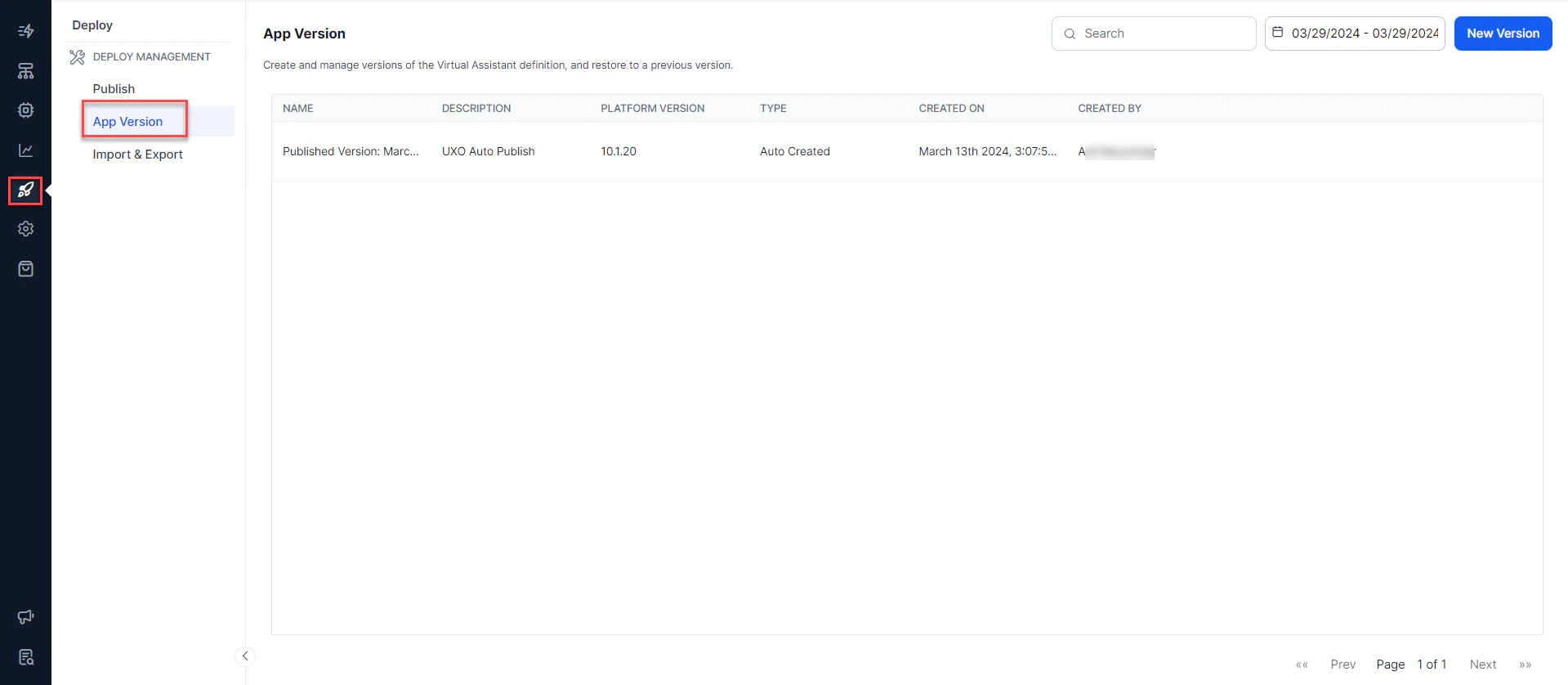
Versioning is supported in Parent Apps and Linked Apps. Access it from **Deploy > Deploy Management > App Versions**.
***
## Version Types
| Type | Description | Limits |
| ---------------- | ------------------------------------------------ | ------------------------------------------------------------------------ |
| **User Created** | Created manually by a developer | Max 20; oldest deleted when limit is reached |
| **Auto Created** | Created automatically on each successful publish | Max 20; can't be deleted; not created if the publish request is rejected |
 ***
## Creating a Version
1. On the **App Versions** page, click **New Version**.
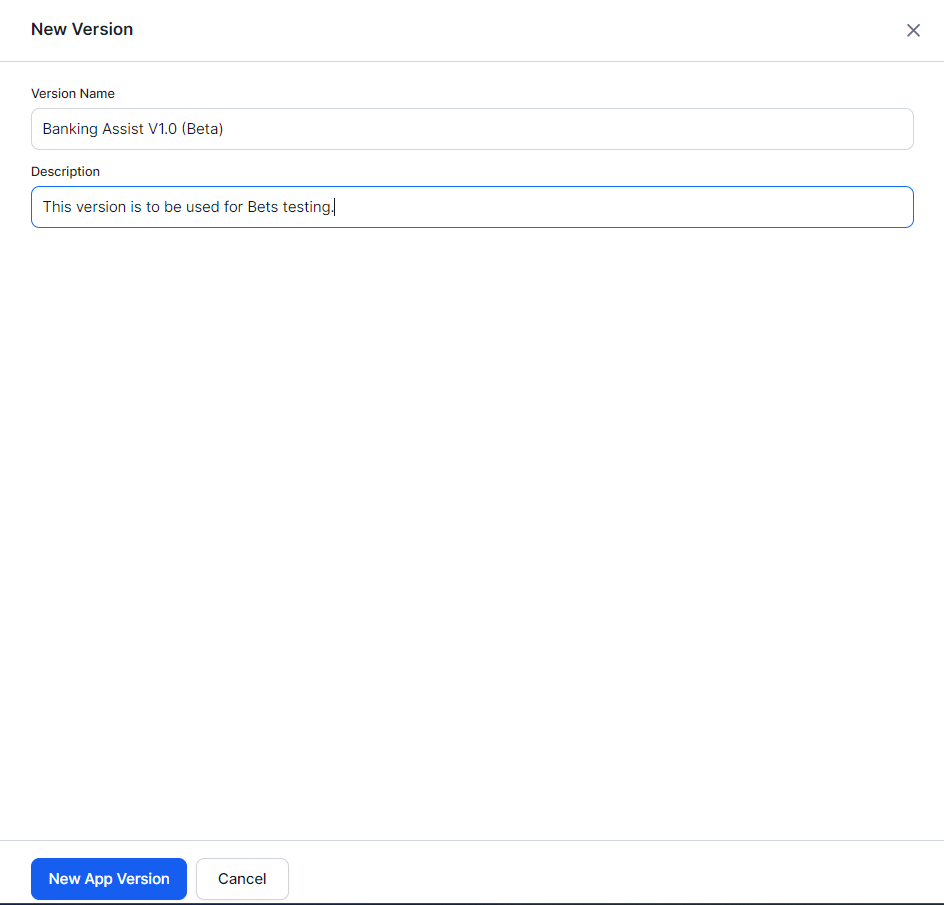
2. Enter a **Version Name** and a brief **Description** of the changes.
3. Click **New App Version**.
***
## Creating a Version
1. On the **App Versions** page, click **New Version**.
2. Enter a **Version Name** and a brief **Description** of the changes.
3. Click **New App Version**.
 ## Version Actions
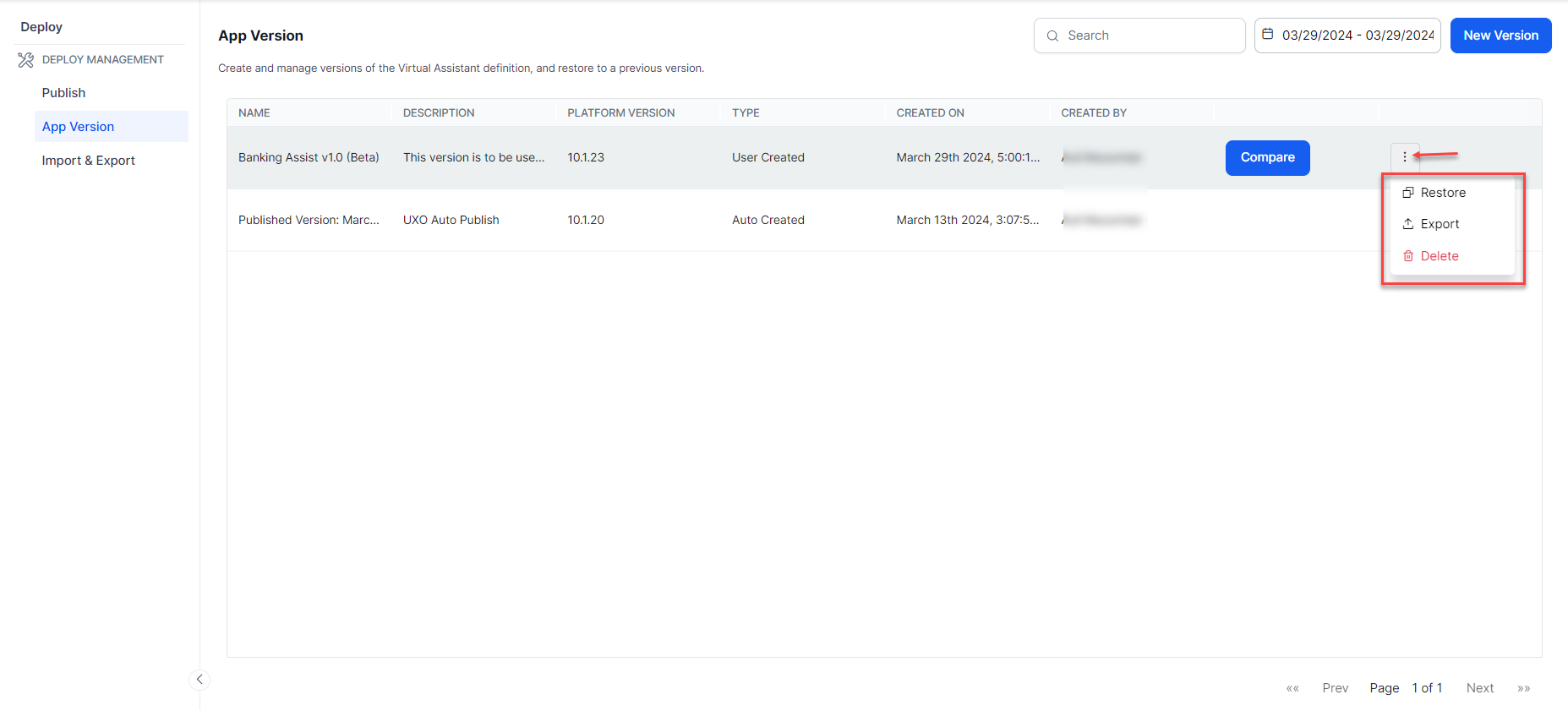
Each version on the **App Versions** page shows the following details:
| Field | Description |
| ---------------- | ------------------------------------ |
| Name | Version name |
| Description | Summary of changes |
| Platform Version | Platform version at time of creation |
| Created On | Creation timestamp |
| Created By | User who created the version |
Available actions per version:
* **Restore** — Replace the in-development copy with this version
* **Export** — Download a `.zip` archive of this version
* **Delete** — Remove the version (not available for Auto Created versions)
* **Compare** — Diff this version against another
## Version Actions
Each version on the **App Versions** page shows the following details:
| Field | Description |
| ---------------- | ------------------------------------ |
| Name | Version name |
| Description | Summary of changes |
| Platform Version | Platform version at time of creation |
| Created On | Creation timestamp |
| Created By | User who created the version |
Available actions per version:
* **Restore** — Replace the in-development copy with this version
* **Export** — Download a `.zip` archive of this version
* **Delete** — Remove the version (not available for Auto Created versions)
* **Compare** — Diff this version against another
 ***
## Comparing Versions
Version comparison helps you:
* Debug a published version by comparing it with a previous one
* Analyze changes before publishing
* Assess the impact before or after a version restore
* Review NLP/NLU training changes across versions
**Steps:**
1. On the **App Versions** page, hover over a version and click **Compare**.
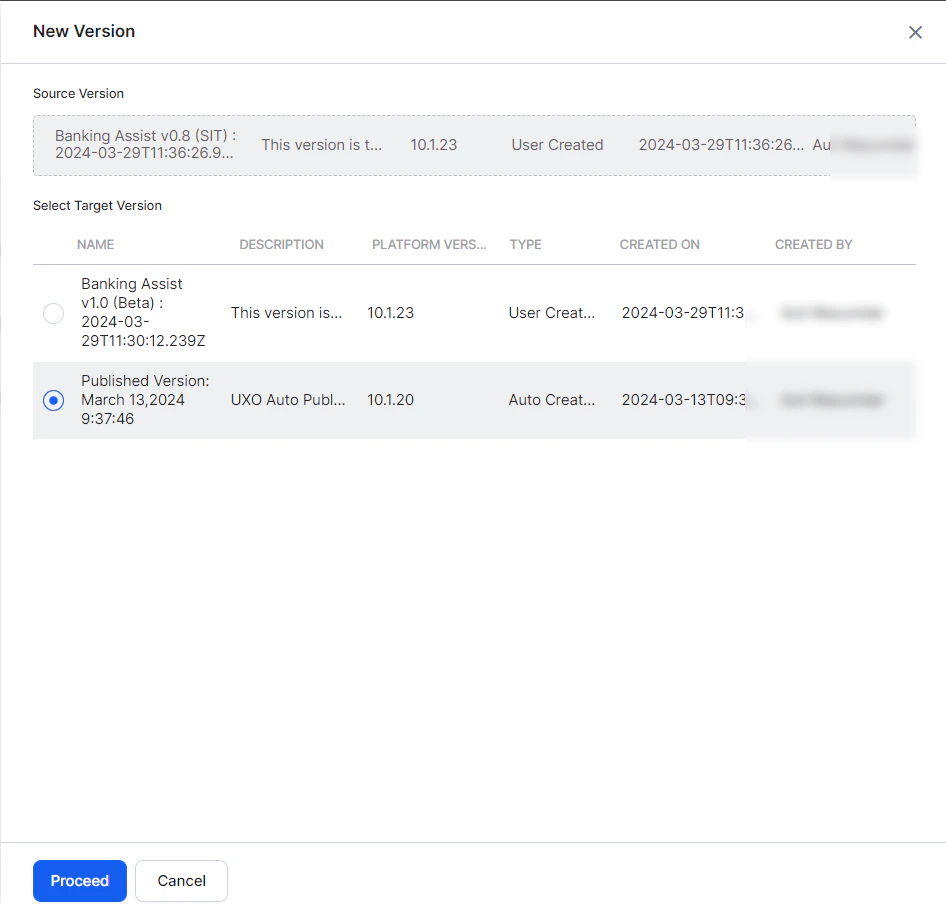
2. In the comparison window, select a target version to compare against.
3. Click **Proceed**.
***
## Comparing Versions
Version comparison helps you:
* Debug a published version by comparing it with a previous one
* Analyze changes before publishing
* Assess the impact before or after a version restore
* Review NLP/NLU training changes across versions
**Steps:**
1. On the **App Versions** page, hover over a version and click **Compare**.
2. In the comparison window, select a target version to compare against.
3. Click **Proceed**.
 The comparison page categorizes changes across: **Tasks**, **Training**, **Intelligence**, **Settings**, **Variables**, and **Change Logs**.
Changes are shown in JSON format:
| Change Type | How Shown |
| ----------- | --------------------------------------------------------------------- |
| Added | Highlighted in the secondary version; empty line shown in the primary |
| Removed | Highlighted in the primary version; empty line shown in the secondary |
| Updated | Same key, different values highlighted in both versions |
The comparison page categorizes changes across: **Tasks**, **Training**, **Intelligence**, **Settings**, **Variables**, and **Change Logs**.
Changes are shown in JSON format:
| Change Type | How Shown |
| ----------- | --------------------------------------------------------------------- |
| Added | Highlighted in the secondary version; empty line shown in the primary |
| Removed | Highlighted in the primary version; empty line shown in the secondary |
| Updated | Same key, different values highlighted in both versions |
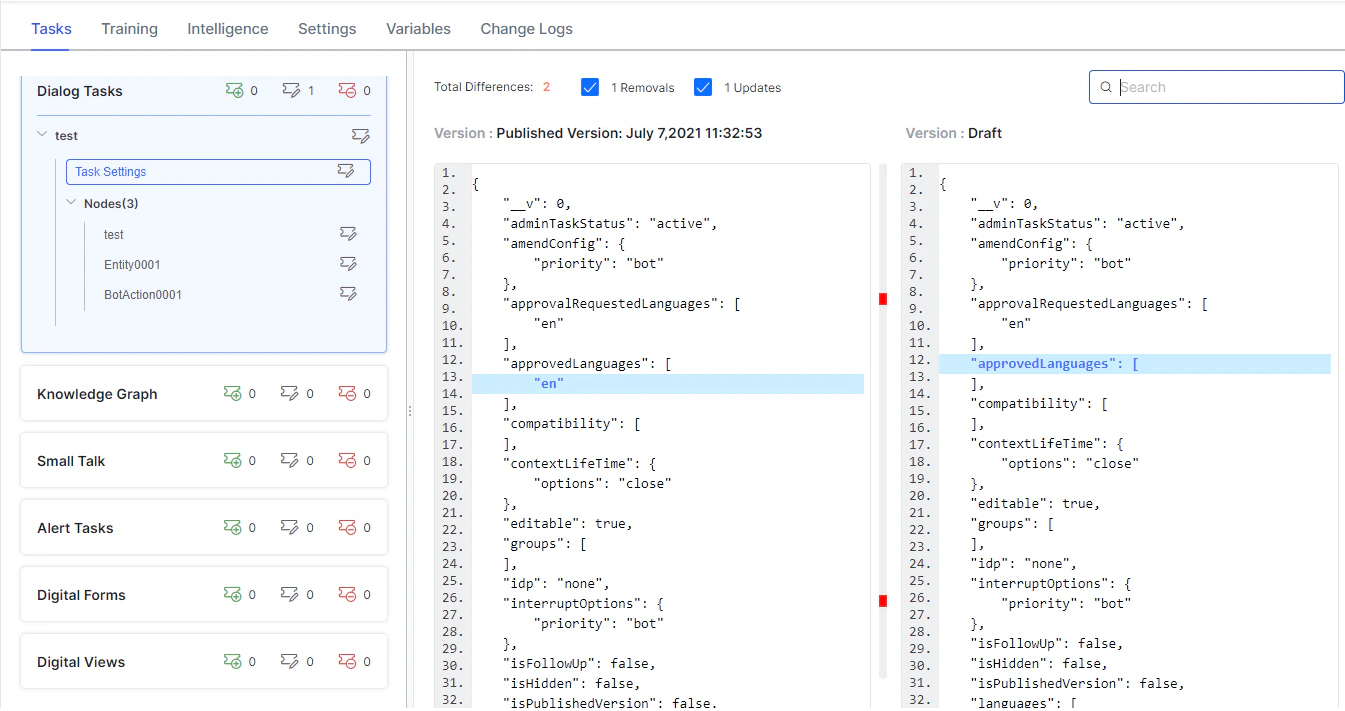 A summary count of total changes is shown at the top. Use search to filter results.
***
## Restoring a Version
Restoring replaces the current in-development copy with the selected version. The platform validates version compatibility and rejects incompatible restorations.
### Restoration Rules by Component
#### Tasks
Applies to Dialog Tasks, Alert Tasks, Small Talk, UI Forms, Panels, and Widgets.
* Tasks in the agent but absent from the restored version are marked **Deleted**.
* Deleted tasks are unavailable for development and are removed from the Published copy on the next publish.
* Deletions can't be excluded from publish requests.
* Restoring a version that contains previously deleted tasks re-adds them as new tasks; the originals remain in the publish logs as deleted.
* If the agent is restored to an unpublished state, imports may be restricted.
#### Knowledge Graph
Applies to Knowledge Tasks per language.
* FAQs absent from the restored version are marked **Deleted** and unavailable for development.
* Deleted FAQs are removed from the Published copy only when their parent nodes are selected during the publish request.
* If parent nodes aren't selected, the FAQs remain in the Published copy but are treated as deleted in the in-development copy.
#### Small Talk
* Small Talk items absent from the restored version are marked **Deleted**.
* Deleted items are removed from the Published copy only when **Small Talk** is selected during the publish request.
#### Languages
* Languages absent from the restored version are marked as deleted in the configured version.
* Deleted languages are unavailable for development.
* Deletions take effect in the Published copy after the next publish.
#### Channels
* Channel settings aren't versioned — current channel enablement is unchanged on restore.
* **Exception**: The **Webhook channel** configuration is replaced by that of the restored version.
#### AI Agent Management
* AI Agent Import isn't allowed until the restored version is published.
***
## Exporting a Version
Click **Export** on any version to download a `.zip` archive. Use it as a backup or as an import file during development.
***
## Deleting a Version
Click **More Options > Delete** to remove a user-created version.
Deleted versions can't be recovered. Only delete a version if you are absolutely certain it's no longer needed.
***
A summary count of total changes is shown at the top. Use search to filter results.
***
## Restoring a Version
Restoring replaces the current in-development copy with the selected version. The platform validates version compatibility and rejects incompatible restorations.
### Restoration Rules by Component
#### Tasks
Applies to Dialog Tasks, Alert Tasks, Small Talk, UI Forms, Panels, and Widgets.
* Tasks in the agent but absent from the restored version are marked **Deleted**.
* Deleted tasks are unavailable for development and are removed from the Published copy on the next publish.
* Deletions can't be excluded from publish requests.
* Restoring a version that contains previously deleted tasks re-adds them as new tasks; the originals remain in the publish logs as deleted.
* If the agent is restored to an unpublished state, imports may be restricted.
#### Knowledge Graph
Applies to Knowledge Tasks per language.
* FAQs absent from the restored version are marked **Deleted** and unavailable for development.
* Deleted FAQs are removed from the Published copy only when their parent nodes are selected during the publish request.
* If parent nodes aren't selected, the FAQs remain in the Published copy but are treated as deleted in the in-development copy.
#### Small Talk
* Small Talk items absent from the restored version are marked **Deleted**.
* Deleted items are removed from the Published copy only when **Small Talk** is selected during the publish request.
#### Languages
* Languages absent from the restored version are marked as deleted in the configured version.
* Deleted languages are unavailable for development.
* Deletions take effect in the Published copy after the next publish.
#### Channels
* Channel settings aren't versioned — current channel enablement is unchanged on restore.
* **Exception**: The **Webhook channel** configuration is replaced by that of the restored version.
#### AI Agent Management
* AI Agent Import isn't allowed until the restored version is published.
***
## Exporting a Version
Click **Export** on any version to download a `.zip` archive. Use it as a backup or as an import file during development.
***
## Deleting a Version
Click **More Options > Delete** to remove a user-created version.
Deleted versions can't be recovered. Only delete a version if you are absolutely certain it's no longer needed.
***