> ## Documentation Index
> Fetch the complete documentation index at: https://koreai.mintlify.site/llms.txt
> Use this file to discover all available pages before exploring further.
# Publishing your App
[Back to Deployment](/ai-for-service/deployment/overview)
End users can interact with an AI Agent only after it's published. The platform provides a publishing workflow for administrators to review and approve changes before they reach end users.
Before publishing, configure at least one channel. See [Channel Enablement](/ai-for-service/channels#voice-channels).
***
## Agent States
| State | Description |
| ------------------ | ------------------------------------------------------------------------------------------------------------------------------------------------------------------ |
| **In Development** | Default state when an agent is created. All changes happen here. Publishing a component creates a Published copy, but the In Development version remains editable. |
| **Published** | Contains components approved for end-user access. Developers can't edit the Published copy directly. |
Switch between states using the dropdown on the top left of the agent window.
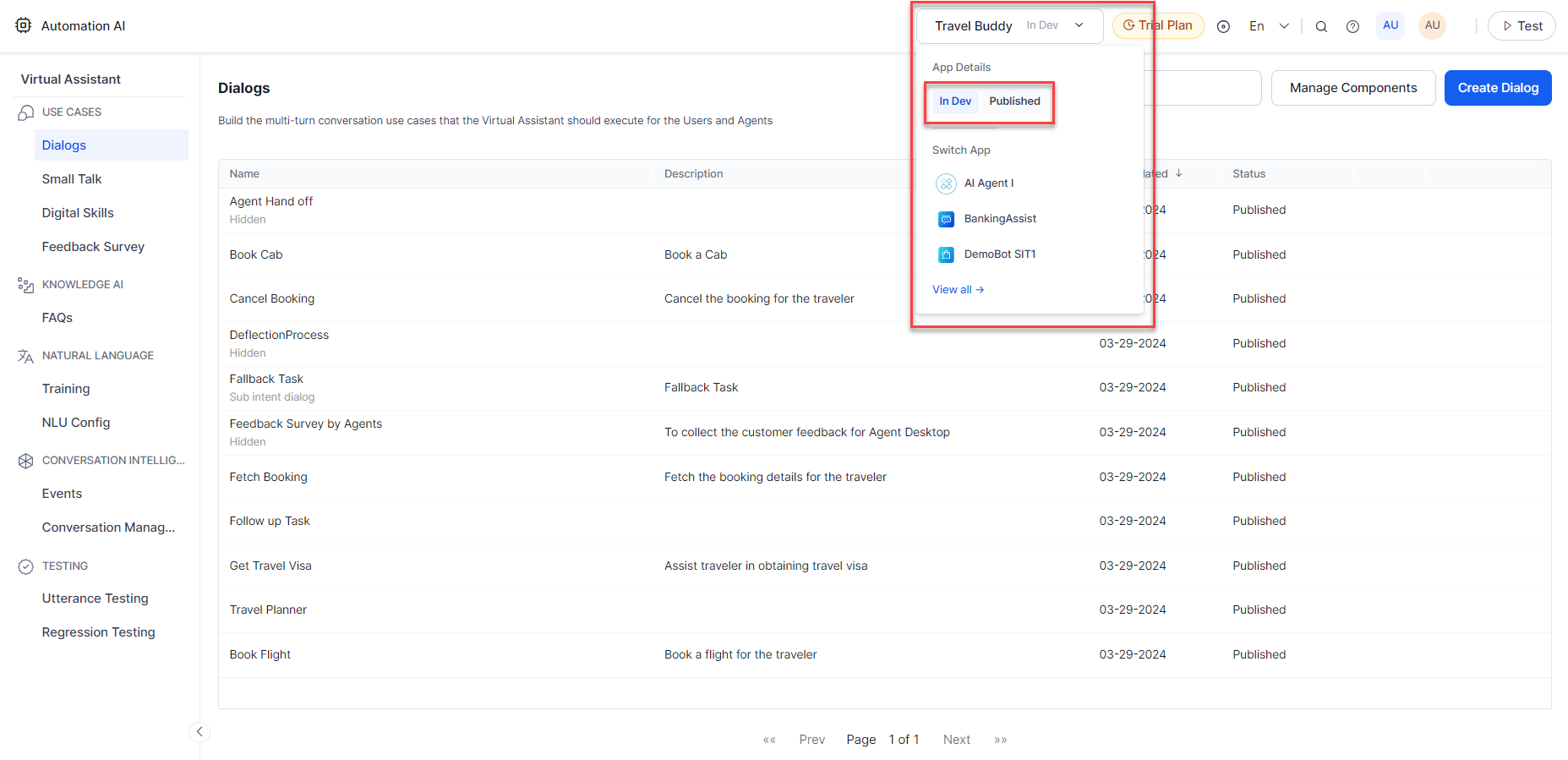 The Publish Status indicator tracks the progress of each publish request and reports success or failure with details.
If the agent is trained in a language using NLP Version 2, a banner notifies you about the upcoming auto-upgrade to NLP Version 3.
***
## Component Statuses
| Status | Description |
| ----------------------- | ----------------------------------------------------------------------------------------------------------- |
| **In Progress** | Configuration started but not complete. Applies to Alert, Action, and Information tasks only. |
| **Configured** | Configuration complete; not yet published. |
| **Awaiting Approval** | Publish request submitted; pending admin review. |
| **Published** | Approved and available to end users. |
| **Upgrade in Progress** | A new version of a published task is being configured. |
| **Rejected** | Admin rejected the publish request. A notification email is sent to the developer. |
| **Suspended** | Admin suspended the agent. End users can't access it; developers can still work on the in-development copy. |
A Published task can't be deleted. Admins can Suspend it if it's no longer needed. A Suspended task can be Upgraded to create a Configured copy for further changes.
***
## Publishing an Agent
Only the agent owner can publish. Developers with edit access can't.
1. Open the agent and go to **Deploy > Publish**.
2. All components are selected by default. Deselect any you don't want to publish, then click **Next**.
The Publish Status indicator tracks the progress of each publish request and reports success or failure with details.
If the agent is trained in a language using NLP Version 2, a banner notifies you about the upcoming auto-upgrade to NLP Version 3.
***
## Component Statuses
| Status | Description |
| ----------------------- | ----------------------------------------------------------------------------------------------------------- |
| **In Progress** | Configuration started but not complete. Applies to Alert, Action, and Information tasks only. |
| **Configured** | Configuration complete; not yet published. |
| **Awaiting Approval** | Publish request submitted; pending admin review. |
| **Published** | Approved and available to end users. |
| **Upgrade in Progress** | A new version of a published task is being configured. |
| **Rejected** | Admin rejected the publish request. A notification email is sent to the developer. |
| **Suspended** | Admin suspended the agent. End users can't access it; developers can still work on the in-development copy. |
A Published task can't be deleted. Admins can Suspend it if it's no longer needed. A Suspended task can be Upgraded to create a Configured copy for further changes.
***
## Publishing an Agent
Only the agent owner can publish. Developers with edit access can't.
1. Open the agent and go to **Deploy > Publish**.
2. All components are selected by default. Deselect any you don't want to publish, then click **Next**.
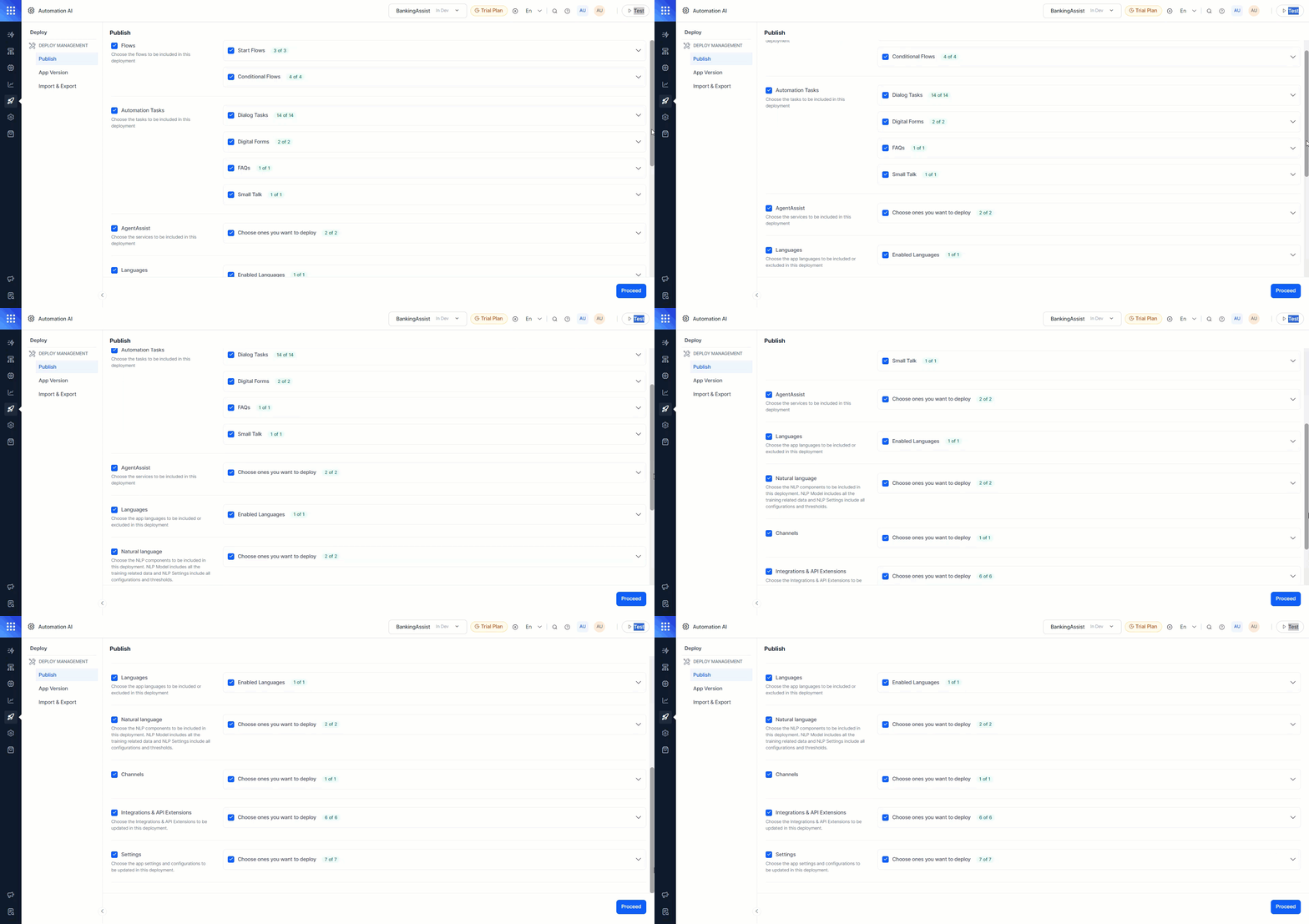 3. Enter comments for the admin and click **Confirm**.
Publishing without the **NL Model** leaves unpublished training data associated with the in-development version of the respective tasks.
***
## Publishable Components
### Flows, Tasks & Languages
| Component | What Gets Published |
| ----------------------------------------------------------------- | ------------------------------------------------------------------------------------------------------------------------------------------------------------------------------------ |
| Flows (Start, Conditional) | Flows without a published version; upgraded versions of published flows |
| Tasks (Dialog, Alert, Panels, Widgets, Digital Forms, Small Talk) | Tasks without a published version; upgraded versions. When a new language is enabled in development, all tasks appear in the publish window with the new language checkbox selected. |
| Knowledge Graph (per language) | New and updated Level 1 terms; Traits and Synonyms replace the published set with all additions, updates, and deletions |
### Natural Language
**NL Model**
The NL Model publishes training data for specific intents without publishing task definitions — letting NLP trainers and developers work independently.
Steps to publish training data for specific intents:
1. Expand **Natural Language > NL Model** and click **All Components**.
3. Enter comments for the admin and click **Confirm**.
Publishing without the **NL Model** leaves unpublished training data associated with the in-development version of the respective tasks.
***
## Publishable Components
### Flows, Tasks & Languages
| Component | What Gets Published |
| ----------------------------------------------------------------- | ------------------------------------------------------------------------------------------------------------------------------------------------------------------------------------ |
| Flows (Start, Conditional) | Flows without a published version; upgraded versions of published flows |
| Tasks (Dialog, Alert, Panels, Widgets, Digital Forms, Small Talk) | Tasks without a published version; upgraded versions. When a new language is enabled in development, all tasks appear in the publish window with the new language checkbox selected. |
| Knowledge Graph (per language) | New and updated Level 1 terms; Traits and Synonyms replace the published set with all additions, updates, and deletions |
### Natural Language
**NL Model**
The NL Model publishes training data for specific intents without publishing task definitions — letting NLP trainers and developers work independently.
Steps to publish training data for specific intents:
1. Expand **Natural Language > NL Model** and click **All Components**.
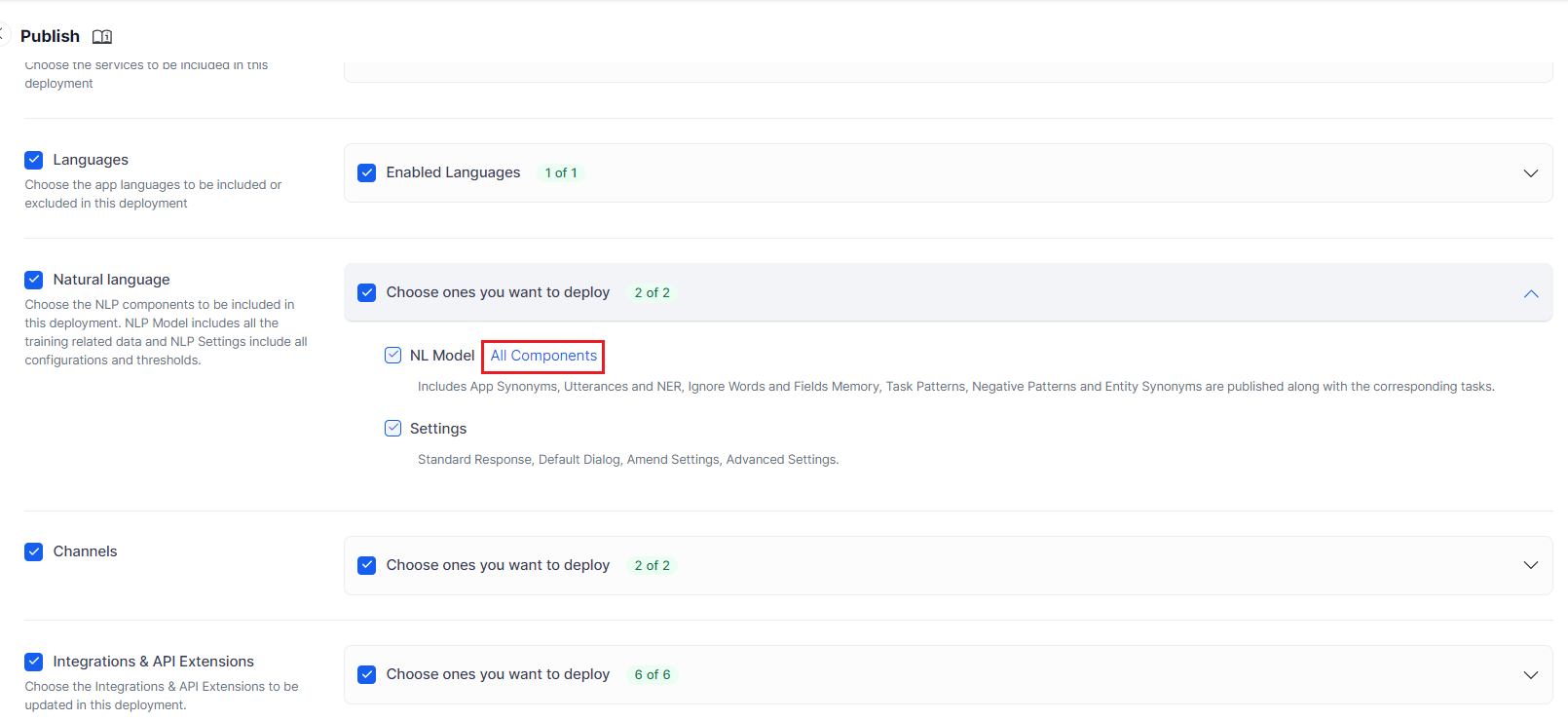 2. Select the relevant components:
| Component | Behavior |
| ----------------- | ------------------------------------------------------------------------------------------------------------------------------------------------------------------------------------------------------------------------------------------------------------------------------------------------------------------------------------------------------------------------------------------------------------------------------------------------------------------------------------------------------------------------------------------------------------------------------------------------------------------------------------------------------------------------------------------------------------------------------------------------------------------------------------------------------------------------------------------------------------------------------------------------------------------------------------------------------------------------------------------------------------------------------------------------------------------------------------------------------------------------------------------------------------------------------------------------------------------------------------------------------------------------------------------------------------------------------------------------------------------------------------------------------------------------------------------------------------------------------------------------------------------------------------------------------------------------------------------------------------------------------------------------------------------------------------------------------ |
| **ML Utterances** | Replaces old utterances with the In Development set. Click **Customize** to select utterances for specific tasks.
2. Select the relevant components:
| Component | Behavior |
| ----------------- | ------------------------------------------------------------------------------------------------------------------------------------------------------------------------------------------------------------------------------------------------------------------------------------------------------------------------------------------------------------------------------------------------------------------------------------------------------------------------------------------------------------------------------------------------------------------------------------------------------------------------------------------------------------------------------------------------------------------------------------------------------------------------------------------------------------------------------------------------------------------------------------------------------------------------------------------------------------------------------------------------------------------------------------------------------------------------------------------------------------------------------------------------------------------------------------------------------------------------------------------------------------------------------------------------------------------------------------------------------------------------------------------------------------------------------------------------------------------------------------------------------------------------------------------------------------------------------------------------------------------------------------------------------------------------------------------------------ |
| **ML Utterances** | Replaces old utterances with the In Development set. Click **Customize** to select utterances for specific tasks. 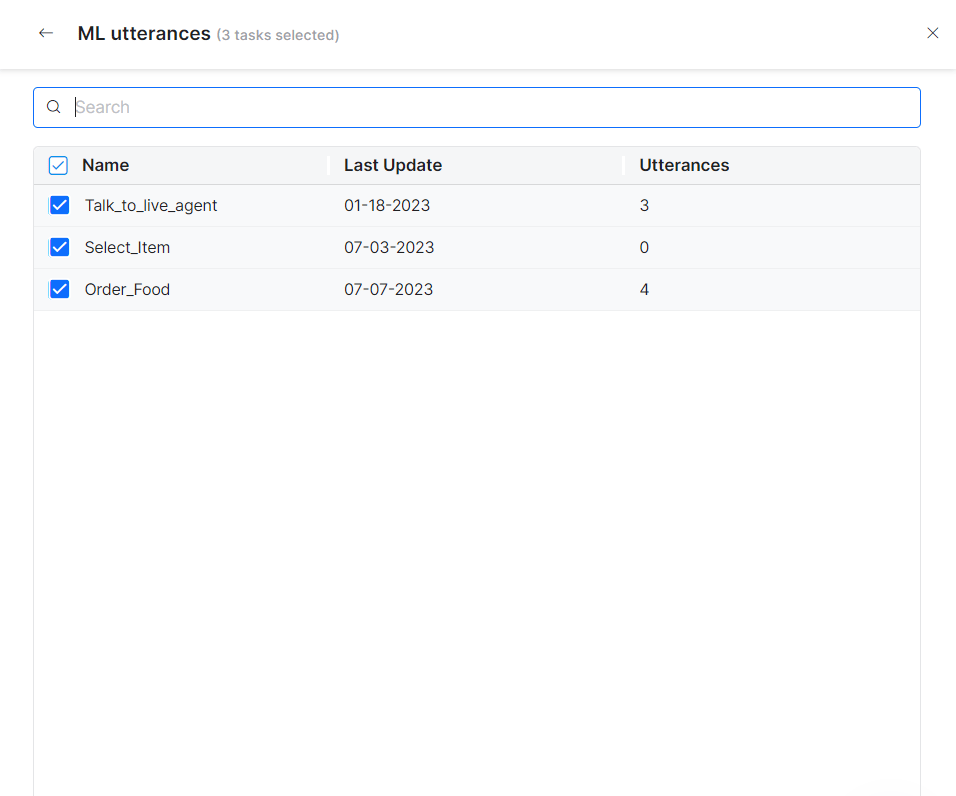 |
| **Patterns** | Replaces old patterns. Click **Customize** to select updated patterns.
|
| **Patterns** | Replaces old patterns. Click **Customize** to select updated patterns. 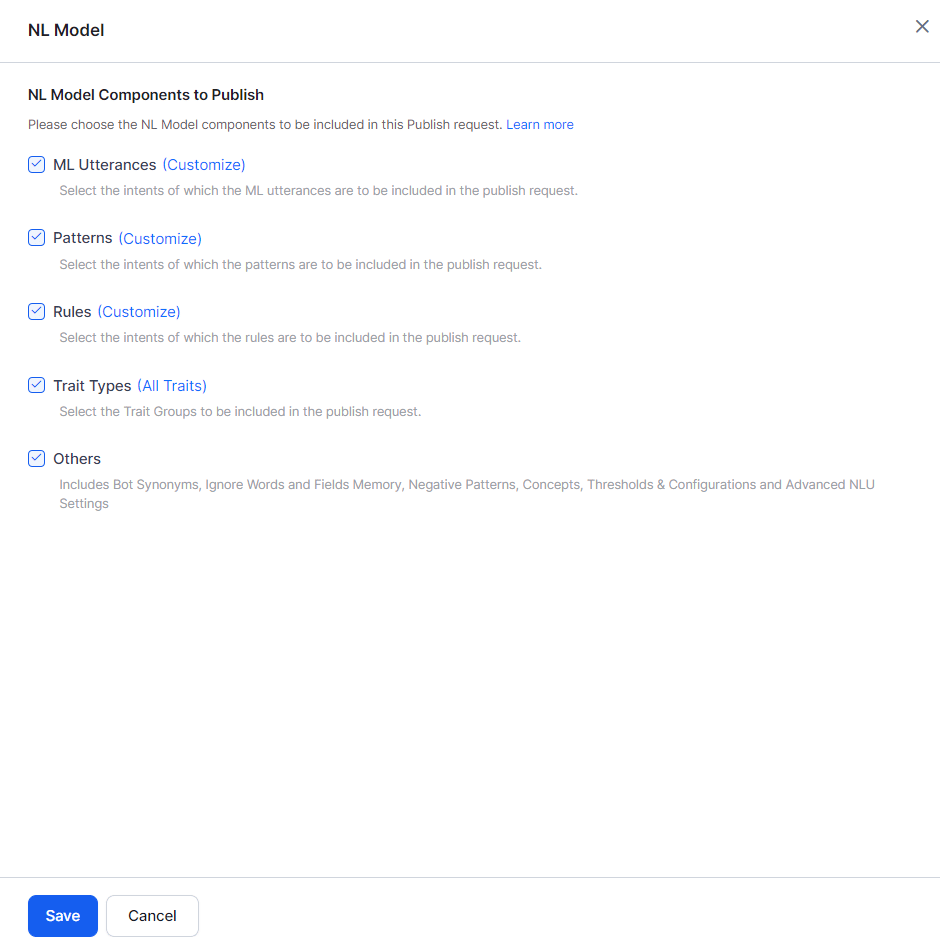 |
| **Rules** | Replaces intents with rules for Dialog Execution and Knowledge Graph detection. Click **Customize** to select specific rules. |
| **Trait Types** | Replaces traits in the Published version with the In Development set. |
| **Others** | Replaces Bot Synonyms, Utterances and NER, Ignore Words and Field Memory, Entity Patterns and Negative Patterns, and Entity Synonyms. |
If Dialog Tasks are selected under **Publish > Tasks**, their training data is published automatically and NL Model components can't be customized separately. Deselect the tasks first to customize ML Utterances, Patterns, and Rules individually. Selecting NL Model components and then adding Dialog Tasks triggers a warning to reset publishable components.
**Settings**
| Component | Behavior |
| ------------------ | ---------------------------------------------------------- |
| Standard Responses | Replaces the full set with the In Development version |
| Default Dialog | Replaces the configuration with the In Development version |
| Amend Settings | Replaces the configuration with the In Development version |
| Advanced Settings | Replaces the configuration with the In Development version |
### Channels
Replaces the Published channel configuration with the In Development version — including new channels, updated configurations, and disabled channels.
### Extensions
| Component | Behavior |
| ---------------- | ------------------------------------------------- |
| Event Handlers | Replaces selected events in the Published version |
| BotKit | Replaces the BotKit configuration |
| Agent Transfer | Replaces the Agent Transfer configuration |
| Web / Mobile SDK | Replaces the SDK configuration |
### Settings
| Component | Behavior |
| ---------------------- | --------------------------------------------------------------------------------------------------------- |
| General Settings | Replaces with the In Development version |
| Agent Variables | Replaces with the In Development version |
| PII Settings | Replaces with the In Development version |
| IVR Settings | Replaces with the In Development version |
| Hold & Resume Settings | Replaces with the In Development version |
| Custom Script | Replaces the script file with the In Development version |
| Generative AI and LLM | Replaces integrations, Prompts Library, Feature Mappings, and Guardrails with the In Development version |
| Advanced Settings | Replaces Language Detection Preference, Subdomain, Show link for task setup/execution, and Error Messages |
## Excluded Components
The following components are outside the publishing workflow — they either don't affect end users directly or only do so as part of a task definition. Both agent states show the same information for these:
* Batch Testing (custom suites and test reports)
* Manage Developer Access
* App Creation, Resetting, and Deletion
* **Language enablement**: Enabling a new language in the In Development version requires re-publishing all components for that language.
***
## Publication Approval
When you publish, the platform sends an approval request to the admin. Behavior depends on the agent's **Purpose**:
| Agent Type | Approval Outcome |
| ------------------ | ------------------------------------------------------------------------------------------------------------------------------------------------------------------ |
| **Employee Agent** | Admin selects users from the enterprise account who can access the agent, then approves. Only selected users can interact with the agent in the selected channels. |
| **Consumer Agent** | Any user can access the agent in the selected channels once the admin approves. |
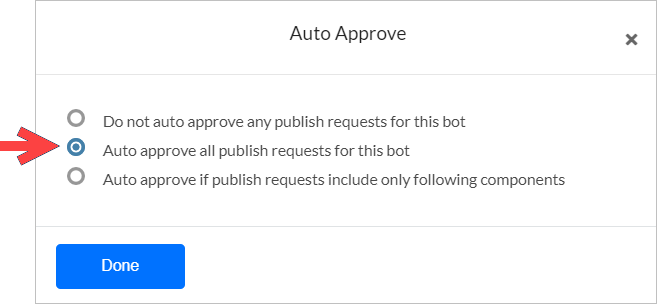
### Auto Approval
Admins can enable auto-approval for an agent:
1. Open the Platform Admin Console.
2. Go to **Bots Management > Consumer Bots** or **Enterprise Bots**.
3. Click the more icon for the agent and select **Bot Settings**.
|
| **Rules** | Replaces intents with rules for Dialog Execution and Knowledge Graph detection. Click **Customize** to select specific rules. |
| **Trait Types** | Replaces traits in the Published version with the In Development set. |
| **Others** | Replaces Bot Synonyms, Utterances and NER, Ignore Words and Field Memory, Entity Patterns and Negative Patterns, and Entity Synonyms. |
If Dialog Tasks are selected under **Publish > Tasks**, their training data is published automatically and NL Model components can't be customized separately. Deselect the tasks first to customize ML Utterances, Patterns, and Rules individually. Selecting NL Model components and then adding Dialog Tasks triggers a warning to reset publishable components.
**Settings**
| Component | Behavior |
| ------------------ | ---------------------------------------------------------- |
| Standard Responses | Replaces the full set with the In Development version |
| Default Dialog | Replaces the configuration with the In Development version |
| Amend Settings | Replaces the configuration with the In Development version |
| Advanced Settings | Replaces the configuration with the In Development version |
### Channels
Replaces the Published channel configuration with the In Development version — including new channels, updated configurations, and disabled channels.
### Extensions
| Component | Behavior |
| ---------------- | ------------------------------------------------- |
| Event Handlers | Replaces selected events in the Published version |
| BotKit | Replaces the BotKit configuration |
| Agent Transfer | Replaces the Agent Transfer configuration |
| Web / Mobile SDK | Replaces the SDK configuration |
### Settings
| Component | Behavior |
| ---------------------- | --------------------------------------------------------------------------------------------------------- |
| General Settings | Replaces with the In Development version |
| Agent Variables | Replaces with the In Development version |
| PII Settings | Replaces with the In Development version |
| IVR Settings | Replaces with the In Development version |
| Hold & Resume Settings | Replaces with the In Development version |
| Custom Script | Replaces the script file with the In Development version |
| Generative AI and LLM | Replaces integrations, Prompts Library, Feature Mappings, and Guardrails with the In Development version |
| Advanced Settings | Replaces Language Detection Preference, Subdomain, Show link for task setup/execution, and Error Messages |
## Excluded Components
The following components are outside the publishing workflow — they either don't affect end users directly or only do so as part of a task definition. Both agent states show the same information for these:
* Batch Testing (custom suites and test reports)
* Manage Developer Access
* App Creation, Resetting, and Deletion
* **Language enablement**: Enabling a new language in the In Development version requires re-publishing all components for that language.
***
## Publication Approval
When you publish, the platform sends an approval request to the admin. Behavior depends on the agent's **Purpose**:
| Agent Type | Approval Outcome |
| ------------------ | ------------------------------------------------------------------------------------------------------------------------------------------------------------------ |
| **Employee Agent** | Admin selects users from the enterprise account who can access the agent, then approves. Only selected users can interact with the agent in the selected channels. |
| **Consumer Agent** | Any user can access the agent in the selected channels once the admin approves. |
### Auto Approval
Admins can enable auto-approval for an agent:
1. Open the Platform Admin Console.
2. Go to **Bots Management > Consumer Bots** or **Enterprise Bots**.
3. Click the more icon for the agent and select **Bot Settings**.
 4. Select **Auto Approve > Auto Approve all publish requests for this bot**.
 ***
***