> ## Documentation Index
> Fetch the complete documentation index at: https://koreai.mintlify.site/llms.txt
> Use this file to discover all available pages before exploring further.
# GenAI Features - Automation AI
[Back to Generative AI Features](/ai-for-service/generative-ai-tools/genai-features)
LLM-powered features for Automation AI that accelerate dialog development, improve NLP accuracy, and enable natural conversations.
The platform regularly integrates new models from providers like OpenAI, Azure OpenAI, and Anthropic. To use a model not yet available as a pre-built integration, add it using [Provider's New LLM Integration](/ai-for-service/generative-ai-tools/llm-integration#add-a-new-model-to-a-pre-built-integration).
## Model Feature Matrix
(✅ Supported | ❌ Not supported)
### Runtime Features
| Model | Agent Node | Prompt Node | Repeat Responses | Rephrase Responses | Rephrase User Query | Zero-shot ML Model |
| :----------------------------------------------------------------------------------------------------------------------------- | :--------: | :---------: | :--------------: | :----------------: | :-----------------: | :----------------: |
| Azure OpenAI - GPT-4 Turbo, GPT-4o, GPT-4o mini, GPT-5.1, GPT-5.2, GPT-5.4, GPT-5.4 Mini, GPT-5.4 Nano, GPT-5-mini | ✅ | ✅ | ✅ | ✅ | ✅ | ✅ |
| OpenAI - GPT-3.5 Turbo, GPT-4, GPT-4 Turbo, GPT-4o, GPT-4o mini, GPT-5.2, GPT-5.3 Instant, GPT-5.4, GPT-5.4 Mini, GPT-5.4 Nano | ✅ | ✅ | ✅ | ✅ | ✅ | ✅ |
| Anthropic - Claude Opus 4.6, Sonnet 4.6/4.5, Haiku 4.5 | ✅ | ✅ | ❌ | ✅ | ✅ | ✅ |
| Amazon Bedrock | ✅ | ✅ | ✅ | ✅ | ❌ | ❌ |
| Google - Gemini 2.5 Flash-Lite, Gemini 2.5 Flash, Gemini 2.5 Pro, Gemini 3 Flash Preview, and Gemini 3.1 Pro Preview | ✅ | ✅ | ✅ | ✅ | ✅ | ✅ |
| Provider's New LLM | ✅ | ✅ | ✅ | ✅ | ✅ | ✅ |
| Custom LLM | ✅ | ✅ | ✅ | ✅ | ✅ | ✅ |
| Kore.ai XO GPT | ❌ | ❌ | ❌ | ✅ | ✅ | ❌ |
### Designtime Features
| Model | Automatic Dialog Generation | Conversation Test Case Suggestions | Conversation Summary | NLP Batch Test Case Suggestions | Training Utterance Suggestions |
| :----------------------------------------------------------------------------------------------------------------------------- | :-------------------------: | :--------------------------------: | :------------------: | :-----------------------------: | :----------------------------: |
| Azure OpenAI - GPT-4 Turbo, GPT-4o, GPT-4o mini, GPT-5.1, GPT-5.2, GPT-5.4, GPT-5.4 Mini, GPT-5.4 Nano, GPT-5-mini | ✅ | ✅ | ❌ | ✅ | ✅ |
| OpenAI - GPT-3.5 Turbo, GPT-4, GPT-4 Turbo, GPT-4o, GPT-4o mini, GPT-5.2, GPT-5.3 Instant, GPT-5.4, GPT-5.4 Mini, GPT-5.4 Nano | ✅ | ✅ | ❌ | ✅ | ✅ |
| Anthropic - Claude Opus 4.6, Sonnet 4.6/4.5, Haiku 4.5 | ✅ | ✅ | ❌ | ✅ | ✅ |
| Amazon Bedrock | ✅ | ✅ | ❌ | ✅ | ✅ |
| Google - Gemini 2.5 Flash-Lite, Gemini 2.5 Flash, Gemini 2.5 Pro, Gemini 3 Flash Preview, and Gemini 3.1 Pro Preview | ✅ | ✅ | ❌ | ✅ | ✅ |
| Provider's New LLM | ✅ | ✅ | ❌ | ✅ | ✅ |
| Custom LLM | ✅ | ✅ | ✅ | ✅ | ✅ |
| Kore.ai XO GPT | ❌ | ❌ | ✅ | ❌ | ❌ |
**System Prompt Limitation** — The platform doesn't provide system prompts in the following cases and you must create a custom prompt:
* OpenAI GPT-4o mini or Azure OpenAI GPT-4o mini models.
* Amazon Bedrock, Google Gemini, Provider's New LLM, and Custom models.
* Rephrase User Query with OpenAI or Azure OpenAI models.
* Azure OpenAI or OpenAI GPT-5 series models used with Repeat Responses, Rephrase User Query, Zero-shot ML Model, Automatic Dialog Generation, Conversation Test Case Suggestions, Conversation Summary, NLP Batch Test Case Suggestions, or Training Utterance Suggestions.
***
## Runtime Features
### Agent Node
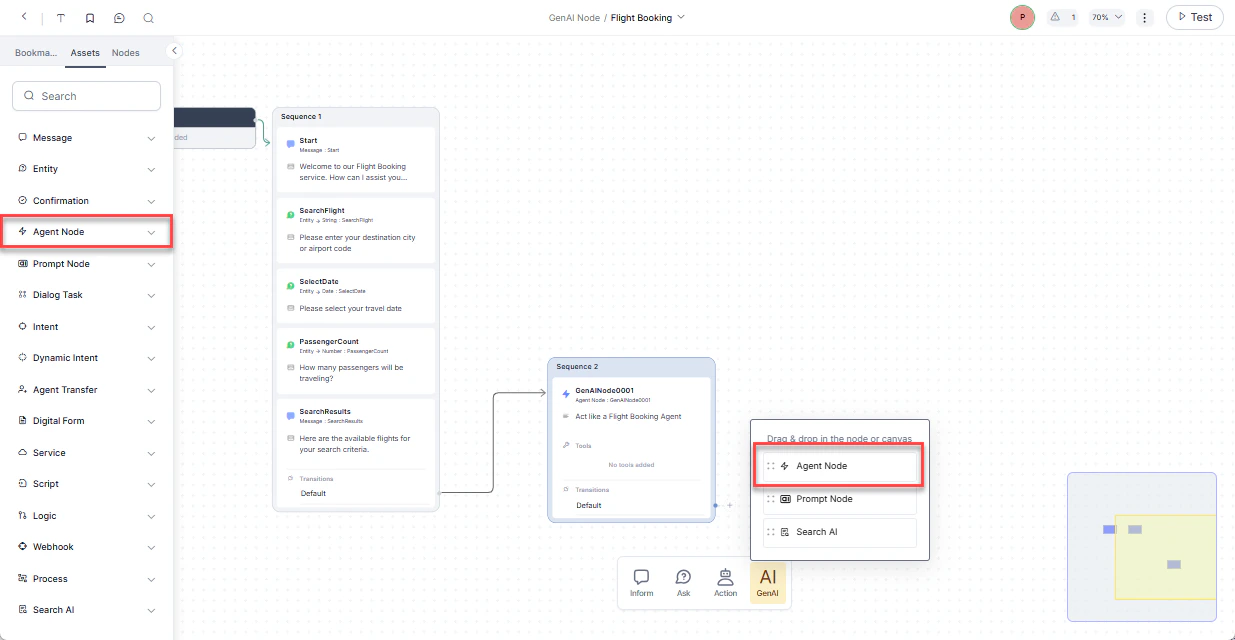
Adds an Agent Node to Dialog Tasks that collects entities from users in a free-flowing conversation using LLM and generative AI. Supports English and non-English app languages. You can define the entities to collect, rules, and scenarios, and reuse the node across Dialog Tasks.
 **Usage**
When creating or editing a Dialog Task manually or [auto-generated](/ai-for-service/automation/agent-flows#creating-dialog-tasks), find the Agent Node in the nodes list. If disabled, the node is unavailable. [Learn more](/ai-for-service/automation/agent-node).
### Prompt Node
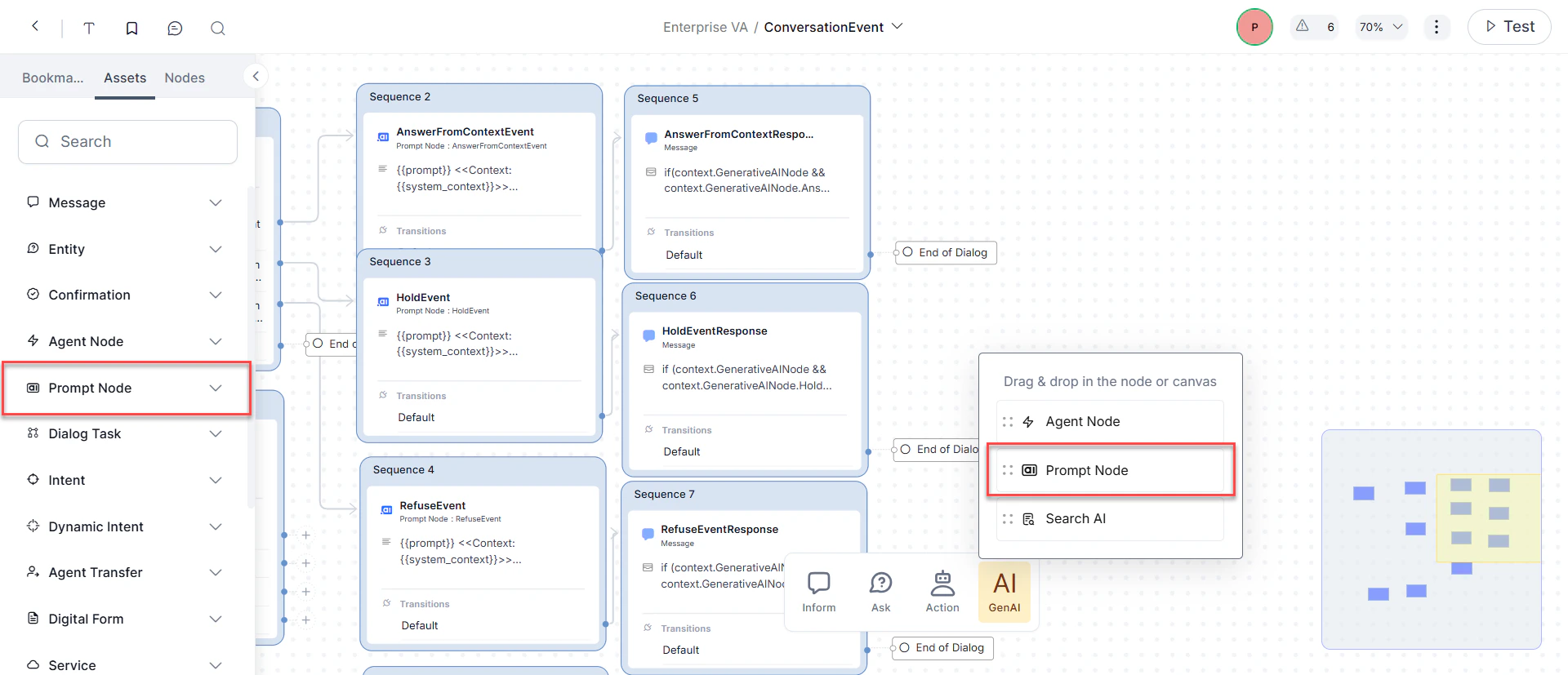
Defines custom prompts based on conversation context and LLM responses. Select a model, configure its settings, and preview responses within the dialog flow.
**Usage**
When creating or editing a Dialog Task manually or [auto-generated](/ai-for-service/automation/agent-flows#creating-dialog-tasks), find the Agent Node in the nodes list. If disabled, the node is unavailable. [Learn more](/ai-for-service/automation/agent-node).
### Prompt Node
Defines custom prompts based on conversation context and LLM responses. Select a model, configure its settings, and preview responses within the dialog flow.
 **Usage**
1. In the Dialog Builder, click **Gen AI** and select **Prompt Node**.
2. Configure **Component Properties**:
* **General Settings**: Set the node **Name**, **Display Name**, and write your prompt.
* **Advanced Settings**: Configure **Model**, **System Context**, **Temperature**, and **Max Tokens**.
3. Under **Advanced Controls**, set the **Timeout** wait time and timeout error handling.
4. Under **Instance Properties**, add custom tags to the current message, user profile, and session to build custom conversation profiles.
5. Configure node connections to define transition conditions and conversation paths.
If disabled, you can't configure custom prompts for different use cases. [Learn more](/ai-for-service/automation/dialogs/node-types/genai-prompt).
### Repeat Responses
Uses LLM to reiterate recent app responses when the Repeat Response event is triggered. Currently supported for IVR, Audiocodes, and Twilio Voice channels.
### Rephrase Responses
Rephrases app responses to be more natural, empathetic, and human-like. Supports standard and structured content types (JSON and JavaScript). The system sends all User Prompts, Error Prompts, and app responses along with conversation context to the LLM.
The `Default_V2` system prompt supports advanced content formats and is available exclusively with OpenAI GPT-4o. Starting with v10.14, all new custom prompts use the V2 format by default; existing prompts are unaffected.
#### Node Level Configuration
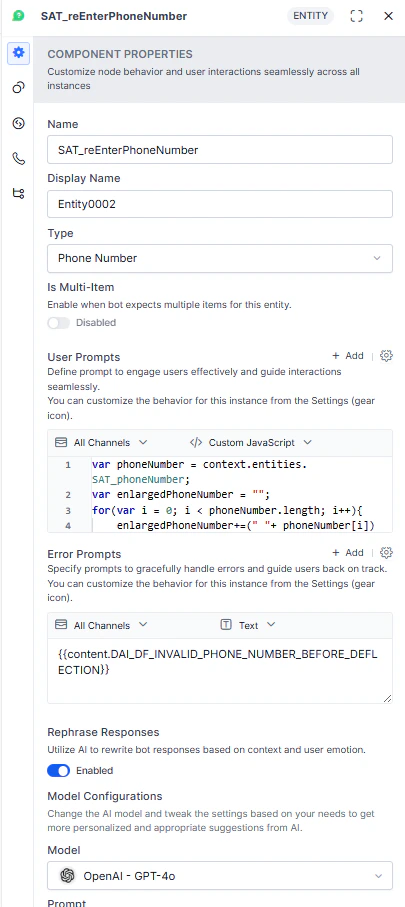
Enable rephrasing per node for User Prompts, Error Prompts, and app responses from Message, Entity, and Confirmation nodes. Off by default.
**Usage**
1. In the Dialog Builder, click **Gen AI** and select **Prompt Node**.
2. Configure **Component Properties**:
* **General Settings**: Set the node **Name**, **Display Name**, and write your prompt.
* **Advanced Settings**: Configure **Model**, **System Context**, **Temperature**, and **Max Tokens**.
3. Under **Advanced Controls**, set the **Timeout** wait time and timeout error handling.
4. Under **Instance Properties**, add custom tags to the current message, user profile, and session to build custom conversation profiles.
5. Configure node connections to define transition conditions and conversation paths.
If disabled, you can't configure custom prompts for different use cases. [Learn more](/ai-for-service/automation/dialogs/node-types/genai-prompt).
### Repeat Responses
Uses LLM to reiterate recent app responses when the Repeat Response event is triggered. Currently supported for IVR, Audiocodes, and Twilio Voice channels.
### Rephrase Responses
Rephrases app responses to be more natural, empathetic, and human-like. Supports standard and structured content types (JSON and JavaScript). The system sends all User Prompts, Error Prompts, and app responses along with conversation context to the LLM.
The `Default_V2` system prompt supports advanced content formats and is available exclusively with OpenAI GPT-4o. Starting with v10.14, all new custom prompts use the V2 format by default; existing prompts are unaffected.
#### Node Level Configuration
Enable rephrasing per node for User Prompts, Error Prompts, and app responses from Message, Entity, and Confirmation nodes. Off by default.
 #### Feature Level Advanced Settings
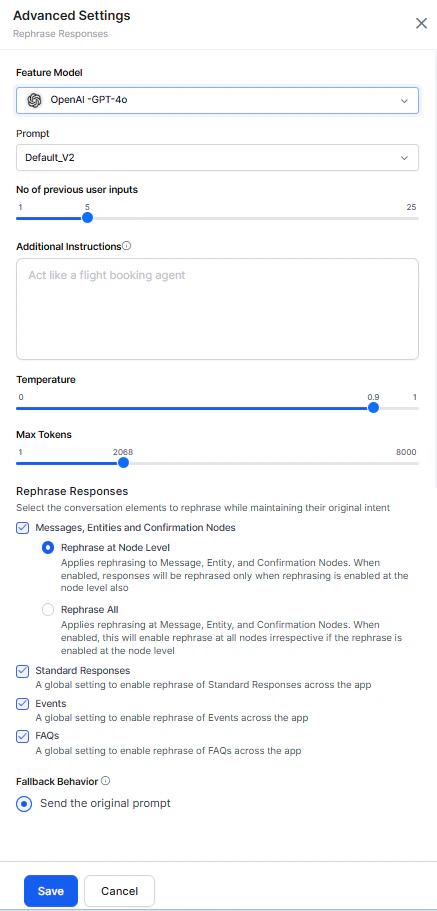
Global rephrasing settings that maintain tonal consistency across the conversation. Configure which response types to send to the LLM:
* **Messages, Entities, and Confirmation Nodes**:
* **Rephrase at Node Level**: Rephrases only nodes with rephrasing explicitly enabled.
* **Rephrase All**: Rephrases all Message, Entity, and Confirmation nodes. Nodes with defined settings use their own; others use global settings.
* **Standard Responses**: Rephrases all Standard Responses.
* **Events**: Rephrases all event-based responses.
* **FAQs**: Rephrases all FAQ responses.
#### Feature Level Advanced Settings
Global rephrasing settings that maintain tonal consistency across the conversation. Configure which response types to send to the LLM:
* **Messages, Entities, and Confirmation Nodes**:
* **Rephrase at Node Level**: Rephrases only nodes with rephrasing explicitly enabled.
* **Rephrase All**: Rephrases all Message, Entity, and Confirmation nodes. Nodes with defined settings use their own; others use global settings.
* **Standard Responses**: Rephrases all Standard Responses.
* **Events**: Rephrases all event-based responses.
* **FAQs**: Rephrases all FAQ responses.
 See [Change Settings for a Pre-built Model](/ai-for-service/generative-ai-tools/genai-features#pre-built-model-settings).
### Rephrase User Query
Improves intent detection and entity extraction by enriching user queries with conversation history context. Handles three scenarios:
| Scenario | Description | Example |
| --------------------------------- | ---------------------------------------------------------- | --------------------------------------------------------------------------------------------------------------- |
| **Completeness** | Completes an incomplete query using conversation context. | "How about Orlando?" → "What's the weather forecast for Orlando tomorrow?" |
| **Co-referencing** | Resolves pronouns or vague references using prior context. | "I take it every six hours." → "I take ibuprofen every six hours." |
| **Completeness + Co-referencing** | Handles both issues together. | "What about the interest rates of both loans?" → "What's the interest rate of the personal loan and home loan?" |
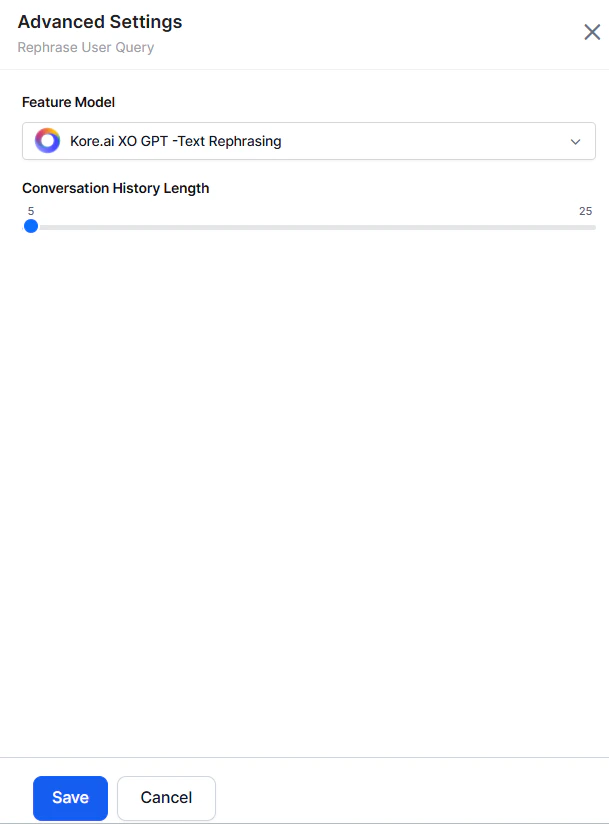
#### Conversation History Length
Controls the number of recent messages (user and AI Agent) sent to the LLM as rephrasing context. Default: 5. Limited to the session's available history.
Access from **Rephrase User Query > Advanced Settings**.
See [Change Settings for a Pre-built Model](/ai-for-service/generative-ai-tools/genai-features#pre-built-model-settings).
### Rephrase User Query
Improves intent detection and entity extraction by enriching user queries with conversation history context. Handles three scenarios:
| Scenario | Description | Example |
| --------------------------------- | ---------------------------------------------------------- | --------------------------------------------------------------------------------------------------------------- |
| **Completeness** | Completes an incomplete query using conversation context. | "How about Orlando?" → "What's the weather forecast for Orlando tomorrow?" |
| **Co-referencing** | Resolves pronouns or vague references using prior context. | "I take it every six hours." → "I take ibuprofen every six hours." |
| **Completeness + Co-referencing** | Handles both issues together. | "What about the interest rates of both loans?" → "What's the interest rate of the personal loan and home loan?" |
#### Conversation History Length
Controls the number of recent messages (user and AI Agent) sent to the LLM as rephrasing context. Default: 5. Limited to the session's available history.
Access from **Rephrase User Query > Advanced Settings**.
 ### Zero-shot ML Model
Production-ready in English. Experimental in other languages — use caution in non-English production environments.
Uses LLMs to identify intents from user utterances based on semantic similarity, without requiring training data. Best suited for AI Agents with fewer, well-defined intents.
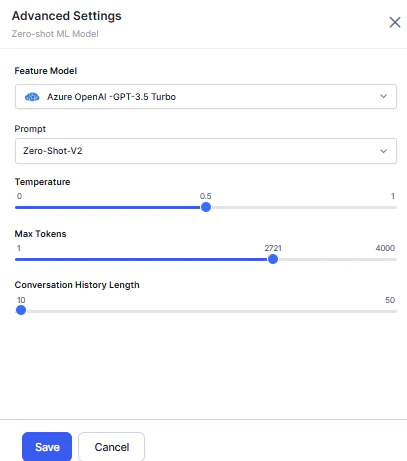
Two template prompts are available for supported OpenAI and Azure OpenAI models: **Default** and **Zero-Shot-V2** (selected by default). You can import both and create custom prompts from them.
#### Conversation History Length
Applies only to Zero-shot V2 prompts.
Specifies the number of recent messages sent to the LLM as context. Default: 10. Limited to the session's available history.
### Zero-shot ML Model
Production-ready in English. Experimental in other languages — use caution in non-English production environments.
Uses LLMs to identify intents from user utterances based on semantic similarity, without requiring training data. Best suited for AI Agents with fewer, well-defined intents.
Two template prompts are available for supported OpenAI and Azure OpenAI models: **Default** and **Zero-Shot-V2** (selected by default). You can import both and create custom prompts from them.
#### Conversation History Length
Applies only to Zero-shot V2 prompts.
Specifies the number of recent messages sent to the LLM as context. Default: 10. Limited to the session's available history.
 **Usage**
1. Before utterance testing, select **Zero-shot Model** as the Network Type.
2. Provide a descriptive input with subject, object, and nouns.
3. The system compares the utterance against intent names and displays the most logical match.
If disabled, matched intents aren't identified or displayed during utterance testing.
***
## Designtime Features
### Few-shot ML Model
Production-ready in English. Experimental in other languages.
Uses Kore.ai's hosted embeddings to identify intents based on semantic similarity between user and training utterances.
**Usage**
1. Before utterance testing, select **Few-Shot Model (Kore.ai Hosted Embeddings)** as the network type.
2. Provide a descriptive intent name and training utterances.
3. The system identifies the most logical match using default configuration, user utterance, and intent names.
If disabled, logically matched intents aren't identified or displayed during utterance testing.
### Automatic Dialog Generation
Auto-generates conversations and dialog flows in the selected language based on the intent description. The platform uses LLM to build Dialog Tasks for Conversation Design, Logic Building, and Training, including Entities, Prompts, Error Prompts, App Action nodes, Service Tasks, Request Definitions, and Connection Rules. You only need to configure flow transitions.
**Usage**
1. Before utterance testing, select **Zero-shot Model** as the Network Type.
2. Provide a descriptive input with subject, object, and nouns.
3. The system compares the utterance against intent names and displays the most logical match.
If disabled, matched intents aren't identified or displayed during utterance testing.
***
## Designtime Features
### Few-shot ML Model
Production-ready in English. Experimental in other languages.
Uses Kore.ai's hosted embeddings to identify intents based on semantic similarity between user and training utterances.
**Usage**
1. Before utterance testing, select **Few-Shot Model (Kore.ai Hosted Embeddings)** as the network type.
2. Provide a descriptive intent name and training utterances.
3. The system identifies the most logical match using default configuration, user utterance, and intent names.
If disabled, logically matched intents aren't identified or displayed during utterance testing.
### Automatic Dialog Generation
Auto-generates conversations and dialog flows in the selected language based on the intent description. The platform uses LLM to build Dialog Tasks for Conversation Design, Logic Building, and Training, including Entities, Prompts, Error Prompts, App Action nodes, Service Tasks, Request Definitions, and Connection Rules. You only need to configure flow transitions.
.gif?s=af9bda20459b7682f353c65e107510a2) **Usage**
1. Launch a Dialog Task for the first time — the platform triggers the generation flow.
2. Provide an intent description and choose to generate a conversation.
3. Preview the generated conversation, edit the description, and regenerate if needed.
4. The platform sends the updated description to Generative AI and returns a new conversation.
5. When satisfied, generate the dialog task.
The platform uses the configured API Key to authorize and generate suggestions from OpenAI.
If disabled, the auto-generate option is unavailable when launching a Dialog Task.
### Conversation Test Cases Suggestions
Creates a test suite for each intent (new and existing) to evaluate the impact of changes on conversation execution. Supports English and non-English app languages.
**Usage**
1. Launch a Dialog Task for the first time — the platform triggers the generation flow.
2. Provide an intent description and choose to generate a conversation.
3. Preview the generated conversation, edit the description, and regenerate if needed.
4. The platform sends the updated description to Generative AI and returns a new conversation.
5. When satisfied, generate the dialog task.
The platform uses the configured API Key to authorize and generate suggestions from OpenAI.
If disabled, the auto-generate option is unavailable when launching a Dialog Task.
### Conversation Test Cases Suggestions
Creates a test suite for each intent (new and existing) to evaluate the impact of changes on conversation execution. Supports English and non-English app languages.
.gif?s=ebb83043b24ed03a5489f38ac1dbd078) **Usage**
1. Create a test suite by recording a live conversation with an AI Agent.
2. An icon indicates Generative AI-generated input suggestions at each step.
3. The platform sends the following to OpenAI or Anthropic Claude-1 to generate suggestions:
* Randomly selected intents (Dialog, FAQ)
* Conversation flow and current intent
* Node type details: entity name, type, and sample values
* Input scenarios: entities, no entities, entity combinations, digression, and error triggers
4. Accept suggestions or enter custom input at each step.
5. Stop recording and validate the model to create the test suite.
If disabled, Generative AI suggestions aren't displayed. [Learn more](/ai-for-service/automation/testing/regression-testing/conversation-testing/create-a-test-suite).
### Conversation Summarization
Generates natural language summaries of interactions between the AI Agent, users, and human agents. Distills intents, entities, decisions, and outcomes into a concise synopsis. Pre-integrated with Kore.ai's Contact Center platform and extensible via API.
For existing apps, the feature is enabled by default with the XO GPT Model. For new apps, it's disabled.
**Scenario 1 — Agent Handoff**
When a conversation transfers to a live agent, the system generates a transcript and interaction summary for the agent. The summary appears on the Agent Console in SmartAssist.
**Usage**
1. Create a test suite by recording a live conversation with an AI Agent.
2. An icon indicates Generative AI-generated input suggestions at each step.
3. The platform sends the following to OpenAI or Anthropic Claude-1 to generate suggestions:
* Randomly selected intents (Dialog, FAQ)
* Conversation flow and current intent
* Node type details: entity name, type, and sample values
* Input scenarios: entities, no entities, entity combinations, digression, and error triggers
4. Accept suggestions or enter custom input at each step.
5. Stop recording and validate the model to create the test suite.
If disabled, Generative AI suggestions aren't displayed. [Learn more](/ai-for-service/automation/testing/regression-testing/conversation-testing/create-a-test-suite).
### Conversation Summarization
Generates natural language summaries of interactions between the AI Agent, users, and human agents. Distills intents, entities, decisions, and outcomes into a concise synopsis. Pre-integrated with Kore.ai's Contact Center platform and extensible via API.
For existing apps, the feature is enabled by default with the XO GPT Model. For new apps, it's disabled.
**Scenario 1 — Agent Handoff**
When a conversation transfers to a live agent, the system generates a transcript and interaction summary for the agent. The summary appears on the Agent Console in SmartAssist.
 **Scenario 2 — Conversation Wrap-Up**
When closing a conversation, the system uses the [Conversation Summary API](/ai-for-service/apis/automation/conversation-summary) to generate closing notes from the full conversation transcript using an open-source LLM.
### NLP Batch Test Cases Suggestions
Generates test cases for each intent based on the selected NLU language. Supports English and non-English app languages. For multilingual NLU, utterances are generated in the language you specify.
**Usage**
1. When creating a New Test Suite, select **Add Manually** or **Upload Test Cases File**.
2. **Add Manually** creates an empty test suite. Select a Dialog Task and Generative AI generates test cases based on intent context.
3. Click **Generate Test Cases**. The platform sends the following to OpenAI or Anthropic Claude-1:
* Intent, entities, and probable entity values
* Scenarios for simulating end-user utterances
* Random training utterances (to avoid duplicates)
If disabled, you can't generate test cases during batch testing. [Learn more](/ai-for-service/automation/testing/regression-testing/batch-testing#auto-generating-test-cases).
### Training Utterance Suggestions
Generates suggested training utterances and NER annotations for each intent based on the selected NLU language, eliminating the need to create them manually.
**Scenario 2 — Conversation Wrap-Up**
When closing a conversation, the system uses the [Conversation Summary API](/ai-for-service/apis/automation/conversation-summary) to generate closing notes from the full conversation transcript using an open-source LLM.
### NLP Batch Test Cases Suggestions
Generates test cases for each intent based on the selected NLU language. Supports English and non-English app languages. For multilingual NLU, utterances are generated in the language you specify.
**Usage**
1. When creating a New Test Suite, select **Add Manually** or **Upload Test Cases File**.
2. **Add Manually** creates an empty test suite. Select a Dialog Task and Generative AI generates test cases based on intent context.
3. Click **Generate Test Cases**. The platform sends the following to OpenAI or Anthropic Claude-1:
* Intent, entities, and probable entity values
* Scenarios for simulating end-user utterances
* Random training utterances (to avoid duplicates)
If disabled, you can't generate test cases during batch testing. [Learn more](/ai-for-service/automation/testing/regression-testing/batch-testing#auto-generating-test-cases).
### Training Utterance Suggestions
Generates suggested training utterances and NER annotations for each intent based on the selected NLU language, eliminating the need to create them manually.
.gif?s=750c6e05508827b2d61aa913e2d22e47) The platform generates utterances based on:
* Intent
* Entities and entity types
* Probable entity values
* Structural variations: entity combinations, different sentence structures, and more
You can add or delete suggested utterances, or generate additional suggestions.
If disabled, the **Suggestions** tab is hidden on the training page.
The platform generates utterances based on:
* Intent
* Entities and entity types
* Probable entity values
* Structural variations: entity combinations, different sentence structures, and more
You can add or delete suggested utterances, or generate additional suggestions.
If disabled, the **Suggestions** tab is hidden on the training page.