> ## Documentation Index
> Fetch the complete documentation index at: https://koreai.mintlify.site/llms.txt
> Use this file to discover all available pages before exploring further.
# Streaming Responses
[Back to Prompts Library](/ai-for-service/generative-ai-tools/prompts-library)
Streaming responses enable real-time, incremental LLM output—the model transmits output pieces as they become available instead of waiting for a complete response. This reduces latency and improves interaction for conversational AI, speech-to-text, and content generation tools.
***
## Current Capabilities
* **Voice:** Supports the [Voice Gateway](/ai-for-service/channels/voice-gateway/configure-voice-gateway) channel for GenAI features including Agent Node, with Deepgram as the supported TTS engine.
* **Chat:** Delivers real-time LLM response streaming for [Web/Mobile SDK](/ai-for-service/sdk/bot-sdk-introduction) and Microsoft Teams channels. Agent Node and Prompt Node stream responses token-by-token.
* **Models:** Integrates with OpenAI and Azure OpenAI out of the box. Custom prompts support other streaming-capable LLMs.
* **Node-level activation:** Streaming activates when a streaming prompt is selected at the node level, even if the feature-level prompt doesn't use streaming.
**Agent Node Tool Calling and Streaming**
* **V1 Custom JavaScript Prompts:** Supports tool calling and streaming as separate capabilities only—not simultaneously.
* **V2 Custom JavaScript Prompts:** Supports both tool calling and streaming together using the OpenAI/Azure OpenAI response format.
### Benefits
| Benefit | Description |
| ------------------------ | ----------------------------------------------------------------- |
| Real-Time Output | Text appears instantly, reducing wait times. |
| Lower Latency | Faster response time improves user experience. |
| Improved Interaction | Partial outputs support iterative writing and brainstorming. |
| Live Application Support | Enhances real-time chat, speech-to-text, and code autocompletion. |
***
## Use Cases
| Domain | Use Cases |
| ---------------- | -------------------------------------------------------------------------- |
| Healthcare | Streaming patient history summaries; real-time clinical study analysis. |
| Finance | Streaming portfolio breakdowns; incremental compliance document summaries. |
| E-commerce | Streaming side-by-side product comparisons for informed decisions. |
| Education | Delivering detailed course outlines or study material summaries. |
| Legal | Streaming legal precedent explanations; incremental contract analysis. |
| Customer Support | Streaming detailed troubleshooting steps for complex issues. |
| Human Resources | Streaming HR policy or benefits explanations for employees. |
| Marketing | Streaming in-depth campaign analysis and ROI breakdowns. |
***
## Enable Streaming
### Use a Default Streaming Prompt
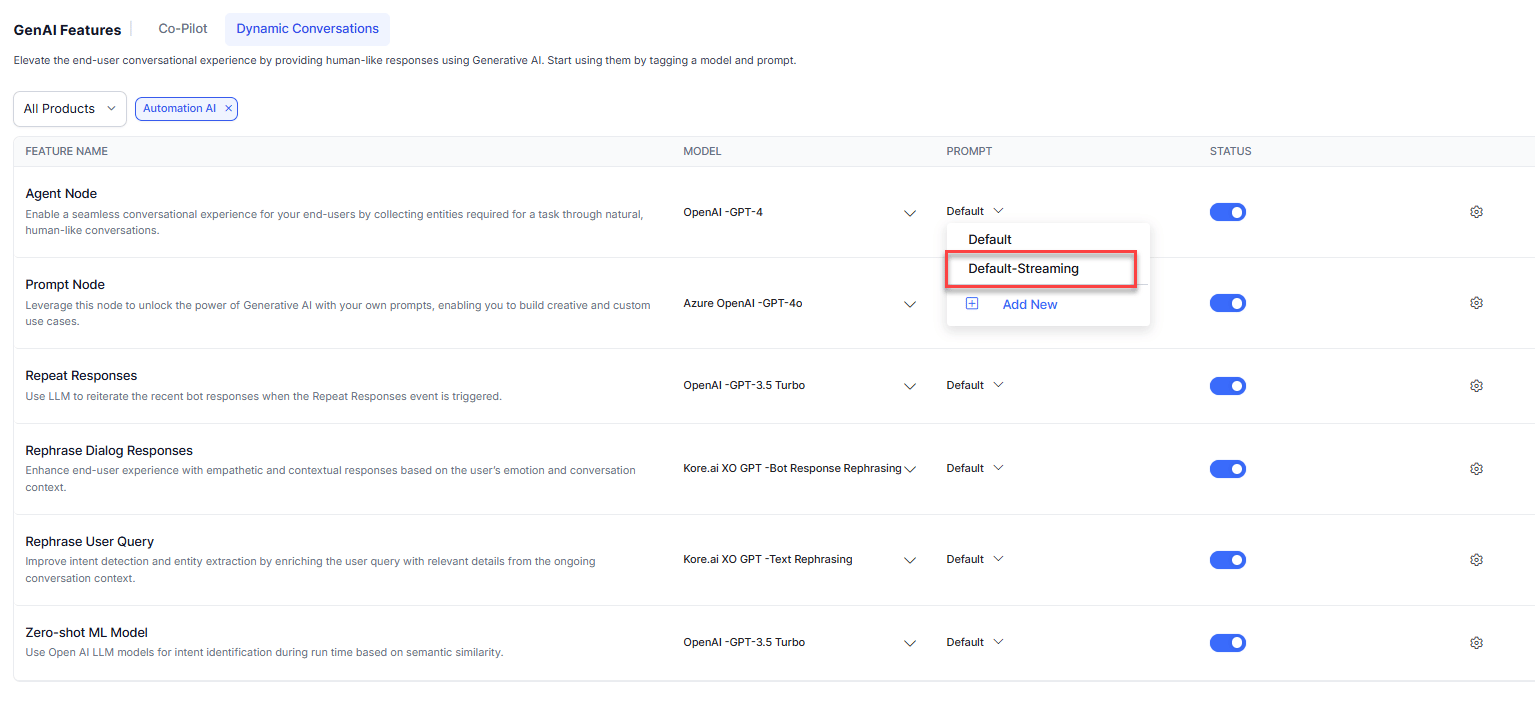
The Platform provides default streaming prompts for Agent Node and Prompt Node for OpenAI models.
Go to **Generative AI Tools** > **GenAI Features** and select the default-streaming prompt for the required feature.
 ### Create a Custom Streaming Prompt
See [How to Add a Custom Prompt](/ai-for-service/generative-ai-tools/prompts-library) and enable the **Stream Response** toggle.
The streamed response must follow this format:
| Field | Description |
| ------------------ | --------------------------------------------------------------- |
| `conv_status` | Indicates whether the conversation has `ended` or is `ongoing`. |
| AI Agent response | The generated response sent to the end user. |
| collected entities | Stringified JSON object containing extracted entities. |
* Add the required stream parameter to your custom prompt (for example, `"stream": true` for OpenAI/Azure OpenAI).
* The saved prompt appears with a "stream" tag in the Prompts Library.
* Enabling streaming disables: Exit Scenario, AI Agent Response, Collected Entities, and Tool Call Request (for Agent Node).
***
## Performance Benchmarks
| Task | Mode | Input Tokens | Output Tokens | Time (s) | Reduction |
| -------------- | ------------- | ------------ | ------------- | -------- | ---------------------------- |
| Agent Node | Non-streaming | 777 | 90 | 2.59 | Output: -30%, Time: 83% |
| | Streaming | 676 | 62 | 0.44 | |
| 50-word Joke | Non-streaming | 95 | 54 | 2.4 | Output: +10%, Time: 80% |
| | Streaming | 68 | 60 | 0.47 | |
| 500-word Joke | Non-streaming | 95 | 595 | 22.39 | Output: +10%, Time: 98% |
| | Streaming | 68 | 649 | 0.41 | |
| 500-word Joke | Non-streaming | 68 | 642 | 30.11 | Output: -0.05%, Time: 97% |
| | Streaming | 68 | 641 | 0.88 | |
| 500-word Story | Non-streaming | 68 | 616 | 16.86 | Output: +2.27%, Time: 97.5% |
| | Streaming | 68 | 630 | 0.44 | |
| 500-word Essay | Non-streaming | 70 | 687 | 22.23 | Output: +1.46%, Time: 97.15% |
| | Streaming | 70 | 697 | 0.63 | |
**Key insights:**
* Output \< 100 tokens: 80-85% time reduction.
* Output 100-600 tokens: 97-98% time reduction.
* Output > 600 tokens: 98-99% time reduction.
* Output quality variance is minimal (≤2.5%), ensuring task reliability.
These benchmarks were conducted under specific scenarios. Performance varies by environment. Conduct your own testing before enabling streaming in production.
***
## Analytics
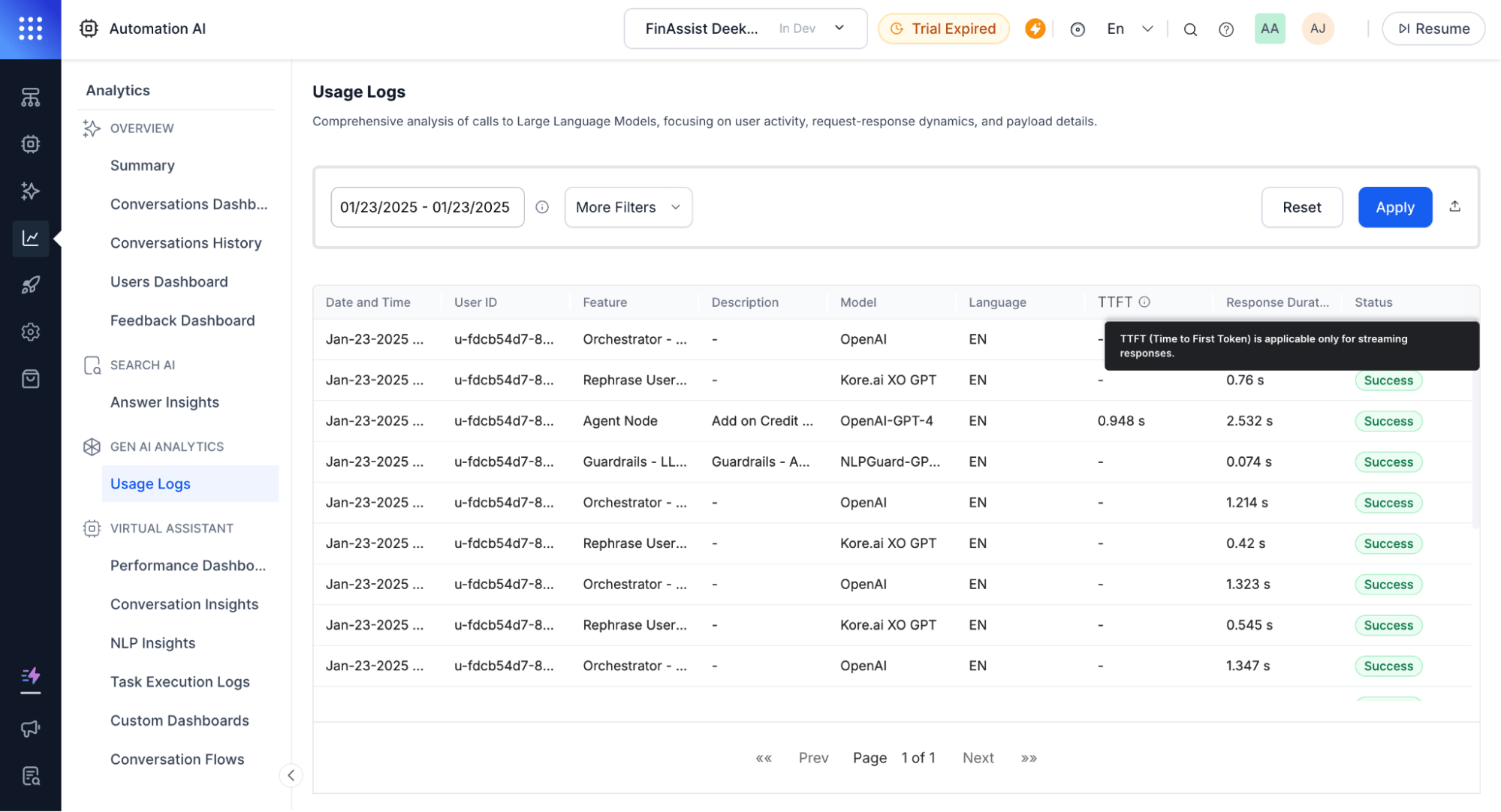
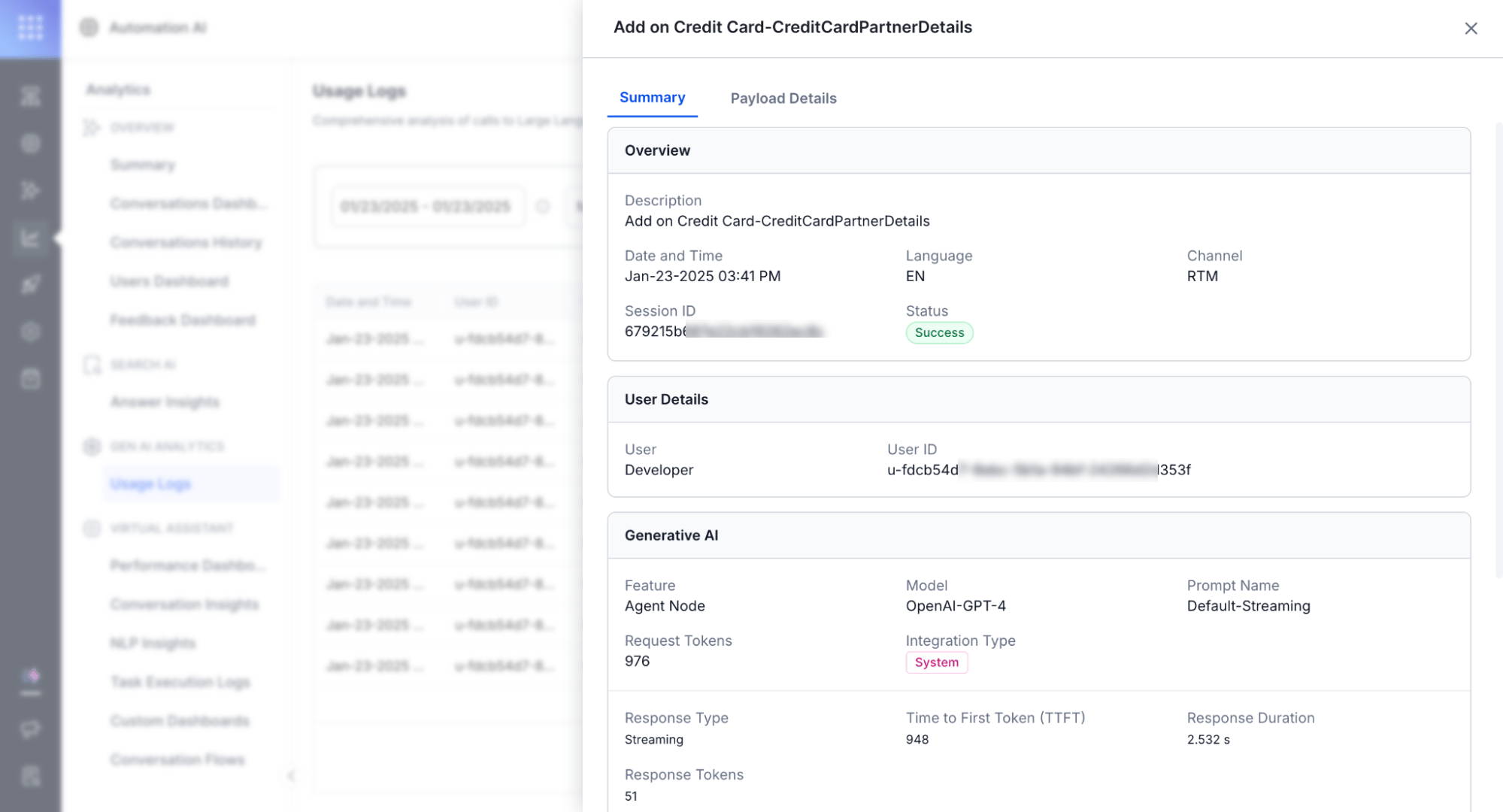
Usage Logs track and differentiate streaming and non-streaming responses.
| Metric | Description |
| ------------------------------ | ---------------------------------------------------------------------------------------------------------- |
| **TTFT** (Time to First Token) | Time until the first token appears. Blank for the final response chunk since no further messages are sent. |
| **Response Duration** | Time from the first chunk to the last chunk. |
| **Response Type** | Indicates streaming or non-streaming on the Detailed Log page. |
### Create a Custom Streaming Prompt
See [How to Add a Custom Prompt](/ai-for-service/generative-ai-tools/prompts-library) and enable the **Stream Response** toggle.
The streamed response must follow this format:
| Field | Description |
| ------------------ | --------------------------------------------------------------- |
| `conv_status` | Indicates whether the conversation has `ended` or is `ongoing`. |
| AI Agent response | The generated response sent to the end user. |
| collected entities | Stringified JSON object containing extracted entities. |
* Add the required stream parameter to your custom prompt (for example, `"stream": true` for OpenAI/Azure OpenAI).
* The saved prompt appears with a "stream" tag in the Prompts Library.
* Enabling streaming disables: Exit Scenario, AI Agent Response, Collected Entities, and Tool Call Request (for Agent Node).
***
## Performance Benchmarks
| Task | Mode | Input Tokens | Output Tokens | Time (s) | Reduction |
| -------------- | ------------- | ------------ | ------------- | -------- | ---------------------------- |
| Agent Node | Non-streaming | 777 | 90 | 2.59 | Output: -30%, Time: 83% |
| | Streaming | 676 | 62 | 0.44 | |
| 50-word Joke | Non-streaming | 95 | 54 | 2.4 | Output: +10%, Time: 80% |
| | Streaming | 68 | 60 | 0.47 | |
| 500-word Joke | Non-streaming | 95 | 595 | 22.39 | Output: +10%, Time: 98% |
| | Streaming | 68 | 649 | 0.41 | |
| 500-word Joke | Non-streaming | 68 | 642 | 30.11 | Output: -0.05%, Time: 97% |
| | Streaming | 68 | 641 | 0.88 | |
| 500-word Story | Non-streaming | 68 | 616 | 16.86 | Output: +2.27%, Time: 97.5% |
| | Streaming | 68 | 630 | 0.44 | |
| 500-word Essay | Non-streaming | 70 | 687 | 22.23 | Output: +1.46%, Time: 97.15% |
| | Streaming | 70 | 697 | 0.63 | |
**Key insights:**
* Output \< 100 tokens: 80-85% time reduction.
* Output 100-600 tokens: 97-98% time reduction.
* Output > 600 tokens: 98-99% time reduction.
* Output quality variance is minimal (≤2.5%), ensuring task reliability.
These benchmarks were conducted under specific scenarios. Performance varies by environment. Conduct your own testing before enabling streaming in production.
***
## Analytics
Usage Logs track and differentiate streaming and non-streaming responses.
| Metric | Description |
| ------------------------------ | ---------------------------------------------------------------------------------------------------------- |
| **TTFT** (Time to First Token) | Time until the first token appears. Blank for the final response chunk since no further messages are sent. |
| **Response Duration** | Time from the first chunk to the last chunk. |
| **Response Type** | Indicates streaming or non-streaming on the Detailed Log page. |
 ***
## Limitations
| Limitation | Reason |
| ---------------------- | ------------------------------------------------------------------------------------------------ |
| No post-processing | Requires the complete response, which conflicts with incremental delivery. |
| No guardrails | Content moderation requires full-context evaluation, incompatible with token-by-token streaming. |
| Voice compatibility | Depends on TTS engine support for bi-directional streaming (for example, Deepgram). |
| No BotKit interception | Real-time delivery is incompatible with message interception. |
Streaming quality depends heavily on prompt design. LLMs are subject to hallucination—ensure prompts are accurate and aligned with desired output before using in production.
***
## Limitations
| Limitation | Reason |
| ---------------------- | ------------------------------------------------------------------------------------------------ |
| No post-processing | Requires the complete response, which conflicts with incremental delivery. |
| No guardrails | Content moderation requires full-context evaluation, incompatible with token-by-token streaming. |
| Voice compatibility | Depends on TTS engine support for bi-directional streaming (for example, Deepgram). |
| No BotKit interception | Real-time delivery is incompatible with message interception. |
Streaming quality depends heavily on prompt design. LLMs are subject to hallucination—ensure prompts are accurate and aligned with desired output before using in production.