> ## Documentation Index
> Fetch the complete documentation index at: https://koreai.mintlify.site/llms.txt
> Use this file to discover all available pages before exploring further.
# CCAI Upgrade from XO10 to XO11
> Contact Center AI Migration from XO v10 to v11
[Back to TOC](/ai-for-service/index)
This document provides step-by-step instructions to upgrade your SmartAssist or Contact Center AI (CCAI) account to XO v11.
**Prerequisites**
* A valid SmartAssist account.
* Bot Owner access is required to upgrade.
**Pre-Upgrade Checklist**
* Download reports not supported in XO v11. For example, download the **Agent Login Logout Details Report** from SmartAssist before upgrading—it's not available after migration.
* Review the changes and enhanced features before proceeding.
* Notify SmartAssist users of the upcoming upgrade and expected downtime.
* Note that any active conversations on all channels are terminated during the upgrade. Wait for conversations to taper off before starting.
* All other data (reports, dashboards, etc.) is preserved after the upgrade.
## What Changes
### Bot to App Transition
SmartAssist Instance bot and child bots become individual Apps in XO v11.
### Workflow Migration
All existing workflows transfer in their current state. Flows containing deflection nodes are maintained during the transfer with a renewed experience. The Conversational Input and Run Automation nodes are combined.
### User and Role Migration
All current roles transfer directly. SmartAssist roles are recreated as custom roles with the same permissions, using the naming convention: `{roleName}_{instanceBotName}`.
### Use Case Handling
After the upgrade, configurations made in SmartAssist use cases continue to work in XO v11, but the dialogs won't be visible. To make changes, Contact support.
### Agent Transfer Settings
Agent transfer configurations are preserved and implemented at the application level.
### Default Flow Changes
XO v11 discontinues existing default flows such as **No Agents Available** and **Out of Hours** from the left navigation menu. Dedicated flow types now support these scenarios.
### New or Changed Reports
* **Agent Entry-Exit Summary Report** (new): Tracks agent app entry and exit events. Login and logout events aren't included.
* **Agent Activity Summary Report** (changed): First login and last logout fields are replaced by App Entry and App Exit fields.
If you need reports with the previous columns, rerun them in SmartAssist before upgrading.
### Billing Structure Change
| User Type | XO v11 Access |
| --------------------------------- | ----------------------------------------------------------------------------------------------------------- |
| Enterprise users | XO v11 Enterprise Standard (includes Automation AI, Contact Center AI, Basic RAG Search AI, Basic Agent AI) |
| Non-Enterprise Free users | XO v11 trial for Automation AI and Search AI; "Try now" option for Agent AI and Search AI |
| Non-Enterprise paid users (\$10+) | XO v11 trial for Automation AI and Search AI; "Try now" option for Agent AI and Search AI |
### Updated Automation Node in Experience Flows
The updated Automation node introduces new transitions (`On Success` and `On Failure`) and expanded Default routing options, including the ability to select linked apps. During migration:
* Existing `Let the bot handle` configurations map to the appropriate radio buttons in XO v11.
* `Go to a node` selections map to `Exit Automation and go to a selected node` under the respective success or failure category.
* For Agent Transfer functionality, the system uses existing configurations from Conversational IVR (now merged with Automation in XO v11) or creates new Agent Transfer nodes with the default `Connect to Agent` dialog.
### Deflection Flow
After migrating, the **Deflect to Chat** node in SmartAssist experience flows continues to function as configured. XO v11 supports chat deflection based on the selected configuration—Automation or Agent Transfer—through a Deflection Flow node.
* Within Agent Transfer selections, chat deflection remains available in both waiting and transfer contexts.
* XO v11 introduces a new **Deflection Flow node** for voice channels.
* Default flows (Default Conversational Input Voice Flow and Agent Deflection Flow) and custom flows using Deflect to Chat automatically upgrade to use this node.
* By default, the node triggers using automation context. Flow developers can override this by selecting **trigger using user selection**, which prompts a dropdown for Chat Automation or Agent Transfer.
* If **Go to node** isn't set for User Selection, an error appears. Chat Automation selections don't require this validation.
* Migrated flows appear under Start Flows. The Deflection Flow node is available in both Start and Conditional Voice flows.
To use the Deflection Flow, users must upgrade to enable automation access.
## Important Points
### Upgrade Access Impact
The upgrade is irreversible. If an error occurs during the upgrade, the system automatically reverts the process and users continue to access SmartAssist.
### Localization
The XO v11 Contact Center UI supports English, Japanese, and Korean. Users who selected any other app language are automatically switched to English after migration.
### Audit Trail Requirements
* Audit Event records are created when the upgrade is initiated.
* Upgrade status updates are tracked throughout the process.
### Role-Based Access Control
* Only app owners can upgrade the SmartAssist instance and child bots.
* Agents and supervisors receive notifications about the upgrade after it completes.
* Users access XO v11 using their existing SmartAssist credentials.
* Agents and supervisors are redirected to XO v11 for contact center operations.
## Upgrade Journey from SmartAssist to XO v11
### Upgrade Notification
1. Log in to **SmartAssist** > **Configurations**. A notification appears at the top of the screen.
 2. The following options are available:
* **Learn More**: Opens [XO v11 Documentation](https://docs.kore.ai/ai-for-service/home/).
* **Go to new Platform**: Opens the [XO v11 Platform](https://platform.kore.ai/).
3. Select **Go to new Platform** to start the upgrade.
Only app owners can upgrade SmartAssist instance bots and child bots.
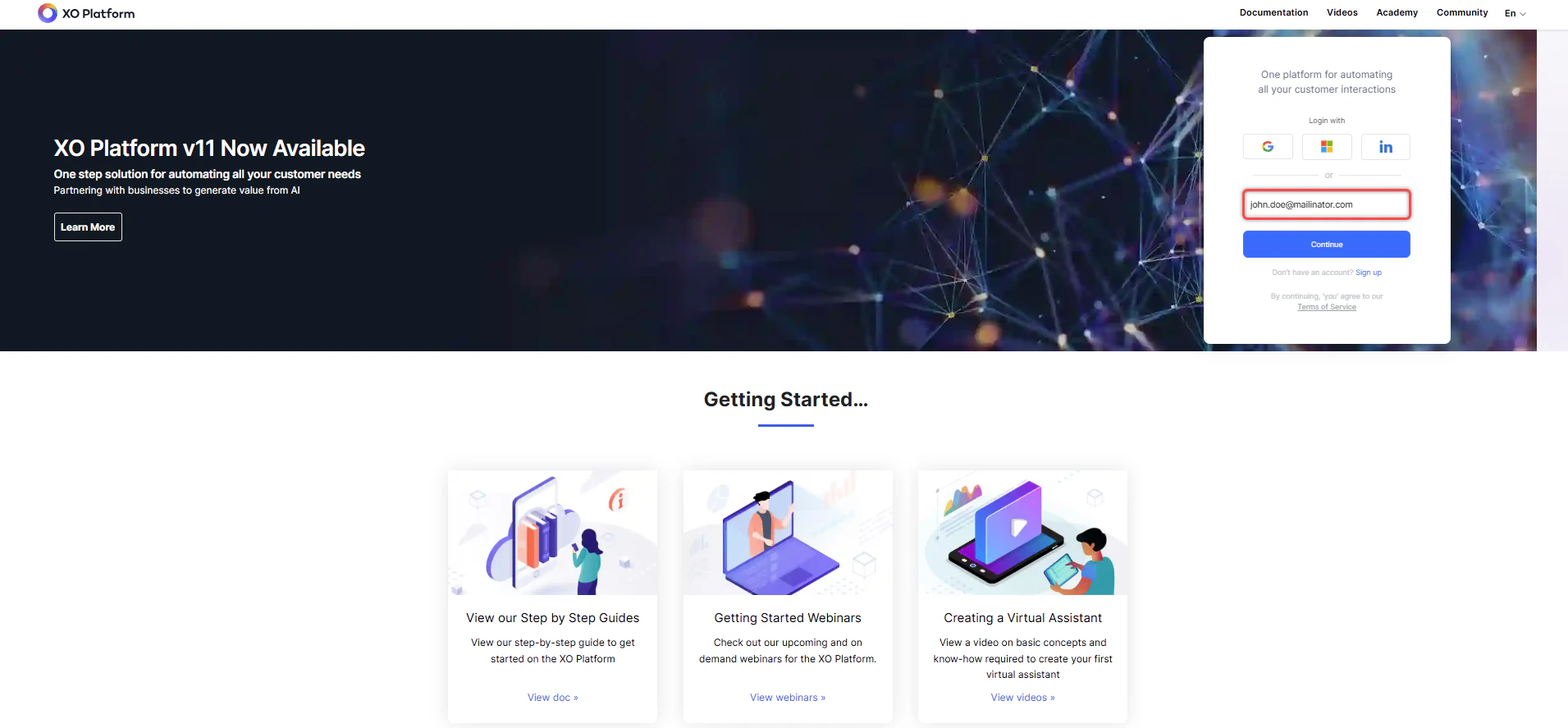
4. Log in to XO v11 using your SmartAssist credentials.
2. The following options are available:
* **Learn More**: Opens [XO v11 Documentation](https://docs.kore.ai/ai-for-service/home/).
* **Go to new Platform**: Opens the [XO v11 Platform](https://platform.kore.ai/).
3. Select **Go to new Platform** to start the upgrade.
Only app owners can upgrade SmartAssist instance bots and child bots.
4. Log in to XO v11 using your SmartAssist credentials.
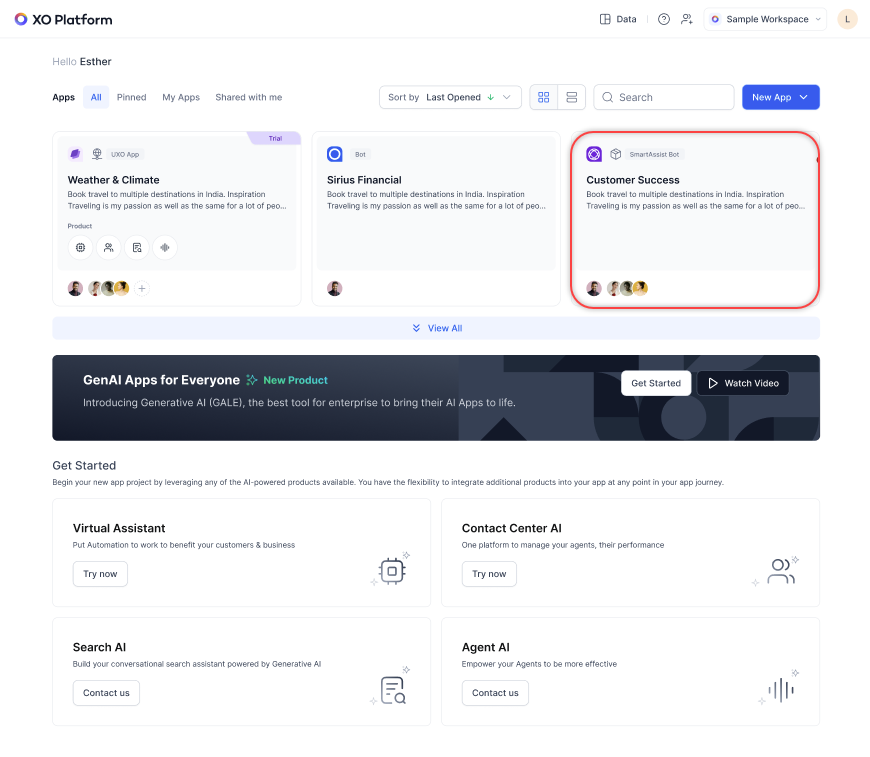
 5. All apps (SmartAssist and automation bots) appear. Select the **SmartAssist bot** to upgrade it to an App in XO v11.
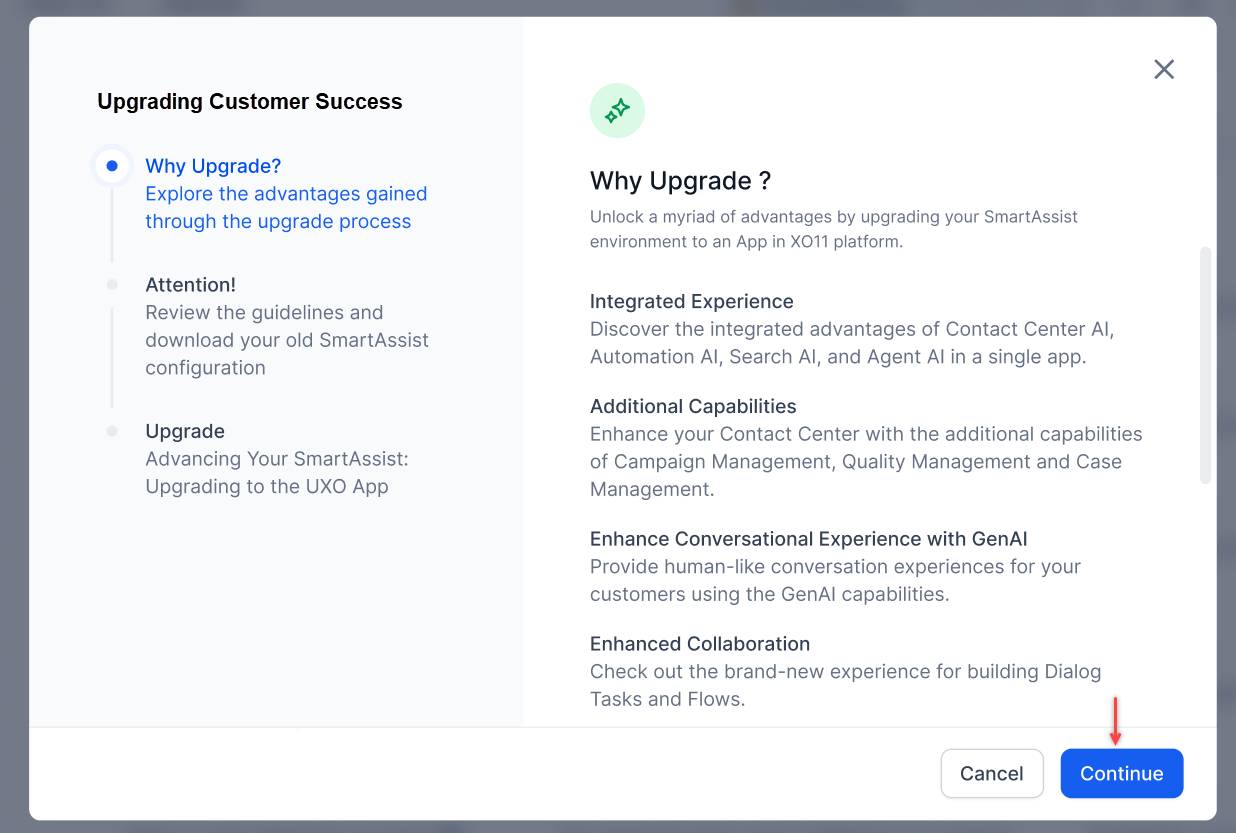
 6. A pop-up appears with the following options: **Why Upgrade?**, **Attention**, and **Upgrade**. Select **Continue**.
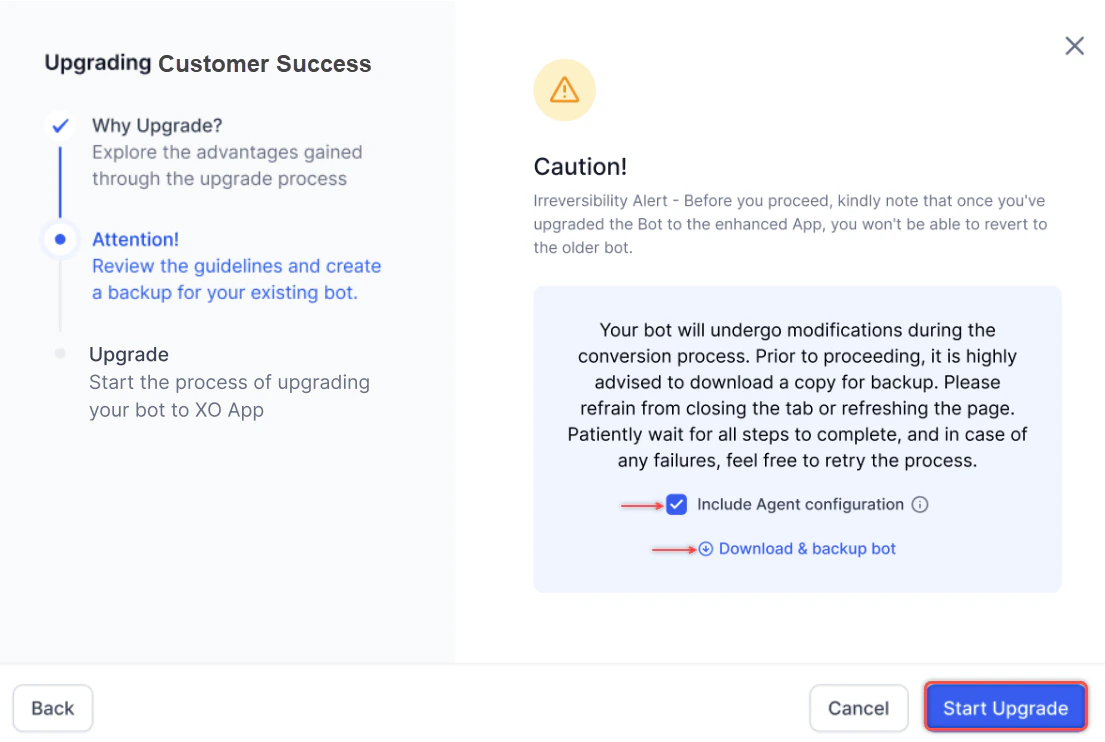
 7. The **Include Agent Configuration** checkbox is selected by default. It includes agent profile data, agent group assignments, agent-to-skill mappings, agent-to-experience flows, and agent-to-queue mappings. Select **Download & backup your bot**, then select **Start Upgrade**. The system downloads:
* Instance-bot configurations
* Agent-related information (for example, agent mapping to queues and agent groups)
* Experience flow and channel configurations
* All contact center settings, including standard responses, digital forms, conversation status control configurations, and other SmartAssist configurations
7. The **Include Agent Configuration** checkbox is selected by default. It includes agent profile data, agent group assignments, agent-to-skill mappings, agent-to-experience flows, and agent-to-queue mappings. Select **Download & backup your bot**, then select **Start Upgrade**. The system downloads:
* Instance-bot configurations
* Agent-related information (for example, agent mapping to queues and agent groups)
* Experience flow and channel configurations
* All contact center settings, including standard responses, digital forms, conversation status control configurations, and other SmartAssist configurations
 A complete backup of your SmartAssist configuration is downloaded. This data can't be imported into XO v10 or XO v11, but serves as a reference for troubleshooting issues that may arise during migration.
8. A progress bar appears. Select **Finish** when complete.
A complete backup of your SmartAssist configuration is downloaded. This data can't be imported into XO v10 or XO v11, but serves as a reference for troubleshooting issues that may arise during migration.
8. A progress bar appears. Select **Finish** when complete.
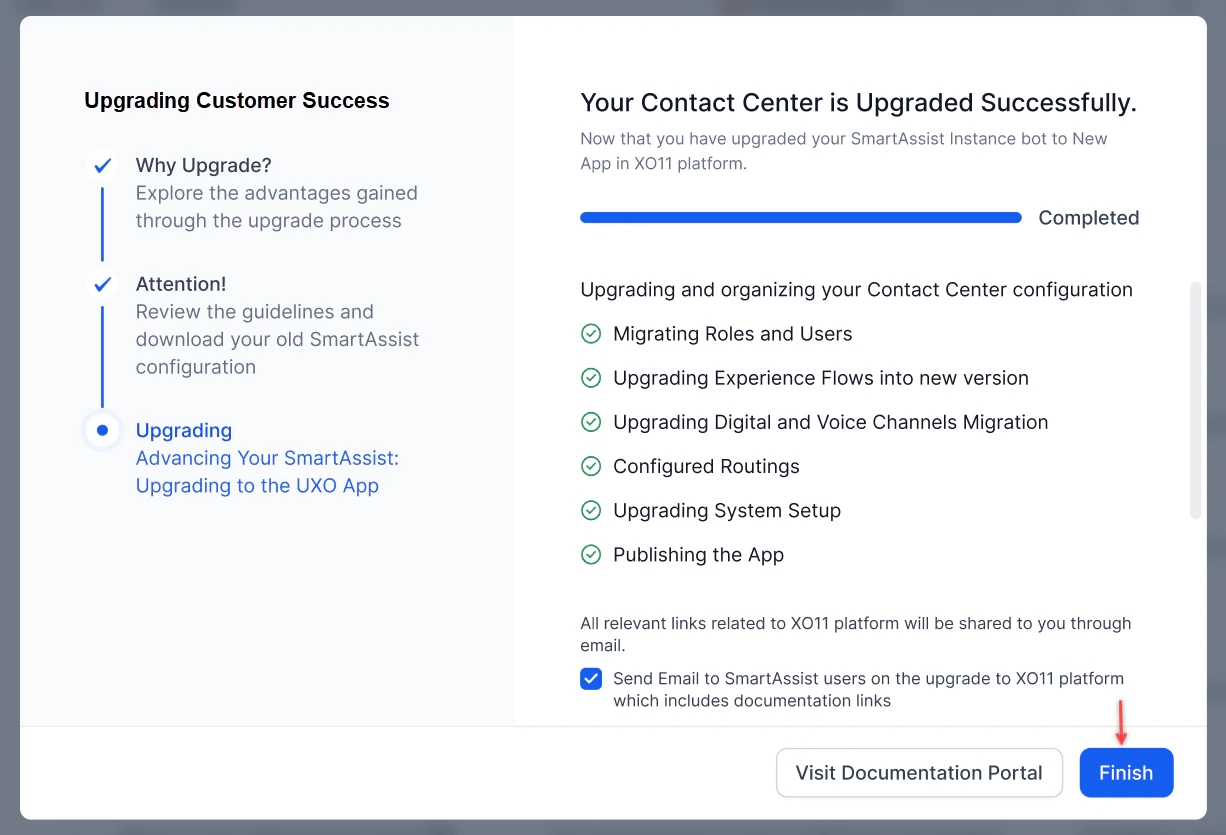 The **Send Email to SmartAssist users** option is selected by default. When the app owner selects Finish, the system sends an email notifying users about the upgrade. **Visit Documentation Portal** redirects to the [XO v11 documentation page](https://docs.kore.ai/ai-for-service/home/).
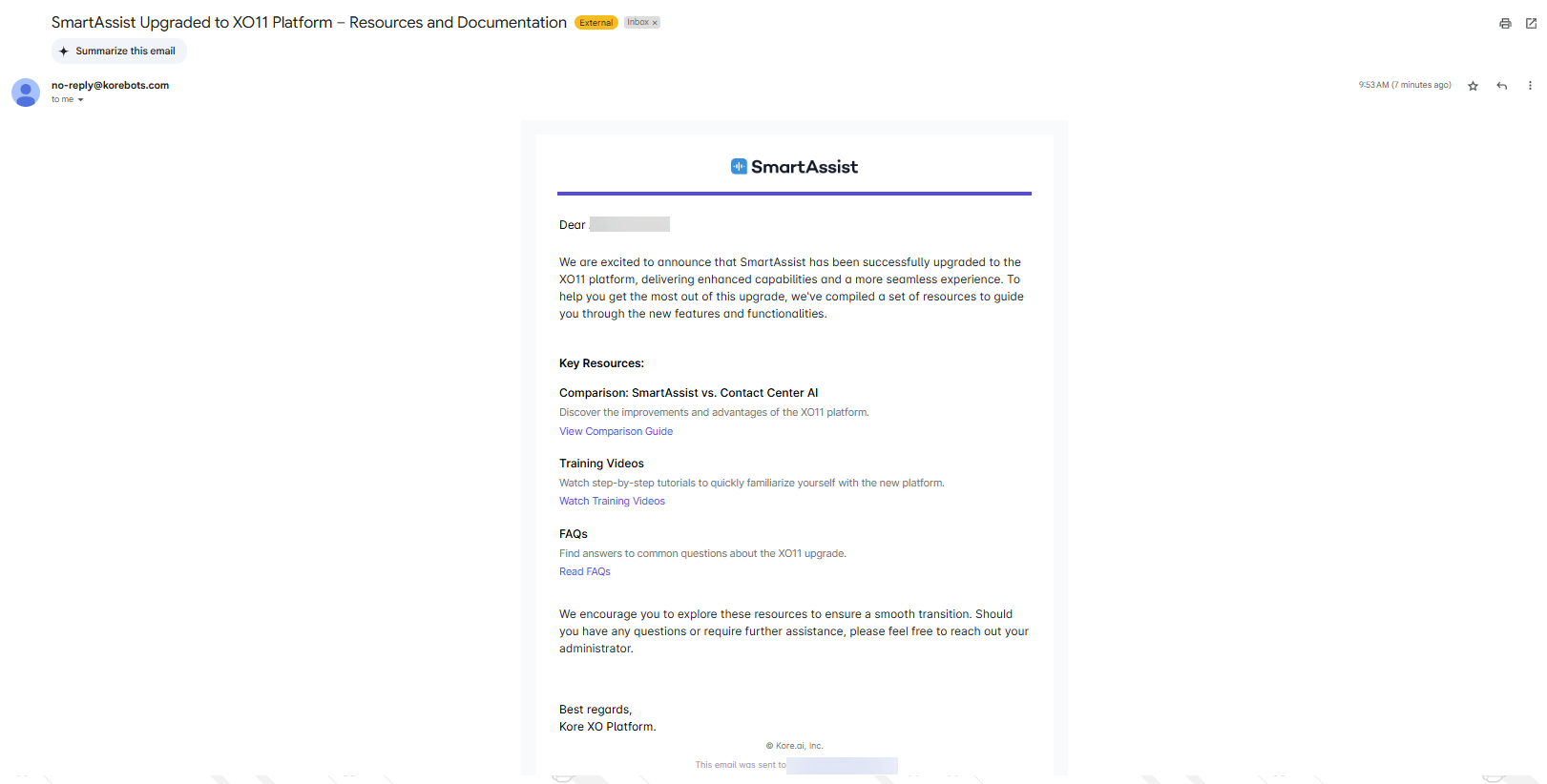 Supervisors and agents can't access XO v11 during the upgrade. They can log in and see their assigned app only after the instance bot is upgraded. They can use their SmartAssist credentials to log in.
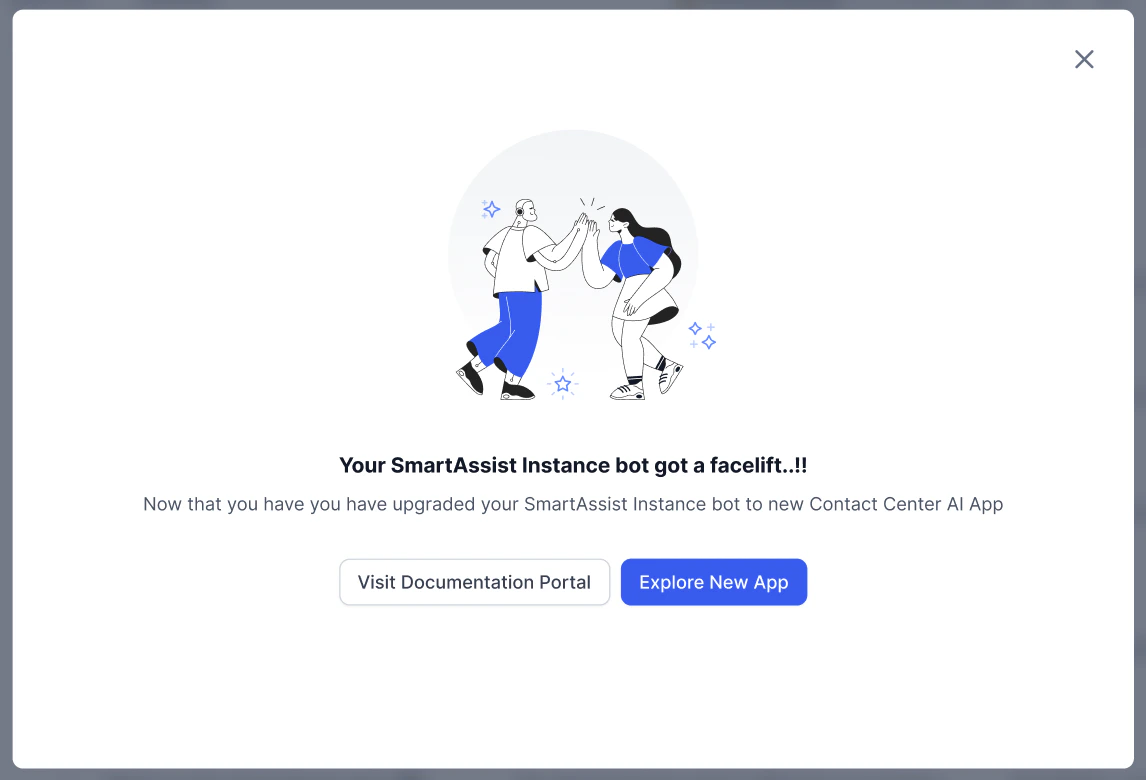
9. A success message confirms the upgrade. The SmartAssist instance bot is now an App in XO v11.
Supervisors and agents can't access XO v11 during the upgrade. They can log in and see their assigned app only after the instance bot is upgraded. They can use their SmartAssist credentials to log in.
9. A success message confirms the upgrade. The SmartAssist instance bot is now an App in XO v11.
 ### Upgrade Failure
If an error occurs, the system stops and auto reverts the upgrade.
1. An error notification appears in the upgrade window.
### Upgrade Failure
If an error occurs, the system stops and auto reverts the upgrade.
1. An error notification appears in the upgrade window.
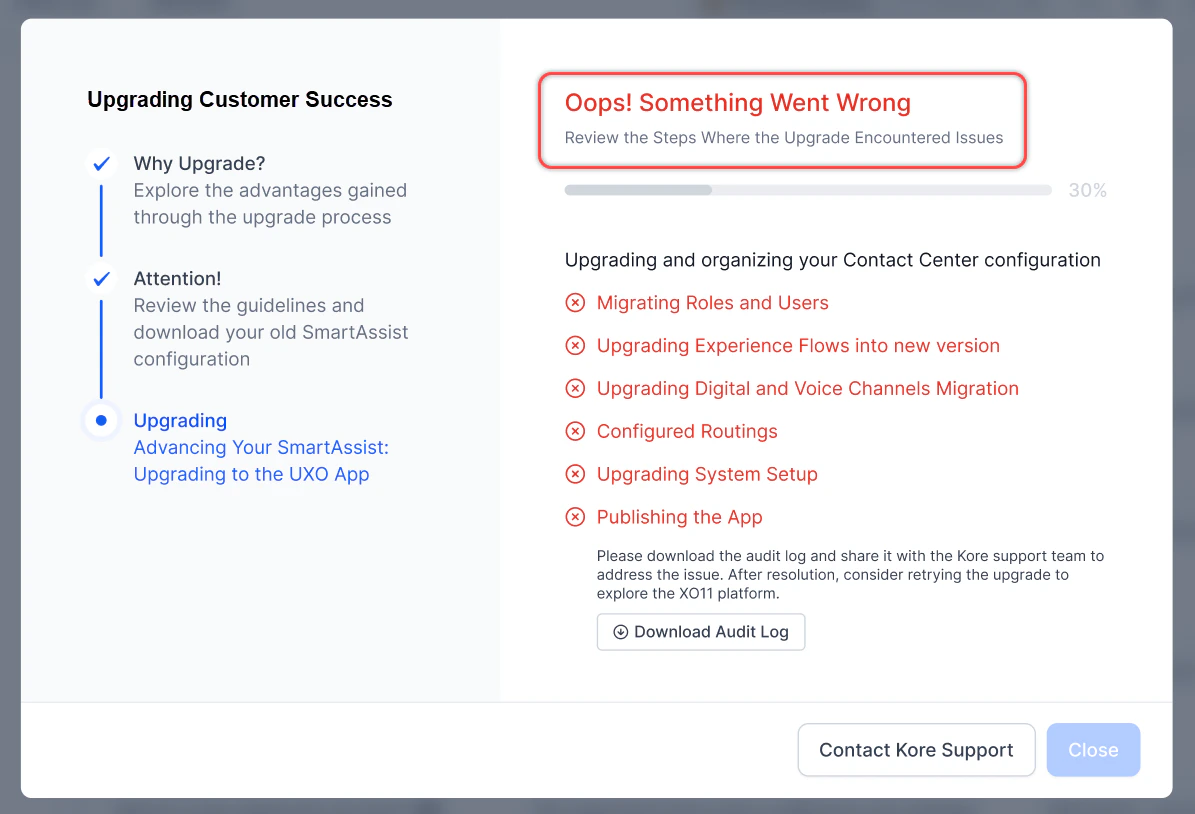 2. The upgrade is auto reverted, highlighting the steps where issues occurred.
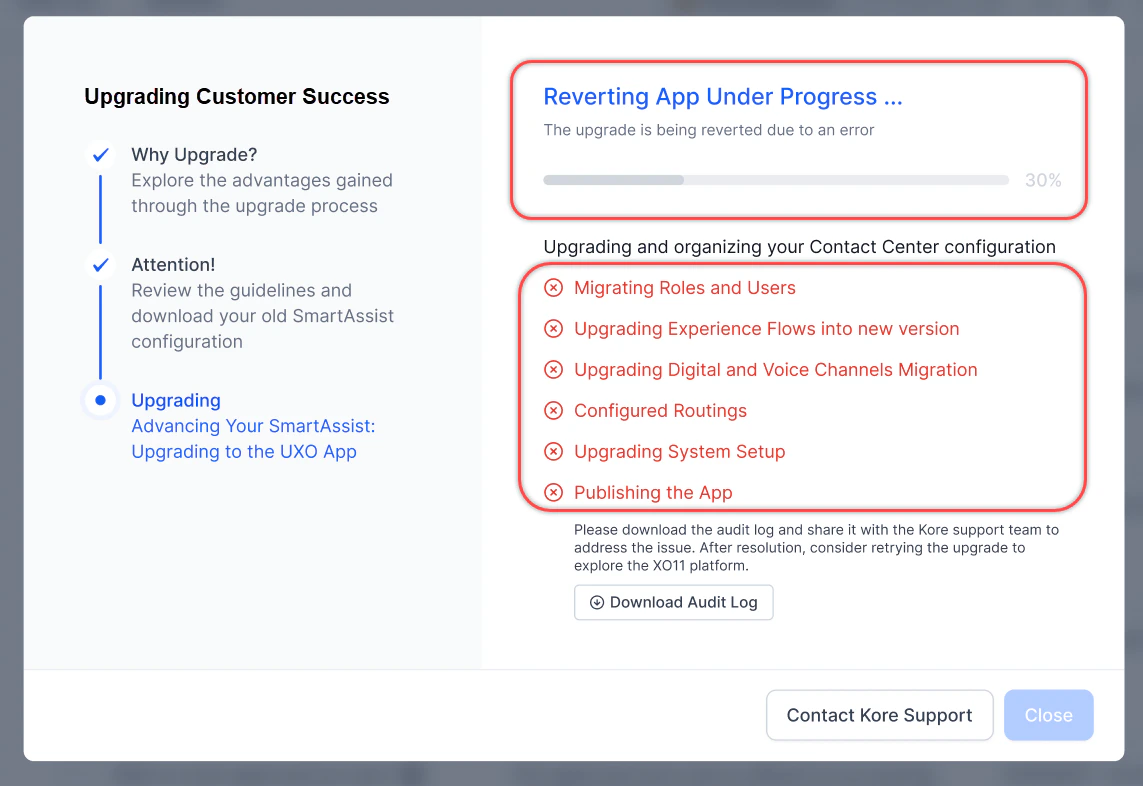 3. Select **Download Audit Log** to download the CSV file. Share it with Support for assistance, then select **Close**.
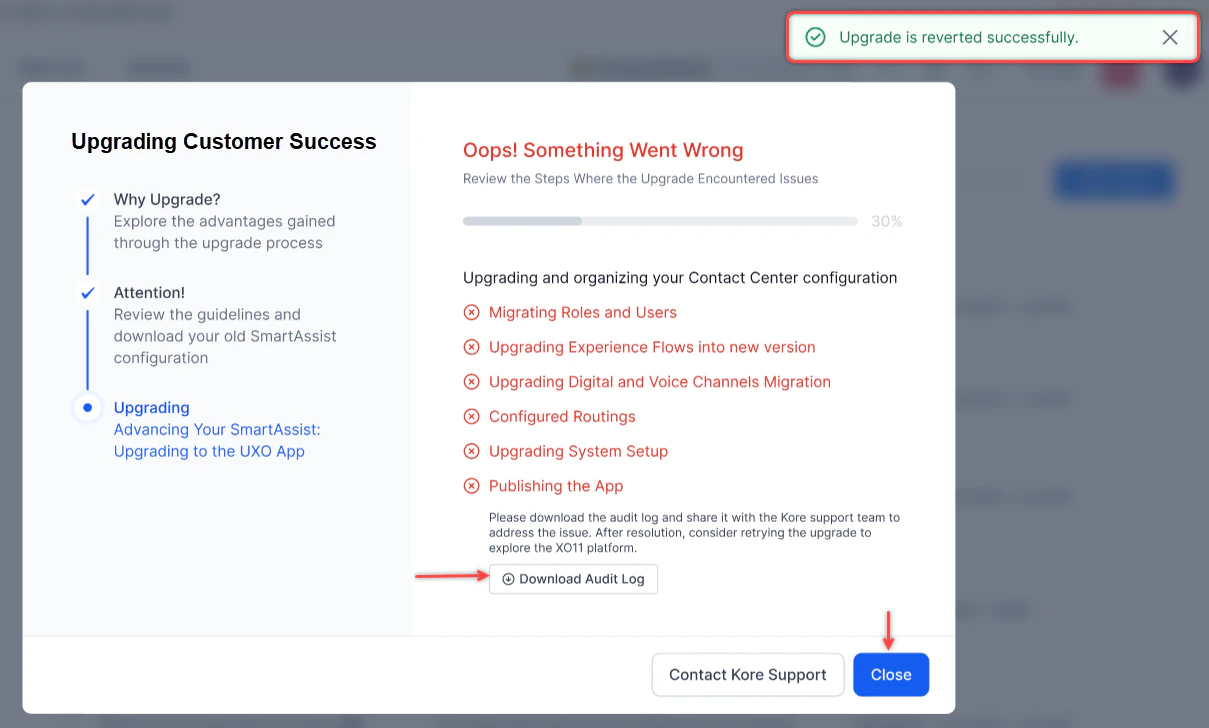 You are redirected to the XO v11 home page.
## Post-Upgrade Journey
### License Migration
The SmartAssist license is automatically migrated for existing Enterprise accounts to XO v11 by provisioning module-specific licenses for Contact Center AI, Automation AI, Search AI, and Agent AI based on the customer's existing SmartAssist configuration.
You are redirected to the XO v11 home page.
## Post-Upgrade Journey
### License Migration
The SmartAssist license is automatically migrated for existing Enterprise accounts to XO v11 by provisioning module-specific licenses for Contact Center AI, Automation AI, Search AI, and Agent AI based on the customer's existing SmartAssist configuration.
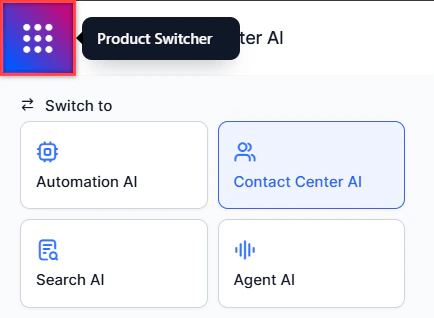 Access the modules on the XO v11 platform via the **Product Switcher** at the top-left corner.
### Upgrade of Instance Bot and Child Bot to XO v11
* Enterprise SmartAssist licenses are automatically analyzed and converted into equivalent module-specific licenses on XO v11.
* New licenses are provisioned across four modules based on the customer's previous usage:
* Contact Center AI
* Automation AI
* Search AI
* Agent AI
* The license conversion is integrated into the upgrade framework to maintain uninterrupted service access.
When upgrading an account associated with SmartAssist, the instance bot doesn't initially appear in XO v11. Contact the Support team to execute a migration script that makes the instance bot visible. The instance bot must then be upgraded, after which it becomes the Contact Center AI instance and SmartAssist configurations are properly migrated.
### Upgrade Access Matrix
#### Enterprise Standard
**App Owner**
* Default landing: CCAI flows and channels page.
* Access rights:
* **Contact Center AI**: Full access (excluding Campaigns, Case Management, and Quality Management).
* **Automation AI**: Full access.
* **Search AI**: Basic RAG access.
* **Agent AI**: Basic access.
**Supervisor\_BotName**
* Limited to CCAI only.
* No access to Automation AI, Search AI, or Agent AI.
* Monitor access limited to supervised queues.
* Available features: Monitor dashboard without queue restrictions.
**Agent\_BotName**
* Limited to CCAI only.
* No access to Automation AI, Search AI, or Agent AI.
* Default landing: Agent Console.
* Data access limited to own interactions.
* Available features: Agent Console, Interactions Dashboard, My Dashboard.
**CustomRole\_BotName**
* Access based on configured permissions.
* Automation AI access can be included alongside CCAI if granted.
* Landing page determined by permissions:
* Flow Management permission → Flows and Channels
* Monitor permission → Monitor
* Agent Console permission → Agent Console
#### Non-Enterprise
**App Owner**
* Default landing: CCAI flows and channels page (trial version).
* Access rights:
* **Contact Center AI**: Full trial access (excluding Campaigns, Case, and Quality Management).
* **Automation AI**: Full trial access.
* **Search AI**: Basic RAG with "Try Now" option.
* **Agent AI**: Basic access with "Try Now" option.
**Other Non-Enterprise Roles**
* Similar restrictions as Enterprise Standard, but in trial mode.
* Supervisor and agent roles are limited to CCAI trial access.
* Custom roles follow the permission-based access model.
### Automation Bots Upgrade
#### Enterprise Automation Bots
* **App Owner**: Default landing: Automation AI flows page. Full access to Automation AI and CCAI. Basic RAG access for Search AI. Basic Agent AI access.
* **All other roles** (Supervisor, Agent, Custom): No access.
#### Non-Enterprise Automation Bots
* **App Owner**: Default landing: Automation AI flows page (trial version). "Try Now" access to Contact Center AI. Trial version of Search AI with Basic RAG. "Try Now" access to Agent AI.
* **All other roles** (Supervisor, Agent, Custom): No access.
### Data Access Restrictions
| Role | Data Access |
| ------------ | ------------------------------- |
| Supervisors | Limited to assigned queue data |
| Agents | Limited to own interaction data |
| App Owners | No restrictions |
| Custom Roles | Based on assigned permissions |
### Roles and Permissions
Roles in SmartAssist are mapped at the instance bot level. After the upgrade to XO v11, these roles—including default and custom roles—are mapped at the workspace level.
| SmartAssist Role | XO v11 CCAI Role |
| ----------------------------------- | ---------------------- |
| Instance bot creator in SmartAssist | App Owner |
| Agent | Agent + botName |
| Supervisor | Supervisor + botName |
| Custom roles | Custom roles + botName |
For details on Contact Center AI role permissions, see [Role Management](/ai-for-service/user-management/users-and-role).
## SmartAssist vs. Contact Center AI Documentation Links
| SmartAssist | XO v11 Contact Center AI Module |
| ---------------------- | ---------------------------------------------------------------------------------------------------------------------------------------------------------------------------------------------------------------------------------------------------------------------------------------------------------------------------------------------------------------------------------------------------------------------------------------------------------------- |
| Experience Flows | 1. Inbound Flows → Flows & Channels > Start Flows. [Learn more](/ai-for-service/flows/create-and-manage-flows#create-a-start-flow)
Access the modules on the XO v11 platform via the **Product Switcher** at the top-left corner.
### Upgrade of Instance Bot and Child Bot to XO v11
* Enterprise SmartAssist licenses are automatically analyzed and converted into equivalent module-specific licenses on XO v11.
* New licenses are provisioned across four modules based on the customer's previous usage:
* Contact Center AI
* Automation AI
* Search AI
* Agent AI
* The license conversion is integrated into the upgrade framework to maintain uninterrupted service access.
When upgrading an account associated with SmartAssist, the instance bot doesn't initially appear in XO v11. Contact the Support team to execute a migration script that makes the instance bot visible. The instance bot must then be upgraded, after which it becomes the Contact Center AI instance and SmartAssist configurations are properly migrated.
### Upgrade Access Matrix
#### Enterprise Standard
**App Owner**
* Default landing: CCAI flows and channels page.
* Access rights:
* **Contact Center AI**: Full access (excluding Campaigns, Case Management, and Quality Management).
* **Automation AI**: Full access.
* **Search AI**: Basic RAG access.
* **Agent AI**: Basic access.
**Supervisor\_BotName**
* Limited to CCAI only.
* No access to Automation AI, Search AI, or Agent AI.
* Monitor access limited to supervised queues.
* Available features: Monitor dashboard without queue restrictions.
**Agent\_BotName**
* Limited to CCAI only.
* No access to Automation AI, Search AI, or Agent AI.
* Default landing: Agent Console.
* Data access limited to own interactions.
* Available features: Agent Console, Interactions Dashboard, My Dashboard.
**CustomRole\_BotName**
* Access based on configured permissions.
* Automation AI access can be included alongside CCAI if granted.
* Landing page determined by permissions:
* Flow Management permission → Flows and Channels
* Monitor permission → Monitor
* Agent Console permission → Agent Console
#### Non-Enterprise
**App Owner**
* Default landing: CCAI flows and channels page (trial version).
* Access rights:
* **Contact Center AI**: Full trial access (excluding Campaigns, Case, and Quality Management).
* **Automation AI**: Full trial access.
* **Search AI**: Basic RAG with "Try Now" option.
* **Agent AI**: Basic access with "Try Now" option.
**Other Non-Enterprise Roles**
* Similar restrictions as Enterprise Standard, but in trial mode.
* Supervisor and agent roles are limited to CCAI trial access.
* Custom roles follow the permission-based access model.
### Automation Bots Upgrade
#### Enterprise Automation Bots
* **App Owner**: Default landing: Automation AI flows page. Full access to Automation AI and CCAI. Basic RAG access for Search AI. Basic Agent AI access.
* **All other roles** (Supervisor, Agent, Custom): No access.
#### Non-Enterprise Automation Bots
* **App Owner**: Default landing: Automation AI flows page (trial version). "Try Now" access to Contact Center AI. Trial version of Search AI with Basic RAG. "Try Now" access to Agent AI.
* **All other roles** (Supervisor, Agent, Custom): No access.
### Data Access Restrictions
| Role | Data Access |
| ------------ | ------------------------------- |
| Supervisors | Limited to assigned queue data |
| Agents | Limited to own interaction data |
| App Owners | No restrictions |
| Custom Roles | Based on assigned permissions |
### Roles and Permissions
Roles in SmartAssist are mapped at the instance bot level. After the upgrade to XO v11, these roles—including default and custom roles—are mapped at the workspace level.
| SmartAssist Role | XO v11 CCAI Role |
| ----------------------------------- | ---------------------- |
| Instance bot creator in SmartAssist | App Owner |
| Agent | Agent + botName |
| Supervisor | Supervisor + botName |
| Custom roles | Custom roles + botName |
For details on Contact Center AI role permissions, see [Role Management](/ai-for-service/user-management/users-and-role).
## SmartAssist vs. Contact Center AI Documentation Links
| SmartAssist | XO v11 Contact Center AI Module |
| ---------------------- | ---------------------------------------------------------------------------------------------------------------------------------------------------------------------------------------------------------------------------------------------------------------------------------------------------------------------------------------------------------------------------------------------------------------------------------------------------------------- |
| Experience Flows | 1. Inbound Flows → Flows & Channels > Start Flows. [Learn more](/ai-for-service/flows/create-and-manage-flows#create-a-start-flow)
2. Call Disconnect Flow → Flows & Channels > Exit Flows. [Learn more](/ai-for-service/flows/create-and-manage-flows#create-an-exit-flow)
3. All other flows → Contact Center AI > Conditional Flows. [Learn more](/ai-for-service/contact-center/flows-and-routing/conditional-and-waiting-flows#conditional-flows) |
| Waiting Experience | Contact Center AI > Waiting Flows. [Learn more](/ai-for-service/contact-center/flows-and-routing/conditional-and-waiting-flows#waiting-flows) |
| Use Cases | Deprecated. Existing Q\&A use cases → Answers > Knowledge AI > FAQs. [Learn more](/ai-for-service/automation/knowledge-ai/manage-faqs)
Conversation use cases → Automation > Use Cases > Dialogs. [Learn more](/ai-for-service/automation/dialogs/manage-dialogs)
Ability to classify use cases for automation, deflection, or agent transfer is deprecated—modify dialogs to include agent transfer nodes manually. |
| Skills | Contact Center AI > Skills. [Learn more](/ai-for-service/contact-center/routing-queues-skills#skills) |
| Queues | Contact Center AI > Queues. [Learn more](/ai-for-service/contact-center/routing-queues-skills#queues) |
| Hours of Operation | Contact Center AI > Hours of Operation. [Learn more](/ai-for-service/contact-center/configurations/operational-configurations#hours-of-operation) |
| Default Flows | Deprecated. Use conditional flows for no agents available and out of hours scenarios. [Learn more](/ai-for-service/contact-center/flows-and-routing/conditional-and-waiting-flows#conditional-flows) |
| Users | Contact Center AI > Agent Management > Agent Groups. [Learn more](/ai-for-service/contact-center/supervisor#agent-groups) |
| Agent Groups | Contact Center AI > Agent Management > Agent Groups. [Learn more](/ai-for-service/contact-center/supervisor#agent-groups) |
| Agent Settings | Contact Center AI > Agent Management > Agent Settings. [Learn more](/ai-for-service/contact-center/supervisor#agent-settings) |
| Role Management | Users > Access Controls > Role Management. [Learn more](/ai-for-service/user-management/users-and-role#roles-and-permissions) |
| Agent Status | Contact Center AI > Agent Management > Agent Status. [Learn more](/ai-for-service/contact-center/supervisor#agent-status) |
| Service Level | Contact Center AI > Performance Management > SLAs & Alerts. [Learn more](/ai-for-service/contact-center/performance-management/slas-and-alerts#service-level) |
| Channels > Voice | Flows & Channels > Channels > Voice Gateway. [Learn more](/ai-for-service/channels#configure-voice-gateway) |
| Channels > Chat | Flows & Channels > Channels > Digital. [Learn more](/ai-for-service/channels#digital-channels) |
| Channels > Email | Flows & Channels > Channels > Digital. [Learn more](/ai-for-service/channels#digital-channels) |
| Agent Transfer > Voice | App Settings > Integrations > Voice. [Learn more](/ai-for-service/integrations/agents/agent-transfer-integrations) **Note**: Additional settings may be required. |
| Agent Transfer > Chat | App Settings > Integrations > Chat. [Learn more](/ai-for-service/integrations/agents/agent-transfer-integrations) **Note**: Additional settings may be required. |
| Agent Console | Contact Center AI > Console. [Learn more](/ai-for-service/contact-center/agent-console) |
| Monitor | Contact Center AI > Console > Monitor. [Learn more](/ai-for-service/contact-center/supervisor#real-time-monitor) |
| Surveys | Contact Center AI > Configurations > Surveys. [Learn more](/ai-for-service/manage-assistant/feedback-survey) |
| Agent Forms | Contact Center AI > Configurations > Agent Forms. [Learn more](/ai-for-service/contact-center/configurations/operational-configurations#agent-forms) |
| Dispositions | Contact Center AI > Agent Management > Dispositions. [Learn more](/ai-for-service/contact-center/supervisor#disposition-codes) |
| Languages & Speech | Contact Center AI > Configurations > Languages & Speech. [Learn more](/ai-for-service/contact-center/configurations/operational-configurations#languages-and-speech) |
| Standard Responses | Contact Center AI > Configurations > Response Templates. [Learn more](/ai-for-service/contact-center/configurations/operational-configurations#response-templates) |
| Interactions | Contact Center AI > Analytics > Conversations. [Learn more](/ai-for-service/analytics/overview/conversations) |
| Queues & Agents | Contact Center AI > Analytics > Queues & Agents. [Learn more](/ai-for-service/analytics/contact-center/queues-and-agents) |
| Reports | Contact Center AI > Analytics > Reports. [Learn more](/ai-for-service/analytics/contact-center/reports/reports-list) |
| API Setup | App Settings > Dev Tools > API Scopes. [Learn more](/ai-for-service/administration/api-scopes) |
| Widgets | Contact Center AI > Configurations > Widgets. [Learn more](/ai-for-service/contact-center/configurations/operational-configurations#widgets) |
| AgentAssist settings | Agent AI module. [Learn more](/ai-for-service/agentai/configuration/widget-settings) |
| SearchAssist | Agent AI module. [Learn more](/ai-for-service/agentai/configuration/linked-services) |
| Advanced settings | Contact Center AI > Configurations > Advanced Settings. [Learn more](/ai-for-service/contact-center/configurations/settings/configuration-settings#advanced-settings) |
SmartAssist is nearing end-of-life. All new Contact Center features will be developed exclusively on XO v11. Existing users must migrate to ensure uninterrupted service and continued feature access.
***