> ## Documentation Index
> Fetch the complete documentation index at: https://koreai.mintlify.app/llms.txt
> Use this file to discover all available pages before exploring further.
# Adherence Heatmap
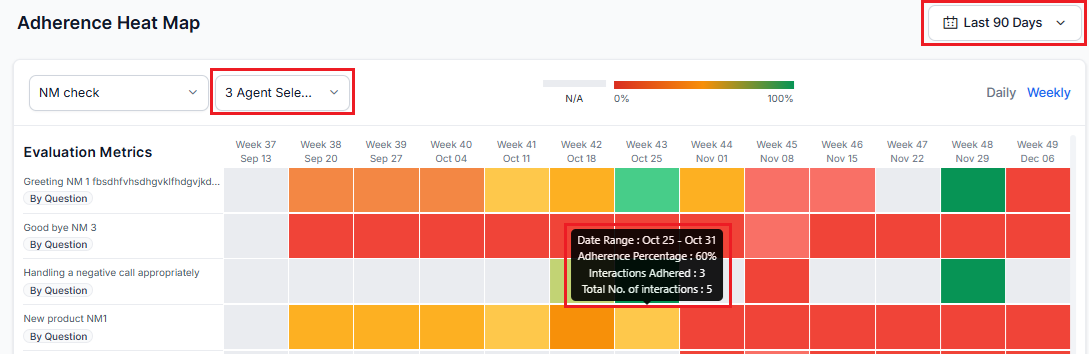
The Adherence Heatmap lets supervisors track how consistently agents meet evaluation metrics over time. It highlights non-compliant interactions and, on hover, shows the date range, total interactions, adhered interactions, and adherence percentage.
Using date range, agent, and language filters, supervisors can:
* Identify agents with adherence issues.
* Monitor compliance across evaluation forms, metrics, or queues.
* Make data-driven coaching decisions.
To use this feature, enable **Auto QA** in **Settings**.
Navigate to **Quality AI** > **ANALYZE** > **Adherence Heatmap**.
 Use the dropdown to select an evaluation form and visualize its adherence metrics in the heatmap.
***
## Adherence Metrics
### Metric Applicability
| Metric Type | When It Applies |
| ------------------------- | --------------------------------------------------------------------------------------------------------- |
| **Static** (by question) | Applies to all terminated or failed interactions in the selected queue. |
| **Dynamic** (by question) | Applies only when the system detects the relevant trigger. If no trigger is found, the metric is skipped. |
### Color Coding
Each heatmap tile is color-coded by adherence percentage:
| Color | Meaning |
| -------- | --------------------------------------------------- |
| Red | 0% adherence |
| Green | 100% adherence |
| Gradient | Transitions in 10% increments between red and green |
| Gray | Metric not applicable |
### Fatal Errors and Failed Interactions
| Category | Description |
| ----------------------- | -------------------------------------------------------------------------------------------------------------------------------------------------------------------------------------------------- |
| **Failed Interactions** | Interactions that don't meet minimum quality or compliance thresholds, including fatal errors and process failures (for example, missed greetings, incorrect information, or compliance breaches). |
| **Fatal Errors** | Critical issues flagged immediately, regardless of other scores. When a fatal error occurs, the entire interaction's adherence score is set to 0% (red). |
Agents can use flagged fatal errors for self-assessment and coaching preparation. For more details, see [AI-Assisted Manual Audit](../ai-assisted-manual-audit.md).
### Adherence Calculation
**Adherence % = Interactions where agent met the metric ÷ Interactions where the metric applies**
The system calculates the percentage for each tile based on the selected evaluation form, agent, and date range.
### Hover Tooltip
Hover over a tile to see the adherence percentage and interaction count for that date range. If no interactions exist, the tooltip shows nothing.
Use the dropdown to select an evaluation form and visualize its adherence metrics in the heatmap.
***
## Adherence Metrics
### Metric Applicability
| Metric Type | When It Applies |
| ------------------------- | --------------------------------------------------------------------------------------------------------- |
| **Static** (by question) | Applies to all terminated or failed interactions in the selected queue. |
| **Dynamic** (by question) | Applies only when the system detects the relevant trigger. If no trigger is found, the metric is skipped. |
### Color Coding
Each heatmap tile is color-coded by adherence percentage:
| Color | Meaning |
| -------- | --------------------------------------------------- |
| Red | 0% adherence |
| Green | 100% adherence |
| Gradient | Transitions in 10% increments between red and green |
| Gray | Metric not applicable |
### Fatal Errors and Failed Interactions
| Category | Description |
| ----------------------- | -------------------------------------------------------------------------------------------------------------------------------------------------------------------------------------------------- |
| **Failed Interactions** | Interactions that don't meet minimum quality or compliance thresholds, including fatal errors and process failures (for example, missed greetings, incorrect information, or compliance breaches). |
| **Fatal Errors** | Critical issues flagged immediately, regardless of other scores. When a fatal error occurs, the entire interaction's adherence score is set to 0% (red). |
Agents can use flagged fatal errors for self-assessment and coaching preparation. For more details, see [AI-Assisted Manual Audit](../ai-assisted-manual-audit.md).
### Adherence Calculation
**Adherence % = Interactions where agent met the metric ÷ Interactions where the metric applies**
The system calculates the percentage for each tile based on the selected evaluation form, agent, and date range.
### Hover Tooltip
Hover over a tile to see the adherence percentage and interaction count for that date range. If no interactions exist, the tooltip shows nothing.
 ***
## Filters
### Date Range
The default date range is the last 7 days. The system uses the user's system time zone.
| View | When it applies |
| ---------------- | --------------------------------------------------------------------------------------------------- |
| **Daily** | Date range of 1–14 days; each tile shows one day. Horizontal scroll appears for ranges over 7 days. |
| **Weekly** | Date range over 14 days; each tile shows one full week. |
| **Custom Range** | All interaction data from 12:00:00 AM to 11:59:59 PM in the agent's time zone, up to 31 days. |
Manual Evaluation metrics display a visual indicator and represent unaudited conversations when no data is available.
***
## Filters
### Date Range
The default date range is the last 7 days. The system uses the user's system time zone.
| View | When it applies |
| ---------------- | --------------------------------------------------------------------------------------------------- |
| **Daily** | Date range of 1–14 days; each tile shows one day. Horizontal scroll appears for ranges over 7 days. |
| **Weekly** | Date range over 14 days; each tile shows one full week. |
| **Custom Range** | All interaction data from 12:00:00 AM to 11:59:59 PM in the agent's time zone, up to 31 days. |
Manual Evaluation metrics display a visual indicator and represent unaudited conversations when no data is available.
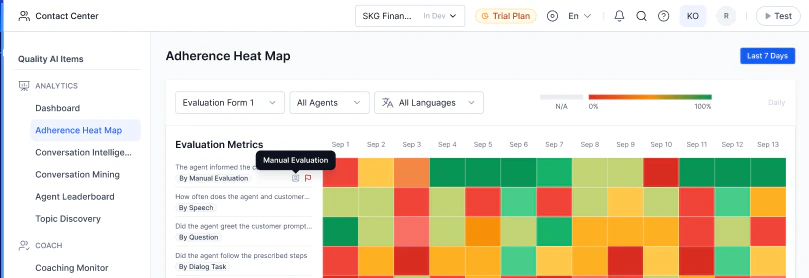 ### Evaluation Form
Select forms across assigned queues and set a default that persists across sessions — both on the Heatmap page and the QA Dashboard. Fatal metrics are highlighted with visual indicators. Selecting a new default replaces the previous one.
### Agent
By default, all agents in the selected queues are shown. You can search and multi-select agents. Only tiles for the selected date range, agent, and language remain active; others are grayed out.
### Language
Use the **All Languages** dropdown to select one or more languages. Only metrics configured for the selected languages appear.
When a language filter is applied, only metrics configured for the selected languages appear in the dropdown.
***
## Clickable Functionality
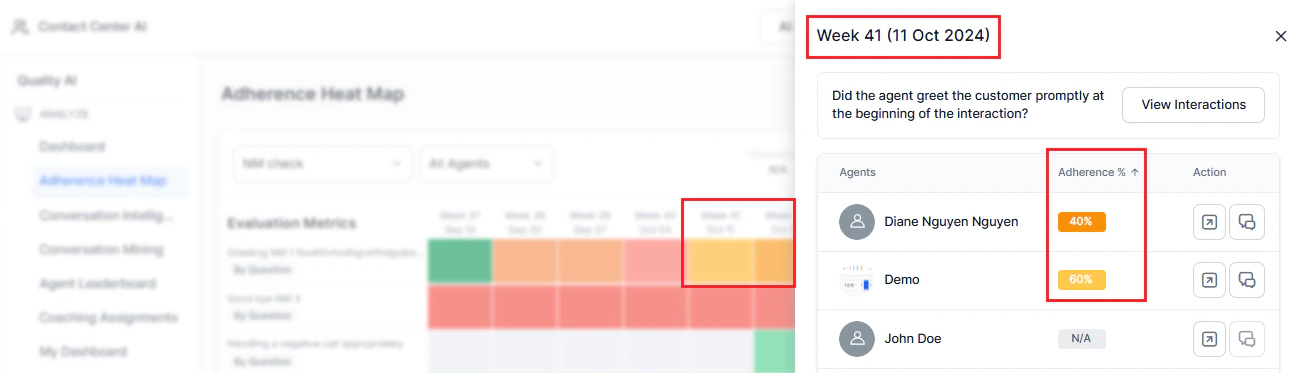
Selecting a date range tile opens a window showing agent-wise adherence for that metric, ordered from least to most adherent.
### Evaluation Form
Select forms across assigned queues and set a default that persists across sessions — both on the Heatmap page and the QA Dashboard. Fatal metrics are highlighted with visual indicators. Selecting a new default replaces the previous one.
### Agent
By default, all agents in the selected queues are shown. You can search and multi-select agents. Only tiles for the selected date range, agent, and language remain active; others are grayed out.
### Language
Use the **All Languages** dropdown to select one or more languages. Only metrics configured for the selected languages appear.
When a language filter is applied, only metrics configured for the selected languages appear in the dropdown.
***
## Clickable Functionality
Selecting a date range tile opens a window showing agent-wise adherence for that metric, ordered from least to most adherent.
 ### Adherence Display
You can sort the adherence column by percentage. The default order shows the lowest adherence first.
### Adherence Display
You can sort the adherence column by percentage. The default order shows the lowest adherence first.
 ### Heatmap Interaction
Selecting a tile shows the percentage and count of adhered interactions per agent.
### Heatmap Interaction
Selecting a tile shows the percentage and count of adhered interactions per agent.
 ### View Interactions
Select **View Interactions** to open the [Conversation Mining](../analyze/conversation-mining-interactions.md) page with failed interactions for all agents. The applied filters (shown as **Unsaved**) include the evaluation metric name and metric qualification (pass/fail count).
### View Interactions
Select **View Interactions** to open the [Conversation Mining](../analyze/conversation-mining-interactions.md) page with failed interactions for all agents. The applied filters (shown as **Unsaved**) include the evaluation metric name and metric qualification (pass/fail count).
 **Filter parameters:**
* Agents with no applicable interactions appear at the end of the list.
**Filter parameters:**
* Agents with no applicable interactions appear at the end of the list.
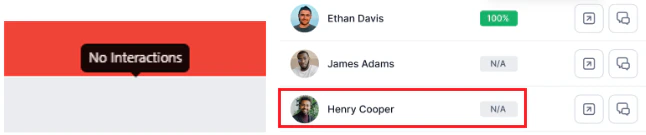 * **No Interactions**: Shown for N/A cases. The tile appears gray.
* **No Failed Interactions**: Shown for agents with 100% adherence.
* **View Interactions disabled**: For agents with no applicable interactions or 100% adherence.
* **No Interactions**: Shown for N/A cases. The tile appears gray.
* **No Failed Interactions**: Shown for agents with 100% adherence.
* **View Interactions disabled**: For agents with no applicable interactions or 100% adherence.
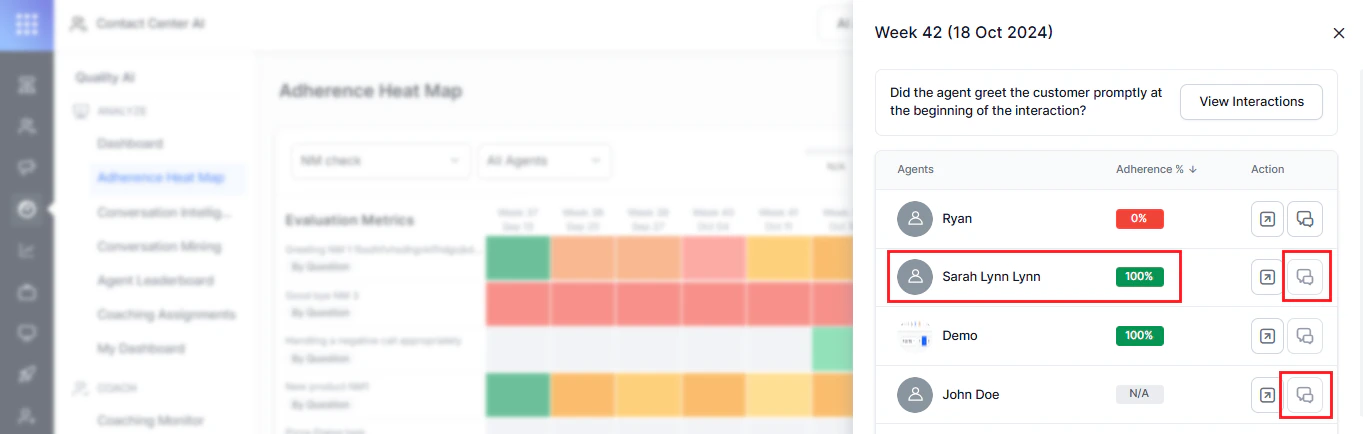 - Select **View Interaction** to open the Conversation Mining page showing all failed interactions and the filtering criteria tags based on the metric you selected.
- Notification tags appear only when navigating from Adherence Heatmap to Conversation Mining, not when accessing Conversation Mining directly.
- Select **View Interaction** to open the Conversation Mining page showing all failed interactions and the filtering criteria tags based on the metric you selected.
- Notification tags appear only when navigating from Adherence Heatmap to Conversation Mining, not when accessing Conversation Mining directly.
 ### Action Filters
| Action | Description |
| ---------------------------- | ----------------------------------------------------------------------------------------------------------------------------- |
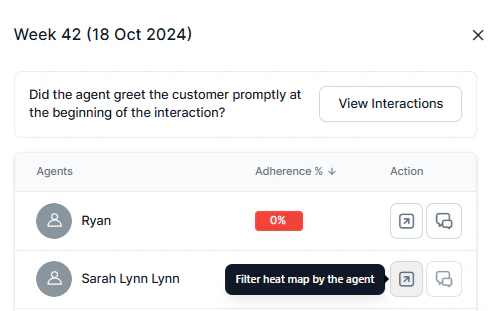
| **Filter Heatmap by Agent** | Selecting the icon navigates to the agent's heatmap metrics page for the selected date range. |
| **View Failed Interactions** | Selecting the agent interaction icon opens the Interactions page in Conversation Mining for that agent's failed interactions. |
### Action Filters
| Action | Description |
| ---------------------------- | ----------------------------------------------------------------------------------------------------------------------------- |
| **Filter Heatmap by Agent** | Selecting the icon navigates to the agent's heatmap metrics page for the selected date range. |
| **View Failed Interactions** | Selecting the agent interaction icon opens the Interactions page in Conversation Mining for that agent's failed interactions. |
 ***
## QA / Supervisor Dashboard
The Supervisor Dashboard shows a simplified Adherence Heatmap with data from the last 7 days, a default evaluation form, and no clickable functionality. You can select and set an evaluation form as the default from the dropdown. For details, see [Supervisor Dashboard](../analyze/dashboard.md).
***
Built with [Mintlify](https://mintlify.com).
***
## QA / Supervisor Dashboard
The Supervisor Dashboard shows a simplified Adherence Heatmap with data from the last 7 days, a default evaluation form, and no clickable functionality. You can select and set an evaluation form as the default from the dropdown. For details, see [Supervisor Dashboard](../analyze/dashboard.md).
***
Built with [Mintlify](https://mintlify.com).