> ## Documentation Index
> Fetch the complete documentation index at: https://koreai.mintlify.app/llms.txt
> Use this file to discover all available pages before exploring further.
# Supervisor View - Agent-Specific Dashboard
The Agent-Specific Dashboard gives supervisors a detailed view of each agent's performance. It includes Sentiment and Resolution insights at the L3 topic level, helping supervisors identify coaching opportunities and create targeted plans.
Supervisors can filter data by Language, Date Range, and Channel (voice or chat) to focus on the most relevant interactions.
Only authorized users can view automated scores and access QA features. Enable the following in **Quality AI** > **Settings**:
* **Auto QA**
* **Agent Score Card**
* **Agent Access to Scored Interactions**
***
## Access the Agent-Specific Dashboard
**Option 1:**
1. Navigate to **Quality AI** > **ANALYZE** > **Dashboard** > **Agent Leaderboard**.
 2. Select any agent to open their dashboard **Overview**.
 **Option 2:**
1. Navigate to **Quality AI** > **ANALYZE** > **Agent Leaderboard**.
**Option 2:**
1. Navigate to **Quality AI** > **ANALYZE** > **Agent Leaderboard**.
 2. Select any agent to open their dashboard **Overview**.
 ***
## Filters
### Language Filter
Search and filter by one or more languages. Metrics are calculated using languages configured at the evaluation metric level under **Language Settings**.
By default, all languages are selected. Metrics appear only for languages configured under **Configuration** > **Settings**.
Applying a language filter updates the following widgets:
| Widget | Update |
| ------------------------- | ---------------------------------------------- |
| **Total Audits** | Shows audit count for selected languages only. |
| **Avg. Audits per Agent** | Shows average for selected languages. |
| **Evaluation Score** | Updates Manual and Auto QA scores. |
| **Fail Statistics** | Shows failure data for selected languages. |
| **Performance Monitor** | Updates performance metrics. |
***
## Agent Performance Metrics
Metrics are filtered by selected languages and date range.
| Metric | Description |
| ------------------------------ | ----------------------------------------------------------------- |
| **Total Interactions** | Total interactions completed by the agent in the selected period. |
| **Kore Evaluation Score** | Average Auto QA score for the agent's completed calls. |
| **No. of Supervisor Audits** | Total manual audits completed for that agent's interactions. |
| **Supervisor Audit Score** | Average manual audit score for audited interactions. |
| **Total Coaching Assignments** | Total coaching sessions assigned over the selected date range. |
| **No. of Fails** | Total scorecard failures over the selected date range. |
| **Fatal Interactions** | Interactions that failed critical compliance or quality checks. |
***
## Coaching Insights
| Display | Description |
| ------------------------ | ------------------------------------------------------------------------------------------ |
| **Select Scorecard** | Choose a scorecard template to filter the Coaching Insights analysis. |
| **Strongest Attributes** | Top 5 attributes with scores 80 or higher, based on the selected scorecard and date range. |
| **Opportunity Areas** | Bottom 5 attributes with scores below 80 — areas needing improvement. |
***
## Filters
### Language Filter
Search and filter by one or more languages. Metrics are calculated using languages configured at the evaluation metric level under **Language Settings**.
By default, all languages are selected. Metrics appear only for languages configured under **Configuration** > **Settings**.
Applying a language filter updates the following widgets:
| Widget | Update |
| ------------------------- | ---------------------------------------------- |
| **Total Audits** | Shows audit count for selected languages only. |
| **Avg. Audits per Agent** | Shows average for selected languages. |
| **Evaluation Score** | Updates Manual and Auto QA scores. |
| **Fail Statistics** | Shows failure data for selected languages. |
| **Performance Monitor** | Updates performance metrics. |
***
## Agent Performance Metrics
Metrics are filtered by selected languages and date range.
| Metric | Description |
| ------------------------------ | ----------------------------------------------------------------- |
| **Total Interactions** | Total interactions completed by the agent in the selected period. |
| **Kore Evaluation Score** | Average Auto QA score for the agent's completed calls. |
| **No. of Supervisor Audits** | Total manual audits completed for that agent's interactions. |
| **Supervisor Audit Score** | Average manual audit score for audited interactions. |
| **Total Coaching Assignments** | Total coaching sessions assigned over the selected date range. |
| **No. of Fails** | Total scorecard failures over the selected date range. |
| **Fatal Interactions** | Interactions that failed critical compliance or quality checks. |
***
## Coaching Insights
| Display | Description |
| ------------------------ | ------------------------------------------------------------------------------------------ |
| **Select Scorecard** | Choose a scorecard template to filter the Coaching Insights analysis. |
| **Strongest Attributes** | Top 5 attributes with scores 80 or higher, based on the selected scorecard and date range. |
| **Opportunity Areas** | Bottom 5 attributes with scores below 80 — areas needing improvement. |

 ***
## Sentiment Insights
Provides a visual understanding of agent sentiment across all assigned conversations. Helps supervisors spot issues, guide coaching, and improve service quality.
| View | Description |
| ------------------------------------- | ------------------------------------------------------------------------------------------------ |
| **Average Sentiment Score** | Agent's average sentiment across all topics, with positive/negative counts and trend indicators. |
| **Top 5 Highest Sentiment L3 Topics** | Top 5 L3 topics with the highest sentiment, in descending order. |
| **Top 5 Lowest Sentiment L3 Topics** | Top 5 L3 topics with the lowest sentiment, in ascending order. |
**Visual indicators:**
* Green = Positive sentiment
* Red = Negative sentiment
**Drill-down options:**
| Option | Action |
| ------------------------------- | -------------------------------------------------------------- |
| **View All Topics** | Opens Topic Discovery with all filters pre-applied. |
| **View Conversations** | Opens Conversation Mining filtered to the selected topic. |
| **Identify Performance Gaps** | Comparison view of highest vs. lowest sentiment. |
| **Spot Coaching Opportunities** | Identify negative sentiment drivers or recurring frustrations. |
| **Monitor Trends** | Track sentiment patterns over time. |
***
## Sentiment Insights
Provides a visual understanding of agent sentiment across all assigned conversations. Helps supervisors spot issues, guide coaching, and improve service quality.
| View | Description |
| ------------------------------------- | ------------------------------------------------------------------------------------------------ |
| **Average Sentiment Score** | Agent's average sentiment across all topics, with positive/negative counts and trend indicators. |
| **Top 5 Highest Sentiment L3 Topics** | Top 5 L3 topics with the highest sentiment, in descending order. |
| **Top 5 Lowest Sentiment L3 Topics** | Top 5 L3 topics with the lowest sentiment, in ascending order. |
**Visual indicators:**
* Green = Positive sentiment
* Red = Negative sentiment
**Drill-down options:**
| Option | Action |
| ------------------------------- | -------------------------------------------------------------- |
| **View All Topics** | Opens Topic Discovery with all filters pre-applied. |
| **View Conversations** | Opens Conversation Mining filtered to the selected topic. |
| **Identify Performance Gaps** | Comparison view of highest vs. lowest sentiment. |
| **Spot Coaching Opportunities** | Identify negative sentiment drivers or recurring frustrations. |
| **Monitor Trends** | Track sentiment patterns over time. |
 ***
## Resolution Insights
Helps supervisors assess how well an agent resolves customer issues.
| View | Description |
| -------------------------------------- | -------------------------------------------------------------------------- |
| **Average Resolution Rate** | Agent's overall resolution rate across all conversations and topics. |
| **Top 5 Highest Resolution L3 Topics** | Top 5 L3 topics with the highest resolution rates, in descending order. |
| **Top 5 Lowest Resolution L3 Topics** | Bottom 5 L3 topics with the lowest resolution rates, in ascending order. |
| **Resolved/Unresolved Breakdown** | Counts and percentages of resolved and unresolved conversations per topic. |
**Drill-down options:**
| Option | Action |
| ----------------------------- | ----------------------------------------------------------------------- |
| **View All Topics** | Opens Topic Discovery with the selected topic and filters pre-applied. |
| **View Conversations** | Opens Conversation Mining with the exact topic and filters pre-applied. |
| **Identify Performance Gaps** | Comparison view of highest vs. lowest resolution rates. |
***
## Resolution Insights
Helps supervisors assess how well an agent resolves customer issues.
| View | Description |
| -------------------------------------- | -------------------------------------------------------------------------- |
| **Average Resolution Rate** | Agent's overall resolution rate across all conversations and topics. |
| **Top 5 Highest Resolution L3 Topics** | Top 5 L3 topics with the highest resolution rates, in descending order. |
| **Top 5 Lowest Resolution L3 Topics** | Bottom 5 L3 topics with the lowest resolution rates, in ascending order. |
| **Resolved/Unresolved Breakdown** | Counts and percentages of resolved and unresolved conversations per topic. |
**Drill-down options:**
| Option | Action |
| ----------------------------- | ----------------------------------------------------------------------- |
| **View All Topics** | Opens Topic Discovery with the selected topic and filters pre-applied. |
| **View Conversations** | Opens Conversation Mining with the exact topic and filters pre-applied. |
| **Identify Performance Gaps** | Comparison view of highest vs. lowest resolution rates. |
 ***
## Coaching Assignments
Shows all coaching assignments given to the agent. Supervisors can track scorecard performance trends over time to assess progress or decline.
***
## Coaching Assignments
Shows all coaching assignments given to the agent. Supervisors can track scorecard performance trends over time to assess progress or decline.
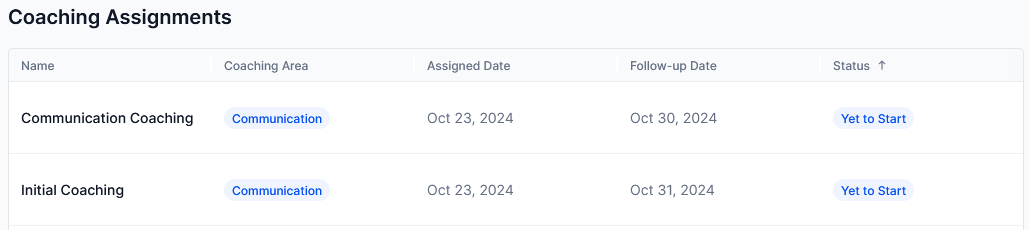 | Column | Description |
| ------------------ | ---------------------------------------------------- |
| **Agent** | Name of the agent receiving the coaching assignment. |
| **Coaching Area** | Attributes designated as coaching focus areas. |
| **Assigned Date** | Date the coaching session was assigned. |
| **Follow-up Date** | Scheduled follow-up date for the assignment. |
| **Status** | Current progress of the assignment. |
**Status values:**
| Status | Who sees it | Meaning |
| ---------------- | --------------- | --------------------------------------------------------- |
| **Start Now** | Agent only | Coaching is ready to start; no interactions reviewed yet. |
| **Yet to Start** | Supervisor only | No interactions reviewed yet. |
| **In Progress** | Both | At least one interaction reviewed. |
| **Completed** | Both | All interactions reviewed. |
For more information, see [Coaching Assignments](../coach/coaching-assignments-supervisor-view-and-creation.md).
***
## Scorecard Trend
Displays an agent's assigned scorecards and highlights performance trends over Daily, Weekly, and Monthly intervals. Supervisors can track attribute-level scoring patterns and identify progress or decline for informed coaching decisions.
### Language Settings
Each scorecard supports independent language settings. When you select a scorecard, all associated languages are auto-selected. Agents can assign different languages to different scorecards for localized tracking.
| Column | Description |
| ------------------ | ---------------------------------------------------- |
| **Agent** | Name of the agent receiving the coaching assignment. |
| **Coaching Area** | Attributes designated as coaching focus areas. |
| **Assigned Date** | Date the coaching session was assigned. |
| **Follow-up Date** | Scheduled follow-up date for the assignment. |
| **Status** | Current progress of the assignment. |
**Status values:**
| Status | Who sees it | Meaning |
| ---------------- | --------------- | --------------------------------------------------------- |
| **Start Now** | Agent only | Coaching is ready to start; no interactions reviewed yet. |
| **Yet to Start** | Supervisor only | No interactions reviewed yet. |
| **In Progress** | Both | At least one interaction reviewed. |
| **Completed** | Both | All interactions reviewed. |
For more information, see [Coaching Assignments](../coach/coaching-assignments-supervisor-view-and-creation.md).
***
## Scorecard Trend
Displays an agent's assigned scorecards and highlights performance trends over Daily, Weekly, and Monthly intervals. Supervisors can track attribute-level scoring patterns and identify progress or decline for informed coaching decisions.
### Language Settings
Each scorecard supports independent language settings. When you select a scorecard, all associated languages are auto-selected. Agents can assign different languages to different scorecards for localized tracking.
 If the administrator has disabled Agent Scorecard for a specific agent, neither the agent nor their supervisor can view this feature in the Dashboard. See [Settings](../configure/quality-ai-general-settings.md).
### Avg. Scorecard Score
Shows the agent's average score for the chosen scorecard and date range. If no conversations exist after assigning the scorecard, no score appears.
### Attributes
Shows all attributes in the selected scorecard and the average score for each attribute within the selected date range.
**Time range options:**
| Range | Period |
| ----------- | ------------------------------------- |
| **Daily** | Last 7 days from the current date. |
| **Weekly** | Last 7 weeks from the current week. |
| **Monthly** | Last 7 months from the current month. |
***
Built with [Mintlify](https://mintlify.com).
If the administrator has disabled Agent Scorecard for a specific agent, neither the agent nor their supervisor can view this feature in the Dashboard. See [Settings](../configure/quality-ai-general-settings.md).
### Avg. Scorecard Score
Shows the agent's average score for the chosen scorecard and date range. If no conversations exist after assigning the scorecard, no score appears.
### Attributes
Shows all attributes in the selected scorecard and the average score for each attribute within the selected date range.
**Time range options:**
| Range | Period |
| ----------- | ------------------------------------- |
| **Daily** | Last 7 days from the current date. |
| **Weekly** | Last 7 weeks from the current week. |
| **Monthly** | Last 7 months from the current month. |
***
Built with [Mintlify](https://mintlify.com).