> ## Documentation Index
> Fetch the complete documentation index at: https://koreai.mintlify.site/llms.txt
> Use this file to discover all available pages before exploring further.
# How the Web SDK Works
[Back to Web SDK Overview](/ai-for-service/sdk/web-sdk)
The Web SDK integrates Kore.ai bots into web applications via WebSocket. It runs entirely on the client side in the user's browser — the SDK files (JavaScript, CSS) are static assets served with minimal overhead.
***
## Architecture
* JavaScript libraries are embedded in your web application.
* The SDK communicates with the Platform bot over a secure WebSocket (`wss://`).
* All session state is stored client-side in the browser — the SDK is stateless on the server.
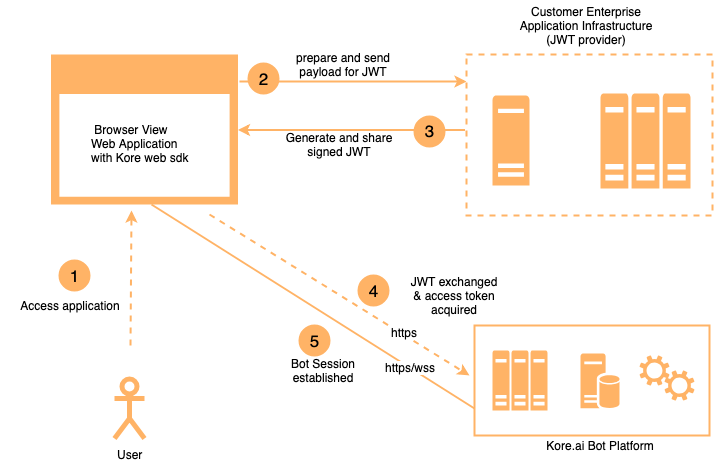
### JWT Flow
Authentication uses JSON Web Tokens (JWTs):
1. When the SDK initializes, it calls a client-provided assertion function.
2. That function calls your server-side JWT generation service.
3. The signed JWT is sent to the Platform to authenticate the user and establish the bot session.
4. Messages are exchanged over the WebSocket using the established session.
 ***
## Session Persistence
Because all session state is enclosed in the JWT, the SDK works correctly in active-active (multi-server) setups:
* User requests can be routed to any web server without disrupting the session.
* If the client state is lost (for example, page refresh), the session restores from the user identity in the JWT.
* Enable `loadHistory` to retrieve recent conversation history on reconnect.
***
## Server Requirements
The Web SDK is lightweight — it only requires serving static files.
| Resource | Minimum |
| -------- | ------- |
| CPUs | 2 |
| RAM | 4 GB |
Scale based on your overall application traffic, not on the SDK specifically.
***
## Security
| Mechanism | Detail |
| ----------------- | -------------------------------------------------------------------------------------- |
| Transport | Secure WebSocket (`wss://`) — all traffic is end-to-end encrypted |
| Authentication | Signed JWTs — only authorized clients can establish bot sessions |
| Secret handling | Client secrets and private keys never leave the server; JWT signing occurs server-side |
| App credentials | Obtained by registering your app on the Platform |
| HTTPS enforcement | Enable `requireHTTPS` to force HTTPS-only communication |
### JWT Generation Service Requirements
Host a server-side JWT service that:
1. Receives a request from the SDK with the user identity.
2. Retrieves the Client ID and secret (or private key) from a secure location (environment variables, secrets manager).
3. Signs and returns the JWT.
**Recommendations:**
* Host behind HTTPS with a valid SSL certificate.
* Restrict server access and follow security hardening practices.
* Store secrets in a secrets manager; rotate them periodically.
* Implement rate limiting.
* Minimum spec: 2 vCPUs, 4 GB RAM.
***
***
## Session Persistence
Because all session state is enclosed in the JWT, the SDK works correctly in active-active (multi-server) setups:
* User requests can be routed to any web server without disrupting the session.
* If the client state is lost (for example, page refresh), the session restores from the user identity in the JWT.
* Enable `loadHistory` to retrieve recent conversation history on reconnect.
***
## Server Requirements
The Web SDK is lightweight — it only requires serving static files.
| Resource | Minimum |
| -------- | ------- |
| CPUs | 2 |
| RAM | 4 GB |
Scale based on your overall application traffic, not on the SDK specifically.
***
## Security
| Mechanism | Detail |
| ----------------- | -------------------------------------------------------------------------------------- |
| Transport | Secure WebSocket (`wss://`) — all traffic is end-to-end encrypted |
| Authentication | Signed JWTs — only authorized clients can establish bot sessions |
| Secret handling | Client secrets and private keys never leave the server; JWT signing occurs server-side |
| App credentials | Obtained by registering your app on the Platform |
| HTTPS enforcement | Enable `requireHTTPS` to force HTTPS-only communication |
### JWT Generation Service Requirements
Host a server-side JWT service that:
1. Receives a request from the SDK with the user identity.
2. Retrieves the Client ID and secret (or private key) from a secure location (environment variables, secrets manager).
3. Signs and returns the JWT.
**Recommendations:**
* Host behind HTTPS with a valid SSL certificate.
* Restrict server access and follow security hardening practices.
* Store secrets in a secrets manager; rotate them periodically.
* Implement rate limiting.
* Minimum spec: 2 vCPUs, 4 GB RAM.
***