> ## Documentation Index
> Fetch the complete documentation index at: https://koreai.mintlify.site/llms.txt
> Use this file to discover all available pages before exploring further.
# BotKit SDK Tutorial — Flight Search Sample Bot
This tutorial walks through setting up the BotKit SDK with the Flight Search sample assistant to handle webhook events. You will configure ngrok as a test callback server, register your app, and test the full flow.
***
## Prerequisites
| Prerequisite | Notes |
| ------------ | ------------------------------------------- |
| **ngrok** | Simulates your callback server on localhost |
| **Node.js** | Version 10 or above |
### Install and Run ngrok
1. Download from [ngrok.com/download](https://ngrok.com/download).
2. Start ngrok on port 8003 using `ngrok http 8003` command.
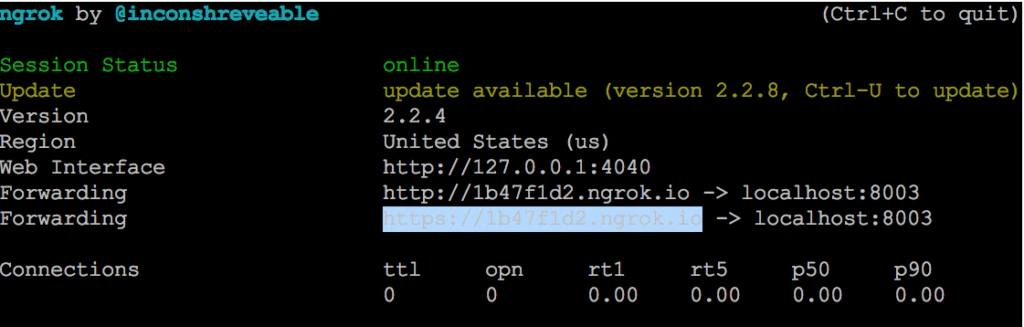 3. Copy the HTTPS **Forwarding URL** (for example, `https://1b47f1d2.ngrok.io`). Leave ngrok running.
### Install Node.js
1. Download from [nodejs.org/en/download](https://nodejs.org/en/download/).
2. Verify the installation, by checking the version number using `node -v` command.
***
## Configure the Assistant
### Install the Flight Search Assistant
1. Log into XO Platform and click **New Bot > Start from the Store**.
2. Find **Flight Search** and install it.
### Register Your App and Generate Credentials
1. Go to **Deploy > Integrations > BotKit**, click **Add** next to the **App name** dropdown.
2. Enter a name and click **Next**. Copy the **Client ID** and **Client Secret**. Click **Done**.
3. In **Callback URL**, paste the ngrok Forwarding URL.
Each ngrok session generates a new URL. Update the Callback URL whenever you restart ngrok.
4. In **Events**, select **OnHookNode** — triggered when a Webhook node is reached in the dialog.
5. Click **Save**.
***
## Publish the Assistant
You must publish the assistant to share with other users. See [Publishing your App](/ai-for-service/deployment/publishing-app). To just test, skip to [Configure the BotKit SDK](#configure-the-botkit-sdk).
**After publishing, deploy in the Admin Console:**
* **Enterprise Users** — Go to **Bots Management > Enterprise Bots**, click **Ellipses > Manage bot tasks**, select all tasks, and assign via **Bot & task assignments**.
* **General Public** — Go to **Bots Management > Consumer Bots**, click **Ellipses > Manage bot tasks**, and select all tasks.
***
## Configure the BotKit SDK
1. Download and extract the BotKit SDK from [github.com/Koredotcom/BotKit](https://github.com/Koredotcom/BotKit).
2. Edit `config.json`:
```json theme={null}
{
"server": { "port": 8003 },
"app": {
"apiPrefix": "",
"url": ""
},
"credentials": {
"apikey": "",
"appId": ""
},
"redis": { "options": { "host": "localhost", "port": 6379 }, "available": false },
"examples": { "mockServicesHost": "https://localhost:8004" }
}
```
3. In `FindAFlight.js` file, update the following variables with your assistant's **Bot Name** and **Bot ID** (found in **Settings** > **Config Settings** > **General Settings**):
```javascript theme={null}
var botId = "st-26cfae3a-XXXX-XXXX-991a-376b7fe579d5";
var botName = "Flight Search Sample Tutorial";
```
***
## Start and Test
1. On a command terminal, navigate to your BotKit SDK folder and execute `node app.js` command.
Expected output: `app listening at https://:::8003`
2. **Testing checklist:**
* ngrok running: `ngrok http 8003`
* Node.js running: `node app.js`
* Platform: click **Talk to Bot** (bottom-right corner of any page)
3. After the Flight Search dialog starts, webhook messages are exchanged between the third-party web service and the BotKit SDK.
***
## Next Steps
For production use, replace the ngrok Callback URL with your actual server URL. Have your Enterprise Admin publish and deploy the assistant to users.
3. Copy the HTTPS **Forwarding URL** (for example, `https://1b47f1d2.ngrok.io`). Leave ngrok running.
### Install Node.js
1. Download from [nodejs.org/en/download](https://nodejs.org/en/download/).
2. Verify the installation, by checking the version number using `node -v` command.
***
## Configure the Assistant
### Install the Flight Search Assistant
1. Log into XO Platform and click **New Bot > Start from the Store**.
2. Find **Flight Search** and install it.
### Register Your App and Generate Credentials
1. Go to **Deploy > Integrations > BotKit**, click **Add** next to the **App name** dropdown.
2. Enter a name and click **Next**. Copy the **Client ID** and **Client Secret**. Click **Done**.
3. In **Callback URL**, paste the ngrok Forwarding URL.
Each ngrok session generates a new URL. Update the Callback URL whenever you restart ngrok.
4. In **Events**, select **OnHookNode** — triggered when a Webhook node is reached in the dialog.
5. Click **Save**.
***
## Publish the Assistant
You must publish the assistant to share with other users. See [Publishing your App](/ai-for-service/deployment/publishing-app). To just test, skip to [Configure the BotKit SDK](#configure-the-botkit-sdk).
**After publishing, deploy in the Admin Console:**
* **Enterprise Users** — Go to **Bots Management > Enterprise Bots**, click **Ellipses > Manage bot tasks**, select all tasks, and assign via **Bot & task assignments**.
* **General Public** — Go to **Bots Management > Consumer Bots**, click **Ellipses > Manage bot tasks**, and select all tasks.
***
## Configure the BotKit SDK
1. Download and extract the BotKit SDK from [github.com/Koredotcom/BotKit](https://github.com/Koredotcom/BotKit).
2. Edit `config.json`:
```json theme={null}
{
"server": { "port": 8003 },
"app": {
"apiPrefix": "",
"url": ""
},
"credentials": {
"apikey": "",
"appId": ""
},
"redis": { "options": { "host": "localhost", "port": 6379 }, "available": false },
"examples": { "mockServicesHost": "https://localhost:8004" }
}
```
3. In `FindAFlight.js` file, update the following variables with your assistant's **Bot Name** and **Bot ID** (found in **Settings** > **Config Settings** > **General Settings**):
```javascript theme={null}
var botId = "st-26cfae3a-XXXX-XXXX-991a-376b7fe579d5";
var botName = "Flight Search Sample Tutorial";
```
***
## Start and Test
1. On a command terminal, navigate to your BotKit SDK folder and execute `node app.js` command.
Expected output: `app listening at https://:::8003`
2. **Testing checklist:**
* ngrok running: `ngrok http 8003`
* Node.js running: `node app.js`
* Platform: click **Talk to Bot** (bottom-right corner of any page)
3. After the Flight Search dialog starts, webhook messages are exchanged between the third-party web service and the BotKit SDK.
***
## Next Steps
For production use, replace the ngrok Callback URL with your actual server URL. Have your Enterprise Admin publish and deploy the assistant to users.