> ## Documentation Index
> Fetch the complete documentation index at: https://koreai.mintlify.site/llms.txt
> Use this file to discover all available pages before exploring further.
# Widget SDK Message Formatting and Templates
The Widget SDK lets you override default message formatting using templates to display custom-formatted bot messages in the Widget SDK channel.
For Web/Mobile SDK templates, see [Web & Mobile SDK Message Formatting and Templates](/ai-for-service/sdk/web-mobile-sdk-message-formatting-and-templates).
***
## Template Types
Widget SDK templates support two header option types:
* **`url`** — Opens an external site.
* **`postback`** — Triggers an utterance in the assistant. The `payload` defines the utterance; `nlmeta` provides additional context to trigger the task.
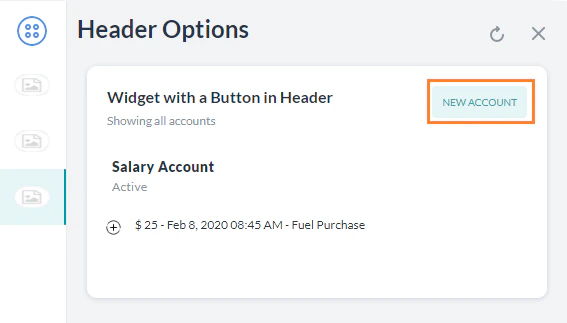
### Button Template
Displays a clickable button in the header of any message template.
```javascript theme={null}
var message = {
"templateType": "List",
"widgetName": "Account Summary",
"description": "Showing all accounts",
"headerOptions": {
"layout": { "align": "top", "colSize": "25%" },
"type": "button",
"button": {
"type": "postback",
"title": "New Account",
"payload": "Apply Account",
"nlmeta": {
"intent": "Apply Account",
"isRefreshplace": "true",
"entities": { "Name": "John" },
"interruptionOptions": "discardAll"
},
"customdata": { "key": "value" }
}
},
"elements": [
{
"title": "Salary Account",
"subtitle": "Active",
"details": [
{
"image": { "image_type": "image", "image_src": "https://..." },
"description": "$ 25 - Feb 8, 2020 08:45 AM - Fuel Purchase"
}
]
}
]
};
print(JSON.stringify(message));
```
 ***
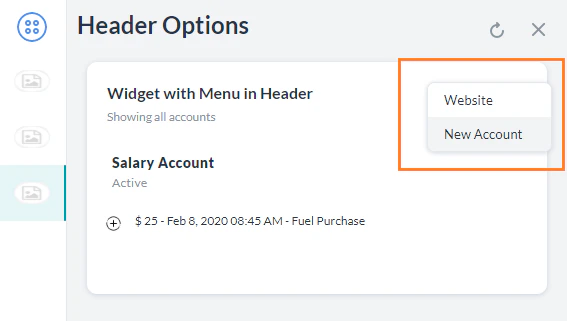
### Menu Template
Displays a dropdown menu in the header of any message template. Supports `url` and `postback` menu items.
```javascript theme={null}
var message = {
"templateType": "List",
"widgetName": "Account Summary",
"description": "Showing all accounts",
"headerOptions": {
"layout": { "align": "top", "colSize": "25%" },
"type": "menu",
"menu": [
{ "type": "url", "title": "Website", "url": "kore.ai" },
{
"type": "postback",
"title": "New Account",
"payload": "Create Account",
"nlmeta": { "intent": "Create Account", "entities": {}, "interruptionOptions": "discardAll" }
}
]
},
"elements": [
{
"title": "Salary Account",
"subtitle": "Active",
"details": [
{
"image": { "image_type": "image", "image_src": "https://..." },
"description": "$ 25 - Feb 8, 2020 08:45 AM - Fuel Purchase"
}
]
}
]
};
print(JSON.stringify(message));
```
***
### Menu Template
Displays a dropdown menu in the header of any message template. Supports `url` and `postback` menu items.
```javascript theme={null}
var message = {
"templateType": "List",
"widgetName": "Account Summary",
"description": "Showing all accounts",
"headerOptions": {
"layout": { "align": "top", "colSize": "25%" },
"type": "menu",
"menu": [
{ "type": "url", "title": "Website", "url": "kore.ai" },
{
"type": "postback",
"title": "New Account",
"payload": "Create Account",
"nlmeta": { "intent": "Create Account", "entities": {}, "interruptionOptions": "discardAll" }
}
]
},
"elements": [
{
"title": "Salary Account",
"subtitle": "Active",
"details": [
{
"image": { "image_type": "image", "image_src": "https://..." },
"description": "$ 25 - Feb 8, 2020 08:45 AM - Fuel Purchase"
}
]
}
]
};
print(JSON.stringify(message));
```
 ***
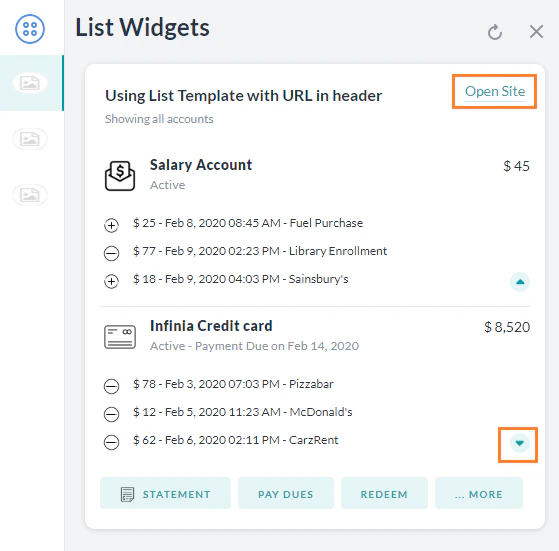
### List Template
Displays a formatted list with optional images, buttons, and expandable details per item. Use `buttonsLayout.displayLimit.count` to control how many buttons show before an overflow icon appears.
```javascript theme={null}
var message = {
"templateType": "List",
"widgetName": "Account Summary",
"description": "Showing all accounts",
"headerOptions": {
"type": "url",
"url": { "title": "Open Site", "link": "kore.ai" }
},
"elements": [
{
"image": { "image_type": "image", "image_src": "https://..." },
"title": "Salary Account",
"subtitle": "Active",
"buttonsLayout": { "displayLimit": { "count": 2 }, "style": "fitToWidth" },
"value": { "layout": { "align": "top", "colSize": "25%" }, "type": "text", "text": "$ 45" },
"details": [
{ "image": { "image_type": "image", "image_src": "https://..." }, "description": "$ 25 - Feb 8, 2020" }
],
"default_action": { "type": "postback", "payload": "Show recent transactions" },
"buttons": [
{
"type": "postback", "title": "Statement", "payload": "Account Statement",
"nlmeta": { "intent": "Account Statement", "isRefreshplace": "true", "interruptionOptions": "discardAll" }
},
{
"type": "postback", "title": "Upgrade", "payload": "Upgrade Account",
"nlmeta": { "intent": "Upgrade Account", "isRefreshplace": "true", "interruptionOptions": "discardAll" }
}
]
}
]
};
print(JSON.stringify(message));
```
***
### List Template
Displays a formatted list with optional images, buttons, and expandable details per item. Use `buttonsLayout.displayLimit.count` to control how many buttons show before an overflow icon appears.
```javascript theme={null}
var message = {
"templateType": "List",
"widgetName": "Account Summary",
"description": "Showing all accounts",
"headerOptions": {
"type": "url",
"url": { "title": "Open Site", "link": "kore.ai" }
},
"elements": [
{
"image": { "image_type": "image", "image_src": "https://..." },
"title": "Salary Account",
"subtitle": "Active",
"buttonsLayout": { "displayLimit": { "count": 2 }, "style": "fitToWidth" },
"value": { "layout": { "align": "top", "colSize": "25%" }, "type": "text", "text": "$ 45" },
"details": [
{ "image": { "image_type": "image", "image_src": "https://..." }, "description": "$ 25 - Feb 8, 2020" }
],
"default_action": { "type": "postback", "payload": "Show recent transactions" },
"buttons": [
{
"type": "postback", "title": "Statement", "payload": "Account Statement",
"nlmeta": { "intent": "Account Statement", "isRefreshplace": "true", "interruptionOptions": "discardAll" }
},
{
"type": "postback", "title": "Upgrade", "payload": "Upgrade Account",
"nlmeta": { "intent": "Upgrade Account", "isRefreshplace": "true", "interruptionOptions": "discardAll" }
}
]
}
]
};
print(JSON.stringify(message));
```
 ***
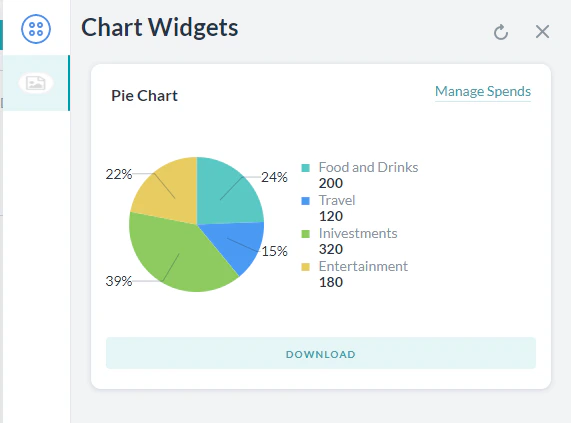
### Pie Chart Template
Displays data in a pie chart with optional buttons and a header link.
```javascript theme={null}
var data = {
"templateType": "piechart",
"pie_type": "regular",
"title": "Spend Analysis",
"headerOptions": { "type": "url", "url": { "title": "Manage Spends", "link": "https://kore.ai" } },
"elements": [
{ "title": "Food and Drinks", "value": "200", "displayValue": "$ 200" },
{ "title": "Travel", "value": "120", "displayValue": "$ 120" },
{ "title": "Investments", "value": "320", "displayValue": "$ 320" },
{ "title": "Entertainment", "value": "180", "displayValue": "$ 180" }
],
"buttons": [{ "type": "postback", "title": "Download", "payload": "Show Expense Report" }]
};
print(JSON.stringify(data));
```
***
### Pie Chart Template
Displays data in a pie chart with optional buttons and a header link.
```javascript theme={null}
var data = {
"templateType": "piechart",
"pie_type": "regular",
"title": "Spend Analysis",
"headerOptions": { "type": "url", "url": { "title": "Manage Spends", "link": "https://kore.ai" } },
"elements": [
{ "title": "Food and Drinks", "value": "200", "displayValue": "$ 200" },
{ "title": "Travel", "value": "120", "displayValue": "$ 120" },
{ "title": "Investments", "value": "320", "displayValue": "$ 320" },
{ "title": "Entertainment", "value": "180", "displayValue": "$ 180" }
],
"buttons": [{ "type": "postback", "title": "Download", "payload": "Show Expense Report" }]
};
print(JSON.stringify(data));
```
 ***
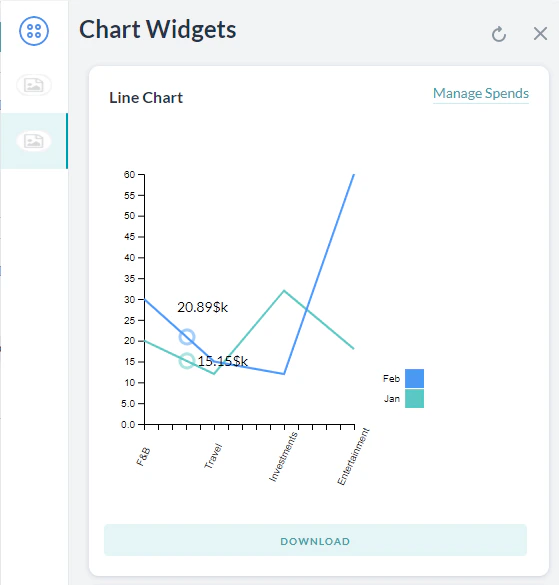
### Line Chart Template
Displays data as a line chart with multiple data series.
```javascript theme={null}
var data = {
"templateType": "linechart",
"headerOptions": {
"type": "url",
"url": { "title": "Manage Spends", "link": "https://kore.ai" },
"image": { "image_type": "image", "image_src": "https://..." }
},
"X_axis": ["F&B", "Travel", "Investments", "Entertainment"],
"Auto_adjust_X_axis": "yes",
"elements": [
{ "title": "Jan", "values": [20, 12, 32, 18], "displayValues": ["$20k","$12k","$32k","$18k"] },
{ "title": "Feb", "values": [30, 15, 12, 60], "displayValues": ["$30k","$15k","$12k","$60k"] }
],
"buttons": [{ "type": "postback", "title": "Download", "payload": "Download Report" }],
"speech_hint": "Here is your report"
};
print(JSON.stringify(data));
```
***
### Line Chart Template
Displays data as a line chart with multiple data series.
```javascript theme={null}
var data = {
"templateType": "linechart",
"headerOptions": {
"type": "url",
"url": { "title": "Manage Spends", "link": "https://kore.ai" },
"image": { "image_type": "image", "image_src": "https://..." }
},
"X_axis": ["F&B", "Travel", "Investments", "Entertainment"],
"Auto_adjust_X_axis": "yes",
"elements": [
{ "title": "Jan", "values": [20, 12, 32, 18], "displayValues": ["$20k","$12k","$32k","$18k"] },
{ "title": "Feb", "values": [30, 15, 12, 60], "displayValues": ["$30k","$15k","$12k","$60k"] }
],
"buttons": [{ "type": "postback", "title": "Download", "payload": "Download Report" }],
"speech_hint": "Here is your report"
};
print(JSON.stringify(data));
```
 For customized JavaScript responses and channel-specific templates, see [JavaScript Prompts or Responses](/ai-for-service/automation/dialogs/prompt-editor).
***
For customized JavaScript responses and channel-specific templates, see [JavaScript Prompts or Responses](/ai-for-service/automation/dialogs/prompt-editor).
***