> ## Documentation Index
> Fetch the complete documentation index at: https://koreai.mintlify.site/llms.txt
> Use this file to discover all available pages before exploring further.
# JFrog Connector
[Back to Search AI connectors list](/ai-for-service/searchai/content-sources#supported-connectors)
**JFrog Artifactory** is a universal repository manager that supports multiple package formats such as Maven, PyPI, NPM, and more. It enables organizations to manage both internal and external artifacts efficiently by providing centralized control, build metadata tracking, fine-grained access, and integration with DevOps tools.
The JFrog connector lets Search AI index artifacts and retrieve metadata from JFrog repositories, making it an effective integration point in RAG-based solutions.
## Connector Specifications
| Specification | Details |
| ----------------- | ---------------- |
| Repository type | Cloud or On-Prem |
| Supported content | Artifacts |
| RACL support | Yes |
| Content filtering | No |
## Prerequisites
A valid JFrog Identity Token with admin permissions for the target projects and repositories.
## Connector Configuration
### Create an Identity Token in JFrog
1. Sign in to your [JFrog](https://jfrog-dev.kore.ai/ui/login) Artifactory account.
2. Go to **User Profile** > **Identity Token**.
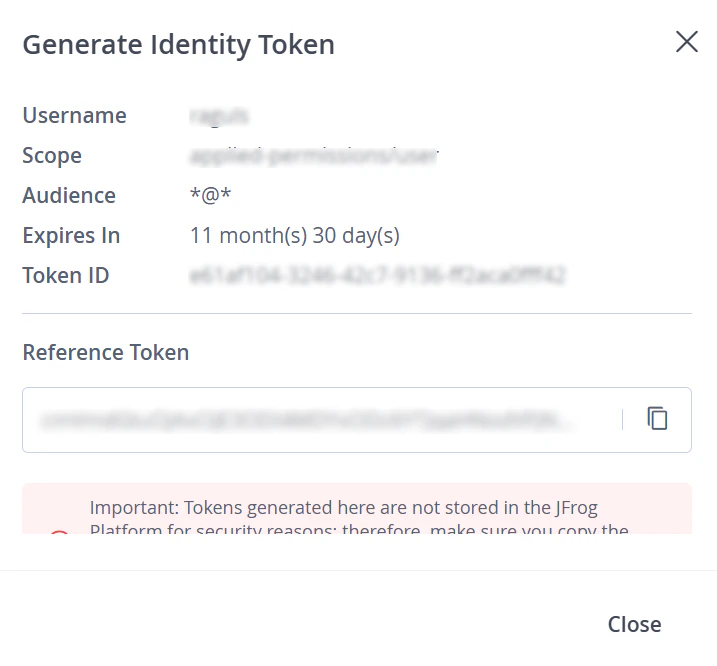
3. Click **Generate Identity Token**.
4. Under Scopes, select **admin** to assign administrator privileges.
5. Click **Generate**, then copy the token.
 ### Configure the Connector in Search AI
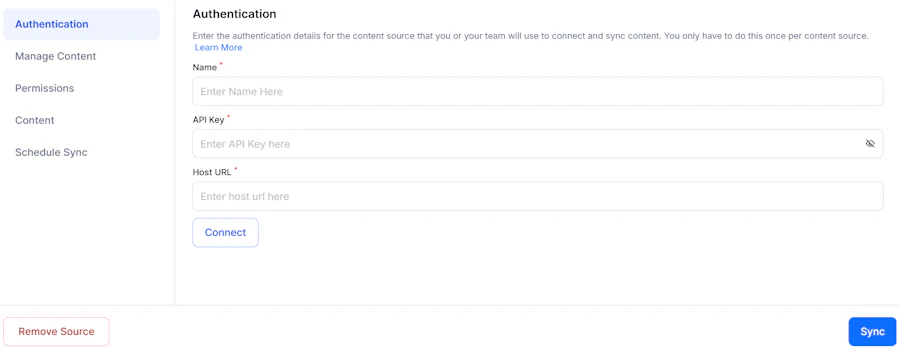
On the Authentication page, provide the following details:
| Field | Description |
| ------------ | ------------------------------------------------------------------------- |
| **Name** | Unique name for this connector |
| **API Key** | Identity token generated from JFrog Artifactory |
| **Host URL** | Base URL of your JFrog Artifactory instance (e.g., `https://jfrog-xxxx/`) |
Ensure the domain name is explicitly defined in the Host URL. Click **Connect** to validate access and proceed.
### Configure the Connector in Search AI
On the Authentication page, provide the following details:
| Field | Description |
| ------------ | ------------------------------------------------------------------------- |
| **Name** | Unique name for this connector |
| **API Key** | Identity token generated from JFrog Artifactory |
| **Host URL** | Base URL of your JFrog Artifactory instance (e.g., `https://jfrog-xxxx/`) |
Ensure the domain name is explicitly defined in the Host URL. Click **Connect** to validate access and proceed.
 ## Content Ingestion
After a successful connection, Search AI ingests all artifacts from the repositories and projects linked to the authenticated account. Each artifact is processed as a distinct document with the following fields:
| Field | Description |
| ----------------- | --------------------------------------------------- |
| `doc_source_type` | Type of content ingested. Value: `Artifact` |
| `content` | Metadata associated with the artifact |
| `repository_name` | Name of the repository where the artifact is stored |
| `project_name` | Name of the project the artifact is associated with |
| `project_id` | Unique identifier of the related project |
| `cfs4` | Repository type (e.g., `LOCAL`) |
| `cfs5` | Package type (e.g., `Generic`) |
## Access Control
* Each artifact in JFrog is linked to a project via a unique **Project ID**.
* This Project ID is stored in the **RACL field** of the ingested data.
* Associate users with the relevant Project ID using the [Permission Entity APIs](/ai-for-service/apis/searchai/permission-entity-apis). Users added to these permission entities gain access to artifacts associated with that project.
## Content Ingestion
After a successful connection, Search AI ingests all artifacts from the repositories and projects linked to the authenticated account. Each artifact is processed as a distinct document with the following fields:
| Field | Description |
| ----------------- | --------------------------------------------------- |
| `doc_source_type` | Type of content ingested. Value: `Artifact` |
| `content` | Metadata associated with the artifact |
| `repository_name` | Name of the repository where the artifact is stored |
| `project_name` | Name of the project the artifact is associated with |
| `project_id` | Unique identifier of the related project |
| `cfs4` | Repository type (e.g., `LOCAL`) |
| `cfs5` | Package type (e.g., `Generic`) |
## Access Control
* Each artifact in JFrog is linked to a project via a unique **Project ID**.
* This Project ID is stored in the **RACL field** of the ingested data.
* Associate users with the relevant Project ID using the [Permission Entity APIs](/ai-for-service/apis/searchai/permission-entity-apis). Users added to these permission entities gain access to artifacts associated with that project.