> ## Documentation Index
> Fetch the complete documentation index at: https://koreai.mintlify.site/llms.txt
> Use this file to discover all available pages before exploring further.
# Users and Role Management
Manage users and roles to control who has access to Contact Center AI (CCAI) and what they can do. Users include App Owners, App Developers, App Testers, Supervisors, and Agents. Roles define each user's permissions across the platform.
| Section | Description |
| ----------------------------------------------- | ------------------------------------------------------- |
| [Users](#users) | Add, edit, and manage users and groups. |
| [Roles and Permissions](#roles-and-permissions) | Understand default roles and configure permission sets. |
| [Custom Roles](#custom-roles) | Create and manage custom roles for your organization. |
## Users
### Navigate to Users
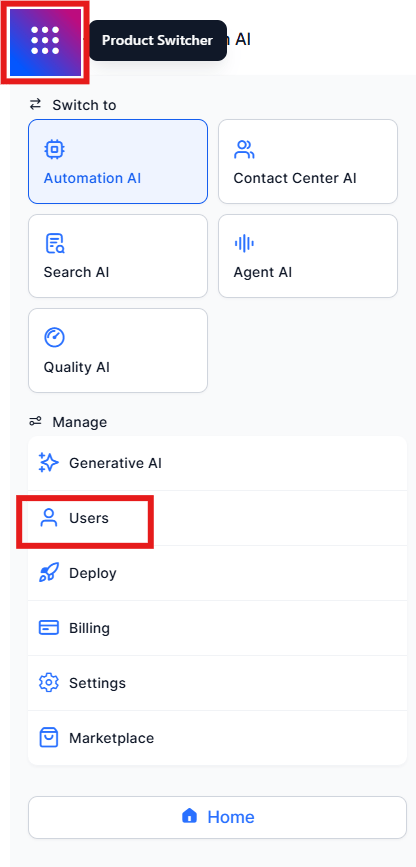
Go to **Manage** > **Users** > **Manage Users** from the left navigation menu or the product switcher.
 ***
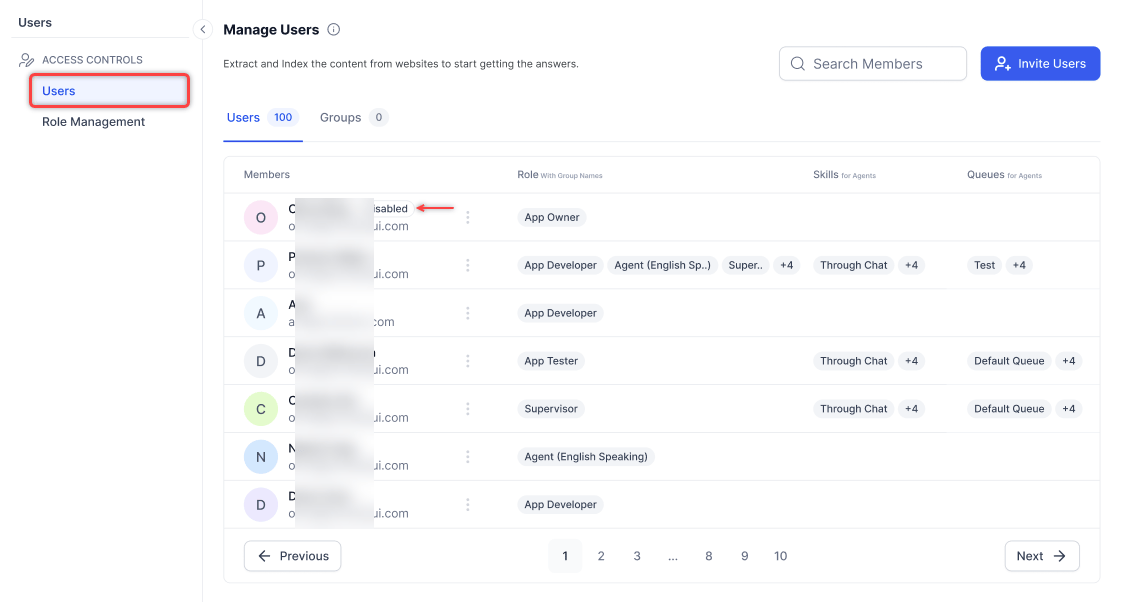
### User List Features
| Feature | Description |
| ---------- | --------------------------------- |
| **Search** | Find a user by name. |
| **User** | User's name and configured email. |
| **Role** | Role assigned to the user. |
| **Skills** | Skills assigned to the user. |
| **Queues** | Queues assigned to the user. |
### Add a User
1. Select **Invite Users**.
***
### User List Features
| Feature | Description |
| ---------- | --------------------------------- |
| **Search** | Find a user by name. |
| **User** | User's name and configured email. |
| **Role** | Role assigned to the user. |
| **Skills** | Skills assigned to the user. |
| **Queues** | Queues assigned to the user. |
### Add a User
1. Select **Invite Users**.
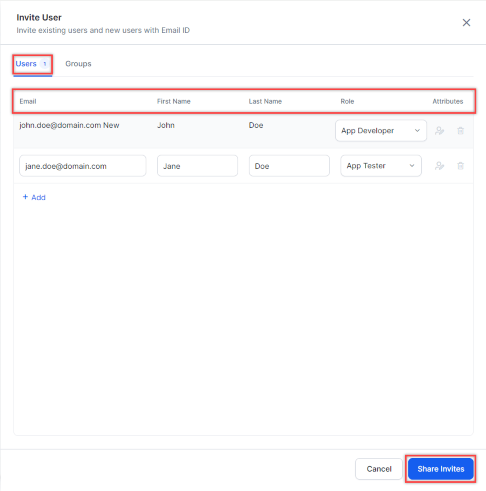
 2. In the **Invite User** window, fill in the following fields:
* **Email**: User's email address.
* **First Name** and **Last Name**.
* **Role**: Select App Developer, App Tester, Agent, or Supervisor.
* Users with **Change User Role** set to **Yes** can modify another user's role.
* Users with **Change User Role** set to **No** can't. See [Permissions](#permissions).
* **Attributes**: Edit user details or delete the user.
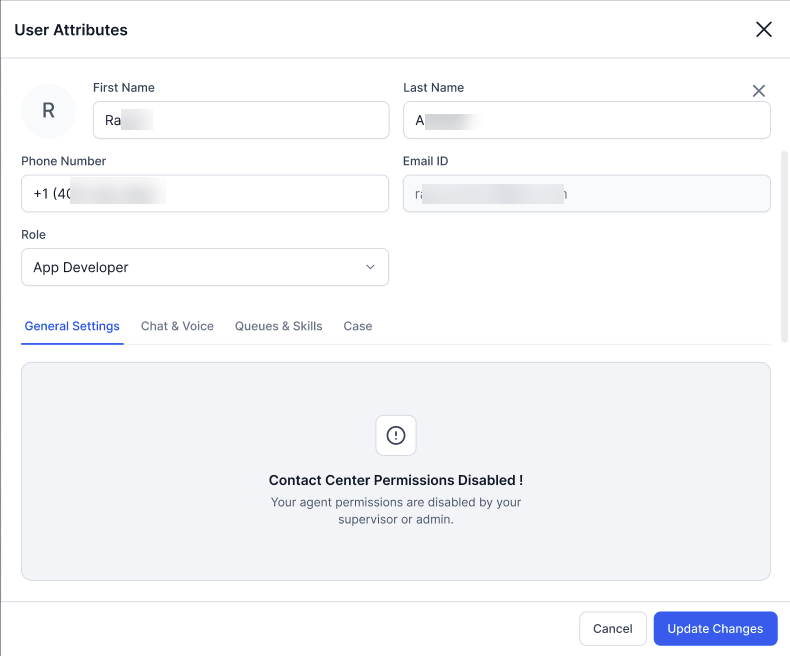
Users whose accounts are disabled appear with a **Disabled** tag. If a user with disabled Contact Center permissions sends an invite, the new user's Contact Center permissions are also disabled.
2. In the **Invite User** window, fill in the following fields:
* **Email**: User's email address.
* **First Name** and **Last Name**.
* **Role**: Select App Developer, App Tester, Agent, or Supervisor.
* Users with **Change User Role** set to **Yes** can modify another user's role.
* Users with **Change User Role** set to **No** can't. See [Permissions](#permissions).
* **Attributes**: Edit user details or delete the user.
Users whose accounts are disabled appear with a **Disabled** tag. If a user with disabled Contact Center permissions sends an invite, the new user's Contact Center permissions are also disabled.
 ***
### Manage Profile Fields
App Owners and Administrators can create custom fields to capture agent metadata beyond the default profile attributes. Once created, a custom field appears in the profile of every agent in the account.
To add a custom field:
1. Select **Manage Profile Fields** in the upper-right corner.
2. Select **Add Custom Field**.
3. Enter the required details and select **Save**.
The field appears in the profile of all agents. Field values can be updated in two ways:
* From the UI - Edit the value directly in the agent profile and select Save.
* Using API - Use the [Agent APIs](/ai-for-service/apis/contact-center/api-list#agent-creation-apis) to read or write custom field values.
***
### User Attributes
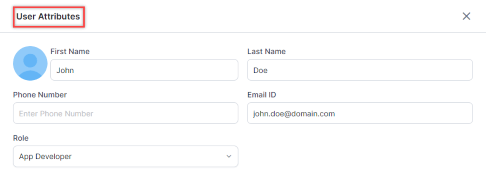
In the User Attributes window, you can:
* Upload a profile picture (optional).
* Edit first name, last name, email, role, and phone number.
***
### Manage Profile Fields
App Owners and Administrators can create custom fields to capture agent metadata beyond the default profile attributes. Once created, a custom field appears in the profile of every agent in the account.
To add a custom field:
1. Select **Manage Profile Fields** in the upper-right corner.
2. Select **Add Custom Field**.
3. Enter the required details and select **Save**.
The field appears in the profile of all agents. Field values can be updated in two ways:
* From the UI - Edit the value directly in the agent profile and select Save.
* Using API - Use the [Agent APIs](/ai-for-service/apis/contact-center/api-list#agent-creation-apis) to read or write custom field values.
***
### User Attributes
In the User Attributes window, you can:
* Upload a profile picture (optional).
* Edit first name, last name, email, role, and phone number.
 #### General Settings
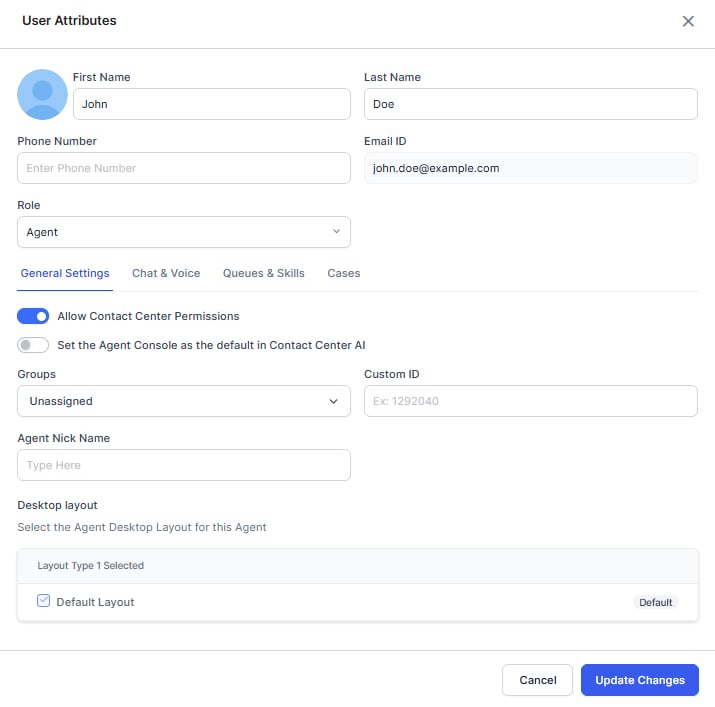
Enable **Allow Contact Center Permissions** to configure:
* **Set Agent Console as default**-Makes the Agent Console the default landing page. Dynamic Navigation Control determines the landing page based on the user's permissions.
* **Group**
* **Custom ID**-Supports all special characters except spaces and backslashes, up to 64 characters.
* **Agent Nick Name**
* **Desktop layout**
#### General Settings
Enable **Allow Contact Center Permissions** to configure:
* **Set Agent Console as default**-Makes the Agent Console the default landing page. Dynamic Navigation Control determines the landing page based on the user's permissions.
* **Group**
* **Custom ID**-Supports all special characters except spaces and backslashes, up to 64 characters.
* **Agent Nick Name**
* **Desktop layout**
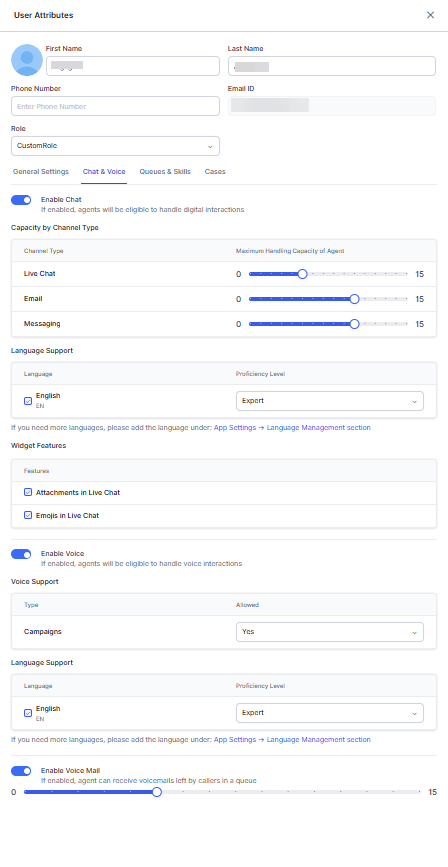
 #### Chat & Voice
**Enable Chat** to set:
1. **Capacity by Channel Type**-Maximum concurrent conversations per channel (up to 15 per type). When an agent reaches the total digital conversation limit, they're marked **System Busy** and receive no new digital conversations until existing ones are closed.
2. **Language Support**-Supported languages and proficiency level (Novice, Average, Good, or Expert).
3. **Widget Features**-Attachments and emojis in live chat.
Agents aren't listed in Agent Transfers when Chat and Email channel slots are set to zero.
**Enable Voice** to set:
1. **Voice Support**-Agents can accept inbound and manual outbound calls by default. Campaign calls are disabled by default; enable them and ensure the agent is in the queue attached to the campaign.
2. **Languages**-Supported languages and proficiency levels.
**Enable Voice Mail** to set the number of voicemails callers can leave in a queue.
#### Chat & Voice
**Enable Chat** to set:
1. **Capacity by Channel Type**-Maximum concurrent conversations per channel (up to 15 per type). When an agent reaches the total digital conversation limit, they're marked **System Busy** and receive no new digital conversations until existing ones are closed.
2. **Language Support**-Supported languages and proficiency level (Novice, Average, Good, or Expert).
3. **Widget Features**-Attachments and emojis in live chat.
Agents aren't listed in Agent Transfers when Chat and Email channel slots are set to zero.
**Enable Voice** to set:
1. **Voice Support**-Agents can accept inbound and manual outbound calls by default. Campaign calls are disabled by default; enable them and ensure the agent is in the queue attached to the campaign.
2. **Languages**-Supported languages and proficiency levels.
**Enable Voice Mail** to set the number of voicemails callers can leave in a queue.
 #### Queues & Skills
**Queues**
1. Search for a queue and select it from the list. Only existing queues appear. To add a queue, see [Add a Queue](/ai-for-service/contact-center/routing-queues-skills#add-a-queue).
2. Assign one or more queues and mark preferred queues-preferred queues take priority when routing incoming interactions.
3. To remove a queue, select the **Delete** icon.
**Skills**
1. Search for a skill and select it from the dropdown. Only existing skills appear. To add a skill, see [Add a Skill](/ai-for-service/contact-center/routing-queues-skills#add-a-skill).
2. Set the proficiency level: Novice, Average, Good, or Expert.
3. To remove a skill, select the **Delete** icon.
***
### Save User Record
Select **Invite User** at the bottom of the window (available from any section).
#### Queues & Skills
**Queues**
1. Search for a queue and select it from the list. Only existing queues appear. To add a queue, see [Add a Queue](/ai-for-service/contact-center/routing-queues-skills#add-a-queue).
2. Assign one or more queues and mark preferred queues-preferred queues take priority when routing incoming interactions.
3. To remove a queue, select the **Delete** icon.
**Skills**
1. Search for a skill and select it from the dropdown. Only existing skills appear. To add a skill, see [Add a Skill](/ai-for-service/contact-center/routing-queues-skills#add-a-skill).
2. Set the proficiency level: Novice, Average, Good, or Expert.
3. To remove a skill, select the **Delete** icon.
***
### Save User Record
Select **Invite User** at the bottom of the window (available from any section).
 Minimum requirements to save a user record:
1. Mandatory fields: email, first name, and role.
2. At least one channel enabled (Chat or Voice).
3. At least one language assigned to the enabled channel.
***
### Edit a User Record
1. On the Manage Users page, select the **Ellipsis** icon (⋮) for the user.
2. In the **User Attributes** window, make your changes.
3. Select **Update Changes**.
Users whose accounts are disabled can only edit the Name, Phone Number, and Role fields of other users.
Minimum requirements to save a user record:
1. Mandatory fields: email, first name, and role.
2. At least one channel enabled (Chat or Voice).
3. At least one language assigned to the enabled channel.
***
### Edit a User Record
1. On the Manage Users page, select the **Ellipsis** icon (⋮) for the user.
2. In the **User Attributes** window, make your changes.
3. Select **Update Changes**.
Users whose accounts are disabled can only edit the Name, Phone Number, and Role fields of other users.
 ***
### Promote as Owner
1. Select the **Ellipsis** icon (⋮) for the user.
2. On the **Promote app owner** pop-up, select a role and select **Save**.
***
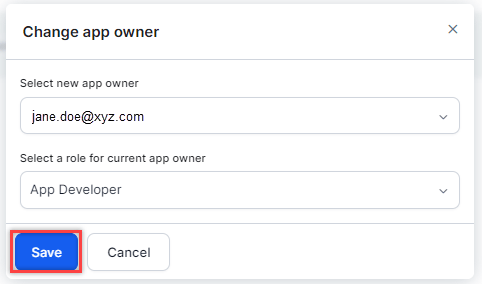
### Change Owner
1. Select the **Ellipsis** icon (⋮) for the current App Owner.
2. On the **Promote app owner** pop-up, select a role and select **Save**.
***
### Promote as Owner
1. Select the **Ellipsis** icon (⋮) for the user.
2. On the **Promote app owner** pop-up, select a role and select **Save**.
***
### Change Owner
1. Select the **Ellipsis** icon (⋮) for the current App Owner.
2. On the **Promote app owner** pop-up, select a role and select **Save**.
 ***
### Delete a User Record
1. Select the **Ellipsis** icon (⋮) for the user.
2. Select **Delete**.
3. Confirm when prompted.
* You can't delete your own user account.
* You can't delete the CCAI App Owner.
* Reports, dashboards, and APIs continue to display deleted agents as long as historical data includes them.
* After deletion, the user can no longer sign in. To temporarily restrict access without deleting, disable their Chat and Voice channels or move them to the [Unassigned group](/ai-for-service/contact-center/supervisor#pre-configured-groups).
***
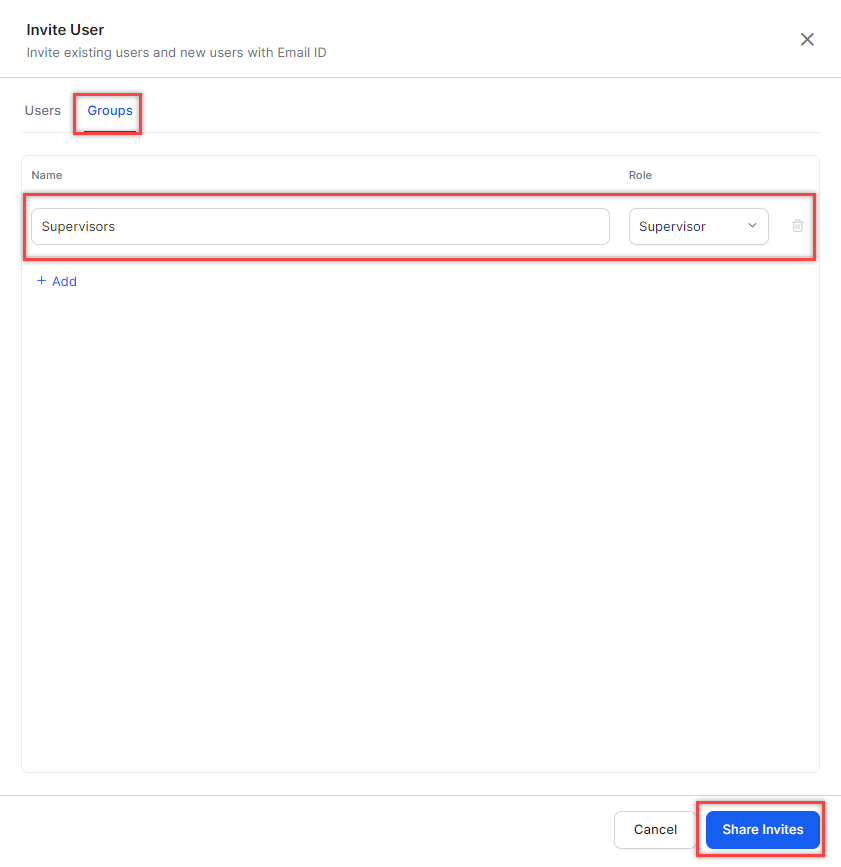
### Add a Group
1. Select **Invite Users**.
2. In the **Invite User** window, configure:
* **Name**: Group name. See [Create a Group](/ai-for-service/administration/groups-management#create-a-group).
* **Role**: App Developer, App Tester, Agent, or Supervisor.
3. Select **Share Invites**.
***
### Delete a User Record
1. Select the **Ellipsis** icon (⋮) for the user.
2. Select **Delete**.
3. Confirm when prompted.
* You can't delete your own user account.
* You can't delete the CCAI App Owner.
* Reports, dashboards, and APIs continue to display deleted agents as long as historical data includes them.
* After deletion, the user can no longer sign in. To temporarily restrict access without deleting, disable their Chat and Voice channels or move them to the [Unassigned group](/ai-for-service/contact-center/supervisor#pre-configured-groups).
***
### Add a Group
1. Select **Invite Users**.
2. In the **Invite User** window, configure:
* **Name**: Group name. See [Create a Group](/ai-for-service/administration/groups-management#create-a-group).
* **Role**: App Developer, App Tester, Agent, or Supervisor.
3. Select **Share Invites**.
 ***
## Roles and Permissions
The Platform uses role-based access control. Roles determine which features a user can access and at what level.
Go to **Manage** > **Users** > **Manage Users** and select the **Role Management** tab.
### Role Management Live Board
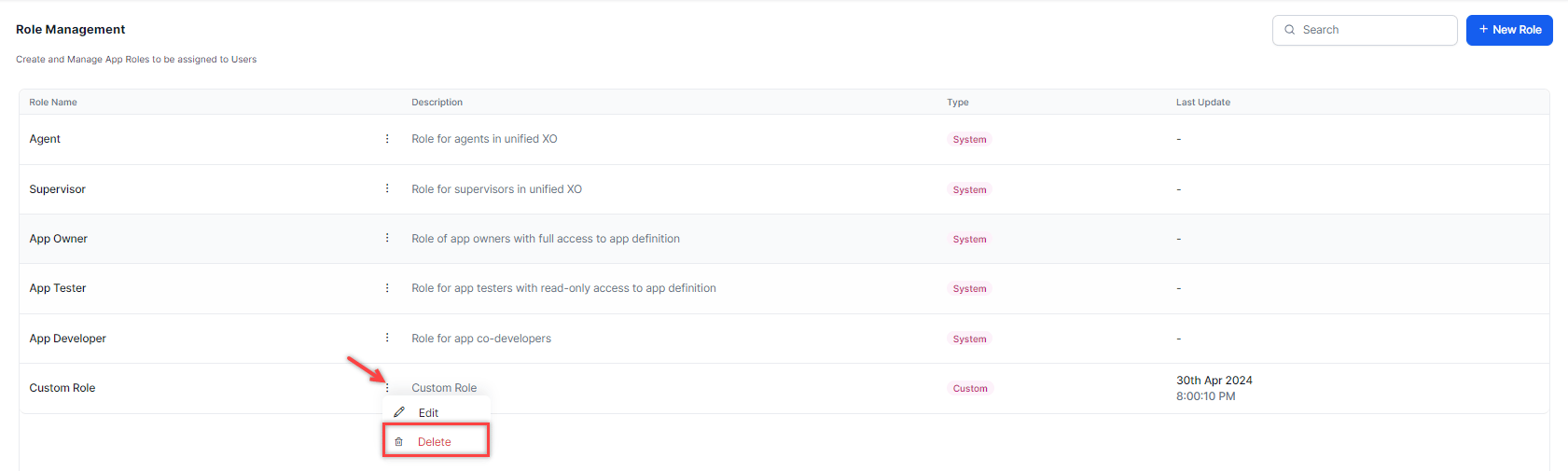
The Role Management board lists all roles with the following information:
| Column | Description |
| :-------------- | :-------------------------------------------------------------------------- |
| **Role Name** | Name of the role across Platform. |
| **Actions** | Edit or delete a role. |
| **Description** | Short description of the role. |
| **Type** | **System** = default, preconfigured roles. **Custom** = user-created roles. |
| **Last Update** | Date the role was last modified. |
### Default Roles
Default roles are fixed and can't be edited or deleted.
| Role | Access Level |
| :---------------- | :--------------------------------------------- |
| **App Owner** | Full access and control over the app. |
| **App Developer** | Co-developer access. |
| **App Tester** | Read-only access to the app definition. |
| **Supervisor** | Operations management access. |
| **Agent** | Access to the agent console and internal chat. |
## Permissions
* The **Monitor Console** permission is restricted to queues the user is assigned to.
* The **Transfer/Close Multiple Conversations** permission is split into three child permissions: **Change Queue for Conversations**, **Assign Conversations**, and **Force Close Conversations**. Child values inherit from the parent.
### Parent and Child Permissions
**Agent Desktop Console** and **Monitor Console** are parent permissions.
* When a parent is set to **No** or **View**, all child permissions are automatically disabled and can't be changed.
* Monitor Console functions as a View permission when set to **Yes** with all underlying permissions set to **No**.
***
## Permission Reference Tables
The tables below show the access level each default role and custom role has for each permission. For Custom Roles, the column shows the available options you can assign.
### Automation
| Permission | Description | Owner | Developer | Tester | Supervisor | Agent | Custom |
| :---------------------------- | :------------------------------------------------------------------------------------------ | :---- | :-------- | :----- | :--------- | :---- | :----------------- |
| **Tasks** | Create and manage dialog, action, alert, information, and flow tasks. | Full | Full | View | No | No | Full / View / No |
| **Natural Language** | Manage NL training data (utterances, patterns, synonyms), configurations, and thresholds. | Full | Full | View | No | No | Full / View / No |
| **Knowledge Graph** | Manage knowledge collection and training (Questions, Alternate Questions, Synonyms, Class). | Full | Full | View | No | No | Full / View / No |
| **Testing** | Manage Batch Testing and Conversation Testing. | Full | Full | View | No | No | Full / View / No |
| **App Developers** | Manage App Owners and co-developers. | Full | View | View | No | No | Full / View / No |
| **Bot Settings** | Manage General Settings, Language Management, Auth Profiles, PII, IVR, Variables, Versions. | Full | Full | No | No | No | Full / View / No |
| **Dashboard** | View and export dashboard data. | Yes | Yes | Yes | No | No | Yes / No |
| **Custom Dashboards** | Manage custom dashboards, widgets, and definitions. | Full | Full | View | No | No | Full / View / No |
| **Storyboard** | View and create Scenes. | Full | Full | View | No | No | Full / View / No |
| **Bot Builder API Scopes** | Manage API Scopes for platform APIs. | Yes | Yes | No | No | No | Yes / No |
| **Integrations & Extensions** | Manage BotKit, WebSDK, Agent Transfer, Actions, External NLU. | Yes | Yes | No | No | No | Yes / No |
| **Publish Bot** | Raise a request to publish the app. | Yes | Yes | No | No | No | Yes / No |
| **Bot Analytics** | View and export bot analytics. | Yes | Yes | Yes | No | No | Yes / No |
| **Bot Import** | Import a bot definition file or restore a version. | Yes | Yes | No | No | No | Yes / No |
| **IntentDiscovery** | Manage Intent Discovery. | Full | Full | Full | No | No | Full / View / No |
| **Use Case Management** | Create and manage FAQs and conversations. | Full | Full | Full | None | None | View / None / Full |
| **Automations Dashboard** | Access automation metrics in Dashboard. | Yes | Yes | Yes | Yes | No | Yes / No |
| **Automations Tab** | Access the Automations tab and Platform. | Yes | Yes | Yes | No | No | Yes / No |
### Flows and Routing
| Permission | Description | Owner | Developer | Tester | Supervisor | Agent | Custom |
| :--------------------------------- | :-------------------------------------------------- | :---- | :-------- | :----- | :--------- | :---- | :----------------- |
| **Waiting Experience** | Create and manage waiting experiences. | Full | Full | Full | None | None | View / None / Full |
| **Hours of Operation** | Create and manage hours of operation. | Full | Full | Full | None | None | View / None / Full |
| **Queue Settings** | Create and manage queues. | Full | Full | Full | Full | None | View / None / Full |
| **Flow Management** | Create and manage experience flows. | Full | Full | Full | None | None | View / None / Full |
| **Default Flows** | Manage default flow properties. | Full | Full | Full | None | None | View / None / Full |
| **Transfer Routing Rules** | Configure global transfer rules for chat/voice. | Full | Full | Full | None | None | View / None / Full |
| **Agent Playbook - Configuration** | Manage agent playbook feature accessibility. | Full | Full | Full | None | None | None / Full |
| **AgentAssist Settings** | Define AgentAssist widget accessibility for agents. | Full | Full | Full | None | None | View / None / Full |
| **Agent Coaching - Configuration** | Manage real-time coaching feature accessibility. | Full | Full | Full | None | None | View / None / Full |
| **Service Level - Configuration** | Manage service level feature accessibility. | Full | Full | Full | Full | None | View / None / Full |
### User Management
| Permission | Description | Owner | Developer | Tester | Supervisor | Agent | Custom |
| :---------------------------------------------------------- | :------------------------------------------------------------ | :---- | :-------- | :----- | :--------- | :---- | :------------------------------------------------------ |
| **Edit User Information** | Allow users to modify user-related information | Yes | Yes | No | Yes | No | Yes / No |
| **Agent Status** | Create and manage agent status types. | Full | Full | Full | Full | None | View / None / Full |
| **User Management** | Manage Users of App, App Owner, and co-developers of an App. | Full | Full | View | Full | No | Full / View / No / View & Invite / Edit / Edit & Delete |
| **User Management > Manage Custom Profile Fields** | Manage custom profile fields for agents. | Yes | Yes | No | No | No | Yes / No |
| **User Management > Edit User Information** | Allow users to modify user-related information. | Yes | Yes | No | Yes | No | Yes / No |
| **Agent Settings** | Modify global agent settings. | Full | Full | Full | Full | None | View / None / Full |
| **Agent Settings > Agent Console Chat Timer Display Logic** | Allow users to modify agent console chat timer display logic. | Yes | Yes | Yes | Yes | No | Yes / No |
| **Skill Management** | Create and manage agent skills and skill groups. | Full | Full | Full | Full | None | View / None / Full |
| **Visibility of Captured Sentiment** | Manage visibility of customer sentiment in the agent console. | Yes | Yes | Yes | Yes | Yes | Yes / No |
| **Agent Group Management** | Create and manage agent groups. | Full | Full | Full | Full | None | View / None / Full |
| **Change User Role** | Allow user roles to be modified. | Yes | Yes | Yes | Yes | No | Yes / No |
### User Management Permission Options
The User Management permission supports six access levels. Each level defines which user lifecycle actions the role can perform.
| Permission | Create Users | Edit Users | Delete Users | View Users | Invite Users |
| :------------ | :----------- | :--------- | :----------- | :--------- | :----------- |
| Full Access | ✓ | ✓ | ✓ | ✓ | ✓ |
| Edit & Delete | — | ✓ | ✓ | ✓ | — |
| Edit | — | ✓ | — | ✓ | — |
| View | — | — | — | ✓ | — |
| View & Invite | — | — | — | ✓ | ✓ |
| None | — | — | — | — | — |
Setting the User Management permission to View, View & Invite, or None turns off all child permissions. If you set the parent permission to Edit, Edit & Delete, or Full Access, the system restores the previous child permission configurations.
### Agent and Supervisor Experience Agent Desktop Console
**Agent Desktop Console** is a parent permission. Child permissions are disabled when the parent is set to **No** or **View**.
| Permission | Description | Owner | Developer | Tester | Supervisor | Agent | Custom |
| :---------------------------------------------------- | :---------------------------------------------------------------------------------------------------- | :---- | :-------- | :----- | :--------- | :---- | :----------------- |
| **Internal Chat** | Chat internally with others in the account. | Yes | Yes | Yes | Yes | Yes | Yes / No |
| **Modify Skill Subscription** | Allows agents to opt in/out of specific skills. | Yes | Yes | No | Yes | No | Yes / No |
| **Modify Queue Subscription** | Allows agents to opt in/out of specific queues. | Yes | Yes | No | Yes | No | Yes / No |
| **Audio Calls in Messaging Conversations** | Add audio calls to a messaging interaction. | Yes | Yes | Yes | Yes | Yes | Yes / No |
| **Video Calls in Messaging Conversations** | Add video calls to a messaging interaction. | Yes | Yes | Yes | Yes | Yes | Yes / No |
| **Desktop Layout Creation** | Create custom desktop layouts. | Yes | Yes | Yes | Yes | No | Yes / No |
| **Desktop Layout Publishing** | Publish custom layouts account-wide. | Yes | Yes | Yes | Yes | No | Yes / No |
| **Request Supervisor Support** | Send a request for supervisor support. | Yes | Yes | Yes | Yes | Yes | Yes / No |
| **Receive Supervisor Support** | Receive supervisor support requests from agents. | Yes | Yes | Yes | Yes | No | Yes / No |
| **Call Dialing Stage Settings** | Enable call controls during dialing (Outbound Dialer). | No | No | No | No | No | Yes / No |
| **Direct Outward Dialing** | Make direct outward calls. | Yes | Yes | Yes | Yes | No | Yes / No |
| **Outbound Email** | Send outbound emails when enabled for the account. | Yes | Yes | Yes | Yes | No | Yes / No |
| **Agent Channel Selection for Upcoming Interactions** | Select preferred channel for upcoming interactions. | Yes | Yes | No | No | No | Yes / No |
| **Manually Redact Sensitive Data** | Redact selected text during live conversations. | Yes | Yes | No | Yes | No | Yes / No |
| **Consult Call** | Make a consult call before transferring a conversation. | Yes | Yes | Yes | Yes | Yes | Yes / No |
| **Consult Chat** | Allow agents to initiate a consult chat with another agent before transferring the chat conversation. | Yes | Yes | Yes | Yes | Yes | Yes / No |
| **Widget Management** | Create and manage custom widgets. | Full | Full | Full | Full | None | View / None / Full |
| **Survey Management** | Create and manage surveys. | Full | Full | Full | None | None | View / None / Full |
| **Disposition Management** | Create and manage dispositions. | Full | Full | Full | None | None | View / None / Full |
| **Access to Agent's Personal Dashboard** | Define My Dashboard accessibility for agents. | No | No | No | No | No | Yes / No |
| **Standard Responses** | Create and manage standard responses. | Full | Full | Full | None | None | View / None / Full |
| **Queues and Agents** | Access Queues and Agents metrics in Dashboard. | Yes | Yes | Yes | Yes | No | Yes / No |
| **Secure Form Management** | Create and manage secure forms. | Full | Full | Full | Full | None | View / None / Full |
| **Secure Form Data View** | View filled-out secure forms and data. | Yes | Yes | Yes | Yes | No | Yes / No |
### Agent and Supervisor Experience Monitor Console
**Monitor Console** is a parent permission. Child permissions are disabled when the parent is set to **No** or **View**.
| Permission | Description | Owner | Developer | Tester | Supervisor | Agent | Custom |
| :--------------------------------------------------- | :----------------------------------------------------------------------------------------------------------------------------------------------------------------------------- | :---- | :-------- | :----- | :--------- | :---- | :----------------- |
| **Join Conversation** | Join a conversation. | Yes | Yes | Yes | Yes | No | Yes / No |
| **Listen and Whisper Conversation** | Listen and whisper to a conversation. | Yes | Yes | Yes | Yes | No | Yes / No |
| **Monitor Queue Visibility** | Which queues the user can access. | All | All | All | Self | Self | All / Self |
| **Bot-led Interactions** | Access bot-driven interactions on the Monitor tab. | Yes | Yes | No | Yes | No | Yes / No |
| **Force Logout** | Force logout another user from the system. | Yes | Yes | Yes | Yes | No | Yes / No |
| **Change Queue for Conversations** | Change the queue for individual or multiple conversations. | Yes | Yes | Yes | Yes | No | Yes / No |
| **Assign Individual or Multiple Conversations** | Assign individual or multiple conversations to an agent. | Yes | Yes | Yes | Yes | No | Yes / No |
| **Override Queue Transfer Restrictions in Monitor** | Allows users to bypass queue-level transfer restrictions when changing queue assignments from the Monitor tab. Queue transfer restrictions continue to apply in Agent Console. | No | No | No | No | No | Yes / No |
| **Force Close Individual or Multiple Conversations** | Force close individual or multiple conversations. | Yes | Yes | Yes | Yes | No | Yes / No |
| **Profile** | Allow user to edit another user's profile details in the monitor. | Yes | Yes | Yes | Yes | No | Yes / No |
| **Mark Offline** | Allow user to mark another user as offline. | Yes | Yes | Yes | Yes | No | Yes / No |
| **Edit Disposition from Dashboard > Interactions** | Edit disposition code after a conversation ends. | Yes | Yes | Yes | Yes | No | Yes / No |
| **Download Interactions Data** | Download transcripts, recordings, events, and latency reports. | Yes | Yes | Yes | Yes | No | Yes / No |
| **Reports** | Create, view, and run reports. | Full | Full | Full | Full | None | View / None / Full |
| **Voice Campaigns** | Access Voice Campaigns under the Campaigns module. | Full | Full | Full | Full | None | View / None / Full |
| **Proactive Web Campaigns** | Access Proactive Web Campaigns under the Campaigns module. | Full | Full | Full | Full | None | View / None / Full |
| **SMS Campaigns** | Access SMS Campaigns under the Campaigns module. | Full | Full | Full | Full | None | View / None / Full |
| **Service Level Configuration** | Manage service level feature accessibility. | Full | Full | Full | Full | None | View / None / Full |
| **Dashboard Content** | Define whose interactions the user can access. | All | All | All | All | Own | Own / All / Queues |
| **Dynamic Queue Reprioritization** | Manage queue priority to control routing logic. | Yes | Yes | Yes | Yes | No | Yes / No |
### System
| Permission | Description | Owner | Developer | Tester | Supervisor | Agent | Custom |
| :--------------------------------- | :----------------------------------------------- | :---- | :-------- | :----- | :--------- | :---- | :----------------- |
| **Channel Management** | Manage communication channels. | Full | Full | Full | None | None | View / None / Full |
| **Billing** | Manage account-level billing preferences. | Full | None | None | None | None | View / None / Full |
| **API** | Manage API setup and configuration. | Full | Full | Full | None | None | View / None / Full |
| **Language & Speech Control** | Manage ASR/TTS voice preferences. | Full | Full | Full | Full | None | View / None / Full |
| **Agent Playbook - Configuration** | Manage agent playbook feature accessibility. | Full | Full | Full | None | None | None / Full |
| **WFM Configuration Management** | Manage WFM configurations. | Yes | Yes | Yes | No | No | Yes / No |
| **VoiceGateway Settings** | Manage Bot Delay Response Behavior settings. | Full | Full | None | Full | None | View / None / Full |
| **Agent AI Settings** | Define Agent AI widget accessibility for agents. | Full | Full | Full | None | None | View / None / Full |
| **Agent Coaching - Configuration** | Manage real-time coaching feature accessibility. | Full | Full | Full | None | None | View / None / Full |
### Other Modules
| Permission | Description | Owner | Developer | Tester | Supervisor | Agent | Custom |
| :--------------------------------------------------- | :----------------------------------------------------------------- | :---- | :-------- | :----- | :--------- | :---- | :--------------- |
| **Answers Module** | Access and manage the Answers module. | Yes | Yes | Yes | No | No | Yes / No |
| **Campaign Module** | Access and manage the Campaigns module. | Yes | Yes | No | Yes | No | Yes / No |
| **AgentAI Module** | Access and manage the AgentAI module. | Yes | Yes | Yes | No | No | Yes / No |
| **Auto QA** | Enable or disable access to Auto QA. | Full | Yes | No | No | No | Full / No |
| **Conversational Intelligence** | Configuration and view access to Conversational Intelligence. | Full | Full | View | View | No | View / Full / No |
| **Evaluation Forms and Metrics** | Create and edit evaluation forms and metrics. | Full | Full | View | Full | No | Full / View / No |
| **Audit Allocation Creation** | Create and assign interactions for audit. | Full | Full | No | Full | No | Full / No |
| **QA Functionalities Access** | Access scored interactions, submit audits, and QA dashboard. | Full | Full | Full | Full | No | Full / No |
| **Agent Scorecards & Attributes** | Access agent scorecards and interactions. | Full | Full | View | Full | No | — |
| **Agent access to dashboard & coaching assignments** | Agent-level access to their dashboard and coaching sessions. | — | Full | Full | — | — | — |
| **Quality AI Reporting** | Create, view, and run Quality AI Reporting. | — | Full | Full | — | — | — |
| **Agent Dashboard** | Access to agent dashboard. | No | No | No | No | Full | — |
| **Cross Queue Data Access** | Access data across all queues without individual queue assignment. | Yes | Yes | Yes | Yes | — | — |
| **Download Conversations** | Download conversation recordings or transcripts. | Yes | Yes | Yes | Yes | — | — |
## App Owner Exclusive Permissions
The following permissions are implicitly granted to App Owners only and aren't available to any other role:
| Permission | Description |
| ----------------------------- | --------------------------------------------------------- |
| **Create New User Role** | Only App Owners can access the Create New User Role menu. |
| **Billing Module Access** | Only App Owners can access the Billing module. |
| **Activation of Free Tokens** | Only App Owners can activate free tokens. |
| **App Profile Modification** | Only App Owners can edit the App Profile. |
| **Delete App** | Only App Owners can delete the app. |
## Custom Roles
Create custom roles to define specific permission sets tailored to your organization's needs. You can add, edit, and delete custom roles if you have the **Role Management** permission set to **Yes**.
### Add a Role
1. Select **+ New Role**.
***
## Roles and Permissions
The Platform uses role-based access control. Roles determine which features a user can access and at what level.
Go to **Manage** > **Users** > **Manage Users** and select the **Role Management** tab.
### Role Management Live Board
The Role Management board lists all roles with the following information:
| Column | Description |
| :-------------- | :-------------------------------------------------------------------------- |
| **Role Name** | Name of the role across Platform. |
| **Actions** | Edit or delete a role. |
| **Description** | Short description of the role. |
| **Type** | **System** = default, preconfigured roles. **Custom** = user-created roles. |
| **Last Update** | Date the role was last modified. |
### Default Roles
Default roles are fixed and can't be edited or deleted.
| Role | Access Level |
| :---------------- | :--------------------------------------------- |
| **App Owner** | Full access and control over the app. |
| **App Developer** | Co-developer access. |
| **App Tester** | Read-only access to the app definition. |
| **Supervisor** | Operations management access. |
| **Agent** | Access to the agent console and internal chat. |
## Permissions
* The **Monitor Console** permission is restricted to queues the user is assigned to.
* The **Transfer/Close Multiple Conversations** permission is split into three child permissions: **Change Queue for Conversations**, **Assign Conversations**, and **Force Close Conversations**. Child values inherit from the parent.
### Parent and Child Permissions
**Agent Desktop Console** and **Monitor Console** are parent permissions.
* When a parent is set to **No** or **View**, all child permissions are automatically disabled and can't be changed.
* Monitor Console functions as a View permission when set to **Yes** with all underlying permissions set to **No**.
***
## Permission Reference Tables
The tables below show the access level each default role and custom role has for each permission. For Custom Roles, the column shows the available options you can assign.
### Automation
| Permission | Description | Owner | Developer | Tester | Supervisor | Agent | Custom |
| :---------------------------- | :------------------------------------------------------------------------------------------ | :---- | :-------- | :----- | :--------- | :---- | :----------------- |
| **Tasks** | Create and manage dialog, action, alert, information, and flow tasks. | Full | Full | View | No | No | Full / View / No |
| **Natural Language** | Manage NL training data (utterances, patterns, synonyms), configurations, and thresholds. | Full | Full | View | No | No | Full / View / No |
| **Knowledge Graph** | Manage knowledge collection and training (Questions, Alternate Questions, Synonyms, Class). | Full | Full | View | No | No | Full / View / No |
| **Testing** | Manage Batch Testing and Conversation Testing. | Full | Full | View | No | No | Full / View / No |
| **App Developers** | Manage App Owners and co-developers. | Full | View | View | No | No | Full / View / No |
| **Bot Settings** | Manage General Settings, Language Management, Auth Profiles, PII, IVR, Variables, Versions. | Full | Full | No | No | No | Full / View / No |
| **Dashboard** | View and export dashboard data. | Yes | Yes | Yes | No | No | Yes / No |
| **Custom Dashboards** | Manage custom dashboards, widgets, and definitions. | Full | Full | View | No | No | Full / View / No |
| **Storyboard** | View and create Scenes. | Full | Full | View | No | No | Full / View / No |
| **Bot Builder API Scopes** | Manage API Scopes for platform APIs. | Yes | Yes | No | No | No | Yes / No |
| **Integrations & Extensions** | Manage BotKit, WebSDK, Agent Transfer, Actions, External NLU. | Yes | Yes | No | No | No | Yes / No |
| **Publish Bot** | Raise a request to publish the app. | Yes | Yes | No | No | No | Yes / No |
| **Bot Analytics** | View and export bot analytics. | Yes | Yes | Yes | No | No | Yes / No |
| **Bot Import** | Import a bot definition file or restore a version. | Yes | Yes | No | No | No | Yes / No |
| **IntentDiscovery** | Manage Intent Discovery. | Full | Full | Full | No | No | Full / View / No |
| **Use Case Management** | Create and manage FAQs and conversations. | Full | Full | Full | None | None | View / None / Full |
| **Automations Dashboard** | Access automation metrics in Dashboard. | Yes | Yes | Yes | Yes | No | Yes / No |
| **Automations Tab** | Access the Automations tab and Platform. | Yes | Yes | Yes | No | No | Yes / No |
### Flows and Routing
| Permission | Description | Owner | Developer | Tester | Supervisor | Agent | Custom |
| :--------------------------------- | :-------------------------------------------------- | :---- | :-------- | :----- | :--------- | :---- | :----------------- |
| **Waiting Experience** | Create and manage waiting experiences. | Full | Full | Full | None | None | View / None / Full |
| **Hours of Operation** | Create and manage hours of operation. | Full | Full | Full | None | None | View / None / Full |
| **Queue Settings** | Create and manage queues. | Full | Full | Full | Full | None | View / None / Full |
| **Flow Management** | Create and manage experience flows. | Full | Full | Full | None | None | View / None / Full |
| **Default Flows** | Manage default flow properties. | Full | Full | Full | None | None | View / None / Full |
| **Transfer Routing Rules** | Configure global transfer rules for chat/voice. | Full | Full | Full | None | None | View / None / Full |
| **Agent Playbook - Configuration** | Manage agent playbook feature accessibility. | Full | Full | Full | None | None | None / Full |
| **AgentAssist Settings** | Define AgentAssist widget accessibility for agents. | Full | Full | Full | None | None | View / None / Full |
| **Agent Coaching - Configuration** | Manage real-time coaching feature accessibility. | Full | Full | Full | None | None | View / None / Full |
| **Service Level - Configuration** | Manage service level feature accessibility. | Full | Full | Full | Full | None | View / None / Full |
### User Management
| Permission | Description | Owner | Developer | Tester | Supervisor | Agent | Custom |
| :---------------------------------------------------------- | :------------------------------------------------------------ | :---- | :-------- | :----- | :--------- | :---- | :------------------------------------------------------ |
| **Edit User Information** | Allow users to modify user-related information | Yes | Yes | No | Yes | No | Yes / No |
| **Agent Status** | Create and manage agent status types. | Full | Full | Full | Full | None | View / None / Full |
| **User Management** | Manage Users of App, App Owner, and co-developers of an App. | Full | Full | View | Full | No | Full / View / No / View & Invite / Edit / Edit & Delete |
| **User Management > Manage Custom Profile Fields** | Manage custom profile fields for agents. | Yes | Yes | No | No | No | Yes / No |
| **User Management > Edit User Information** | Allow users to modify user-related information. | Yes | Yes | No | Yes | No | Yes / No |
| **Agent Settings** | Modify global agent settings. | Full | Full | Full | Full | None | View / None / Full |
| **Agent Settings > Agent Console Chat Timer Display Logic** | Allow users to modify agent console chat timer display logic. | Yes | Yes | Yes | Yes | No | Yes / No |
| **Skill Management** | Create and manage agent skills and skill groups. | Full | Full | Full | Full | None | View / None / Full |
| **Visibility of Captured Sentiment** | Manage visibility of customer sentiment in the agent console. | Yes | Yes | Yes | Yes | Yes | Yes / No |
| **Agent Group Management** | Create and manage agent groups. | Full | Full | Full | Full | None | View / None / Full |
| **Change User Role** | Allow user roles to be modified. | Yes | Yes | Yes | Yes | No | Yes / No |
### User Management Permission Options
The User Management permission supports six access levels. Each level defines which user lifecycle actions the role can perform.
| Permission | Create Users | Edit Users | Delete Users | View Users | Invite Users |
| :------------ | :----------- | :--------- | :----------- | :--------- | :----------- |
| Full Access | ✓ | ✓ | ✓ | ✓ | ✓ |
| Edit & Delete | — | ✓ | ✓ | ✓ | — |
| Edit | — | ✓ | — | ✓ | — |
| View | — | — | — | ✓ | — |
| View & Invite | — | — | — | ✓ | ✓ |
| None | — | — | — | — | — |
Setting the User Management permission to View, View & Invite, or None turns off all child permissions. If you set the parent permission to Edit, Edit & Delete, or Full Access, the system restores the previous child permission configurations.
### Agent and Supervisor Experience Agent Desktop Console
**Agent Desktop Console** is a parent permission. Child permissions are disabled when the parent is set to **No** or **View**.
| Permission | Description | Owner | Developer | Tester | Supervisor | Agent | Custom |
| :---------------------------------------------------- | :---------------------------------------------------------------------------------------------------- | :---- | :-------- | :----- | :--------- | :---- | :----------------- |
| **Internal Chat** | Chat internally with others in the account. | Yes | Yes | Yes | Yes | Yes | Yes / No |
| **Modify Skill Subscription** | Allows agents to opt in/out of specific skills. | Yes | Yes | No | Yes | No | Yes / No |
| **Modify Queue Subscription** | Allows agents to opt in/out of specific queues. | Yes | Yes | No | Yes | No | Yes / No |
| **Audio Calls in Messaging Conversations** | Add audio calls to a messaging interaction. | Yes | Yes | Yes | Yes | Yes | Yes / No |
| **Video Calls in Messaging Conversations** | Add video calls to a messaging interaction. | Yes | Yes | Yes | Yes | Yes | Yes / No |
| **Desktop Layout Creation** | Create custom desktop layouts. | Yes | Yes | Yes | Yes | No | Yes / No |
| **Desktop Layout Publishing** | Publish custom layouts account-wide. | Yes | Yes | Yes | Yes | No | Yes / No |
| **Request Supervisor Support** | Send a request for supervisor support. | Yes | Yes | Yes | Yes | Yes | Yes / No |
| **Receive Supervisor Support** | Receive supervisor support requests from agents. | Yes | Yes | Yes | Yes | No | Yes / No |
| **Call Dialing Stage Settings** | Enable call controls during dialing (Outbound Dialer). | No | No | No | No | No | Yes / No |
| **Direct Outward Dialing** | Make direct outward calls. | Yes | Yes | Yes | Yes | No | Yes / No |
| **Outbound Email** | Send outbound emails when enabled for the account. | Yes | Yes | Yes | Yes | No | Yes / No |
| **Agent Channel Selection for Upcoming Interactions** | Select preferred channel for upcoming interactions. | Yes | Yes | No | No | No | Yes / No |
| **Manually Redact Sensitive Data** | Redact selected text during live conversations. | Yes | Yes | No | Yes | No | Yes / No |
| **Consult Call** | Make a consult call before transferring a conversation. | Yes | Yes | Yes | Yes | Yes | Yes / No |
| **Consult Chat** | Allow agents to initiate a consult chat with another agent before transferring the chat conversation. | Yes | Yes | Yes | Yes | Yes | Yes / No |
| **Widget Management** | Create and manage custom widgets. | Full | Full | Full | Full | None | View / None / Full |
| **Survey Management** | Create and manage surveys. | Full | Full | Full | None | None | View / None / Full |
| **Disposition Management** | Create and manage dispositions. | Full | Full | Full | None | None | View / None / Full |
| **Access to Agent's Personal Dashboard** | Define My Dashboard accessibility for agents. | No | No | No | No | No | Yes / No |
| **Standard Responses** | Create and manage standard responses. | Full | Full | Full | None | None | View / None / Full |
| **Queues and Agents** | Access Queues and Agents metrics in Dashboard. | Yes | Yes | Yes | Yes | No | Yes / No |
| **Secure Form Management** | Create and manage secure forms. | Full | Full | Full | Full | None | View / None / Full |
| **Secure Form Data View** | View filled-out secure forms and data. | Yes | Yes | Yes | Yes | No | Yes / No |
### Agent and Supervisor Experience Monitor Console
**Monitor Console** is a parent permission. Child permissions are disabled when the parent is set to **No** or **View**.
| Permission | Description | Owner | Developer | Tester | Supervisor | Agent | Custom |
| :--------------------------------------------------- | :----------------------------------------------------------------------------------------------------------------------------------------------------------------------------- | :---- | :-------- | :----- | :--------- | :---- | :----------------- |
| **Join Conversation** | Join a conversation. | Yes | Yes | Yes | Yes | No | Yes / No |
| **Listen and Whisper Conversation** | Listen and whisper to a conversation. | Yes | Yes | Yes | Yes | No | Yes / No |
| **Monitor Queue Visibility** | Which queues the user can access. | All | All | All | Self | Self | All / Self |
| **Bot-led Interactions** | Access bot-driven interactions on the Monitor tab. | Yes | Yes | No | Yes | No | Yes / No |
| **Force Logout** | Force logout another user from the system. | Yes | Yes | Yes | Yes | No | Yes / No |
| **Change Queue for Conversations** | Change the queue for individual or multiple conversations. | Yes | Yes | Yes | Yes | No | Yes / No |
| **Assign Individual or Multiple Conversations** | Assign individual or multiple conversations to an agent. | Yes | Yes | Yes | Yes | No | Yes / No |
| **Override Queue Transfer Restrictions in Monitor** | Allows users to bypass queue-level transfer restrictions when changing queue assignments from the Monitor tab. Queue transfer restrictions continue to apply in Agent Console. | No | No | No | No | No | Yes / No |
| **Force Close Individual or Multiple Conversations** | Force close individual or multiple conversations. | Yes | Yes | Yes | Yes | No | Yes / No |
| **Profile** | Allow user to edit another user's profile details in the monitor. | Yes | Yes | Yes | Yes | No | Yes / No |
| **Mark Offline** | Allow user to mark another user as offline. | Yes | Yes | Yes | Yes | No | Yes / No |
| **Edit Disposition from Dashboard > Interactions** | Edit disposition code after a conversation ends. | Yes | Yes | Yes | Yes | No | Yes / No |
| **Download Interactions Data** | Download transcripts, recordings, events, and latency reports. | Yes | Yes | Yes | Yes | No | Yes / No |
| **Reports** | Create, view, and run reports. | Full | Full | Full | Full | None | View / None / Full |
| **Voice Campaigns** | Access Voice Campaigns under the Campaigns module. | Full | Full | Full | Full | None | View / None / Full |
| **Proactive Web Campaigns** | Access Proactive Web Campaigns under the Campaigns module. | Full | Full | Full | Full | None | View / None / Full |
| **SMS Campaigns** | Access SMS Campaigns under the Campaigns module. | Full | Full | Full | Full | None | View / None / Full |
| **Service Level Configuration** | Manage service level feature accessibility. | Full | Full | Full | Full | None | View / None / Full |
| **Dashboard Content** | Define whose interactions the user can access. | All | All | All | All | Own | Own / All / Queues |
| **Dynamic Queue Reprioritization** | Manage queue priority to control routing logic. | Yes | Yes | Yes | Yes | No | Yes / No |
### System
| Permission | Description | Owner | Developer | Tester | Supervisor | Agent | Custom |
| :--------------------------------- | :----------------------------------------------- | :---- | :-------- | :----- | :--------- | :---- | :----------------- |
| **Channel Management** | Manage communication channels. | Full | Full | Full | None | None | View / None / Full |
| **Billing** | Manage account-level billing preferences. | Full | None | None | None | None | View / None / Full |
| **API** | Manage API setup and configuration. | Full | Full | Full | None | None | View / None / Full |
| **Language & Speech Control** | Manage ASR/TTS voice preferences. | Full | Full | Full | Full | None | View / None / Full |
| **Agent Playbook - Configuration** | Manage agent playbook feature accessibility. | Full | Full | Full | None | None | None / Full |
| **WFM Configuration Management** | Manage WFM configurations. | Yes | Yes | Yes | No | No | Yes / No |
| **VoiceGateway Settings** | Manage Bot Delay Response Behavior settings. | Full | Full | None | Full | None | View / None / Full |
| **Agent AI Settings** | Define Agent AI widget accessibility for agents. | Full | Full | Full | None | None | View / None / Full |
| **Agent Coaching - Configuration** | Manage real-time coaching feature accessibility. | Full | Full | Full | None | None | View / None / Full |
### Other Modules
| Permission | Description | Owner | Developer | Tester | Supervisor | Agent | Custom |
| :--------------------------------------------------- | :----------------------------------------------------------------- | :---- | :-------- | :----- | :--------- | :---- | :--------------- |
| **Answers Module** | Access and manage the Answers module. | Yes | Yes | Yes | No | No | Yes / No |
| **Campaign Module** | Access and manage the Campaigns module. | Yes | Yes | No | Yes | No | Yes / No |
| **AgentAI Module** | Access and manage the AgentAI module. | Yes | Yes | Yes | No | No | Yes / No |
| **Auto QA** | Enable or disable access to Auto QA. | Full | Yes | No | No | No | Full / No |
| **Conversational Intelligence** | Configuration and view access to Conversational Intelligence. | Full | Full | View | View | No | View / Full / No |
| **Evaluation Forms and Metrics** | Create and edit evaluation forms and metrics. | Full | Full | View | Full | No | Full / View / No |
| **Audit Allocation Creation** | Create and assign interactions for audit. | Full | Full | No | Full | No | Full / No |
| **QA Functionalities Access** | Access scored interactions, submit audits, and QA dashboard. | Full | Full | Full | Full | No | Full / No |
| **Agent Scorecards & Attributes** | Access agent scorecards and interactions. | Full | Full | View | Full | No | — |
| **Agent access to dashboard & coaching assignments** | Agent-level access to their dashboard and coaching sessions. | — | Full | Full | — | — | — |
| **Quality AI Reporting** | Create, view, and run Quality AI Reporting. | — | Full | Full | — | — | — |
| **Agent Dashboard** | Access to agent dashboard. | No | No | No | No | Full | — |
| **Cross Queue Data Access** | Access data across all queues without individual queue assignment. | Yes | Yes | Yes | Yes | — | — |
| **Download Conversations** | Download conversation recordings or transcripts. | Yes | Yes | Yes | Yes | — | — |
## App Owner Exclusive Permissions
The following permissions are implicitly granted to App Owners only and aren't available to any other role:
| Permission | Description |
| ----------------------------- | --------------------------------------------------------- |
| **Create New User Role** | Only App Owners can access the Create New User Role menu. |
| **Billing Module Access** | Only App Owners can access the Billing module. |
| **Activation of Free Tokens** | Only App Owners can activate free tokens. |
| **App Profile Modification** | Only App Owners can edit the App Profile. |
| **Delete App** | Only App Owners can delete the app. |
## Custom Roles
Create custom roles to define specific permission sets tailored to your organization's needs. You can add, edit, and delete custom roles if you have the **Role Management** permission set to **Yes**.
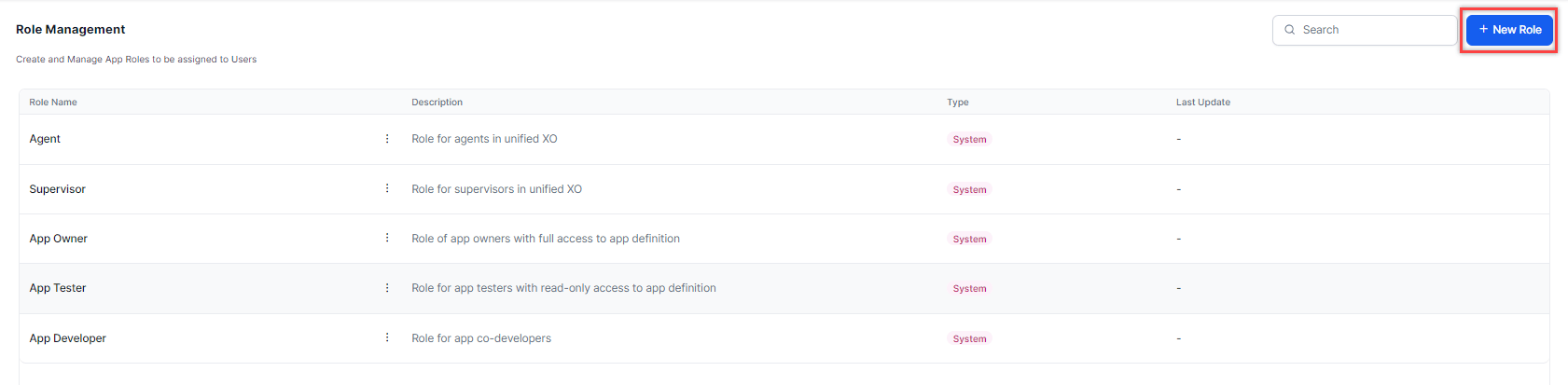
### Add a Role
1. Select **+ New Role**.
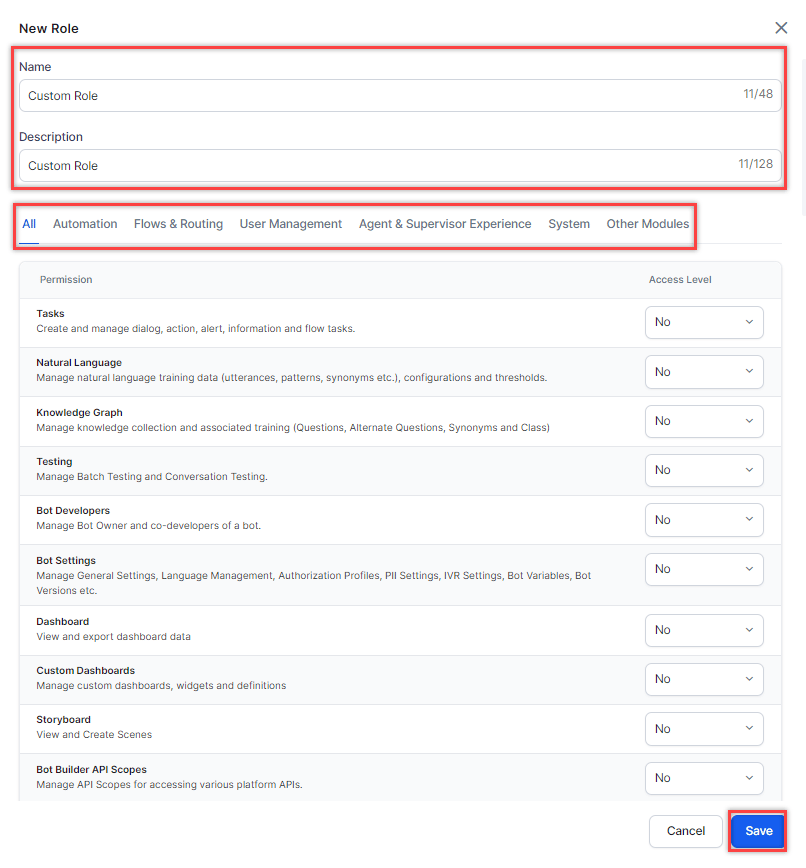
 2. In the **New Role** window, fill in:
* **Role Name**: Displayed across Platform (for example, Experience Designer).
* **Description**: Summary of the role's responsibilities or access level.
* **Permissions**: Set each permission using the available dropdown options.
3. Select **Save**.
2. In the **New Role** window, fill in:
* **Role Name**: Displayed across Platform (for example, Experience Designer).
* **Description**: Summary of the role's responsibilities or access level.
* **Permissions**: Set each permission using the available dropdown options.
3. Select **Save**.
 ***
### Edit a Role
1. Select the **Ellipsis** icon (⋮) for the role and select **Edit**.
***
### Edit a Role
1. Select the **Ellipsis** icon (⋮) for the role and select **Edit**.
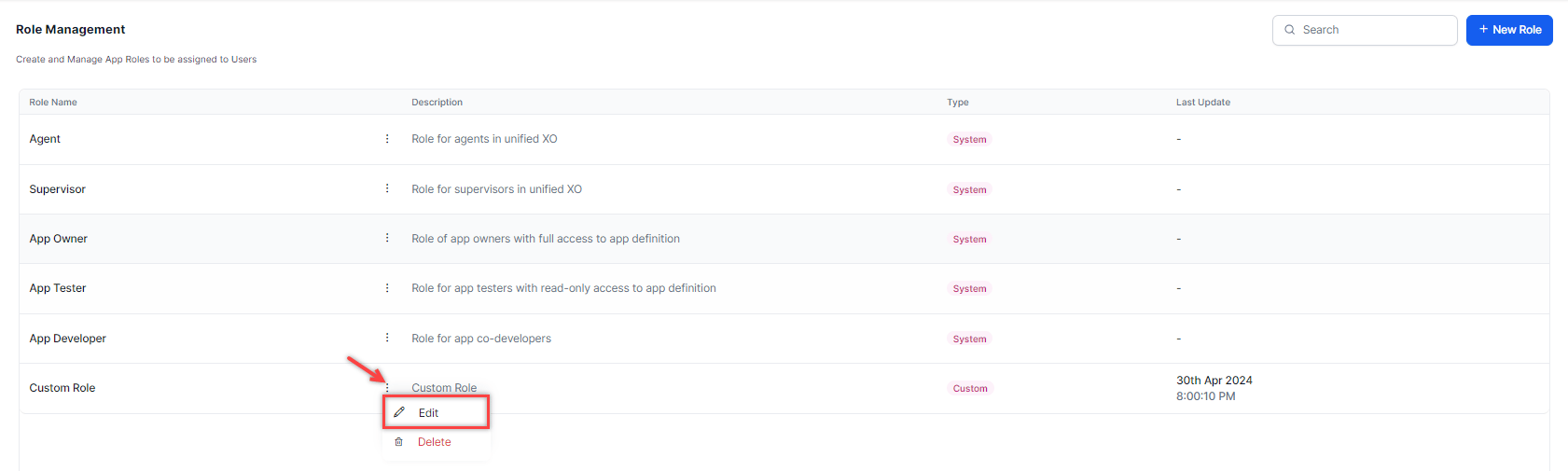 2. In the **Edit Role** window, make your changes and select **Save**.
***
### Delete a Role
1. Select the **Ellipsis** icon (⋮) for the role and select **Delete**.
2. In the **Edit Role** window, make your changes and select **Save**.
***
### Delete a Role
1. Select the **Ellipsis** icon (⋮) for the role and select **Delete**.
 2. Select **Yes** to confirm.
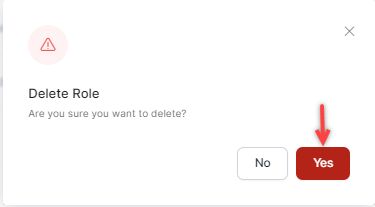 You can't delete default roles (App Owner, App Developer, App Tester, Supervisor, Agent). Deleted roles can't be restored.
***
You can't delete default roles (App Owner, App Developer, App Tester, Supervisor, Agent). Deleted roles can't be restored.
***