

Audit Log Dashboard
Each audit log entry captures the following information:
User ID, Role ID, Model ID, Workflow ID, Guardrail ID, Integration ID, and Experiment ID are the unique identifiers for the respective module entities in the system.
IP Address is fetched from the user’s current network.
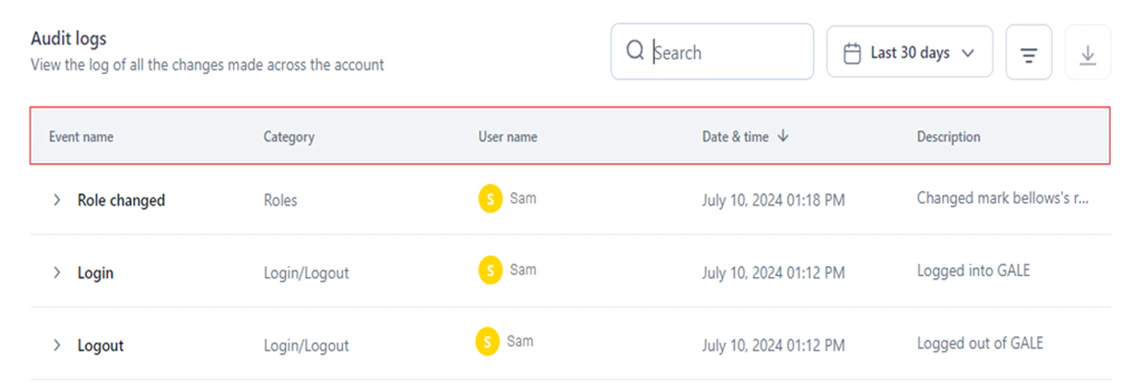
Filter Audit Logs
Select the Filter icon to narrow down logs by category, event, or user using Is Equal To or Is Not Equal To operators. Combine multiple filters using AND (all conditions must be met) or OR (any one condition must be met) — operators cannot be mixed in the same filter set.Export Audit Logs
Select the Export icon on the Audit Logs page to download a CSV file containing all audit log entries, including date and time, event name, category, description, user or app name, and IP address.Audit log event reference
The tables below list all tracked events by category.Account-level events
The User ID and IP Address are shown for audit log entries across all modules, in addition to module and category-specific metadata listed below.Login/Logout
Login/Logout
Metadata: Email ID is shown for all events in this category.
Roles
Roles
Metadata: Role ID is shown for all events except Role Changed.
App API Key
App API Key
Metadata: IP Address and User ID are shown for all events.
API App
API App
Metadata: App ID, IP Address, and User ID are shown for all events.
Integrations
Integrations
Metadata: IP Address, Integration Name, Integration ID, Integration Type, and User ID are shown for all events.
Models
Models
Metadata:
- IP Address, User ID, Model ID, and Model Name are shown for all Model events.
- Model Type is also shown for: Model Added, Model Deleted, API Key Created, API Key Deleted, Model Fine-tuning, Model Deployed, and Model Undeployed.
- Hardware Type is shown for: Model Fine-tuning, Model Deployed, and Model Undeployed.
Workflows
Workflows
Metadata: Workflow ID and Workflow Name are shown for all events.
Workflows Flow Management: Integration Node
Workflows Flow Management: Integration Node
Metadata: User ID, IP Address, Agent ID, Node name, Node ID, and Node Type are shown for all events.
Users Management
Users Management
Prompts
Prompts
Metadata:
- Prompt ID is shown for all Prompts events.
- Prompt Name is shown for: Prompt Created, Versions Committed, Versions Restored, Prompt Shared, Endpoint Copied, and API Key Created.
Dataset
Dataset
Manage Custom Scripts
Manage Custom Scripts
Metadata: User ID, User Name, IP Address, and Custom Script Name are shown for all events.
Guardrails
Guardrails
Metadata: Guardrail Name, Guardrail ID, and Hardware Type are shown for all events.
Script
Script
Metadata: User ID, User Name, IP Address, Agent ID, Node name, Node ID, and Node Type are shown for all events.
OCR
OCR
Metadata: User ID, User Name (where applicable), IP Address, Connection Name, Connection ID, Deployment Name, and Hardware Type are shown for all events.
Workflow-level events
User ID, IP Address, and Workflow ID are included in all workflow-level entries, in addition to any category-specific metadata listed.User Management
User Management
Workflow Management
Workflow Management
Metadata for deployment events: Workflow version, API mode, sync/async, and URL are shown for Workflow Deployed and Workflow Undeployed events.
Metadata for version and configuration events: Version ID is shown for the events below.
Guardrails
Guardrails
OCR
OCR
Metadata: User ID, IP Address, Agent ID, Node name, Node ID, and Node Type are shown for all events.