Agent AI Web SDK provides a versatile and customizable solution for integrating AI Agent functionalities into web applications. Built using JavaScript, Preact, and SCSS, this SDK enables seamless interaction, real-time event handling, and UI customization for an enhanced user experience.

Prerequisites

Before using the SDK, generate the following identifiers:
  • Client ID
  • Bot ID
  • Client Secret
To generate the above identifiers, follow these steps:
  1. Navigate to the AgentAssist Configuration page.
  2. Open the Automations section.
  3. Create a new app or import an existing one.
  4. Once the app is created or imported, its details are displayed under the Channels section of the Configuration page.
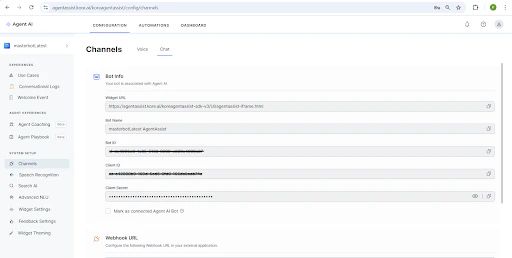
Generate a JWT (JSON Web Token) using the above identifiers. web-sdk-channel

Getting Started

There are two ways to integrate the SDK into your project:
  • Installation via CDN
  • Installation via NPM

Installation via CDN

Include the SDK directly in your HTML via a CDN:

Installation via NPM

To install the SDK via NPM, use the following command
Initialize the SDK in your project