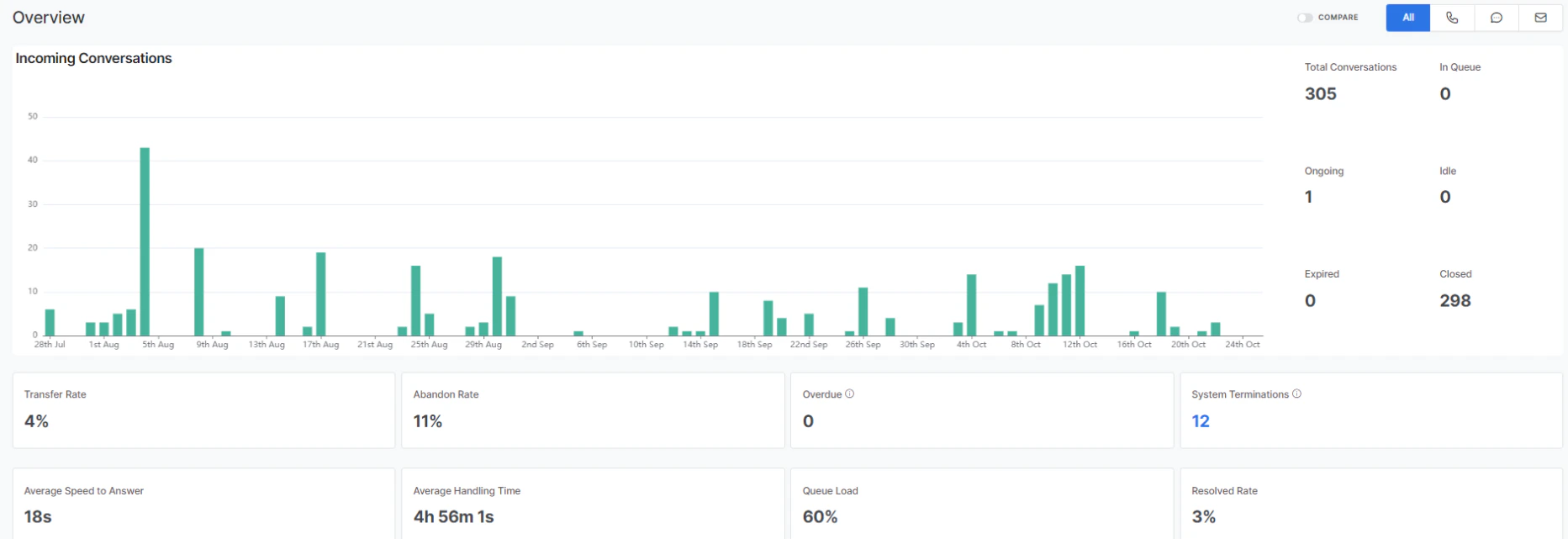
Back to Analytics Overview The Queues & Agents dashboard displays Overview, Efficiency, Agent Performance, and Queue Performance metrics for a selected time period.

Accessing the Dashboard

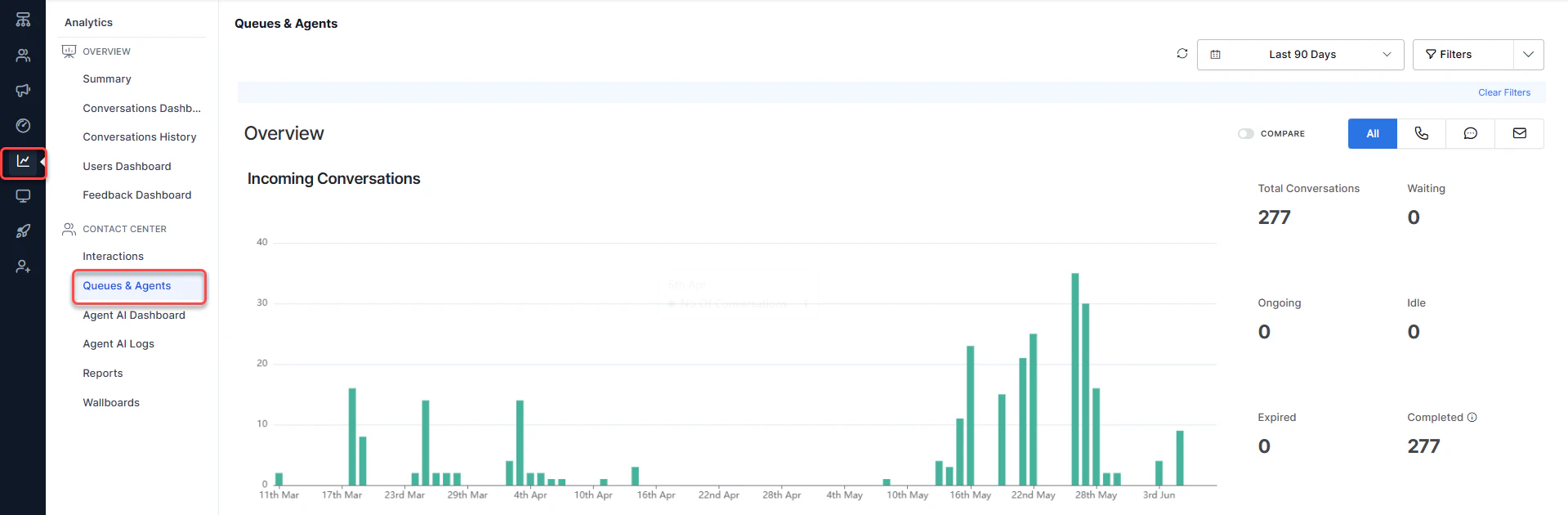
  1. Select Analytics on the left navigation pane.
Navigating to Queues Agents Report
  1. Select Queues & Agents under the Contact Center section. The dashboard displays on the right side of the page.

Time Selection

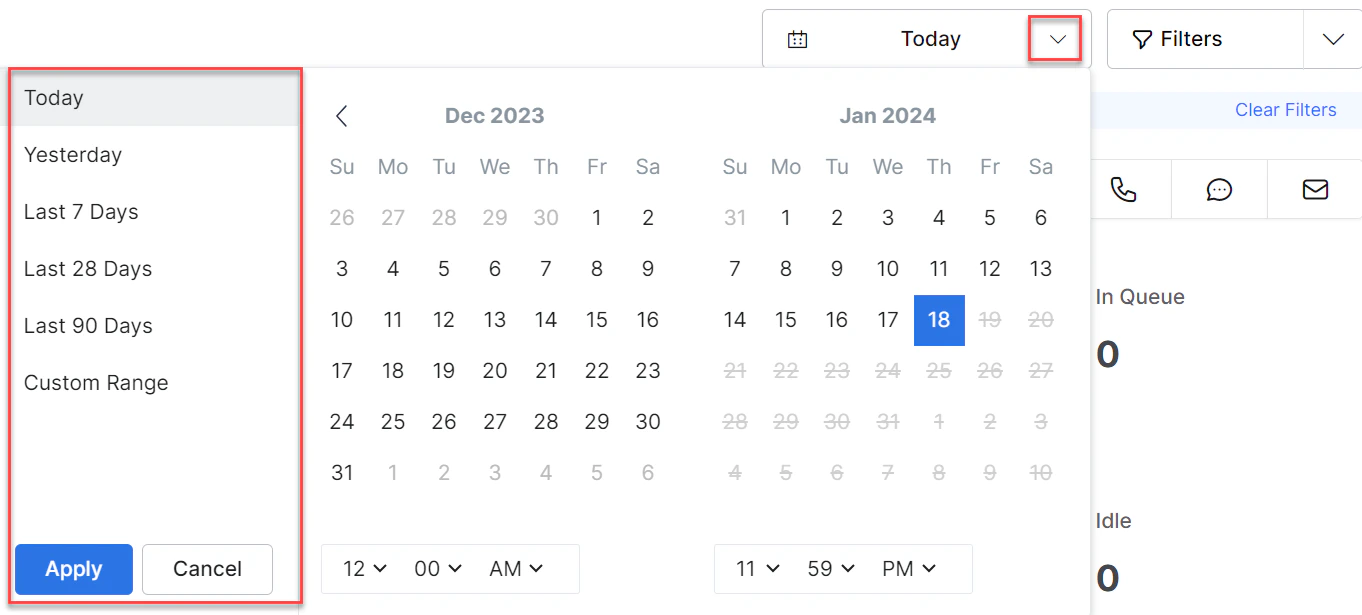
Filter data for a specific time range by selecting a range and selecting Apply. Time Selection
Filters

You can create, save, edit, copy, and delete filters to avoid repeatedly setting the same options.

Create Filter

  1. Select Filter.
  2. Select New Filter.
  3. Select the Queues, Channels, Direction, and Agents.
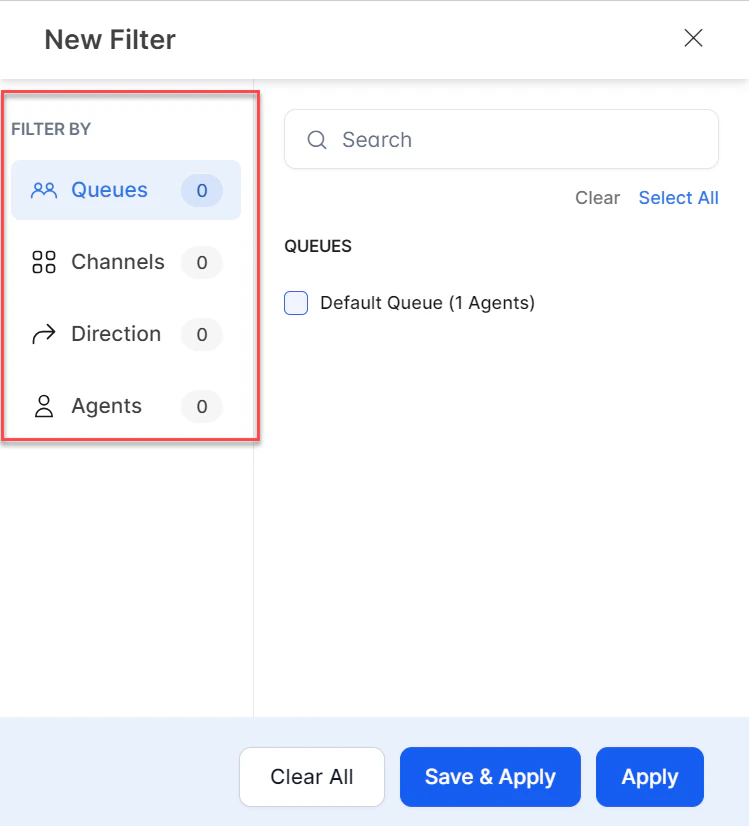
Create Filters Available options:
  • Clear: Clears the current selection.
  • Save & Apply: Saves the filter for future use.
  • Apply: Applies the filter for the current session only (not saved).
  1. Select Save & Apply.
  2. Enter a name for the filter and select Save & Apply.
A confirmation message appears and the filter is created.

Edit Filter

  1. Select the Filters tab. The saved filter name appears.
  2. Select Edit.
  3. Make the necessary changes and select Save & Apply.
A confirmation message appears and the filter is updated.

Copy Filter

  1. Select Duplicate.
  2. In the Rename Filter window, enter a name and select Save.
A confirmation message appears and a copy of the filter is created.

Mark as Default

  1. Select Mark as Default.
A confirmation message appears and the filter is set as default.

Delete Filter

  1. Select Delete.
  2. In the confirmation window, select Delete.
A confirmation message appears and the filter is deleted.

Overview of Incoming Conversations

This section displays metrics for all conversations (phone, chat, and email).
MetricDescription
Total ConversationsTotal conversation count for the selected time range.
In QueueCount of conversations currently in a queue.
OngoingCount of ongoing conversations.
IdleCount of idle conversations.
ExpiredCount of expired conversations.
ClosedCount of closed conversations.
Transfer RatePercentage of transferred conversations.
Abandon RatePercentage of abandoned conversations.
OverdueLive count of conversations in the overdue state, based on selected queues and agents.
System TerminationsCount of conversations terminated by the system (based on selected queues). Select the count to view details.
Average Speed to AnswerAverage time for an agent to respond to an assigned conversation.
Average Handling TimeAverage handling time of conversations.
Queue LoadLive metric showing the current load on the system as a percentage of its capacity.
Resolved RatePercentage of resolved conversations.
COMPARE: The COMPARE toggle compares historical metrics against a previous equal-sized time range. For example, if Average Handle Time is 12m 2s for the last 30 days and was 6m 1s previously, selecting Compare shows a 50% increase. Abandon Rate Selecting the percentage on the Abandon Rate widget shows:
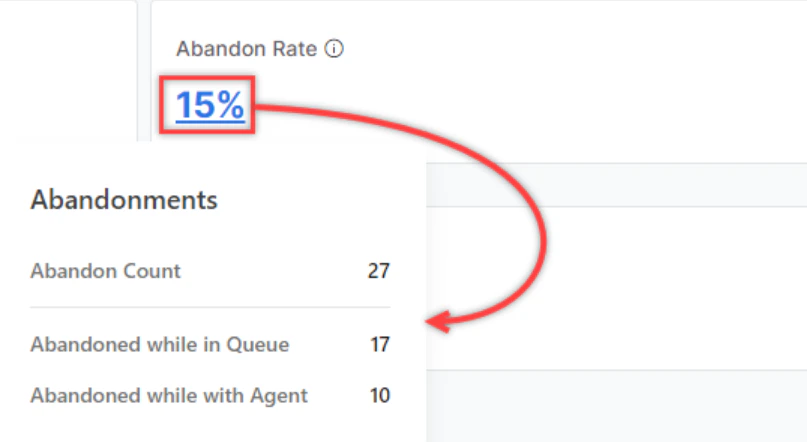
  • Abandoned while in Queue: Count of conversations abandoned while waiting in the queue.
  • Abandoned while with Agent: Count of conversations abandoned while attended by an agent.
Abandon Count formulas:
  • Digital Channels: Abandon Count = User Abandons While Waiting in Queue + Conversations With Agent that went through the Idle-Expired Sequence
  • Voice Channels: Abandon Count = User Abandons While Waiting in Queue + Conversations With Agent where User Disconnects While Agent has the call on hold
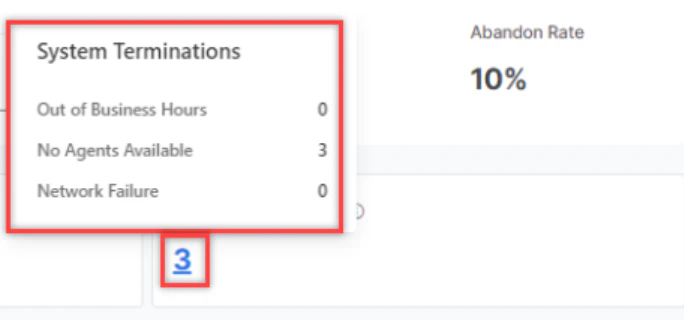
System Terminations Resolved Rate

Efficiency

This section displays individual metrics for all conversations (call, chat, and email).

Voice Metrics

  • Average Speed to Answer
  • Average Handle Time
  • Average Pick-up Time
  • Average Engagement Time
  • Average Talk Time
  • Average Mute/Hold Time

Chat Metrics

  • Average Speed to Answer
  • Average Handle Time
  • Average First Response Time
  • Average Agent Response Time
  • Average Customer Response Time

Transfers

  • Transfer Rate
  • Call Transfers
  • Chat Transfers
Skills In Queue: Displays conversation counts per skill for conversations currently in the queue (active or waiting). Top Skills: Displays the number of conversations per skill for the selected time range. Conversations by Disposition Set: Lets you select a Disposition Set from the list and view conversations by disposition code.
  • The Resolution Disposition Set is the default and appears in the Disposition & Notes section of the Live Interactions pane in the Agent Console.
  • A multi-colored progress bar appears for codes in the selected Disposition Set.
  • Separate progress bars appear under each Disposition Code.
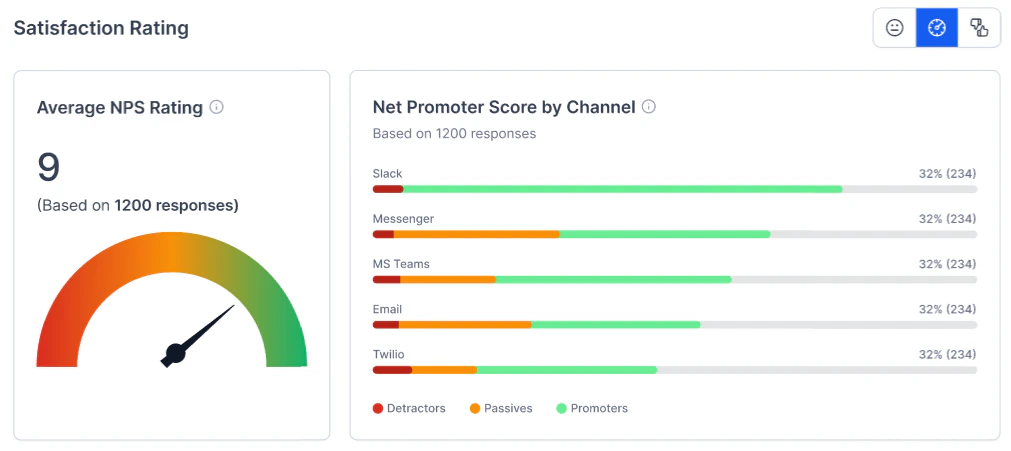
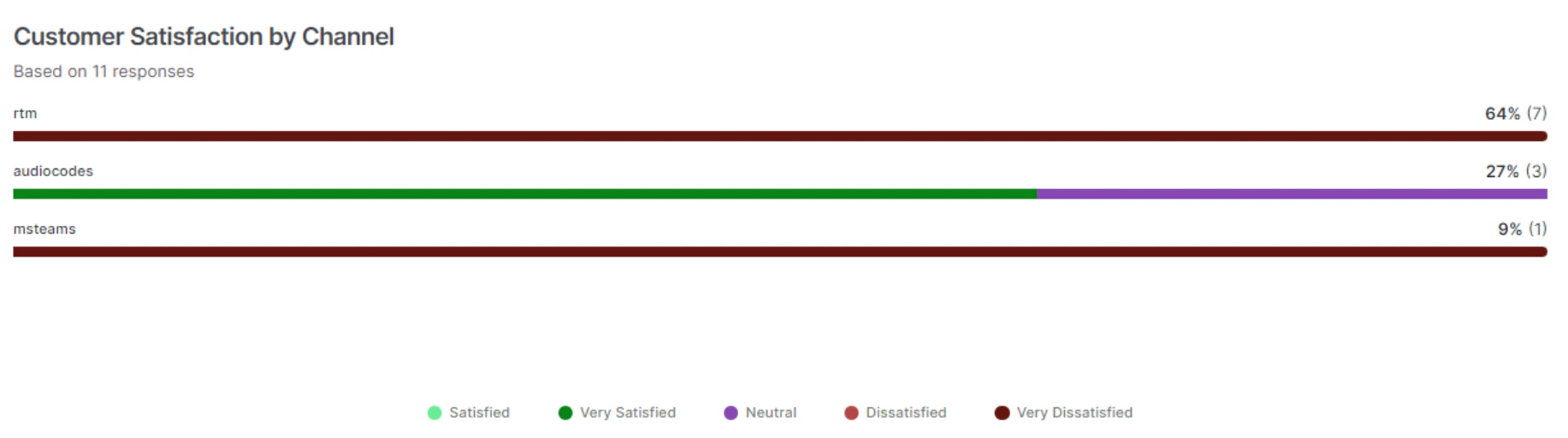
Satisfaction Rating: Displays results for the selected feedback survey (CSAT, NPS, Like/Dislike). Average Satisfaction Rating Customer Satisfaction by Channel: Displays channel-wise customer satisfaction metrics based on survey responses. Customer Satisfaction by Channel

Agent Performance

This section displays agent performance metrics for all conversations (call, chat, and email). Agent Performance
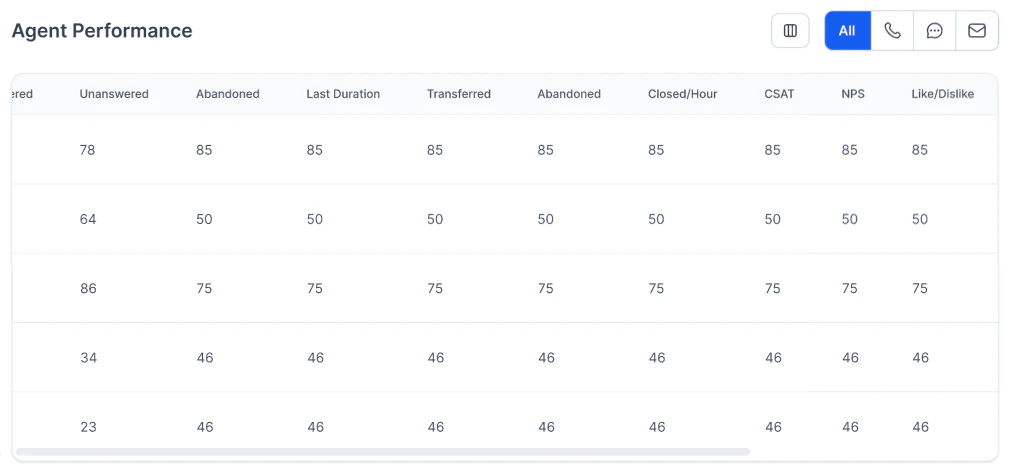
Agent Performance Metrics

MetricDescription
OfferedNumber of conversations assigned to the agent.
AnsweredNumber of conversations answered by the agent.
UnansweredNumber of conversations assigned but not answered by the agent.
AbandonedNumber of conversations where the user dropped off while with the agent.
TransferredNumber of conversations transferred by the agent.
Logged InAgent login time between the selected start and end filters.
Closed/HourNumber of conversations closed per hour.
AHTAverage Handle Time of conversations by the agent.
CSATAverage CSAT score of the agent.
NPSAverage NPS score of the agent.
Like/DislikeAverage Like/Dislike score of the agent.

Queue Performance

This section displays queue performance metrics for all conversations (call, chat, and email). Queue Performance
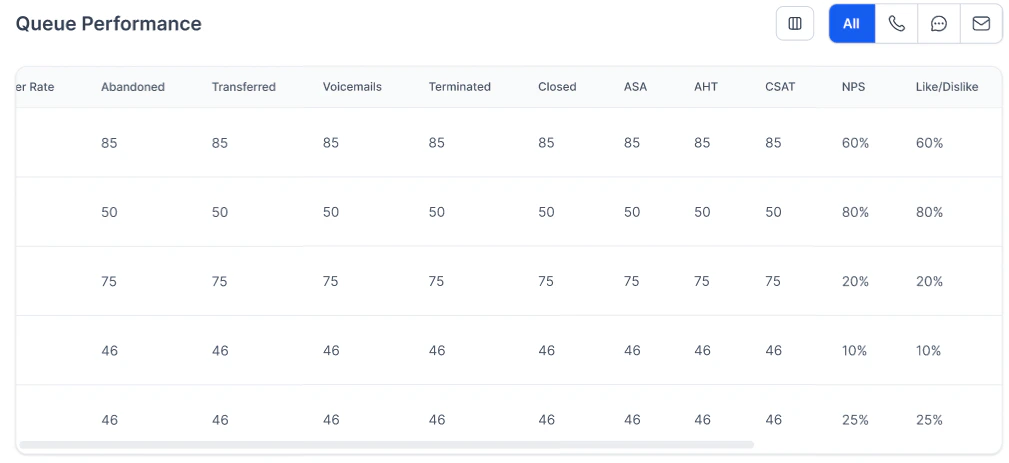
Queue Performance Metrics

MetricDescription
IncomingIncoming = InQueue + Active + Idle + Expired + Completed + Transferred Out. Completed = Abandoned in Queue + System Terminated + All Conversations With Resolutions. Includes both inbound and outbound calls if the conversation entered the queue. For No-Filters, includes conversations transferred directly from AI Agents to an agent without entering a queue.
AnsweredNumber of conversations answered by agents in the queue.
AbandonedNumber of conversations where the user dropped off while with an agent in the queue.
TransferredNumber of conversations transferred from the queue.
VoicemailsNumber of voicemails in the queue.
TerminatedConversations terminated by the system (for example, no agents available, outside working hours, voice gateway failure, or network error).
ClosedConversations an agent closed after performing after-call work, assigning dispositions, writing notes, and selecting Close.
ASAAverage Speed to Answer by agents in the queue.
AHTAverage Handle Time of conversations by agents in the queue.
CSATAverage CSAT score in the queue.
NPSAverage NPS score in the queue.
Like/DislikeAverage Like/Dislike score in the queue.

Queues and Agents Field Reference

The behavior of each metric differs depending on whether data is filtered by queue or by agent.
MetricFiltered by QueuesFiltered by Agents
Total ConversationsConversations that have entered a queue.Interactions that an agent accepts.
In Queue (live)Conversations currently waiting in a queue.NA
Ongoing (live)Conversations in progress with agents from the queue.Conversations in progress with selected agents.
Idle (live)Conversations where the customer has been silent for a configured period (for example, 5 minutes).Conversations where the customer has been silent for a configured period (for example, 5 minutes).
Expired (live)Conversations where the customer has been silent for a configured period (for example, 10 minutes).Conversations where the customer has been silent for a configured period (for example, 10 minutes).
ClosedInteractions that entered the queue and were ended by an agent or closed by the system while in the queue.Interactions ended by the selected agent.
Transfer RateTransfers / Total Conversations × 100. Transfers = interactions where an agent in the queue transferred the call.Transfers / Total Conversations × 100. Transfers = interactions where the selected agent transferred the call.
Abandon RateAbandonments / Closed × 100. Abandonments = interactions abandoned while in the selected queue or while being handled by an agent in the queue.Abandonments / Closed × 100. Abandonments = interactions abandoned while being handled by the selected agent.
Average Speed to AnswerSum of (Queue Wait time) / Closed. Queue Wait time = Accepted time – Queue Entry Time.Sum of (Queue Wait time) / Closed. Queue Wait time = Accepted time – Queue Entry Time.
Average Handle Time(Talk time + Hold Time + ACW time) / Closed. For chats, Hold Time = 0.(Talk time + Hold Time + ACW time) / Closed. For chats, Hold Time = 0.
Queue Load100 × (Active or Waiting interactions / Handling Capacity of All Agents in Queue).NA
Resolved RateCalls resolved in the queue / Closed calls. May be misleading with non-default disposition sets.Calls resolved by the agent / Closed calls. May be misleading with non-default disposition sets.

Voice Metrics Reference

MetricFiltered by QueuesFiltered by Agents
Average Speed to AnswerSum of (Queue Wait time) across all conversations / Closed. Queue Wait time = Accepted time – Queue Entry Time.Sum of (Queue Wait time) across all conversations / Closed. Queue Wait time = Accepted time – Queue Entry Time.
Average Handle TimeHandle Time of Each Interaction / Number of Closed Interactions. Handle Time = Talk Time + Hold Time + ACW time.Handle Time of Each Interaction / Number of Closed Interactions. Handle Time = Talk Time + Hold Time + ACW time.
Average Pick-up TimePick-up time of each Interaction / Number of Closed Interactions. Pick Up Time = Time Agent Accepted – Time Agent was Assigned the interaction.Pick-up time of each Interaction / Number of Closed Interactions. Pick Up Time = Time Agent Accepted – Time Agent was Assigned the interaction.
Average Engagement TimeEngagement Time = Talk Time + Hold Time.Engagement Time = Talk Time + Hold Time.
Average Talk TimeAverage talk time across all voice calls. Talk time = time the agent and caller were in active conversation.Average talk time across all voice calls. Talk time = time the agent and caller were in active conversation.
Average Mute/Hold TimeAverage hold time across all voice calls.Average hold time across all voice calls.

Chat Metrics Reference

MetricFiltered by QueuesFiltered by Agents
Average Speed to AnswerSum of (Queue Wait time) across all conversations / Closed. Queue Wait time = Accepted time – Queue Entry Time.Sum of (Queue Wait time) across all conversations / Closed. Queue Wait time = Accepted time – Queue Entry Time.
Average Handle TimeHandle Time of Each Interaction / Number of Closed Interactions. Handle Time = Talk Time + ACW time.Handle Time of Each Interaction / Number of Closed Interactions. Handle Time = Talk Time + ACW time.
Average First Response TimeFirst Response Time of Each Interaction / Number of Closed Interactions. First Response Time = from Agent accepted to Agent’s first message.First Response Time of Each Interaction / Number of Closed Interactions. First Response Time = from Agent accepted to Agent’s first message.
Average Agent Response TimeAverage of all durations from a customer’s message to the agent’s corresponding response. When there is a continuous stream of messages, the earliest message is used.Average of all durations from a customer’s message to the agent’s corresponding response. When there is a continuous stream of messages, the earliest message is used.
Average Customer Response TimeAverage of all durations from an agent’s message to the next message from the customer. When there is a continuous stream of messages, the earliest message is used.Average of all durations from an agent’s message to the next message from the customer. When there is a continuous stream of messages, the earliest message is used.

Transfer and Skills Metrics Reference

MetricFiltered by QueuesFiltered by Agents
Transfer RateConversations transferred from the queue (including back to the same queue) / Total Conversations.Conversations transferred from the agent / Total Conversations.
Total TransfersConversations transferred from the queue (including back to the same queue).Conversations transferred from the agent.
Call TransfersFraction of Total Transfers from voice calls.Fraction of Total Transfers from voice calls.
Chat TransfersFraction of Total Transfers from digital channels.Fraction of Total Transfers from digital channels.
Skills in Queue (live)Count of conversations in the selected queue (active or waiting) per skill. Top 5 skills shown.NA
Top SkillsCount of closed conversations entering selected queues per skill.Count of closed conversations accepted by selected agents per skill.
Conversations by Disposition SetCount of closed conversations assigned a particular disposition code. Changing the Disposition Set shows a different set of codes.Count of closed conversations assigned a particular disposition code. Changing the Disposition Set shows a different set of codes.
Average Satisfaction RatingSum of all CSAT ratings / Number of conversations with a CSAT rating.Sum of all CSAT ratings / Number of conversations with a CSAT rating.
Customer Satisfaction by ChannelAverage CSAT rating by channel.Average CSAT rating by channel.