Back to Analytics Overview The Queue Metrics Summary Report is a daily summary of queue load and performance information.

Generating the Report

  1. On the Reports tab, select New Report.
  2. In the list of reports, choose Queue Metrics Summary Report.
  3. Enter the Report Name and Report Description.
  4. Select a Time Period.
  5. Select Data Filters.
  6. Select Report Generation and choose from the following options:
    • Run On Demand
    • Schedule — You can create up to six schedules (only one if you select Hourly). Schedule Options
  7. Select Format:
    • PDF
    • CSV
  8. Enter a Send To address (single email address or mailing list).
  9. Select Create.
  10. The Queue Metrics Summary Report is generated. Queue Metrics Summary Report Created
  11. Select the Run icon next to the report instance. Run Queue Metrics Summary Report
Run On Demand: Triggers report generation immediately when selected. Schedule: Sets the report to generate automatically on the scheduled day and time, without needing to select Run.
  1. Select the PDF/Page icon to generate the report output. Queue Metrics Summary Report PDF
The red dot beside the report indicates it was generated within the last 24 hours. You can download, save, and view the report in PDF format.
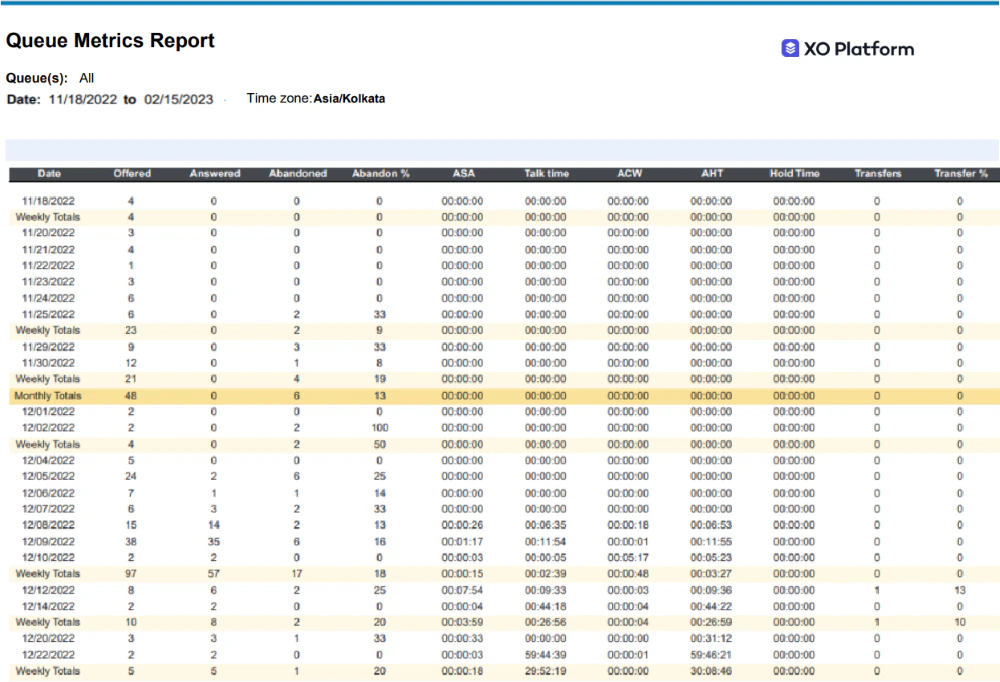
The report is generated and available for download. Queue Metrics Summary Report Output

Report Fields

FieldDescriptionExampleWeekly SummaryMonthly Summary
DateDate for which metrics are being consolidated.”01/31/2023”NANA
OfferedAll conversations that entered this queue.2SUMSUM
AnsweredAll conversations accepted by agents in this queue.2SUMSUM
AbandonedAll conversations abandoned by callers while in this queue or with agents.1SUMSUM
Abandon %Number abandoned / Number offered × 100.50SUMSUM
ASAAverage Speed to Answer — average wait time in a queue.”00:00:11”SUMSUM
Talk timeAverage talk time — time agents in this queue spent interacting with the end user.”00:00:11”SUMSUM
ACWAverage duration of After Contact Work performed by each agent for calls on this queue.”00:00:11”SUMSUM
AHTAverage Handle Time for each agent for calls on this queue.”00:00:11”SUMSUM
Hold timeAverage hold time for all calls while in this queue.”00:00:11”SUMSUM
TransfersNumber of conversations transferred from this queue.50SUMSUM
Transfer %Number transferred / Number offered × 100.6SUMSUM