

- Consistent Spell Correction Experience: Spell correction happens at a central place immediately after language detection, unlike Version 1 where it occurred separately at each NLP engine.
- Enhanced Accuracy: Words are checked against comprehensive dictionaries using edit distance to find and rank corrections based on their commonness.
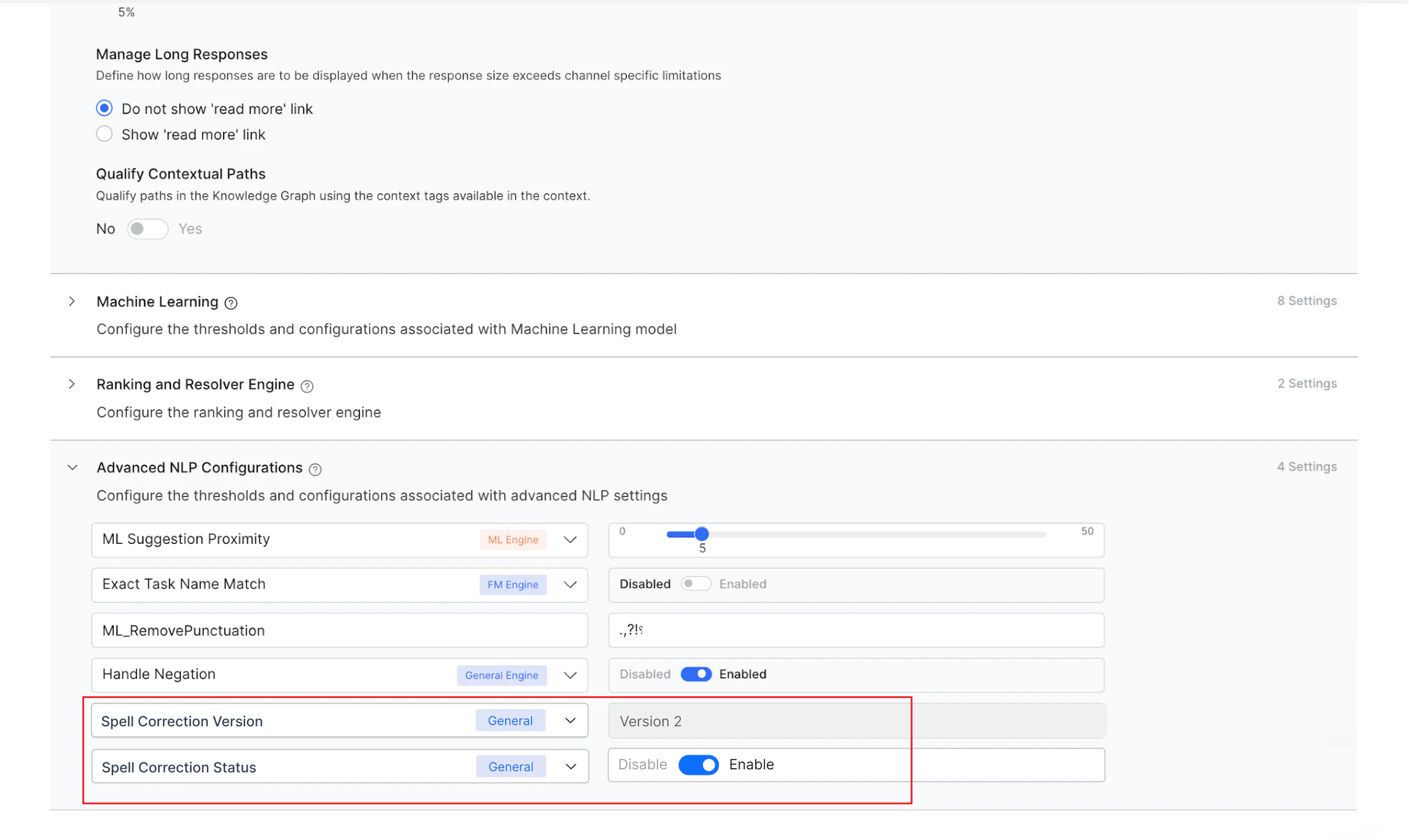
Configurations to Manage Spell Correction
Two new language-specific settings are available in Advanced NLP Configurations (disabled by default):- Spell Correction Version: Select from the drop-down and choose the version.
- Spell Correction Status: Select from the drop-down and toggle the status to Enabled.
- Auto-Correction in Knowledge Graph.
- ML_Spell_Correction custom flag in Advanced NLP Configurations.
Impact on New and Existing Bots
- New bots and existing bots without spell correction enabled (in configured or published copy for ML and KG engines): Only Spell Correction V2 is supported. Configure and enable the settings as described above.
- Existing bots with spell correction already enabled (in either configured or published copy in ML or KG engine): Both versions are supported. An upgrade banner appears on the NLU Config screen. You can initiate the upgrade from the banner, and the platform will automatically configure the required settings.
