

Why Use CX Insights?
Key Capabilities
Access CX Insights
Navigate to Quality AI > CX Insights.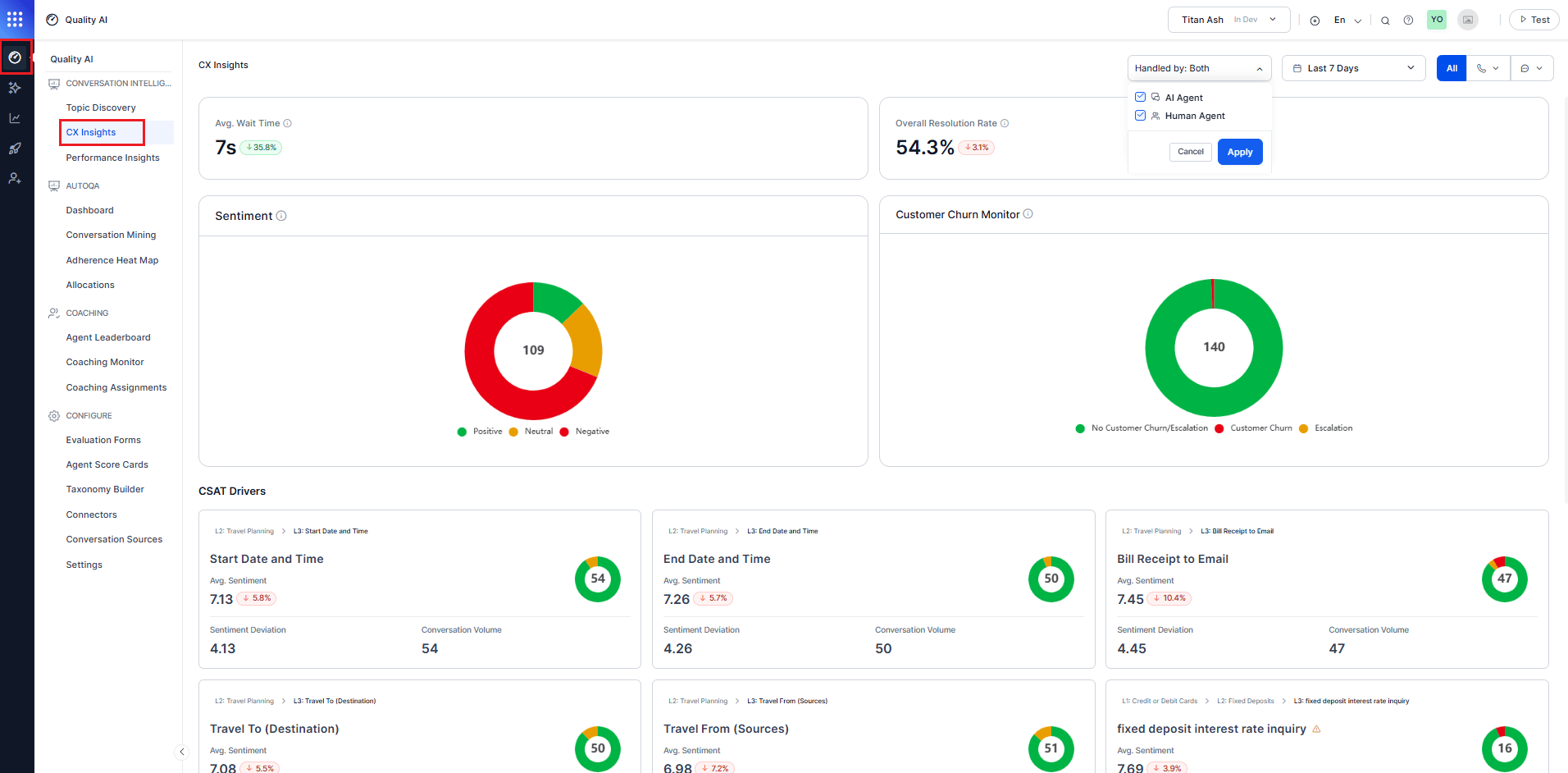
Enable the Conversational Intelligence option under Configure > Settings to access CX Insights and CX trends.
Handled By Filter
The Handled By filter shows as a dropdown in the upper-right corner of the CX Insights page, next to the Date Range and Channel filters. The label displays Handled by: followed by the current selection. The dropdown includes two checkboxes: AI Agent and Human Agent. Select an agent to view data for the other conversation type, and then select Apply. For conversations transferred from an AI Agent to a Human Agent:- AI Agent displays analytics calculated only from the AI Agent conversation segment.
- Human Agent displays analytics calculated only from the Human Agent conversation segment.
- Both display aggregated analytics across both conversation segments.
Per-Segment and Combined Analytics
CX Insights computes analytics at the segment level and aggregates results based on the selected filter.- Sentiment analysis is calculated independently for AI Agent and Human Agent segments.
- Topic classification is performed separately for each segment using the shared L1/L2/L3 taxonomy.
- CSAT and DSAT drivers are derived from sentiment and topic outputs of the selected segment.
- When Both is selected, CX Insights aggregates segment-level results into a combined view.
Topic Classification
- AI Agent and Human Agent conversations share the same L1/L2/L3 taxonomy.
- Each conversation segment is independently classified, and results are then aggregated for reporting.
Filters
Date Range
Filter CX Insights data by date range (for example, Last 90 Days, Last 28 Days, Last 7 Days). The default is Today. Select a range, and select Apply after choosing the desired range.Channel and Direction
Filter CX data by channel and interaction direction. Applying this filter updates all widgets in real time. Available direction options:Top-Level CX Metrics
Summarizes the key customer experience performance indicators that provide a high-level view of service quality and customer experience. To see which agents or behaviors influence CX outcomes, refer to Performance Insights.Average Wait Time
Displays the average time customers wait before an agent responds. Calculation: Calculated as total wait time ÷ customers served in the period. Defaults to 0 when no data is available. What it shows: Current average wait time (for example, 8s), percentage change compared to the previous period, and a directional indicator showing increase or decrease. Use this to: Monitor accessibility and responsiveness and identify staffing or queue optimization needs.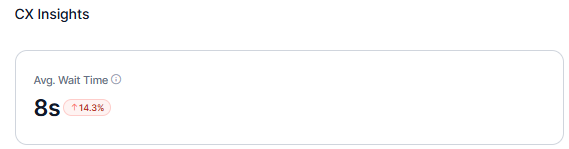
Overall Resolution Rate
Shows the percentage of interactions marked as resolved in the selected period. Displays 0% when no qualifying conversations exist. What it shows: Resolution rate percentage, comparison with the previous equivalent time range, and an improvement or decline indicator. Use this to: Track end-to-end resolution effectiveness, measure impact of process improvements, and set benchmarks.
Sentiment Distribution
These widgets provide a visual summary of customer sentiment and churn risk, helping you understand overall customer mood and identify experience trends.Sentiment Category
The Sentiment widget classifies interactions as Positive, Neutral, or Negative based on average sentiment scores, reflecting overall customer emotion (for example, happy, satisfied, or disappointed). A doughnut chart shows the distribution across sentiment categories. Color coding: Positive (Green), Neutral (Yellow), Negative (Red). What it shows: Total number of interactions at the center, proportional distribution across sentiment categories, and overall customer sentiment across conversations. Displays an empty state when no conversations are processed. Use this to: Understand overall customer mood and track sentiment shifts over time. Use this to: Understand overall customer, track sentiment shifts over time, and compare topic-level experience trends.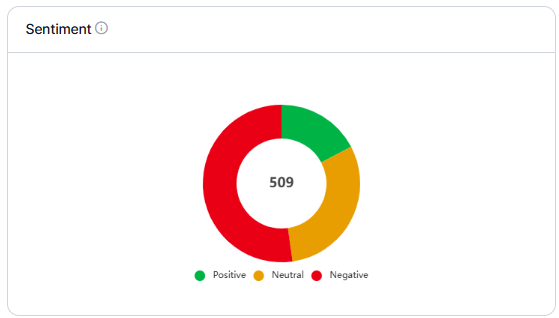
Customer Churn Monitor
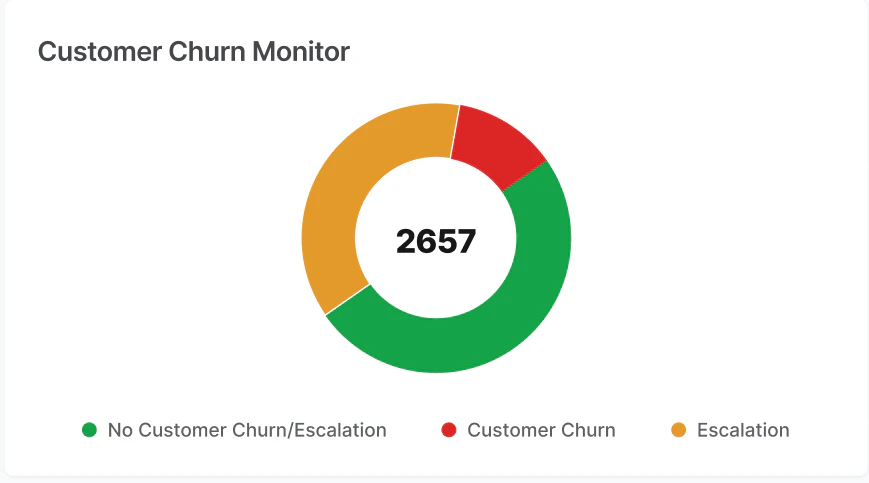
Displays churn risk in a pie chart, comparing the churn percentage with total calls and escalations. Hover over a section to see its value; select a section to view related calls.Churn and Escalation Categories
What it shows: Total interaction count, distribution of churn and escalation categories, and an empty state when no qualifying data is available.
Use this to: Identify churn risks early, track escalation trends, and prioritize retention.
Enable Conversational Intelligence in Configuration > Settings to populate churn insights before processing conversations.
CSAT Drivers
CSAT Drivers identify topics that positively influence customer satisfaction. The system uses a driver impact scoring model based on sentiment and topic volume.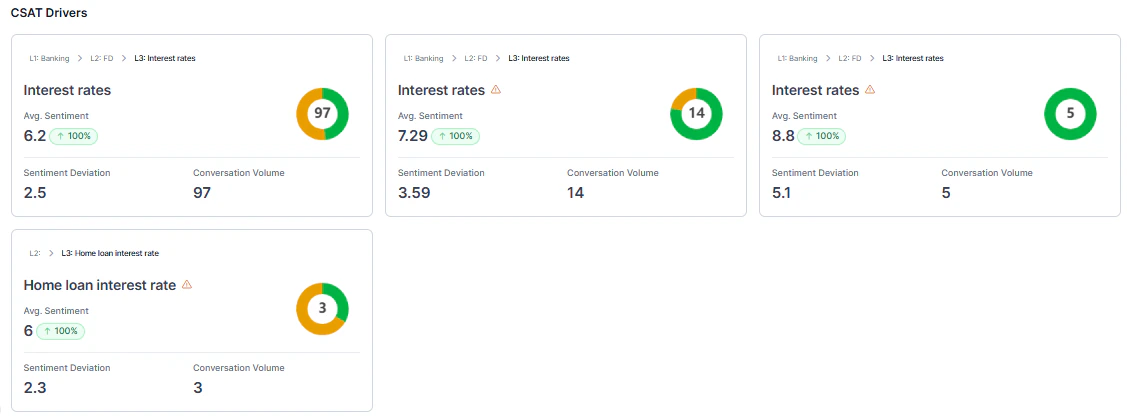
Driver Impact Formula
Driver Impact Score = (Average Sentiment − Baseline Sentiment) × Conversation CountQualification Criteria
A topic qualifies as a CSAT driver only when it meets both:- Volume: ≥30 conversations and ≥2% of total conversations.
- Deviation: ≥0.8 sentiment points from baseline.
Driver Card Details
Each CSAT Driver card displays the topic name with taxonomy path (for example, L2: Travel Planning > L3: Cost of the Flights), average sentiment score with comparison indicator, color-coded sentiment badge, sentiment deviation from baseline, and conversation volume.Warning Indicators
Topics that don’t meet qualification thresholds display a warning appears.
Display rules:
- If 6+ qualified drivers exist: Show top 6 (no warnings).
- If fewer than 6 qualified drivers: Fill remaining slots with warning cards.
- If limited data: Show a warning message indicating insufficient data.
Baseline Calculation
The baseline adjusts based on filters applied. When multiple or all channels are selected, it uses the average sentiment across all conversations in the filtered period. When a single channel is selected, it uses the average sentiment for that specific channel within the same period.When Conversational Intelligence or Generative AI is disabled, Generative AI insights aren’t available. Enable the feature to access advanced speech analytics and CX insights. Navigate to Generative AI Tools > Gen AI Feature > Copilot to enable it.
DSAT Drivers
Highlights the top 6 DSAT (Dissatisfaction) topics that negatively impact customer satisfaction. It uses the same scoring model as CSAT Drivers, but displays topics with sentiment below the baseline.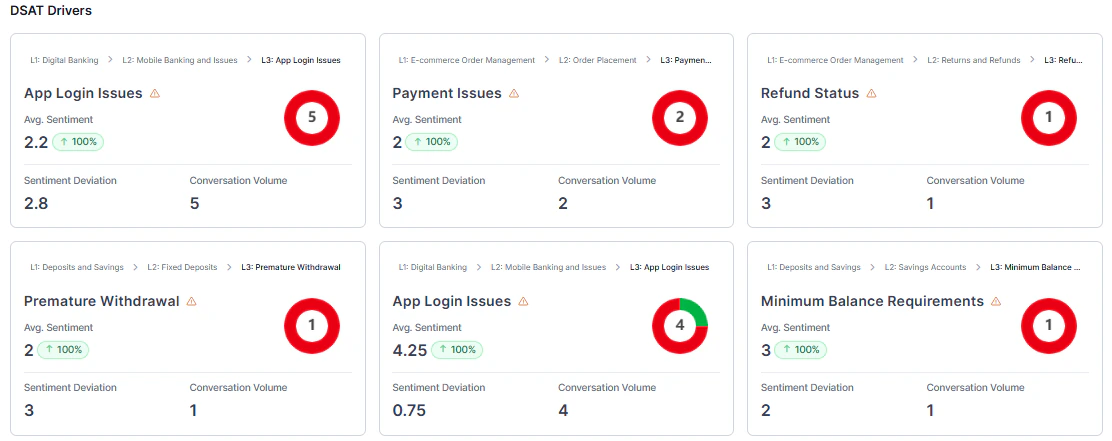
If no data is available, more conversations are needed to identify dissatisfaction drivers.
CX Data Handling Rules
CX Insights excludesBelow Threshold or Duration Unavailable conversations from all aggregated metrics. Manually evaluated conversations remain included. Excluded interactions don’t affect totals, averages, distributions, or driver calculations.