

- Conversation Intelligence
- Quality AI General Settings
- Language Settings
Access Conversation Intelligence
Navigate to Quality AI > Configure > Settings > Conversation Intelligence.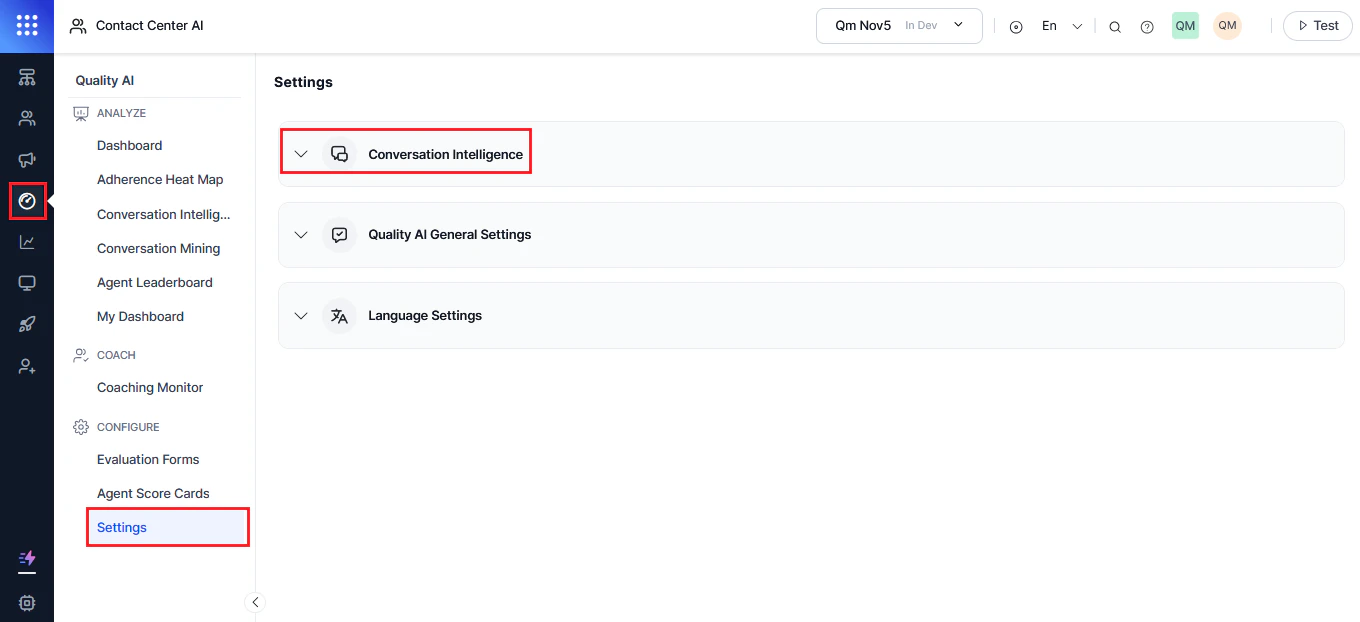
Enable Conversation Intelligence
- Enable the Conversation Intelligence Dashboard toggle.
- Configure script adherence settings as required.
Role permissions in Settings are defined by Admin based on agent roles.
Interaction Level Resolution Detection Methods
This setting defines how the system determines contact-level resolution across conversations. Select the method that aligns with your quality standards and reporting needs. The system controls resolution calculation, while the Taxonomy Builder defines success and failure criteria for topics.Method 1: Topic-Based Resolution (Strict)
The system evaluates resolution using AND logic across all L3 topics in a conversation. A contact is marked resolved only when every topic is successfully resolved.Use when:
- You want strict resolution evaluation across all topics
- You want to prevent minor mentions from affecting resolution metrics
- You want structured control via Taxonomy Builder
Configuration:
- Go to Settings > Conversation Intelligence
- Select Topic-Based Resolution (Strict)
- Select Save
Method 2: Overall Contact Level Resolution (Holistic Assessment)
The system uses an LLM-based evaluation to determine whether the primary reason for contact is resolved, even if minor issues remain unresolved.Use when:
- You want outcome-based evaluation of primary intent
- You want flexibility in handling secondary issues
- You want LLM-driven resolution assessment
Configuration:
- Go to Settings > Conversation Intelligence
- Select Overall Contact Level Resolution (Holistic Assessment)
- Select Save
- Go to Quality AI > Configure > Taxonomy Builder
- Open the Resolution tab
- Configure Successful resolution description, Unsuccessful resolution description, and Overall resolution description and save configuration.
Impact of Changing Resolution Method
Changing the resolution method affects:- All taxonomies in the organization
- All queues and agents
- Historical data interpretation
- Real-time dashboards and reports
- Agent performance metrics
- QA workflows
Settings vs Taxonomy Configuration
Settings (Application Level)
- Defines global resolution detection method
- Applies across the entire organization
- Requires admin permissions
- Takes effect immediately system-wide
Taxonomy Builder (Taxonomy Level)
- Defines topic structure and classification
- Configures topic-level resolution criteria (L3 only)
- Manages resolution descriptions (when enabled)
- Supports version-controlled updates
Disable Conversation Intelligence
- Turn off the Conversation Intelligence Dashboard option.
- Select Confirm.
- Select Save to apply changes.