

Searching through attachments is not supported.
Specifications
Authorization Support
Search AI supports two authentication methods for GitHub:- Personal Access Token
- OAuth 2.0
Prerequisites
Personal Access Token
- In your GitHub account, go to Developer Settings > Personal Access Tokens.
- Under Fine-grained tokens, click Generate new token and enter the following:
- Resource owner: Select your organization.
- Repository access: Choose All repositories.
- Assign the required permissions and save.
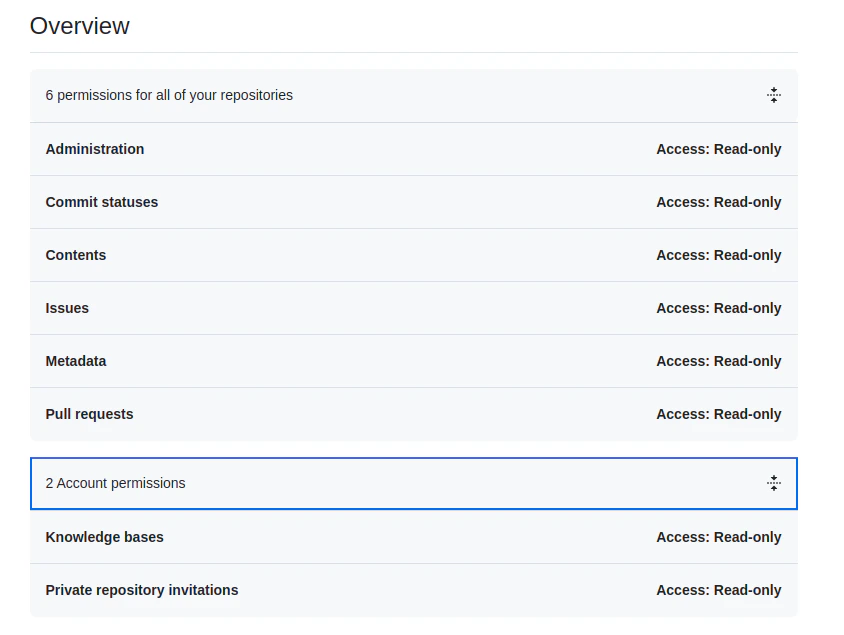
OAuth 2.0
- Register a new OAuth application in GitHub.
- Enter the basic details of the app.
- Use one of the following callback URLs based on your region:
- JP Region:
https://jp-bots-idp.kore.ai/workflows/callback - DE Region:
https://de-bots-idp.kore.ai/workflows/callback - Prod:
https://idp.kore.com/workflows/callback
- JP Region:
- Generate a Client ID and Client Secret.
- Use the device flow and the client credentials to manually create an access token using an API client tool such as Postman.
Configure the GitHub Connector in Search AI
- Navigate to the Connectors page and select GitHub.
-
Provide the following fields:
- Click Connect to authenticate.
Content Ingestion
- In Manage Content, select the object types to ingest: Issues, Pull Requests, or README files.
- Choose an ingestion mode:
- Ingest All Content — syncs all content from accessible repositories. Click Sync.
- Ingest Filtered Content — configure standard filters to select specific repositories.
doc_source_type in the ingested JSON. For all content types, repository_id and repository_name capture repository details, and the url field contains the link to the specific object. Creation and update timestamps are stored in their respective fields.
- Issues: Also captures status, comments, reporter, assignee, reactions, closure date, closed by, and labels.
- Pull Requests: Includes commit details in the
contentfield, plus associated project, PR visibility, and assigned reviewers.
RACL Support
Each piece of content (issue, pull request, or README) is linked to a repository through a unique repository ID. When ingested into Search AI, the repository ID is stored in thesys_racl field of the corresponding chunks. These repository IDs are the permission entities that control access.
Search AI automatically identifies users who have access to each repository in GitHub and associates them with the corresponding repository ID permission entity — no manual mapping required.