
Export Agentic Apps
The Agent Apps Export functionality lets you export and download the configuration details of one or more agent applications. This feature provides a convenient way to backup, share, or migrate agent app setups across environments. By exporting agent apps, users can preserve important app configurations, agent definitions, and tool configurations in a standardized file format for future use. This simplifies the backup and recovery process, minimizing errors and speeding up the process.Export Options
When exporting, choose one of the following options:- Export the entire app - App-level export includes data and configuration related to the entire application. This export is useful when you want to back up or migrate the complete app setup. It includes:
- Application metadata
- Application orchestration details
- All configured agents and their metadata
- Tools and their configurations
- Application-level configurations
- MCP server configurations
- Custom memory store definitions
- Environment Variables and Namespaces
- Content Variables
- Export one or more individual agents- This exports only the selected agents and includes all details required to replicate or transfer each agent’s functionality. It includes:
- Agent metadata and configuration
- Tools used by the agent
- Delegation rules, if applicable
Export App and Agents
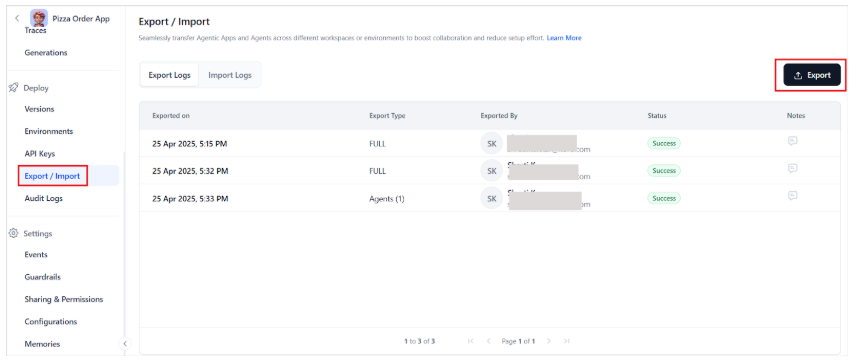
To export an Agentic app or an agent, follow these steps:- Open the Agentic app and go to the Export/Import page.
-
Select the Export option in the upper-right corner.
-
Choose your preferred export type.
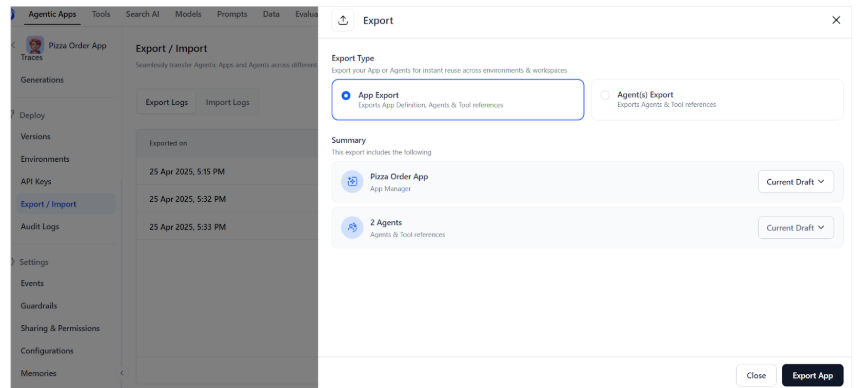
- For app export, select the versions of the apps and the agents you want to export and select Export App.
-
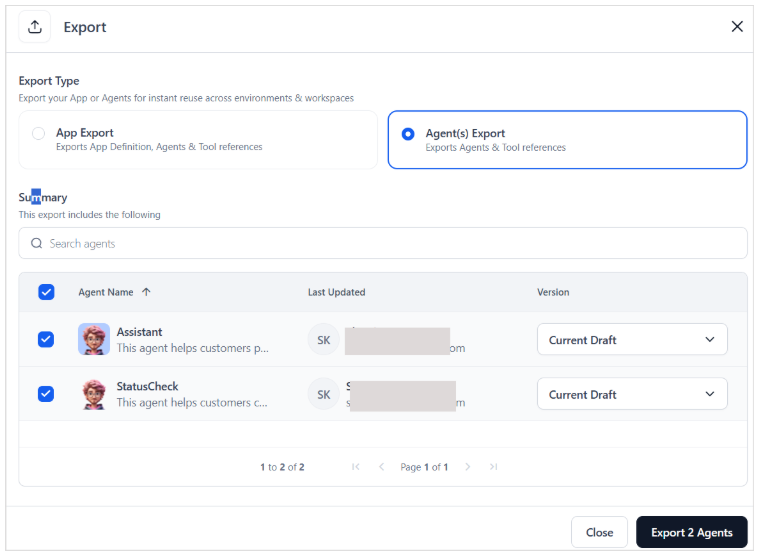
To export one or more agents, select the agents and the corresponding versions and select on Export Agent option.
- App export filename: app-<app-name>-<date-time>.json
- Agent export file: agents-<app-name>-<date-time>.json