Back to Analytics Overview The Queue Metrics Interval Report provides queue performance metrics at sub-daily intervals (15 minutes to 4 hours), including service level data highlighting both met and unmet targets.

Generating the Report

  1. On the Reports tab, select New Report.
  2. In the list of reports, choose Queue Metrics Interval Report.
  3. Enter the Report Name and Report Description.
  4. Select the Time Period.
  5. Select the Data Filters.
  6. Select Report Generation and choose from the following options:
    • Run On Demand
    • Schedule — You can create up to six schedules (only one if you select Hourly). Schedule Options
  7. Select Format: CSV
  8. Enter a Send To address (single email address or mailing list).
  9. Select Create. Create Report
  10. The Queue Metrics Interval Report is generated. Report Generated
  11. Select the Run icon next to the report instance. Run Report
Run On Demand: Triggers report generation immediately when selected. Schedule: Sets the report to generate automatically on the scheduled day and time, without needing to select Run.
  1. Select the CSV icon to generate the report output. CSV Icon
The red dot beside the report indicates it was generated within the last 24 hours. You can download, save, and view the report in CSV format.
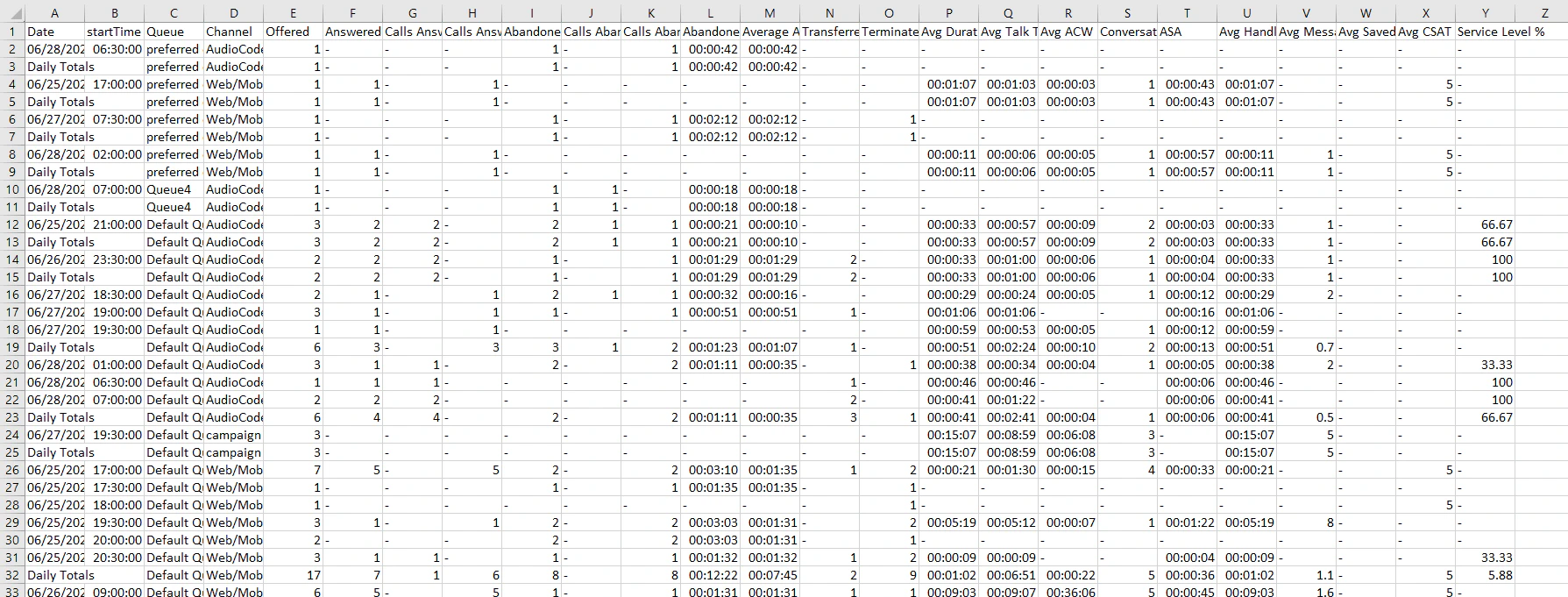
The report is generated and available for download. CSV Output

Report Fields

Key Fields

FieldDescription
DateThe date.
Start TimeStart time of the interval (format: NN am/pm).
QueueName of the queue.
ChannelChannel type (Voice, Chat, etc.).

Data Fields

FieldDescription
OfferedNumber of calls offered during this interval.
AnsweredNumber of calls answered during this interval.
Calls Answered within ThresholdNumber of calls answered within the Required Service Level (RSL) time threshold.
Calls Answered Beyond ThresholdNumber of calls answered after the RSL time threshold. The answer event must be within the time bucket.
Abandoned in QueueNumber of calls abandoned in this queue during this interval.
Calls Abandoned within ThresholdNumber of calls abandoned within the RSL time threshold. The abandon event must be within the time bucket.
Calls Abandoned beyond ThresholdNumber of calls abandoned after the RSL time threshold. The abandon event must be within the time bucket.
Abandoned TimeTotal time that abandoned-in-queue calls waited before being abandoned during this interval.
Average Abandoned TimeAverage time that abandoned-in-queue calls waited before being abandoned during this interval. The denominator is the number of calls abandoned in a queue.
Transferred OutNumber of calls transferred from this queue to other queues during this interval.
TerminatedNumber of calls terminated in this queue during this interval.
Average DurationAverage duration of calls (from session start to session end) for all conversations completed in this interval, not counting ACW.
Average Talk TimeTotal talk time during this interval (excluding hold time, ACW, and snooze time) / number of answered calls, for all conversations completed in this interval.
Average ACWAverage ACW time for all conversations with non-zero ACW time, for all conversations completed in this interval.
Conversations with ACWCount of conversations with non-zero ACW time, for all conversations completed in this interval.
ASAAverage speed to answer (average queue wait time) for all conversations completed in this interval.
Average Handle TimeAverage handle time for all conversations completed in this interval.
Average MessagesCount of all messages for all conversations completed in this interval / answered conversations.
Average Saved MessagesCount of all saved (standard) messages for all conversations completed in this interval / answered conversations.
Average CSATAverage CSAT on all calls / number of calls with CSAT info, for all conversations completed in this interval.
Service level %Calls answered within the threshold / offered calls.