

How knowledge bases work
A knowledge base processes content through an ingestion pipeline (index-time) and serves it via a retrieval pipeline (query-time).Ingestion process
The ingestion pipeline transforms raw content into retrieval-ready chunks with embeddings and metadata.- Ingestion: Registers and tracks content for processing. For uploaded files, the platform checks for duplicates using content hashing, files that have already been indexed with unchanged content are skipped. For connected data sources, the platform discovers and tracks all documents within the source.
-
Extraction: The extraction stage pulls content from your source files. Depending on the content format, different extraction strategies are used.
The extraction stage also captures document metadata (titles, headings, page numbers) that’s used later for enrichment and search result context.
-
Chunking - The chunking stage splits text into smaller segments that can be individually embedded and retrieved. The chunking strategy you choose directly affects search quality — it determines how coherent and complete each retrievable unit of content is. The platform supports three chunking strategies:
Chunk overlap ensures that context at chunk boundaries is not lost. A concept that spans two paragraphs will appear in both chunks when overlap is configured. Always configure overlap when your content spans section boundaries.
-
Enrich: The enrichment stage adds metadata to each chunk, improving search quality and enabling filtering. The following enrichments are applied:
Enrichment metadata is stored alongside each chunk and can be used to filter and rank search results at query time.
- Embedding Generation: The embedding stage converts each text chunk into a vector representation that captures its semantic meaning. These vectors enable semantic search — finding content that’s conceptually related to a query even when the exact words differ.
-
Store: The final stage writes the processed chunks to the vector database for fast retrieval. Each stored chunk includes:
- The original text content
- The vector embedding
- Enrichment metadata
- Source information — document ID, source ID, and page number
- Permission metadata for access control
Retrieval process
When an agent needs information from a knowledge base, the platform executes a search query and returns the most relevant chunks as context for the agent to compose a response. The search pipeline runs in the following sequence:- The agent sends the query to the runtime.
- Runtime embeds the query text into a vector representation.
- Hybrid search runs - semantic and keyword search execute simultaneously.
- Results from both strategies are merged.
- Merged results are re-ranked by relevance.
- Permission filters are applied to the re-ranked results.
- Filtered, ranked chunks are returned to the agent as context.
- The agent uses the context to compose a response.
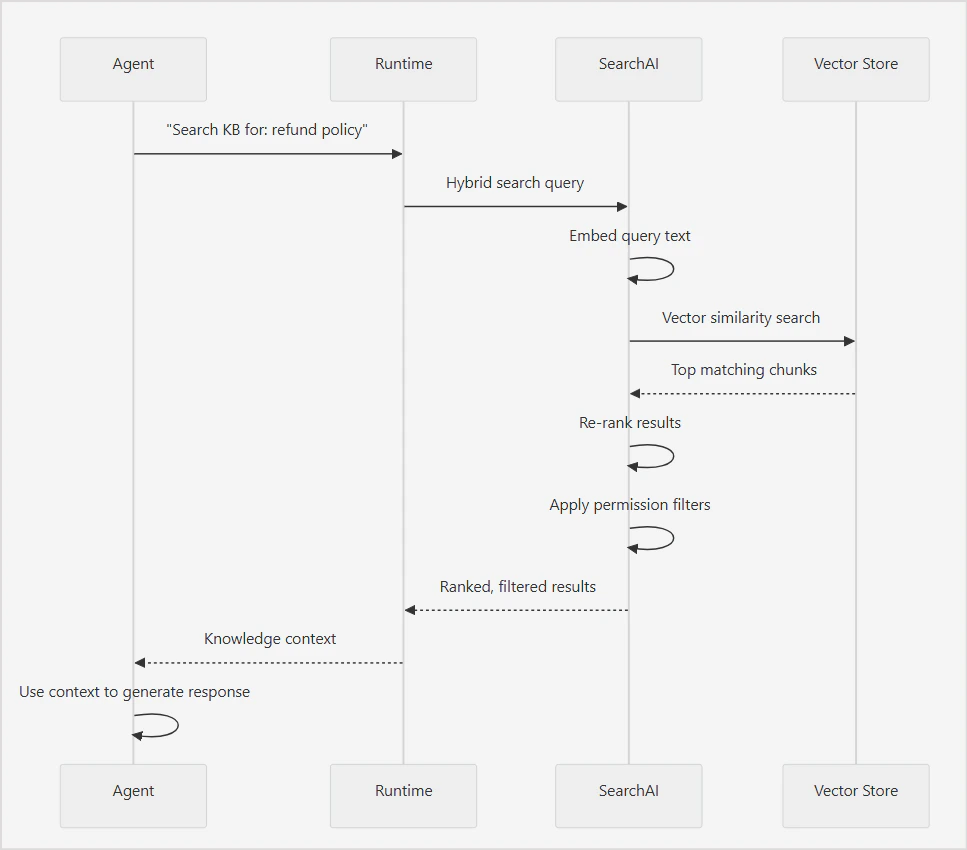
Key concepts
-
Hybrid Search: The platform uses hybrid search by default, combining two complementary strategies to maximize retrieval quality.
- Semantic Search : Semantic search finds chunks whose vector embeddings are most similar to the query embedding. This helps retrieve conceptually relevant content even when the user’s phrasing does not directly match the source text. Example: A query for “How do I get my money back?” can match a chunk about “Refund policy and procedures” even though none of the query words appear in the chunk heading. Use semantic search when users are likely to phrase queries in natural language that differs from the terminology used in the source content.
- Keyword Search: Keyword search finds chunks containing the exact terms in the query. This helps retrieve content with specific names, product codes, technical terms, or identifiers that semantic search might miss due to low vector similarity. Use keyword search when the content contains precise terms — such as model numbers, error codes, or proper nouns — that must match exactly.
- Re-Ranking After the initial search, results are re-ranked to improve relevance ordering. Re-ranking evaluates the merged result set and adjusts the order based on relevance signals beyond initial similarity scores.
- Permission Aware Search
Permission filtering happens after re-ranking. The agent only receives chunks the requesting user is authorized to access, regardless of their relevance score. This means result counts may vary between users querying the same knowledge base with the same query.
Adding knowledge base
Knowledge bases are created and managed at the project level and are available to all agents within that project. Every knowledge base in the project is automatically exposed as a tool that any agent can attach to and use. To create a knowledge base:- Navigate to Knowledge Bases in the left sidebar.
- Click + New Knowledge Base.
-
Enter a name and description.
- Name: used to identify the knowledge base across the project.
- Description: helps agents identify when to use this knowledge base as a tool. Write this clearly and specifically.
- Click Create.
Adding data sources
A knowledge base can ingest content from multiple source types simultaneously. Each source is managed independently, and you can add, sync, and remove sources without affecting others. When you add a data source to the knowledge base, the platform immediately begins processing it in the background. You don’t have to perform any other steps to trigger ingestion or indexing. To add a data source, follow these steps:- Go to the Sources and select + Add Data Source.
- Select the source connector and select Connect.
- Provide configuration details for the source.
File uploads
Upload files directly from your local system. The intelligence pipeline immediately processes the uploaded files. If a source file changes, re-upload it.- Supported file types: PDF, DOCX, TXT, CSV, MD, XLSX, JSON, HTML.
- Maximum file size: 100 MB per file
- Maximum batch size: 40 files per upload.
If the source file changes, you need to re-upload it.
- Essential Fields - the most commonly used fields like Author, Category, Tags, Department.
- More Fields - a list of additional fields covering document metadata such as Title, Content Summary, Language.
- Advanced (custom JSON) — add custom fields not covered by the standard list, as JSON, for example,
{"custom_string_1": "value", "custom_number_1": 42}.
Fields filled in during upload become searchable. Only filled fields create vocabulary entries for natural language queries — empty fields are not indexed.
Web crawl
Crawl and index web pages from any public or authenticated website. Navigate to Sources > Add Source > Web Crawler to manage web sources.- Provide the domain URL.
- Enter auth details, if required.
- Select Discovery method.
- Crawl Full Sitemap: Discovers the sitemap and retrieves the list of URLs to be crawled.
- Guided Discovery: Guide the system to identify pages based on a given URL pattern.
- Direct URLs: Directly provide URLs to crawl.
- From the list of the discovered URLs, select the URls to crawl.
- Configure the web crawl settings.
- Start Crawl.
- Rendering controls how pages are processed before content is extracted. Standard option fetches the raw HTTP response only. It’s the fastest option, but doesn’t capture content that’s rendered client-side (for example, React/Vue apps, JS-loaded sections). Best for static HTML sites. Full rendering loads the page in a headless browser and executes JavaScript before extracting content, capturing dynamic content like expandable sections, tabs, and client-rendered text. Slower and more resource-intensive, but necessary for JavaScript-heavy sites. Auto allows the system to automatically choose per page whether a lightweight HTTP fetch or full browser rendering is needed, based on page characteristics.
- Learned patterns determines whether the crawler reuses extraction patterns from previous crawl runs. Set to Keep by default, which reuses known page layouts and skips the AI layout detection step — making repeat crawls faster. Select Reset after a site redesign or template change so the crawler re-learns the new structure from scratch.
- Crawl Speed controls the delay between page requests. Default value is 200 ms. Faster speeds can trigger rate limits on external sites.
- Max pages caps the number of pages fetched in a batch. The default is 1,000 per batch.
- Max depth controls how many link-hops from the seed URL the crawler will follow. Default: 5, Range: 1-20.
- robots.txt honors crawler directives in robots.txt.
-
Extraction quality controls how aggressively the crawler cleans and filters page content during extraction. Default value is Balanced.
Custom thresholds
- Duplicate content - Controls how pages with identical content at different URLs are handled. Options: Deduplicate (default) or Keep all.
- Cookie consent - Rejects or closes cookie popups before extraction; never accepts tracking. Options: Auto-dismiss (default) or Ignore.
- Enable the Scheduled Crawl toggle.
-
Specify the following settings:
- Click Save to save the schedule.
This configuration is available only after the initial sync is successful. Go to the source, click Reconfigure Crawl Strategy and then click on Configure to view the scheduler.
Connectors
Pre-built integrations for third-party applications. Navigate to Sources > Add Source to configure integrations. Connector Setup Workflow For each connector,- Authentication — Provide OAuth credentials, API keys, or tokens to enable connection with the third party application.
- Ingestion — Select content types and apply filters.
- Field Mapping — Align source fields with the inbuilt schema. Map custom fields, if required.
- Permissions — Configure security settings to enable authorized access to information from the third-party applications.
- Manually perform a full content synchronization. Incremental or delta synchronizations do not trigger a permission sync.
- A scheduled permission synchronization run. During a permission synchronization, the connector does not re-ingest content. It retrieves the latest permissions from the source system and applies them to the documents that are already indexed.
Until a permission synchronization completes after enabling permission aware ACL, content indexed while ACL was disabled remains accessible to all users.
View ingested content
To view the ingested content, follow these steps:- Go to the Documents page.
- The ingested documents are listed. Click on any document to view the extracted content and the related metadata. Following details of the document are shown.
- Metadata - Provides general information about the document like type, language, size, page count.
-
Extraction Quality - Provides metrics that help evaluate the quality of content extraction.
- Extraction Report - Shows the extraction configuration used for the document. Use Re-extract to rerun document extraction if extraction settings have changed, metadata needs to be regenerated or extraction quality needs improvement.
- Content Analysis - Displays attributes identified during content processing like detected language.
- Processing Pipeline - Series of steps through which the document is processed. Also indicates the current status of each step. A document is fully available for retrieval only after all processing stages are successfully completed.
- Source Info - Details of the source of the document.
- Raw Metadata - Document metadata in JSON format.
- You can reprocess a given document to ingest, extract and index it again. By default, it uses the Extraction quality configuration for the source. Use the Extraction Preset option to change the config for a given document.
- Use the Delete button to delete a single page from the source. Note that if the source is synchronized again, the deleted document will be ingested again unless added to the exclude list explicitly.
View extracted chunks
- Navigate to Chunks page.
- Click on a document to see the chunks extracted from the document.
- See token distribution across chunks from the document.
Configure content processing pipeline
By default, the platform creates a default pipeline for processing of the ingested content automatically to make it searchable. The default pipeline consists of the following stages. You can reconfigure any stage as required. Alternatively, you can add a new flow to the pipeline for custom configurations. Extraction: Extracts raw text and structure from ingested files and connected sources. The extraction strategy varies by file type, for example, tables in spreadsheets are extracted differently from paragraphs in a PDF. Configure extraction settings to control how the platform interprets your content structure. Chunking: Splits extracted content into smaller segments for indexing. Chunk size and overlap affect search quality; smaller chunks return more precise results while larger chunks retain more surrounding context. Configure the chunking strategy based on the nature of your content and how users are likely to query it. Content Intelligence: Enriches chunks with additional metadata, such as topic tags, summaries, or classifications, to improve search relevance. Configure what enrichment is applied to your content at this stage. Visual Analysis: Processes visual content in ingested files, such as images, diagrams, and charts, and extracts text or descriptions for inclusion in the index. Enable this stage when your content contains visual elements that carry meaningful information. Embedding Fields: Defines which fields from the extracted and enriched content are included in the embedding. Controlling embedding fields lets you tune what the vector search considers when matching a query to a chunk. Embedding: Converts the selected fields into vector representations using the configured embedding model. The choice of embedding model affects the quality of semantic search results. Configure the model here based on your language and domain requirements. Opensearch: At this stage, the processed and embedded chunks are written to the index using their embeddings. You can run test queries to see what is currently indexed and verify search quality as content is added.The pipeline runs in sequence. A change to an upstream stage, such as chunking, affects all downstream stages. Re-indexing is required when pipeline configuration changes are saved.
Adding a Pipeline Stage
Click + at any connection point in the pipeline canvas to insert a new stage. There are two categories of stages that can be added to a pipeline. Add a stage and select it for configuration. Pipeline Stages — content-processing stages that run as part of the core ingestion flow.
Utility Stages — general-purpose stages you can insert anywhere in the pipeline for custom processing logic.
Field Mapping
Configure one or more rules to map or transform fields during processing. Each rule is independently set to one of two modes, so a single stage can mix Visual and CEL rules as needed.- Visual mode — Build a rule using an IF/THEN structure: IF a selected field meets a condition (equals, and so on) against a value, THEN set a target field to a new value. The source (
Select field...) and target (Select target field...) dropdowns list the indexed fields available from your source documents. - CEL mode — Write a CEL expression that evaluates directly to the target value, for example,
document.source_type == 'pdf' ? 'document' : 'other'.
API Call
Calls an external HTTP endpoint during processing.- Auth & Headers — Configure authentication (for example, API key, bearer token, basic auth) and custom request headers sent with each call.
- Behavior — Configure request behavior such as timeout duration, retry attempts, and error handling.
- Test — Send a test request using sample data to validate the results of the .
LLM
Enriches content with a large language model call.Custom Script
Runs sandboxed JavaScript to transform document content and metadata. Custom Script runs for document files (PDF, DOCX, text, HTML, web pages). It does not run for JSON, CSV, or Excel uploads. Use a structured-ingestion path for JSON, CSV, or Excel content formats.
Content changes made by the script are embedded and searchable. Metadata changes are stored on the chunk/document but are not searchable (canonical) fields yet. Provide sample content and Run on sample to test the script behavior.
Each Utility Stage also supports an optional Execution Condition — a CEL expression that, when set, limits the stage to run only if the expression evaluates to
true. Click Apply to save a stage’s configuration, or Reset to discard changes.
Field Intelligence
Manage indexed fields and how agents can use them in search. Summary — Dashboard of field health: active field count, indexed records, connected sources, open warnings, and quick links to review fields/capabilities. Fields — Full inventory of mapped fields, each showing its data type, storage field name, and which search capabilities (Answer, Semantic, Filter, Sort, Aggregate) are enabled on it. Capabilities — Review and assign fields to each search capability (Answer, Semantic, Filter, Sort, Aggregate). Agent View — Read-only view of what’s exposed to agents: coverage %, a confidence breakdown per capability, and the field labels/keys agents can discover.Configure vocabulary
Vocabulary lets you define aliases for terms that appear in your knowledge base content. When a user queries using an alias, the platform expands the query at runtime to include both the alias and the canonical term — improving search coverage without requiring the user to know the exact terminology used in the source documents. Configure vocabulary when:- Your source documents use formal or technical terminology that users are unlikely to search for exactly.
- Your content uses abbreviations or acronyms that users may spell out — or vice versa.
- Different teams or user groups use different terms for the same concept.
- Search queries consistently miss relevant content despite the content existing in the knowledge base.
Configure AI
This section controls the models and LLM-powered features used for document ingestion, enrichment, and search in the given project. Tenant Models: Manage the LLM providers and models available for this workspace. Click Configure Models to add or update model configurations. See Models for details.Embedding models
Embedding models convert documents into vectors for semantic search. The active model applies to all document ingestion and retrieval in this workspace. BGE-M3 is the default embedding model.Changing the embedding model requires re-ingestion. All documents are automatically re-processed and re-embedded. This operation may take time and incur costs depending on your provider.
Enrichment features
LLM-powered features that run during ingestion to generate summaries, questions, field mappings, and vocabulary. Each feature can be enabled or disabled independently and uses a configurable model. Click Change on any feature to switch its model.- Progressive Summarization: Generates 2–3 sentence summaries per chunk using context from previous chunks. Improves retrieval quality for long documents.
- Question Synthesis: Generates 3–5 answerable questions per chunk. Improves retrieval accuracy by matching user queries to pre-generated questions.
- Field Mapping Suggestions: Suggests field mappings from the connector schema to the canonical schema during source configuration.
- Domain Vocabulary Generation: Enriches domain vocabulary with aliases, descriptions, and capabilities to improve search relevance for domain-specific terms.
- Knowledge Graph Extraction: Extracts entities and relationships to build a knowledge graph. This feature can be enabled upon request.
Advanced features
Higher-cost features for visual and multimodal content analysis. Each feature uses a balanced-tier model and can be enabled or disabled independently.- Vision Analysis: Analyzes page screenshots and images to understand visual content. Useful for documents that contain charts, diagrams, or image-heavy pages.
- Multimodal Deep Analysis: Performs deep analysis of images, tables, and charts with data extraction. Use this for documents where structured visual content needs to be indexed.
Query pipeline LLM
Controls the LLM used at query time to understand and process queries. Query Intelligence: When enabled, it automatically assigns the best available model for vocabulary resolution, query classification, filters, aggregations, structured queries, and enhanced search accuracy.Query Intelligence applies to direct search queries only. It is not used when searching through Agent and Tools.
Knowledge Graph
Knowledge Graph classifies documents against a configurable taxonomy, extracts entities from your content, and links them into a searchable graph, in addition to the standard chunk-based search index. Standard knowledge base search retrieves chunks based on text similarity, treating each chunk largely as an independent unit. Knowledge Graph adds structure on top of this. It organizes content into a taxonomy (such as , domain → category → product → attribute) and connects related entities across documents, so the platform understands not just what text matches a query, but how concepts relate to each other. This is useful when:- Your content naturally maps to a structured taxonomy — such as a product catalog, service categories, or a domain with defined categories and attributes.
- You want to answer relationship-aware queries, such as “what products fall under Pharmacy” or “what attributes does this product have” — questions that depend on structure, not just text similarity.
- The same entity (a product, term, or concept) appears across multiple documents, and you want it recognized and linked as a single connected entity rather than treated as separate, unrelated mentions.
- You want to filter or facet search results by category, product, or attribute, rather than relying purely on keyword or semantic match.
Setting Up the Knowledge Graph
Setting up Knowledge Graph involves:- Picking an industry domain (or letting AI generate one).
- Building a taxonomy of products and attributes for that domain.
- Automatically classifying every document against the taxonomy.
- Extracting entities from content and linking them into the graph.
- Navigate to Knowledge Graph in the left sidebar of the knowledge base.
- Click Select your domain.
-
Configure Taxonomy: Configuring the taxonomy defines the schema that the Knowledge Graph will classify the content against.
- Click Set Up Taxonomy to save the configuration and create the taxonomy.
- Graph View - Visualizes the knowledge graph as a network of connected nodes.
- Statistics — Summary metrics about the documents as per the taxonomy.
- Attributes — Lists the attributes defined in the taxonomy and their occurrences in the indexed content.
Search and test
The Search and Test tab lets you validate the knowledge base configuration by running queries against indexed content before connecting it to an agent. It shows exactly how the knowledge base will respond to a query, including which chunks are returned, how they are ranked, and how each stage of the search pipeline performed. Query Settings Enter a query in the Query field and configure the following settings before running a search: Query Type controls how the search matches the query to indexed content. Three options are available:- Hybrid - combines semantic search and keyword search. Returns results that are both conceptually relevant and lexically matched. Recommended for most use cases.
- Semantic - finds conceptually relevant content based on meaning, even when the exact words don’t appear in the source.
- Keyword - finds exact or near-exact matches. Best for structured content where precise term matching is important.
- Search retrieval time - total time taken and the time per search engine.
- Results - ranked list of matching chunks showing relevance score, source file, content preview, and metadata fields.
- Resolution Chain Debug, a step-by-step breakdown of how the query was processed.
- Data and Indexing - Shows the current state of indexed content, document count, chunk count, and the last indexed timestamp.
- Enrichment - Shows the configuration status of vocabulary and field mappings.
- Pipeline Health - Shows the embedding model in use, the current pipeline status, and whether any index errors have occurred.
Additional settings
Manage knowledge base configuration, view indexing details, configure citation behavior, access API information, and perform administrative actions such as rebuilding or deleting the knowledge base.- General - Basic information about the knowledge base.
- Index Configuration - Displays the retrieval and indexing settings used by the knowledge base.
-
Citations - Controls how source references appear in search results and AI-generated responses. When enabled, response includes references to the content used to generate the answer.
Available link behavior options may depend on the source type.
- API & SDK - Provides programmatic access information for the knowledge base.
- Rebuild Index - Reprocesses all documents and rebuilds the search index. Time taken to rebuild index depends on the content volume and knowledge base size.
- Delete Knowledge Base - Permanently deletes the knowledge base and all associated data.
Use knowledge base as a tool in agents
Every knowledge base in the project automatically has a corresponding knowledge tool. Agents access the knowledge base content by attaching this tool. Once attached, the agent can invoke it at runtime to search the knowledge base and retrieve relevant content. To attach a knowledge tool from the agent configuration:- Navigate to the agent and open the Tools section.
- Click Attach Tool.
- From the list of available tools, locate the knowledge tool for your knowledge base — knowledge tools are listed alongside all other project tools.
- Select the tool to attach it to the agent.
- Navigate to Knowledge Tools at the project level.
- Open the knowledge tool that corresponds to your knowledge base.
- Copy the DSL definition shown on the tool page.
- Open the agent’s DSL editor by clicking DSL at the top of the agent page.
- Paste the copied DSL into the Tools section of the agent definition.
- Compile and save the changes.