Build intelligent virtual assistants for customers, agents, and employees across voice and digital channels.

Overview

Automation AI enables you to create conversational AI experiences that:
  • Understand natural language with advanced NLU
  • Manage complex multi-turn dialogs
  • Integrate with enterprise systems
  • Deploy across voice and digital channels
For knowledge retrieval, see Search AI. For agent handoff, see Contact Center AI.

Key Components

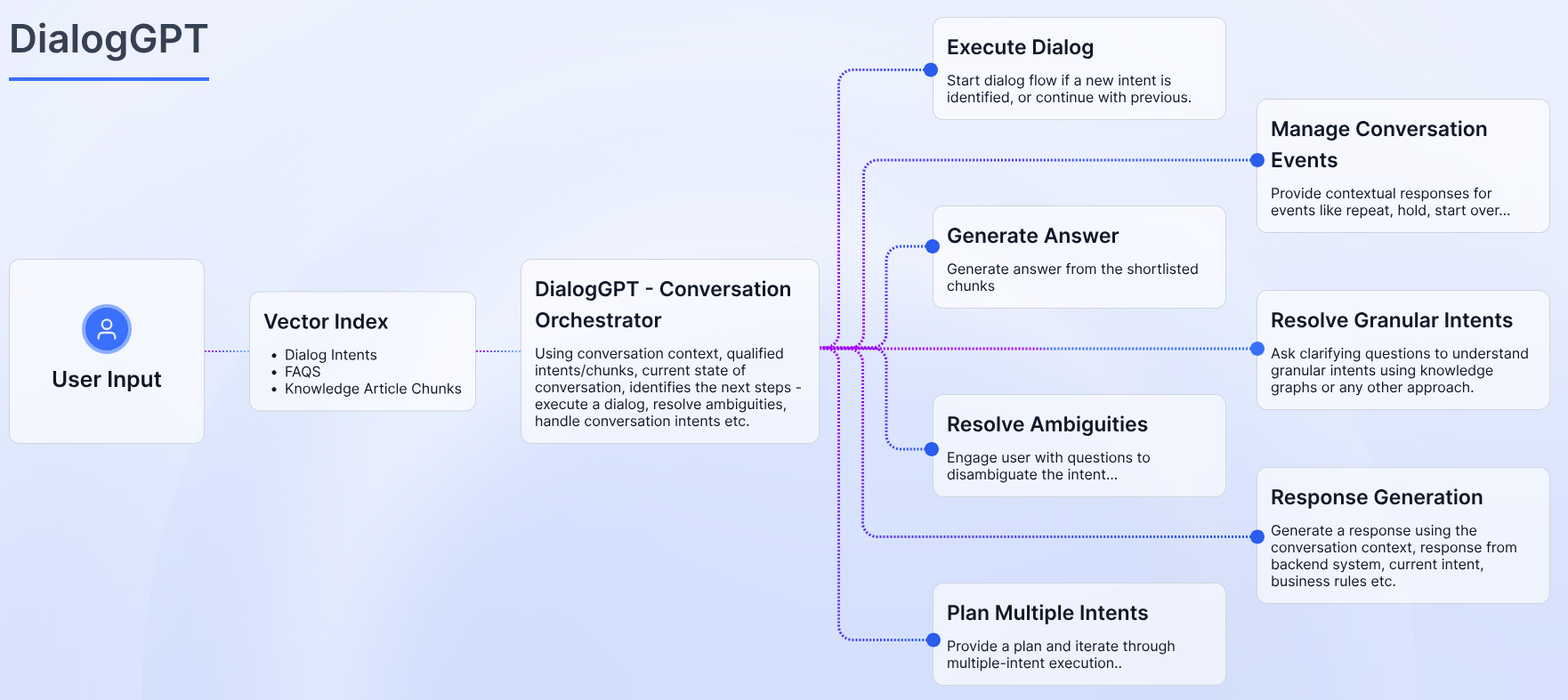
DialogGPT Orchestration

LLM-powered conversation management that intelligently routes between:
  • Traditional dialog flows — Structured, predictable conversations
  • Generative responses — Open-ended, context-aware answers
  • Agent handoff — Seamless transfer to human agents
┌─────────────────────────────────────────────────────────────────┐
│                        User Message                              │
└─────────────────────────────────┬───────────────────────────────┘


┌─────────────────────────────────────────────────────────────────┐
│                      DialogGPT Orchestrator                      │
│                                                                  │
│  Analyzes intent, context, and confidence to route to:          │
│                                                                  │
│  ┌─────────────┐  ┌─────────────┐  ┌─────────────┐              │
│  │   Dialog    │  │  Generative │  │   Agent     │              │
│  │   Flows     │  │     AI      │  │   Handoff   │              │
│  │             │  │             │  │             │              │
│  │ Structured  │  │   LLM-      │  │  Transfer   │              │
│  │ tasks       │  │   powered   │  │  to human   │              │
│  └─────────────┘  └─────────────┘  └─────────────┘              │
└─────────────────────────────────────────────────────────────────┘

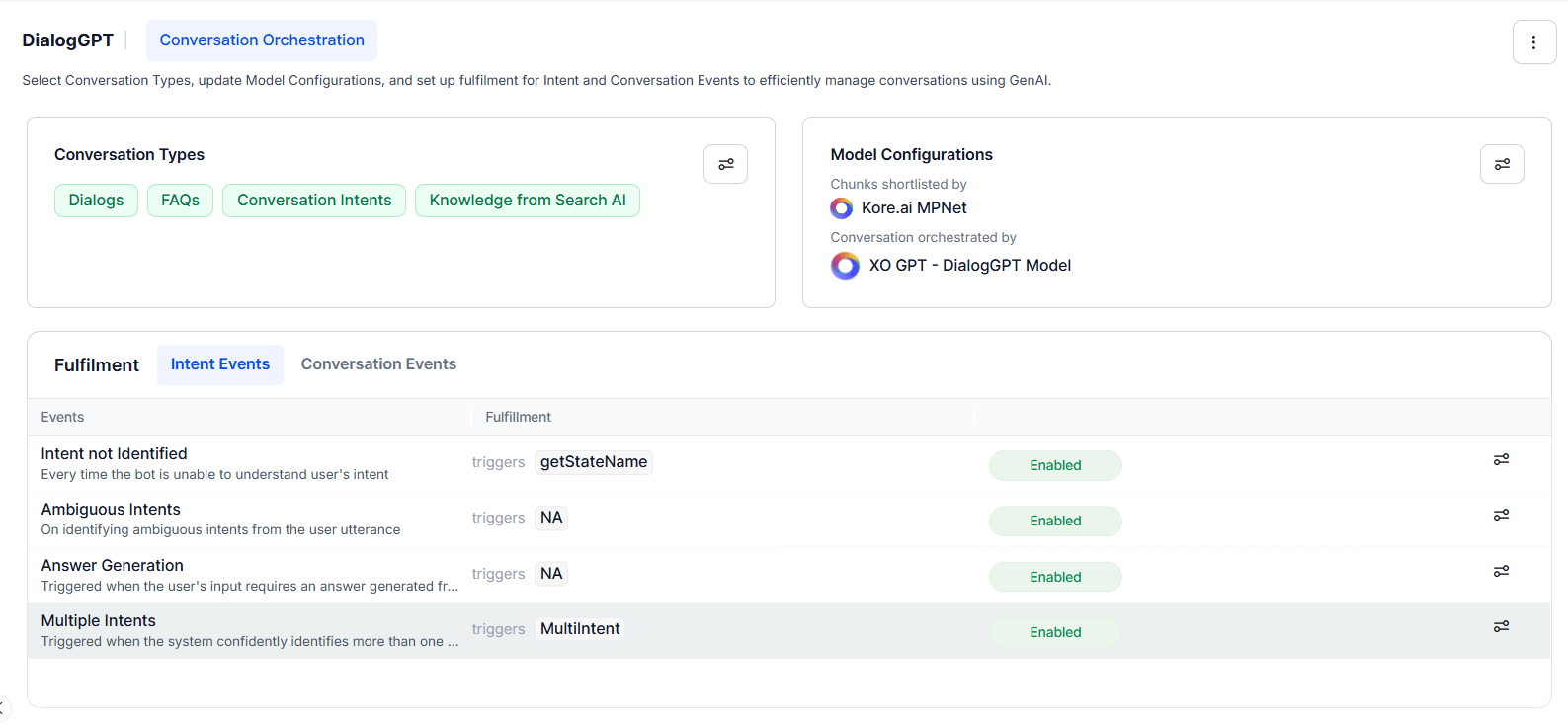
DialogGPT Configuration

DialogGPT Settings:
  enabled: true
  model: gpt-4

  routing_mode: auto | dialog_first | generative_first

  confidence_thresholds:
    high: 0.85      # Route to matched dialog
    medium: 0.60    # Use generative with guardrails
    low: 0.40       # Fallback or clarification

  generative_settings:
    temperature: 0.7
    max_tokens: 500
    guardrails:
      - no_hallucination
      - stay_on_topic
      - no_competitor_mentions

  fallback:
    action: clarify | handoff | default_response
    message: "I'm not sure I understand. Could you rephrase?"

Natural Language Understanding

The NLU engine processes user messages to extract meaning and intent.

NLU Pipeline

┌─────────────────────────────────────────────────────────────────┐
│                        User Message                              │
│                "I want to return my order from last week"        │
└─────────────────────────────────┬───────────────────────────────┘


┌─────────────────────────────────────────────────────────────────┐
│                      Pre-processing                              │
│                                                                  │
│  Tokenization → Normalization → Spell correction                 │
└─────────────────────────────────┬───────────────────────────────┘


┌─────────────────────────────────────────────────────────────────┐
│                    Intent Recognition                            │
│                                                                  │
│  ML Model + Rules + Patterns → Intent: "initiate_return" (0.92) │
└─────────────────────────────────┬───────────────────────────────┘


┌─────────────────────────────────────────────────────────────────┐
│                    Entity Extraction                             │
│                                                                  │
│  "last week" → @sys.date (relative)                             │
│  "order" → @order_reference                                      │
└─────────────────────────────────┬───────────────────────────────┘


┌─────────────────────────────────────────────────────────────────┐
│                    Sentiment & Traits                            │
│                                                                  │
│  Sentiment: neutral | Traits: [request, transactional]          │
└─────────────────────────────────────────────────────────────────┘

Intent Recognition

Intents represent user goals. The ML engine uses training utterances to recognize intents.

Creating Intents

Intent: initiate_return
Description: User wants to return a purchased item

Training Utterances:
  - "I want to return my order"
  - "How do I send back an item?"
  - "I need to make a return"
  - "Can I get a refund on my purchase?"
  - "Return this product please"
  - "I'd like to return something I bought"
  # Add 15-25 varied utterances

Entities:
  - @order_id (optional)
  - @product_name (optional)
  - @return_reason (optional)

Confirmation:
  required: false
  threshold: 0.85

Intent Training Best Practices

PracticeDescription
VarietyInclude different phrasings, not just synonyms
Real examplesUse actual customer messages when possible
Entity markingMark entities in utterances for extraction
Negative examplesAdd utterances that should NOT match
Regular updatesReview misclassifications and retrain

Machine Learning Settings

ML Engine Configuration:
  algorithm: transformer  # or neural_network, svm

  training:
    epochs: auto
    batch_size: 32

  thresholds:
    definitive_match: 0.85
    probable_match: 0.60
    min_match: 0.40

  features:
    use_synonyms: true
    use_patterns: true
    use_knowledge_graph: true

  multi_intent:
    enabled: true
    max_intents: 3

  auto_correction:
    spelling: true
    grammar: false

Entity Extraction

Entities are structured data extracted from user messages.

Built-in Entities

EntityExamplesFormat
@sys.date”tomorrow”, “next Monday”, “Jan 15”ISO date
@sys.time”3pm”, “15:00”, “afternoon”ISO time
@sys.number”five”, “42”, “1,000”Number
@sys.currency”$50”, “50 dollars”, “USD 50”Amount + currency
@sys.emailuser@example.comEmail string
@sys.phone”(555) 123-4567”Phone string
@sys.percentage”50%”, “half”Decimal
@sys.location”New York”, “123 Main St”Location object

Custom Entity Types

List Entity — Predefined values:
Entity: @product_category
Type: list
Values:
  - Electronics:
      synonyms: [tech, gadgets, devices]
  - Clothing:
      synonyms: [apparel, clothes, fashion]
  - Home & Garden:
      synonyms: [home, garden, furniture]
Fuzzy matching: true
Regex Entity — Pattern-based:
Entity: @order_id
Type: regex
Pattern: "ORD-[A-Z0-9]{8}"
Examples:
  - ORD-ABC12345
  - ORD-XYZ98765
Composite Entity — Grouped entities:
Entity: @full_address
Type: composite
Components:
  - @street_address (required)
  - @city (required)
  - @state (required)
  - @zip_code (required)
Pattern: "{@street_address}, {@city}, {@state} {@zip_code}"
ML Entity — Machine learning based:
Entity: @product_name
Type: ml
Training data:
  - "I want to return my [iPhone 14](product_name)"
  - "The [Samsung TV](product_name) is defective"
  - "Can I exchange my [Nike shoes](product_name)?"
NER model: transformer

Entity Prompts

Configure how to collect missing entities:
Entity: @order_id
Prompts:
  initial: "What's your order number? You can find it in your confirmation email."
  retry: "I didn't catch that. Order numbers look like ORD-ABC12345."
  error: "That doesn't look like a valid order number. Please try again."
Max retries: 3
Validation: regex_match

Sentiment Analysis

Detect user emotion to adjust responses:
Sentiment Detection:
  enabled: true

  levels:
    - very_negative: -1.0 to -0.6
    - negative: -0.6 to -0.2
    - neutral: -0.2 to 0.2
    - positive: 0.2 to 0.6
    - very_positive: 0.6 to 1.0

  actions:
    very_negative:
      - increase_empathy: true
      - offer_escalation: true
      - notify_supervisor: true
    negative:
      - increase_empathy: true

Traits

Classify overall message characteristics:
TraitDescription
GreetingHello, hi, good morning
GratitudeThank you, thanks, appreciate it
ComplaintFrustrated, unhappy, issue
QuestionInterrogative patterns
CommandImperative patterns
FarewellGoodbye, bye, see you

Dialog Management

Build conversation flows using nodes and transitions. For detailed flow building, see Flows & Dialogs.

Dialog Node Types

Node TypePurposeUse Case
IntentEntry point for intentStart of dialog
MessageDisplay text/mediaResponses, confirmations
EntityCollect user inputForm fields, selections
ScriptRun custom codeCalculations, API prep
ServiceCall external APIBackend integrations
AgentAI agent executionLLM-powered tasks
PromptSingle LLM callSummarization, extraction
LogicConditional branchingDecision trees
ConfirmationVerify with userBefore actions
Agent TransferHandoff to humanEscalation

Dialog Flow Example

┌─────────────────────────────────────────────────────────────────┐
│  Intent: initiate_return                                         │
└─────────────────────────────────┬───────────────────────────────┘


┌─────────────────────────────────────────────────────────────────┐
│  Entity: @order_id                                               │
│  Prompt: "What's your order number?"                            │
└─────────────────────────────────┬───────────────────────────────┘


┌─────────────────────────────────────────────────────────────────┐
│  Service: get_order_details                                      │
│  API: GET /orders/{{order_id}}                                  │
└─────────────────────────────────┬───────────────────────────────┘

              ┌───────────────────┼───────────────────┐
              ▼                   ▼                   ▼
       [Order Found]      [Order Not Found]    [API Error]
              │                   │                   │
              ▼                   ▼                   ▼
       [Check Eligibility]  [Message: Not found]  [Fallback]

       ┌──────┴──────┐
       ▼             ▼
  [Eligible]    [Not Eligible]
       │             │
       ▼             ▼
  [Create Return] [Message: Policy]


  [Confirmation]


  [End: Success]

Context Variables

Store and access data throughout conversations:
// Session variables (current conversation)
context.session.orderId = "ORD-12345";
context.session.returnReason = "defective";

// User variables (persist across conversations)
context.user.preferredLanguage = "es";
context.user.tier = "premium";

// Global variables (all users)
context.global.businessHours = { start: 9, end: 18 };

// Entity values
context.entities.order_id;
context.entities.product_name;

// System variables
context.system.currentIntent;
context.system.sentiment;
context.system.channel;

Interruption Handling

Handle topic changes gracefully:
Interruption Settings:
  allow_interruptions: true

  hold_and_resume:
    enabled: true
    max_depth: 3
    resume_message: "Now, back to your {{previous_topic}}..."

  task_switching:
    mode: confirm | auto | block
    message: "Would you like to pause this and help with something else?"

  global_intents:  # Always available
    - help
    - cancel
    - agent_transfer

AI Agents

Agent Node

Integrate AI agents into dialog flows:
Agent Node Configuration:
  agent_type: prompt
  model: gpt-4

  instructions: |
    You are a helpful customer service agent for Acme Corp.

    Your capabilities:
    - Answer questions about products and policies
    - Help with order status and returns
    - Provide troubleshooting assistance

    Guidelines:
    - Be concise and friendly
    - Always verify order numbers before providing details
    - If you can't help, offer to transfer to a human agent

  tools:
    - name: search_knowledge_base
      description: Search product documentation
    - name: check_order_status
      description: Look up order details
    - name: create_ticket
      description: Create support ticket

  guardrails:
    - no_competitor_mentions
    - no_pricing_promises
    - escalate_on_frustration

  max_turns: 10
  timeout: 60s

Prompt Node

Use LLMs for specific tasks:
Prompt Node: Summarize Issue
Model: gpt-4
Temperature: 0.3

Prompt: |
  Summarize the customer's issue in 1-2 sentences based on this conversation:

  {{conversation_history}}

  Summary:

Output Variable: issue_summary
Max Tokens: 100

Agent Tools

Define tools agents can use:
Tools:
  - name: get_order_status
    description: Retrieve order details and shipping status
    parameters:
      - order_id: string (required)
    api:
      method: GET
      url: /api/orders/{{order_id}}

  - name: create_return
    description: Initiate a return for an order
    requires_confirmation: true
    parameters:
      - order_id: string (required)
      - reason: string (required)
    api:
      method: POST
      url: /api/returns

Integration Actions

Pre-built Actions

30+ pre-built integrations with enterprise systems:
CategoryIntegrations
CRMSalesforce, HubSpot, Microsoft Dynamics 365, Zoho
TicketingZendesk, ServiceNow, Freshdesk, Jira
CommerceShopify, Magento, WooCommerce, BigCommerce
CommunicationTwilio, SendGrid, Mailchimp
CalendarGoogle Calendar, Outlook, Calendly
PaymentStripe, PayPal, Square

Custom API Actions

Create custom integrations:
Action: get_order_status
Type: REST API

Request:
  method: GET
  url: "https://api.example.com/orders/{{order_id}}"
  headers:
    Authorization: "Bearer {{env.API_KEY}}"
    Content-Type: "application/json"
  timeout: 10s

Response Mapping:
  success:
    condition: status_code == 200
    mapping:
      order_status: response.order.status
      delivery_date: response.order.estimated_delivery
      tracking_url: response.order.tracking.url

  not_found:
    condition: status_code == 404
    mapping:
      error: "Order not found"

  error:
    condition: status_code >= 500
    action: retry
    max_retries: 2

Error Handling:
  timeout:
    message: "I'm having trouble looking that up. Please try again."
  failure:
    action: fallback_flow

Testing & Debugging

Conversation Testing

Test dialogs in the builder:
  1. Open Test panel
  2. Enter test utterances
  3. Verify intent recognition and confidence
  4. Check entity extraction
  5. Review conversation flow
  6. Validate API responses

Batch Testing

Run automated test suites:
Test Suite: Return Flow
Tests:
  - name: "Happy path - valid order"
    steps:
      - user: "I want to return my order ORD-12345"
        expect:
          intent: initiate_return
          entities:
            order_id: "ORD-12345"
      - user: "It's defective"
        expect:
          entity_filled: return_reason
      - expect:
          message_contains: "return label"

  - name: "Invalid order number"
    steps:
      - user: "Return order 999"
        expect:
          intent: initiate_return
      - expect:
          message_contains: "couldn't find"

Debug Mode

Enable detailed logging:
  • Intent confidence scores
  • Entity extraction details
  • API request/response logs
  • Context variable values
  • Dialog path taken

Deployment

Channel Support

Deploy to multiple channels. See Channels for detailed configuration.
ChannelFeatures
WebChat widget, customizable UI
VoiceIVR, voice bots, telephony
MessagingWhatsApp, SMS, Messenger
SocialTwitter, Instagram
MobileiOS/Android SDKs

Versioning

Manage assistant versions:
Version Management:
  current: v2.3.1

  environments:
    development:
      version: v2.4.0-beta
      auto_deploy: true
    staging:
      version: v2.3.1
      approval_required: true
    production:
      version: v2.3.0
      approval_required: true
      rollback_enabled: true