
The Integrations page connects your Platform account to 120+ third-party services. Once connected, integrations are available from the Tool Flow canvas to build AI applications. See the Integration node for usage details.Documentation Index
Fetch the complete documentation index at: https://koreai.mintlify.app/llms.txt
Use this file to discover all available pages before exploring further.
| Section | Description |
|---|---|
| Authentication Types | Overview of supported auth types (API, OAuth2, Bearer, Basic Auth, and others). |
| Access Integrations | How to navigate to the Integrations page and use its features. |
| Supported Integrations | Full list of available third-party integrations with their actions and auth types. |
| Add a Connection | Steps to configure a new connection, including auth-type-specific setup and error handling. |
| Manage Connections | How to view, edit, delete, test, and enable or disable existing connections. |
| AI-Specific Integrations | Dedicated setup flows for Hugging Face, AWS S3 Bucket, and Weights & Biases. |
Auth Types
Each integration uses one of the following authentication types:| Method | Description |
|---|---|
| API | Authenticates via a token in request headers or query parameters. Used for API Key or Access Token integrations. |
| OAuth2 | Industry-standard authorization framework. Uses temporary access tokens, permission scopes, token expiry, and refresh tokens to renew access without re-login. |
| Bearer | Passes a bearer token in the request header, typically within an OAuth2 workflow, to access protected resources. |
| Basic Auth | Authenticates using a username and password sent with each request. Supported for ServiceNow, Freshdesk, Snowflake, Amplitude, and Mixpanel. |
Additional authentication methods for certain integrations include Basic, Basic with JWT, OAuth1, and custom authentication defined by the service provider. Some providers support multiple authentication methods.
Access Integrations
Got to Autonomous Agents > Settings > Integrations. The features on the Integration page:| Feature | Description |
|---|---|
| All Integrations tab | Lists all available integrations grouped by category. Once you connect an integration, it moves to the Connected tab. Deleting a connection returns it to this list. |
| Connected tab | Shows all configured connections for your account. |
| Search | Find integrations by full or partial name. |
| Category filter | Filter by category (AI and Machine Learning, Marketing and Social Media, E-commerce, etc.). Select one or more and click Apply. |
| Authorization filter | Filter by authentication type (API, OAuth2, Bearer, Basic Auth). Select one or more and click Apply. |
| List view | Displays integrations in a table with Connection Name, Description, and Type columns. |
| Tile view | Default view. Displays integrations as individual cards. |
Supported Integrations
The following third-party integrations are available on the Platform:List of Supported Integrations
List of Supported Integrations
| Integration | Description | Actions | Authorization |
|---|---|---|---|
| Acculynx | AccuLynx API for seamless data exchange between AccuLynx and other applications. | 8 | API |
| Active_campaign | APIs for marketing automation, CRM, and email marketing. | 7 | API |
| Affinity | CRM focused on relationship intelligence; supports data sync, workflow automation, and relationship insights across platforms. | 20 | API |
| Agencyzoom | P&C insurance platform for increasing sales, retention, and agency performance analysis. | 99 | API, Basic with JWT |
| Ahrefs | SEO and marketing platform for site audits, keyword research, content analysis, and competitive insights. | 40 | API |
| Airtable | Low-code platform for building apps, managing critical data, and reimagining workflows with AI. | 17 | OAuth2, Bearer, API |
| Amplitude | Digital analytics software for product analytics. | 16 | Basic |
| Apaleo | API-first property management platform for hotels and apartment groups. | 29 | OAuth2 |
| Apollo | CRM tool for managing contacts, leads, and opportunities. | 17 | API |
| Asana | Tool for teams to organize, track, and manage work. | 15 | OAuth2 |
| Attio | Fully customizable workspace for team relationships and workflows. | 56 | OAuth2 |
| AWS S3 Bucket | Connect to your AWS S3 bucket. | 1 | API |
| Bamboohr | HR software as a service. | 159 | API |
| Bill | Integration with Bill.com API. | 221 | Billcom Auth |
| Bitbucket | Git-based code hosting and collaboration platform with pull requests and integrations. | 15 | OAuth2 |
| Blackboard | Insights on Blackboard Learn usage with in-app messages, digital guides, and tooltips. | 314 | OAuth2 |
| Bolna | Conversational voice agents to enhance interactions, streamline operations, and automate support. | 15 | API |
| Borneo | Data security and privacy platform for sensitive data discovery and remediation. | 154 | API, OAuth2 |
| Box | Cloud content management and file sharing for businesses. | 273 | OAuth2 |
| Brevo | Email marketing, SMS campaigns, and marketing automation (formerly Sendinblue). | 221 | API |
| Browserbase_tool | Browsing app that fetches a URL, reads its contents, and returns them. | 1 | API |
| Bugbug | Browser-based app for quick and reliable test automation. | 4 | API |
| Cal | Shareable booking pages, calendar syncing, and availability management. | 142 | API, Calcom Auth |
| Calendly | Appointment scheduling tool that automates invitations, availability checks, and reminders. | 41 | OAuth2 |
| Canva | Programmatic access to Canvas LMS features including courses, users, enrollments, and grades. | 32 | OAuth2 |
| Canvas | Web-based LMS for managing course materials and communicating learning achievements. | 79 | OAuth2, API |
| Clickup | Unified platform for tasks, docs, goals, and chat with customizable workflows. | 126 | OAuth2, API |
| codeinterpreter | Python-based coding environment with integrated data analysis, script execution, and visualization. | 4 | API |
| Coinbase | APIs for cryptocurrency trading and management. | 6 | API |
| Composio | Enables AI agents and LLMs to authenticate and integrate with various tools via function calling. | 12 | API |
| Composio_search | All-in-one tool for searching and scraping the web. | 12 | API |
| Confluence | Tool for team collaboration and knowledge management. | 190 | OAuth2 |
| Contentful | Content platform APIs for managing and delivering content to apps and websites. | 3 | OAuth2, API |
| Crustdata | AI-powered platform providing real-time company and people data for B2B sales, AI SDRs, and investors. | 14 | API |
| Coda | Collaborative workspace platform for team productivity and project management. | 97 | API |
| Dialpad | Cloud-based communication platform for voice calls, video meetings, messaging, and collaboration. | 192 | OAuth2, API |
| Discord | Instant messaging and VoIP social platform. | 169 | OAuth2, Bearer |
| Discordbot | Automated Discord programs for moderation, music playback, and user engagement. | 169 | OAuth2, Bearer |
| Docusign | eSignature and digital agreement solutions for sending, signing, tracking, and managing documents. | 342 | OAuth2 |
| Dropbox | File hosting service with cloud storage, file synchronization, and client software. | 9 | OAuth2 |
| Dynamics365 | Microsoft platform combining CRM, ERP, and productivity apps for sales, marketing, and operations. | 16 | OAuth2 |
| Elevenlabs | AI voice generation platform supporting any language for video creators, developers, and businesses. | 59 | API |
| Entelligence | AI-powered insights, recommendations, and predictive analytics for data-driven decisions. | 2 | API |
| Exa | Search service offering Search, Similarlink, and Answer actions for querying and generating results. | 4 | API |
| Excel | Connect to Excel to create and manage spreadsheets. | 25 | OAuth2 |
| Figma | Collaborative interface design tool. | 44 | OAuth2, API |
| Firecrawl | Automates web crawling and data extraction for content gathering, site indexing, and insights. | 7 | API |
| Fireflies | Transcribes, summarizes, searches, and analyzes voice conversations. | 10 | API |
| Flutterwave | APIs for making and receiving payments in various currencies and countries. | 2 | API |
| Foursquare | Place search and recommendations from the Foursquare Places database. | 5 | API |
| Freshdesk | Customer support platform with smart automation for help desk operations. | 7 | Basic |
| Gmail | Connect to Gmail to send and manage emails. | 21 | OAuth2, Bearer |
| Gong | Platform for video meetings, call recording, and team collaboration. | 54 | API |
| Google_maps | Web mapping platform with satellite imagery, street maps, real-time traffic, and route planning. | 4 | OAuth2, API |
| Googleads | Connect to Google Ads to manage and create campaigns. | 4 | OAuth2 |
| Googlebigquery | Connect to BigQuery to query BigData. | 1 | Google Service Account |
| Googlecalendar | Time-management and scheduling calendar service by Google. | 12 | OAuth2, Bearer |
| Googledocs | Connect to Google Docs for document-related actions. | 5 | OAuth2, Bearer |
| Googledrive | Connect to your Google Drive account. | 10 | OAuth2, Bearer |
| Googlemeet | Video conferencing tool by Google. | 5 | OAuth2 |
| Googlephotos | Photo and video storage service integrated with Google Drive. | 12 | OAuth2 |
| Googlesheets | Web-based spreadsheet program integrated with Google Drive. | 9 | OAuth2 |
| Googlesuper | Unified Google platform combining Drive, Calendar, Gmail, Sheets, Analytics, Ads, and more. | 93 | API, OAuth2, Bearer |
| Googletasks | Simple to-do list and task management integrated with Gmail and Google Calendar. | 11 | OAuth2 |
| Gorgias | Integration for Gorgias with a focus on e-commerce enhancements. | 32 | OAuth2 |
| Github | Code hosting platform for version control, collaboration, repository management, and CI/CD. | 908 | OAuth2 |
| Hackernews | Cybersecurity news platform for real-time updates, threat intelligence, and breach reports. | 6 | API |
| Heygen | AI-powered video platform for streamlining video creation. | 35 | API |
| Hubspot | Inbound marketing, sales, and customer service platform integrating CRM, email automation, and analytics. | 229 | OAuth2, Bearer |
| Hugging Face | Connect to your Hugging Face setup for open-source model access. | 1 | API |
| Intercom | Messaging platform for communicating with customers via app, website, social media, or email. | 43 | OAuth2 |
| Jira | Jira API tool for project and issue management. | 544 | OAuth2, API |
| Jungle Scout | Amazon seller tool for product research, sales estimates, and competitive insights. | 6 | API |
| Klaviyo | Data-driven email and SMS marketing platform for targeted messages and conversion tracking. | 231 | API, OAuth2 |
| Kommo | CRM integration (formerly amoCRM) for managing customer relationships, sales pipelines, and processes. | 15 | OAuth2 |
| Linear | Connect to Linear to create and manage issues, projects, teams, and more. | 15 | OAuth2, API |
| Connect to LinkedIn to send and manage emails. | 4 | OAuth2 | |
| Linkhut | Platform for saving, organizing, and sharing links. | 2 | OAuth2 |
| Linkup | Search the web for relevant results (RAG use case). | 1 | API |
| Listennotes | Podcast search engine. | 26 | API |
| Lmnt | API for text-to-speech and voice cloning. | 7 | API |
| Mailchimp | Email marketing and automation platform for campaign templates, audience segmentation, and analytics. | 271 | OAuth2 |
| Mem0 | AI-driven note-taking, knowledge recall, and productivity tools. | 43 | API |
| Metaads | Meta Marketing API for managing ad campaigns, ad sets, ads, custom audiences, and analytics. | 16 | OAuth2, API |
| Microsoft_clarity | Free tool that captures real user behavior on your site. | 1 | Bearer |
| Microsoft_teams | Connect to Microsoft Teams to manage channels. | 13 | OAuth2 |
| Mixpanel | Analytics platform for measuring user engagement and retention. | 19 | Basic |
| Monday | Cloud-based work operating system for building workflow apps and managing projects. | 21 | OAuth2 |
| Neon | Serverless Postgres platform for building reliable and scalable applications. | 69 | API |
| Notion | Unified workspace for notes, docs, wikis, and tasks with custom collaboration workflows. | 23 | OAuth2, API |
| One_drive | Microsoft cloud storage for storing, syncing, and sharing files across devices. | 7 | OAuth2 |
| Onepage | API for enriching user and company data with token validation and generic search. | 2 | API |
| Open_sea | NFT marketplace for NFTs and crypto collectibles. | 22 | API |
| Outlook | Microsoft email and calendaring platform integrating contacts, tasks, and scheduling. | 22 | OAuth2 |
| Pagerduty | Manage incidents, schedules, and alerts directly from your application. | 357 | OAuth2, API |
| Perplexityai | AI search service with natural language processing, configurable parameters, and domain filtering. | 1 | API |
| Peopledatalabs | B2B data enrichment and identity resolution for enriched user profiles and customer validation. | 14 | API |
| Pipedrive | Sales management tool with pipeline visualization, lead tracking, and automation. | 275 | OAuth2, Bearer |
| Placekey | APIs for generating unique identifiers for physical places, enabling data matching and entity resolution. | 2 | API |
| Posthog | Open-source product analytics platform for tracking user interactions and refining features. | 358 | API |
| Quickbooks | Cloud-based accounting software for managing finances, income, and expenses. | 13 | OAuth2 |
| Ramp | Finance platform for managing finances, tracking income and expenses, and gaining business insights. | 8 | OAuth2 |
| Recallai | Single API for meeting bots on Zoom, Google Meet, Microsoft Teams, and more. | 8 | API |
| Connect to Reddit to post and comment. | 9 | OAuth2 | |
| Resend | Connect to Resend to send emails. | 18 | API |
| Retellai | Captures calls and transcripts for conversation analysis, insights, and customer interaction enhancement. | 10 | API |
| Rocketlane | Customer onboarding and project delivery with shared workspaces, milestones, and status tracking. | 6 | API |
| Salesforce | Leading CRM platform for sales, service, marketing, and analytics. | 32 | OAuth2 |
| Search AI | Connect to your Search AI setup. | 1 | API |
| Semanticscholar | AI-powered academic search engine for discovering and understanding scientific literature. | 14 | API |
| Semrush | SEO tool suite for keyword research, competitor analysis, and Google Ad optimization. | 36 | API |
| Sendgrid | Cloud-based email delivery platform for transactional and marketing email with analytics. | 375 | API |
| Sentry | Error tracking and monitoring management. | 178 | Bearer |
| Serpapi | Real-time API for structured search engine results, scraping, and SERP analysis. | 10 | API |
| Servicenow | IT Service Management platform to boost productivity and maximize ROI. | 5 | Basic |
| Share_point | Microsoft platform for document management, intranets, and secure team content storage. | 6 | OAuth2 |
| Shortcut | Aligns product development work with company objectives for teams with a shared purpose. | 122 | API |
| Shopify | Global commerce platform for selling online and in person. | 26 | API, OAuth2 |
| Slack | Channel-based messaging platform with tool integrations and enterprise-grade security. | 174 | OAuth2, Bearer |
| slackbot | Automates Slack responses and reminders for onboarding, FAQs, and notifications. | 174 | OAuth2, Bearer |
| Snowflake | Connect to Snowflake to run queries. | 4 | Basic |
| Stripe | Payment processor for accepting online payments. | 19 | API |
| Supabase | Open-source backend-as-a-service with Postgres database, authentication, storage, and real-time APIs. | 77 | OAuth2, API |
| Tavily | Advanced search with image inclusion, raw content, and domain filtering. | 1 | API |
| Textrazor | Natural language processing tools for advanced text analysis via API. | 1 | API |
| Text_to_pdf | Convert text to a PDF file. | 1 | API |
| Tinyurl | APIs for shortening URLs into branded links and tracking link analytics. | 1 | API |
| Todoist | Productivity app for managing tasks and projects. | 4 | OAuth2 |
| Trello | Web-based kanban-style list-making application. | 323 | OAuth, Bearer |
| Social media network (now X). | 72 | OAuth2 | |
| Twitter_media | Multimedia tools within Twitter for brands to leverage rich content in marketing campaigns. | 1 | OAuth |
| Typefully | AI-powered content creation management. | 5 | API |
| Weathermap | Visual weather data, forecasts, and mappings for understanding climate patterns and severe weather. | 1 | API |
| Weight & Biases | Connect to your Weights & Biases setup. | 1 | API |
| WhatsApp Business API integration for customer messaging and automation. | 5 | API | |
| Workiom | APIs for automating workflows, integrating tools, and building custom applications. | 3 | API |
| Yousearch | Search tool for finding relevant information with filtering or privacy-focused features. | 1 | API |
| Youtube | YouTube actions to interact with the app. | 11 | OAuth2 |
| Zenrows | Scrape and extract web data using the ZenRows API. | 1 | API |
| Zendesk | Customer service and sales platform for managing customer communication and support. | 11 | OAuth2 |
| Zoom | Video conferencing platform with breakout rooms, screen sharing, and enterprise integrations. | 172 | OAuth2 |
| Zoominfo | Multi-platform operating system for revenue teams to deliver business growth. | 14 | Basic with JWT |
| Zoho | Zoho CRM actions and interactions. | 6 | OAuth2 |
Add a Connection
You can also add a connection directly from the Integration node on the Tool Flow canvas. Learn more.
- Access Integrations.
- Choose one of the following:
- New connection: In the All Integrations tab, optionally filter by Category and Authorization, then click the integration.
- Existing connection: Click the Connected tab and select the provider.
- Click Add Connection.
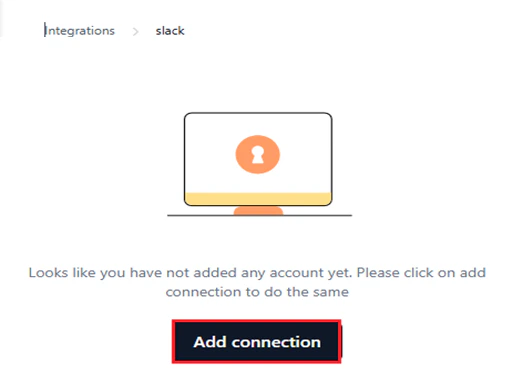
- In the configuration window, enter:
- Connection Name: A unique name for this integration.
- Authorization Details: Credentials based on the selected auth type. If a provider supports multiple auth types, select one—only one auth type is allowed per connection.
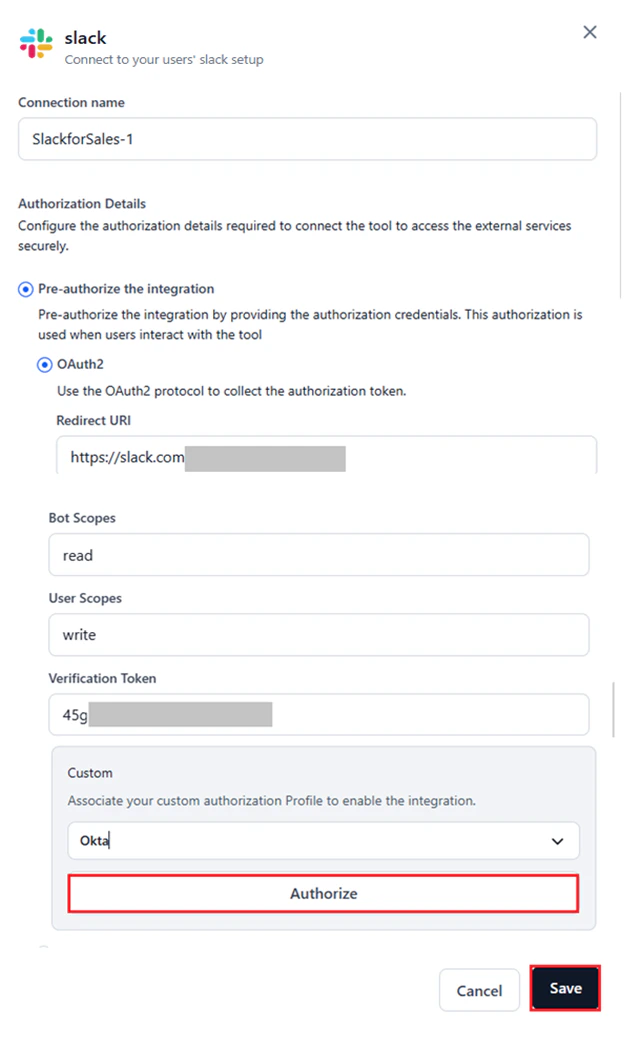
OAuth2
- Select the configured Auth Profile from the Custom dropdown. Learn more about adding an auth profile.
- Fields such as Redirect URL, Scopes, and Base URL auto-populate from the selected profile.
- Click Authorize to test the integration.
- No re-authentication is required unless the auth profile is deleted. Connecting with a deleted profile results in an error, and deleted profiles no longer appear in the Custom dropdown.
Bearer Token
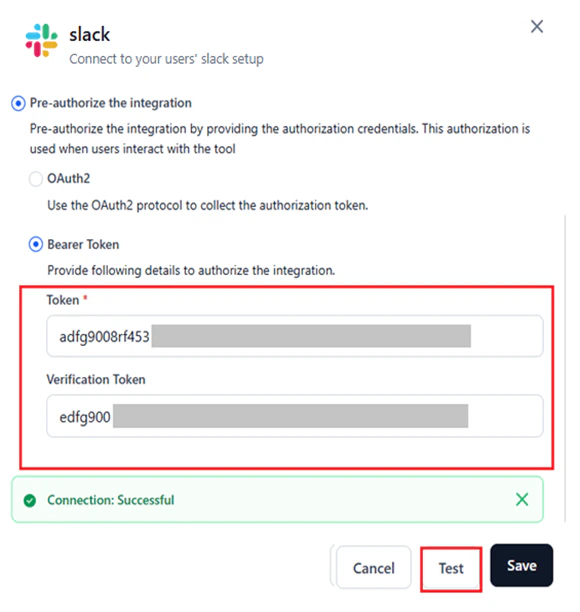
- Enter the bearer token and related fields such as Base URL, API Key, Bot Token, or other credentials as required by the provider.
- Retrieve values from the provider’s Admin console > Settings.
- Click Test to validate. A success message confirms the connection.
API
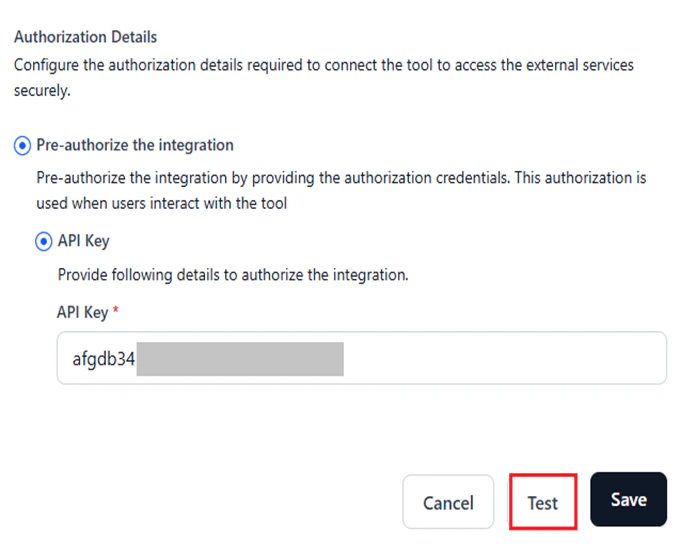
- Enter the API Key or Access Token for the provider. Additional fields may appear based on the provider’s requirements.
- Retrieve values from the provider’s Admin console > Settings.
- Click Test to validate. A success message confirms the connection.
Basic Auth
- Enter the required credentials. For example, Amplitude requires an API Key and API Secret.
- Retrieve values from the provider’s Admin console > Settings.
- Click Test to validate. A success message confirms the connection.

For OAuth1 and other authentication types, retrieve the required values from the provider’s admin console to configure the integration.
- Click Save after a successful test.
The Save button appears only after all required fields are filled in.
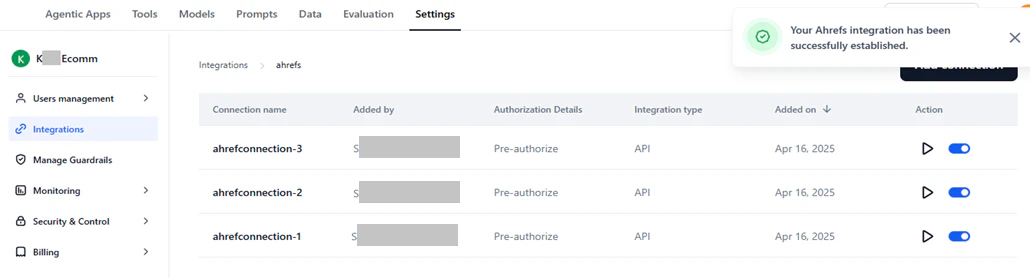
Manage Connection Errors
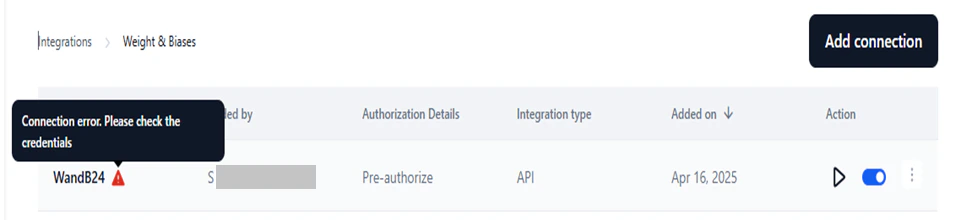
Errors may occur during or after setup due to invalid credentials. View an error:- Go to Connected and select the connection.
- Click the Play icon to test.
- Hover over the warning icon to see the error reason.
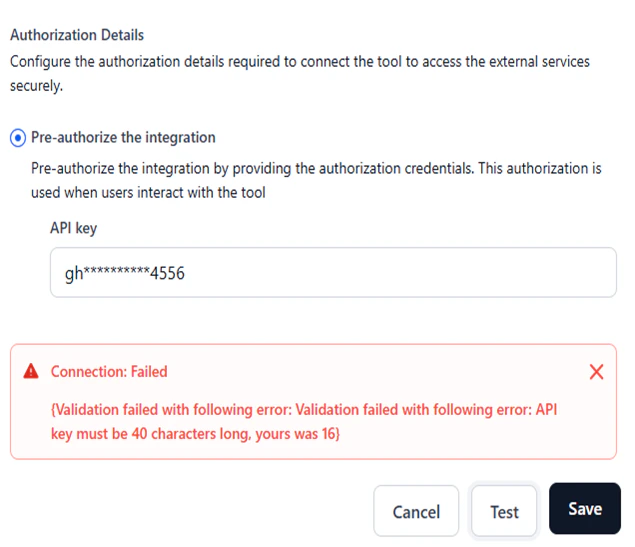
- Click Edit and update the credentials in the configuration window.
- Click Test to validate.
- Click Save.
Manage Connections
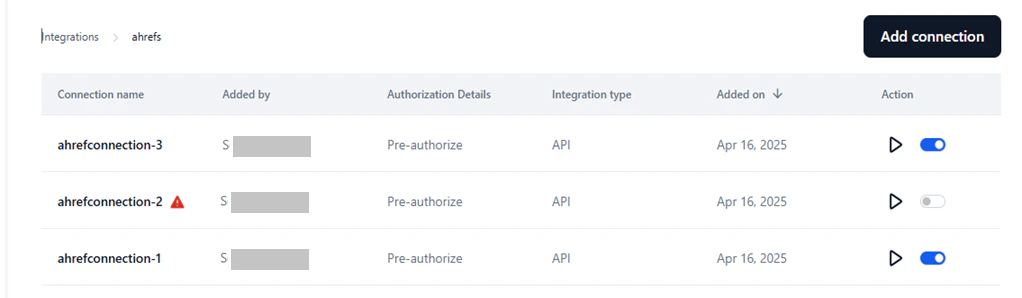
The Connected section lists all configured connections. You can view details and perform management actions from here.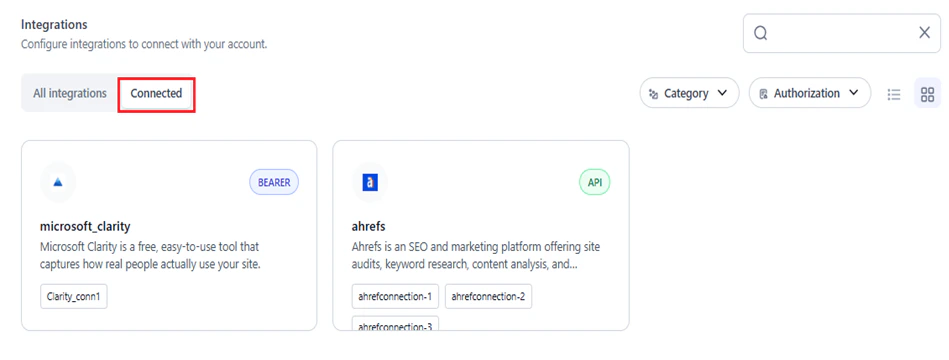
View Connection Summary
Clicking a connection in Connected shows the following details:| Field | Description |
|---|---|
| Connection Name | Unique name set during setup. |
| Added By | Admin or account user who created the connection. |
| Authorization Details | Displays Pre-authorize. |
| Integration Type | Auth method used (API, OAuth2, Bearer, Basic Auth, etc.). |
| Added on | Date the connection was added. |
| Action | Test the connection or toggle it on/off. |
Edit a Connection
You cannot modify the connection name.
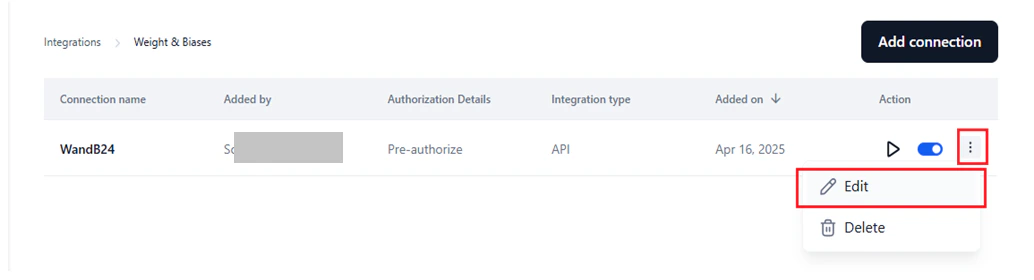
- Go to Connected > select the connection.
-
Click the Ellipses icon > Edit.
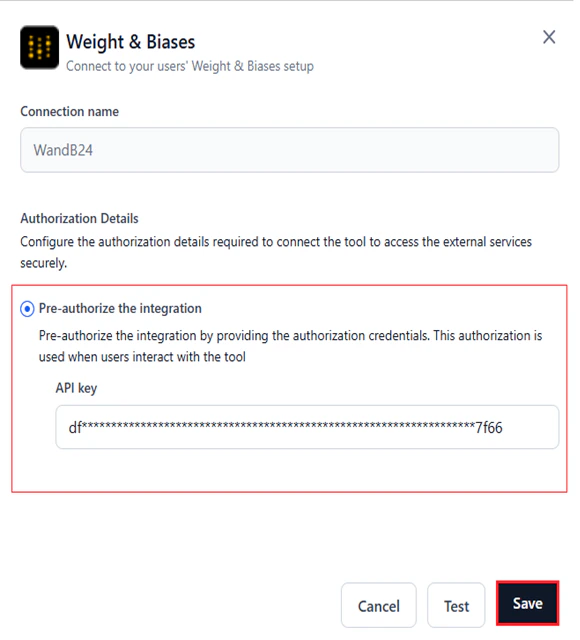
- Update the required fields in Authorization Details.
- (Optional) Click Test to validate.
-
Click Save.
Delete a Connection
- Go to Connected > select the connection.
-
Click the Ellipses icon > Delete.
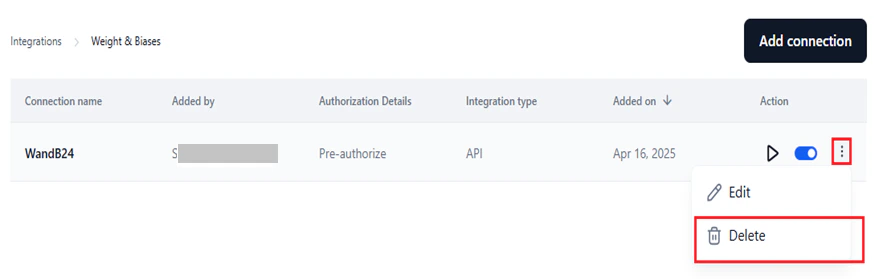
- Click Delete to confirm.
Test a Connection
- Go to Connected > select the connection.
-
Click the Play icon.


Enable or Disable a Connection
Enabling a connection makes it available for user authentication and accessible in the Integration node on the Tool Flow canvas. Use the toggle switch to enable (default) or disable the connection.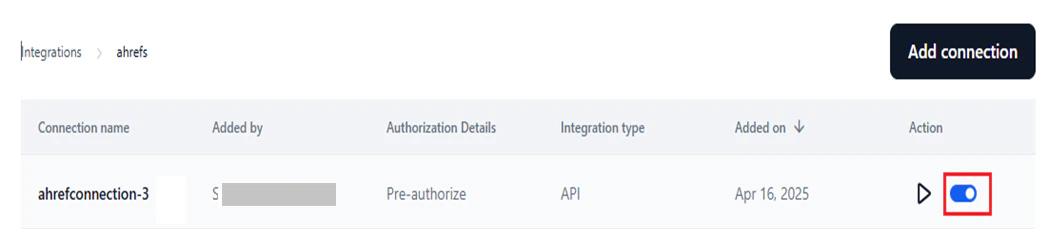
AI-Specific Integrations
The following integrations have dedicated setup flows for AI model management tasks.Hugging Face
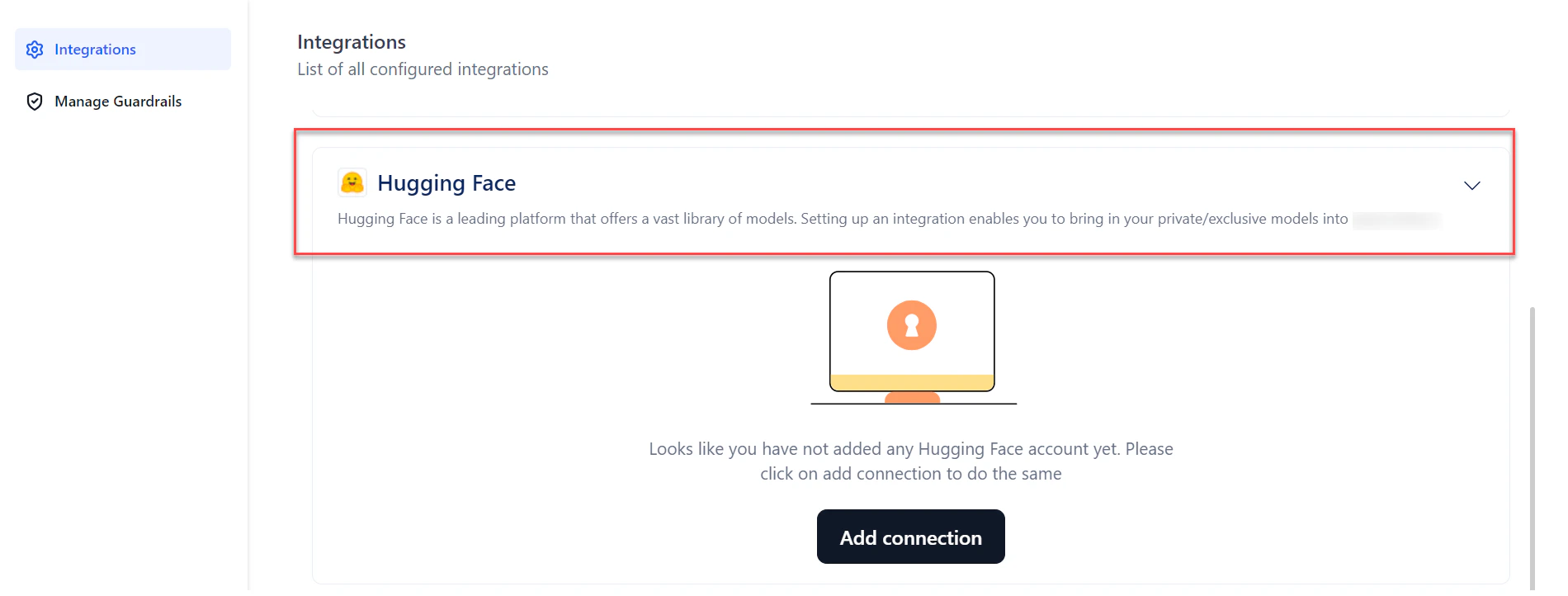
Integrating with Hugging Face lets you use public and private text generation models on the Platform. Private or exclusive models require a Hugging Face access token. To connect:-
Go to Settings > Integrations and select Hugging Face.
-
Click Add Connection.
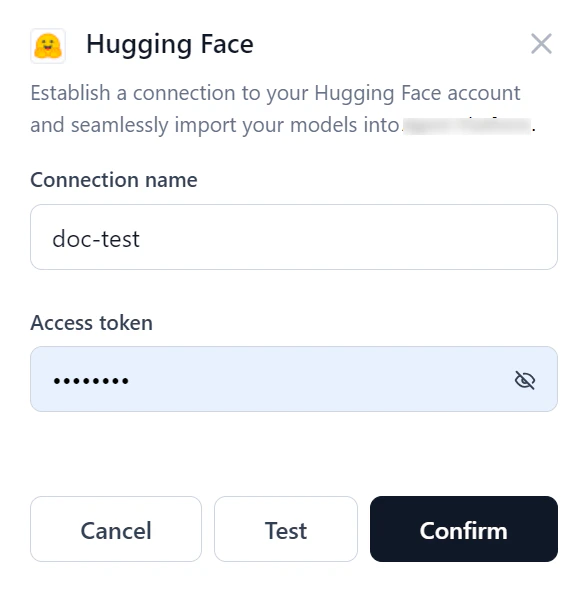
- Provide Connection Name and Access Token (from your Hugging Face account).
-
(Optional) Click Test to validate.
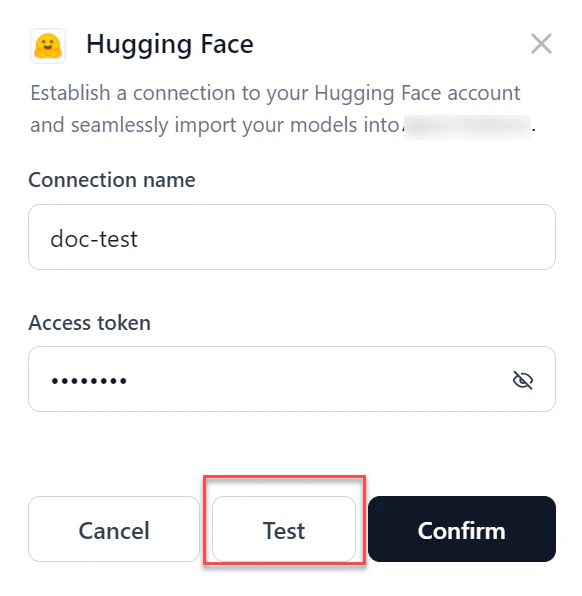
- Click Confirm to create the connection. If the connection fails, verify the access token or cancel and retry.
- After connecting, the connection name appears in the model selection dropdown when deploying an open-source model. See Select and Deploy an Open-Source Model.
- If the connection used for a model deployment is deleted, the system prompts you to select a new connection on redeployment.
AWS S3 Bucket
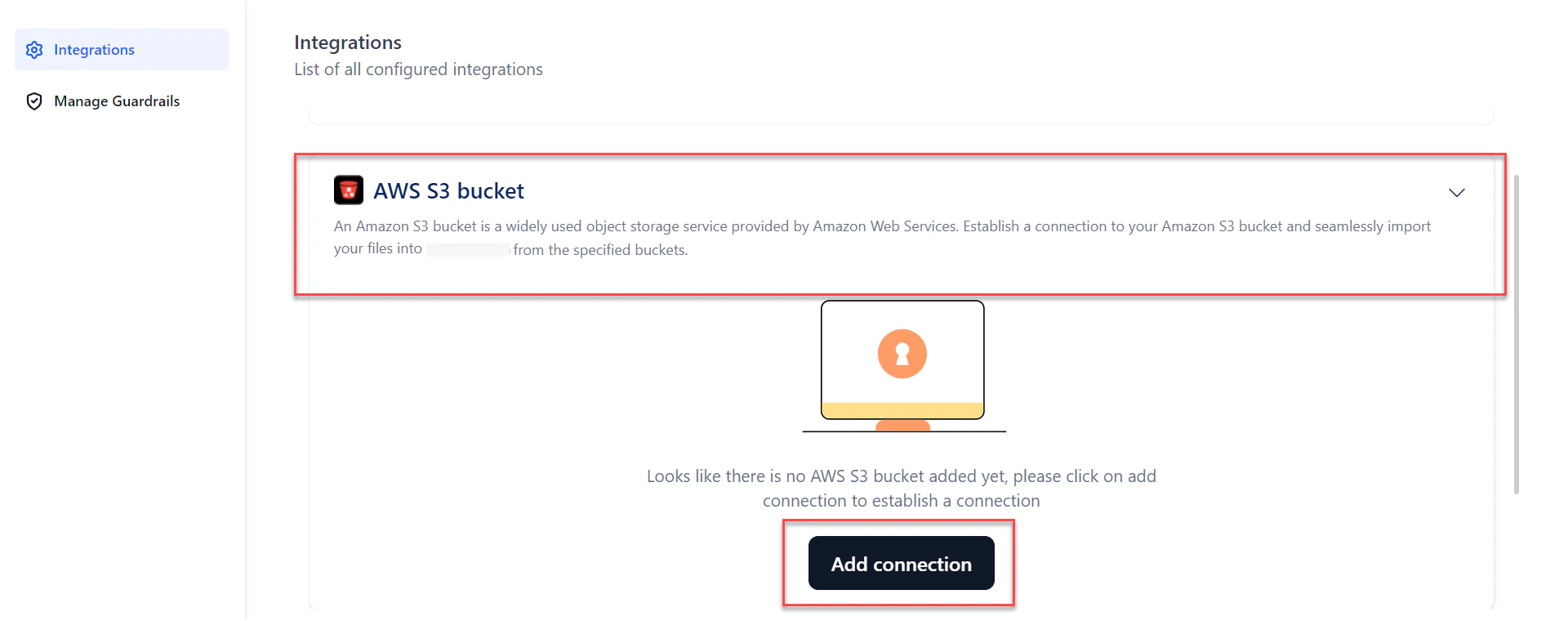
The S3 integration lets you import files from your AWS S3 account and use them in the Tool Flow Builder to develop AI applications. To connect:-
Go to Settings > Integrations and select AWS S3 Bucket.
-
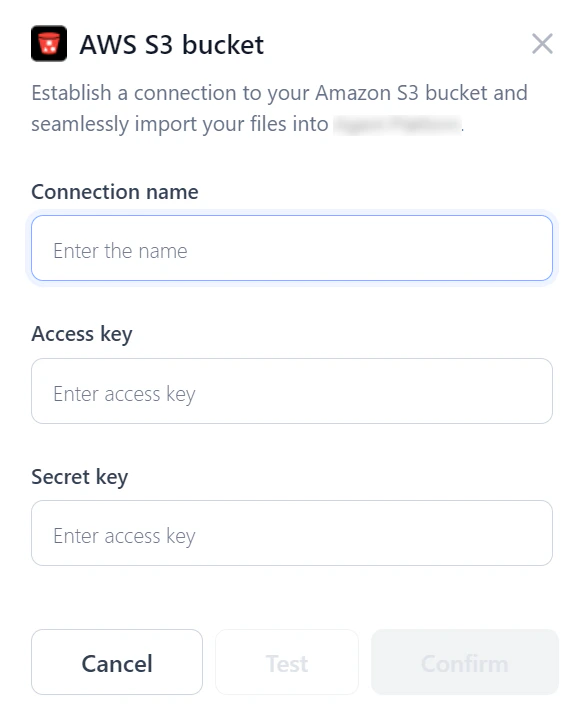
Click Add Connection.
-
Enter:
- Connection Name
- Access Key — unique identifier for your AWS account
- Secret Key — confidential key paired with the Access Key
- Bucket Name — as configured in your S3 console
- (Optional) Click Test to validate. If the connection fails, verify the details or cancel and retry.
- Click Confirm to create the connection.
- Create an Input variable with type Remote File.
- Add an API node and reference the remote file in the URL field.
Weights & Biases (WandB)
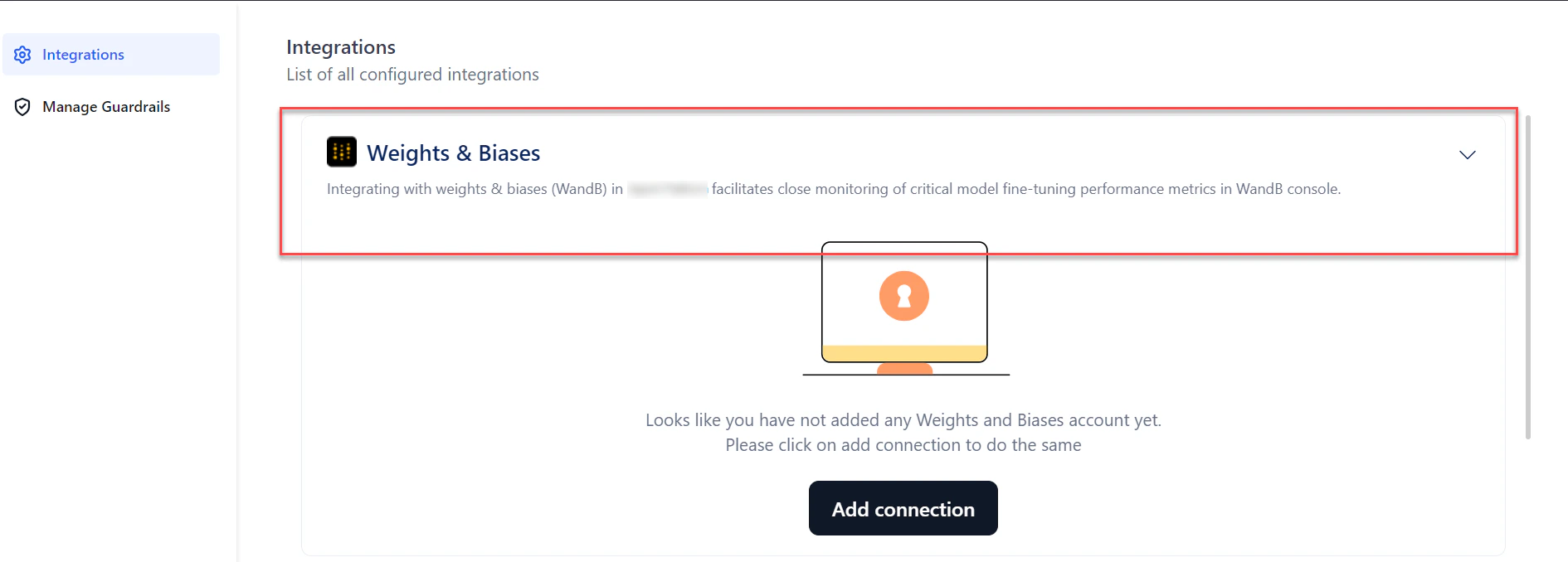
Connecting with WandB sends fine-tuning data from the Platform to the WandB console for additional analytics and monitoring. To connect:-
Go to Settings > Integrations and select Weights & Biases.
-
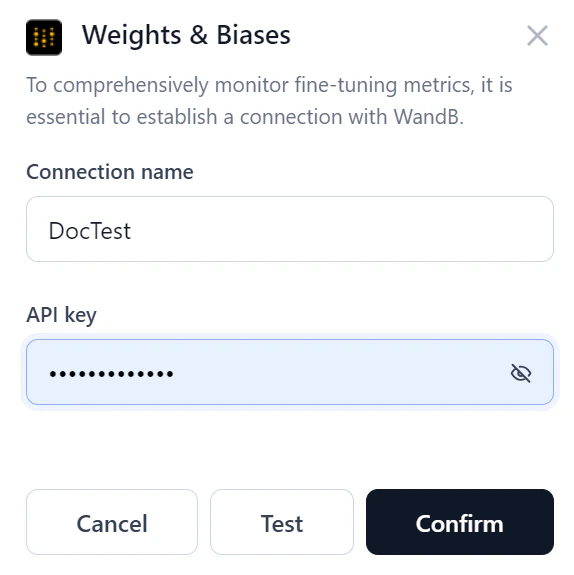
Click Add Connection.
-
Enter:
- Connection Name
- API Key — from your WandB account
-
(Optional) Click Test to validate.
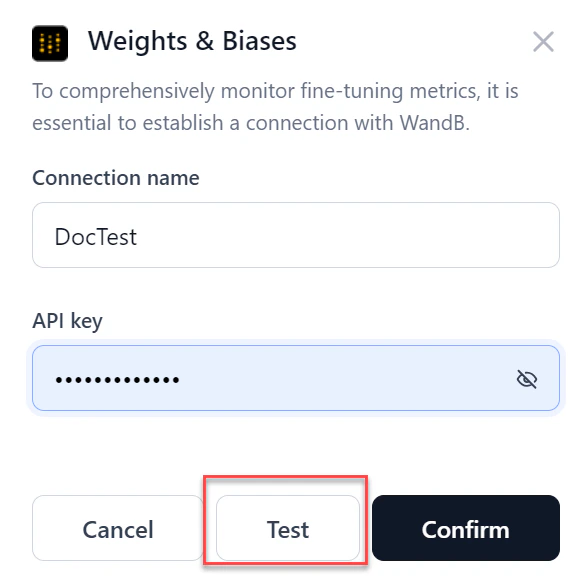
- Click Confirm to create the connection. If the connection fails, verify the API key or cancel and retry.
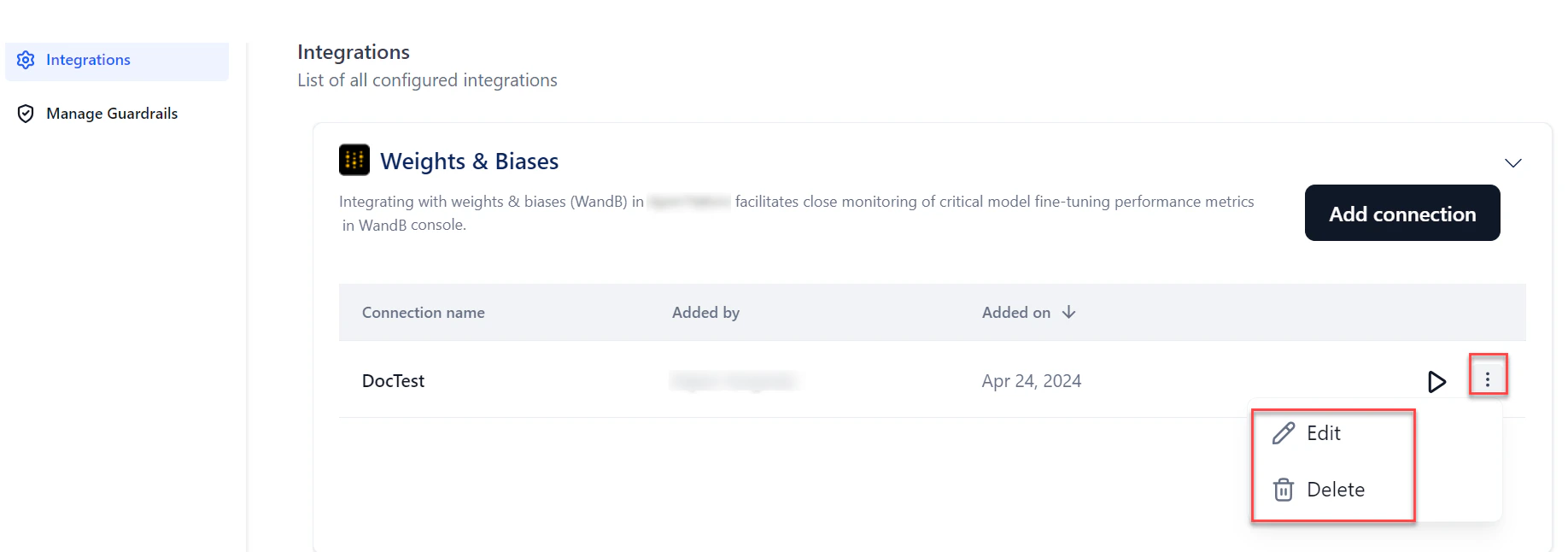
After connecting, the connection name appears in the Weights and Biases section of the fine-tuning wizard. See Create a Fine-Tuned Model.