Back to Search AI connectors list The Zendesk connector lets Search AI ingest content from Zendesk Knowledge Base articles and Tickets, making that content searchable for users.
SpecificationDetails
Repository typeCloud
Supported API versionREST API v2
Supported contentZendesk Knowledge Base Articles and Tickets
RACL supportYes
Content filteringNo
Auto permission resolutionYes

Authorization Support

Search AI uses OAuth 2.0 Authorization Code Grant Type to communicate with Zendesk.

Integration Steps

  1. Set up an OAuth client in Zendesk.
  2. Configure the Zendesk connector in Search AI.

Step 1: Set Up an OAuth Client in Zendesk

Set up an OAuth client in Zendesk and generate OAuth credentials for Search AI to authenticate requests.
  1. Go to the Admin Center in your Zendesk application. alt_text
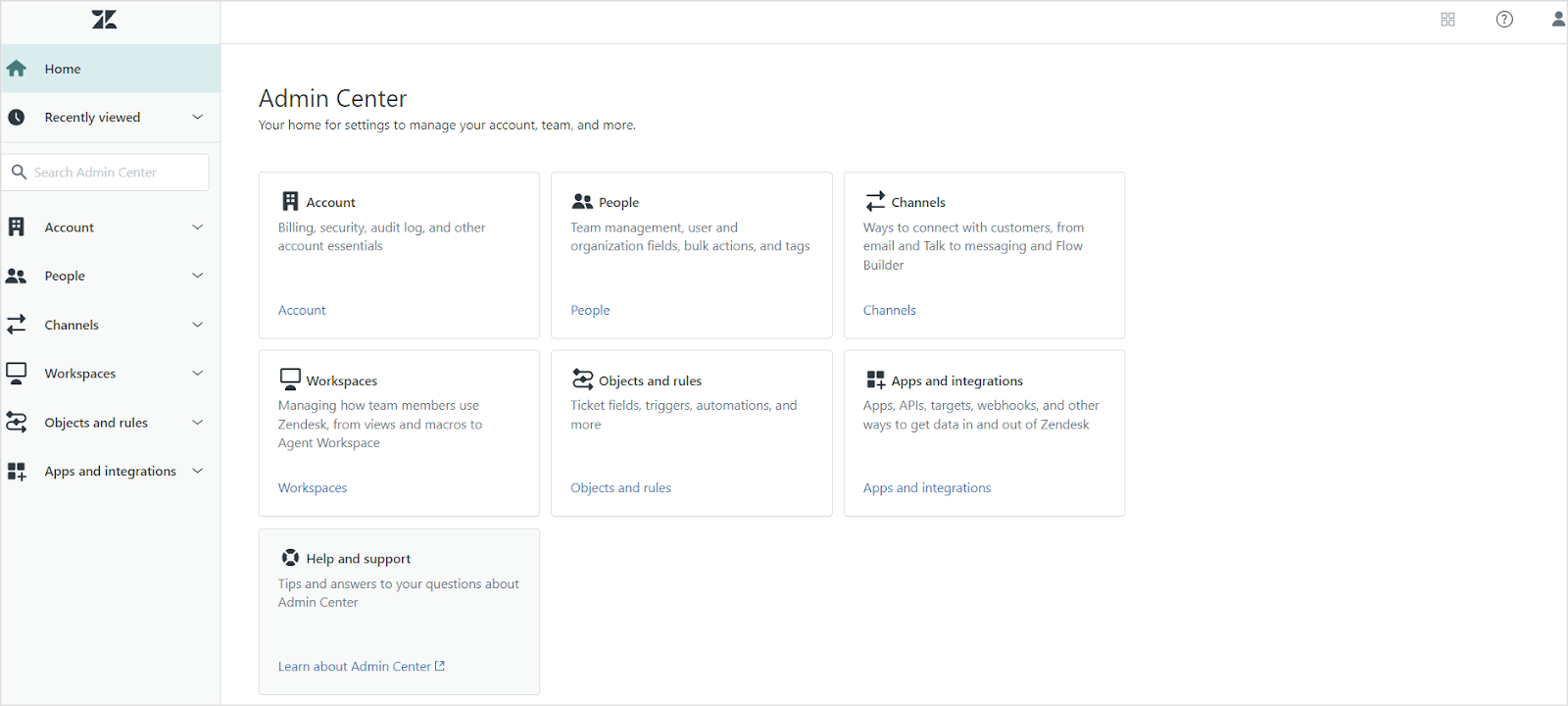
  2. Under Apps and Integrations, go to the Zendesk API page.
  3. On the OAuth Client tab, register Search AI as an OAuth client. See Zendesk OAuth documentation for field descriptions. Set the Redirect URLs field to one of the following based on your region or deployment:
    • JP Region: https://jp-bots-idp.kore.ai/workflows/callback
    • DE Region: https://de-bots-idp.kore.ai/workflows/callback
    • Production: https://idp.kore.com/workflows/callback
After saving, a pre-populated Secret field appears. Copy this value — it is the client secret needed for Step 2.

Step 2: Configure the Zendesk Connector in Search AI

Go to Sources > Connectors and select Zendesk. On the Authorization tab, provide the following details and click Connect.
FieldDescription
NameUnique name for the connector
Authorization TypeOAuth 2.0 (only supported option)
Grant TypeAuthorization Code — see Grant Types for details
Client IDClient ID generated during OAuth registration
Client SecretSecret generated during OAuth registration
Host URLURL of your Zendesk instance
Content TypeSelect the content types to ingest
After a successful connection, ingest content from the Configuration tab using Sync Now.

Content Ingestion

On the Configuration tab, use Sync Now for an immediate sync or Schedule Sync to set up recurring ingestion. Search AI ingests Knowledge Base Articles and Tickets from the connected Zendesk account. The type field in ingested content indicates whether a record is an article or a ticket. Tickets — the following fields are ingested into the content field:
  • Title
  • Content
  • Priority
  • Status
  • Type
  • Assignee
  • Requester
  • Submitter
  • Comments
Articles — the main text content and comments are captured in the content field. Additional fields are stored in their respective indexed or metadata fields. JSON view of ingested content for an article
{
    "_id": "fc-37479a31-bce2-53a7-a341-bd9dcf186282",
    "searchIndexId": "sidx-4793549d-bd30-5f0e-968d-be7d3ea3bde2",
    "streamId": "st-b3c3e04c-567d-5b8c-bee7-719d7fb669a3",
    "createdBy": "u-1e066081-f25d-5b7b-99d5-1b873ea50b09",
    "createdOn": "2025-01-09T08:45:25.000Z",
    "lMod": "2025-01-16T10:58:55.000Z",
    "extractionType": "zendesk",
    "extractionSourceId": "fs-90813a2b-a076-5064-825f-ecf2796132f2",
    "jobId": "fj-7515b09b-5539-5d39-8f0d-f214393389b3",
    "_meta": {
        "state": "approved",
        "isDeleted": false,
        "size": 1363,
        "updateAvailable": false
    },
    "_source": {
        "meta_data": {
            "authorId": 17812183850908,
            "createdOn": "2025-01-09T08:45:25Z",
            "updatedOn": "2025-01-09T08:45:25Z",
            "contentType": "articles"
        },
        "sys_racl": [
            "17831164808092"
        ],
        "sys_content_type": "zendesk",
        "sys_source_name": "myZendeskConnector",
        "sourceType": "zendesk",
        "raw_data": "{\"id\":17831134698268,\"url\":\"https://test3814.zendesk.com/api/v2/help_center/en-us/articles/17831134698268.json\",\"html_url\":\"https://test3814.zendesk.com/hc/en-us/articles/17831134698268-SAMPLE-ARTICLE-Flat-pack-for-faster-shipping\",\"author_id\":17812183850908,\"comments_disabled\":false,\"draft\":false,\"promoted\":false,\"position\":0,\"vote_sum\":0,\"vote_count\":0,\"section_id\":17831158842524,\"created_at\":\"2025-01-09T08:45:25Z\",\"updated_at\":\"2025-01-09T08:45:25Z\",\"name\":\"SAMPLE ARTICLE: Flat pack for faster shipping\",\"title\":\"SAMPLE ARTICLE: Flat pack for faster shipping\",\"source_locale\":\"en-us\",\"locale\":\"en-us\",\"outdated\":false,\"outdated_locales\":[],\"edited_at\":\"2025-01-09T08:45:25Z\",\"user_segment_id\":null,\"permission_group_id\":17831164808092,\"content_tag_ids\":[],\"label_names\":[],\"body\":\"ShipQuick, in line with our commitment to practicality and efficiency, offers Flat Pack Delivery.\",\"permissions\":[\"17831164808092\"],\"connectorBaseUrl\":\"https://test3814.zendesk.com\",\"sourceType\":\"zendesk\"}",
        "base_url": "https://test3814.zendesk.com",
        "title": "SAMPLE ARTICLE: Flat pack for faster shipping",
        "content": "ShipQuick, in line with our commitment to practicality and efficiency, offers Flat Pack Delivery. It's quick, efficient, and streamlined so your delivery can be made simple and fuss-free. Our Flat Pack Delivery means we ship your furniture disassembled in packages. This helps lower shipping costs since items are smaller, easier to manage, and can be loaded more efficiently during transit. Upon arrival, it's easy to put together as our proprietary assembly instructions are clearly written and easy-to-follow. All it requires is a little bit of time.",
        "url": "https://test3814.zendesk.com/hc/en-us/articles/17831134698268-SAMPLE-ARTICLE-Flat-pack-for-faster-shipping",
        "type": "articles",
        "sys_file_type": "articles"
    },
    "connectorId": "fcon-3fea53ce-9a30-5d20-a22a-7d4a1fbef523",
    "externalSourceId": "sidx-4793549d-bd30-5f0e-968d-be7d3ea3bde2_17831134698268",
    "updatedOn": "2025-01-09T08:45:25.000Z"
}
JSON view of ingested content for a ticket
{
    "_id": "fc-ffcc7e33-b387-550a-b1f1-6e1f1a10bf21",
    "searchIndexId": "sidx-4793549d-bd30-5f0e-968d-be7d3ea3bde2",
    "streamId": "st-b3c3e04c-567d-5b8c-bee7-719d7fb669a3",
    "createdBy": "u-1e066081-f25d-5b7b-99d5-1b873ea50b09",
    "createdOn": "2025-01-09T08:45:27.000Z",
    "lMod": "2025-01-20T11:26:26.000Z",
    "extractionType": "zendesk",
    "extractionSourceId": "fs-90813a2b-a076-5064-825f-ecf2796132f2",
    "jobId": "fj-b172bff0-2adb-59e7-b1f0-840eb2b10ad9",
    "_meta": {
        "state": "approved",
        "isDeleted": false,
        "size": 1578,
        "updateAvailable": false
    },
    "_source": {
        "meta_data": {
            "authorId": 17812183850908,
            "createdOn": "2025-01-09T08:45:27Z",
            "updatedOn": "2025-01-20T11:23:14Z",
            "contentType": "articles",
            "comments": "Comment #1 by John Doe (2025-01-10T10:33:53.000Z): This article helps a lot",
            "authorName": "John Doe",
            "section": "Gift cards"
        },
        "sys_racl": [
            "18025455651868"
        ],
        "sys_content_type": "zendesk",
        "sys_source_name": "myZendeskConnector",
        "sourceType": "zendesk",
        "base_url": "https://test3814.zendesk.com",
        "title": "SAMPLE ARTICLE: Gift card expiration date",
        "content": "HomeBuy International Gift Cards have helped decorate many homes across the world. Gift cards are good for 2 years from the date they were sent to the recipient via the ShipQuick website or, if you directly emailed the gift card to the recipient, then from its initial date of purchase. This generous time frame provides enough to browse through collections, imagine new furnishings in a space, take measurements, and find the perfect items.\nComments: Comment #1 by John Doe (2025-01-10T10:33:53.000Z): This article helps a lot\nAuthor Name: John Doe\nSection: Gift cards",
        "url": "https://test3814.zendesk.com/hc/en-us/articles/17831134834076-SAMPLE-ARTICLE-Gift-card-expiration-date",
        "type": "articles",
        "sys_file_type": "articles"
    },
    "connectorId": "fcon-3fea53ce-9a30-5d20-a22a-7d4a1fbef523",
    "externalSourceId": "sidx-4793549d-bd30-5f0e-968d-be7d3ea3bde2_17831134834076",
    "updatedOn": "2025-01-20T11:23:14.000Z"
}

RACL Support

Search AI enforces access control for ingested tickets and articles using the sys_racl field, which stores identifiers (email IDs, organization IDs, group IDs) that determine which users can view a given piece of content.

Tickets

For ingested tickets, the sys_racl field includes:
  • Assignee — email ID of the ticket assignee
  • Requester — email ID of the ticket requester
  • Submitter — email ID of the ticket submitter
  • Followers — email IDs of all ticket followers
  • Collaborators — email IDs of all ticket collaborators
  • Organization ID — ID of the organization associated with the ticket
  • Group ID — ID of the group the ticket is assigned to (if applicable)
Example:
"sys_racl": [
    "peter.mark@example.com",      // assignee of the ticket
    "customer@example.com",         // submitter of the ticket
    "support.lead@example.com",     // collaborator on the ticket
    "17812171469852"                 // organization ID
]

Articles

For ingested articles, sys_racl includes permission entities corresponding to the management permissions and user segments assigned to the article. For example, if an article has management permissions set to “Admins” and visibility set to the “Agents” user segment, Search AI creates two permission entities — one for the management permission and one for the user segment.
"sys_racl": [
    "17831164808092",    // Permission entity for Admin management permission
    "134355653233314"    // Permission entity for Agents user segment
]