

Introduction to Call Control Parameters
Call control parameters are general-purpose parameters that can modify a call’s behavior, including ASR/STT & TTS configurations.Automatic Speech Recognition (ASR) and Speech-to-Text (STT) are two terms that refer to the same technology. Both involve converting spoken language into written text by analyzing and interpreting audio input. The terms are used interchangeably, describing the same function—transforming speech into readable, actionable text.
- Session-Level Parameters: Add the prefix
session.to apply parameters throughout the session (for example,session.ttsprovider). - Node-Level Parameters: Add the prefix node. to apply parameters only at a specific node (for example,
node.ttsprovider). - Default Behavior: The platform considers parameters without a prefix as session-level by default.
- Node-level parameters take precedence over session-level parameters. If no node-level parameters are defined, session-level properties apply.
Node Level Call Control
The call control section is Available In Entity Node/Message Node/Confirmation Node > IVR Properties > Advanced Controls. Learn more.
Channel Level Call Control
Update/Modify Parameters
When updating language settings or modifying Automatic Speech Recognition (ASR) and Text-to-Speech (TTS) parameters in Call Control Parameters, users can specify the updated field along with a minimal set of required parameters. For example, if a user has configured the Speech-to-Text (STT) provider and language in the call control parameters and wants to add existing values. Users only need to provide the additional sttLanguage parameter without redefining the previously set values. This behavior applies to Session-Level Call Control Parameters. Example Existing Parameters:sttProvider and previously set sttLanguage, ensuring that only the new parameter adds without requiring users to re-enter unchanged values.
Supported Speech Engines (ASR/TTS)
Voice Gateway supports several third-party service providers for ASR/TTS. Learn moreSupported Call Control Parameters
Provider Related Parameters
Speech-to-text (STT) and text-to-speech (TTS) services interface with the user using a selected language (for example, English US, English UK, or German). TTS services also use a selected voice (for example, female or male) to respond.-
Use STT for recognizer:
sttProvider→google,microsoft,sarvam. -
Use TTS for synthesizer:
ttsProvider→google,microsoft,aws,sarvam,openai.
Apply the following parameters only when STT is set as Recognizer. Otherwise, the system uses default bot-level or Voice Gateway settings. These properties are applied at the session level.
Example for
node.alternativeLanguages.
Use Cases and Benefits
Cloned Voices
Configure a Custom Cloned Voice (ElevenLabs Integration)
Voice Gateway supports custom voices cloned in ElevenLabs. To activate a cloned voice for an agent, share the ElevenLabs API credentials with the support team. Once integration is complete, enable the voice through call control parameters-no redeployment required. Get the ElevenLabs API key for authentication from the ElevenLabs account under Profile > API Key. Setup Steps:- Raise a support ticket with your credentials: Submit a Support ticket, the team completes the integration on your account and shares the new label name.
- Activate using call control parameters: On completion of the integration, enable the cloned voice in your Voice AI Agent by passing the appropriate call control parameters in your flow configuration. No code changes or redeployment needed.
Treat the ElevenLabs API key as a password. Share it only through secure support tickets and don’t include it in screenshots, logs, or public channels.
Labels and Fallback Provider Related Parameters
Label-Assign/Create a label only if you need to create multiple speech services from the same vendor. Then, use the label in your application to specify which service to use. How to Configure Label- Add a speech service inside the Speech tab.
- Select a provider and add a label with a unique name.
- Use the same label in the call control parameter.
- At the same node where you use fallback call control parameters, you must also pass the primary Recognizer and Synthesizer.
- The node at which you use fallback call control parameters must also define the primary recognizer and synthesizer.
- Best practice: use the same ASR engine in fallback with a different label or region.
- If the current provider fails, Voice Gateway switches to the fallback provider.
- Fallback properties are applied at the session level.
Continuous ASR Related Parameters
Continuous ASR (Automatic Speech Recognition) lets the speech-to-text engine to handle user inputs like phone numbers or customer IDs that may include pauses between utterances. This improves recognition accuracy for digit or character strings.This feature is only available for Microsoft Azure.
AzureSegmentationSilenceTimeout that performs the same function as Continuous ASR. Since Azure’s ASR engine handles silence detection directly (rather than the Voice Gateway), it achieves higher accuracy when merging utterances. Learn more.
Application Scope:
Both continuousASRTimeoutInMS and AzureSegmentationSilenceTimeout apply at the session level. They remain active for the entire call and can be updated at individual nodes as needed.
Barge-In Related Parameters
Barge-In lets the Voice Gateway to detect and respond when a user interrupts the bot by speaking or entering DTMF digits while the bot responds. This enables quicker interactions by preventing users from waiting for the bot to finish speaking.Barge-In applies at the node level.
Turn Detection Parameters
Turn detection determines when a caller has finished speaking by combining voice activity detection, acoustic turn probability, streaming ASR transcripts, text-based end-of-utterance scoring, and expected-answer hints. This model is ASR-provider agnostic. WhenturnDetectionEnable is set to true, the platform automatically derives expected-answer configuration from the entity selected in the Entity node. The following parameters are fetched and sent automatically:
turnDetectionExpectedTypeturnDetectionExpectedLengthturnDetectionExpectedMinturnDetectionExpectedMaxturnDetectionExpectedOptionsturnDetectionExpectedPatternturnDetectionOpenEnded
Example Configuration:
Timeout Related Parameters
These parameters control how long the Voice Gateway waits for user input (speech or DTMF).All timeout-related parameters apply at the node level.
Common ASR Parameters
Microsoft ASR
Google ASR
AWS ASR
NVIDIA ASR
Deepgram ASR
Deepgram Flux ASR
The Deepgram Flux model is a real-time speech-to-text model optimized for low-latency conversational voice AI. It improves response time in voice interactions by detecting when a speaker finishes speaking and enabling the system to respond faster. Key Benefits- Smart turn detection-Identifies when the speaker finishes speaking.
- Supports automatic mid-call language detection.
- Ultra-low latency-~260ms end-of-turn detection.
- Faster responses-Enable quicker AI agent replies.
- Clean transcripts-Turn-based conversation structure.
- Natural interruptions-Supports barge-in scenarios.
- High accuracy-Built on Deepgram Nova-3 transcription engine.
- Select Deepgram ASR from the ASR provider list.
- Configure Call Control Parameters
sttProvider: deepgramflux
sttLanguage: en
deepgramEotThreshold: 0.8
deepgramEotTimeoutMs: 3000
deepgramModel: flux-general-multi
Parameter Details
Recommended Configuration
For most conversational AI use cases:
This provides a good balance between speed and reliability.
Limitations
- Flux doesn’t support smart formatting for numbers.
eager_eot_thresholdisn’t yet supported on the platform.
Sarvam ASR
Sarvam ASR is a speech-to-text provider optimized for Indian languages. Configure it using call control parameters. For additional information on the supported languages, refer to the list of supported languages.
Example Configuration
Azure ASR
Common TTS Parameters
TTS Options in Voice Gateway
Voice Gateway now supports attsOptions parameter that lets bot developers to customize Text-to-Speech (TTS) messages by passing dynamic objects tailored to the specific TTS provider. Depending on the provider, use these options to fine-tune aspects like voice settings, speed, and other properties.
Each TTS provider has its own set of customizable parameters. For more detailed information on the parameters they support, refer to their official websites.
Structure of ttsOptions
The ttsOptions object contains provider-specific settings in a key-value format. Following are examples of different TTS providers:
ElevenLabs
optimize_streaming_latency: Adjusts the latency during streaming.voice_settings: Includes various voice customization options likestability,similarity_boost, anduse_speaker_boost. Learn more.speed: Controls the speed of the generated speech. The default value is 1, and the allowable values are>=0.7and<=1.2. Values less than 1 slow down the speech, while values > 1 speed it up. Learn more.
ttsOptions to select a specific ElevenLabs model. To use the ElevenLabs v3 (eleven_v3) model-which is required for features such as audio tags-pass the model_id parameter inside ttsOptions.
Parameter
Example: Setting the model in a Script Node
model_id alongside other ElevenLabs-specific parameters in a single ttsOptions object:
- Parameter Name:
ttsOptions - Value:
{"model_id": "eleven_v3"}
Deepgram
Apart from generic parameters likettsLanguage and voiceName, which are common across most TTS engines, Deepgram offers a few additional parameters that enhance customization:
encoding(string): You can specify the desired encoding format for the output audio file, such asmp3orwav.model(enum): Defines the AI model used for synthesizing the text into speech. The default model isaura-asteria-en, optimized for natural-sounding English voice output.sample_rate(string): This enables you to set the sample rate of the audio output, offering control over the quality and clarity of the sound produced.Container: The Container feature lets users to specify the desired file format wrapper for the output audio generated through text-to-speech synthesis.
aura-2-thalia-en), two additional ttsOptions parameters are available: speed and pronunciations.
These settings appear only when an Aura-2 model is selected. Values outside the supported range, or malformed pronunciation entries, are rejected with a validation error before the request is sent. Learn more.
Example configuration:
AWS
Apart from generic parameters likettsLanguage and voiceName, which are common across most TTS engines, Aws offers a few additional parameters that enhance customization, like ttsEnhanceVoice, also known as an engine.
Amazon Polly has four voice engines that convert input text into lifelike speech. These include standard, neural, generative, and long-form.
ttsEnhancedVoice = “neural”
OpenAI STT
OpenAI STT provides speech-to-text transcription through OpenAI’s audio models. Configure it using call control parameters. OpenAI STT isn’t available as a selectable option in the UI. To configure it, contact the Voice Gateway team. The team creates a label associated with your account, which you then use as thettsLabel value in the call control parameters.
Parameter Support by Model
Send only parameters supported by the selected model. Sending an unsupported parameter causes the session to fail.
Turn Detection Behavior
Models
gpt-live-transcribe and gpt-realtime-whisper don’t support server-side turn detection. For these models, Voice Gateway uses its native turn detection capabilities — mod_vad_kore, mod_smart_turn, or mod_kore_turn_taking — and sends input_audio_buffer.commit at the end of detected speech.
All other OpenAI STT models use server-side turn detection behavior as configured by openaiTurnDetection.
Example Configuration
Open AI (Whisper)
Apart from generic parameters likettsLanguage and voiceName, which are common across most TTS engines, Whisper offers a few additional parameters that enhance customization, like a model.
For real-time applications, the standard tts-1 model provides the lowest latency but at a lower quality than the tts-1-hd model. Because of the audio generation process, tts-1 may produce more static in certain situations than tts-1-hd. Sometimes, the audio may not have noticeable differences depending on your listening device and the person.
Sarvam
Sarvam TTS supports Indian language voice synthesis. UsettsOptions to configure speech rate and variation.
Example Configuration
ttsOptions parameters
TTS Limitations
The following table describes how Voice Gateway processes and sends responses to the TTS provider in streaming and non-streaming modes.Common Use Cases for Call Control Parameters
Continuous ASR
Continuous ASR (Automatic Speech Recognition) is a feature that lets tuning Speech-to-Text (STT) recognition for the collection of phone numbers, customer identifiers, and other strings of digits or characters, which, when spoken, are often spoken with pauses between utterances. Two parameters to enable it are:Handling Bot Delay
Configure Voice Gateway to act when the bot takes time to respond to a message.Add a delay between bot messages
When two message nodes, or a message node and an entity node, are placed sequentially within the same node, the bot plays the prompts in sequence. By default, the next prompt starts immediately after the previous prompt finishes. To add a pause between prompts, configure a custom delay in the Bot Response node. Add a custom pause- In the Bot Response node, select Add (+).
- Select the SmartAssist Gateway channel with Custom JavaScript.
-
Add the following function to the channel override template:
For example:This example adds a 4-second pause before the message plays. Specify the delay in seconds based on the required conversation flow.
Handle Bot Delay After User Input
The delay is only applied when Voice Gateway sends a response to the bot and is waiting for the bot’s reply. This includes delays at the Entity Node, Confirmation Node, or Message Node with an “On Intent” (User-Bot delay).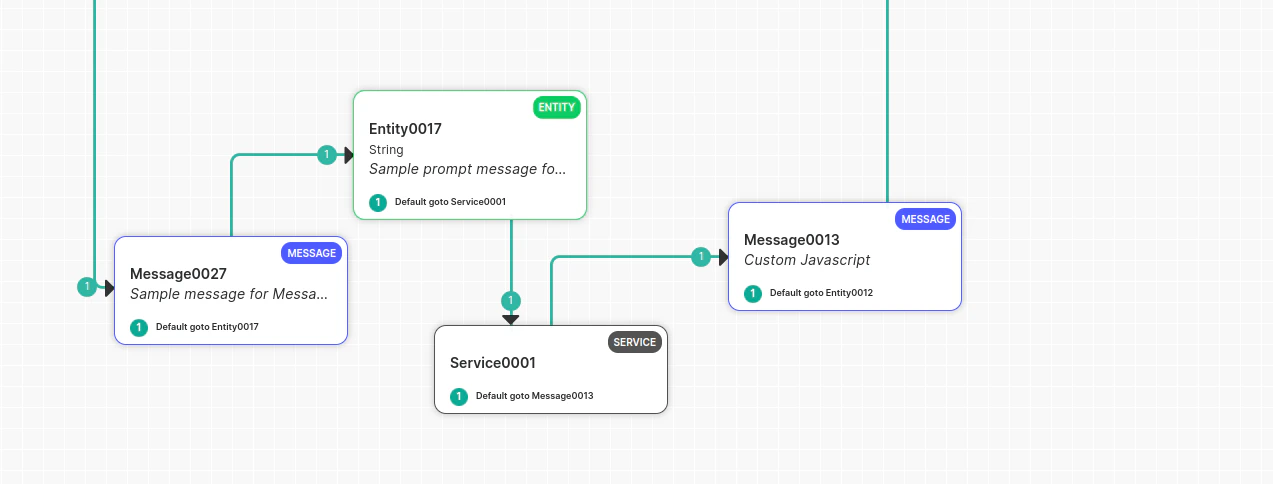
- Play a textual prompt to the user
- Play an audio file to the user
- Disconnect the call
- To play a message to the user, configure a timeout on the botNoInputTimeoutMS parameter and define the action:
- To play a textual prompt, set the prompt on the
botNoInputSpeechparameter. - To play an audio file, set the file URL using the
botNoInputUrlparameter. - To replay the message if the timeout exceeds multiple times, configure the number of retries using the botNoInputRetries parameter.
- Configure a separate timeout for disconnecting the call using the
botNoInputGiveUpTimeoutMSparameter, set to 30 seconds by default.
Example:
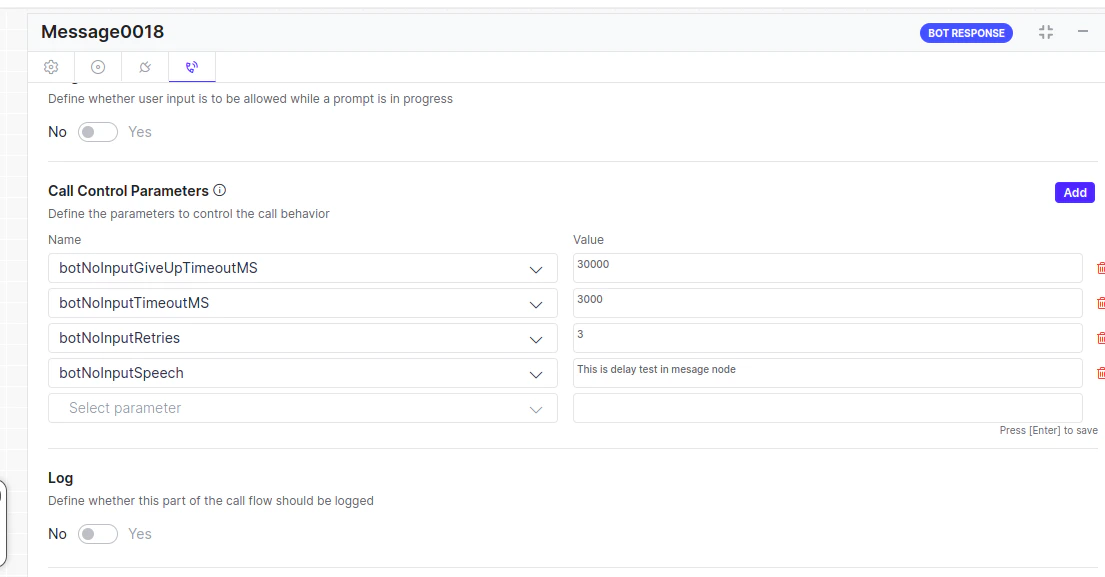
botNoInputSpeech can contain multiple messages, including audio URLs. Example: botNoInputSpeech = [“this is first delay Msg”, https://thisdummy.wav, “ this is third textual Message”].Handle Delay Between Two Message Nodes
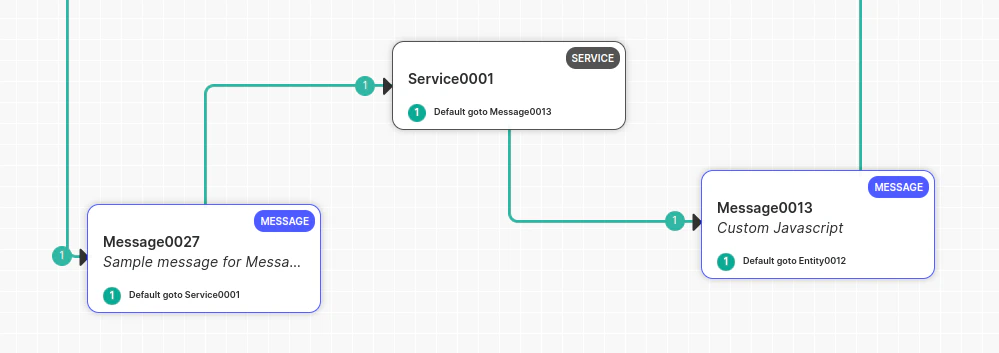
Voice Gateway can only handle delays when it sends a response to the bot and waits for the bot’s reply. If a delay occurs, Voice Gateway can handle it. If a delay occurs between a Message node or Script node where the user hasn’t spoken, Voice Gateway won’t be aware of the delay, and the bot developer must handle it manually. Place a Service Node between two Message nodes (delay observed between two Message nodes): Manage this manually, as the gateway has received a command to play a message and isn’t waiting for user input. The gateway won’t initiate a delay timer and waits for the next bot message. To handle this scenario:- Play music before the API call in the Message node.
- Configure the Service node.
- Deliver the message after the Service node.
If you receive a response from the API and don’t want to play the full music, immediately abort the music and play the Message node prompt using the channel override utility function:
print(voiceUtils.abortPrompt(“Dummy message“)) → (The message parameter is optional).
Barge-In Scenarios
The Barge-In feature controls Voice Gateway behavior in scenarios where the user starts speaking or dials DTMF digits while the bot is playing its response to the user. In other words, the user interrupts (“barges-in”) the bot.Backchannel Words
Backchannel words are short acknowledgments - like uh-huh, okay, or got it - that callers say while listening without intending to interrupt. By default, any speech during playback triggers barge-in and stops the audio. ConfiguringbackchannelWords signals Voice Gateway to keep the audio playing when a caller speaks one of these words during playback, instead of treating it as a barge-in. When Voice Gateway matches an utterance to a configured word, it:
- Skips intent detection and dialog execution for that input.
- Leaves session context — including the last captured user input — unchanged.
- Excludes the utterance from NLP Insights and intent-training data.
- Doesn’t count the utterance against no-input timeouts or retry limits.
- Still records the utterance in the conversation transcript, marked as a backchannel phrase.
backchannel Words at the node-level:
- Each entry must be non-empty after trimming and have a maximum length of 100 characters.
- Lists support a maximum of 100 entries.
- Voice Gateway removes duplicate entries automatically after normalization.
- An empty array or an omitted parameter turns off the feature for that scope with no runtime impact.
- Audio playback starts.
- The caller speaks during playback.
- Voice Gateway normalizes the detected phrase - converting to lowercase, trimming whitespace, and stripping punctuation - and checks it against the configured list.
- If the phrase matches a configured backchannel word, audio continues playing and Voice Gateway sends a
speechDetectedevent with backchannel metadata. Barge-in doesn’t trigger. - If the phrase doesn’t match, standard barge-in behavior applies.
Example Configuration
Backchannel detection uses exact normalized phrase matching. Voice Gateway converts detected speech to lowercase, trims whitespace, and strips punctuation before comparing it against the list.
Language Detection
In this setup, developers don’t need to use DTMF or other methods to switch the bot’s language. Instead, the bot automatically detects the language based on the user’s utterance. For example, if a user speaks in English, the conversation continues in English. If the user switches to Spanish, the language switches to Spanish. Learn more. Configuration Steps:- In Bot Builder (on the child bot), navigate to Languages, add a new language (for example, Spanish), and enable it.
- Select English as the default language from the language dropdown menu. Learn more.
- Create a new dialog titled
Language Detection(or choose a suitable name). - Inside this dialog, add an entity node to capture user intent input.
- Set the entity precedence to ‘Intent over Entity’ in the advanced controls.
- Add the AlternativeLanguage call control parameter.
- Switching languages mid-conversation isn’t supported; doing so can cause the bot to lose context. Language detection should happen at the beginning of the conversation (for example, in the welcome task), with the switch based on the user’s first utterance.
- Opt for ‘Intent over Entity’ to prioritize intent detection in the user’s language.
- Create another dialog with a specific intent (for example, “book flight”) and add relevant entities (for example, selecting source and destination).
- In the entity configuration, include the following call parameters:
- Name: alternativeLanguages
- Value: [] (Leave it empty if no further language switching is needed).
- Add utterances in the desired language and train the bot.
- Change the language to Spanish in the bot language dropdown.
- Open the intent and update utterances and intent details in Spanish.
- Update entity details in Spanish as well.
- Publish the app.
Click-to-Call
To configure ASR (Automatic Speech Recognition) and TTS (Text-to-Speech) in a ClickToCall flow, add the call control parameters in the Script Task node at the start of the flow. Set the parameters must in the following format:Best Practices for Updating ASR or TTS
When to update ASR or TTS
Every ASR or TTS update can trigger a connection or reconnection. During reconnection, messages may remain in a buffer until the system establishes the connection, which can delay or affect the call experience. The system generally has sufficient time to configure ASR or TTS while establishing the call connection. Avoid unnecessary updates during the conversation. Don’t update ASR or TTS unless the change is required.Best practices
1
Configure ASR or TTS in the Experience Flow
Select the required ASR, TTS, and labels in the Experience Flow itself.If additional parameters are required, configure them in the first node of the bot whenever possible. This practice avoids repeated configuration changes and unnecessary connection reinitialization.
2
Pass required parameters when updating ASR or TTS
When using custom labels, pass the required parameters whenever an ASR or TTS is updated:
ttsProvidersttProvidersttLabelttsLabel
azureEndPointId for ASR with a custom label, pass the corresponding sttLabel along with the other required parameters. Otherwise, the system may route the request to the default cloud vendor.3
Avoid unnecessary TTS updates for neural voices
If the Neural TTS voice in use supports multiple languages, check whether the current voice supports the new conversation language. If the voice supports the language, the call control parameters, TTS language, and voice name don’t require an update when the conversation language changes.Example:If the current voice supports the new conversation language, don’t update the call control parameters only to change the language. The Experience Flow uses the existing neural voice for the supported language without triggering another TTS update.This voice supports both English and Hindi. Therefore, when the flow switches to Hindi and the current voice supports Hindi, the call control parameters, TTS language, and voice name don’t require an update.Example:If the current voice doesn’t support the new conversation language, update the call control parameters with both the appropriate
ttsLanguage and a voiceName that supports that language. Otherwise, the system may not apply the requested language correctly, and the update can trigger a reconnection.4
When changing TTS, keep the language configuration consistent
When a TTS configuration change is necessary, verify that the language code in the TTS language parameter matches the language the voice name represents (except Neural voices from Azure).Example:The TTS language and voice language code must match whenever the selected voice requires language-specific configuration.
5
Apply the same principle to ASR
The same best practice applies to ASR. Avoid updating ASR parameters unless the change is required.For example, when using a custom ASR label and updating the azureEndPointId, pass the custom label along with the required ASR parameters.If the configuration omits the label, the system may create the connection using the default cloud vendor, which can lead to unexpected behavior.Recommendation: Configure the required ASR or TTS settings at the beginning of the call and avoid updates during the conversation. When an update is required, pass the complete configuration to ensure the configuration uses the intended provider and settings.