Manage users and roles to control who has access to Contact Center AI (CCAI) and what they can do. Users include App Owners, App Developers, App Testers, Supervisors, and Agents. Roles define each user’s permissions across the platform.
SectionDescription
UsersAdd, edit, and manage users and groups.
Roles and PermissionsUnderstand default roles and configure permission sets.
Custom RolesCreate and manage custom roles for your organization.

Users

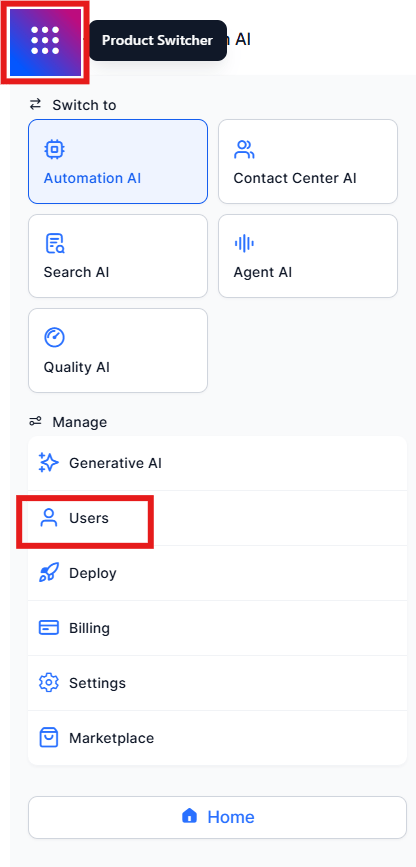
Go to Manage > Users > Manage Users from the left navigation menu or the product switcher. Users Menu
User List Features

FeatureDescription
SearchFind a user by name.
UserUser’s name and configured email.
RoleRole assigned to the user.
SkillsSkills assigned to the user.
QueuesQueues assigned to the user.

Add a User

  1. Select Invite Users. Invite Users Button
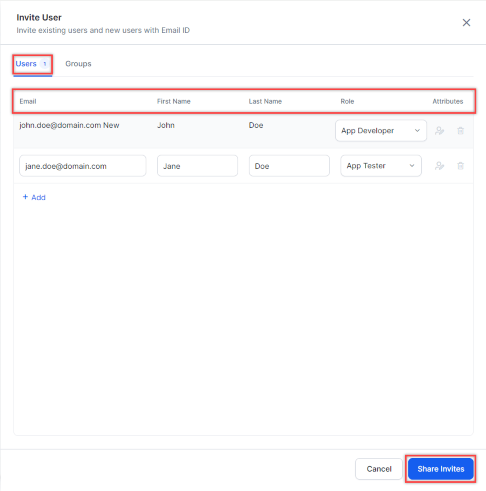
  2. In the Invite User window, fill in the following fields:
    • Email: User’s email address.
    • First Name and Last Name.
    • Role: Select App Developer, App Tester, Agent, or Supervisor.
      • Users with Change User Role set to Yes can modify another user’s role.
      • Users with Change User Role set to No cannot. See Permissions.
    • Attributes: Edit user details or delete the user.
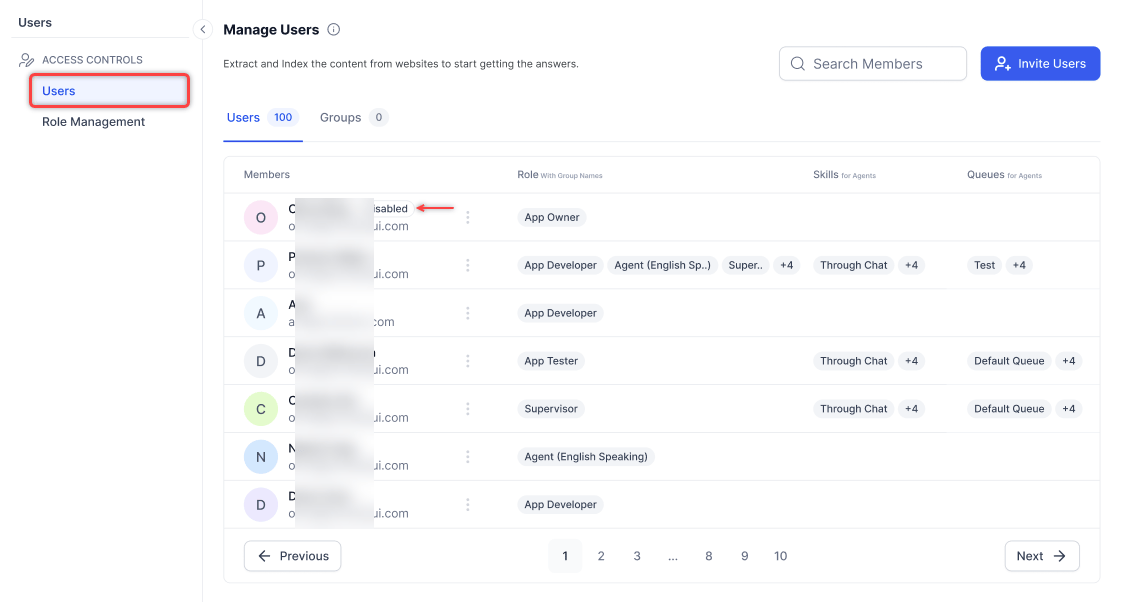
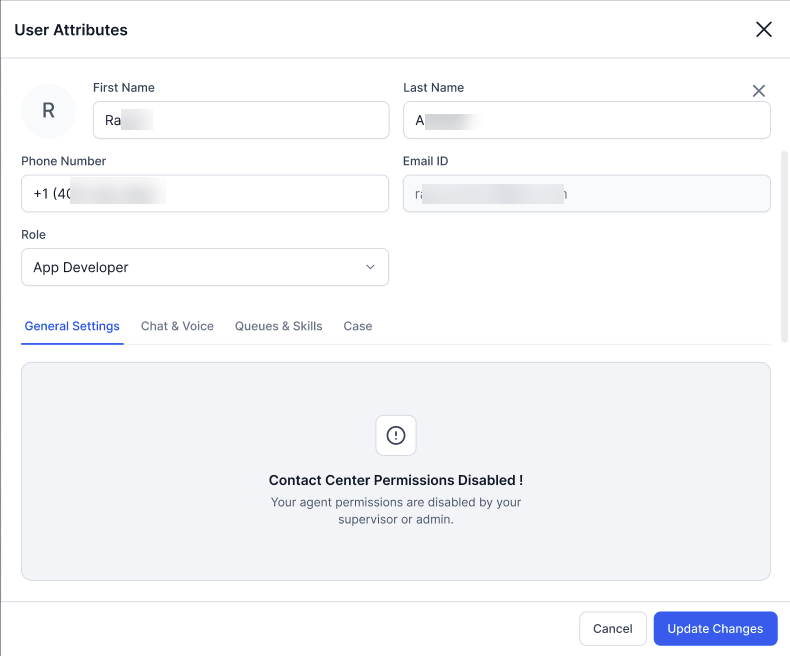
Disabled users appear with a Disabled tag. If a user with disabled Contact Center permissions sends an invite, the new user’s Contact Center permissions are also disabled. Disabled User

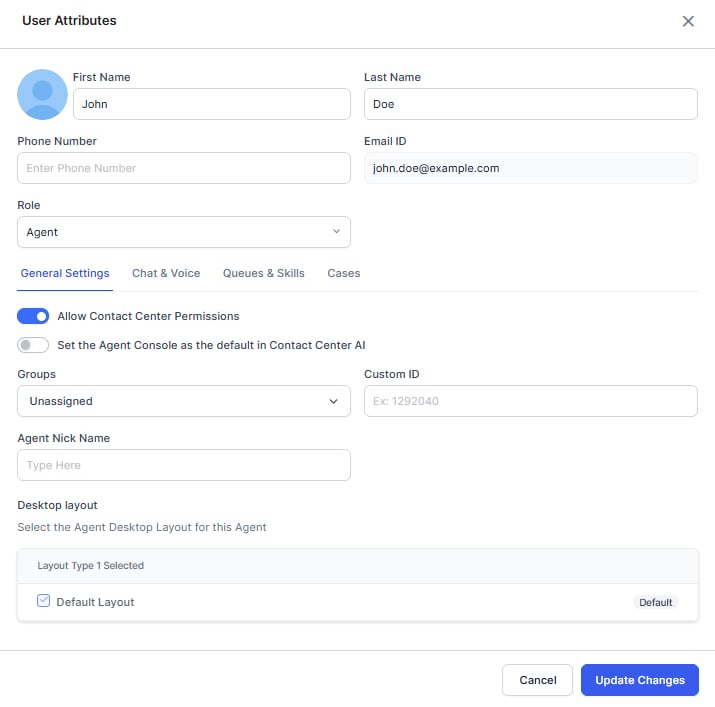
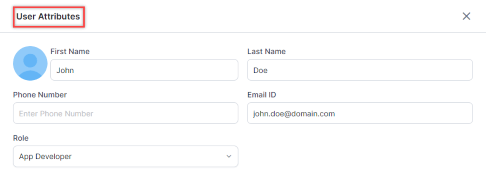
User Attributes

In the User Attributes window, you can:
  • Upload a profile picture (optional).
  • Edit first name, last name, email, role, and phone number.
User Attributes

General Settings

Enable Allow Contact Center Permissions to configure:
  • Set Agent Console as default — Makes the Agent Console the default landing page. Dynamic Navigation Control determines the landing page based on the user’s permissions.
  • Group
  • Custom ID — Supports all special characters except spaces and backslashes, up to 64 characters.
  • Agent Nick Name
  • Desktop layout
General Settings

Chat & Voice

Enable Chat to set:
  1. Capacity by Channel Type — Maximum concurrent conversations per channel (up to 15 per type). When an agent reaches the total digital conversation limit, they are marked System Busy and receive no new digital conversations until existing ones are closed.
  2. Language Support — Supported languages and proficiency level (Novice, Average, Good, or Expert).
  3. Widget Features — Attachments and emojis in live chat.
Agents are not listed in Agent Transfers when Chat and Email channel slots are set to zero.
Enable Voice to set:
  1. Voice Support — Agents can accept inbound and manual outbound calls by default. Campaign calls are disabled by default; enable them and ensure the agent is in the queue attached to the campaign.
  2. Languages — Supported languages and proficiency levels.
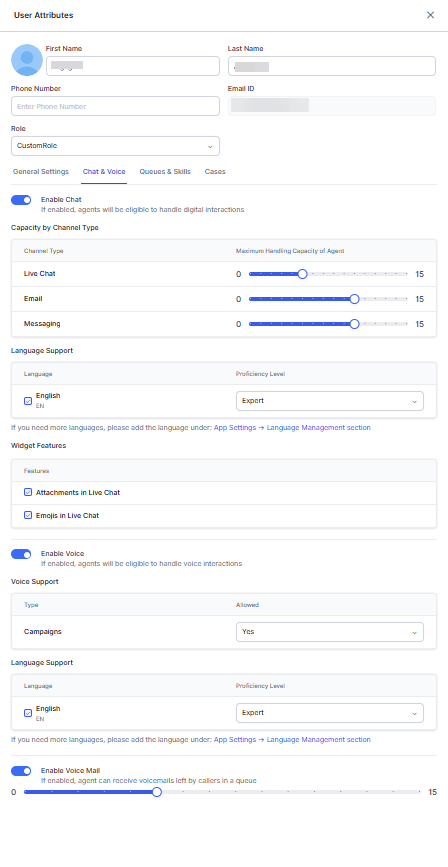
Enable Voice Mail to set the number of voicemails callers can leave in a queue. Chat & Voice Settings

Queues & Skills

Queues
  1. Search for a queue and select it from the list. Only existing queues appear. To add a queue, see Add a Queue.
  2. Assign one or more queues and mark preferred queues — preferred queues take priority when routing incoming interactions.
  3. To remove a queue, select the Delete (bin) icon.
Select Queues Skills
  1. Search for a skill and select it from the dropdown. Only existing skills appear. To add a skill, see Add a Skill.
  2. Set the proficiency level: Novice, Average, Good, or Expert.
  3. To remove a skill, select the Delete (bin) icon.
Select Skills

Save a User

Select Invite User at the bottom of the window (available from any section). Invite User Window
Minimum requirements to save a user record:
  1. Mandatory fields: email, first name, and role.
  2. At least one channel enabled (Chat or Voice).
  3. At least one language assigned to the enabled channel.

Edit a User

  1. On the Manage Users page, select the Ellipsis icon (⋮) for the user. Edit User
  2. In the User Attributes window, make your changes.
  3. Select Update Changes.
Disabled users can only edit the Name, Phone Number, and Role fields of other users. User Attributes - Disabled User

Promote as Owner

  1. Select the Ellipsis icon (⋮) for the user. Promote as Owner
  2. On the Promote app owner pop-up, select a role and select Save.
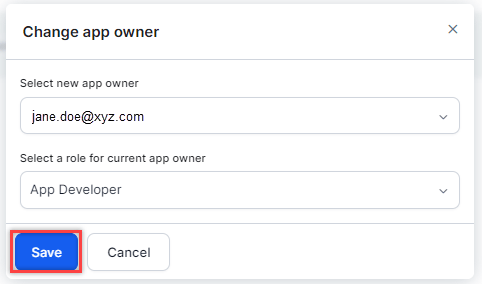
Change Owner

  1. Select the Ellipsis icon (⋮) for the current App Owner. Change Owner Button
  2. On the Promote app owner pop-up, select a role and select Save. Change App Owner

Delete a User

  1. Select the Ellipsis icon (⋮) for the user.
  2. Select Delete. Delete User
  3. Confirm when prompted.
  • You cannot delete your own user account.
  • You cannot delete the CCAI App Owner.
  • Reports, dashboards, and APIs continue to display deleted agents as long as historical data includes them.
  • After deletion, the user can no longer sign in. To temporarily restrict access without deleting, disable their Chat and Voice channels or move them to the Unassigned group.

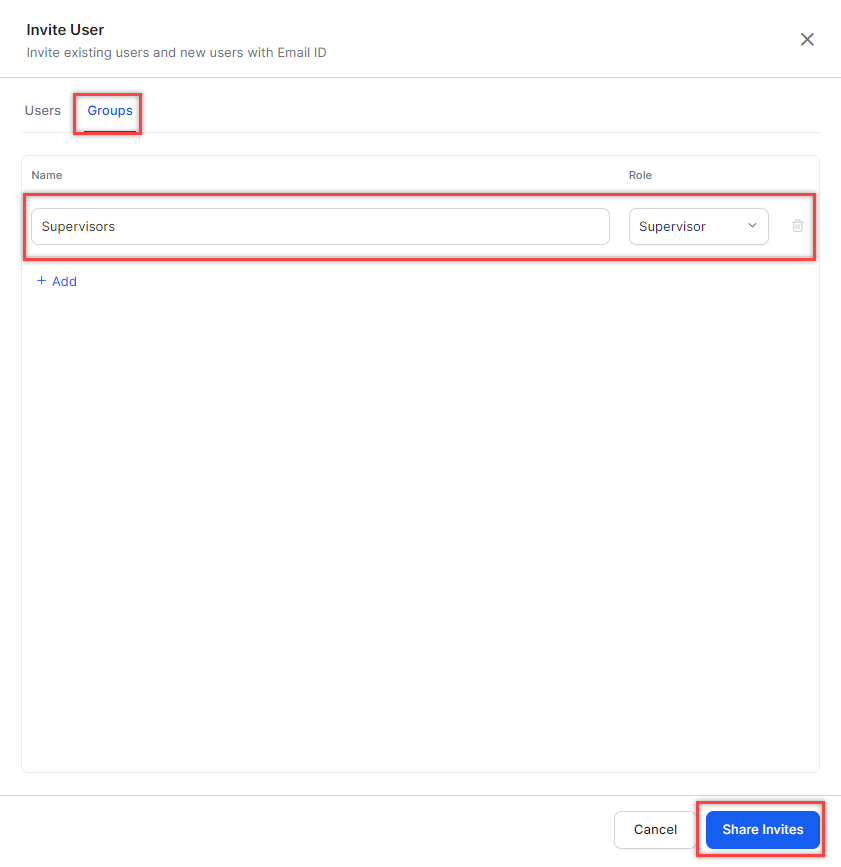
Add a Group

  1. Select Invite Users. Invite Users Button
  2. In the Invite User window, configure:
    • Name: Group name. See Create a Group.
    • Role: App Developer, App Tester, Agent, or Supervisor.
  3. Select Share Invites. Share Group Invite

Roles and Permissions

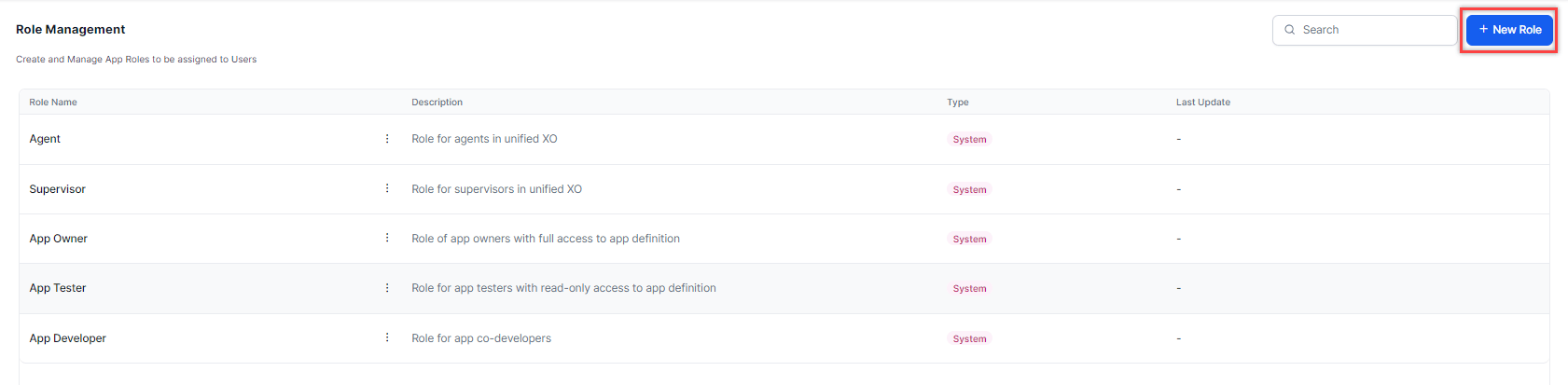
The XO Platform uses role-based access control. Roles determine which features a user can access and at what level. Go to Manage > Users > Manage Users and select the Role Management tab. Product Switcher

Role Management Live Board

The Role Management board lists all roles with the following information:
ColumnDescription
Role NameName of the role across XO Platform.
ActionsEdit or delete a role.
DescriptionShort description of the role.
TypeSystem = default, preconfigured roles. Custom = user-created roles.
Last UpdateDate the role was last modified.

Default Roles

Default roles are fixed and cannot be edited or deleted.
RoleAccess Level
App OwnerFull access and control over the app.
App DeveloperCo-developer access.
App TesterRead-only access to the app definition.
SupervisorOperations management access.
AgentAccess to the agent console and internal chat.

Permissions

Notes

  • The Monitor Console permission is restricted to queues the user is assigned to.
  • The Transfer/Close Multiple Conversations permission is split into three child permissions: Change Queue for Conversations, Assign Conversations, and Force Close Conversations. Child values inherit from the parent.

Parent and Child Permissions

Agent Desktop Console and Monitor Console are parent permissions.
  • When a parent is set to No or View, all child permissions are automatically disabled and cannot be changed.
  • Monitor Console functions as a View permission when set to Yes with all underlying permissions set to No.

Permission Reference Tables

The tables below show the access level each default role and custom role has for each permission. For Custom Roles, the column shows the available options you can assign.

Automation

PermissionDescriptionOwnerDeveloperTesterSupervisorAgentCustom
TasksCreate and manage dialog, action, alert, information, and flow tasks.FullFullViewNoNoFull / View / No
Natural LanguageManage NL training data (utterances, patterns, synonyms), configurations, and thresholds.FullFullViewNoNoFull / View / No
Knowledge GraphManage knowledge collection and training (Questions, Alternate Questions, Synonyms, Class).FullFullViewNoNoFull / View / No
TestingManage Batch Testing and Conversation Testing.FullFullViewNoNoFull / View / No
App DevelopersManage App Owners and co-developers.FullViewViewNoNoFull / View / No
Bot SettingsManage General Settings, Language Management, Auth Profiles, PII, IVR, Variables, Versions.FullFullNoNoNoFull / View / No
DashboardView and export dashboard data.YesYesYesNoNoYes / No
Custom DashboardsManage custom dashboards, widgets, and definitions.FullFullViewNoNoFull / View / No
StoryboardView and create Scenes.FullFullViewNoNoFull / View / No
Bot Builder API ScopesManage API Scopes for platform APIs.YesYesNoNoNoYes / No
Integrations & ExtensionsManage BotKit, WebSDK, Agent Transfer, Actions, External NLU.YesYesNoNoNoYes / No
Publish BotRaise a request to publish the bot.YesYesNoNoNoYes / No
Bot AnalyticsView and export bot analytics.YesYesYesNoNoYes / No
Bot ImportImport a bot definition file or restore a version.YesYesNoNoNoYes / No
IntentDiscoveryManage Intent Discovery.FullFullFullNoNoFull / View / No
Use Case ManagementCreate and manage FAQs and conversations.FullFullFullNoneNoneView / None / Full
Automations DashboardAccess automation metrics in Dashboard.YesYesYesYesNoYes / No
Automations TabAccess the Automations tab and XO Platform.YesYesYesNoNoYes / No

Flows & Routing

PermissionDescriptionOwnerDeveloperTesterSupervisorAgentCustom
Waiting ExperienceCreate and manage waiting experiences.FullFullFullNoneNoneView / None / Full
Hours of OperationCreate and manage hours of operation.FullFullFullNoneNoneView / None / Full
Queue SettingsCreate and manage queues.FullFullFullFullNoneView / None / Full
Flow ManagementCreate and manage experience flows.FullFullFullNoneNoneView / None / Full
Default FlowsManage default flow properties.FullFullFullNoneNoneView / None / Full
Transfer Routing RulesConfigure global transfer rules for chat/voice.FullFullFullNoneNoneView / None / Full
Agent Playbook - ConfigurationManage agent playbook feature accessibility.FullFullFullNoneNoneNone / Full
AgentAssist SettingsDefine AgentAssist widget accessibility for agents.FullFullFullNoneNoneView / None / Full
Agent Coaching - ConfigurationManage real-time coaching feature accessibility.FullFullFullNoneNoneView / None / Full
Service Level - ConfigurationManage service level feature accessibility.FullFullFullFullNoneView / None / Full

User Management

PermissionDescriptionOwnerDeveloperTesterSupervisorAgentCustom
Agent StatusCreate and manage agent status types.FullFullFullFullNoneView / None / Full
Agent SettingsModify global agent settings.FullFullFullFullNoneView / None / Full
Skill ManagementCreate and manage agent skills and skill groups.FullFullFullFullNoneView / None / Full
Visibility of Captured SentimentManage visibility of customer sentiment in the agent console.YesYesYesYesYesYes / No
Agent Group ManagementCreate and manage agent groups.FullFullFullFullNoneView / None / Full
Change User RoleAllow user roles to be modified.YesYesYesYesNoYes / No

Agent & Supervisor Experience — Agent Desktop Console

Agent Desktop Console is a parent permission. Child permissions are disabled when the parent is set to No or View.
PermissionDescriptionOwnerDeveloperTesterSupervisorAgentCustom
Internal ChatChat internally with others in the account.YesYesYesYesYesYes / No
Audio Calls in Messaging ConversationsAdd audio calls to a messaging interaction.YesYesYesYesYesYes / No
Video Calls in Messaging ConversationsAdd video calls to a messaging interaction.YesYesYesYesYesYes / No
Desktop Layout CreationCreate custom desktop layouts.YesYesYesYesNoYes / No
Desktop Layout PublishingPublish custom layouts account-wide.YesYesYesYesNoYes / No
Request Supervisor SupportSend a request for supervisor support.YesYesYesYesYesYes / No
Receive Supervisor SupportReceive supervisor support requests from agents.YesYesYesYesNoYes / No
Call Dialing Stage SettingsEnable call controls during dialing (Outbound Dialer).NoNoNoNoNoYes / No
Direct Outward DialingMake direct outward calls.YesYesYesYesNoYes / No
Outbound EmailSend outbound emails when enabled for the account.YesYesYesYesNoYes / No
Agent Channel Selection for Upcoming InteractionsSelect preferred channel for upcoming interactions.YesYesNoNoNoYes / No
Manually Redact Sensitive DataRedact selected text during live conversations.YesYesNoYesNoYes / No
Consult CallMake a consult call before transferring a conversation.YesYesYesYesYesYes / No
Widget ManagementCreate and manage custom widgets.FullFullFullFullNoneView / None / Full
Survey ManagementCreate and manage surveys.FullFullFullNoneNoneView / None / Full
Disposition ManagementCreate and manage dispositions.FullFullFullNoneNoneView / None / Full
Access to Agent’s Personal DashboardDefine My Dashboard accessibility for agents.NoNoNoNoNoYes / No
Standard ResponsesCreate and manage standard responses.FullFullFullNoneNoneView / None / Full
Queues and AgentsAccess Queues and Agents metrics in Dashboard.YesYesYesYesNoYes / No
Secure Form ManagementCreate and manage secure forms.FullFullFullFullNoneView / None / Full
Secure Form Data ViewView filled-out secure forms and data.YesYesYesYesNoYes / No

Agent & Supervisor Experience — Monitor Console

Monitor Console is a parent permission. Child permissions are disabled when the parent is set to No or View.
PermissionDescriptionOwnerDeveloperTesterSupervisorAgentCustom
Join ConversationJoin a conversation.YesYesYesYesNoYes / No
Listen and Whisper ConversationListen and whisper to a conversation.YesYesYesYesNoYes / No
Monitor Queue VisibilityWhich queues the user can access.AllAllAllSelfSelfAll / Self
Bot-led InteractionsAccess bot-driven interactions on the Monitor tab.YesYesNoYesNoYes / No
Force LogoutForce logout another user from the system.YesYesYesYesNoYes / No
Change Queue for ConversationsChange the queue for individual or multiple conversations.YesYesYesYesNoYes / No
Assign ConversationsAssign individual or multiple conversations to an agent.YesYesYesYesNoYes / No
Force Close ConversationsForce close individual or multiple conversations.YesYesYesYesNoYes / No
Edit Disposition from Dashboard > InteractionsEdit disposition code after a conversation ends.YesYesYesYesNoYes / No
Download Interactions DataDownload transcripts, recordings, events, and latency reports.YesYesYesYesNoYes / No
ReportsCreate, view, and run reports.FullFullFullFullNoneView / None / Full
Voice CampaignsAccess Voice Campaigns under the Campaigns module.FullFullFullFullNoneView / None / Full
Proactive Web CampaignsAccess Proactive Web Campaigns under the Campaigns module.FullFullFullFullNoneView / None / Full
SMS CampaignsAccess SMS Campaigns under the Campaigns module.FullFullFullFullNoneView / None / Full
Service Level ConfigurationManage service level feature accessibility.FullFullFullFullNoneView / None / Full
Dashboard ContentDefine whose interactions the user can access.AllAllAllAllOwnOwn / All
Dynamic Queue ReprioritizationManage queue priority to control routing logic.YesYesYesYesNoYes / No

System

PermissionDescriptionOwnerDeveloperTesterSupervisorAgentCustom
Channel ManagementManage communication channels.FullFullFullNoneNoneView / None / Full
BillingManage account-level billing preferences.FullNoneNoneNoneNoneView / None / Full
APIManage API setup and configuration.FullFullFullNoneNoneView / None / Full
Language & Speech ControlManage ASR/TTS voice preferences.FullFullFullFullNoneView / None / Full
Agent Playbook - ConfigurationManage agent playbook feature accessibility.FullFullFullNoneNoneNone / Full
WFM Configuration ManagementManage WFM configurations.YesYesYesNoNoYes / No
VoiceGateway SettingsManage Bot Delay Response Behaviour settings.FullFullNoneFullNoneView / None / Full
Agent AI SettingsDefine Agent AI widget accessibility for agents.FullFullFullNoneNoneView / None / Full
Agent Coaching - ConfigurationManage real-time coaching feature accessibility.FullFullFullNoneNoneView / None / Full

Other Modules

PermissionDescriptionOwnerDeveloperTesterSupervisorAgentCustom
Answers ModuleAccess and manage the Answers module.YesYesYesNoNoYes / No
Campaign ModuleAccess and manage the Campaigns module.YesYesNoYesNoYes / No
AgentAI ModuleAccess and manage the AgentAI module.YesYesYesNoNoYes / No
Auto QAEnable or disable access to Auto QA.FullYesNoNoNoFull / No
Conversational IntelligenceConfiguration and view access to Conversational Intelligence.FullFullViewViewNoView / Full / No
Evaluation Forms and MetricsCreate and edit evaluation forms and metrics.FullFullViewFullNoFull / View / No
Audit Allocation CreationCreate and assign interactions for audit.FullFullNoFullNoFull / No
QA Functionalities AccessAccess scored interactions, submit audits, and QA dashboard.FullFullFullFullNoFull / No
Agent Scorecards & AttributesAccess agent scorecards and interactions.FullFullViewFullNo
Agent access to dashboard & coaching assignmentsAgent-level access to their dashboard and coaching sessions.FullFull
Quality AI ReportingCreate, view, and run Quality AI Reporting.FullFull
Agent DashboardAccess to agent dashboard.NoNoNoNoFull

App Owner Exclusive Permissions

The following permissions are implicitly granted to App Owners only and are not available to any other role:
PermissionDescription
Create New User RoleOnly App Owners can access the Create New User Role menu.
Billing Module AccessOnly App Owners can access the Billing module.
Activation of Free TokensOnly App Owners can activate free tokens.
App Profile ModificationOnly App Owners can edit the App Profile.
Delete AppOnly App Owners can delete the app.

Custom Roles

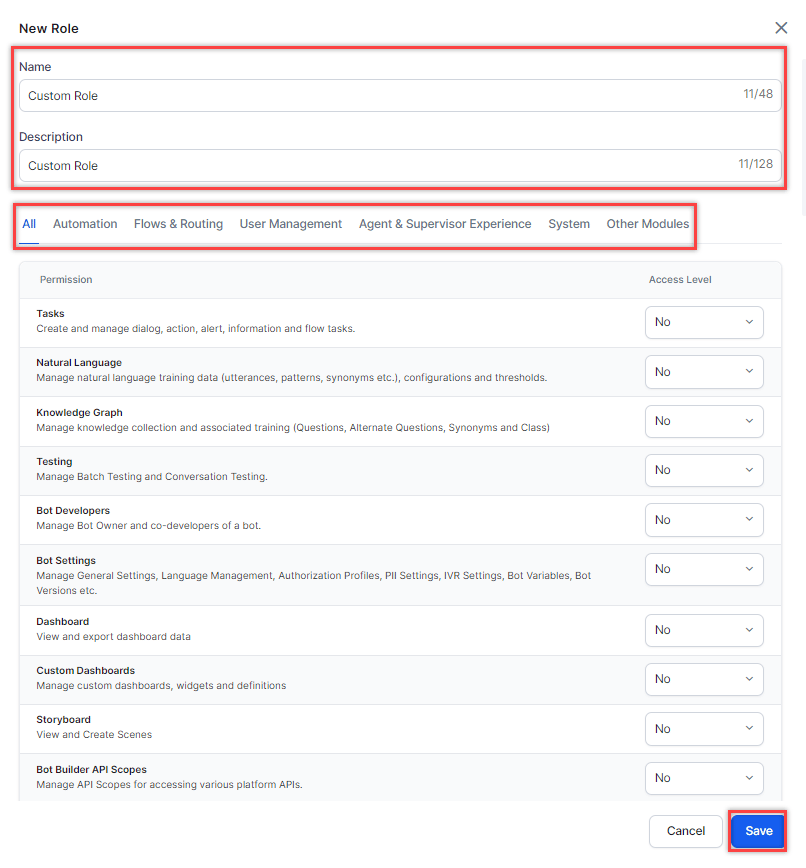
Create custom roles to define specific permission sets tailored to your organization’s needs. You can add, edit, and delete custom roles if you have the Role Management permission set to Yes.

Add a Role

  1. Select + New Role. New Role
  2. In the New Role window, fill in:
    • Role Name: Displayed across XO Platform (for example, Experience Designer).
    • Description: Summary of the role’s responsibilities or access level.
    • Permissions: Set each permission using the available dropdown options.
  3. Select Save. Configure Permissions

Edit a Role

  1. Select the Ellipsis icon (⋮) for the role and select Edit. Edit Button
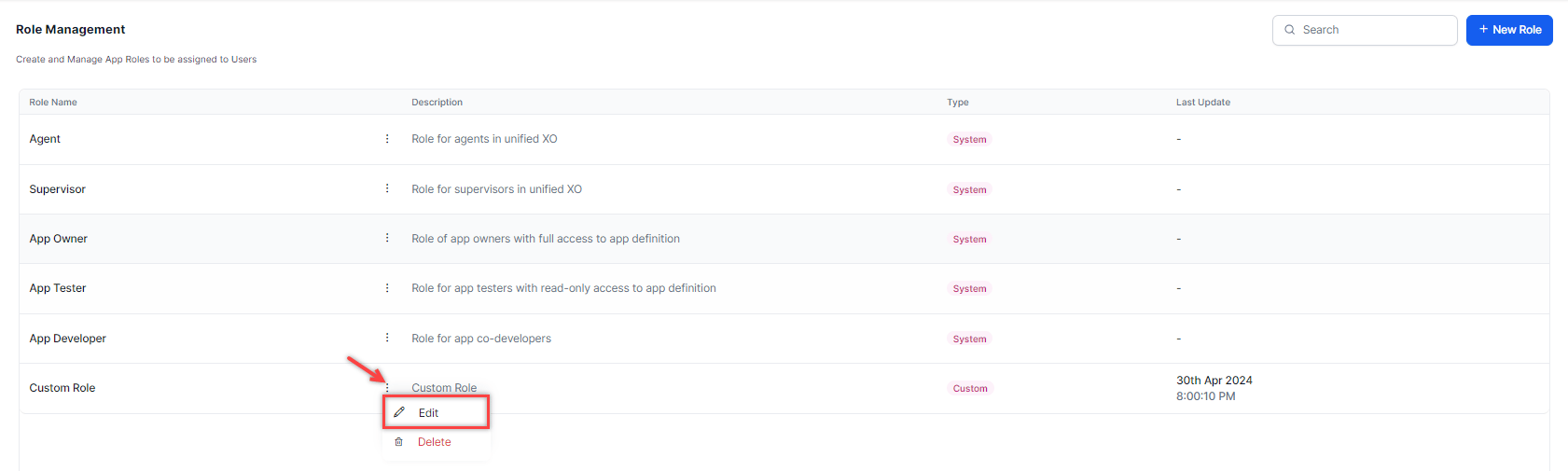
  2. In the Edit Role window, make your changes and select Save.

Delete a Role

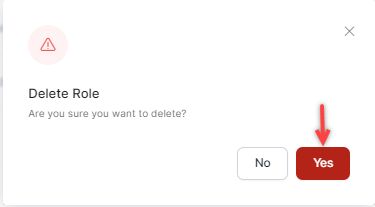
  1. Select the Ellipsis icon (⋮) for the role and select Delete. Delete Button
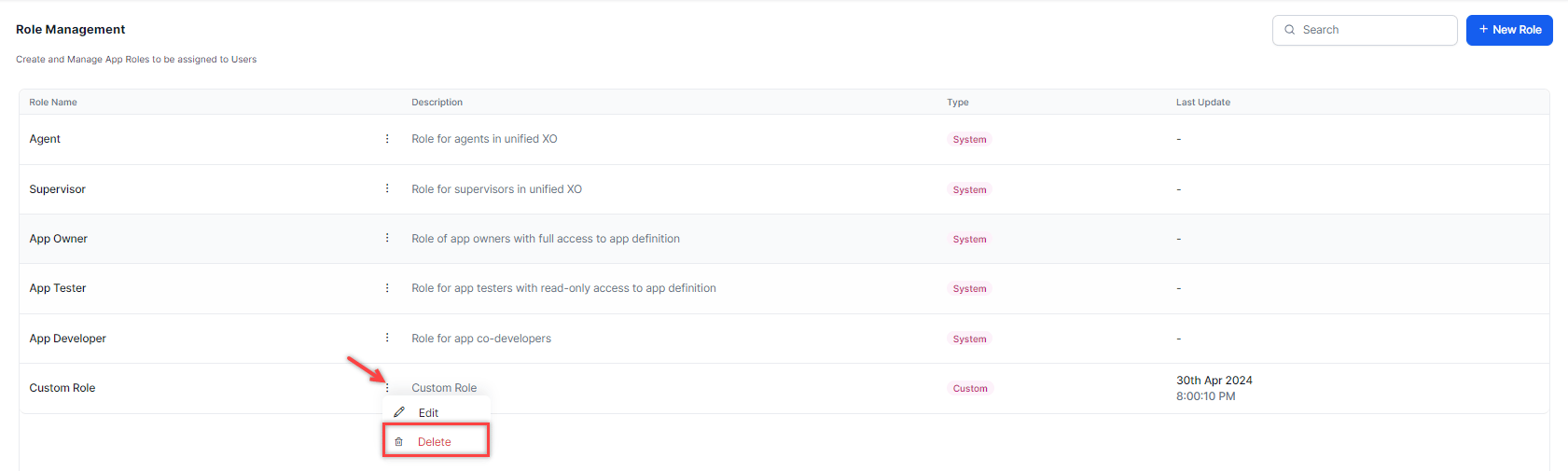
  2. Select Yes to confirm. Delete Confirmation
You cannot delete default roles (App Owner, App Developer, App Tester, Supervisor, Agent). Deleted roles cannot be restored.