

Architecture
- JavaScript libraries are embedded in your web application.
- The SDK communicates with the Platform bot over a secure WebSocket (
wss://). - All session state is stored client-side in the browser — the SDK is stateless on the server.
JWT Flow
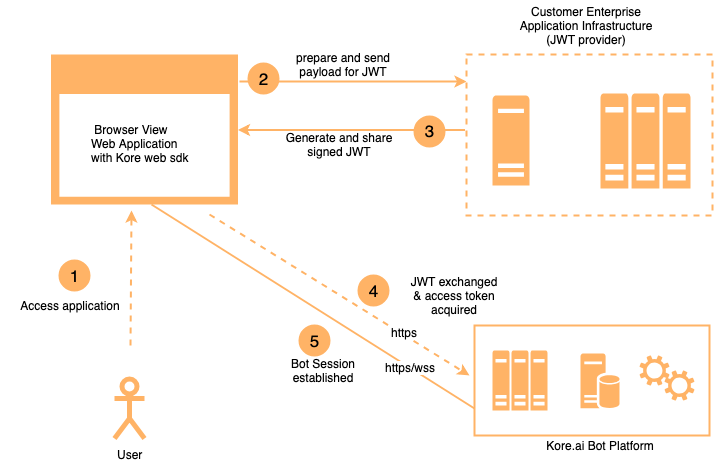
Authentication uses JSON Web Tokens (JWTs):- When the SDK initializes, it calls a client-provided assertion function.
- That function calls your server-side JWT generation service.
- The signed JWT is sent to the Platform to authenticate the user and establish the bot session.
- Messages are exchanged over the WebSocket using the established session.
Session Persistence
Because all session state is enclosed in the JWT, the SDK works correctly in active-active (multi-server) setups:- User requests can be routed to any web server without disrupting the session.
- If the client state is lost (for example, page refresh), the session restores from the user identity in the JWT.
- Enable
loadHistoryto retrieve recent conversation history on reconnect.
Server Requirements
The Web SDK is lightweight — it only requires serving static files.
Scale based on your overall application traffic, not on the SDK specifically.
Security
JWT Generation Service Requirements
Host a server-side JWT service that:- Receives a request from the SDK with the user identity.
- Retrieves the Client ID and secret (or private key) from a secure location (environment variables, secrets manager).
- Signs and returns the JWT.
- Host behind HTTPS with a valid SSL certificate.
- Restrict server access and follow security hardening practices.
- Store secrets in a secrets manager; rotate them periodically.
- Implement rate limiting.
- Minimum spec: 2 vCPUs, 4 GB RAM.