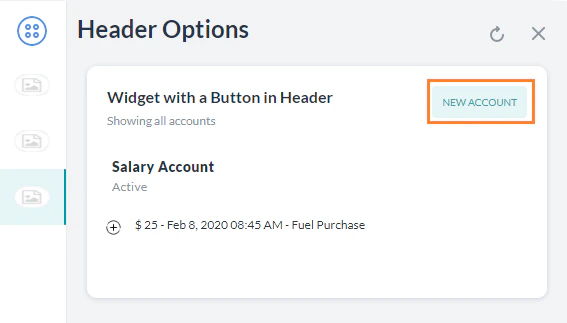
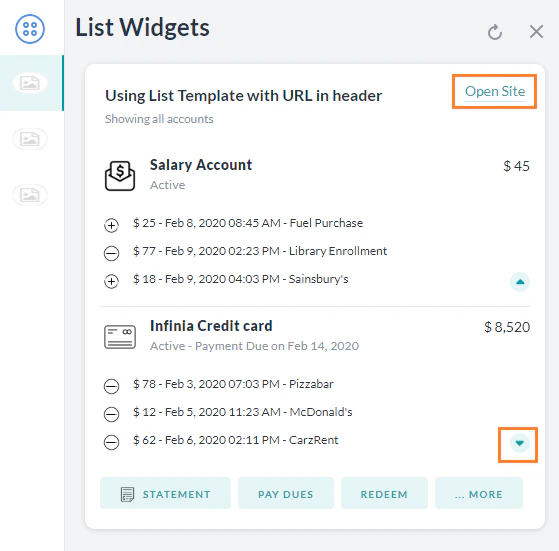
The Platform SDK lets you override default message formatting using templates and markdown. Use templates to render structured UI elements (buttons, carousels, charts) and markdown to style plain text.
Template Types
Displays clickable buttons — either a URL (opens a webpage) or a postback (sends a payload to the Platform).
Required parameters: text (up to 640 chars), buttons array
var message = {
"type": "template",
"payload": {
"template_type": "button",
"text": "What do you want to do next?",
"buttons": [
{ "type": "web_url", "title": "Show Website", "url": "https://petersapparel.parseapp.com" },
{ "type": "postback", "title": "Start Chatting", "payload": "USER_DEFINED_PAYLOAD" }
]
}
};
print(JSON.stringify(message));
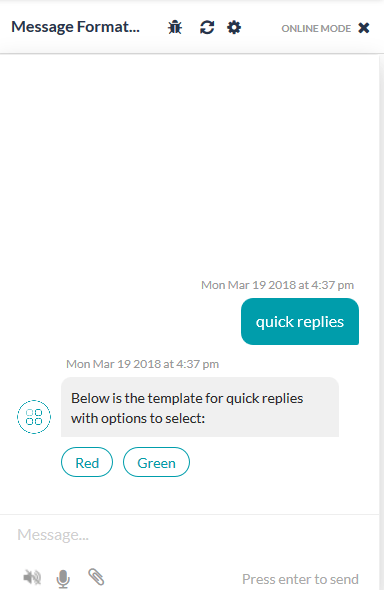
Quick Replies Template — Text
Displays a text message with clickable text choices.
Required parameters: text (up to 640 chars), title per option
var message = {
"type": "template",
"payload": {
"template_type": "quick_replies",
"text": "Pick a color:",
"quick_replies": [
{ "content_type": "text", "title": "Red", "payload": "PICKING_RED" },
{ "content_type": "text", "title": "Green", "payload": "PICKING_GREEN" }
]
}
};
print(JSON.stringify(message));
Quick Replies Template — Text and Image
Same as Quick Replies — Text, with an image_url added per option.
var message = {
"type": "template",
"payload": {
"template_type": "quick_replies",
"text": "Pick a color:",
"quick_replies": [
{ "content_type": "text", "title": "Red", "payload": "PICKING_RED", "image_url": "https://..." },
{ "content_type": "text", "title": "Green", "payload": "PICKING_GREEN", "image_url": "https://..." }
]
}
};
print(JSON.stringify(message));
Feedback Survey Templates
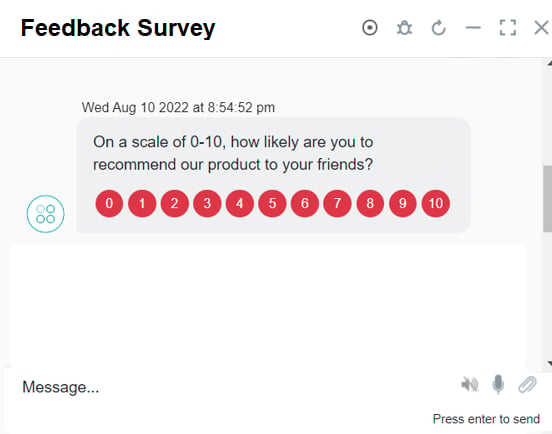
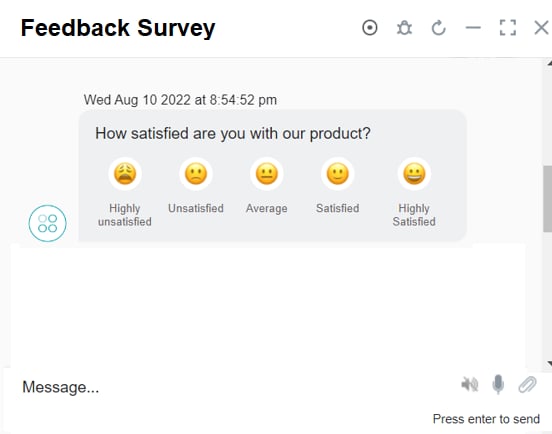
Three survey templates are supported for the web/mobile client: NPS, CSAT, and Like/Dislike. These are available as generic templates in the channel template override section of the feedback survey configuration.
NPS — 0–10 scale; color-coded icons; single selection only.
var message = {
"type": "template",
"payload": {
"text": "On a scale of 0-10, how likely are you to recommend our product?",
"template_type": "feedbackTemplate",
"view": "NPS",
"sliderView": false,
"starArrays": [],
"messageTodisplay": "Glad you liked the experience. Thanks!"
}
};
message.payload.numbersArrays = [];
var displayValues = ["0","1","2","3","4","5","6","7","8","9","10"];
var colors = ["#EF9AA3","#EF9AA3","#EF9AA3","#EF9AA3","#EF9AA3","#EF9AA3","#FB8460","#FB8460","#FB8460","#28A745","#28A745"];
for (var i = 0; i <= 10; i++) {
message.payload.numbersArrays.push({ "numberId": i, "value": displayValues[i], "color": colors[i] });
}
print(JSON.stringify(message));
CSAT — Five smiley icons (Highly Unsatisfied → Highly Satisfied). Scores 1–3 trigger a follow-up question.
var message = {
"type": "template",
"payload": {
"text": "Are you satisfied with our product?",
"template_type": "feedbackTemplate",
"view": "CSAT",
"sliderView": false,
"starArrays": [],
"messageTodisplay": "Glad you liked the experience. Thanks!"
}
};
var displayValues = ["Highly Unsatisfied","Unsatisfied","Average","Satisfied","Highly satisfied"];
message.payload.smileyArrays = [];
for (var i = 1; i <= 5; i++) {
message.payload.smileyArrays.push({ "smileyId": i, "value": displayValues[i-1], "reviewText": displayValues[i-1] });
}
print(JSON.stringify(message));
Like/Dislike — Two icons (Like / Dislike). Dislike triggers a follow-up question.
var message = {
"type": "template",
"payload": {
"text": "Would you recommend our product?",
"template_type": "feedbackTemplate",
"view": "ThumbsUpDown",
"sliderView": false,
"starArrays": [],
"messageTodisplay": "Glad you liked the experience. Thanks!"
}
};
var displayValues = ["Extremely Unlikely","Extremely likely"];
message.payload.thumpsUpDownArrays = [];
for (var i = 0; i <= 1; i++) {
message.payload.thumpsUpDownArrays.push({ "thumpUpId": i, "value": displayValues[i], "reviewText": displayValues[i] });
}
print(JSON.stringify(message));
List Template
Displays a list of items with optional buttons. Limitations: max 4 elements, 1 optional button per element, 1 optional global button.
Required parameters: elements (array), title per element
var message = {
"type": "template",
"AlwaysShowGlobalButtons": false,
"payload": {
"template_type": "list",
"elements": [
{
"title": "Classic T-Shirt Collection",
"image_url": "https://...",
"subtitle": "See all our colors",
"default_action": { "type": "web_url", "url": "https://..." },
"buttons": [{ "title": "View", "type": "web_url", "url": "https://..." }]
}
// ... up to 4 elements
],
"buttons": [{ "title": "View More", "type": "postback", "payload": "payload" }]
}
};
print(JSON.stringify(message));
Error Template
Displays validation, error, or warning messages with a colored background.
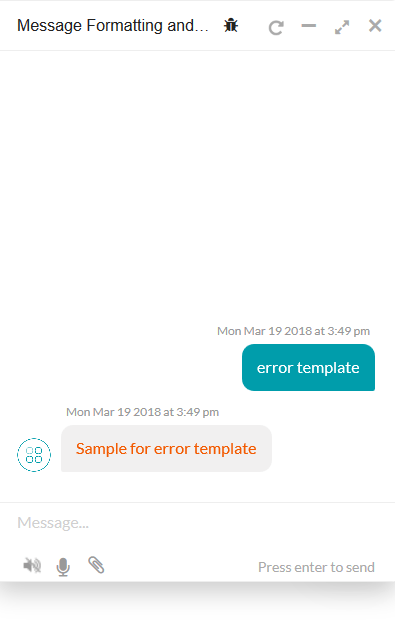
var message = {
"type": "error",
"payload": { "color": "#F35A00", "text": "sample for error template" }
};
print(JSON.stringify(message));
Attachment Template
Renders images, audio, or video from a URL.
Supported formats:
| Type | Extensions |
|---|
| Audio | m4a, amr, wav, aac, mp3 |
| Video | mp4, mov, 3gp, flv |
| Image | png, jpg, jpeg, gif |
To display images, use the url field with the image URL.
Audio:
var message = { "type": "message", "payload": { "text": "", "audioUrl": "https://...file.mp3" } };
print(JSON.stringify(message));
Image:
var message = { "type": "image", "payload": { "url": "https://...image.jpg" } };
print(JSON.stringify(message));
Video (play inline):
var message = { "type": "message", "payload": { "text": "", "videoUrl": "https://...video.mp4" } };
print(JSON.stringify(message));
Text Template
Renders plain text using the Platform’s default formatting.
var message = { "text": "message" };
print(JSON.stringify(message));
Carousel Template
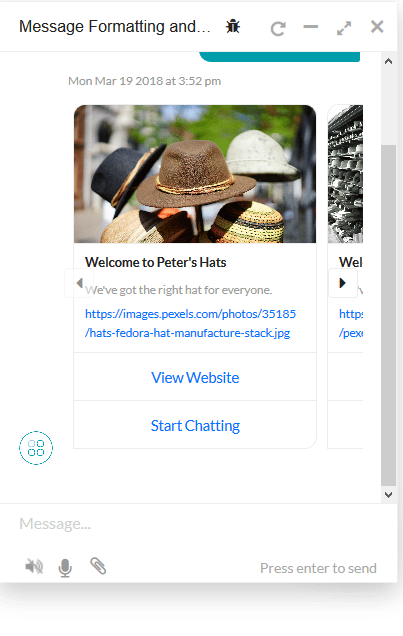
Horizontal scrollable card carousel. Each card has an image, description, and up to 3 buttons.
Required parameters: elements array, each with title, image_url, and buttons
var message = {
"type": "template",
"payload": {
"template_type": "carousel",
"elements": [
{
"title": "Welcome to Peter's Hats",
"image_url": "https://...",
"subtitle": "Lorem ipsum...",
"default_action": { "type": "web_url", "url": "https://..." },
"buttons": [
{ "type": "postback", "title": "Buy now", "payload": "PAYLOAD_0" },
{ "type": "postback", "title": "Show more", "payload": "PAYLOAD_1" }
]
}
// ... additional elements
]
}
};
print(JSON.stringify(message));
Chart Templates
Chart templates are supported only for the Web SDK, not the Mobile SDK.
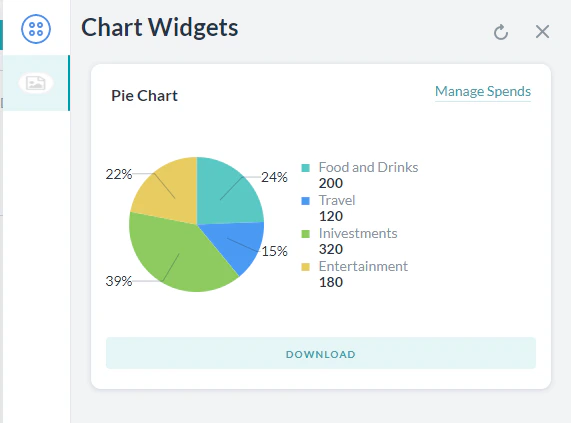
Pie Chart — Regular, donut, or donut with legend.
var message = {
"type": "template",
"payload": {
"template_type": "pie chart",
"pie_type": "regular",
"text": "Traveling expenses",
"elements": [
{ "title": "Airlines", "value": "1264.0", "displayValue": "$ 1,234" },
{ "title": "Hotels", "value": "568.10", "displayValue": "$ 568" },
{ "title": "Food", "value": "324.50", "displayValue": "$ 324" }
],
"speech_hint": "Here is the breakup."
}
};
print(JSON.stringify(message));
Line Chart — Required: template_type, X_axis, elements
Bar Chart — Required: template_type, X_axis, elements. Supports vertical/horizontal, single/multi-series, stacked.
Regular Table — Renders data in a regular or responsive table. Required: template_type, columns, elements.
Mini Table — Renders row headers with column data as separate cards. Ideal for 3–4 columns and 4–5 rows.
BotKit SDK: Sending Templates
To send a template from BotKit, set isTemplate: true in the overrideMessagePayload:
on_user_message: function(requestId, data, callback) {
if (data.message === "Hi") {
data.overrideMessagePayload = {
body: JSON.stringify({
"type": "template",
"payload": {
"template_type": "button",
"text": "Message template from BotKit",
"buttons": [
{ "type": "postback", "title": "Yes", "payload": "Yes" },
{ "type": "postback", "title": "No", "payload": "No" }
]
}
}),
isTemplate: true
};
return sdk.sendUserMessage(data, callback);
}
}
Standard Markdown
Apply Platform markdown directly in JavaScript for text formatting:
| Format | Syntax | Example |
|---|
| Bold | *text* | Here is *bold*. |
| Italic | ~text~ or _text_ | Here is ~italics~. |
| Link | [text](url) | [Kore.ai](https://kore.ai/) |
| Image |  |  |
| New line | \n | — |
| Unordered list | * item (space after *) | — |
| Ordered list | 1. item | — |
| Preformatted | ```text``` | — |
| Indent | >> | >>Indented once |
| Double indent | >>>> | — |
| Headings | #h1, #h2, … #h6 | #h1Heading1 |
| Horizontal rule | ___ (3 underscores) | — |
Default Message Templates for Web SDK
When no custom template is defined, the Web SDK applies these defaults:
| Message type | Default template |
|---|
| Choice — 1–3 options | Button Template |
| Choice — 4–10 options | Quick Replies Template |
| Choice — >10 options | Quick Replies Template; option 9 shows “Show more” |
| Button title >20 chars | First 18 chars + ..; full title shown on click |
| Confirmation | Quick Replies with Yes / No |
| Question | Plain text |
| Error | Text with red font, sent as attachment |
| Warning | Text with orange font, sent as attachment |
| Validation | Text with yellow font, sent as attachment |
| Info / Statement / Greeting / Chit Chat | Plain text |
Custom Templates
Build your own templates beyond those listed above. Reference implementations are available in the Web SDK GitHub repo.
Dropdown template:
var message = {
"type": "template",
"payload": {
"template_type": "dropdown_template",
"heading": "please select: ",
"elements": [
{ "title": "UAE Dirham", "value": "AED" },
{ "title": "Australian Dollar", "value": "AUD" }
]
}
};
print(JSON.stringify(message));
Like-dislike template:
var message = { "type": "template", "payload": { "template_type": "like_dislike" } };
print(JSON.stringify(message));
Multi-select template:
var message = {
"type": "template",
"payload": {
"template_type": "multi_select",
"elements": [
{ "title": "Classic T-Shirt", "value": "tShirt" },
{ "title": "Classic Shirt", "value": "shirts" }
],
"buttons": [{ "title": "Done", "type": "postback", "payload": "payload" }]
}
};
print(JSON.stringify(message));
DatePicker template:
var message = {
"type": "template",
"payload": {
"template_type": "dateTemplate",
"title": "Select a date",
"text_message": "text in message node",
"format": "MM-DD-YYYY"
}
};
print(JSON.stringify(message));
For customized JavaScript responses and channel-specific templates, see JavaScript Prompts or Responses.