Back to Prompts Library Streaming responses enable real-time, incremental LLM output—the model transmits output pieces as they become available instead of waiting for a complete response. This reduces latency and improves interaction for conversational AI, speech-to-text, and content generation tools.

Current Capabilities

  • Voice: Supports the Voice Gateway channel for GenAI features including Agent Node, with Deepgram as the supported TTS engine.
  • Chat: Delivers real-time LLM response streaming for Web/Mobile SDK channels. Agent Node and Prompt Node stream responses token-by-token.
  • Models: Integrates with OpenAI and Azure OpenAI out of the box. Custom prompts support other streaming-capable LLMs.
  • Node-level activation: Streaming activates when a streaming prompt is selected at the node level, even if the feature-level prompt doesn’t use streaming.
Note: Agent Node Tool Calling and Streaming
  • V1 Custom JavaScript Prompts: Supports tool calling and streaming as separate capabilities only—not simultaneously.
  • V2 Custom JavaScript Prompts: Supports both tool calling and streaming together using the OpenAI/Azure OpenAI response format.

Benefits

BenefitDescription
Real-Time OutputText appears instantly, reducing wait times.
Lower LatencyFaster response time improves user experience.
Improved InteractionPartial outputs support iterative writing and brainstorming.
Live Application SupportEnhances real-time chat, speech-to-text, and code autocompletion.

Use Cases

DomainUse Cases
HealthcareStreaming patient history summaries; real-time clinical study analysis.
FinanceStreaming portfolio breakdowns; incremental compliance document summaries.
E-commerceStreaming side-by-side product comparisons for informed decisions.
EducationDelivering detailed course outlines or study material summaries.
LegalStreaming legal precedent explanations; incremental contract analysis.
Customer SupportStreaming detailed troubleshooting steps for complex issues.
Human ResourcesStreaming HR policy or benefits explanations for employees.
MarketingStreaming in-depth campaign analysis and ROI breakdowns.

Enable Streaming

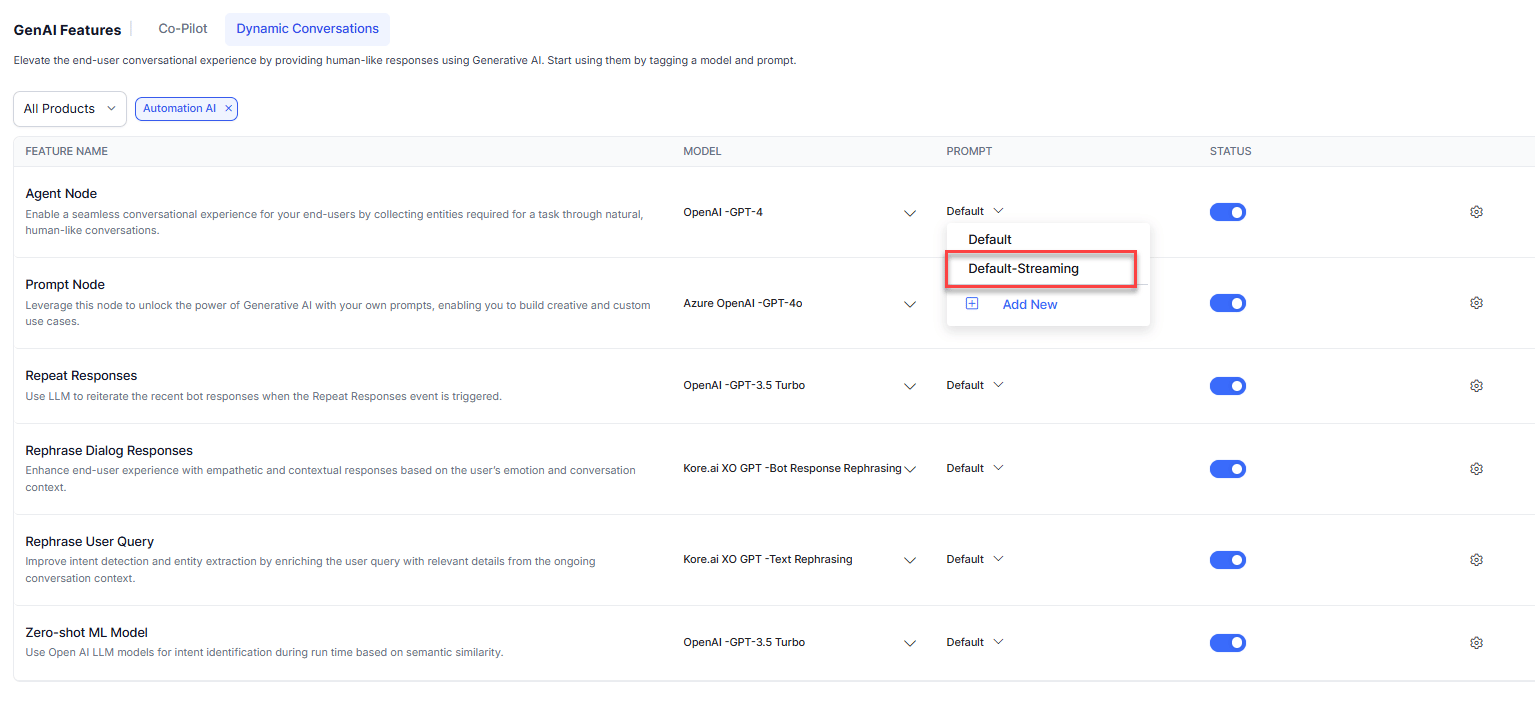
Use a Default Streaming Prompt

The Platform provides default streaming prompts for Agent Node and Prompt Node for OpenAI models. Go to Generative AI Tools > GenAI Features and select the default-streaming prompt for the required feature. Default streaming prompt selection
Create a Custom Streaming Prompt

See How to Add a Custom Prompt and enable the Stream Response toggle. The streamed response must follow this format:
FieldDescription
conv_statusIndicates whether the conversation has ended or is ongoing.
AI Agent responseThe generated response sent to the end user.
collected entitiesStringified JSON object containing extracted entities.
  • Add the required stream parameter to your custom prompt (e.g., "stream": true for OpenAI/Azure OpenAI).
  • The saved prompt appears with a “stream” tag in the Prompts Library.
  • Enabling streaming disables: Exit Scenario, AI Agent Response, Collected Entities, and Tool Call Request (for Agent Node).

Performance Benchmarks

TaskModeInput TokensOutput TokensTime (s)Reduction
Agent NodeNon-streaming777902.59Output: -30%, Time: 83%
Streaming676620.44
50-word JokeNon-streaming95542.4Output: +10%, Time: 80%
Streaming68600.47
500-word JokeNon-streaming9559522.39Output: +10%, Time: 98%
Streaming686490.41
500-word JokeNon-streaming6864230.11Output: -0.05%, Time: 97%
Streaming686410.88
500-word StoryNon-streaming6861616.86Output: +2.27%, Time: 97.5%
Streaming686300.44
500-word EssayNon-streaming7068722.23Output: +1.46%, Time: 97.15%
Streaming706970.63
Key insights:
  • Output < 100 tokens: 80–85% time reduction.
  • Output 100–600 tokens: 97–98% time reduction.
  • Output > 600 tokens: 98–99% time reduction.
  • Output quality variance is minimal (≤2.5%), ensuring task reliability.
These benchmarks were conducted under specific scenarios. Performance varies by environment. Conduct your own testing before enabling streaming in production.

Analytics

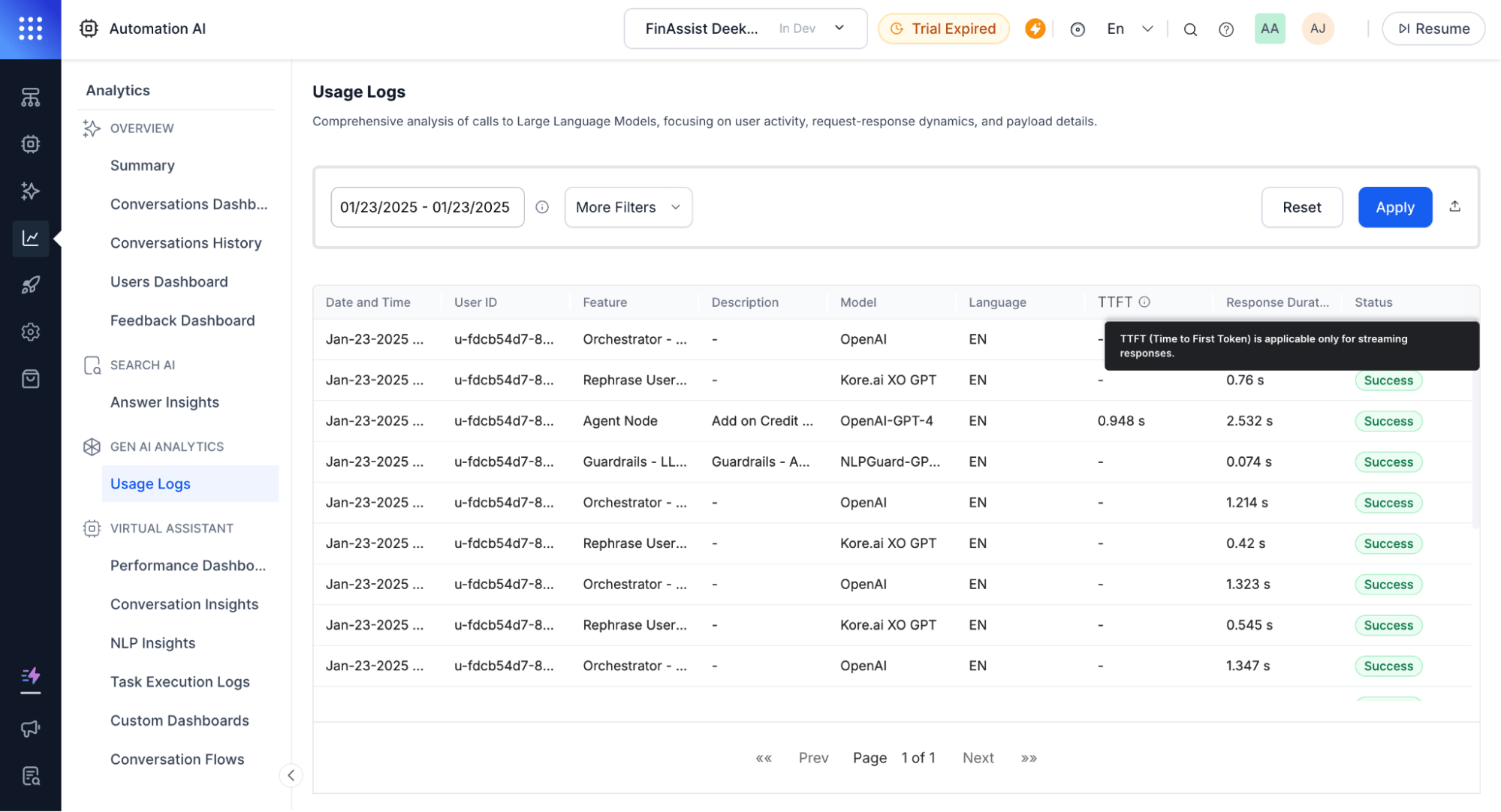
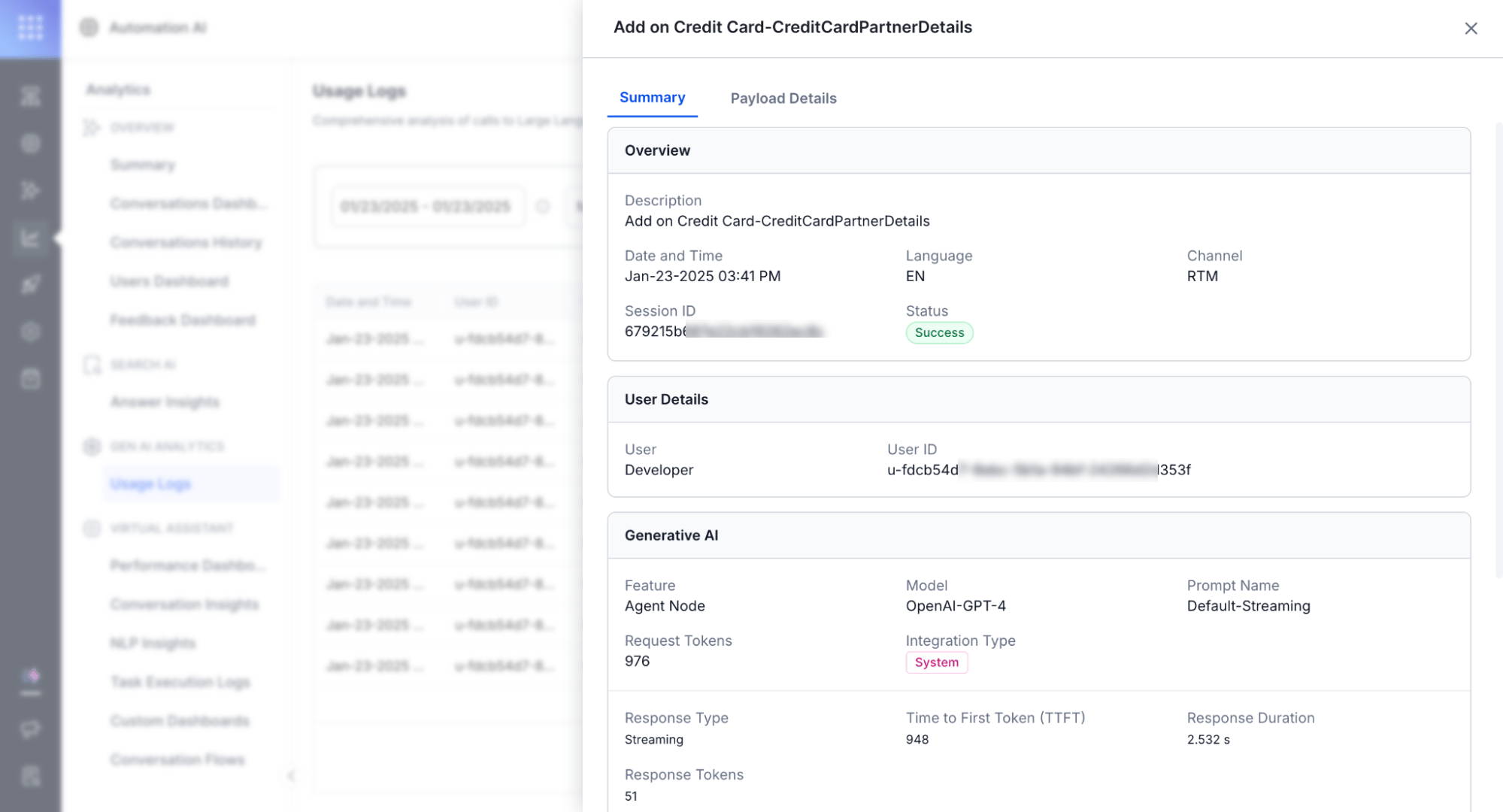
Usage Logs track and differentiate streaming and non-streaming responses.
MetricDescription
TTFT (Time to First Token)Time until the first token appears. Blank for the final response chunk since no further messages are sent.
Response DurationTime from the first chunk to the last chunk.
Response TypeIndicates streaming or non-streaming on the Detailed Log page.
LLM Usage Logs with TTFT column Streaming response detail view

Limitations

LimitationReason
No post-processingRequires the complete response, which conflicts with incremental delivery.
No guardrailsContent moderation requires full-context evaluation, incompatible with token-by-token streaming.
Voice compatibilityDepends on TTS engine support for bi-directional streaming (e.g., Deepgram).
No BotKit interceptionReal-time delivery is incompatible with message interception.
Streaming quality depends heavily on prompt design. LLMs are subject to hallucination—ensure prompts are accurate and aligned with desired output before using in production.