

DialogGPT is the default intent identification mode for new AI for Service apps.
Overview
DialogGPT handles the full conversation lifecycle in three phases: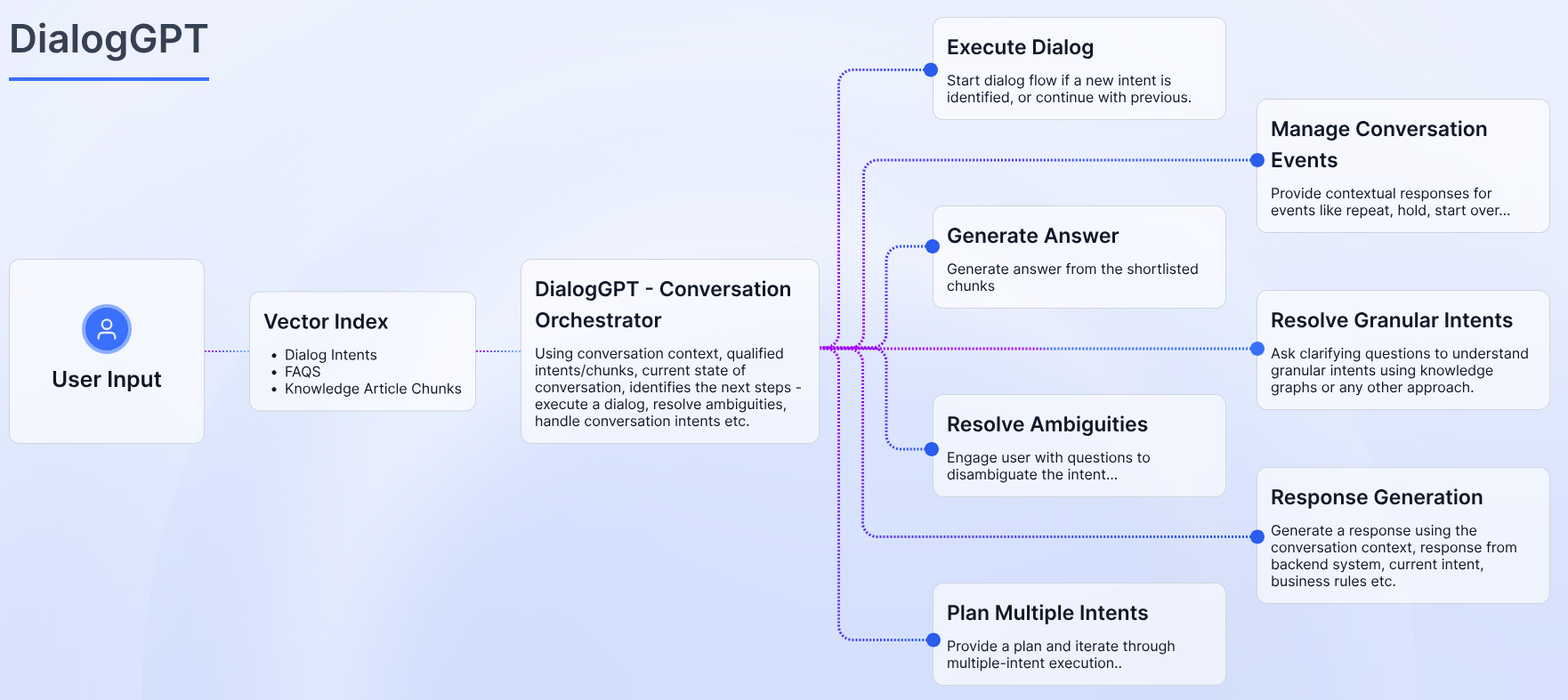
- Chunk Shortlisting: Processes user input and conversation history to retrieve relevant chunks from a vector database
- Intent Identification: Analyzes retrieved chunks with an LLM to resolve intent, ambiguities, and execution order
- Flow Management: Triggers fulfillment (dialog tasks, FAQs, answer generation) and delivers contextually relevant responses
Key Features
Key Benefits
How DialogGPT Works
DialogGPT processes each user utterance through three sequential steps.Step 1: Chunk Shortlisting
DialogGPT rephrases the user input to optimize retrieval, then uses a RAG pipeline to fetch relevant chunks—segments of dialog tasks, FAQs, or Search AI embeddings stored in a vector database. This retrieval operates independently of the Search AI pipeline.From v11.15.1, only sub-intents relevant to the active dialog are appended to
{{dialogs_chunks}}. Previously, all sub-intents were indexed with the top-level intent.Step 2: Intent Identification
The Intelligent Conversation Orchestrator analyzes retrieved chunks with the user input and conversation context. Using an LLM, it:- Identifies the most appropriate intent.
- Resolves ambiguities by ranking options or prompting the user for clarification.
- Determines dependencies and execution order for multi-intent scenarios.
- Routes system intents (repeat, pause, end) to pre-defined handlers.
Step 3: Flow Management and Fulfillment
DialogGPT triggers the resolved intent and:- Executes dialog tasks or FAQs.
- Generates answers for system intents using Answer Generation.
- Requests clarification for ambiguous intents.
- Handles multi-intent scenarios sequentially or in parallel based on dependencies.
Configuration
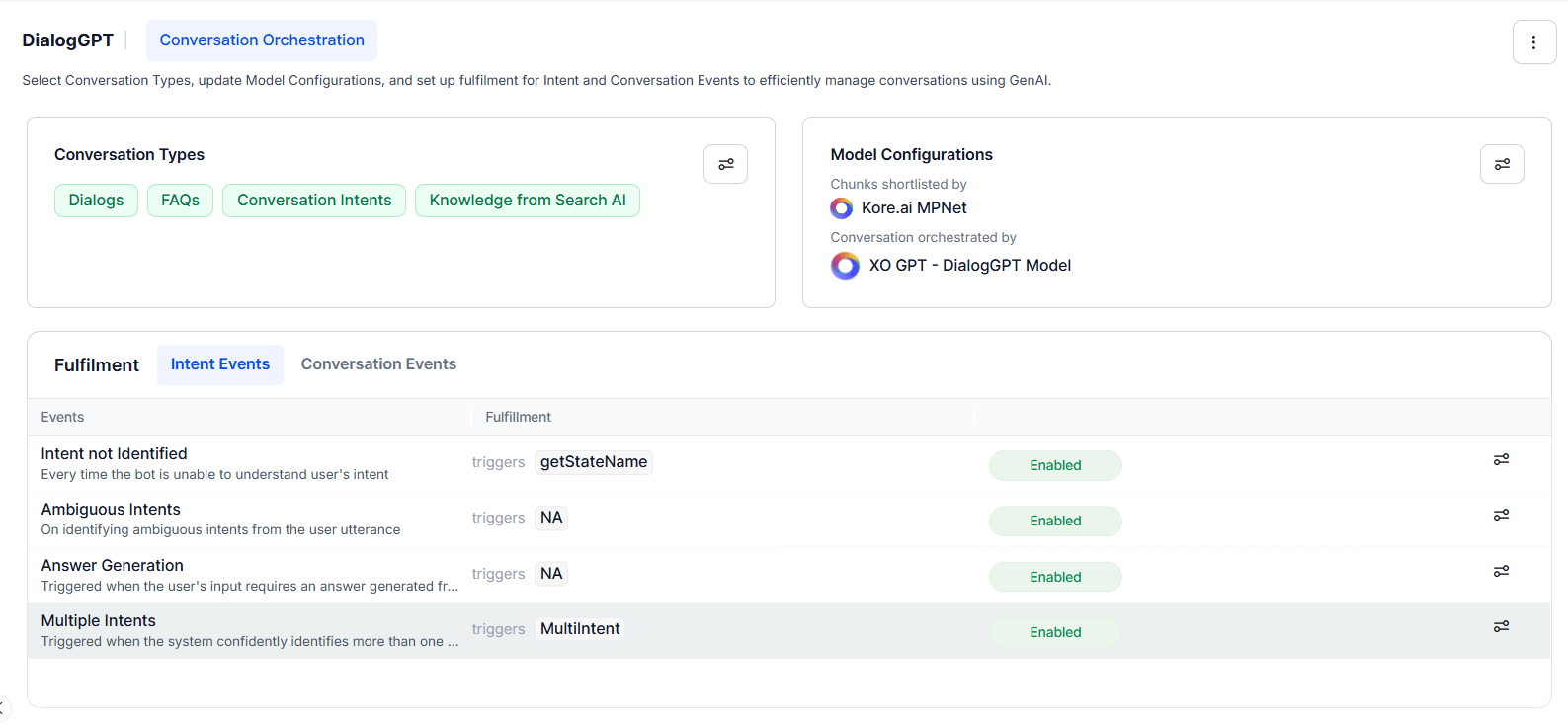
Conversation Types
Configure which conversation types DialogGPT handles. Dialogs and FAQs are enabled by default and can’t be disabled.
To manage: Settings > toggle on/off > Save.
Model Configurations
Use the Model Configurations card to set up models for chunk shortlisting and conversation management. Shortlisting Relevant Chunks: BGE-M3 is the supported and recommended embedding model. The embedding model settings apply only to Dialogs and FAQs; for Knowledge from Search AI, the settings in the Search AI app apply. Optionally adjust Similarity Threshold and Proximity Threshold in advanced settings. Defaults work for most cases. Maximum Chunks from Search AI: Set the maximum number of chunks shortlisted from Search AI and sent to the LLM for answer generation. Default: 5. Click Go to Search AI to configure retrieval settings. Conversation Management: Select the LLM for intent detection and execution planning. Supported models:
Advanced settings: Temperature, Max Tokens, Conversation History Length. Defaults are sufficient for most cases.
To configure: Settings > select model and prompt > adjust settings > Save.
Fulfillment
Fulfillment defines how DialogGPT responds to identified intents. There are two event types: Intent Events and Conversation Events.Intent Events
To configure: click the event’s Settings icon > define event configuration > toggle on/off > Save.
Conversation Events
Conversation Events activate when Conversation Intents is enabled. They handle common conversational phrases.
To configure: click the event’s Settings icon > define configuration > toggle on/off > Save.
Enabling DialogGPT
Prerequisites: Integrate the LLM that will power DialogGPT. See Model Configurations and LLM Integration. Steps:- Go to Generative AI Tools > DialogGPT.
- Click Get Started.
- Select the Conversation Types to enable.
- Under Model Configuration, select the embeddings model for Dialogs and FAQs.
- (Optional) Click Show Advanced Settings to adjust Similarity Threshold and Proximity Threshold.
- (If Knowledge from Search AI is selected) Set the maximum number of chunks to shortlist from Search AI. Click Go to Search AI for retrieval settings.
- Select the Conversation Management Model and Prompt.
- (Optional) Adjust Temperature, Max Tokens, and Conversation History Length (The maximum number of recent messages that can be sent as context is 50).
- Click Enable DialogGPT.
Debug Logs
Debug Logs provide step-by-step visibility into DialogGPT’s decision-making and execution flow. Every LLM call includes full request and response details. For each user utterance, logs capture:
Access Debug Logs via the Playground.
FAQs
Does DialogGPT require training data? No. DialogGPT uses zero-shot intent detection via pre-trained embeddings and LLMs. Developers provide concise dialog descriptions and FAQ alternate questions—embedding models handle the rest. How does zero-shot understanding work? Pre-trained embeddings process the query and conversation history to identify intents and generate accurate responses for unseen scenarios, without any prior training examples. How does DialogGPT handle multiple intents in one query? It uses LLMs to parse multi-intent queries and executes intents in parallel where possible. For example, “Check the weather and book a flight” triggers both tasks simultaneously. How does DialogGPT resolve ambiguous queries? It ranks ambiguous options and either presents them to the user for selection or prompts for clarification before proceeding. How does DialogGPT handle FAQs? FAQs are treated as primary resources. User inputs are processed against FAQ chunks in parallel with dialog intents and search queries, using embeddings for retrieval. How does DialogGPT handle conversational interruptions? It supports conversation intents for common interruptions, including:- Repeating information
- Holding or skipping tasks
- Handling digressions (for example, off-topic questions mid-dialog)
What happens if no intent is matched?
DialogGPT routes the input to Search AI or a predefined fallback dialog—no dead ends.
Can DialogGPT handle fallback scenarios?
Yes. If a user input doesn’t match any intent or FAQ, DialogGPT intelligently routes it to Search AI or a predefined fallback dialog.
Is DialogGPT enterprise-ready?
Yes. DialogGPT supports enterprise-grade security, including secure integrations with cloud providers like Azure (for example, exclusive data protection agreements for regulated industries).