

Orchestrated Autonomy
Structured conversation flows powered by DialogGPT’s intent identification. This option expands the app’s Dynamic Routing capabilities, allowing you to link multiple automation apps to streamline orchestration. Parent App and Linked Apps- The Parent App manages its own dialogs, FAQs, and knowledge base, and orchestrates the dialogs and FAQs of its linked apps. It uses DialogGPT to route user input to the appropriate linked app based on detected intents.
- Linked Apps contribute their dialogs and FAQs to support the parent app’s intent resolution and routing.
- Configured App Index: Represents the in-development version. Created when apps are first linked and updated using Sync Updates after making changes.
- Published App Index: Represents the live version. Created when the parent app is published and automatically updated when linked apps are published.
Full Autonomy
Agent Platform-powered automation that independently handles entire conversation flows without predefined paths. This option uses Agentic Apps to understand, plan, and execute actions based on user queries. It manages context, retrieves information, and orchestrates multi-step tasks to deliver accurate, personalized responses. Learn more.Configure the Node
General Settings
Enter a name for the node and select a conversation management approach.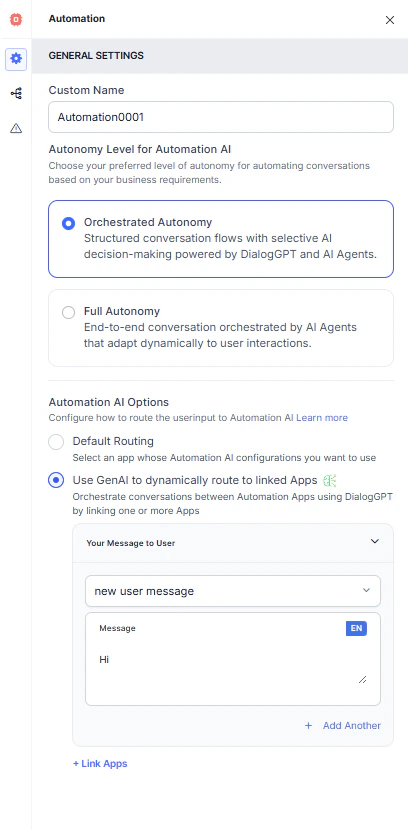
Autonomy Level
Orchestrated Autonomy Select an app and configure how user conversations are handled:- Default Routing: Select an app whose Automation AI configurations you want to use.
- Run based on User Input: The node detects intent from the user’s utterance and decides what to do.
- Your Message to User: Select a message type and type your message. Click + Add Another to add more messages.
- Run a Specific Dialog: Runs the selected dialog when this node is triggered. Use the Dialog dropdown to select one.
- Run based on User Input: The node detects intent from the user’s utterance and decides what to do.
- Use GenAI to dynamically route to linked apps: Use the Message Prompt and Link Apps.
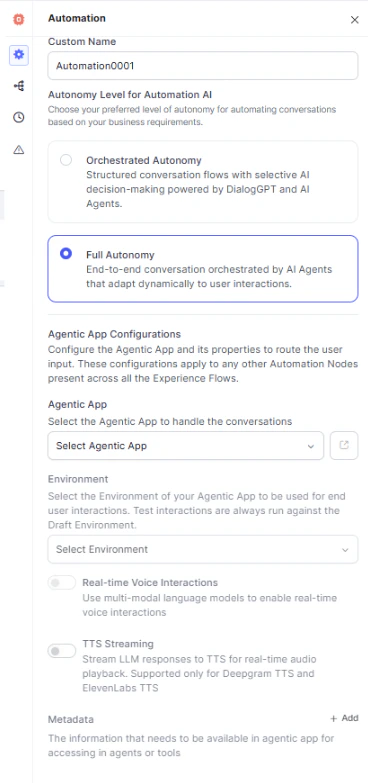
Full Autonomy Agent Platform-powered automation that handles conversations adaptively without predefined paths. Agentic App Configurations
- Agentic App: Select an existing Agentic App or create a new one. See Create an Agentic App.
- Environment: Select the deployment environment. This applies only after the flow is published. The environment must be created within the Agentic App.
- Real-time Voice Interactions: Enables two-way voice streaming via Voice Gateway using multi-modal language models for low-latency, context-aware conversations. When enabled, Voice Gateway uses the models configured in Agent Platform to add voice capabilities.
- TTS Streaming: Sends LLM responses to TTS for real-time audio playback. Supports only Deepgram TTS and ElevenLabs TTS.
Connection Rules
Define how the flow continues based on dialog outcomes and agent transfer events.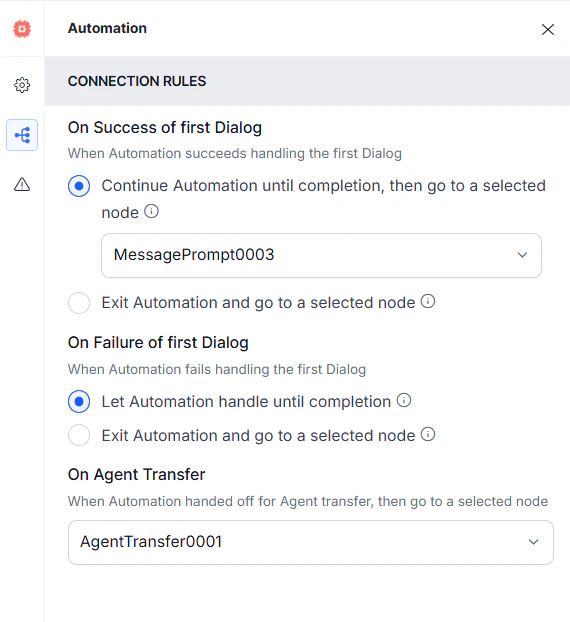
- On Success of First Dialog:
- Continue Automation until completion: Select the next node from the dropdown.
- Exit Automation: Select the next node from the dropdown.
- On Failure of First Dialog:
- Let Automation handle until completion: Select the next node from the dropdown.
- Exit Automation: Select the next node from the dropdown.
- On Agent Transfer: Select the next node when automation hands off to an agent.
Timer
Configure how the bot should respond when no user input is received to identify the dialog.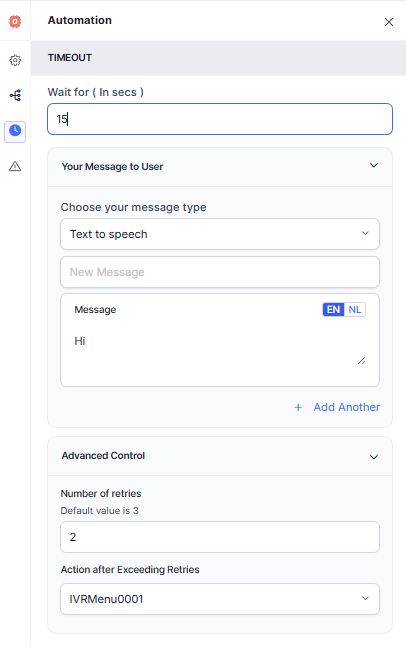
These timeout and retry settings apply only during dialog identification — before a Dialog Flow is triggered. Once a Dialog Flow starts, timeout handling follows the IVR properties of the active dialog node, or falls back to Global Voice Settings if no node-level configuration is present.
Automation Node timeout settings don’t override Dialog Flow or Global Voice timeout configurations once a dialog has been triggered.
Error Handling
Use this section to handle system errors during customer interactions.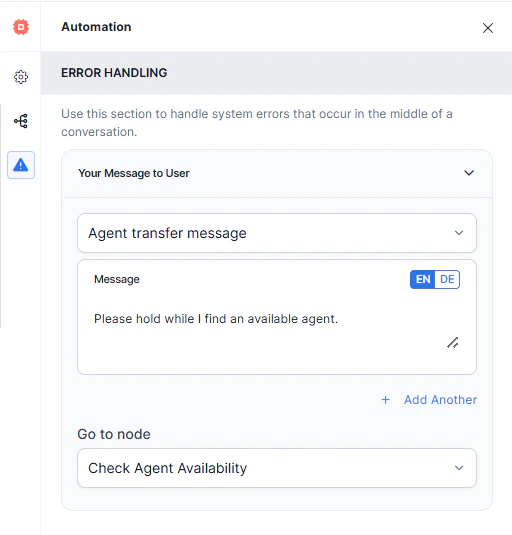
- Your Message to User: Select a message type and type your message. Click + Add Another to add more messages.
- Go to node: Select the node to direct the error handling flow.