Enable a GenAI Feature
Steps:-
Go to Generative AI Tools > GenAI Features.
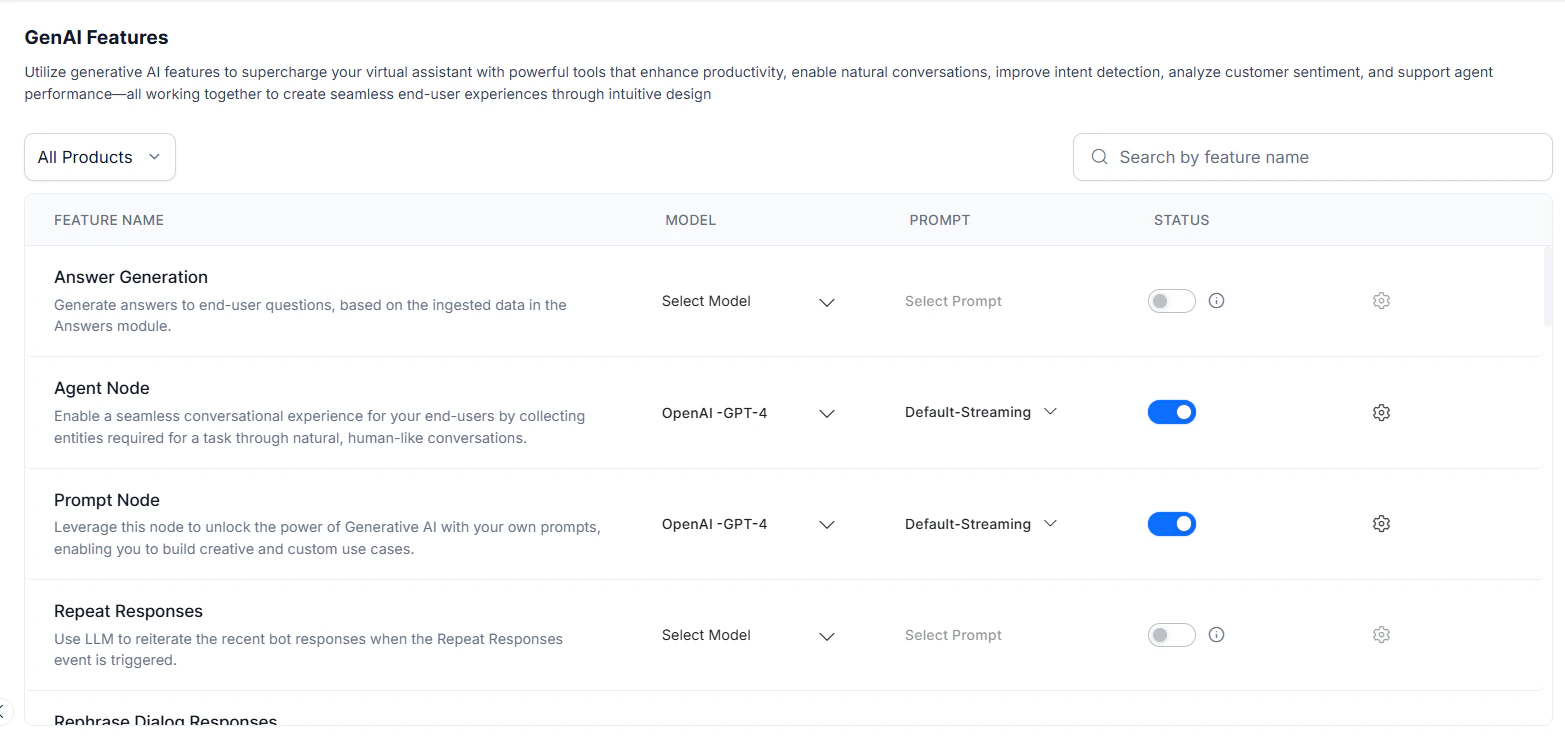
- Select the Model and Prompt for the feature from the drop-down menus.
- Toggle Status on. A success message confirms the change.
GenAI Features Navigation
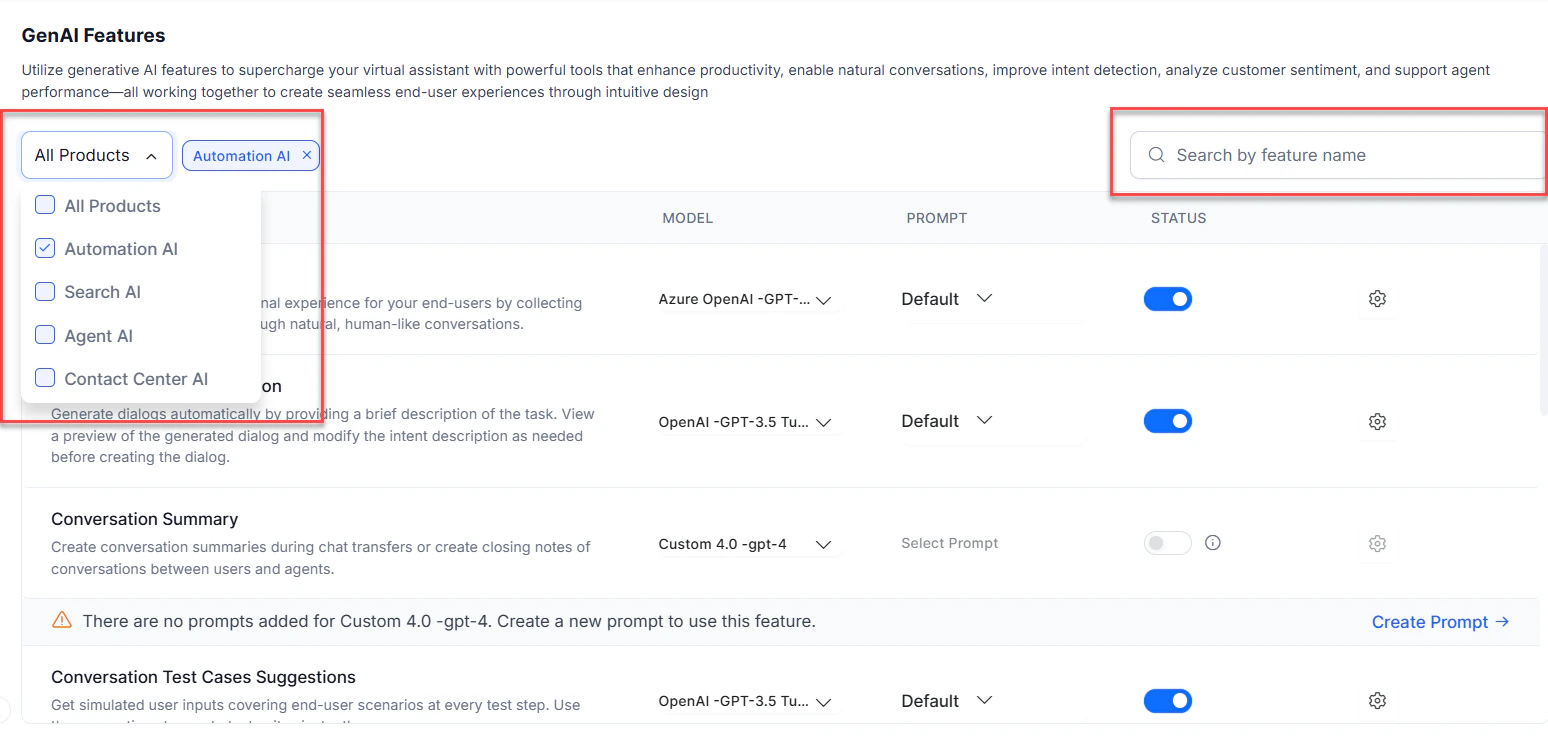
Product Filter and Search
Features are filtered by context — the product you’re working in (Automation, Search, Agent, Contact Center). Add or remove this filter as needed. You can also use the search bar to quickly find any GenAI feature across the platform.
Change Model Settings for a Feature
Pre-built Model Settings
Default settings work for most cases. Adjust them only if you need to fine-tune the model’s behavior. Steps:- Go to Generative AI Tools > GenAI Features.
-
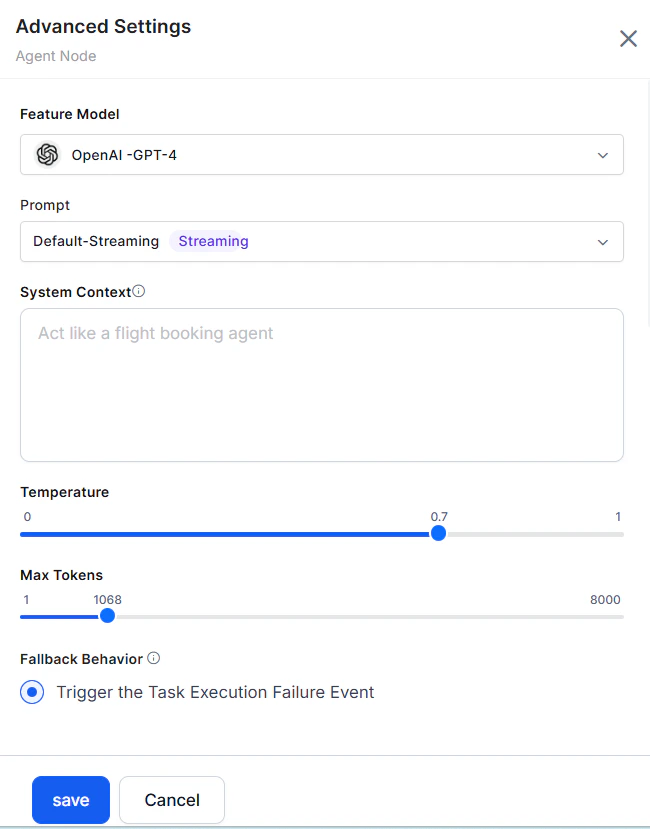
Click the gear icon for the feature to open Advanced Settings.
| Setting | Description |
|---|---|
| Model | The selected model for which settings are displayed. |
| Instructions or Context | Feature-specific instructions or context to guide the model. |
| Temperature | Controls output randomness. Higher values (0.8+) produce creative, less focused responses; lower values (0.5 and below) produce focused, deterministic responses. |
| Max Tokens | Total tokens used per API call. Affects cost and response time. |
| Number of Previous User Inputs | Number of prior user messages sent as context. For example, 5 sends the last 5 responses. |
| Additional Instructions | Specific rephrasing instructions — set a persona, tone, and more. |
| Similarity Threshold | For Answer from Docs: minimum similarity score between the user utterance and document chunks. Higher values restrict results; lower values may dilute responses. |
Custom Model Settings
For custom models, you can only modify the post-processor script to map the actual response to the expected format. Steps:- Go to Generative AI Tools > GenAI Features.
- Click the gear icon for the feature.
-
Click Edit to view the Actual Response.
.png?fit=max&auto=format&n=eMSfxjuT2g-7-Hla&q=85&s=9bc587fc09161f5fb02524017dd0a555)
-
Click Configure to open the Post Processor Script.
.png?fit=max&auto=format&n=eMSfxjuT2g-7-Hla&q=85&s=5c31a856e562bcf3e70c5d75c69da1be)
-
Modify the script and click Save & Test to preview the response.
.png?fit=max&auto=format&n=eMSfxjuT2g-7-Hla&q=85&s=cd0c57cc787184cbcc4f3d354676d57f)
- Click Save.
-
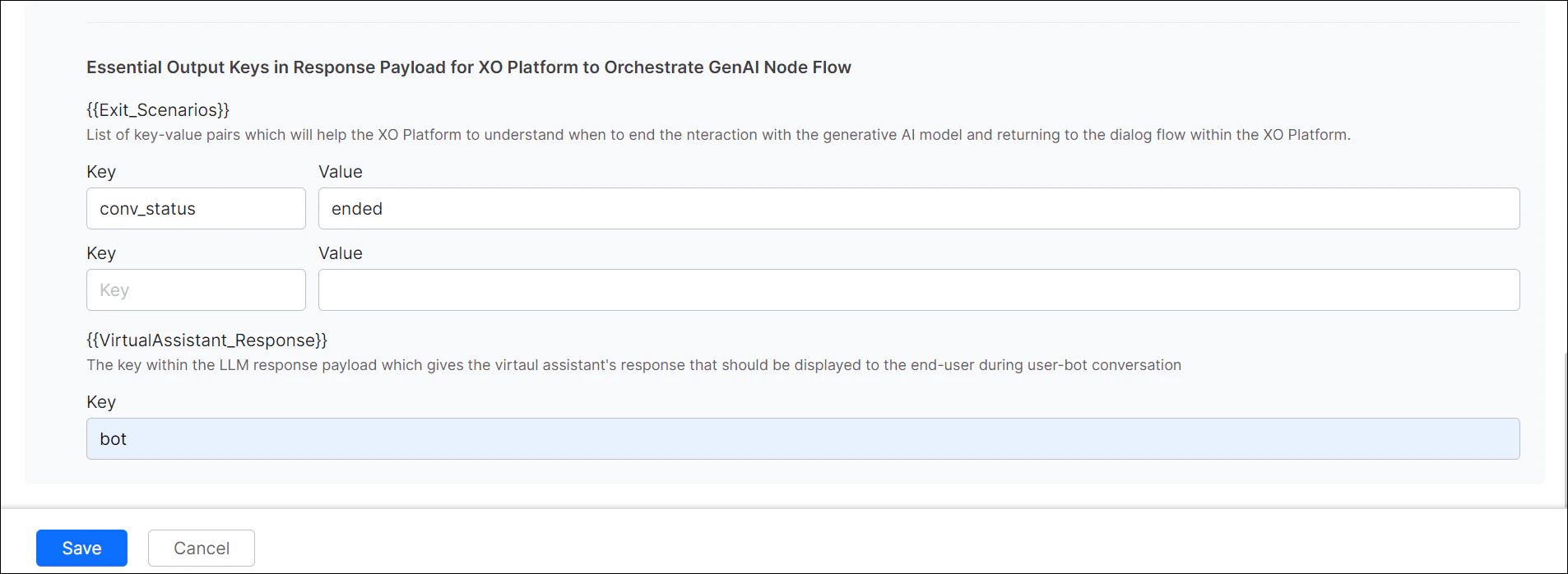
(Agent Node only) Enter the Exit Scenario Key-Value and AI Agent Response Key fields, then click Save.
- Exit Scenario Key-Value: Defines when to end the GenAI interaction and return to the dialog flow.
- AI Agent Response Key: Maps the response payload field used to display the agent’s reply to the user.
Feature Reference
The following tables provide a quick reference of the GenAI features available across the platform modules — Automation AI, Search AI, Agent AI, Contact Center AI, and Quality AI.Automation AI
| GenAI Feature | Description |
|---|---|
| Agent Node | Builds an AI Agent using LLMs, tool calling, and generative AI. Supports entity collection, context handling, multilingual conversations, and external integrations. |
| Prompt Node | Defines custom prompts for creative and custom use cases in the dialog flow. |
| Repeat Responses | Uses LLM to reiterate the last app responses when the Repeat App Response event is triggered. |
| Rephrase Responses | Enhances end-user experience with empathetic and contextual app responses. |
| Rephrase User Query | Improves intent detection and entity extraction by enriching the user query with conversation context. |
| Zero-shot ML Model | Identifies intents at runtime using OpenAI LLM based on semantic similarity, without training data. |
| Few-shot ML Model | Identifies intents at runtime using platform-hosted embeddings based on semantic similarity. |
| Automatic Dialog Generation | Builds production-ready dialog tasks from a brief intent description, with preview and regeneration options. |
| Conversation Test Cases Suggestions | Suggests simulated user inputs covering various scenarios at every test step, used to create test suites. |
| Conversation Summary | Fetches full conversation summaries using the Conversation Summary API and an open-source LLM. |
| NLP Batch Test Cases Suggestions | Generates NLP test cases for every intent including entity checks, ready for use in test suites. |
| Training Utterance Suggestions | Generates high-quality training utterances for each intent; review and add as needed. |
| Use Case Suggestions | Uses OpenAI LLM to generate use cases during the AI Agent creation journey. |
Search AI
| GenAI Feature | Description |
|---|---|
| Answer Generation | Generates answers to user questions based on ingested data. |
| Enrich Chunks with LLM | Refines or enriches extracted chunks using an external LLM. |
| Metadata Extractor Agent | Extracts sources and fields from a query, maps to structured data, and applies filters or boosts. |
| Query Rephrase for Advanced Search API | Adds contextual information to user queries to improve relevance. |
| Query Transformation | Identifies key terms in a query, removes noise, and prioritizes relevant documents. |
| Rephrase User Query | Enriches the user query with conversation context to improve intent detection and entity extraction. |
| Result Type Classification | Determines in Agentic RAG whether the user wants a direct answer or a list of search results. |
| Transform Documents with LLM | Enhances or updates documents during extraction using an external LLM. |
| Vector Generation – Image | Generates embeddings for ingested image content to enable visual semantic search. |
| Vector Generation – Text | Generates embeddings for ingested text content to enable semantic search and accurate responses. |
Agent AI
| GenAI Feature | Description |
|---|---|
| Agent Coaching | Generates best-response suggestions based on conversation history and the current message. |
| Conversation Summary | Creates summaries during chat transfers or as closing notes for conversations between users and agents. |
| Generating Opposite Utterance Suggestions | Uses LLMs to generate opposite utterances during design time. |
| Generating Similar Answer Suggestions | Uses LLMs to generate semantically similar answers during design time. |
| Generating Similar Utterance Suggestions | Uses LLMs to generate semantically similar utterances during design time. |
| Sentiment Analysis | Identifies customer sentiment across agent conversations using LLMs. |
Contact Center AI
| GenAI Feature | Description |
|---|---|
| Agent Response Rephrasing | Rephrases agent responses in formal, friendly, expanded, or neutral tones. |
| Conversation Summary | Creates summaries during chat transfers or as closing notes for conversations. |
| Disposition Prediction for Agent Wrap-Up | Auto-suggests disposition codes based on conversation context and disposition metadata. |
| Sentiment Analysis | Identifies customer sentiment across agent conversations using LLMs. |
Quality AI
| GenAI Feature | Description |
|---|---|
| Advanced Topic Discovery based on Custom Taxonomy and Resolution Detection | Extracts topics and intents from conversations; detects resolution and surfaces trends. |
| Agent Empathy Identification | Identifies agent empathy instances where customers expressed negative sentiment. |
| By Hold Adherence | Detects when an agent places a user on hold and resumes the conversation. |
| By Transfer Adherence | Identifies whether the agent informs the customer about a transfer. |
| By Value Adherence Validation | Validates metric values against reference data; returns binary adherence scores. |
| By Value Metric Extraction | Extracts by-value metrics from user, agent, and bot messages. |
| Churn & Escalation Identification | Identifies customer churn risk and escalation intents using LLMs. |
| Conversation Phase Identification | Identifies conversation phases for phase-level sentiment insights. |
| Crutch Word Usage Detection | Detects agent crutch word usage in customer conversations. |
| Default Script Adherence | Checks agent adherence to default script steps across key conversation phases. |
| GenAI-based Agent Answer Adherence and Customer Trigger Detection | Verifies agent adherence and detects customer triggers without utterance configuration or training. |
| Generating Similar QM Utterance Suggestions | Generates semantically similar phrases during design time. |
| Post Conversation Sentiment Analysis | Generates post-interaction sentiment and emotion moment insights. |
| Sentiment Analysis | Identifies customer sentiment across agent conversations using LLMs. |
| Topic Modelling | Extracts popular topics and intents from agent conversations. |